-
any simple clean settings export?
i am trying to share how i created a character with another user. I don't want to just send over a settings file for the figure, since they may not have all the morphs.
is there a way that i can get a clean listing of what morphs/morph targets (and ideally figures) that went into my character that is easily human readable? (have anyone maybe made a parsor for the setting file?)The absolute easist way to know what's missing is to send over the settings. They'll get a pop-up showing what's missing, and you can take it from there.
Why is this happening to all of my Genesis 8 male modelsPlease put the Viewport n Smooth Sahded mode, put some trunks on the figure, or zoom in to show only the upper figure.
I doubt this is an issue with a non-zero default, more likely it is a morph that's meant to apply a correction when a figure is posed with a specific shape dialed in that is isntead applying whenever the figure is posed. The method nemesis10 gave should reveal the culprit - it will be one of the properties that turns on when you lift the arm - but you may need to turn Preferences>Show Hidden Properties on in the Parameters pane option menu (the lined button in the top corner, or right-click the pane's tab).
it was D.Master's Auto Shape Enhancer & Auto Muscle Enhancer for G8M. + i need to reinstall Genesis 8 Male & the Genesis 8 Starter Essentials i am still getting this message Duplicate formulas found in files. make sure that the content is properly installed. See the log file for more details. i did try looing at the log but i have no idea what i'm looking for
any simple clean settings export?i am trying to share how i created a character with another user. I don't want to just send over a settings file for the figure, since they may not have all the morphs.
is there a way that i can get a clean listing of what morphs/morph targets (and ideally figures) that went into my character that is easily human readable? (have anyone maybe made a parsor for the setting file?)Novica & Forum Members Tips & Product Reviews Pt 13I was very impressed with how well it simulated in this challenging pose. The only problem I had was the black spot on her forehead, caused by the cap intersecting the character mesh. This is a common problem with hair, easily overcome by moving the cap forehead area out away from the character head. Unfortunately, the cap of this hair doesn't have any morphs to do that - not even a simple Expand All. Mesh Grabber will be able to correct this, because the cap is mesh and not dForce hair. I reduced the cap opacity to 0.2 in this render. Her arm on her head hides the thin spot, so I got by with it here.

I've not tried it with dForce, or other strand-based, hair but with a simple convex shape such as most skullcaps a Push Modifier should work as an expand morph, and with a weight map node added you can target the expansion.
The Long Road from a Figure with M4 bones only to Genesis 8?From what I gather, the figure uses the M4 rigging, as it can use M4 poses seemingly without much issue. Apologies about terminology. I'm still pretty new to the 3D world. With no similarities between the figures otherwise, is it too much to hope that I could successfully make an M4 morph without extensive and involved tinkering (a bit out of my skill level)? And by Transfer Utility, do you mean something other than the DAZ Morph Loader tools?
Thanks for replying!
Not enough horror products !
G8 does have some great horror products, and there are products which can be used for horror ends, but I wouldn't call it "plenty". G3 seems to have offered a greater measure of support for horror:The store has PLENTY of "horror products". Severed limbs and blood - sounds like you're after gore... Blood is super easy, there are a TON of water products in the store - puddles, splashes, rigged water, etc. Just add a blood shader and blam, blood. Severed limbs are also really easy, just make a trans map and hide the rest of the body.
- Anneka
- Damien
- Lavinia
- Mathius
- Lucille
- Markus
- Arabella
- Lilith
- Undead Creature Creator (F)
- Undead Creature Creator (M)
Give me G8 versions of these and then we can start to talk about horror support being adequate. I'll even take combo bundles:
- Demon Bundle featuring Anneka and Damien
- Return of the Revenants Bundle featuring Lavinia, Mathius, Lucille, and Markus
- Witch Bundle featuring Arabella and Lilith
Until the release of Spooky Hollow (which is appreciated), has Daz offered any major support to horror since Tasha and Landon?
We do have some good options from PAs thankfully, but how often do we get non-cartoonish horror creatures as good as Lycan or S1M's excellent Creech Evolution (male/female)?...between the abudance of fantasy and horror themed content here, my purchasing has been easily kept in check. Seems every few days, fantasy or horror is the store theme.
Horror might be better supported than some other themes (steampunk for example), but I don't think it comes anywhere near the level of support for fantasy.
Yes. *throws money at screen*Not enough good ones. Still waiting for a realistic Frankenstein laboratory.
The Long Road from a Figure with M4 bones only to Genesis 8?What do you mean by skeleton? Usually that would refer to the rigging, but from yur mention of Morph Loader it sounds as if you mean geometry. Morph Loader, morphs generally, require an exact match at the vertex level - count and order - between the morph shape and the figure. With a weight mapped figure you could use the Transfer Utility to transfer morphs, but from Michael 4's mesh you will probably need to use a modelling tool to conform a base-resolution Genesis 8 Male mesh to your figure's mesh; you may also be able to use that tool to bake new maps from the model to the Genesis 8 Male UVs.
The Long Road from a Figure with M4 bones only to Genesis 8?Okay, so I wasn't sure of the proper place to put this question (feel free to redirect me, anyone), but I've got a bit of an odd project going on. Basically, I have a figure that is not technically an M4, only built with the V4/M4 base skeleton. Ideally, I'd like to translate this figure to a Genesis 8 Male as a morph/material. Working backward, I think I can figure out how to update an M4 into a Genesis 3 Male, and then on to Genesis 8, but is there even a way to translate the morphs and materials from the starting figure to Michael 4? I thought this shouldn't be too hard, as they have the same base skeleton, but I've seemingly exhausted possible settings in the DAZ Morph Loader tools, and no luck. Am I missing something, or is what I'm attempting even possible?
Thanks!
Fit Control for Genesis 8 (Commercial)Thanks for the kind words:) To this day Fit Control is also my daily driver
 I'm just glad we were able to finally solve the crashing issue.
does that include the morph limits issue?
EDIT: Nope, still crashes. So I wouldn't consider it solved.
Lady Noir v2 (aka Rachael from BR) for G3F head morph by AOBB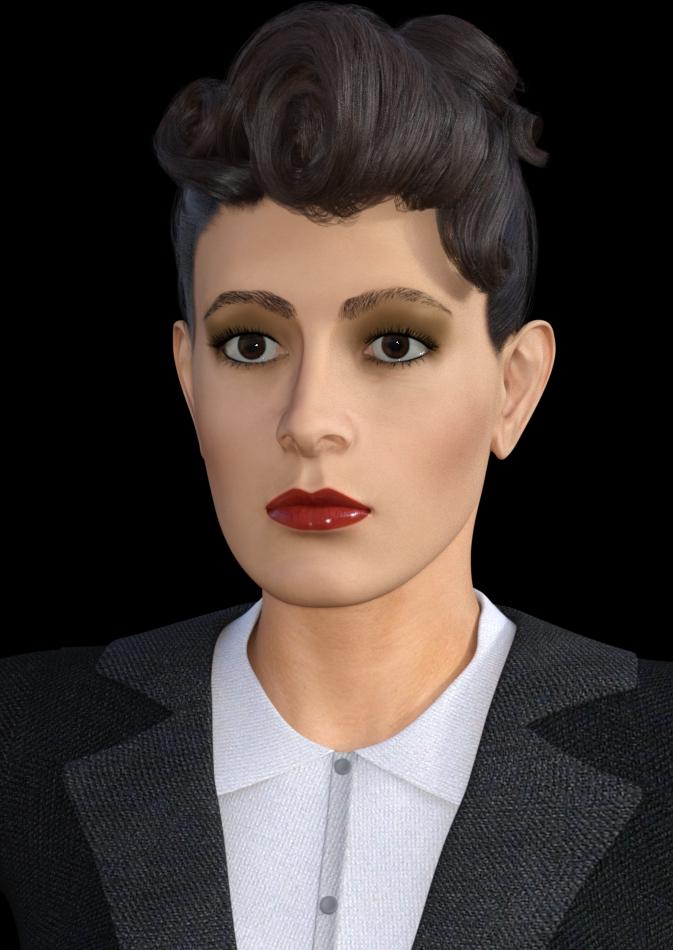
I've 've "put on" LN2 some different makeup and gave her fibermesh brows. I've also thinned the bridge, ridge and tip of her nose, lifted her eyes a bit, narrowed her lower lip and raised its outer edges. All the changes to the facial features are subtle but along with the other changes they bring her look closer to Rachael's. Just so you can see better the similarity of the head morph.
Lady Noir v2 (aka Rachael from BR) for G3F head morph by AOBBI have replaced the morph file with another one. On closer inspection I've noticed that the inside of the eyes and lacrimals were messed up, so I fixed the mesh (at least as far as I can tell). If you have already downloaded the morph, please do it again and install the new, fixed one.
Non-commercial use only.
Good luck and enjoy!
AOBB
Problem Areas for Photorealism4) Poor expressions - mainly due to insufficient geometry, rigging, and / or limited morph capabilities, natural expressions are rare, most images I see that approach photorealism involve very muted expressions, anything more than that and the illusion is broken. Images with convincing non neutral expressions seem to always involve custom morphs to create the expression
Oh, you are so right. This really bothers me a lot.
Part of the problem is, that in order to have natural expressions, you'll need to have custom expressions for every single character.Transferring Raiya's Genesis 2 Characters to G8Oh, I love the Felicity and Yanmei you did!!! Those two were my absolute favorites back in the day.
I'm going to try to follow your process!
Thanks so much, and good luck!! I think I used RY Tessa as the initial materials base for Felicity before using Altern8 and then playing with the skin settings from there (and RY Rika for Yanmei). Please share your renders and let me know if anything I wrote was unclear.

I've tried something. Perhaps it's the character I chose (Alpha Male), but the transfer is easier if you apply everything on G8M. Another thing, the Cayman UVs don't come with a Michael 5 UV for the gens, since it's apparently the same with G2M. But I don't think that would be much of a problem in your case since Raiya was pretty good about only using M6 and V6 (or M5 and V5, when it was strictly a Genesis-only character.)
Example in screenshot is Ryuu for M5, who uses M5 UVs but no longer available. It's another character I'd love to transfer over but the tattoo is a challange with what I'm working with. If the PAs who made him ever decide to re-release this skin for G3M UV's, I'll happily buy it again.
Thanks for checking! I just finished Mia and will be diving into Amon, so I will be checking this out very soon.
Transferring Raiya's Genesis 2 Characters to G8I am amazed that there has never been a proper texture transferring product in the Daz store (not a geographing one). I would love to have a fresh alternative to BSTT. TT leaves so much to be desired. There is a large spot on the right ear of every transfer that has never been addressed, and the ears are a mess in general with some sort of texture that does not even belong on them. The lashes are literally broken in 3 or 4 pieces. There are stretch marks all over the place. The lines on fingers are out of place, the big toe is totally crooked...I could go on and on. Also, there is almost always a texture that TT cannot locate, and I have to manually point it to it. I know there will be limitations to any software that does this, but I feel this could be so much better with a more modern software.
Texture Transformer is definitely not perfect, and I've been experiencing the failure to locate a texture on every conversion. That said, I don't think I've experienced the disaster that you've described here either. It has been workable, for the most part.
Of course, I would welcome something more streamlined! I would love to just feed a program the textures and have it convert instead of needing to save to presets that TT won't even be able to locate a file...
Transferring Raiya's Genesis 2 Characters to G8I am amazed that there has never been a proper texture transferring product in the Daz store (not a geographing one). I would love to have a fresh alternative to BSTT. TT leaves so much to be desired. There is a large spot on the right ear of every transfer that has never been addressed, and the ears are a mess in general with some sort of texture that does not even belong on them. The lashes are literally broken in 3 or 4 pieces. There are stretch marks all over the place. The lines on fingers are out of place, the big toe is totally crooked...I could go on and on. Also, there is almost always a texture that TT cannot locate, and I have to manually point it to it. I know there will be limitations to any software that does this, but I feel this could be so much better with a more modern software.
SereneNight's Sci-Fi Fun Thread 2On the subject of women's clothing for men, here is Peache's latest. I really think this is by far the best looking flannel shirt there is on the market. Too bad the buttons are on the wrong side for the guys, but easy enough to take care of that post. The underwear have a lower morph, which allows them to be lowered to be less high waisted.
It all fit well with autofit, no monkeying around with dforce. Great set!
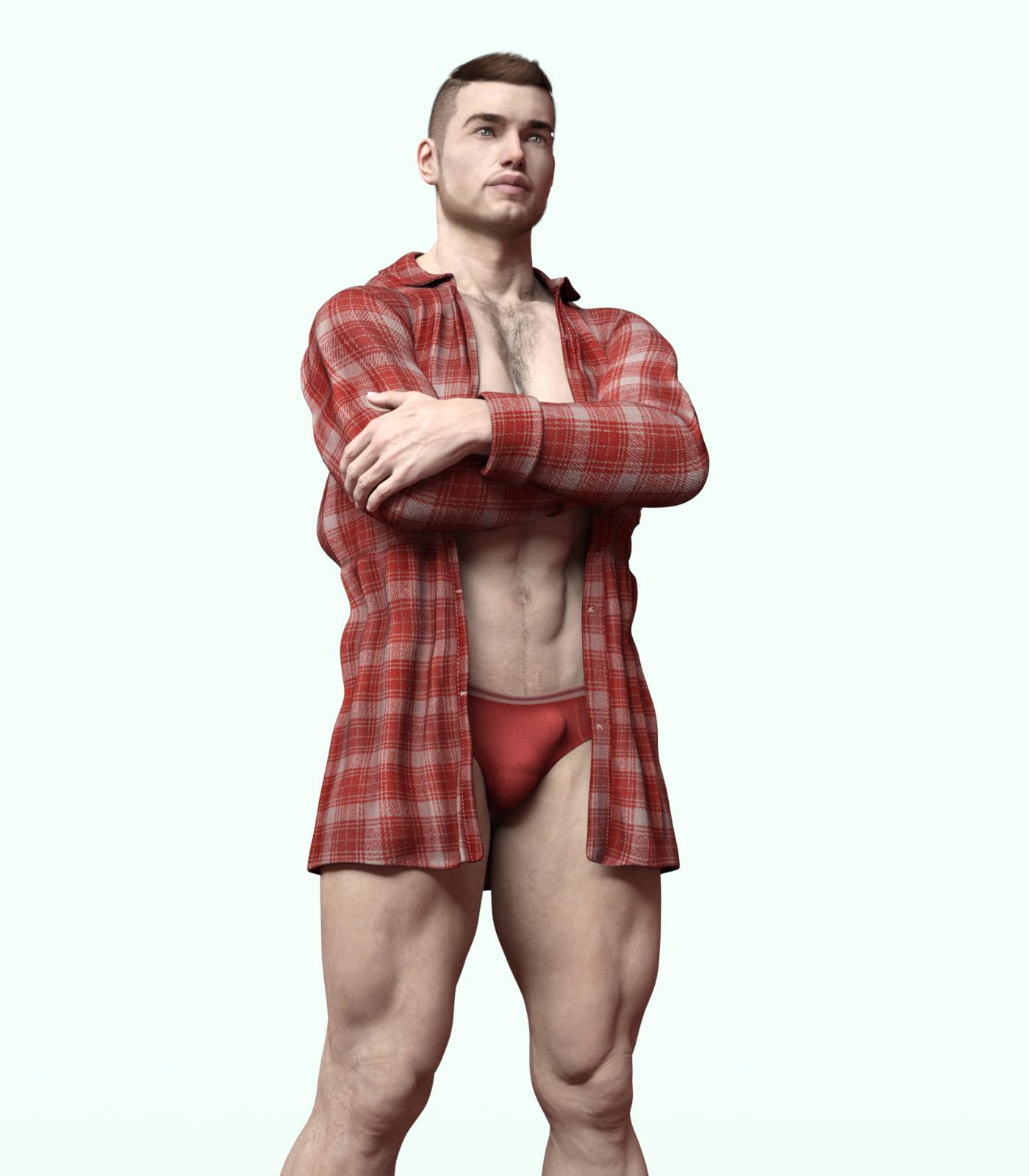 Lady Noir v2 (aka Rachael from BR) for G3F head morph by AOBB
It was quite a rollercoaster ride but I've managed to convert Lady Noir v2 from V4.2 to a G3F morph. The Genesis version is very, very close to the V4.2 original. I have adjusted the size and placement of her ears and made her nose slightly less tilted up. The rar file has the head morph only. No textures.
Please read the ReadMe.txt as it contains installation instructions.
A texture map makes a huge difference as you can see on the attached rendering of LN2 in G3F mode. I have used Victoria 7 Face 05 with the dark brown eye texture and it is a completely different face! Still very pretty, I think. :)
Clothing is Business Suit for G3F and I've used Yvette Hair for a more retro look (hair scarf switched off). All available from the DAZ3D store.
As this is my take on an iconic Noir character (Rachael from BR) so non-commercial use only.
Enjoy!
AOBB
Edit: I have just noticed that LN2's for G3F eyes still don't close completely. I don't know how to fix that.
HeadShop 13 Genesis 8I bought Headsop 13 with Lovechild and had a serial number no problem. Have never had a problem with this vendor, so it isn't typical.
In these pictures, the middle picture is the original, the left picture is the Headshop one, and the right picture is the Face Transfer one. My first impression is this software works best on white people. On the two Black girls, regardless of light skin or dark skin, it seems to interpret their actual skin color as more of a blemish painted on the default skin color that it uses.
No instructions seem to be included. The included PDF file only explains how to install, which involves both clicking on a .exe installer and unzipping a file into a folder created by the installer. Everything I click on in the app generates a popup message linking me to a YouTube video in lieu of included documentation. Maybe I should actually look at those videos to see what I'm missing. But there don't seem to be many adjustments to make to the texture if it's way off. Even mirroring the texture didn't remove Hayley's hair from the texture. I am hoping this is just a case of me not knowing how to use the software yet.
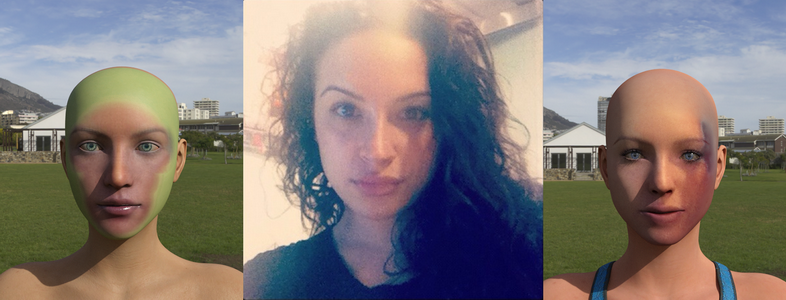
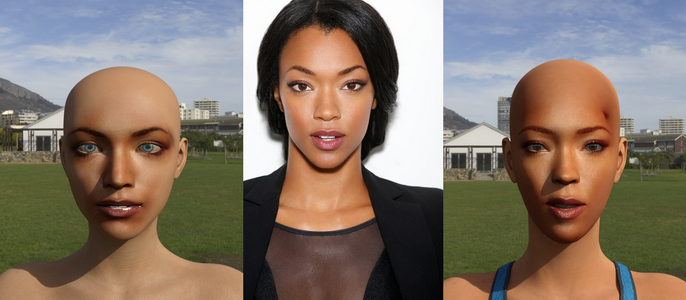
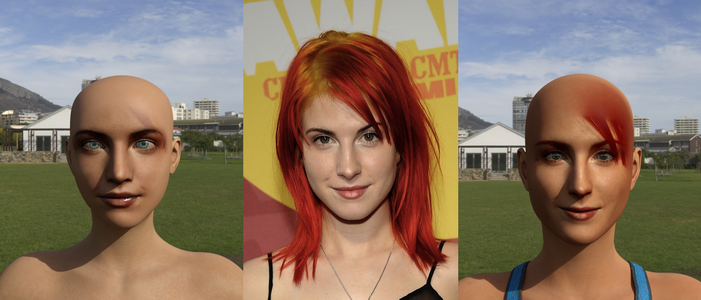
Photos like that first pic will never, ever work. You absolutely must have good quality photos for any of these sort of apps. The best result here is easily the best source photo, but still try for better pics. I know this may be tough if you are looking to do like celebs, but is very important to have a good source pic. If you take a pic yourself, you can control these things. Do NOT use a selfie cam. Use a proper camera, with a proper FOV. A big issue with many selfie pics is the FOV, it blows up the proportions. Mugshot style shots can work pretty well, but again, they need to be high resolution. Tie hair back, use soft, even lighting, and you can get decent results.
You are right. I actually got some really decent results from both using older flip phone photos and great results from high quality photos taken with a pro nikon camera.I was able to find instructions no problem, which isn't always the case with some products. A few are more elusive than the Holy Grail.
LAMH Look At My Hair and Iray TutorialI don't want to get your hopes up as I'm using another app, with custom tools that I don't think are developed for anything else, and another set of tools where the author has gone MIA with orders piling up.
But essentially I export as FBX. Depending on the figure, there may be some morph baking work & rig alterations. With Fur, I've a tool that will apply weight mapping correctly to the fur geom. This can really balloon up the object size. Where there's an All Body fur group, I'll divide that group into 4 or 5 sections.
The resulting fur can be animated with bone deformation, but won't respond to morphs.
Here's a recent example with the Snow Leopard. He ended up with 8 fur sections:


OMG He's so cute! Don't worry I'm no where near ready to do any of this more advanced stuff so no delusions or false hope, But I do Dream and Aspire to reach for it! I only know daz studio at this time, no hex, zbrush etc at this time... lol I'm still struggling with lighting. I'm just trying to learn the basics of each function so I can fiddle with it and maybe make something cool via happy ending and eventually on purpose. So jelly. Here's my hack attempt at a mane (Description of how I did it on the side pannel) I was hoping to make a G3 and G8 version for cat world regenesis out of LAMH but It just might be something out of my dept at this time. My King My Queen
Previous morphs got reset due to changing folders, how to get back?Hi
Today i moved all of my Daz content from C drive to D drive for more space however when i loaded my previous work in Daz, it says that my previous morph lists couldn't be found and my character morphs are set back to default,
How do i get my previous morphs back?
Where does Daz usually keeps saved morphs so i can just transfer those files into my new D Drive folder?
Daz 3D is part of

Connect
DAZ Productions, Inc.
7533 S Center View Ct #4664
West Jordan, UT 84084Licensing Agreement | Terms of Service | Privacy Policy | EULA
© 2026 Daz Productions Inc. All Rights Reserved.