-
Genesis Morphs Eraser plugin
Thanks, Dart. That was some good information. However, I don't think it directly answered any of my questions.
Again, the questions were:
1. Why was the file still 775 mb after deleting the G2 character and clothing from the scene?
2. Why does Carrara bloat so much on Genesis in general? (is it really the morphs, or something else)
3. Did the morph eraser actually work, but not until after I deleted all the common and unused shaders?
4. Is saving the Genesis stuff in the Carrara object file the best way to lower the bloat?
I just did a further experiment. Instead of saving M6 and clothing to the Carrara objects folder, then deleting him from the instances tray, and then reinstalling him from the objects folder, I instead went directly to Edit>Remove Unused Masters, and did all the actions under that tab. The result was the same - a file of 328 mb. So it appears that saving the character in Carrara doesn't make a size difference, but that the Remove Unused Masters stuff does. If so, the answer to question 4 above is clearly NO.
I did this with a file that already had the Morph eraser applied. Next, I will try it with an earlier file, before the Morph Eraser was applied.
Novica & Forum Members Tips & Product Reviews Pt 13Also, @barbult : check the cap and make sure smoothing is on 2 and the subd level should really be set to base resolution. I think some have gone through with high resolution which can also cause the black dots.
I just checked this, and the cap smoothing is Enabled and at Base Shape Matching 2 and at Base resolution, so the product was delivered as you intended. The black dots happen with lots of hair products, and especially on HD characters. This problem is not unique to Neroli Hair. I've used Mesh Grabber to make a morph to push the forehead out a little, which solves the problem for me.
Thanks for checking that and posting your findings. :)
I'm awake and decided not to go to the barn. There's an active tornado warning to the north- northwest of us already (not real close, about an hour driving time.) Since tornadoes are already spinning up, I'm staying put at home. Hang in there Louisiana, Hurricane Zeta is only 1mph off of being a Category 3. Roaring in at 110mph. (And who says they're 100% correct, or what difference ONE mph makes? It's devastating.)
3D Art Freebie Challenge-October 2020-"Winners Announced Annual Monster Mash" -Entries Thread Only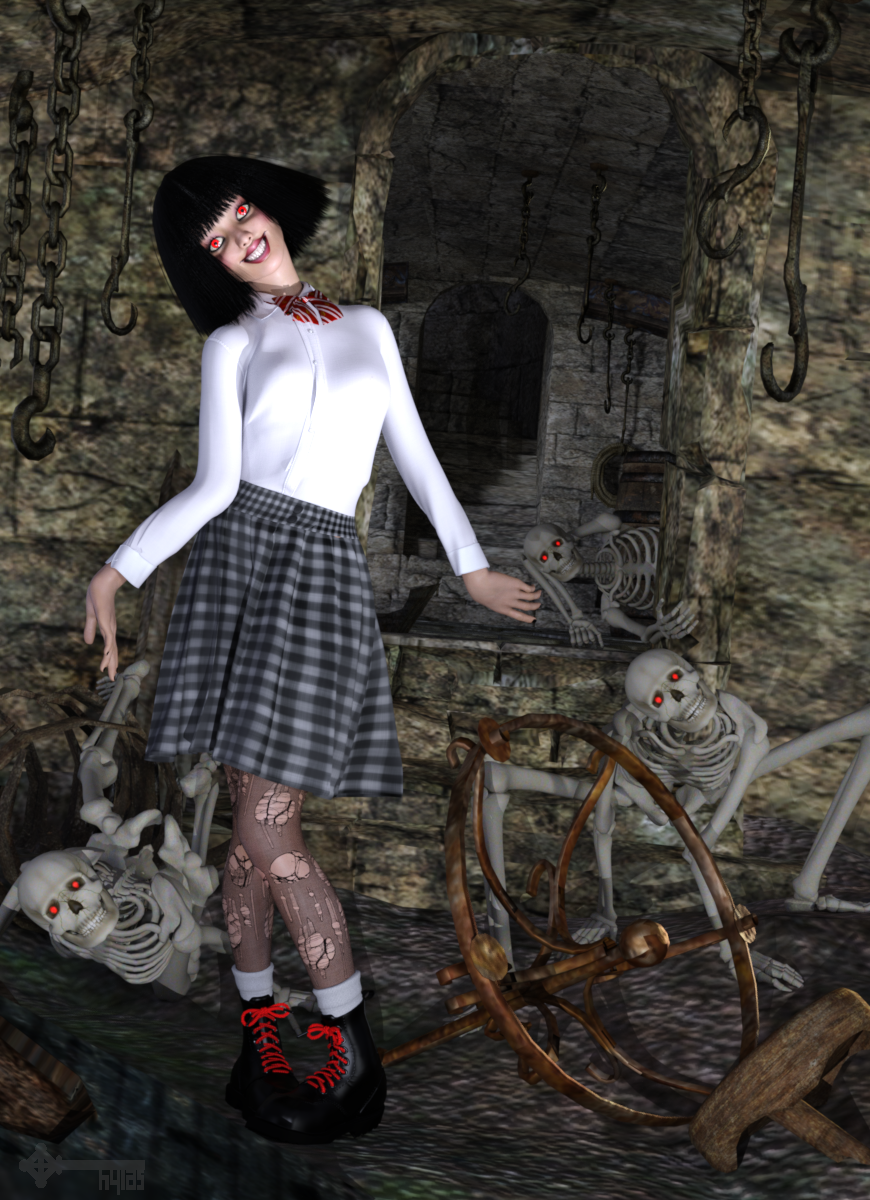
Title: "... and her voice, soft and airy as maggot-infested silk."
Rendered in DAZ Studio, no post work.
Freebies:1) HDRI by Greg Zaal & HDRI Haven: https://hdrihaven.com/hdri/?c=indoor&h=georgentor
2) Cellar by Summoner: https://fantasiesrealm.com/market/Designers/Summoner/Cellar-Exclusive?cPath=449&;
3) Skeleton by Mortem Vetus: https://www.renderosity.com/mod/freestuff/second-sid/84772
4) Head Morph by TritiumCG: https://www.deviantart.com/tritiumcg/art/Rila-Fukushima-Head-Morph-for-G8F-832636705
5) Hair by Mark003: https://www.renderosity.com/mod/freestuff/punk-gaga-hair/60694
6) Blouse and Bow by Yomiuri: https://sharecg.com/v/94694/gallery/21/DAZ-Studio/Blazer-Uniform-Set-for-G8F
7) Skirt by DigiDotz: http://www.digi-dotz.com/index.php/free-poses/daz-clothes/233-free-pleated-skirt-for-daz-g8f
8) Boots by Headkase & Varsel: https://www.sharecg.com/v/56443/browse/11/Poser/Bossy-Boots-2.0-for-GENESIS
Purchased:
1) Raysee Doll
2) Legacy UVs for G8F: V4
3) Iray Converter for Generation 4No Count:
- G8F Body Morphs
- The stockings are a geoshell and a texture I found via image searchEdit (05.NOV): uploaded the image as an attachment because the gallery is unreliable right now.
Genesis Morphs Eraser pluginFor Daz Studio, morph information gets stored in the database under Public Documents > My Daz 3D Library > Data
I had to know this when I was a PA, working on making DS products that never came to fruition.
I was already well acquainted with how a Poser Runtime structure worked, so the new DS system was a breeze. I was pretty loud back then that they had the perfect opportunity to govern that structure with an iron fist to keep the directories from turning inot a massive hoard of unnecesary folder bloat - something that really got out of hand with Poser content as more and more freebies got thrown in without rhyme or reason.
Well, they let artists just toss in mispelled folders, new folders for cataegories that already exist, under a different name... it just makes it more difficult, especially after years and years of misconduct, to 'know' exactly where to find files. But Daz's DIM saves me from that, so I eventually just kept quiet less noisy about it! LOL
But their system works really, really well in Daz Studio. Dialing up a slider will put that obj information into memory on your computer. But none of the other options will. Not until we activate a slider.
Even storing character presets only store information regarding required files - not the actualy mesh info itself - that stays safe and sound in the data folder!
So that's why Daz Studio feels so efficient. Because it really is!
Custom libraries made within Daz Studio don't actually move files around, like Poser and/or Carrara and probably others. To DS, it's just another allocation to the database. Very fast because it's just passing text addresses.
The Long Road from a Figure with M4 bones only to Genesis 8?If it's mostly the in-built hair (head and body/seems to behave like cloth) and materials that I want to keep, does that simplify things at all?
I haven't had much luck with shrinkwrapping the morph on any figure...
Nvidia Ampere (2080 Ti, etc. replacements) and other rumors...Also keep in mind that AMD is - if anything - further along the road to hi-speed direct to SSD storage transfer adoption than Nvidia. Making these 16GB framebuffers on their new cards that much less reveant for the vast majority of their potential user base in the medium term than even what Nvidia has going.
How would you respond to my assuming that Radeon ProRender is going to support outof core rendering very well? As it stands, the only reason I am excited about the 6900XT with its smaller 16G VRAM is that it will probably make the 3090s cheaper. If the VRAM buffer mattered less, then AMD may still be a viable choice.
Blender's render Simplify is magic, but it still can't replace a larger map for a closeup shot.
Genesis Morphs Eraser pluginI can help with that one ;) Here goes:
Carrara 8.5 was set up to use the CMS (Content Management Service) for Daz Studio and, luckilly before development came to a halt, we were also given an update for Postgre database from the previous Valentia.
Daz Studio was built from the ground up to use this database as a new way to deal with "Morph Injection". Before that (gneration 4 and earlier) we had to INJect whatver morphs we wanted to use.
Anyway, Carrara was given access to the database, but the way it saves or stores CAR files, it writes everything available to the scene into the file. So if you have a morph available to you, instead of (like DS) leaving it safe and cozy in the database, Carrara writes it into the CAR file so you can access it even without the database.
This is kind of a magical thing, however, because we can actually create custom Genesis figures that Only Include the Dials We Want!
I have an article on that here: Genesis Morph Reduction
I started doing that just before Alvin's plugin came out, so I never really used it yet. For me, the bloat wasn't the biggest issue. I was Totally into buying all of the Genesis 1 shaping morphs during the Carrara 8.5 beta phases. I love having them all. I use them. But after a while it really got to be a burden for me to have every dial for every morph I've ever bought - so my big issue was not to reduce file size (though that's always a major boon!!!) but to exclude any morph dials I don't need for each of my full time actors that I save to my browser!
So I came up with this method just before the plugin came out.
Genesis Morphs Eraser pluginI don't know why Carrara gets bloated or unbloated, but here is what I finally did. Not sure which step was essential.
After having virtually no success with the Morph Eraser, I decided to simply delete the G2 figure (M6) and his clothing, and see how much it lowered the file size. First, I saved the figure and clothing to the Carrara object file.
The bloated scene file started out at 775 mb. After deleting G2 and resaving, the file was ... 775 mb! Grr.
So, I went back and reopened the newly-saved scene, and additionally did the Edit>Remove Unused Masters trio of actions. I often don't do this because I like to keep my different shader zones intact. But, it seemed like the next step to try.
This time the file saved to 253 mb. Yay, some huge progress! Next, I put G2 and clothing back in from the Carrara browser. I love how the item reappears in the scene in the exact same spot as it was originally. After saving it all, the file size only moved up to 328 mb! So, I am a relatively happy camper.
But it doesn't answer some basic questions. Why was the file still 775 mb after deleting the G2 character and clothing from the scene? Why does Carrara bloat so much on Genesis in general? Did the morph eraser actually work, but not until after I deleted all the common and unused shaders? Is saving the Genesis stuff in the Carrara object file the best way to lower the bloat?
I hope that someday we can get to the bottom of this. Overly large files are a pain for me because they really slog down Carrara functions, increase save and load and render times, and increase error messages. If it wasn't for that, I wouldn't care. :)
3D Art Freebie Challenge-October 2020-"Annual Monster Mash" -Main Thread Only
Title: "... and her voice, soft and airy as maggot-infested silk."
Rendered in DAZ Studio, no post work.
Freebies:1) HDRI by Greg Zaal & HDRI Haven: https://hdrihaven.com/hdri/?c=indoor&h=georgentor
2) Cellar by Summoner: https://fantasiesrealm.com/market/Designers/Summoner/Cellar-Exclusive?cPath=449&;
3) Skeleton by Mortem Vetus: https://www.renderosity.com/mod/freestuff/second-sid/84772
4) Head Morph by TritiumCG: https://www.deviantart.com/tritiumcg/art/Rila-Fukushima-Head-Morph-for-G8F-832636705
5) Hair by Mark003: https://www.renderosity.com/mod/freestuff/punk-gaga-hair/60694
6) Blouse and Bow by Yomiuri: https://sharecg.com/v/94694/gallery/21/DAZ-Studio/Blazer-Uniform-Set-for-G8F
7) Skirt by DigiDotz: http://www.digi-dotz.com/index.php/free-poses/daz-clothes/233-free-pleated-skirt-for-daz-g8f
8) Boots by Headkase & Varsel: https://www.sharecg.com/v/56443/browse/11/Poser/Bossy-Boots-2.0-for-GENESIS
Purchased:
1) Raysee Doll
2) Legacy UVs for G8F: V4
3) Iray Converter for Generation 4No Count:
- G8F Body Morphs
- The stockings are a geoshell and a texture I found via image searchAll The Links Check Out Plz Post To The Entries Thread Now
Black SkinA few years back about the time I started using 3 Delight, the render engine does not render black skin. I try Shania Gen 3 and she comes out all white, the gen 8 black girls like Jennifer just does not color but stays a very pale skin tone. I adapted by simply loading Shania and then using another Gen 8 skin morph. what I get is a very light skinned girl with black features, thats acceptable. As for Jennifer I just have to use anohter Gen 8 body morph such as rachelle or that "orange skin" that seems to fix the problem.
I later discovered that by using the shader tool (Gen 8 only) the girl renders with a rich milk chocolate skin color. That's all good for now.
Like I said I just adapt.
Anyone else expereince this?
Nvidia Ampere (2080 Ti, etc. replacements) and other rumors...Well AMD just launched their new cards, and well it was interesting and all of their cards come with 16GB of vram.. And it looks like AMD's top of the range card is taking on the 3090, at $500 less.. I think that Nvidia may want to be concerned with what AMD have shown.. Will have to wait and see how Nvidia respond to this, only time will tell..
It's enough VRAM because they're gaming cards and no game calls for even 8 Gb. Even for most casual creator uses 10Gb is plenty. You guys have got to understand that DS is a very very niche use case. For 99.999999999999999999999999999+% of users the 3080 will never run out of VRAM.
The only reason to increase the amount of VRAM is for advertising and epeen purposes and considering the cost and performance issues Nvidia clearly has decided against that. Maybe they'll eventually release the prosumer oriented Ampere cards once they figure out the GDDR6X production issues, but that isn't likely to happen for a while.
By that thinking then 4 to 8 GB of system ram is more than enough for most people.. But we all know most people will go for 16 to 32 GB of system ram, as it adds in an amount of future proofing to peoples computers..No. There are very good reasons for more system RAM. There is not any current reason for more VRAM. and the argument about not pushing VRAM because no cards exist that don't have more? WTF?
Even in the Nvidia lineup there have been 11Gb cards for a long time. Nvidia made a very valid point though even with 2 generations of 11Gb flagships there is not a single game that pushes past 8Gb even with every texture setting maxed out at 4k. So why make consumers keep paying for VRAM they aren't using?
That's a great theory, but did you ever stopped to think about that (if I remember correctly ) 780 had 3GB and 980 had 4GB of VRAM. In your logic, there was never any need for higher VRAM amount because.... well, back in the day no game probably required any more than those high end cards had. And when you single out 1080ti and 2080ti, those might have been the flagships, but game developers don't make their games to run only on flagship GPUs. Normal 1080/2080 has only 8GB, so that's the reason why very few games require more than that nowadays. Now that AMD released Big Navis, and all have 16GB of VRAM, that's entirely new ballpark. I bet quite many gamers are going to consider that extra 6GB future proofing, even if you don't see it relevant.
LOL. There were games that pushed 3Gb when the 780ti was the flagship see "will it run Crysis" memes. Same with the 980 ti. There was much complaining when the 980 ti came out with only 4Gb. As it was clear that 4Gb wasn't really adequate at 1440p and wasn't going to work at 4k.
Why don't the mid tier cards need more VRAM? Because most gamers play at 1080p not at 4k. At 1080p no game pushes anything like 6Gb much less 8Gb (no game pushes 8). As far as VRAM goes you could probably get by on a 4 or 5Gb card at 1080p just fine. It's at 1440p and 4k that you need more VRAM and at those resolutions you're spending more on the monitor so it is also reasonable to expect you to spend more on the GPU to drive that monitor.
So there remains no there to your argument no matter how much you wish there was.
Also keep in mind that AMD is - if anything - further along the road to hi-speed direct to SSD storage transfer adoption than Nvidia. Making these 16GB framebuffers on their new cards that much less reveant for the vast majority of their potential user base in the medium term than even what Nvidia has going.
Celebrity Look-a-Likes for 3D figures part 3Morph only but a really good Rami Malek by ElSinestroUno, and it's free
https://www.deviantart.com/elsinestrouno/art/Rami-Malek-859077663
Good work there. Thanks
3D Art Freebie Challenge-October 2020-"Annual Monster Mash" -Main Thread OnlyTitle: "... and her voice, soft and airy as maggot-infested silk."
Rendered in DAZ Studio, no post work.
Freebies:1) HDRI by Greg Zaal & HDRI Haven: https://hdrihaven.com/hdri/?c=indoor&h=georgentor
2) Cellar by Summoner: https://fantasiesrealm.com/market/Designers/Summoner/Cellar-Exclusive?cPath=449&;
3) Skeleton by Mortem Vetus: https://www.renderosity.com/mod/freestuff/second-sid/84772
4) Head Morph by TritiumCG: https://www.deviantart.com/tritiumcg/art/Rila-Fukushima-Head-Morph-for-G8F-832636705
5) Hair by Mark003: https://www.renderosity.com/mod/freestuff/punk-gaga-hair/60694
6) Blouse and Bow by Yomiuri: https://sharecg.com/v/94694/gallery/21/DAZ-Studio/Blazer-Uniform-Set-for-G8F
7) Skirt by DigiDotz: http://www.digi-dotz.com/index.php/free-poses/daz-clothes/233-free-pleated-skirt-for-daz-g8f
8) Boots by Headkase & Varsel: https://www.sharecg.com/v/56443/browse/11/Poser/Bossy-Boots-2.0-for-GENESIS
Purchased:
1) Raysee Doll
2) Legacy UVs for G8F: V4
3) Iray Converter for Generation 4No Count:
- G8F Body Morphs
- The stockings are a geoshell and a texture I found via image searchClothes that have useful realworld morphsI'd like to see clothes that morphs that can be used in the real world. Shirts that can be buttoned/unbuttoned/opened/closed. Pants with working zipper morphs, working clasp/button morphs. Jackets with working zipper morphs. Seems most DAZ clothing is designed for single frame renders and not animation or even multiple image renders in a story timeline. It's sad that we have to learn MD or Maya ourselves to make good clothing morphs.
And if anyone can come up with a way to transfer morphs between clothing, even if it's a 80% solution, that would be gold imo.
Transferring Raiya's Genesis 2 Characters to G8So, I'm working on converting Amon, and while I have been able to transfer the genital maps through Texture Transformer (there is a special setting just for gen maps)...what is up with the G8M gens attachment? Never worked with it before until now. Even with the G8M base shape and G8M Gens base shape, part of the gens mats is sitting behind the G8M figure, so its mats aren't showing. I've also tested lots of G8M character mats that come with gen mats, and the gens look very much like an attachment that does not belong. Am I doing something wrong? Is this an issue that anyone else has experienced?
It's driving me bonkers! I'm foregoing the gen mats for now.
Problem Areas for Photorealismi think symmetry of faces is a big one too. speaking of which, is there an easy way to morph in asymmetry? Vendors sure love symmetry. Do you have to use like Shape Splitter/X-morphs to split morphs or what?
This free set has two G8M asymmetry morphs for the head and one for the body: https://sharecg.com/v/91888/gallery/21/DAZ-Studio/SY-200-Morphs-for-Genesis-8-Head-and-Body
The Long Road from a Figure with M4 bones only to Genesis 8?Well, a non-Daz figure that is being distributed shouldn't have the Michael 4 rigging unless it's a fitted item (clothing, hair, replacement body parts) but that aside your main problems are needing to get the shape onto the figure you want to use and the maps wrapped around it. That isn't simple ot automatic, but it can be done as I suggested above - by using an actual modelling application, using its tools to get the old figure into a pose like the new figure's, and in some way projecting or constraining the new figure to match the old, then load that as a new morph (and then have to adjust the rigging to the shape). Similarly, if you have the two meshes in the same shape you should be able to find tools that will bake the maps from the old figure into maps for the new figure.
The Transfer Utility is sued to rig a new item to match an existing weight-mapped figure, but it can do other things including projecting morphs across - it isn't, however, useful here as your starting point isn't what you'd need.
Why is this happening to all of my Genesis 8 male modelsPlease put the Viewport n Smooth Sahded mode, put some trunks on the figure, or zoom in to show only the upper figure.
I doubt this is an issue with a non-zero default, more likely it is a morph that's meant to apply a correction when a figure is posed with a specific shape dialed in that is isntead applying whenever the figure is posed. The method nemesis10 gave should reveal the culprit - it will be one of the properties that turns on when you lift the arm - but you may need to turn Preferences>Show Hidden Properties on in the Parameters pane option menu (the lined button in the top corner, or right-click the pane's tab).
it was D.Master's Auto Shape Enhancer & Auto Muscle Enhancer for G8M. + i need to reinstall Genesis 8 Male & the Genesis 8 Starter Essentials i am still getting this message Duplicate formulas found in files. make sure that the content is properly installed. See the log file for more details. i did try looing at the log but i have no idea what i'm looking for
Search for "duplicate" - that wil show one of the parties, you then need to find the other property with the same name (assuming it isn't a single-product bug, which can happen but is much rarer).
Novica & Forum Members Tips & Product Reviews Pt 13You are very welcome guys :)
Also, @barbult : check the cap and make sure smoothing is on 2 and the subd level should really be set to base resolution. I think some have gone through with high resolution which can also cause the black dots.
I just checked this, and the cap smoothing is Enabled and at Base Shape Matching 2 and at Base resolution, so the product was delivered as you intended. The black dots happen with lots of hair products, and especially on HD characters. This problem is not unique to Neroli Hair. I've used Mesh Grabber to make a morph to push the forehead out a little, which solves the problem for me.
Novica & Forum Members Tips & Product Reviews Pt 13I was very impressed with how well it simulated in this challenging pose. The only problem I had was the black spot on her forehead, caused by the cap intersecting the character mesh. This is a common problem with hair, easily overcome by moving the cap forehead area out away from the character head. Unfortunately, the cap of this hair doesn't have any morphs to do that - not even a simple Expand All. Mesh Grabber will be able to correct this, because the cap is mesh and not dForce hair. I reduced the cap opacity to 0.2 in this render. Her arm on her head hides the thin spot, so I got by with it here.

I've not tried it with dForce, or other strand-based, hair but with a simple convex shape such as most skullcaps a Push Modifier should work as an expand morph, and with a weight map node added you can target the expansion.
Yes, I thought about mesh offset and weight map, too, but now that I have Mesh Grabber, Mesh Grabber is easier for me. Now Mesh Grabber has the ability to save the modified mesh as a morph without manually export/import obj. So that is what I did with the cap later last night.
I'm going to check the smoothing settings suggested by chevybabe25 and see if maybe I don't even need to do any mesh modification
Daz 3D is part of

Connect
DAZ Productions, Inc.
7533 S Center View Ct #4664
West Jordan, UT 84084Licensing Agreement | Terms of Service | Privacy Policy | EULA
© 2026 Daz Productions Inc. All Rights Reserved.