-
New! Novica & Forum Members Tips & Product Reviews Pt 14
MelanieL said:
@barbult - ah, that's interesting! I must admit that I didn't look below the neckline when I used that sweater. I'll try and take a look tomorrow (it's past bedtime here).
I also changed the eye colour before I even started the render, so I didn't notice anything unusual about the brown eye texture. I used the makeup and noticed it was not LIE (actually I liked that because it loaded much quicker) - I don't expect to use Biddie all that often to be honest, the cheap buy-in was just an incentive for me to put my toes into the Gen9 water..
Victoria 9 is 100 times better. I recommend her if you are looking for a photogenic G9 female. Catch her on sale sometime.
Not able to download Victoria 9Is anyone else having problems with downloading Victoria 9? I can't even get the details to load on my Product Library page when I click on them. Everything that came with my pre-order bundle is the same way, I click on the name of the product, and where the image of the product should be I get the spinning circle indicating it's loading and no matter how long I wait nothing shows up.
I can get anything else to show up, just not V9 and the stuff that came in the bundle. I can get the freebies I got with the bundle to show up.
Legacy UVs for Genesis 9 [Commercial]Jay Versluis said:
Thanks for the suggestions guys!
@Cayman I've used the script like the PDF suggests, and you're quite right only the Head texture is loaded, not the Face. The script isn't loading it. Rosa Maria and Victoria 8.1 don't have that problem, only Crow so far. Here's what I'm doing: Load G9, run the Prepare Script, run the G8.1 script (purple), then apply my material preset. I've tried it the other way round too (load mat preset first, then load the purple script), but it didn't make a difference.
@Richard, good call - Crow doesn't seem to have any geografts I can make out.
@tombraider4ever You can follow my video for converting the character shapes. Together with this product, you can have your old characters running on Genesis 9 in no time. I'm sure we'll see a shape conversion product pop up soon, so these are the manual steps all inside Daz Studio.
Thank you so much for replying

 , I will look at your video and see, but I'm thinking it could be problems with they eyes and mouth, right? since they are separate. I have issues w the eyes on all my characters for G8.1 and older as I mixed morphs fr different morph sets, so any more issues and it will be even more hard than it is allredy. So hard to pose the eyes separately and try to judge for myself: what is normal and what is an eye disorder, very hard I think. So I'm thinking I'll wait for the store product for it and hope that is done so I don't get any more issues w the eyes. I'm not sure I will move to G9, but I'll buy the store conversion product when it comes and this also and try and see if G9 is worth having a lot of the stuff I bought be useless. Footwear w heals, geografts, geoshells, expressions ect. No one asked me - Diomede screenshots on whatever - Warning AI Discussion OK
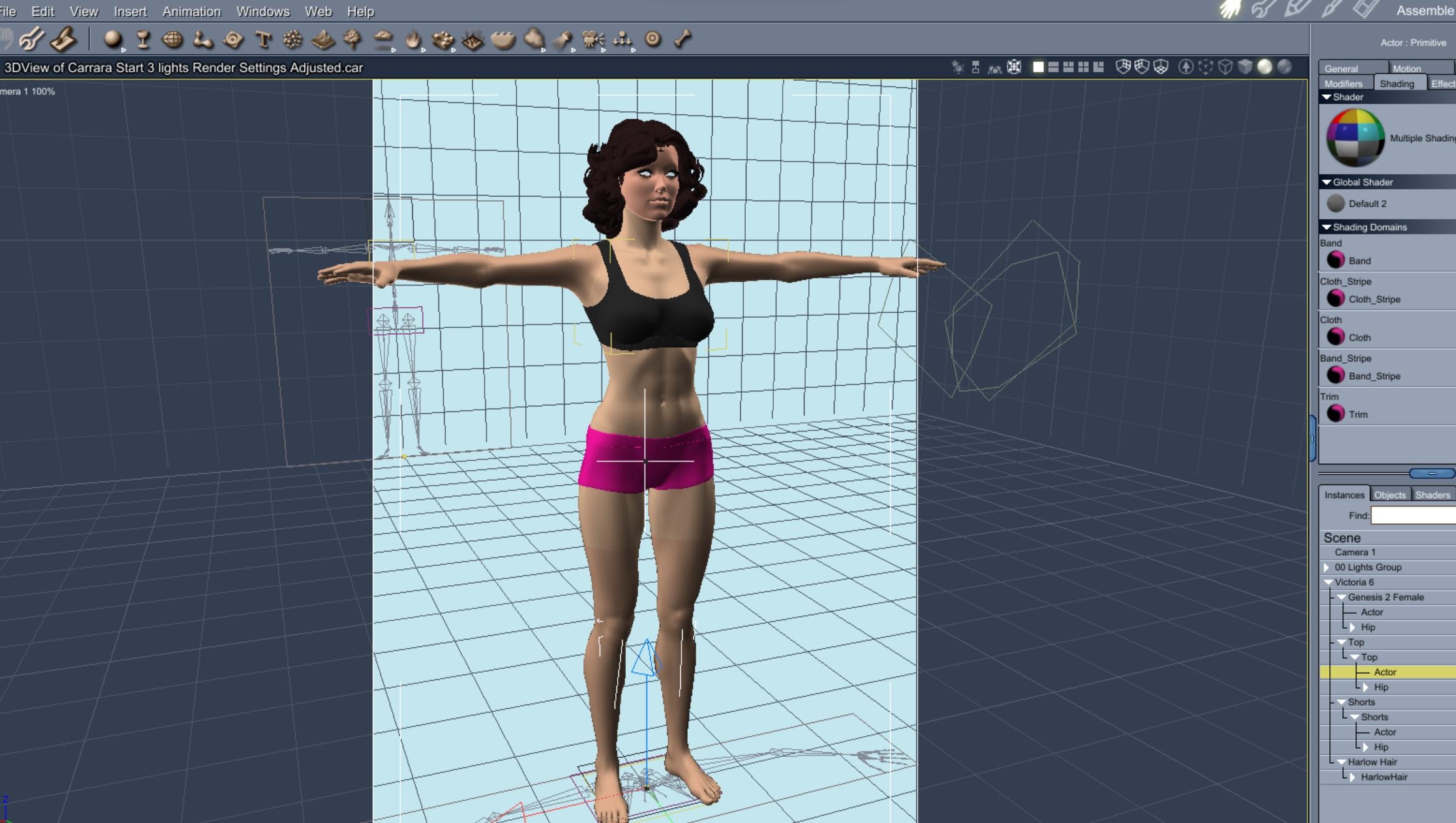
Here I load Genesis 2 female Victoria 6 and fit the basicwear top and shorts.
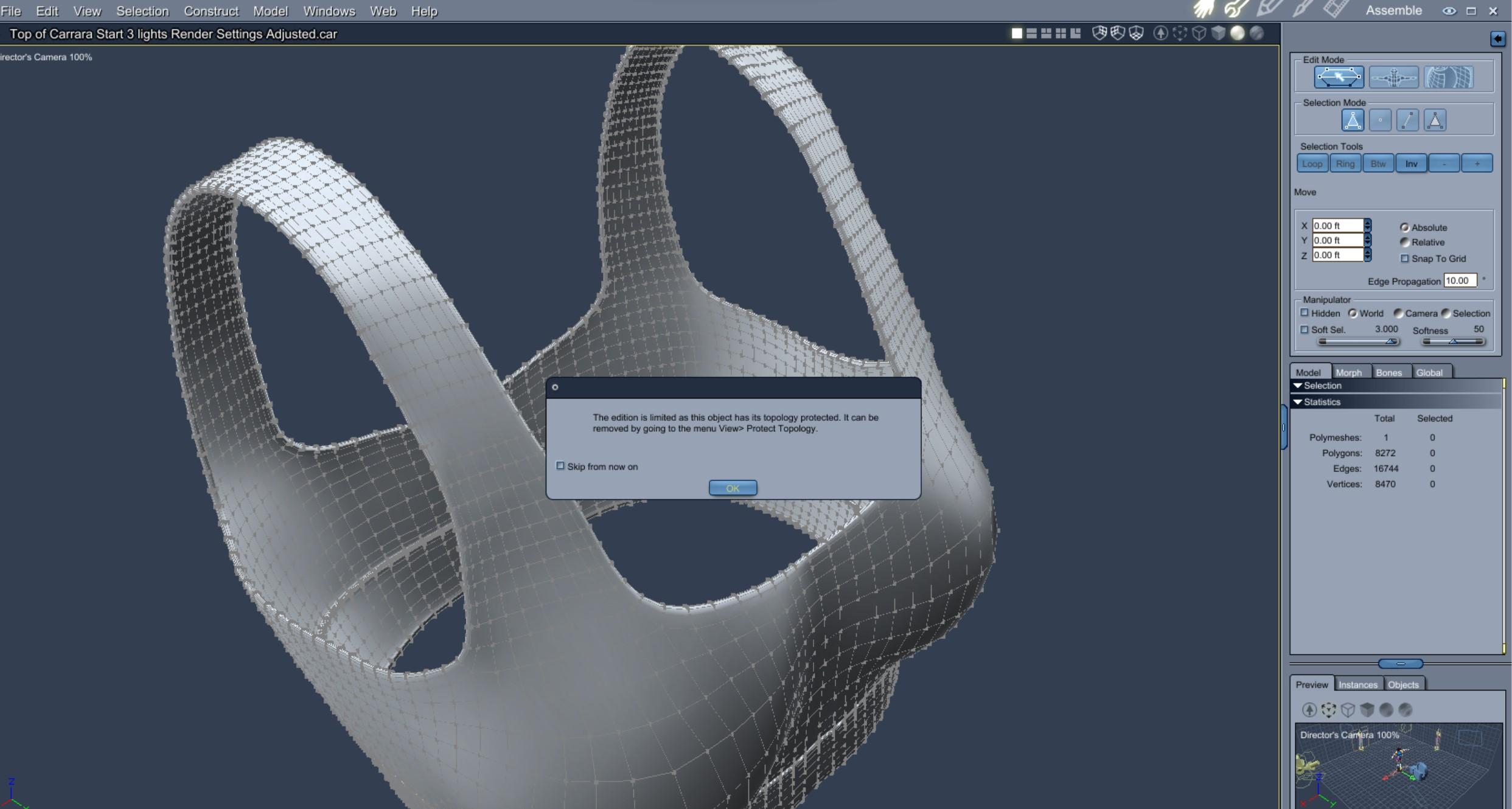
Click the upper right wrench to enter the vertex modeler and get a warning. Ignore the warning by clicking OK.
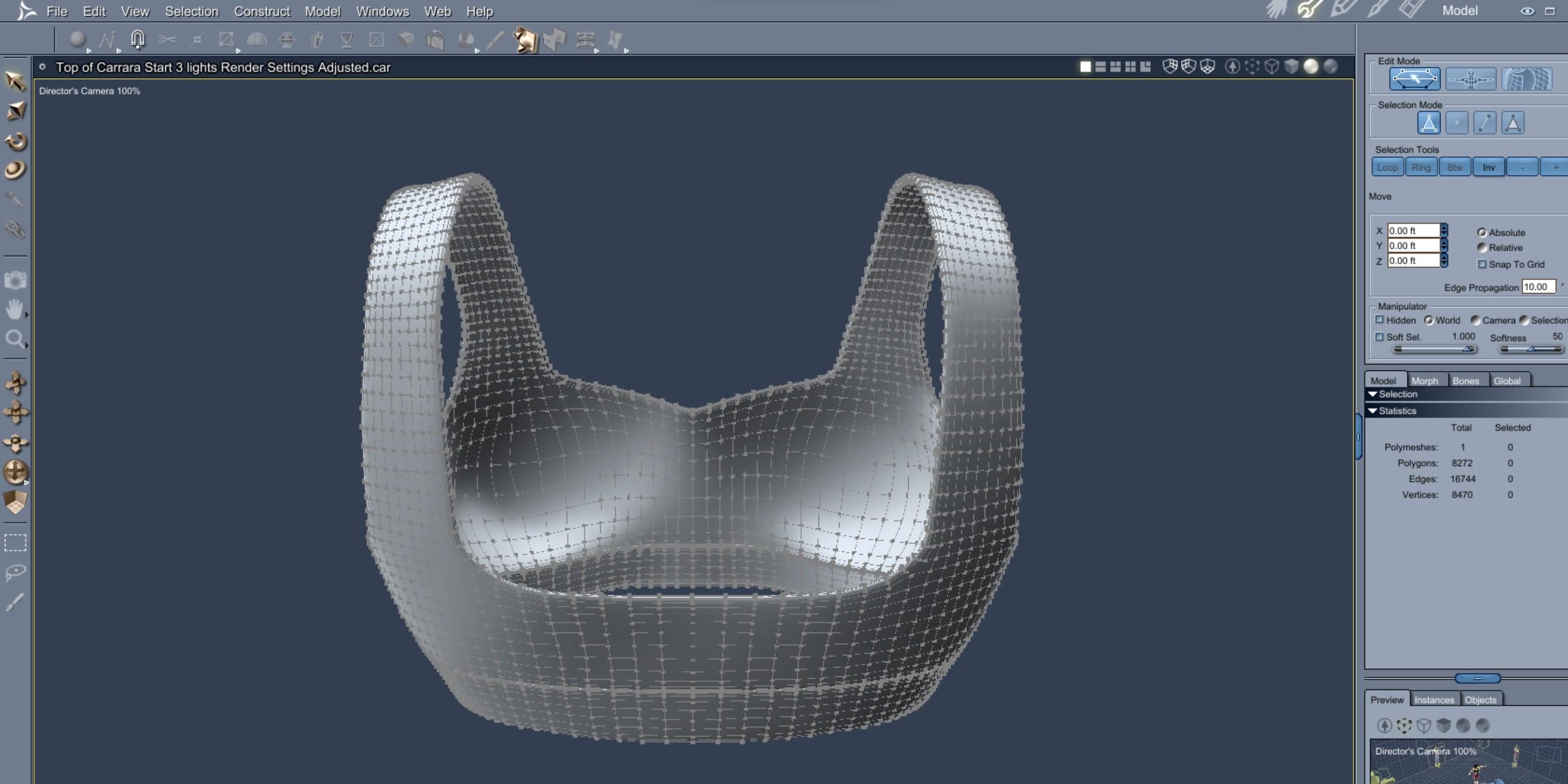
Rotate the camera view so it is convenient to use the marquis or lasso tool to select front polygons without selecting back polygons.
Select some polygons in the neckline.
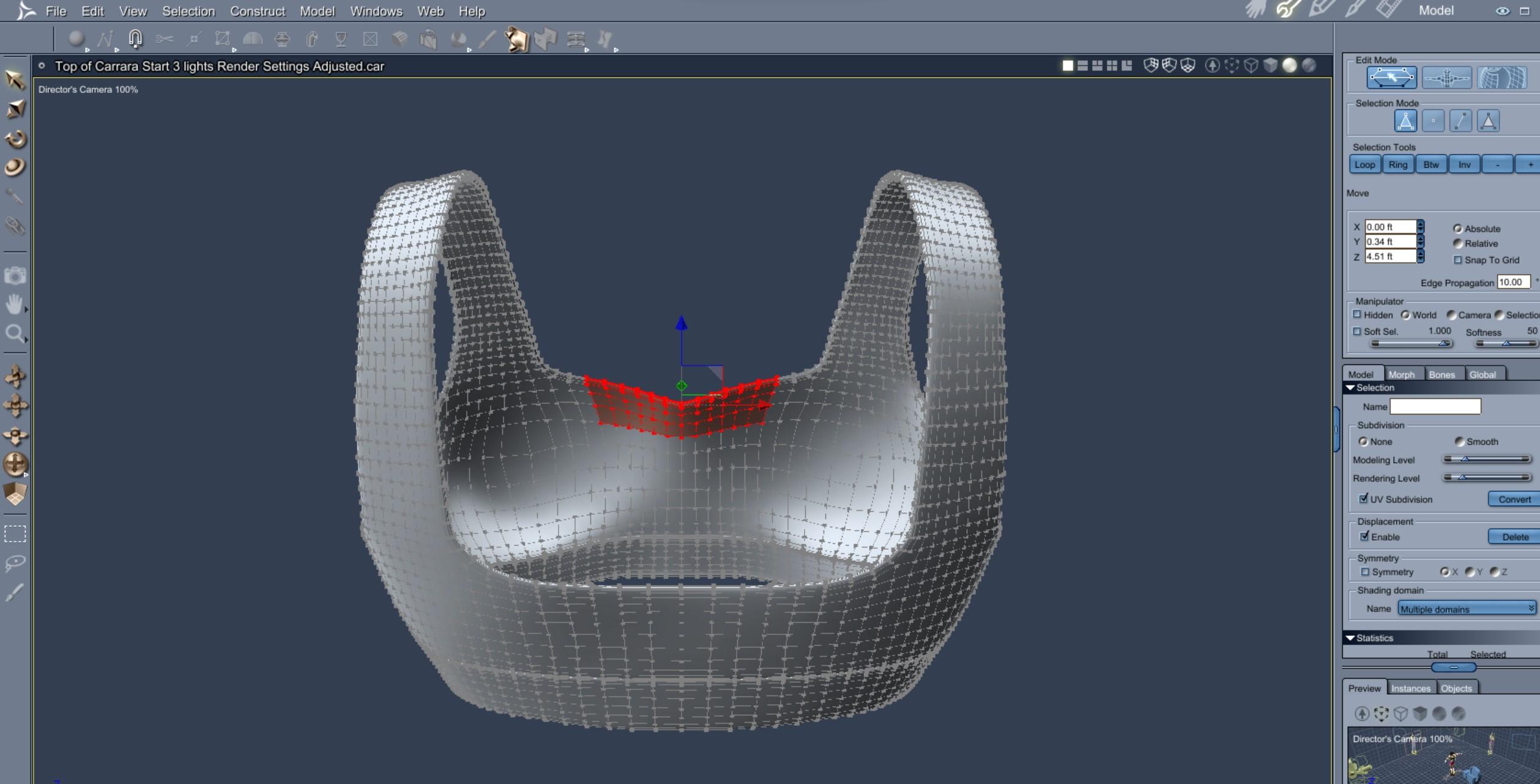
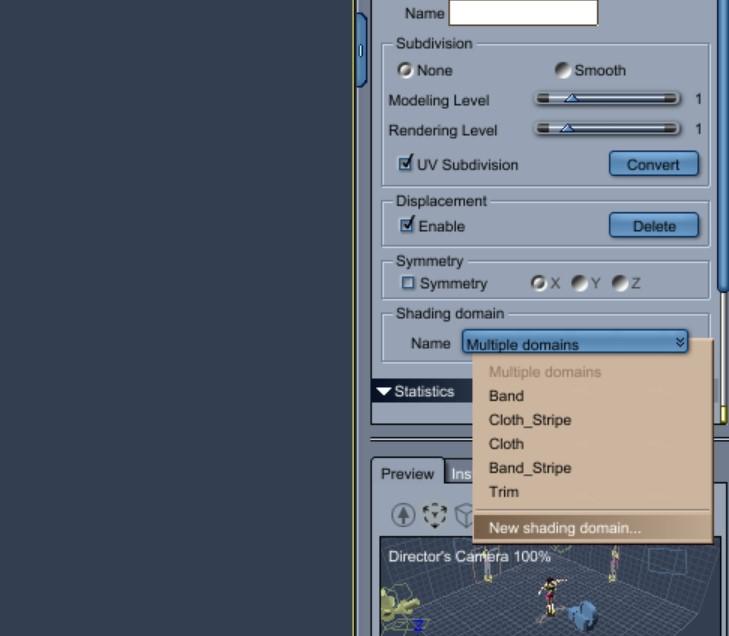
In lower right box, use the shader domain menu to create a new shader domain.
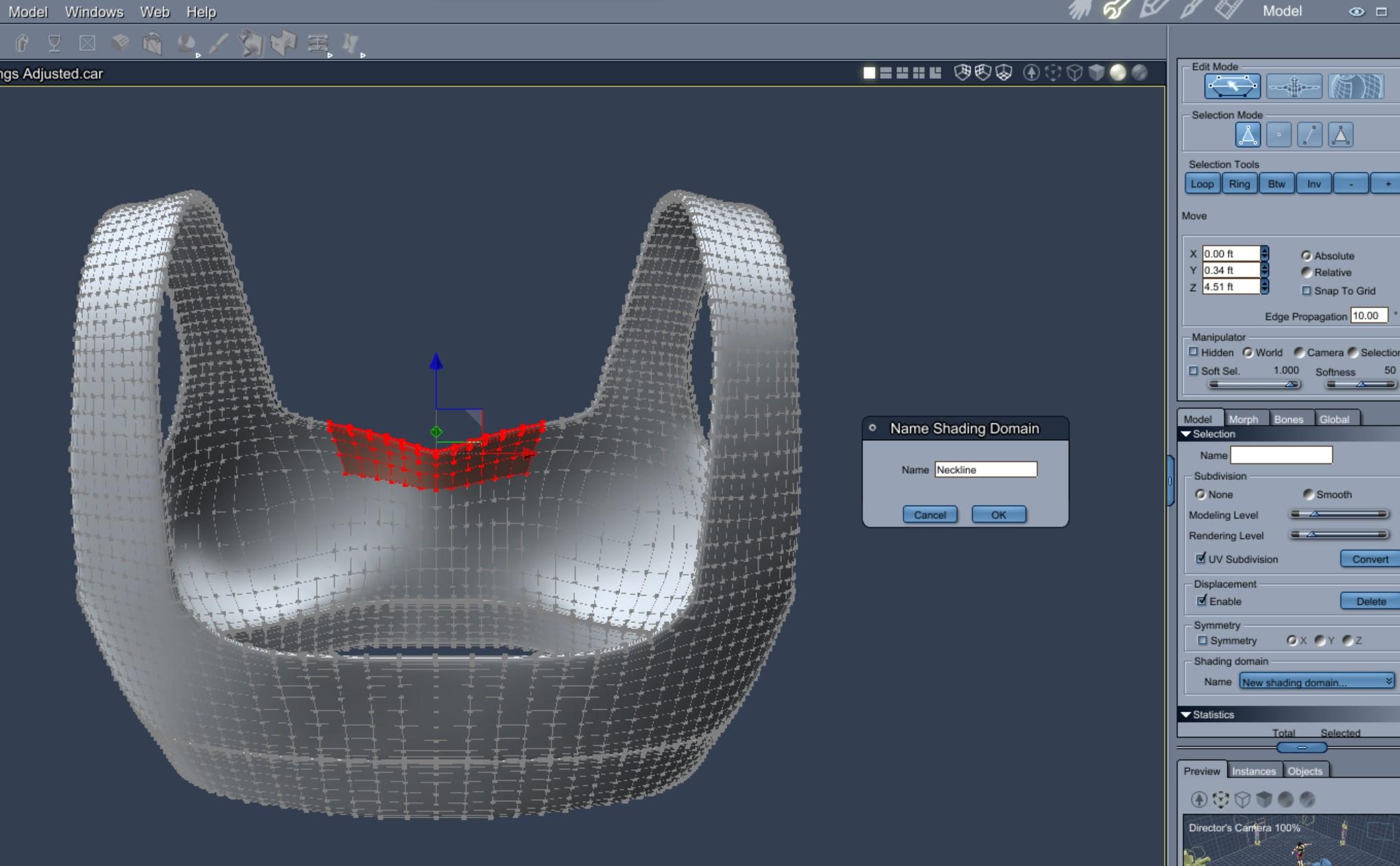
Give the shader domain a name.
 No one asked me - Diomede screenshots on whatever - Warning AI Discussion OK
Creating Shading Domain to Alter Neckline of Existing Rigged Garment
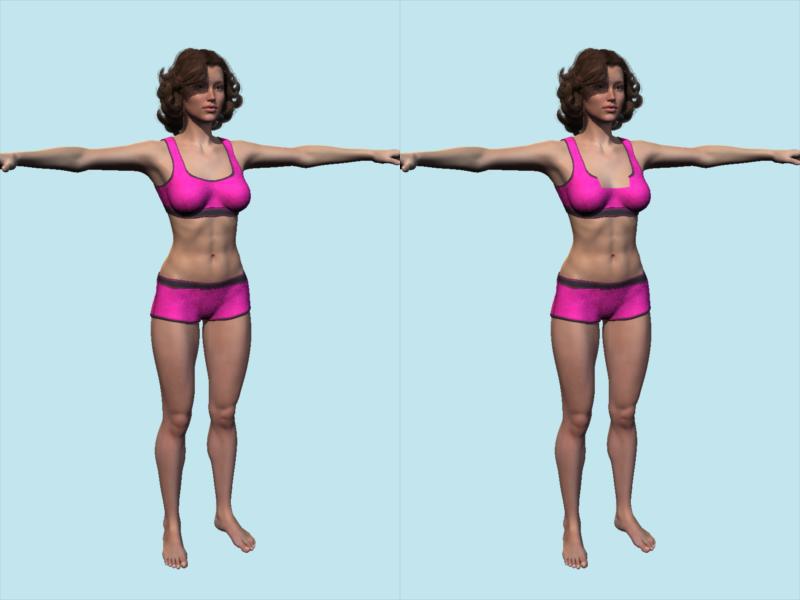
Alpha maps and shading domains can be used to edit the appearance of existing rigged items without altering their geometry. This is useful because morphs cannot add or subtract polygons. Examples include converting a long sleeve shirt to short sleeve, or long pants to shorts, or... Here is an example of editing a neck line. In this example I use the Genesis 2 Victoria 6 figure wearing the G2F basicwear top and shorts. Going to use the vertex modeler to create a new shading domain in the neckline and add a 0 alpha shader to make look invisible.
Here is a comparison of before and after. Very simple example.
 Sales - Not everyone uses Genesis 9 characters!!!!
outrider42 said:
Unless customers don't buy into G9. It is not a given that G9 will be widely adopted by customers. G8 is the new Victoria 4, and G9 has to overcome that. If customers do not buy G9 as much, then G8 will stay viable to PAs for years to come. It isn't about the latest thing, it is which is the popular thing.
You are describing every Genesis generation ever, including 8. No Genesis was Victoria 4 at first and they all ended up being it. Every new generation someone questions it, but the latest Genesis is always the popular Genesis.
G9 surfaces dilemmaSolitarySandpiper said:
IceCrMn said:
I read in another thread that we are expected to build our own LIE overlays or purchase premade ones from the store for makeup.
No solution for the lip surface features or other facial features other than really good textures and maps.
We got one such makeup set with the pre-purchase bundle, I think it's currently called the "Intro Bundle" The name keeps changing so I'm not ceratin how long it will keep it's current name.It can also be bought separately.
https://www.daz3d.com/victoria-9-hd-intro-bundle
https://www.daz3d.com/victoria-9-hd-makeup
It's a set of scripts that apply premade LIE overlays.
A few of the ones for the makeup work.
Some don't.
None of the ones to remove each layer (lipstick, blush, eye shadow, etc,etc) work at all.
Your only choice is to reapply the characters skin mats and remove all of them.
https://www.daz3d.com/forums/discussion/598041/
Very frustrating.
edit: If you have this set and want something to giggle at. Try appling one of the presets to any skin other than V9s
This is V9 with the "G9 feminine skin 01 MAT" and with "V9 Makeup Apply 01 All" preset applied.
Any premades we can buy could very likely end up being for one character only.
i understand why you think this(because the product functionality is borked) but the vicky 9 make-up does work on all of the skins even the dark ones (to some extent)... even the the remove utilities work!
you just need to refresh the iray preview after loading/applying something.


I can get the remove scripts to work if I right click on the Surfaces pane and do "Refresh Images" after cycling iray preview (on,off, Refresh Images, on, off.)
I didn't have it on to start with, so it's starting in the off position.
Not many people are going to fiddle with this to this extent to discover how to get the remove scripts to work.
Overlays still don't work on any skin other than V9's no matter how many times I stop and start iray preview or refresh surface images.
But I can get the remopve scripts to function using the above method.
Legacy UVs for Genesis 9 - Will I be able to convert textures?Cayman Studios said:
shg0816_13461e8196 said:
Would the legacy UV tool allow G8 LIEs to be applied?
For example, I have a G9 Character that I want to use a base G8 skin. I now want to add tattoos, let's say from the inked series. Could I do that?Yes. You apply the LIEs just as you would any texture and then set the UVs. If you look on the product page you can see that one of the popups shows Victoria 8.1 tattoos on Victoria 9.
Thank you! In the cart it goes!
Weird search results - please donateSearching "Victorian" returns also everything with Victoria in the name, making it hard to find something Victorian.
 G9 surfaces dilemma
IceCrMn said:
I read in another thread that we are expected to build our own LIE overlays or purchase premade ones from the store for makeup.
No solution for the lip surface features or other facial features other than really good textures and maps.
We got one such makeup set with the pre-purchase bundle, I think it's currently called the "Intro Bundle" The name keeps changing so I'm not ceratin how long it will keep it's current name.It can also be bought separately.
https://www.daz3d.com/victoria-9-hd-intro-bundle
https://www.daz3d.com/victoria-9-hd-makeup
It's a set of scripts that apply premade LIE overlays.
A few of the ones for the makeup work.
Some don't.
None of the ones to remove each layer (lipstick, blush, eye shadow, etc,etc) work at all.
Your only choice is to reapply the characters skin mats and remove all of them.
https://www.daz3d.com/forums/discussion/598041/
Very frustrating.
edit: If you have this set and want something to giggle at. Try appling one of the presets to any skin other than V9s
This is V9 with the "G9 feminine skin 01 MAT" and with "V9 Makeup Apply 01 All" preset applied.
Any premades we can buy could very likely end up being for one character only.
i understand why you think this(because the product functionality is borked) but the vicky 9 make-up does work on all of the skins even the dark ones (to some extent)... even the the remove utilities work!
you just need to refresh the iray preview after loading/applying something.
G9 surfaces dilemmaIceCrMn said:
I read in another thread that we are expected to build our own LIE overlays or purchase premade ones from the store for makeup.
No solution for the lip surface features or other facial features other than really good textures and maps.
We got one such makeup set with the pre-purchase bundle, I think it's currently called the "Intro Bundle" The name keeps changing so I'm not ceratin how long it will keep it's current name.It can also be bought separately.
https://www.daz3d.com/victoria-9-hd-intro-bundle
https://www.daz3d.com/victoria-9-hd-makeup
It's a set of scripts that apply premade LIE overlays.
A few of the ones for the makeup work.
Some don't.
None of the ones to remove each layer (lipstick, blush, eye shadow, etc,etc) work at all.
Your only choice is to reapply the characters skin mats and remove all of them.
https://www.daz3d.com/forums/discussion/598041/
Very frustrating.
edit: If you have this set and want something to giggle at. Try appling one of the presets to any skin other than V9s
This is V9 with the "G9 feminine skin 01 MAT" and with "V9 Makeup Apply 01 All" preset applied.
Any premades we can buy could very likely end up being for one character only.
Yes, I tried that too, and it does not work, works fine on V9 skin.
I would have thought as an LIE it works on all G9 skins.
G9 eyes: maybe there's a learning curve even for the PAs?
Bingo, but not really complaining as I think it might be due to artistic taste of the PAs.Daywalker Designs said:Gator said:
If the default G9 eyes are much better than most G8 & 8.1, why fix what ain't broke?
With the exception of some custom colors I suppose.
I was under the impression that the original poster was complaining that the eyes of most G9 figures except for Michael and Victoria weren't as good as what G9 is capable of supporting.
G9 surfaces dilemmaI read in another thread that we are expected to build our own LIE overlays or purchase premade ones from the store for makeup.
No solution for the lip surface features or other facial features other than really good textures and maps.
We got one such makeup set with the pre-purchase bundle, I think it's currently called the "Intro Bundle" The name keeps changing so I'm not ceratin how long it will keep it's current name.It can also be bought separately.
https://www.daz3d.com/victoria-9-hd-intro-bundle
https://www.daz3d.com/victoria-9-hd-makeup
It's a set of scripts that apply premade LIE overlays.
A few of the ones for the makeup work.
Some don't.
None of the ones to remove each layer (lipstick, blush, eye shadow, etc,etc) work at all.
Your only choice is to reapply the characters skin mats and remove all of them.
https://www.daz3d.com/forums/discussion/598041/
Very frustrating.
edit: If you have this set and want something to giggle at. Try appling one of the presets to any skin other than V9s
This is V9 with the "G9 feminine skin 01 MAT" and with "V9 Makeup Apply 01 All" preset applied.
Any premades we can buy could very likely end up being for one character only.
Legacy UVs for Genesis 9 - Will I be able to convert textures?shg0816_13461e8196 said:
Would the legacy UV tool allow G8 LIEs to be applied?
For example, I have a G9 Character that I want to use a base G8 skin. I now want to add tattoos, let's say from the inked series. Could I do that?Yes. You apply the LIEs just as you would any texture and then set the UVs. If you look on the product page you can see that one of the popups shows Victoria 8.1 tattoos on Victoria 9.
Legacy UVs for Genesis 9 [Commercial]Jay Versluis said:
@Cayman I've used the script like the PDF suggests, and you're quite right only the Head texture is loaded, not the Face. The script isn't loading it. Rosa Maria and Victoria 8.1 don't have that problem, only Crow so far. Here's what I'm doing: Load G9, run the Prepare Script, run the G8.1 script (purple), then apply my material preset. I've tried it the other way round too (load mat preset first, then load the purple script), but it didn't make a difference.
Jay, you must run the Apply UVs script after loading the MATs. I have tried it with Crow 8.1 just in case there is something I have overlooked, and here is the result, Crow 8.1 on Genesis 9:
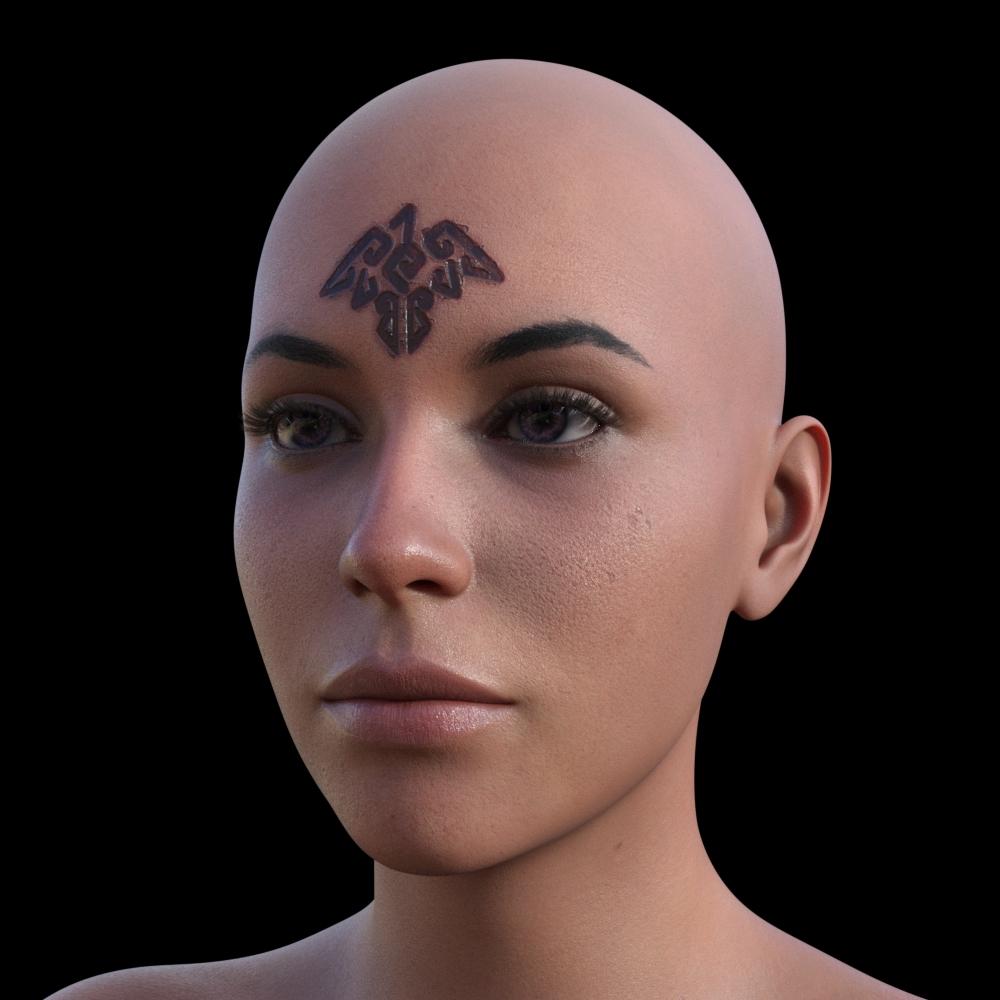
Perhaps at some stage you inadvertently deselected the geografts in the surface tab before applying the MATs or running the script. The script itself contains code which specifically seeks out the Face surface on the geograft in order to copy it onto the main mesh.
G9 eyes: maybe there's a learning curve even for the PAs?Gator said:
If the default G9 eyes are much better than most G8 & 8.1, why fix what ain't broke?
With the exception of some custom colors I suppose.
I was under the impression that the original poster was complaining that the eyes of most G9 figures except for Michael and Victoria weren't as good as what G9 is capable of supporting.
Legacy UVs for Genesis 9 [Commercial]Thanks for the suggestions guys!
@Cayman I've used the script like the PDF suggests, and you're quite right only the Head texture is loaded, not the Face. The script isn't loading it. Rosa Maria and Victoria 8.1 don't have that problem, only Crow so far. Here's what I'm doing: Load G9, run the Prepare Script, run the G8.1 script (purple), then apply my material preset. I've tried it the other way round too (load mat preset first, then load the purple script), but it didn't make a difference.
@Richard, good call - Crow doesn't seem to have any geografts I can make out.
@tombraider4ever You can follow my video for converting the character shapes. Together with this product, you can have your old characters running on Genesis 9 in no time. I'm sure we'll see a shape conversion product pop up soon, so these are the manual steps all inside Daz Studio.
Sales - Not everyone uses Genesis 9 characters!!!!RawArt said:
outrider42 said:
RawArt said:
With G9 out, the future sales potential for NEW G8 products is on a downward curve....so from a business perspective PA's would naturally follow the curve that will be growing in sales over the next few years..and that would be G9.
Thats just how business works.
Unless customers don't buy into G9. It is not a given that G9 will be widely adopted by customers. G8 is the new Victoria 4, and G9 has to overcome that. If customers do not buy G9 as much, then G8 will stay viable to PAs for years to come. It isn't about the latest thing, it is which is the popular thing. This has been proven time and time again, like New Coke, or a newly hyped video game sequel being vastly less popular than the original. The new Battlefield has less active players than the previous one, which is certainly not what the developers wanted. But it doesn't matter what they want, the customers made their choice.
That is how business works. Genesis 9 still has to prove itself to a lot of customers, no matter how much Daz wants to force it on them. Maybe in time it will...but maybe it wont. As we nosedive into recession, customers may be buying less. Jumping into a new generation model requires a lot more investment, since you need so many things you already bought once before, plus converters and so on.
It is a lot cheaper to stay on G8 and buy new stuff for it from the PAs who support it.
Customers have already bought into it.... I already have more than a few G9 products in the store and G9 sales are very comparable to G8.
So it has proven itself
This whole G9 won't sell debate is rather silly IMHO. I didn't buy any G8 content for about a year after it was released. I had enough G3 stuff and I spent my budget on other things like props or shaders. Eventually I was attracted by some of the less conventional looking characters so started to migrate to G8F (G8M followed a long time later). Now I have about as much G8 content as I did for V4 which kept me happy for years. I have so much that I don't need more but if stuff for G8 continues to appear in the store, I will probably buy some of it. I won't be buying G9 content because I can't afford to start over with all the morph packs, skins, etc., etc. So I will bide my time. I don't care whether I am typical of other customers or not - that's just my preference. The more G9 dominates the store, the less I will spend and that's fine by me - I don't expect DAZ to throw up their hands and do a U-Turn.
My hope and expectation is that DS5 will usher in some advanced technology which will require the introduction of new figures to take advantage of that technology. So the more I save now, the better placed I will be to buy into that new generation. I hope others continue to buy G9 so that DAZ can afford to develop towards that advanced technology I'm hoping for.
Sales - Not everyone uses Genesis 9 characters!!!!outrider42 said:
RawArt said:
With G9 out, the future sales potential for NEW G8 products is on a downward curve....so from a business perspective PA's would naturally follow the curve that will be growing in sales over the next few years..and that would be G9.
Thats just how business works.
Unless customers don't buy into G9. It is not a given that G9 will be widely adopted by customers. G8 is the new Victoria 4, and G9 has to overcome that. If customers do not buy G9 as much, then G8 will stay viable to PAs for years to come. It isn't about the latest thing, it is which is the popular thing. This has been proven time and time again, like New Coke, or a newly hyped video game sequel being vastly less popular than the original. The new Battlefield has less active players than the previous one, which is certainly not what the developers wanted. But it doesn't matter what they want, the customers made their choice.
That is how business works. Genesis 9 still has to prove itself to a lot of customers, no matter how much Daz wants to force it on them. Maybe in time it will...but maybe it wont. As we nosedive into recession, customers may be buying less. Jumping into a new generation model requires a lot more investment, since you need so many things you already bought once before, plus converters and so on.
It is a lot cheaper to stay on G8 and buy new stuff for it from the PAs who support it.
Customers have already bought into it.... I already have more than a few G9 products in the store and G9 sales are very comparable to G8.
So it has proven itself
Sales - Not everyone uses Genesis 9 characters!!!!outrider42 said:
RawArt said:
With G9 out, the future sales potential for NEW G8 products is on a downward curve....so from a business perspective PA's would naturally follow the curve that will be growing in sales over the next few years..and that would be G9.
Thats just how business works.
Unless customers don't buy into G9. It is not a given that G9 will be widely adopted by customers. G8 is the new Victoria 4, and G9 has to overcome that. If customers do not buy G9 as much, then G8 will stay viable to PAs for years to come. It isn't about the latest thing, it is which is the popular thing. This has been proven time and time again, like New Coke, or a newly hyped video game sequel being vastly less popular than the original. The new Battlefield has less active players than the previous one, which is certainly not what the developers wanted. But it doesn't matter what they want, the customers made their choice.
That is how business works. Genesis 9 still has to prove itself to a lot of customers, no matter how much Daz wants to force it on them. Maybe in time it will...but maybe it wont. As we nosedive into recession, customers may be buying less. Jumping into a new generation model requires a lot more investment, since you need so many things you already bought once before, plus converters and so on.
It is a lot cheaper to stay on G8 and buy new stuff for it from the PAs who support it.
And that is exactly why I mentioned the dual generation products, like the ones we had for G3/G8 and earlier for G2/G3. Those products do make it easier for customers to eventually transition to a new generation. They might not adapt to the new figure at launch, but, if their hardware allows for it, they'll probably start picking up on it within a few months, because their library allows for it, they already have some useful stuff.
Without the dual generation products, if they don't adapt now, then they probably won't adapt in a few months either. They won't invest in a library for the new generation, and instead of any reluctance slowly falling, reluctance will only increase. They already have experience getting started on a new figure, and already know how much that is going to cost. And the missed products for the new figure will only keep piling up, as will the cost of adapting.
Daz 3D is part of

Connect
DAZ Productions, Inc.
7533 S Center View Ct #4664
West Jordan, UT 84084Licensing Agreement | Terms of Service | Privacy Policy | EULA
© 2026 Daz Productions Inc. All Rights Reserved.