-
question about maya 2022 install...solved.... but what are daz tools dialog?
on my system i have both maya 2020 and maya 2022 installed, when i install the bridge i get NO prompt as to which version i want to install it to...
the 2020 maya plugin appears to work ok but how do i also get it to install to the 2022 installation of Maya and work as well?
unlike the max version which give you a path to install to ( daz central - settings ) where you can define the path. Any Help?
Edit//////////////////// Update////////////////
I have sucessfully after much labor got the install for maya2022 to work i manually installed the plugin from github "Master" then had pymel issues RE:
PyMEL is an open-source Python library that helps with the development of Maya extensions by providing a simplified syntax for common operations.
PyMEL for Python 2 is packaged with Maya and PyMEL for Python 3 can be installed as an optional component with Maya.
turns out pymel for python 3 was installed with maya2022 install but not pymel for python 2 and it is required for the plugin to work correctly so after installing this it works fine and i uninstalled my maya 2020 version because this plugin and Vray were the two i need to work in 2022 and they are both ok it seems. BUT i have a new question can some explain the Daz Studio tools dialog especially the rig or re-target skelton options? Thanx
So in the last 2 installs of DS Pro 4.15 goes in application folder why...?That is the correct behaviour for Daz Central - in order to simplify the process of installation it takes a single setting, for a base path, and places everything (including the applciation) in a specific sub-folder of that.
The We Will Miss You, Chohole Complaint ThreadLeatherGryphon said:
Back in the late 60's, early '70s, usually, because of their expense, only the biggest machines had any sort of graphic output capability. Sure, any computer of the time could print pictures of Einstein or a pin-up girl using text on the printer. Looked great Scotchtaped to your dorm room wall, but real graphics as we know them, were rare.
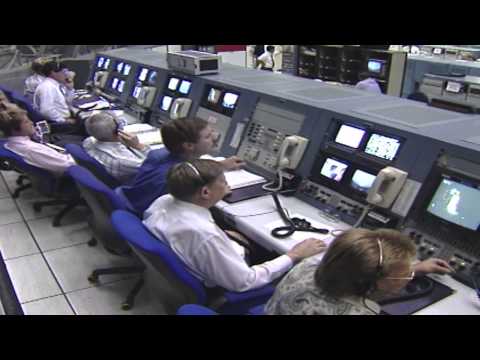
HOWEVER, not to boast (c'mon, you know I love to tell this tale), but I started work at the Kennedy Space Center (KSC) in the early '70s and was the only programmer/operator/engineer assigned to the two Raytheon "mini"-computers in the "Special Measurements Division" (SMD) on the 2nd floor of the "Launch Control Center" (LCC), right next to the Vehicle Assembly Building (VAB), the big boxy building where they assembled the Saturn-V rockets for the moon launches back in the '60s. Our group of techs & engineers were just the little guys in an outside corner room, doing non-launch related tests & research experiments. The really big computers for launch operations were in the huge computer room located in the entire central area of the LCC 2nd floor. During the moon launches in the '60s, the four alternative (two redundant rooms for each of two launch pads) Firing Rooms, i.e. the actual launch rooms on the 3rd floor (the ones you see in old photos, looking out the big louvered shutters facing the launchpad) had monochrome, text oriented monitors at the control consoles. But while I was there in the '70s, they also launched the last of the Saturn-V rockets to put the Skylab space station up. Then there were three launches of the smaller Saturn-1b to get the crews up to it. And I was also there for the launch of the Apollo/Soyuz mission. After that, the firing rooms were torn apart and they started installing new control consoles getting ready for Shuttle operations. Some of the early, new, control consoles that I saw, had color Ayden monitors with 21" circular displays (remember, it was near the end, but still in the era of the "roundie" color TV tubes). Later on after I left, they apparently switched to rectangular color monitors.
The Ayden monitors could display text in colors and I believe could draw lines using text based linear characters. But actually, I don't even know if they had true vector graphics or only used raster graphics, because I never got a chance to work with those particular models.
HOWEVER, in my little area, not worried about launch schedules or massive paperwork, and tight regulation, I was having a ball playing with my (two) monochrome vector graphics, Tektronics 4012 (slightly newer model of the 4010) storage display monitors. https://www.pdp8online.com/tek4010/tek4010.shtml A few times, launch people would come to us with a reel of analog recorded data and ask to get it analyzed, graphed and printed. The momentum, velocity, & acceleration forces on the plug-panel and dropweight in the Shuttle's Tail-Service-Mast (TSM) that retracted from its connection to the Shuttle's tail at the moment of launch by dropping a heavy weight and yanking the huge plug of plumbing and electronics from the both sides of the tail end of the Shuttle and slipping it behind a quickly closing door in the mast to keep it safe from the rocket exhaust that would be blasting at it seconds later, was one of the projects I worked on for them. (whew, long sentence, sorry
 )
)Shuttle Tail Service Mast is the gray rounded structure(s) on either side of the tail in the image below.
Regardless, my point is that not only did I have the Tektronics displays, but I also had a professional dot-matrix printer that I had linked to my computer so the vector image on the Tektronics could be converted by my computer to raster graphics and sent to my dot-matrix thermographic printer. The big room could probably have done it but I often had more time and could get the results to them quicker.
The downside to having such nice toys to play with was that there was absolutely zero software for them provided by my computer's manufacturer (Raytheon). I had to write all the drivers and graphics subroutines myself, as well as the floating point arithmetic routines too!
 But I did, and I loved it. All of my real graphic work was with 2D maps & graphs, but I was playing with primitive 3D graphics in my spare time. Wheee...
But back to the topic, which was, I believe, graphics in the '70s. The highest resolution I had in my devices was 1024x768 on the Tektronics 4012 and similarly on the dot-matrix printer. To get to work on the color Aydens in the big room was my goal, but that never happened. I left the Space Center and went to work for a consulting company. Good career movement, but access to tax funded, super equipment was lacking for a few years until I joined the think-tank Mitre in Washington, DC in 1984.
HOWEVER, in the late '70s, while working a contract for Harris Intertype (newspaper machine division of Harris) I finally had an opportunity to program an Ayden color monitor. Unfortunately it was limited to text and text based linear graphic symbol operations for the control console of an electronic typesetting machine, so I never did get a chance to test out true color graphics on an Ayden. But it was a solid piece of '60/'70s technology with big well written manuals, and rugged hardware and hefty price tag. I loved it.
Ah, the good old days when computers were made of iron and could literally be used as boat anchors when they died.
Interesting YouTube about the LCC
 The We Will Miss You, Chohole Complaint Thread
Back in the late 60's, early '70s, usually, because of their expense, only the biggest machines had any sort of graphic output capability. Sure, any computer of the time could print pictures of Einstein or a pin-up girl using text on the printer. Looked great Scotchtaped to your dorm room wall, but real graphics as we know them, were rare.
HOWEVER, not to boast (c'mon, you know I love to tell this tale), but I started work at the Kennedy Space Center (KSC) in the early '70s and was the only programmer/operator/engineer assigned to the two Raytheon "mini"-computers in the "Special Measurements Division" (SMD) on the 2nd floor of the "Launch Control Center" (LCC), right next to the Vehicle Assembly Building (VAB), the big boxy building where they assembled the Saturn-V rockets for the moon launches back in the '60s. Our group of techs & engineers were just the little guys in an outside corner room, doing non-launch related tests & research experiments. The really big computers for launch operations were in the huge computer room located in the entire central area of the LCC 2nd floor. During the moon launches in the '60s, the four alternative (two redundant rooms for each of two launch pads) Firing Rooms, i.e. the actual launch rooms on the 3rd floor (the ones you see in old photos, looking out the big louvered shutters facing the launchpad) had monochrome, text oriented monitors at the control consoles. But while I was there in the '70s, they also launched the last of the Saturn-V rockets to put the Skylab space station up. Then there were three launches of the smaller Saturn-1b to get the crews up to it. And I was also there for the launch of the Apollo/Soyuz mission. After that, the firing rooms were torn apart and they started installing new control consoles getting ready for Shuttle operations. Some of the early, new, control consoles that I saw, had color Ayden monitors with 21" circular displays (remember, it was near the end, but still in the era of the "roundie" color TV tubes). Later on after I left, they apparently switched to rectangular color monitors.
The Ayden monitors could display text in colors and I believe could draw lines using text based linear characters. But actually, I don't even know if they had true vector graphics or only used raster graphics, because I never got a chance to work with those particular models.
HOWEVER, in my little area, not worried about launch schedules or massive paperwork, and tight regulation, I was having a ball playing with my (two) monochrome vector graphics, Tektronics 4012 (slightly newer model of the 4010) storage display monitors. https://www.pdp8online.com/tek4010/tek4010.shtml A few times, launch people would come to us with a reel of analog recorded data and ask to get it analyzed, graphed and printed. The momentum, velocity, & acceleration forces on the plug-panel and dropweight in the Shuttle's Tail-Service-Mast (TSM) that retracted from its connection to the Shuttle's tail at the moment of launch by dropping a heavy weight and yanking the huge plug of plumbing and electronics from the both sides of the tail end of the Shuttle and slipping it behind a quickly closing door in the mast to keep it safe from the rocket exhaust that would be blasting at it seconds later, was one of the projects I worked on for them. (whew, long sentence, sorry
)Shuttle Tail Service Mast is the gray rounded structure(s) on either side of the tail in the image below.
Regardless, my point is that not only did I have the Tektronics displays, but I also had a professional dot-matrix printer that I had linked to my computer so the vector image on the Tektronics could be converted by my computer to raster graphics and sent to my dot-matrix thermographic printer. The big room could probably have done it but I often had more time and could get the results to them quicker.
The downside to having such nice toys to play with was that there was absolutely zero software for them provided by my computer's manufacturer (Raytheon). I had to write all the drivers and graphics subroutines myself, as well as the floating point arithmetic routines too!
But I did, and I loved it. All of my real graphic work was with 2D maps & graphs, but I was playing with primitive 3D graphics in my spare time. Wheee...But back to the topic, which was, I believe, graphics in the '70s. The highest resolution I had in my devices was 1024x768 on the Tektronics 4012 and similarly on the dot-matrix printer. To get to work on the color Aydens in the big room was my goal, but that never happened. I left the Space Center and went to work for a consulting company. Good career movement, but access to tax funded, super equipment was lacking for a few years until I joined the think-tank Mitre in Washington, DC in 1984.
HOWEVER, in the late '70s, while working a contract for Harris Intertype (newspaper machine division of Harris) I finally had an opportunity to program an Ayden color monitor. Unfortunately it was limited to text and text based linear graphic symbol operations for the control console of an electronic typesetting machine, so I never did get a chance to test out true color graphics on an Ayden. But it was a solid piece of '60/'70s technology with big well written manuals, and rugged hardware and hefty price tag. I loved it.
Ah, the good old days when computers were made of iron and could literally be used as boat anchors when they died.
Interesting YouTube about the LCC
200 Plus Puppeteer Interface for Genesis 8 & 8.1 (Commercial)tjm5635 said:
Zev0 said:
Live in Store
Promo video
"Script not foune in expected directory" This is what I get when attempt to open Puppeteer. I have a G8F selected and installed through Daz Central.
How do I fix this. Please respond via email email removed Thanks
Email removed - we generally ask that people do not post emails, and in any event PAs do not usually provide direct one-on-one support, rather you should open a Support ticket and they will see if they can help you and contact the PA themsevles if they need further information.
Are you sure the Daz Central installation is working? Find the icon for the product in the Products tab of Smart Content - the view that lets you see lots of different products, each with its own icon. Does it have a downward pointing triangle in a broken circle at top-right of the thumbnail?
200 Plus Puppeteer Interface for Genesis 8 & 8.1 (Commercial)Zev0 said:
Live in Store
Promo video
"Script not foune in expected directory" This is what I get when attempt to open Puppeteer. I have a G8F selected and installed through Daz Central.
How do I fix this. Please respond via email email removed Thanks
problem with shaders - Error loading assetI drag and drop any iray material, but it doesn't load anything, in the log file it writes me this:
Invalid node selection for "preset_shader" type.
2021-10-18 23:49:17.242 Error loading asset: C:/Users/Mirko/OneDrive/Documenti/DAZ 3D/Studio/My Daz Connect Library/data/cloud/1_13176/shader presets/iray/nvidia mdl examples/asphalt.dufI have already uninstalled both software and content, and then reinstalled with daz central.
any help?Help with DIM: avoiding a reinstallnonesuch00 said:
James_H said:
Yes, I don't know what has happened. For some reason it was pointing to disk I, but I don't have a disk i/I. When I pointed it to disk D, it does show some installation, but there's still 1700+ products to install. After my previuous reinstall, I had got this down to c 170, mainly G8F & Expressions, which meant I had reduced load time.
I did force the computer to sleep the day before.
Just use Windows to change the drive letter your files are on to match the one DAZ Studio, DAZ Central, and DIM have already configured.
I would avoid doing this, especially if you have other non-Daz content on that same drive.
Help with DIM: avoiding a reinstallJames_H said:
Yes, I don't know what has happened. For some reason it was pointing to disk I, but I don't have a disk i/I. When I pointed it to disk D, it does show some installation, but there's still 1700+ products to install. After my previuous reinstall, I had got this down to c 170, mainly G8F & Expressions, which meant I had reduced load time.
I did force the computer to sleep the day before.
Just use Windows to change the drive letter your files are on to match the one DAZ Studio, DAZ Central, and DIM have already configured.
Mac OS Big SurI seem to have a problem with Big Sur , not even daz central will work , It opens up and then it starts " spinning" i.e. the cursor turns into the spinning wheel and that it , I have to force quit it ..
Anyone had a similar problem ?
Thank You :-)
Ren
So in the last 2 installs of DS Pro 4.15 goes in application folder why...?If you have it set up for Daz Central/Install Manager then you just specify which release channels it goes to and the installer takes care of the actual location.
So in the last 2 installs of DS Pro 4.15 goes in application folder why...?
I used Daz Central in order to package the plugin For beta testers I am going to have to make 2 installers I know where the files go so for me it is not a problem but testers just need to open DAZSTUDIO and play.. It is figuring out the multiple paths that DS is using for installation...why is it different if you install ds thru DIM or DAZCentral....? Or just from the site?Omniflux said:I am not clear on the problem. Is the issue with installing the plugin in the correct location, or with the plugin working after the files are installed in the correct location?
If it is with installing, then what is your current installation method?
So in the last 2 installs of DS Pro 4.15 goes in application folder why...?foleypro said:
Omniflux said:
This is not the default DS install location, you must have installed here manually at some point.
I just installed DS on a clean system that has never had DS before and the default location is C:\Program Files\DAZ 3D\DAZStudio4
Note that this location can be changed by the user at installation time, and you must NOT hard code it anywhere.
To install a plugin with a setup program (as opposed to copying manually), you need to look in the registry for the correct installation path at install time.
HKEY_CURRENT_USER\Software\DAZ\Studio4\InstallPath-64On a default install, the value of this key will be C:/Program Files/DAZ 3D/DAZStudio4
Append /plugins to this value, whatever it is, to get the correct installation path.
C:/Program Files/DAZ 3D/DAZStudio4/plugins
I just realized that maybe you installed with DAZ Central? It could choose a different default path, I haven't tried it...
Yup and that is where everything goes..New install an the last 2 computers...same place...Crap crap...
So in the last 2 installs of DS Pro 4.15 goes in application folder why...?Omniflux said:
This is not the default DS install location, you must have installed here manually at some point.
I just installed DS on a clean system that has never had DS before and the default location is C:\Program Files\DAZ 3D\DAZStudio4
Note that this location can be changed by the user at installation time, and you must NOT hard code it anywhere.
To install a plugin with a setup program (as opposed to copying manually), you need to look in the registry for the correct installation path at install time.
HKEY_CURRENT_USER\Software\DAZ\Studio4\InstallPath-64On a default install, the value of this key will be C:/Program Files/DAZ 3D/DAZStudio4
Append /plugins to this value, whatever it is, to get the correct installation path.
C:/Program Files/DAZ 3D/DAZStudio4/plugins
I just realized that maybe you installed with DAZ Central? It could choose a different default path, I haven't tried it...
So in the last 2 installs of DS Pro 4.15 goes in application folder why...?This is not the default DS install location, you must have installed here manually at some point.
I just installed DS on a clean system that has never had DS before and the default location is C:\Program Files\DAZ 3D\DAZStudio4
Note that this location can be changed by the user at installation time, and you must NOT hard code it anywhere.
To install a plugin with a setup program (as opposed to copying manually), you need to look in the registry for the correct installation path at install time.
HKEY_CURRENT_USER\Software\DAZ\Studio4\InstallPath-64On a default install, the value of this key will be C:/Program Files/DAZ 3D/DAZStudio4
Append /plugins to this value, whatever it is, to get the correct installation path.
C:/Program Files/DAZ 3D/DAZStudio4/plugins
I just realized that maybe you installed with DAZ Central? It could choose a different default path, I haven't tried it...
Daz Studio Login ErrorWhat CPU do you have, and which exact version of Daz Studio are you using? In any event, you don't need to log-in to use Daz Studio if you install your content using Daz Central or Install Manager (or manually).
Need HELP please! Daz does not render with 1050tiHi yall, Well I honestly don't know what to do anymore so I come here for your help, Since yesterday daz is not rendering anything at all, After having tried to clean up assets by uninstalling some things from Daz Central, That is the only thing I could say that I did outside than usual, then just install some new assests in the same old way. All these days I had been working normally without any changes in my editing and rendering routine.
I already tried everything, From updating the drivers to the new version Game ready 496.13, Then change to the latest version of studio, Also thinking that the problem could be related to the assets I tried to do everything with the options offered by the Content DB Maintenance, Search drives for files, and so. Of course I also tried everything in the render settings changing from GPU to CPU and both, changing multiple things in the advanced tab, And NOTHING changes.
I don't know what else to do, I leave an example in which I try to render a scene that I render it TWO DAYS AGO perfectly, but now it doesn't even let me preview in Nvidia Iray mode. I leave the screenshots of the errors, The scene info, and the txt log in which I do not understand much but many warning messages call my attention. What I did in the example is to restart the pc, just start it open Daz, load the scene, and once everything is ready click to render, and that happened. I also noticed that when I open daz the memory starts up with almost 1500mb, and when trying to render, for an moment the CPU usage increases and the GPU does not move.Please can someone guide me to a possible solution
Intentional Lost & Found?Malandar said:
So should we report things when the person who made it misspells the category entry and it makes a new category? (I need to go back to my library and make sure that they are DAZ products, but I don't buy from other stores much One of the ones that stands out most is the one where they misspelled architecture)
Categories are made by Daz as part of packaging the product, but yes please report errors - though bear in mind that somethign like that is unlikely to be a priority fix, especially as fixing it will force a redownload of the full product for DIM/Central users.
Install Managerhi. Keep getting the attached when i close the install manager and when i save it to report it via a bug it will not allow it as the "submit Bug button" is greyed out. is install manager realy needed with daz central now installed?
thenks
pete
Daz still not working on MacOSRichard Haseltine said:
Which MacOS? Have you tried using Install manager, rather than Daz Central? It may also be a matter of folder permissions - PostgreSQL is quite fussy about those.
Big Sur version 11.6. Sorry for not mentioning it earlier. And I did try the install manager but the install always fails. If folder permission is the issue, how do I grant it access?
Daz 3D is part of

Connect
DAZ Productions, Inc.
7533 S Center View Ct #4664
West Jordan, UT 84084Licensing Agreement | Terms of Service | Privacy Policy | EULA
© 2026 Daz Productions Inc. All Rights Reserved.