-
I prefer using DIM, but...
There is no point in using DIM/Daz Central if you use Connect (install in Daz Studio) or vice versa - indeed, if you use DIM/Daz Central (or install manually) there is no reason to have Daz Studio work online at all.
Your last screen shot shows the package Files - the files in the zip, grouped by the type of destination they isntall to. The Installed Files list shows what was isntalled, and the file name is a link that will open a file browser to that location.
In the last screen shot the database icon, the stacked discs at the top to the right, is dark indicating that the database is not available to DIM (though ti clearly is available to Daz Studio) - this suggests that there is a system issue, with something blocking communication.
Which folder in the Content Library under Daz Studio Formats are you using? If it's Daz Connect then that is the content installed through Daz Studio, not the content installed through DIM.
Product INSTALL issueThe support folder is the metadata from DIM/Daz central installs, and your own exported user metadata, so you don't want to delete that. the /Content/cloud/meta/ folder is the metadata from Daz Connect, that causes the downloadable in Connect icon to appear.
Misssing Contentnazmy2_a263cf7a4b said:
I appreciate all your help guys, but I am going to try to use Daz Central instead. Wish me luck.
DAZ Central is going to have yet another idea of where it's going to install content...
You need to find out, where your content is installed and check that DS is looking for content in that location, installing content with different methods over and over again is not going to help.
Misssing ContentI appreciate all your help guys, but I am going to try to use Daz Central instead. Wish me luck.
Misssing ContentHow did you install your content?
Manual, DIM, Connect, Central?
You might just need to reimport the meta data.
Right click on the "Smart content" or "content library tab, or click the menu option button(arrow and lines button at the top of the pane group, make sure smart content or content library are active as the menu options change with the active tab).
The select the "Data base maintenance" option.
In the popout tick the "re-import meta data" option.
As long as the support files are present in mapped directories, then cms should process them and update smart content.
Product INSTALL issueCentral is a dumbed down version of DIM and has its own set of default install locations so it would just make things worst. Use DIM then stop letting DS go online is your best options.
Product INSTALL issueWill an install with DAZ Central actually work without all of these complications? I gave up on it a long time ago.
If I keep DAZ close to work and never connect what are the disadvantages?
Also, since I cannot find the thread where you gave information about how to uninstall items installed by Connect, to be reinstalled only through DIM, can you repeat that here?
Where is Genesis 8.1 female basic model"I'm still dumbfounded that the essentials package wasn't flagged for updating for DIM or Central."
There are people who do their best to not move on to new generations. The addition of new shaders such as "Skin PBR Shader", new figures such as 8.1 etc... are technically additions and not updates since they don't alter the original 8.0 figures at all.
Where is Genesis 8.1 female basic modelI'm still dumbfounded that the essentials package wasn't flagged for updating for DIM or Central.
Product INSTALL issueAscania said:
john_97a982ce said:
Oh my God. What a fiasco. So, the best scenario is to install through DIM with DS open to preserve the Metadata? Or with DS unconnected? Which install scenario makes sure the Data Export works? I guess DIM people just have to ignore the white box?
No. The best practice is to install with DIM only with DS CLOSED for it to install the metadata without interference and completely FORGET about the option to login inside DS. People who don't constantly mess things up by using DAZ Connect don't have any white box to be bothered by or ignore.
Connect is a viable option, though it's true that many script products are not written in a way that works with it (and, to be fair to the authors, they can't test Connect installs during development which is very limiting). Still, for some people it may be the preferred option with DIM or Daz Central a fallback when necessary.
Can't Find filesI mean inside Daz studio , I mentionned the O.S. because I know that this last Apple OS is acting wierd ;-)
At first I had problems with Daz Central but now it seems to be working, but I still can't find all that is supposed to be installed and I can't even find the directory where the files should be , as I can on other OS ..:-(
Product INSTALL issueRichard Haseltine said:
Niot true, the metadata is also used by some other features to identify what they are working on. Of coruse you do get metadata from DIM/Daz Central isntalls, or from manual installs folowed by a reimport of metadata, but please don't muddy the waters with overly sweeping statements.
Quick question Richard, what else uses the meta data?
I'd be interested in an example, if possible, as i neither install the "support folder" nor have i ever "updated the data base" in any way, in 8 or so years, so there's nothing for it to draw on, and i've never see a related error, AFAIK.
Diomede's Notepad, Sketchpad, and Chilling PadDiomede said:
Thanks, HW. Might be even more dangerous to be an American symbol of the nineteenth century industrial workingman. I think I need his axe included. Thoughts on a missing heart?
One of the reasons I've returned to this project is because the missing heart is such a central feature of both Metropolis and The Wizard of Oz.
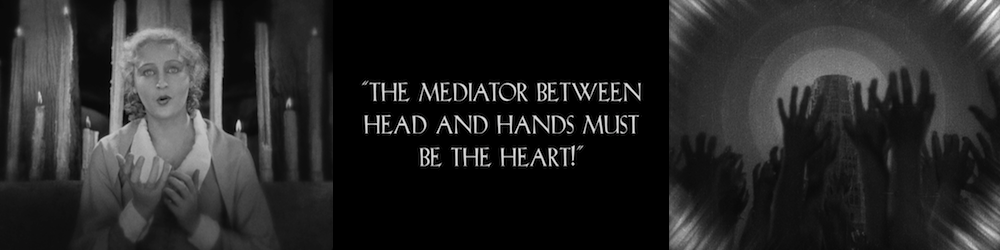
interesting point, love a metaphor carried between different movements
now to fix my missing brain... :)
Product INSTALL issuejestmart said:
Install ONLY with DIM, stop installing through DAZ Studio. Metadata is not needed if you use only the Content Library pane and only the DAZ Studio Formats and Poser Formats which you should do when troubleshooting content issues.
Niot true, the metadata is also used by some other features to identify what they are working on. Of coruse you do get metadata from DIM/Daz Central isntalls, or from manual installs folowed by a reimport of metadata, but please don't muddy the waters with overly sweeping statements.
Accessing Tutorial Productsnamffuak said:
If you installed with DIM - locate the product in the 'Installed' tab, right-click on it, and select "Show Installed Files". Clicking oon the resulting link(s) will take you right to the product folder.
Thank you, so much, Namffuak - without your input, I never would have thought of installing them with DIM! As I said above, to Catheine, I've relied on DAZ Central too much.
 Accessing Tutorial Products
Catherine3678ab said:
DAZ 3D\Studio\My Library\General
I unzip mine to transfer over to My Library. In the General folder, without trying too hard, are at least 36 tutorial folders. One day I should watch/read them.
I would think that DIM would install to the same location too. BUT - hay over on the DIM installer I recall seeing a box that required checking IF one wanted to include such items for download. The box is called General. Near the bottom of the list.
Thanks you, both of you - I was so used to all (most) other DAZ products going directly into DAZ Central on purchase, that it hadn't occurred to me that I needed to manually download them from DIM. Having done so with a couple of them, guess what? The famed 'General' folder has now magically appeared!!! Exactly where you said it would be, Catherine. Thank you again.
 Duplicate Formulas ... again ... and still
How did you isntall Daphne? Daz Install Manager or Daz Central will have an option to uninstall, if you installed through Daz Studio itself you can find the uninstall comand by right-clicking on Daphne's container in Products>D in the Content Library pane.
Umbra Outfit for Genesis 8 & 8.1 Females [Commercial]N00b4Ever said:
Hi Herschel,
Thanks for working on the fix... I just wanted to give you my experience with the latest version of you product which I downloaded on 21/10/21. I had created a discussion in the commons not knowing about this thread. I'll just copy/paste what i wrote there. Again these issues are present as of the latest version downloaded on 21/10/21.
---------
None of the pressure morphs work with G8F despite the outfit being advertised to be compatible with the G8F figure. In addition, the Umbra Strap Arm Right Micro Pressure PRESET does not work properly with the G8.1F. Hand poses only work for G8.1F.
Let me be more specific.
G8F figure:
None of the micro pressure morphs work, they don't even show up in the parameters tab or shaping tab. Hand poses do not work either.
G8.1F figure:
All ON and OFF micro pressure morphs work with the exception of the ON Umbra Strap Arm RIGHT Micro Pressure. The ON PRESET applies the micro pressure on the LEFT side, and the morph slider (for the right arm) doesn't show up in the parameters tab. However it does show up in the shaping tab and it does work when you move the slider. Pressing the OFF PRESET for the right arm will correctly remove the morph. Hand poses work but they move the figure back to the origin.
The hand poses are for the add-on https://www.daz3d.com/cyber-samurai-expansion-for-umbra-outfit
----------
Cheers.
I can definitely confirm I've had multiple updates before the 21st, including around the time I posted the pic with the morphs working.
Did you use central or dim to install? Maybe uninstall and try the other? I've been swamped with work so I couldn't test everything to the degree you seem to have done, but all the morphs seemed to work with g8 - even if one of them - the corset? - had the morph misnamed to refer to the stockings or something, even in the final update.
I'll see if I can try things out more extensively, I'm 14 hours into a render that is a bit too ambitious for my rig right now. :)
Edit: I have two sets of morphs showing up in smart content, 8 and 8.1, and I apply them to the character - I'm sure this is not your case, but just for clarity's sake.
Old solution for expressions on G8.1 not working for anyone else?Creatortwin95 said:
I usaly sign in and use it online.
I have everything checked in but the 'Automatically Login with Rememberd Credentials'.
Ok, not something I would recommend when using DIM or DAZ Central to install content.
The only reason to log in/sign in to DS, is to use DAZ Connect inside DS to install/update content and when doing that, the content gets installed to another location (second time) which is at least wasting disk space and causing havoc with products that are looking for files in DAZ Central/DIM installed locations.
When you go to Smart Content tab, do the thumbnails have a white circle with a down-arrow on their top right corner?, if not, you have also used DAZ Connect to install the content that has already been installed with DAZ Central or DIM.
Old solution for expressions on G8.1 not working for anyone else?I used Daz Install manager last time but I used Daz Central this time. Computer wouldn't let me download Daz Install Manager.
Daz 3D is part of

Connect
DAZ Productions, Inc.
7533 S Center View Ct #4664
West Jordan, UT 84084Licensing Agreement | Terms of Service | Privacy Policy | EULA
© 2026 Daz Productions Inc. All Rights Reserved.