-
Anyone Have Battleworn Female Bot G3/8?
1) The bodysuit does appear to be a permanent part of the texture.
2) The pumps don't come with it. You can't do that with textures or at least without an HD morph on G8, and neither is in the list of included things below.
3) Yes, eyes of any G3/G8 character can be used on any other except for Sakura 8 (because her big flat anime eyeballs are conformers).
A script to fit newer clothing to older Genesis and Legacy figures?There is a way of using GenX to save custom morphs which involves exporting your character as an object, then using morph loader to create a character morph for Michael 4, then using GenX to transfer your character as a single morph to Genesis 1, 2, or 3. Here's the link to the pdf tutorial Fissan's guide to converting morphs from Gen4/Gen3 to Genesis.
n00b to published artist?So, I got into 3d modeling a couple of months ago so I could create fanfic type things, but I think now that I might want to create a few products to sell so I can buy more stuff from the Daz shop without risking my kid's college fund. I have years of experience in actual dressmaking, usually historically accurate garments or fantasy-type things, and I was thinking it might transfer kind of well to 3d clothing? Does this sound like A Plan That Could Work or am I getting ahead of myself? Is there even demand for historically accurate clothes?
DazToUnreal window not showingHi :)
I shared a topic about that here : https://www.daz3d.com/forums/discussion/452926/daz-to-unreal-bridge-plugin-showing-problem-morph-exporting-fix
Using Morphing Fantasy Dress with Genesis Males?Well the one for G1 should work with the male morph directly.
I've not tried fitting the MFD on males from newer figures, but tools like SY Ultra templates for males, which add projection templates for long tunics, could be useful to get the skirt to behave.
I was thinking I might have the best luck with G1 males, so will start there. And I really need to get that SY product, which has been in my wishlist forever.
pretty sure there were textures too for the MFD for Genesis 1 males, fantasy ones
I will have to look for those.
Thanks to both of you!
Painted-on hair for G3M and/or G8MYou could use textures for older generations on newer ones, using the Legacy UV sets by Caiman Studios:
https://www.daz3d.com/cayman-studios
and also (maybe, I didn't try this) switch them between genders with the utilities by Sloshwerks:
Thanks, but I didn't want to use geografts, since the skins would still have UVs that aren't G3 and G8 Base Male. And using the Map Transfer to make them into Base Male skins is difficult to do because of where the geografts located. I have tried, so that's why I'd prefer a skin that already has hair.
I have that too, but no painted-on hair for female characters that's short hair. They're all tied-back or updo hair which isn't what I'm looking for.
Male Poke throughUse bulge morphs on your character instead of applying the gens. Should be some free ones around or included in some morph sets.
Hylas' corner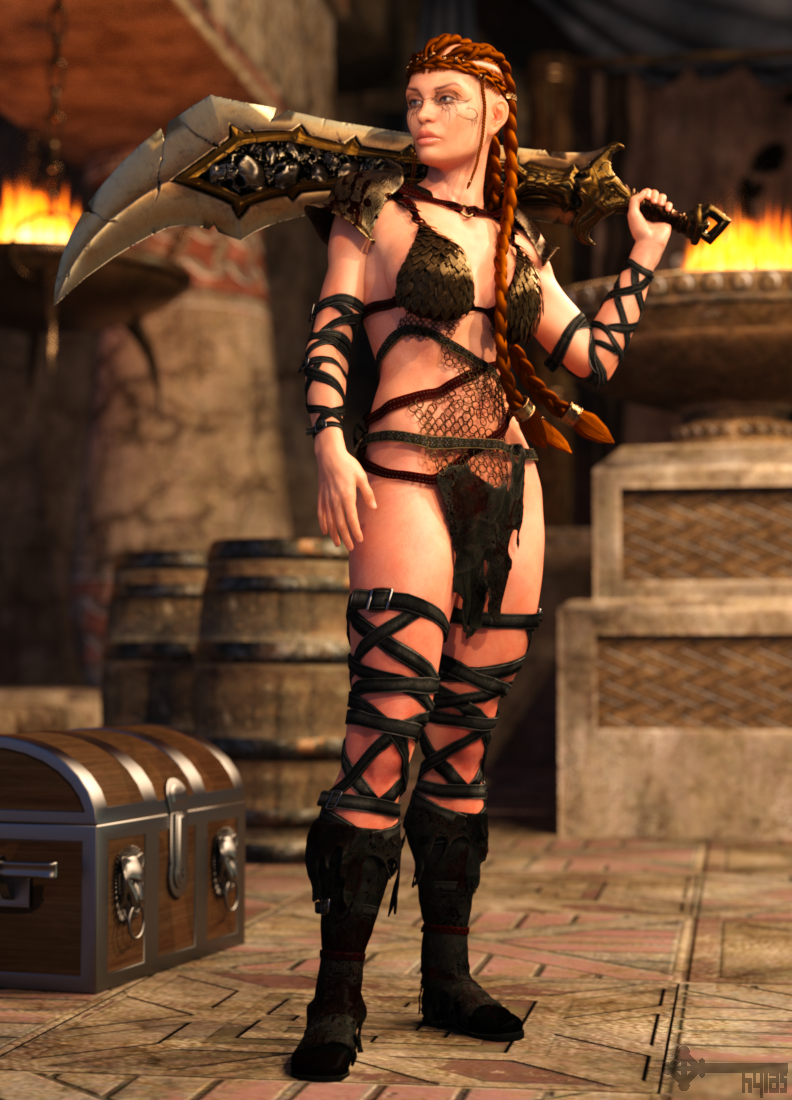
I'm very happy to have discovered 3DPoetry who has several amazing freebies over at Renderosity. I downloaded two V7 skins, one V4 skin, and an amazing braided hair piece. I tweaked the V7 skin settings extensively and the V4 skin of course needed converting to IRAY, but the maps are rock solid and that's what ultimately really matters. The above skin is Dragania for V7 and the RavenCrow hair piece.
Freebie Credits:
Skin by 3DPoetry: https://www.renderosity.com/rr/mod/freestuff/3dp-dragania-for-v7-g3/75877
Hair by 3DPoetry: https://www.renderosity.com/rr/mod/freestuff/ravencrow-character-and-hair-for-poser-victoria-4/76334
Morph by TastyMoonCheese: https://www.deviantart.com/succulentfruit13/art/Fitness-Model-Mia-Sand-Morph-For-Genesis-8-Female-830322600
Straps by Sedartonfokcaj: https://www.deviantart.com/sedartonfokcaj/art/Barbarian-Style-Straps-for-Genesis-432923796
Chest by Syntrifid: https://sharecg.com/v/12499/view/11/Poser/Posable-Treasure-Chest
Barrel by Summoner: https://fantasiesrealm.com/market/Designers/Summoner/Cellar-Exclusive?cPath=449&;
HDRI by Greg Zaal & HDRI Haven: https://hdrihaven.com/hdri/?c=indoor&h=mutianyuUsing Morphing Fantasy Dress with Genesis Males?Well the one for G1 should work with the male morph directly.
I've not tried fitting the MFD on males from newer figures, but tools like SY Ultra templates for males, which add projection templates for long tunics, could be useful to get the skirt to behave.
Using Morphing Fantasy Dress with Genesis Males?Some historical background. Victoria 3 & 4 both included a male morph, sometimes called Vincent. (I was told it was due to the months-long lag between Victoria & Michael base releases.) Some MFD texture sets were made that had robe designs intended for Vincent, such as Once Upon a Time: Camelot (https://www.daz3d.com/once-upon-a-time-camelot) & the now unavailable On the Dark Side (http://docs.daz3d.com/doku.php/public/read_me/index/1301/start#product_notes)
I have been wondering how much work it would be to get the MFDs to fit Genesis Males (any generation), since I like the looks of those MFD textures. I do have the V3/4 autofit clones plus MFD for Gen3/4 & G1/2/3/8.
Introducing the Daz to Maya Bridge & native Maya File FormatsHi everyone :)
I explained morph exporting problems and fixing tips on there : https://www.daz3d.com/forums/discussion/452246/daz-to-maya-bridge-morph-exporting-problem-reason-and-fix
Daz to Unreal Bridge [Materials - Plugin FIX - Morph Exporting - Smooth Meshes FIX]Hello everyone.
As you know, Bridge plugins are very cool for us. I am using maya - unreal and daz. But sometimes i got problems about morphs, plugins or textures and materials. Let we fix them. I am sharing my experiences.
Enable with Github (Follow those Steps)
1) Click this link and download this file. Extract it : https://github.com/David-Vodhanel/DazToRuntime/archive/master.zip2) Open extraxted folder and go to DazToRuntime-master\Unreal\UnrealPlugin and copy the DazToUnreal folder and paste here : C:\Program Files\Epic Games\UE_4.26\Engine\Plugins
3) Open your main project folder and and create a new folder. Rename it "Plugins" . Paste the same DazToUnreal folder here.
4) Open UE 4.26 and click Yes for " Do you want to rebuild ? " window.
UE - From Maya Smooth Mesh FIX
If you working with Daz > Maya > Unreal , your character will not have smooth mesh. For fixing that, Open IrayUberShader into Unreal Material Editor (Search it first) and Enable Tesellation > Choose PN Tesellation. All shapes will be smooth.
Why Daz To Unreal Bridge ? Is it really good ?
Daz studio using Iray render engine and materials. And daz characters ready to render always. UE5 Bridge plugin converting Iray materials to Unreal Engine shader system. Its a big function. Sending materials to Iray to Unreal Engine function and you see the result. This is very useful and necessary thing.
Yes. It is really good. Because its creating all texture maps and materials automatically for you.Daz to Maya => Maya to Unreal Engine ( With All materials and textures like Iray. Possible ? Yes :) )
This is a little bit hard thing. But i must do that. Because i am Maya animator and daz characters very good. What can we do ?
- I am using Daz To Maya bridge. After importing to maya, i am animating.. After i exported it as FBX. Thats okay. This was Maya side.
- Open daz again. Same character. But export it with Daz To Unreal Engine plugin. Dont select morphs or animations. Just Sketal Mesh. And export it a folder.You will see the .dtu file on there. (dtu => Daz To Unreal)
- Import that .dtu file into your Unreal Engine project. When it finished, import your FBX file from Maya ( Choose morph targets if you want.. )- Your Maya FBX file looking weird :) No materials correctly and eyes, textures and others... Don't worry. We will change those materials to .DTU file materials. Did you understood this ? Cool.
- Open your Maya fbx MESH file with Unreal Engine and find Face material. Change this material to Daz To Unreal converted material. Just searh face and you will see like " v7_face (Material Instance) "
- Do them for all materials. Be careful ! The new materials must be Material Instance . Not normal material.
Morph ProblemFor Daz to Maya with morphs, i explained fixing way Daz to Maya Bridge morph problem here : https://www.daz3d.com/forums/discussion/452246/daz-to-maya-bridge-morph-exporting-problem-reason-and-fix#latest
IMPORTANT NOTE : If you make manual blendshapes for unreal, don't forget to rename blendshape names like "Genesis8Male1 , Genesis8Male2 etc..." If you don't do that, maya makes automatic same name every manual morphs. So unreal accepting only one because they are all same name ;)Why is deleting a character so long?Here are some informations
Hardware is recent with 8 proc and 16G of RAM. System is win10.
Used memory by DS after loading a char 2.3G
No errors in the log file. When I launch DS, I have a bunch of warnings. Most concern daz connect (that I do not use). Some concern morphs or expression packages. When I delete the char, only the usual daz connect warnings.
Here is an example of the daz connect message
2020-11-22 01:14:38.235 WARNING: ..\..\..\..\..\src\sdksource\cloud\dzcloudtasknotifier.cpp(178): Got an unknown command from the persistent connection: HTTP/1.1 400 Bad Request
and of the morph loading warning
2020-11-22 01:08:20.843 WARNING: ..\..\..\..\..\src\sdksource\fileinput\dzassetdaz.cpp(6615): Could not find output property for formula: Genesis8Female:/data/DAZ%203D/Genesis%208/Female/Morphs/SickleYield2018/SY200/PBMSY200WristsThickness.dsf#PHMSY200WristsThickness?value in file : /data/DAZ%203D/Genesis%208/Female/Morphs/SickleYield2018/SY200/CTRLSY200Skinny.dsf
But as I said, this happens with a bare char without any morph dialed.
It also hapens with g8M, but g3 or older are OK. And of course, it concerns all g8F chars, not only the generic one.
Other item deletion (including primitives and even very large envs) is reasonnably fast (1-20s).
This really seems to be related to g8, and is probably caused by an asset. I really do not understand how there can be an interaction between an asset (even a morph package) and deletion problems for a generic char, but I will try to uninstall my assets.
A script to fit newer clothing to older Genesis and Legacy figures?FSMC Designs:
I have tried that(and as of this time, still trying)but the M4 figure I use is important to what I use him for, and he is the first morph I did and got hit with a massive dose of beginner's luck. He's perfect just as he is, face wise anyway. Unfortunately for me, after a couple of computer crashes and adding "The Freak" morphs to the figure, I have lost the original morph files for this figure and would like to change some body morphs, but the controls are gone from the figure, making it just about impossible to change him. I have tried the Legacy to newer figures stuff, and for some reason, I can't seem to get it to work. so kinda stuck. The only reason I still have him(and a few other morphs), is because I keep them on a flash drive in my purse.
pwiecek:
a lot of what Richard said is Greek to me, but I get the gist. I may look into Crossdresser 4, as I have spent soooo much money on all of this other stuff, so why not?I am determined to find a way, or find someone who knows more about what they are doing to fix this problem.
DAZ to C4D bridge for 4.14 ProThat's interesting, I'm running C4D R21 and when I use auto-import in the bridge plugin, there are no pose morph tags on the model.
Is this what you are experiencing?
Artists of G3 products please update them to G8 & 2 other suggestionsMost G3 items will work fine on G8, either with autofit or changing the scene identifier to the target figure ot G8 (see image). There are also converters for this from Riversoftart in the store
https://www.daz3d.com/riversoft-art
As for pokethru with fat/big models, that can usually be fixed with adding a smoothing modifier with collision set to the figure. Also dforce items should work fine if you change the morph during a tineline animation
Thank you Mike, bookamrked for future reference.
Artists of G3 products please update them to G8 & 2 other suggestionsMost G3 items will work fine on G8, either with autofit or changing the scene identifier to the target figure ot G8 (see image). There are also converters for this from Riversoftart in the store
https://www.daz3d.com/riversoft-art
As for pokethru with fat/big models, that can usually be fixed with adding a smoothing modifier with collision set to the figure. Also dforce items should work fine if you change the morph during a tineline animation
Thank you Mike, bookamrked for future reference.
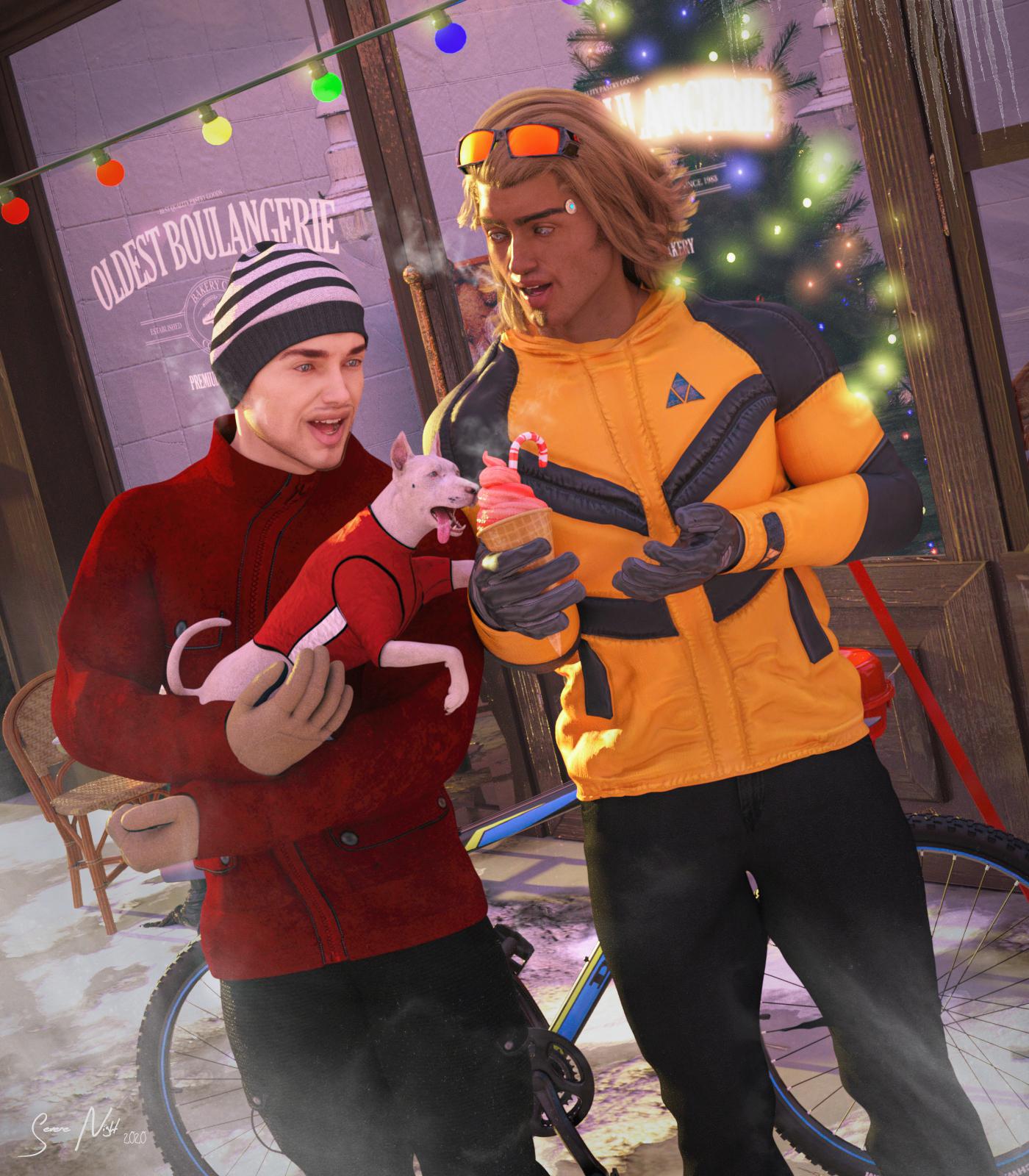
SereneNight's Sci-Fi Fun Thread 2Owen and Boyd take to the town with their Dog Bitty. Bitty of course has an agenda of her own. Refueling- And Boyds ice cream looks pretty good.
I wanted to have Bitty LICK the ice cream, however the dog or the morph for her tongue is just too attached to the lower half of her jaw, so it didn't extend enough to lick the cone well.
You may ask why a robot dog actually eats, but Bitty does consume glucose. The nannites which help her run her robotic body require it. Her preferred drink is flat soda. However, any other sugar source will do. Also, grandad has programmed her to behave like any other dog, so she has cravings.
 Knittingmommy's Laboratory
Nice smile ,I've found if I parent Face Control to the figures head before I begin morphing it's easier to get it in the right place after I morph ....
How many people are still using Genesis 2?this is Ripley.. her body is G8 with an invisible head, her head is G1 with an invisible body parented on to the G8 neck.
---
None of the large head morphs transfer via genX or riversofts stuff
---
So this is my temporary work around to use my old characters (actually about 20 cats) have been converted this way.
Gives me access to the new posing and outfits and let's me keep their heads together.
Yeah, that's a good option for those older heads that aren't really transferable, also a good option for stand-alone figures. I did that there with Blue 2.0's head on Genesis 8 Female:

I'm going to try that with Cookie one of these days. It would be cool to use the adorable Cookie with my G8F wardrobe.
Oh, now that's an interesting idea! I might have to borrow that idea myself. I love Cookie! I never thought about parenting heads from earlier figures like that. I'm definitely trying that in the near future. :)
Here's my attempt (G8F on the left, Cookie on the Right):
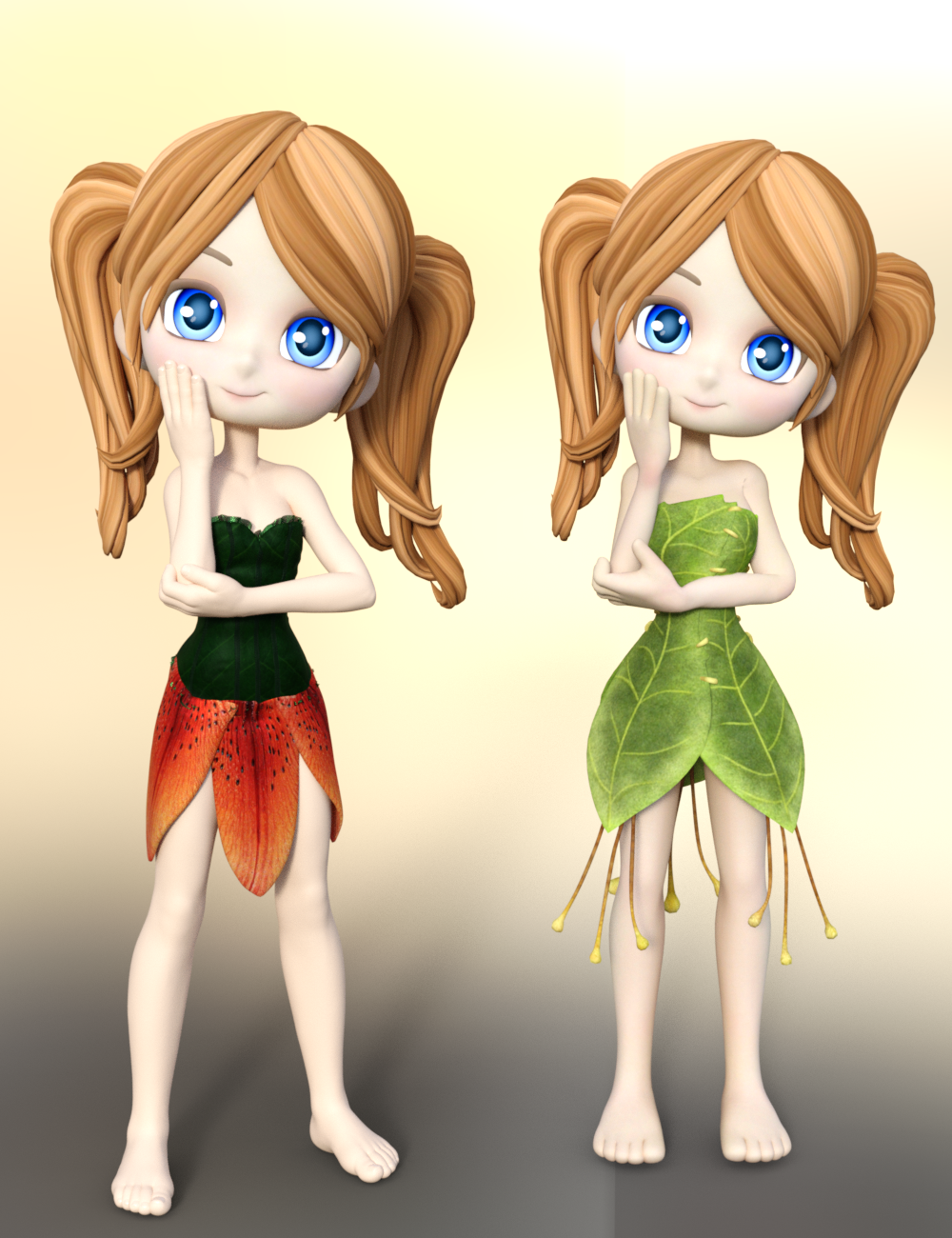
Cookie comes with just a head that you can load so that made it super easy to just parent that to G8F's head.
Here are the morphs I used if you're interested:
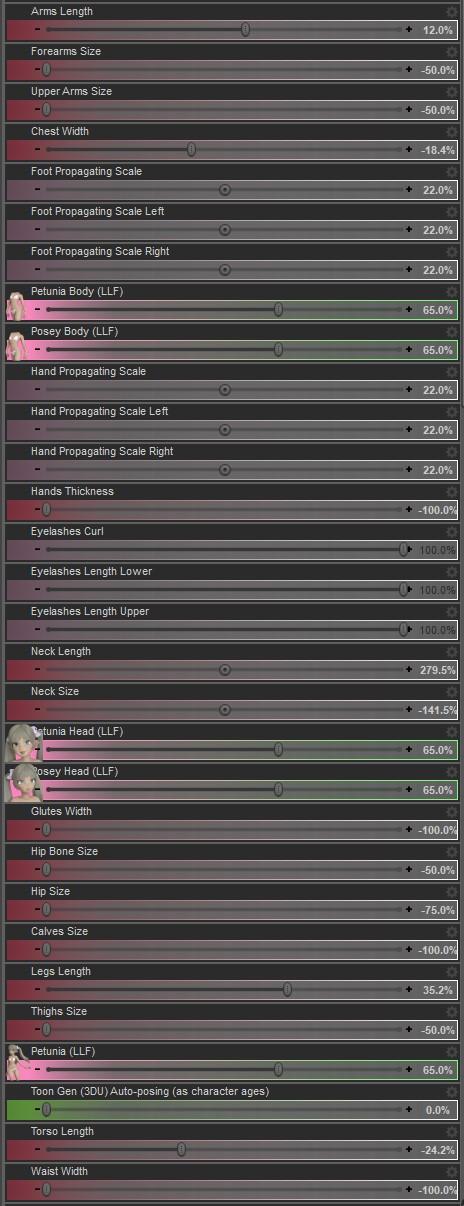
I also added a Push Modifier to G8F and a Diffuse Overlay to the base G8F's skin:
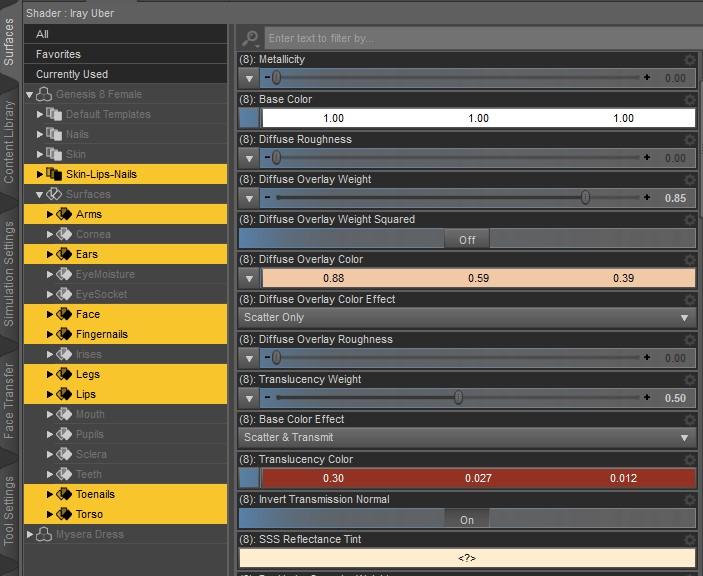

If you add a Push Modifier to the character you might need to add a push modifier to clothing too.
I think she came out pretty well! I can see me using "G8F Cookie" more since I have so much more clothing and poses for G8F.
Oh! Super nice! Those morphs will come in handy. Thanks. I like your Cookie on G8F. I'm definitely going to have to play with that. :)
Oh, now that's an interesting idea! I might have to borrow that idea myself. I love Cookie! I never thought about parenting heads from earlier figures like that. I'm definitely trying that in the near future. :)
Cookie heads on G8 good idea...
but a cookie body clone for genesis would be nice to allow all the cartoon wardrobe to work will all the poses and bodies availableYeah, that would be nice. I have a lot of Cookie clothes and I have plans to pick up more. Cookie will never get old. I wonder if Lady Littlefox has ever considered upgrading Cookie? She did with Star so I guess anything's possible. 'Twould be nice. :)
Daz 3D is part of

Connect
DAZ Productions, Inc.
7533 S Center View Ct #4664
West Jordan, UT 84084Licensing Agreement | Terms of Service | Privacy Policy | EULA
© 2026 Daz Productions Inc. All Rights Reserved.