-
Male Poke through
Just making the element invisible creates a divot in the clothing where the element used to be that hurts to look at. Ouch!
Best to just unfit the bodypart. Select the element and then "Fit To" and select "None", then make everything invisible using the command-click on the Eye in the menu. However, there's a bug that when you refit the element and have Jepe's Bodyhair Shell applied, your, ahem, element will be transparent. It's a bug, throw it on the pile. I just delete the element, and usually most of my figures are saved both ways. Well, it works.
To get the effect that should be there in clothing (pants and and possibly the shirt if your hero needs it), I use the "Fit Control" property to transfer the, ahem, proper attributes from the member to the clothing. It's very nice, and also allows you to remove unused morphs from your clothes to reduce, ahem, the file size. I wish you could delete morphs that aren't used from all items and save them, as it would really decrease load times and is clearly already implemented (but unused elsewhere).
Celebrity Look-a-Likes for 3D figures part 3Any resemblance?
What character is that?
Exactly. It's a morph for the figure. But it doesn't exist as a product yet.
Newbie questionWhich basic child figure, Kids 4 or earlier, or a genesis morph?
Daz to Maya Bridge [Morph Exporting Problem - Reason and FIX]I cannot overstate how grateful I am that you posted this workaround. I needed to bring over a morph which I forgot to bake in my blendshape and the Maya blendshape system, although it recognizes deltas, behaves differently ... I was able to bring over the morph with the bridge with your method! Awesome!For the next update of the bridge, a possibility to bring over favorited morphs would be totally awesome ...
Star Wars Renders 2013 +@draven_11_74c1296a16 Thank you! My only gripe with the flight suit was the legs/ankles - they would have been perfect with some morphs to tuck into boots, instead it needed an opacity map to cut off at the right length but it still works out very nicely. She's a custom dialled G8F with custom textures. IIRC it's a couple of base characters from maelwenn and various other morph packs.
Genesis 8 Basic Female Broken Morphs"Duplicate formulas" has nothing to do with a morph being activated or not, that is something that happens when the morphs/characters you have installed for the base figure (G8F) don't want to play together.
Clear your scene and clear the log, load "Genesis 8 Female Dev Load" into the empty scene, open the log and save it somewhere you can find it.
Attach the log to your post ("Attach a file" above the blue "Post Comment" button).Catoon Questionas for a g8 clone... you wouldn't get the hairy body....
but my whimsicats were created back in genesis and none of the large head morphs will transfer via genX or any scripts
so I finally ended up taking g8 bodies ... shrinking the heads and making them invisible and then taking my g1 character shrinking the body making in invisible and parenting it to the g8 neck.
works pretty well and I get the new bone structure etc.Artists of G3 products please update them to G8 & 2 other suggestionsMost G3 items will work fine on G8, either with autofit or changing the scene identifier to the target figure ot G8 (see image). There are also converters for this from Riversoftart in the store
https://www.daz3d.com/riversoft-art
As for pokethru with fat/big models, that can usually be fixed with adding a smoothing modifier with collision set to the figure. Also dforce items should work fine if you change the morph during a tineline animation
Do these programs work on shoes as well? I tried lots of trick with shoes (even changing scene identifier) but most of the time the shoes doe not fit at all.
Genesis 8 Basic Female Broken MorphsTo fix any ill-behaving morphs, do as follows;
1. Load your base figure or the developer version to an empty scene. ("Genesis 8 Basic Female" or "Genesis 8 Female Dev Load")
2. Select the figure
3. Select "Show Hidden properties" in the Parameters-Tab, drop down menu (right-click)
4. Zero the figure (Found in Parameters-Tab, drop down menu)
5. Memorize the figure (Found in Parameters-Tab, drop down menu)
6. File->Save As->Support Asset->Save Modified AssetsThis procedure will zero the default value in the ill-behaving morph/morphs, and while saving DS also shows you a list of the morphs it is changing.
Genesis 8 Female loads with my morphTo fix any ill-behaving morphs, do as follows;
1. Load your base figure or the developer version to an empty scene. ("Genesis 8 Basic Female" or "Genesis 8 Female Dev Load")
2. Select the figure
3. Select "Show Hidden properties" in the Parameters-Tab, drop down menu (right-click)
4. Zero the figure (Found in Parameters-Tab, drop down menu)
5. Memorize the figure (Found in Parameters-Tab, drop down menu)
6. File->Save As->Support Asset->Save Modified AssetsThis procedure will zero the default value in the ill-behaving morph/morphs, and while saving DS also shows you a list of the morphs it is changing.
Genesis 8 Female loads with my morphI did it again but I dont know how, as I thought I had it at zero when I saved my morph. I can't even fix it now. My genesis 8 female just loads with my morph. I fixed it once but I don't know what channel and value to zero out now.
Animate 2 Mastery bug. Please help!Animate 2 has a lot of bugs - when converting from keyframe to timeline figures will usually jump a small amount no matter what you do, its annyoing but its something to factor in to your workflow.
However - they will jump a lot if you have any figure scale thats not 100% (the greater above or below, the bigger the jump)
For scene position always make sure figure transitiopns and rotations are 0 on all axis - To convert movement and scene positions use the figure Hip only.
Animate 2 primarily modifies the keyframe positions of bones and morphs etc by storing their values, so if you modify an animation in Animate 2, you're adding values to the original keyframe values. The Animation is done by calculations instead of real world cordinates - so when you convert the keyrame values into animate2 it will add those values, effectivly multiplying them. This is why sometimes its easy to over morph figures or bones etc becasue the aniblocks have values in them that stack up.
Do you recognize this sword?I was unable to find it, but I'm going to tell you what I did in case you want to try some of these sources and not duplicate my efforts. I'm no sword expert but I do look for enough of them that I thought I might've seen it before, so I tried.
1) I searched my own collection. And yes, I know you couldn't duplicate that part if you wanted to :)
2) I searched for "sword" at renderosity. It didn't turn up in those results.
3) I searched for "sword" at 3dcu, which only returns 100 products maximum. It didn't turn up that way.
4) I searched for "sword" at forender.com. It didn't turn up there although they do have very similar styles.
5) I searched for "sword" at cgtrader, including both the "free" and default ("not free") searches. At 120 results per page, I checked all 8 pages of free results and the first ten (of at least 55) pages of not-free results, with the default sorting parameters. It didn't turn up there.
Keep in mind, that doesn't mean it's not on any of those sites; it might be available at any of them, just not in a way that would cause it to turn up in a search for that term.
Also keep in mind, it could be an "omni"-type prop from renderosity, which are designed to morph in a million ways. I kind of don't think so though because none of the cross-guards (between the handle and the blade) seemed to morph in a way so as to produce "yours."
Also keep in mind, it could be a prop generated in any other non-compatible software like 3DS Max, but converted to an .obj file and imported into DAZ Studio if that's the source of your image.
I hope someone else is able to ID it though. Best of luck!
Star Wars Renders 2013 +Concentrate.
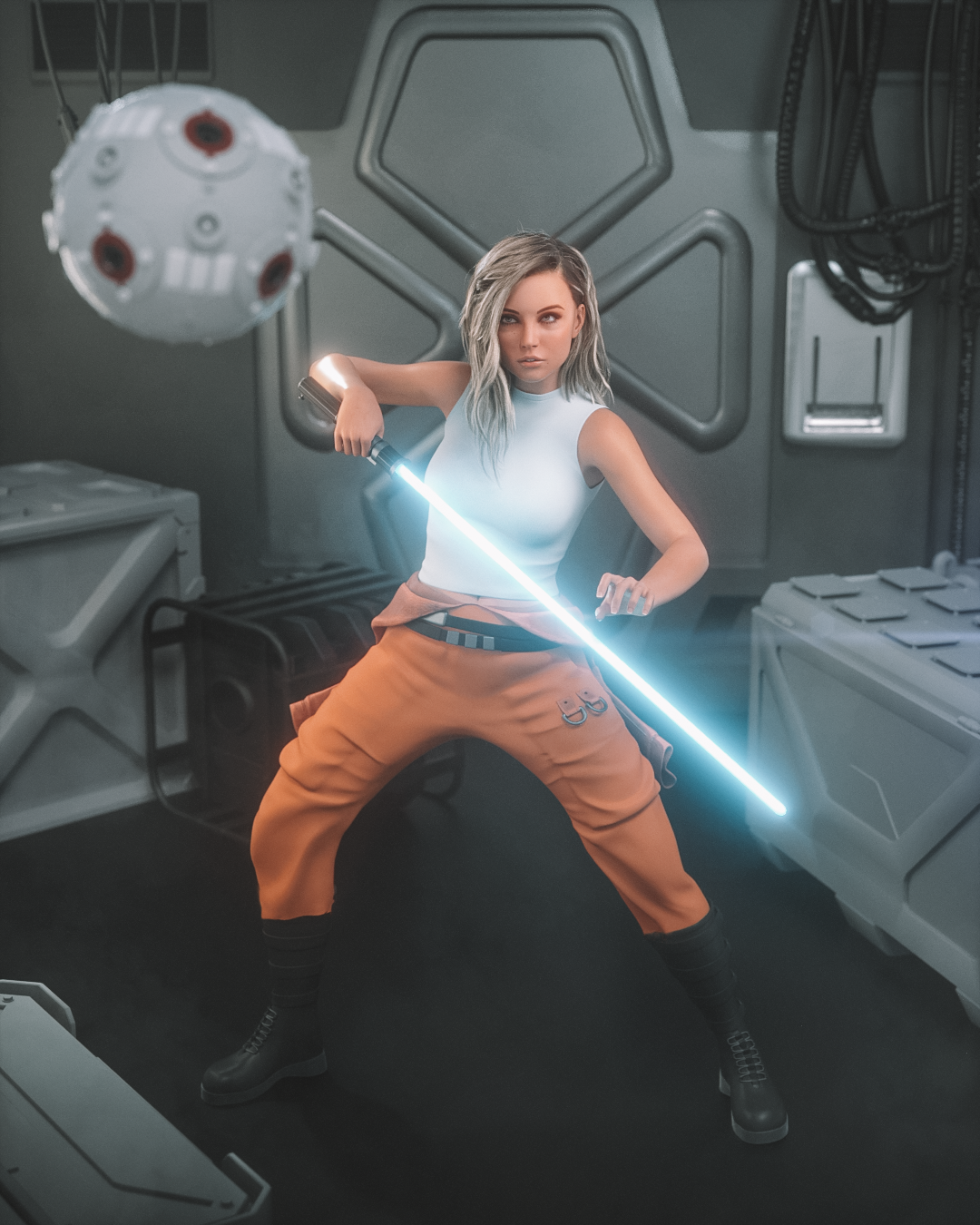
I thought the "flight suit" pants in the Augmentation Outfit made for a good rebel pilot uniform
Very nice, loving your renders - Also had the same thought with the Augmentation Outfit! Also what character is that I'm guessing G8F but is it a custom morph?
Anyone Have Battleworn Female Bot G3/8?1) The bodysuit does appear to be a permanent part of the texture.
2) The pumps don't come with it. You can't do that with textures or at least without an HD morph on G8, and neither is in the list of included things below.
3) Yes, eyes of any G3/G8 character can be used on any other except for Sakura 8 (because her big flat anime eyeballs are conformers).
Thanks so much! I think I will pick her up. She's not my usual model type but I do like her look. I don't have Sakura 8 (I'm mostly Team G3), so eyes won't be a problem. The bodysuit being permanent isn't a problem, either. Accessorize! Try other shaders!
Daz3d to Unreal Engine BridgeHi :)
I shared a topic about that here : https://www.daz3d.com/forums/discussion/452926/daz-to-unreal-bridge-plugin-showing-problem-morph-exporting-fix
Genesis 3 & 8 Face ControlsHowever, used completely in isolation it is operating at the base res so for things like smiles where in the real world we get all sorts of creases and crinkles its not going to capture that like an hd morph.
I will be releasing an add-on with corrective morhs + HD morphs. Here is a sample. Normal results on the left and on the right same pose but with corrective morphs.
Oh well it's mine when it comes out .......!!
Anyone Have Battleworn Female Bot G3/8?1) The bodysuit does appear to be a permanent part of the texture.
2) The pumps don't come with it. You can't do that with textures or at least without an HD morph on G8, and neither is in the list of included things below.
3) Yes, eyes of any G3/G8 character can be used on any other except for Sakura 8 (because her big flat anime eyeballs are conformers).
A script to fit newer clothing to older Genesis and Legacy figures?There is a way of using GenX to save custom morphs which involves exporting your character as an object, then using morph loader to create a character morph for Michael 4, then using GenX to transfer your character as a single morph to Genesis 1, 2, or 3. Here's the link to the pdf tutorial Fissan's guide to converting morphs from Gen4/Gen3 to Genesis.
n00b to published artist?So, I got into 3d modeling a couple of months ago so I could create fanfic type things, but I think now that I might want to create a few products to sell so I can buy more stuff from the Daz shop without risking my kid's college fund. I have years of experience in actual dressmaking, usually historically accurate garments or fantasy-type things, and I was thinking it might transfer kind of well to 3d clothing? Does this sound like A Plan That Could Work or am I getting ahead of myself? Is there even demand for historically accurate clothes?
Daz 3D is part of

Connect
DAZ Productions, Inc.
7533 S Center View Ct #4664
West Jordan, UT 84084Licensing Agreement | Terms of Service | Privacy Policy | EULA
© 2026 Daz Productions Inc. All Rights Reserved.