-
Ok, I've seen the meal, but please pass the Ketchup?
Also hoping to see Andrey Pestryakov's store in rhe sale; or did I miss it already?
His stuff has definitely been on sale at least once. Sometimes a PA isn't in the list of "featured artist catalogues" but all their stuff is in the "Even more" list for that day. For example, today Zev0 is not listed as a featured artist, but all his (non-new) stuff is on sale in the even more section.
Ok, I've seen the meal, but please pass the Ketchup?Also hoping to see Andrey Pestryakov's store in rhe sale; or did I miss it already?
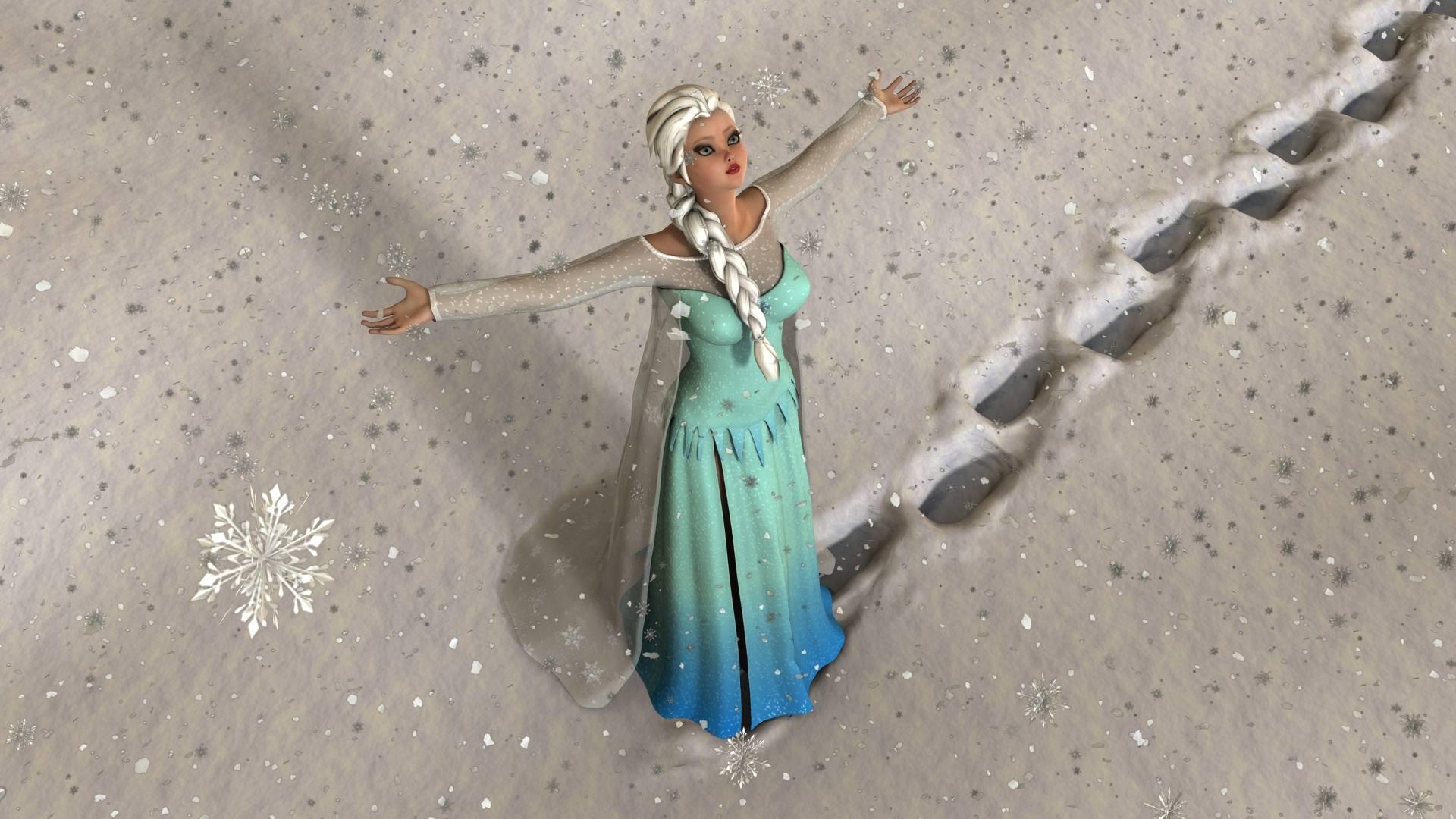
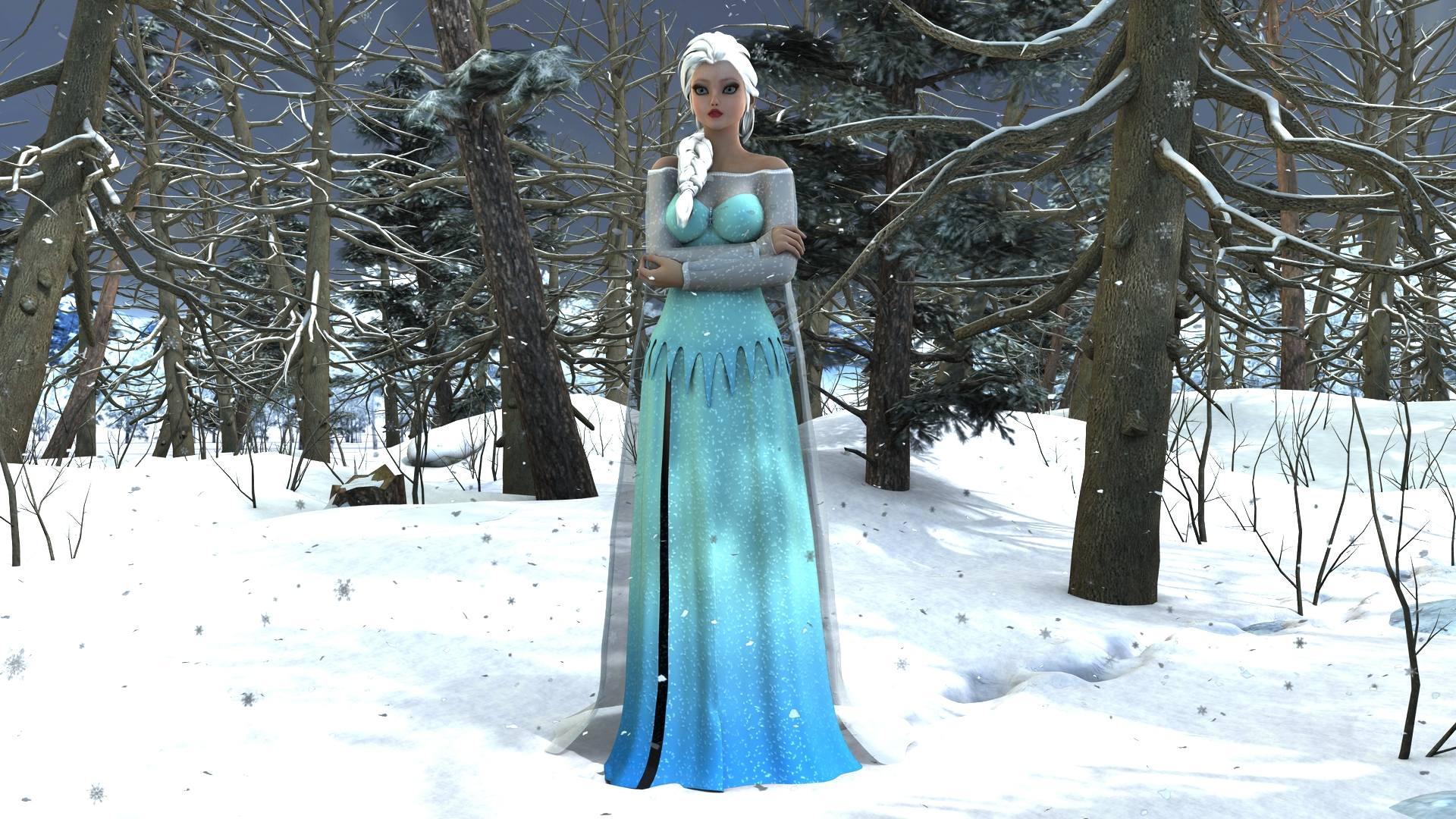
Show Us Your Iray Renders. Part IVI was playing round with different light shaders for Iray. and a couple of these test renders actually came out very well. so I thought i share them. it took about a hour & a half to render because of all the trees I used Andrey Pestryakov Forest winter and applied Uber Iray shaders to the complete set up of the forest and the snow flakes . So with nothing further to due. These are a couple of Iray renders of the character Elsa from the Disney movie Frozen. rendered in Daz Studio 4.8 full GPU rendered - No post work
 Art & Animations By Ivy Summers
I was playing round with different light shaders for Iray. and a couple of these test renders actually came out very well. so I thought i share them. it took about a hour & a half to render because of all the trees I used Andrey Pestryakov Forest winter and applied Uber Iray shaders to the complete set up of the forest. So with nothing further to due. These are a couple of Iray renders of the character Elsa from the Disney movie Frozen. rendered in Daz Studio 4.8 full GPU rendered - No post work
Rock In Forest,Village Road, The Lost Place- Updates?The purchased icon shows up for me on The Lost Place. It's the only one I checked. The names didn't sound familiar so I searched on this one. It's by Andrey Pestryakov so I figured all three are his therefore I have them. Then I remembered I did a pic with Village Road recently.
I really have no intention of rendering these in iRay and just received updates in DIM. If anyone has installed the updates already, are the iRay materials separate or do they replace the 3DL ones?
I'd be astonished if the 3DL materials were junked.
Cheers,
Alex.
Rock In Forest,Village Road, The Lost Place- Updates?The purchased icon shows up for me on The Lost Place. It's the only one I checked. The names didn't sound familiar so I searched on this one. It's by Andrey Pestryakov so I figured all three are his therefore I have them. Then I remembered I did a pic with Village Road recently.
I really have no intention of rendering these in iRay and just received updates in DIM. If anyone has installed the updates already, are the iRay materials separate or do they replace the 3DL ones?
D/S workspace and videocardsVideo card memory isn't an issue unless you have a Nvidia video card, and you've enable it when Iray rendering, where the scene of models and textures needs to be loaded into the video card's memory before Iray rendering. If the scene exceeds the video card's memory limit, Iray will run in CPU mode only, even if you have GPU checked in the Iray Render Settings, Advanced Tab.
What may be more helpful for you is to list your computer specs (cpu, system memory, hard drive capacities, OS and if 64/32 bit, video card model) and describe the issues you're having. There are many users here would would give you suggestions to upgrade your computer to improve those issues.
Edit: There are products here at DAZ that are resource intensive, even on a well equipped computer. I can have performance issues with Lost World, Ultimo Paradiso and scenes constructed of Forest products/scenes constructed of Tropical products by Andrey Pestryakov.
New hardware advice pleaseSickleYield said:MJC is right; but also bear in mind that changing your shader and light setup may add just as much speed.-Use Advanced Ambient lights instead of UberEnvironment. It's many times faster even if you stick with default spotlights and point lights; but if you need lots of spots and points, using Advanced ones is much faster than using default ones.
-On any transmapped or transparent or translucent object, ctrl+click the ubersurface base onto it, then scroll down and set occlusion to override and 128 samples. This makes 3Delight MUCH faster when it hits those transparencies. You can render entire Pestryakov forest sets in a reasonable time if you do this to all the trees and leaves.
Thank you so much for this advice (as well as making great content).
I am using an i5 4440 with 8 GB RAM and probably will go up to the i7-4790K and 16 GB RAM. Your reminder about dealing lighting will help me keep render times down.
I was going to also try to render layers and use a shadow plane if I lock down my camera.New hardware advice pleaseMJC is right; but also bear in mind that changing your shader and light setup may add just as much speed.
-Use Advanced Ambient lights instead of UberEnvironment. It's many times faster even if you stick with default spotlights and point lights; but if you need lots of spots and points, using Advanced ones is much faster than using default ones.
-On any transmapped or transparent or translucent object, ctrl+click the ubersurface base onto it, then scroll down and set occlusion to override and 128 samples. This makes 3Delight MUCH faster when it hits those transparencies. You can render entire Pestryakov forest sets in a reasonable time if you do this to all the trees and leaves.
Show Us Your Iray Renders. Part IIII made test, I have only GTX 760 2GB but I can render 192 untextured genesis with it
now if I use full textured 2 genesis I run in trouble thanks to maps
I render all my images with maps 1000 x1000 and for normal maps 2000x2000 as more important herebellow quick test with 24 genesis without textures, see the speed ? my clock is 1159 and 1152 cuda cores only
SickleYield said:Aha, delicious Romulan ale. :D Pretty. Nice lighting.MEC4D said:Only one card you own can handle around 32 millions of poly (without textures) the problem are texture maps , no matter jpg or bitmap Iray will take around 3 bytes per pixel and you are killing the memory very fast with the bigger resolution that is not needed , using color maps for bump maps in place of 8bits also take more memory and once the limit is reached Iray switch totally to CPU only , resulting in slow rendering . That why is important to have all materials converted to Iray, for faster calculation and reducing the size (resolution) of the maps as much as possible as compressing the jpg does not matter here as memory are taken by pixel and not size of the imageSickleYield said:Peter Fulford said:SickleYield said:The error I made was that I actually have two 980's, not 960's.Ah, OK. 4096 CUDA cores with 4GB working space. Very nice!
Given what some folks are fitting into 4GB in Octane I'm a bit puzzled by your description of your Iray limits.
Is 6GB going to be enough for Iray?
.
It just depends on what size scenes you want to do. I cannot reasonably use an entire Andrey Pestryakov set, ever. I can do most of Stonemason's (including big ones) in a couple of hours provided there's not an SSS cube being used for atmosphere or something else that adds significantly to time (20 minutes or less at 1000/x1300 promo size). I did not significantly use HD morphs before anyway because most have subtle effects except when seen in extreme closeup, and Iray is not slowed by hairs the way 3Delight is. It IS slowed by massive amounts of geometry or transmissive objects.
Octane is a lot faster than Iray, just as Iray is a lot faster than Luxrender - it is on my long-term "get" list along with Marvelous Designer.
So it really is just the textures? I'll have to look at the Pestryakov forest set and see what its jpgs look like.Show Us Your Iray Renders. Part IIIAha, delicious Romulan ale. :D Pretty. Nice lighting.
MEC4D said:Only one card you own can handle around 32 millions of poly (without textures) the problem are texture maps , no matter jpg or bitmap Iray will take around 3 bytes per pixel and you are killing the memory very fast with the bigger resolution that is not needed , using color maps for bump maps in place of 8bits also take more memory and once the limit is reached Iray switch totally to CPU only , resulting in slow rendering . That why is important to have all materials converted to Iray, for faster calculation and reducing the size (resolution) of the maps as much as possible as compressing the jpg does not matter here as memory are taken by pixel and not size of the imageSickleYield said:Peter Fulford said:SickleYield said:The error I made was that I actually have two 980's, not 960's.Ah, OK. 4096 CUDA cores with 4GB working space. Very nice!
Given what some folks are fitting into 4GB in Octane I'm a bit puzzled by your description of your Iray limits.
Is 6GB going to be enough for Iray?
.
It just depends on what size scenes you want to do. I cannot reasonably use an entire Andrey Pestryakov set, ever. I can do most of Stonemason's (including big ones) in a couple of hours provided there's not an SSS cube being used for atmosphere or something else that adds significantly to time (20 minutes or less at 1000/x1300 promo size). I did not significantly use HD morphs before anyway because most have subtle effects except when seen in extreme closeup, and Iray is not slowed by hairs the way 3Delight is. It IS slowed by massive amounts of geometry or transmissive objects.
Octane is a lot faster than Iray, just as Iray is a lot faster than Luxrender - it is on my long-term "get" list along with Marvelous Designer.
So it really is just the textures? I'll have to look at the Pestryakov forest set and see what its jpgs look like.Show Us Your Iray Renders. Part IIIOnly one card you own can handle around 32 millions of poly (without textures) the problem are texture maps , no matter jpg or bitmap Iray will take around 3 bytes per pixel and you are killing the memory very fast with the bigger resolution that is not needed , using color maps for bump maps in place of 8bits also take more memory and once the limit is reached Iray switch totally to CPU only , resulting in slow rendering . That why is important to have all materials converted to Iray, for faster calculation and reducing the size (resolution) of the maps as much as possible as compressing the jpg does not matter here as memory are taken by pixel and not size of the image
SickleYield said:Peter Fulford said:SickleYield said:The error I made was that I actually have two 980's, not 960's.Ah, OK. 4096 CUDA cores with 4GB working space. Very nice!
Given what some folks are fitting into 4GB in Octane I'm a bit puzzled by your description of your Iray limits.
Is 6GB going to be enough for Iray?
.
It just depends on what size scenes you want to do. I cannot reasonably use an entire Andrey Pestryakov set, ever. I can do most of Stonemason's (including big ones) in a couple of hours provided there's not an SSS cube being used for atmosphere or something else that adds significantly to time (20 minutes or less at 1000/x1300 promo size). I did not significantly use HD morphs before anyway because most have subtle effects except when seen in extreme closeup, and Iray is not slowed by hairs the way 3Delight is. It IS slowed by massive amounts of geometry or transmissive objects.
Octane is a lot faster than Iray, just as Iray is a lot faster than Luxrender - it is on my long-term "get" list along with Marvelous Designer.
Show Us Your Iray Renders. Part IIIPeter Fulford said:SickleYield said:The error I made was that I actually have two 980's, not 960's.Ah, OK. 4096 CUDA cores with 4GB working space. Very nice!
Given what some folks are fitting into 4GB in Octane I'm a bit puzzled by your description of your Iray limits.
Is 6GB going to be enough for Iray?
.
It just depends on what size scenes you want to do. I cannot reasonably use an entire Andrey Pestryakov set, ever. I can do most of Stonemason's (including big ones) in a couple of hours provided there's not an SSS cube being used for atmosphere or something else that adds significantly to time (20 minutes or less at 1000/x1300 promo size). I did not significantly use HD morphs before anyway because most have subtle effects except when seen in extreme closeup, and Iray is not slowed by hairs the way 3Delight is. It IS slowed by massive amounts of geometry or transmissive objects.
Octane is a lot faster than Iray, just as Iray is a lot faster than Luxrender - it is on my long-term "get" list along with Marvelous Designer.
Has Anyone Used the Exporter for Vue 2015 Yet?Fauvist said:argel1200 said:That's just the Vue 2015 version of the Exporter module that has been around for a long time now.I didn't know that. What happens to the "solid growth" trees when you export them?
Thanks!
There is nothing different compared to previous versions. Solid growth plants export as .obj (and some other formats) with poor topology and high polycount. Some are ok, most require substantial work in a modeler to look good. The excellent procedural materials get exported as crappy bit maps (plus lots of issues with transparency in most cases). I would recommend to import Poser/DS content to Vue, not the other way round. Vue plants (SolidGrowth and also TPF) are procedural and that is really their strengths. Once you take them out of Vue, you loose that advantage and you are better off with plants that are modeled for use in DS and Poser, like some of the excellent onces available here, for example Andrey Pestryakov's store: http://www.daz3d.com/andrey-pestryakov
Ciao
TDAnybody use(ing) this Daz PA product: "Forest." ?Hey folks.
I tried "Swamp" and "Forest Lake" by Andrey Pestryakov, they are very beautiful, however they are not going to work right now for my renders, too resource heavy. What Im looking for is something to make forests but must have a ground prop . So I'm wondering if anyone is using this item:
Thanks
NEW! Novica & Invited Guest Contributors Tips & Product Reviews Pt 6Invited Guest Contributor
Well, I picked up the Foxes bundle (and a GC) and here's a pair of quick-ish renders of both foxes in their LAMH fur.
First is the Red Fox by Alessandro AM. He's in one of the scenes from HDR ProSets Yosemite Pack Two by DAZ3D/DimensionTheory, standing on a felled tree from Nature - Trees Pack 1 by Andrey Pestryakov retextured (to fit in better with the background and proximity to the camera) using a Shades of Life - Nature projection shaders by DimensionTheory. No extra lighting (just what comes with the Yosemite scene).
Second is the Arctic Fox by Alessandro AM, running though the snow in Easy Environments: Snowy Mountains by Flipmode. (I have all of the Easy Environment sets so far and I liked the look of this addition to the EE canon when Flipmode first posted some images in the Products forum.) The footsteps in the snow are created by one of several morphs in the snowdrift prop. Lighting the Arctic Fox is a bit trickier than the Red one - the fur can quite easily come out too bright white - and I think I still need to work some more on the lighting. Alessandro recommends using UberEnvironment plus a distant or spotlight but I'm not sure I've got the balance and brightnesses right. Anyway I thought it was worth adding here as a "first look".
Flash Sale alertsFour hours only, 60% off
Andrey Pestyakov:
http://www.daz3d.com/andrey-pestryakovAlessandro_am
http://www.daz3d.com/alessandro_amShow Us Your Bryce Renders! Part 9Thank you everyone. The grass is from the Grass Pack from DAZ Studio, possibly Andrey Pestryakov or Predatron, I'm not really sure which :red:
I want to build an islandI'm looking to build a small island with a sandy beach for my Daz3D characters to run around on. I have loads of products which should be useful in this endeavour, but I'm struggling to pull them together.
I have Sea Scapes , which has a really useful sea plane and sky dome, but I think the island itself is too unrealistic. I have Rock Model Pack to dress the coast up with some rocks, and plenty of grasses and plants courtesy of Andrey Pestryakov, Predatron and others. I have Seaside Shore Shaders and numerous others to get the surfaces looking right too.
Probably most important, I have Bryce 7, though I've not used it very much.
What I want to do is make an object or objects that I can (probably) put in the Sea Scapes sea to make my sandy/rocky island. I'm shooting for something like the beach/rock/grass combination of some of these islands:
..but more at the scale of this island (or even smaller):
All the islands I've seen produced in Bryce, including the selection for sale in the store are of the big mountain poking straight up out of the sea variety. But what's the point of having your own private island if it hasn't got a beach?
Suggestion: A burned tree setI have the nature - broken tree pack 1 by Andrey Pestryakov and it is great but it would be cool to have also a burned tree pack for scenes after a fire in the woods or for post apocalyptic renders :)
Daz 3D is part of

Connect
DAZ Productions, Inc.
7533 S Center View Ct #4664
West Jordan, UT 84084Licensing Agreement | Terms of Service | Privacy Policy | EULA
© 2026 Daz Productions Inc. All Rights Reserved.