-
Creative Opportunity ($$) for Artists
info_b3470fa520 said:
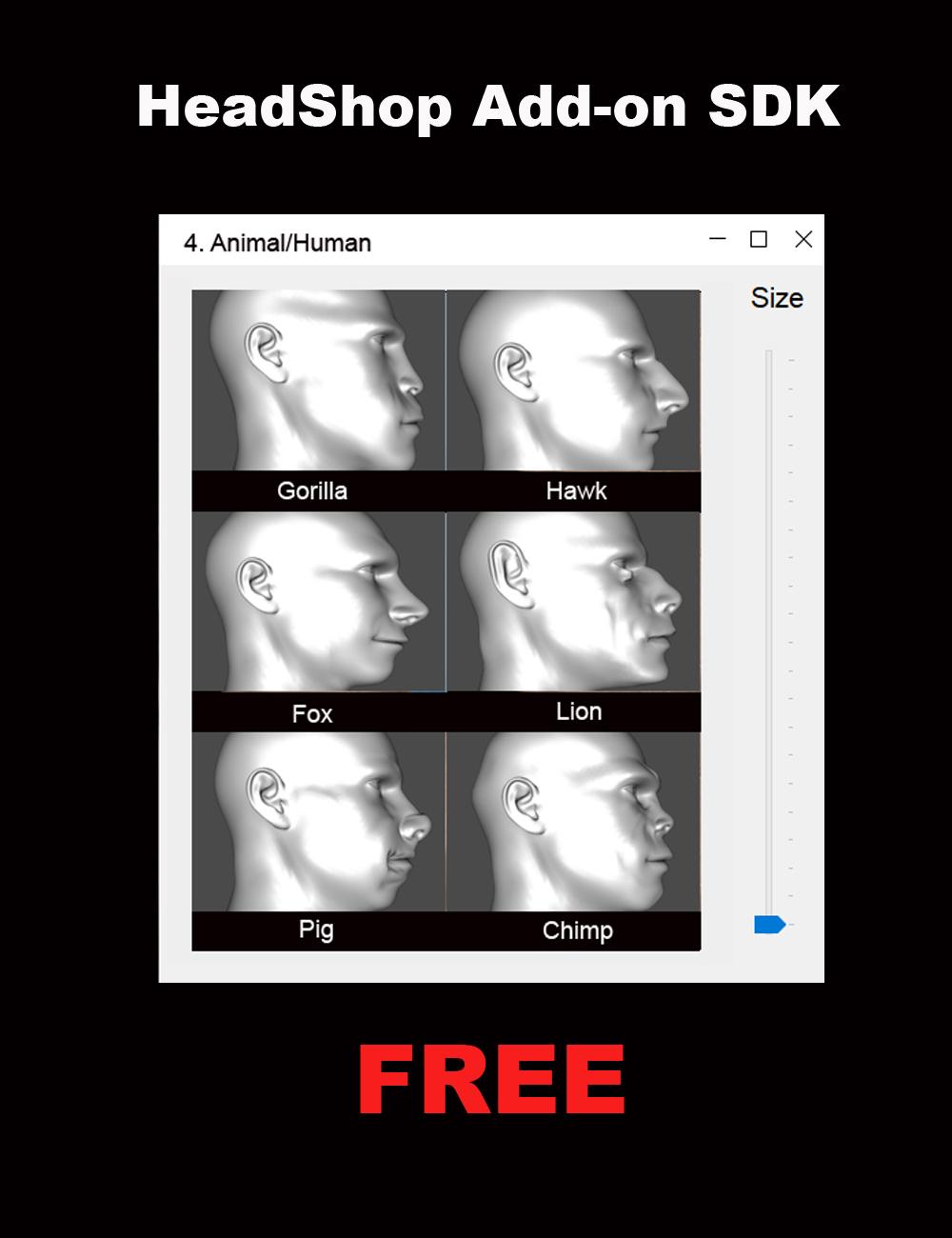
We had made some significant changes to the HeadShop product line (HeadShop 14 and OneClick). The new architecture now allows third party artists to easily create/add new morph libraries to HeadShop via the "AutoSculpt" tab. The architecture supports Genesis 8 and 8.1 Base Male and Female figures.
Do you have Daz' permission to include the OBJ files?
These libraries of six items can range from very simple "dial-spinning" to elaborate Blender or Hexagon sculpting all based on the supplied base Gen 8 and 8.1 OBJ files supplied with the HeadShop SDK. No coding is required and in fact you need to use no other software than DAZ Studio.
You can create HeadShop Add-ons for your own amusement or as a commercial product to be sold through DAZ, and make some easy profit from your effort. Abalone, the creators of HeadShop are fully supporting your efforts! Please don't hesitate to email us at [email protected] or skype at lasloves.
(HeadShop Add-on SDK - PrintAhead)
Good Luck and looking forward to your fun projects.
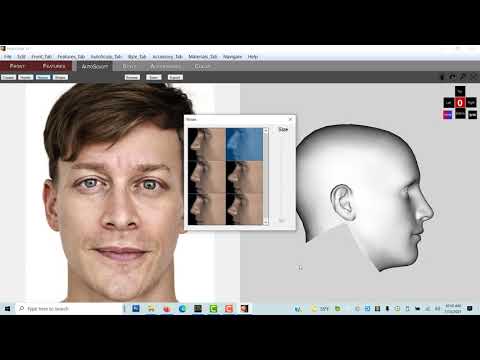
We hope you will also see a complete "how-to" on generating Add-ons at https://youtu.be/JajgHwrSSlE
Laslo Vespremi, CEO, Abalone LLC - A California Company (PrintAhead - 3D Printed Heads, Statues, Busts & More!)
 Making Skins tutorial, Part 1, Part 2 - painting skins
Part Two is now in the final proof-reading basket :-) whew! I think I covered too many topics in it but anyways it's done. Making some skin starters using Textura and by using HeadShop 14. I go over the situation concerning what is happening with the textures being created by HeadShop 14. This is not a discussion about which program morphs better than another. This tutorial is about making textures.
I do include a little tip I came across in how to remove an unwanted section of a morph from a morph.
For fun there is also a section showing how photo images can be used to apply details {such as clothing, "etc."} to figures. Use of an image editor that works with layers is pretty much mandatory for any amount of texturing work. Textura can be linked to programs such as PhotoShop and PaintShopPro, and maybe some others. I suggest only sending over one mapped area at a time because the first time I tried using this feature I had set the entire lot over. It went over to PSP no problems. It was the coming back part, I don't know if I had tried to switch between programs too soon or if it was all just too much, but yes, yours truly crashed the programs!
And then a very small bonus section about shopping :-) I like shopping. I think that should be declared an Olympic sport or something. How much can you spend and how fast an in one store you know ;-) No returning stuff though, gotta play fair ;-)
It's been a long hot stressful week, I hope everybody has a nice peaceful weekend, Part Two is expected to be released sometime this weekend.
 Creative Opportunity ($$) for Artists
We had made some significant changes to the HeadShop product line (HeadShop 14 and OneClick). The new architecture now allows third party artists to easily create/add new morph libraries to HeadShop via the "AutoSculpt" tab. The architecture supports Genesis 8 and 8.1 Base Male and Female figures. These libraries of six items can range from very simple "dial-spinning" to elaborate Blender or Hexagon sculpting all based on the supplied base Gen 8 and 8.1 OBJ files supplied with the HeadShop SDK. No coding is required and in fact you need to use no other software than DAZ Studio.
You can create HeadShop Add-ons for your own amusement or as a commercial product to be sold through DAZ, and make some easy profit from your effort. Abalone, the creators of HeadShop are fully supporting your efforts! Please don't hesitate to email us at [email protected] or skype at lasloves.
(HeadShop Add-on SDK - PrintAhead)
Good Luck and looking forward to your fun projects.
We hope you will also see a complete "how-to" on generating Add-ons at https://youtu.be/JajgHwrSSlE
Laslo Vespremi, CEO, Abalone LLC - A California Company (PrintAhead - 3D Printed Heads, Statues, Busts & More!)
Links edited by mod
Celebrity Look-a-Likes for 3D figures part 3khryss666 said:
ive been lookkng for a mena suvari (around the day of the dead 2008 time) .. .and a bruce campbell (round army of darkness 1992 time) ... have tried sveral times to "sculpt" my own .. but always just look off
ive tried to use facetransfer and headshop and 1 other and they didnt do to well either ... and i tried to tweek from their outputs still bad outcomes ...
any help would be amazing
thanks
If you start out with Tristan 8, you could easily work your way to Bruce Campbell. Just requires some darkening of the eyebrows, thicker eyelashes and keep nudging all your morph options until you get that distinct top of his nose/brow/tighteyes right, that scowl. Once you have that down, it's just tweaking for details. Pose him with either his signature car salesman smile (high mouth corners, teeth lower) or his closed mouth default (mouth in a single line, high bottom lip pushed over top teeth).
Celebrity Look-a-Likes for 3D figures part 3ive been lookkng for a mena suvari (around the day of the dead 2008 time) .. .and a bruce campbell (round army of darkness 1992 time) ... have tried sveral times to "sculpt" my own .. but always just look off
ive tried to use facetransfer and headshop and 1 other and they didnt do to well either ... and i tried to tweek from their outputs still bad outcomes ...
any help would be amazing
thanks
Free Tip re HeadShop 14's Add-onI installed the update for HS14. Has the ability for us to add our own morphs to the plugin :-)
They may think this is easy to use, few minor details we're not born knowing about, so I don't think so. A few hours later finally got something showing.
So, in the fond hopes that this info saves somebody some hair:
One can drag the head duf from the Desktop into D/S. As it loads, one realizes one has the figure at base resolution with almost all parts hidden.
So one sees a head. One morphs the head. Then one exports the .obj file.
Filling in a little gap, try selecting the Head to export, use the default D/S export settings, keep the names short, no spaces.
Ignore the .mtl files.
That json file ... can be opened in Notetab Light. The name of the folder and display has to be SHORT or it will not display.
One cannot edit files that are in the Program Folder.
Make many copies of that json example file, you may need them.
Maybe tomorrow one will work, but today, no. No way one was going to show for use. So finally I copied the information 6 times so it has its 0-5 places filled. I was testing only with one morph ;-)
At the end of each group is a comma EXCEPT at the last one, no comma.
Even though there is no counterpart .obj one still has to log a reference to it. If there is a counterpart made [using the other figure to make of it of course] it should have the same name with the F at the end of the Female's obj name. {going by the other files}
If ANY "mistake" is made in this additional folder one is putting into the Morphing drawer, HS wil NOT work.
Now before anybody gets too excited about making morphs to put into this plugin, remember where the Program Folders are located ;-)
Now I'm going to mention something 'cause the concept is that we can make these additional add-ons for ourselves as well as to share for others to use in their HeadShops. These folders have .obj files in them. So dear PAs and anybody else, please verify with the company whether this is okay with them or not.
Certainly what one can do safely is make the add-ons for themselves, then when the morph is in D/S, remake the morph properly {like we normally do - putting it on a slider}. And for these types there is all kinds of storage space as many of us have invested {a small fortune} in external hard drives, yes.
If anybody feels any info here has saved them hours of hair pulling and they can now run off and make a fortune, feel free to say tah ;-) {don't worry, nobody takes me seriously}
https://www.daz3d.com/gift-card
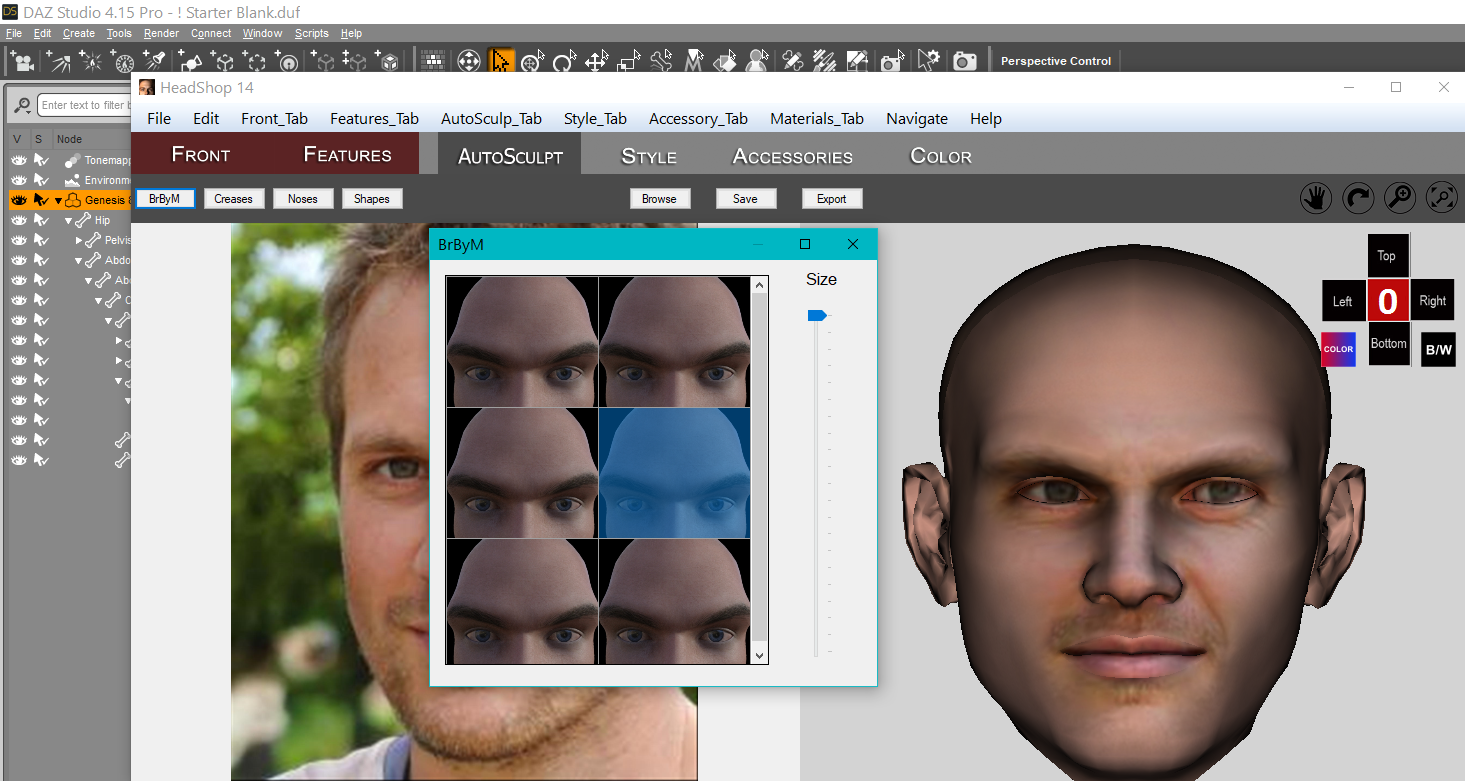 PA Opportunity! Easily Produce HeadShop Add-ons! (Commercial)
We had made some significant changes to the HeadShop product line (HeadShop 14 and OneClick). The new architecture now allows third party PAs to easily create/add new morph libraries to HeadShop via the "AutoSculpt" tab. The architecture supports Genesis 8 and 8.1 Base Male and Female figures. These libraries of six items can range from very simple "dial-spinning" to elaborate Blender or Hexagon sculpting all based on the supplied base Gen 8 and 8.1 OBJ files supplied with the HeadShop SDK. No coding is required and in fact you need to use no other software than DAZ Studio.
you can create HeadShop Add-ons for your own amusement or as a commercial product to be sold through DAZ, and make some easy profit from your effort. Abalone, the creators of HeadShop are fully supporting your efforts! Please don't hesitate to email us at [email protected] or skype at lasloves.
(HeadShop Add-on SDK - PrintAhead)
Good Luck and looking forward to your fun projects.
We hope you will also see a complete "how-to" on generating Add-ons at
Laslo Vespremi, CEO, Abalone LLC - A California Company (PrintAhead - 3D Printed Heads, Statues, Busts & More!)
HeadShop vs Face TransferFSMCDesigns said:
Artini said:
I prefer Face Transfer - https://www.daz3d.com/face-transfer-unlimited
because it has an Interactive License, which I have bought, as well,
so I can use the results of Face Transfer in other programs (Unity, Unreal,...) if I wish.
I have also purchased https://www.daz3d.com/face-transfer-shapes-for-genesis-8
with its Interactive License, to further refine results from Face Transfer.
Interesting that you also purchased the interactive licenses. I have seen a ton of G2 celebrity "mods" in several games and on patreon using facegen, face transfer and even headshop and always wondered about the legality.
Ok, noted.
HeadShop vs Face Transfersectorzeromedia said:
Which gives better results? Which is easier to use? If you knew before you bought what you know now which one would you get? Or... both?
Actually I have all 3 {FaceGen}.
Face Transfer when used as intended, to make a transfer of a face image to the figure with something of a front view morph, works fast. Mats, esp. for the eyes, needs to be adjusted but that's not hard. Pick any eye mat from one of the myriad of characters we have and presto. For side views you seriously will want to invest in the Face Transfer Shapes as well. And I've been receiving feedback that the morphs I made to raise/lower eyes are also an essential to have if using certain angles of photos with Face Transfer.
HeadShop makes a full head morph smartly from one photo. Both front and side views. It includes some additional shaping morphs such as for noses.
FaceGen makes full head morphs too ... and includes an option to keep the eyes round.
For all of them, the best results happen if/when using proper photos - avoiding smiles with teeth showing, hair on the face, glasses, etc. A quick trip to an image editor can make a big difference in the final results.
Face Transfer you already have in Daz Studio ... can try it out and keep 3 free saves.
Daz3D.com provides a 30 day guarantee period so you can purchase and try out HeadShop and/or FaceGen and make a decision that you are happy with.
HeadShop vs Face TransferDepends what you're doing with the work.
Face Transfer Shapes on its own is not a merchant resource.
Face Transfer can be used as a merchant resource IF one replaces ALL the textures, etc. used. for making morphs. [meaning you can do what you want to with the morphs]
If putting mesh into games, one needs the interactive license for all the figures and morphs and textures and etc. involved.
Facegen is also sold offsite and is not subject to the same conditions as Daz3D provides. FaceGen and HeadShop can be used to make characters for free and sale. [that does not include redistributing the figures themselves of course]
Disclaimer: I'm not a lawyer, over the years I've asked a lot of questions and these were the answers.
HeadShop vs Face TransferArtini said:
I prefer Face Transfer - https://www.daz3d.com/face-transfer-unlimited
because it has an Interactive License, which I have bought, as well,
so I can use the results of Face Transfer in other programs (Unity, Unreal,...) if I wish.
I have also purchased https://www.daz3d.com/face-transfer-shapes-for-genesis-8
with its Interactive License, to further refine results from Face Transfer.
Interesting that you also purchased the interactive licenses. I have seen a ton of G2 celebrity "mods" in several games and on patreon using facegen, face transfer and even headshop and always wondered about the legality.
HeadShop vs Face TransferI am still waiting for the renders of the HeadShop 14 created faces from the side and without a hair.
https://www.daz3d.com/headshop-14-with-autosculpt-win
Most of the previous versions of HeadShop had problems with the seams under the chin
and was easily spotted, while looking at the head from its profile.
HeadShop vs Face TransferWhich gives better results? Which is easier to use? If you knew before you bought what you know now which one would you get? Or... both?HeadShop 14 WIN with Gen 8.1 Support Submitted to DAZ (Commercial)It is released: https://www.daz3d.com/headshop-14-super-upgrade-win
and https://www.daz3d.com/headshop-14-with-autosculpt-win
What does it mean super upgrade?
I will eventually purchase the upgrade,
because I support this line of products from version 9, 10.2, OneClick, 11, 12, 13
and all FaceShops: 3.7, 4, 5, 6ez, 7.02 ez and 8, Dresshop 2.0, Hairshop 1.0
You have released a lot of different versions and I have spent a lot of money on them.
Could you please post some render from the side and without the hair. Thanks.
Creating a Genesis 8 character from a custom mesh?arstropica said:
Richard Haseltine said:
I'm sure Blender must have some kind of projection/shrink wrap type function. Hexxagon will snap to a background object, I think, though not sure if it works with a push/shrink type of tool.
Based on my research, Blender's shrinkwrap uses a combination of vertex positioning and groups to deform meshes. As a tool, it is more of a broadsword than a scalpel for doing any type of detailed retopology work. I've checked out HeadShop, Facegen and Daz's Face Transfer plugin and none of them really deliver good results. My initial goal was to take a 2D information from a photograph of a face and project it onto a Daz figure as accurately as possible. I had to come up with my own modeling workflow which uses 3 different types of software to import photogrammetric objects into Daz.
1. Face Alignment (free / open source)
URL: https://github.com/1adrianb/face-alignment
Requirements: Linux (apparently mac and windows too), Miniconda (https://docs.conda.io/en/latest/miniconda.html), Python 3.7
Installation: Clone my repository fork (https://github.com/arstropica/face-alignment/tree/demo) and follow the Github instructions.
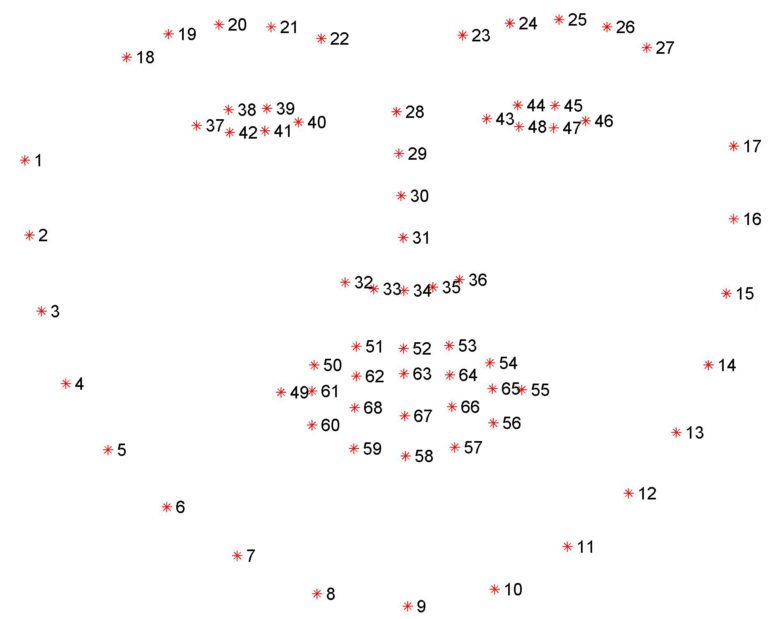
This python script is part of a 2-step process that generates an accurate 3D facial model from almost any photograph of a human in which the facial features are visible. The purpose of the script is to identify and localize facial landmarks on a 2D photo that can be used to build a 3D model later on. In it's original form, the script will generate 69 facial landmarks using DLib, a Computer Vision library. But we really only need 5 of these landmarks (2 eyes, 1 nose, and 2 lips corners).
I had to write my own implementation of the script to extract the 5 landmarks for the next step. (https://github.com/arstropica/face-alignment/blob/demo/scripts/batch.py).
Run python scripts/batch.py <image directory> to generate the landmark text files.
2. Microsoft Deep 3D Face Reconstruction (free / open source)
URL: https://github.com/microsoft/Deep3DFaceReconstruction
Requirements: Linux, Github Large File Storage (https://git-lfs.github.com/), Miniconda (https://docs.conda.io/en/latest/miniconda.html), Python 3.7, g++ & gcc Linux libraries
Installation: You can either clone the original repository, setup an anaconda environment and then download the dependencies separately or use my branch (https://github.com/arstropica/Deep3DFaceReconstruction/tree/demo) which contains the anaconda environment file as well as the dependencies and follow the Github instructions. If you do use my branch, you'll also need to install and initialize Github's LFS extension (https://git-lfs.github.com/) in the cloned repository in order to be able to download the 100M+ model files.
The Deep 3D package uses AI to reconstruct a 3D facial model from an image. The python script accepts the 5 landmarks from the previous step (similar to Facegen) and uses a trained AI model to render a textured 3D mesh of the facial characteristics of the subject in a photograph.
Copy your text and image files from the image directory in the face-alignment repo, to an "input" directory in Deep3D and run the demo.py script to generate the mesh(es).

3. Softwrap for Blender (paid plugin)
URL: https://blendermarket.com/products/softwrap
Requirements: Blender v2.8+, Meshlab
Installation: install from the settings/add-ons panel like any Blender plugin.
This is finally where the magic happens!
Softwrap is a Blender plugin that uses a cloth-like physics engine (not unlike dForce) to deform one mesh using another. It does it without changing the vertex order of the source mesh so it's perfect for Daz. There are a ton of settings from symmetrical deformations to mesh filtering, smoothing, elasticity, etc. A better way to look at the plugin is that it treats your source mesh as a cloth that wraps around a hard 3D object. Using the plugin to get a Genesis model to conform to a 3D mesh requires a few preliminary steps.
First take your 3D face mesh from Deep 3D and use an application like MeshLab to convert it to a DAE model. You need to do this if you want to import the face model into Daz Studio as it doesn't handle OBJ vertex colors well.
Then, in Blender, unwrap the model's UV map and bake the DAE model's vertex colors to a bitmap texture. (Here is a good tutorial if you don't know how: https://www.youtube.com/watch?v=7cphcAZ5ai8). It is a good idea to normalize the positioning of the model by rotating and aligning it with the origin and resetting its pivot.
Export the baked texture and the unwrapped model back to an OBJ and MAT format. Now you can import it into Daz.
At this point, I usually make shape or pose to adjustments to my Genesis character's head in Daz. I import my textured facial model into a scene with a vanilla Genesis character and position and/or scale it so that it covers the character's face. I then use the shape and pose morphs to make gross changes to Genesis facial characteristics so that the forehead, eyes, nose, mouth, chin and jaw are roughly the same shape, size and dimensions as my facial mask. This doesn't have to be perfect, but it will help with Softwrap's retopology process.
Export your Genesis character from Daz as an OBJ at base resolution (I use 1% scale to work in Blender). Also export your positioned 3D facial model the same way.
Import both OBJ models into Blender (ensuring the Poly Groups option is checked).
You may want to create a custom vertex group for the part of your Genesis model that will should not be affected by Softwrap. I usually create a group excluding the character's face, lips and eyelids.
In the Softwrap rollout, select the Genesis character as the source mesh and the Deep 3D mask as the target mesh. Select your vertex group as the Snapping & Frozen Group to protect the bits of your Genesis character that shouldn't be affected by the plugin. Hit the Start button and slowly increase the Snapping strength control to see the changes.
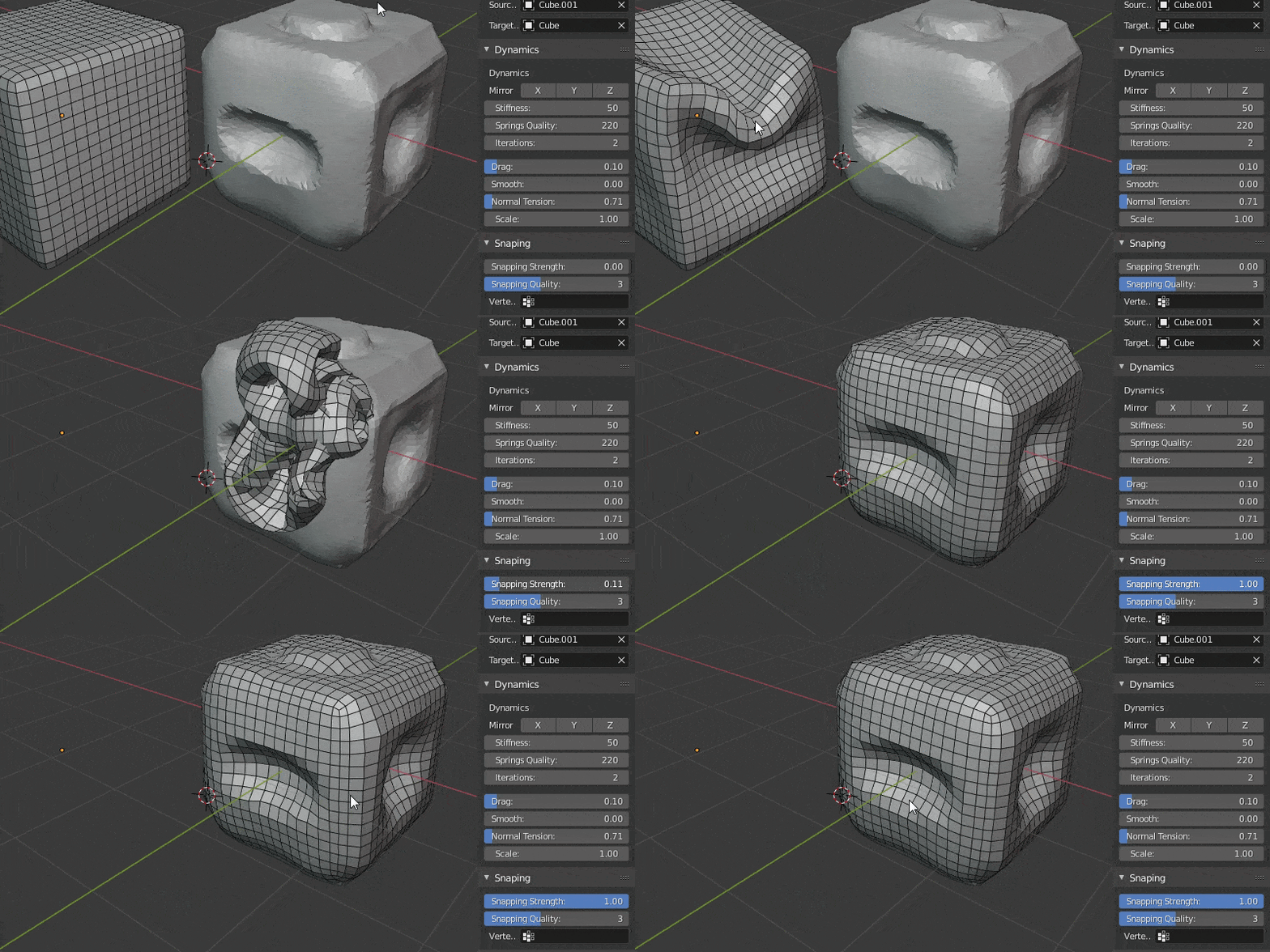

Use the pins, and other settings to fine tune the fit and then hit apply once you are satisfied. You can also leave the deformation as a shapekey and continue modifying your mesh.
Then you just export the mesh back to Daz (this time at 100%) and import it as a morph on a clean Genesis character and you have a good beginning for a custom character without ever having to do manual modelling.
Hope someone finds this helpful!
Cool :)
But if you export at 1%, shouldn't you reimport at 10,000%? (or do you mean export from blender at 100% and then import to Daz at 10,000%?)
Headshop 13 + Lovechild for G8 - eyes mis-shapenclivewil2 said:
Catherine3678ab said:
Yes I see the image. You're quite right, the eyes are goofy. I haven't tried this method yet with the eyes but did for another morph and it worked well.
hmm i wouldn't like my chances of accurately selecting every eye vertex without missing any, or accidentally selecting any non-eye verts, but in itself that video was hugely interesting and i bet i use that method elsewhere, so thanks for posting that.
i did try one trick i used successfully when doing a Mesh Grabber morph on eyelids, which was to move the eyes back out of range, do the morph, and then move them forward again. it didn't work and i didn't really expect it to, but it was worth a shot.
i might try importing new non-distorted eyes from 3ds max and seeing how seamlessly i can replace the pear-shaped ones - i figure if i parent the imports to the original hidden eyes, i'll retain control over movement etc. but i don't know what unwanted transforms and distortions will be passed down the hierarchy chain to the imports. hopefully they will only inherit their scale and rotation and nothing else.
----> yeah ok, that didn't work. the imported eyes work as expected but the original morphed eyes are going off centre, i.e. the verts are moving outward while the pivot stays in place (pic shows morphed eye on left, my imported eye on right)
FaceGen has a 'spherical eyes' option to counter exactly this problem, i'd love to see HeadShop include something similar one day...
I use that feature in FaceGen all the time too.
Creating a Genesis 8 character from a custom mesh?info_b3470fa520 said:
Hi Arstropica, this is Laslo from Abalone LLC, creators of HeadShop. I sent you a PM, love to talk to you about a project.
My email is [email protected] or [email protected]. My skype is lasloves, I am in California.
Hope to talk to you soon.
Laslo
I replied your message.
Headshop 13 + Lovechild for G8 - eyes mis-shapenCatherine3678ab said:
Yes I see the image. You're quite right, the eyes are goofy. I haven't tried this method yet with the eyes but did for another morph and it worked well.
hmm i wouldn't like my chances of accurately selecting every eye vertex without missing any, or accidentally selecting any non-eye verts, but in itself that video was hugely interesting and i bet i use that method elsewhere, so thanks for posting that.
i did try one trick i used successfully when doing a Mesh Grabber morph on eyelids, which was to move the eyes back out of range, do the morph, and then move them forward again. it didn't work and i didn't really expect it to, but it was worth a shot.
i might try importing new non-distorted eyes from 3ds max and seeing how seamlessly i can replace the pear-shaped ones - i figure if i parent the imports to the original hidden eyes, i'll retain control over movement etc. but i don't know what unwanted transforms and distortions will be passed down the hierarchy chain to the imports. hopefully they will only inherit their scale and rotation and nothing else.
----> yeah ok, that didn't work. the imported eyes work as expected but the original morphed eyes are going off centre, i.e. the verts are moving outward while the pivot stays in place (pic shows morphed eye on left, my imported eye on right)
FaceGen has a 'spherical eyes' option to counter exactly this problem, i'd love to see HeadShop include something similar one day...
Headshop 13 + Lovechild for G8 - eyes mis-shapenCatherine3678ab said:
With regards to the eyelashes, after loading the figure into the scene I delete the eyelashes from the scene and set the figure to base resolution. After Headshop has done its thing and returned the morph to the figure, then I'll reapply the eyelashes and reset the resolution. On the Parameters Tab for the face morph, check that "auto-follow" is checked. Zero any morphs before saving them.oh ok, i've just been setting the morph to auto follow, parent the eyelashes, then save the scene and reload it. that has worked for me so far.
attached (i hope) a pic showing the squished eyes. eyelashes are ok now as you can see.
Headshop 13 + Lovechild for G8 - eyes mis-shapenclivewil2 said:
hello, i bought HS13 in the hope that i'd have better luck with it than i did with HS OneClick. I'd like to get this working if possible, as it might work with photos that FaceGen and Face Transfer have issues with - angled heads, open mouths etc.
this post was originally going to be about the eyelashes not adjusting to the morph, but i've just discovered that if i quit/restart DS then it solves itself...
...however, the eyes are noticably mis-shaped, with the irises being stretched taller/narrower and canted inwards at the top.
unlike the eyelashes, they are still like this even after a quit-restart-reload. pic on request.
is there any fix for this, or a way of replacing the eyes with a vanilla pair? i haven't yet googled anything useful.
(fwiw - i read that Abalone's support is conducted via Skype, and i'm mostly deaf so that's not going to be much good to me unfortunately.)
Unfortunately I don't do Skype either and have been waiting for a reply to a reply on a PM for several days now, the email address I had apparently is from a domain which is down so maybe when he sees this he'll let us know his working email. Contact has been made! :-)
I'm on W10 - Headshop 13 - have not had it noticably misshaping the eyes. However have found it best to just let the program put the dots where it wants to and leave them alone. Then I'll use of the other morph options to further enhance the character's face morph. [i.e. for the nose]
With regards to the eyelashes, after loading the figure into the scene I delete the eyelashes from the scene and set the figure to base resolution. After Headshop has done its thing and returned the morph to the figure, then I'll reapply the eyelashes and reset the resolution. On the Parameters Tab for the face morph, check that "auto-follow" is checked. Zero any morphs before saving them.
Daz 3D is part of

Connect
DAZ Productions, Inc.
7533 S Center View Ct #4664
West Jordan, UT 84084Licensing Agreement | Terms of Service | Privacy Policy | EULA
© 2026 Daz Productions Inc. All Rights Reserved.