-
HD morphs?
I''m afraid not. The nearest method I can think of is to export the figuer at base resolution and at a sufficiently high resolution to show the morph (View SubD Level set to 3 or 4) then you should be able to generate a set of displacement maps from those and apply them selectively to the figure with the morph itself zeroed, but that has a number of drawbacks.
HD morphs?Is there a way to make an HD morph not apply to parts of the figure. I know you can do that with normal morphs and the geometry editor, but I can't seem to make the same thing work for HD morphs.
Thanks for your time.
Fredda is adorable!I think the character looks a lot better if you set the head morph to about 80%-85%
Kitbashing Hair, What might I have Forgotten?I wonder if someone might be able to help me.
I am kitbashing an old Victoria 3 hair model and trying to get it to work with G8F as if a newly modelled hair. The hair is the now unavailable Las Vegas hair by Jim Burton. It doesn't attach well to G8F which is why I'm trying this idea.
The process I am following is this:
- Save Toulouse Hair as an .obj file.
- Load into a modeller (my own one in this case)
- Delete all the hair, but leave the hair cap.
- In DS save the Las Vegas hair as an .obj file. This hair has no skull cap.
- Merge the obj file in the modeller with the Toulouse Hair skull cap and translate the hair strands as needed while leaving the skull cap in position.
- Export the hair as an .obj file from the modeller
- Import the hair model into DS, load in Toulouse Hair.
- Use the Transfer Utility from Toulouse Hair to rig the hair.
- Load each morph into the figure using stages 4-6 and then load as a morph using Morph Loader (the simpler one).
- When fitted to a character, specify that the original base figure is 'Unsupported'.
Right, having told you what I did, now can I ask what I did wrong, or could do differently? Should I have changed facet group names to match the G8F facet group names or does the Transfer Utility do it all? Or is it better to specify a compatibility base figure? Victoria 3 has a 'Neck', while G8F has an upper and lower neck. Unlike modern hair, the rigging of the original hair starts with the 'Chest', with the left and right shoulder being rigged off the head... It's all a bit odd by comparison with modern hair.
If I have done it not too badly, I may try doing some hair totally from scratch at some point. I wanted to start with something where I knew it should work if I get it right rather than start with something that may be impossible from the beginning. I forgot to mention the result of the process above - it seems to follow the character shape quite well, but I am not sure whether it's a fluke or whether I have followed a sensible process to cover all that I need to cover.
Regards,
Richard.
Cyberpunk character renderingRobinson said:
I haven't noticed many graphical glitches at all so far...
I've seen a couple. One was a seated female character wearing a dress with an obvious but inappropriate graphical optimisation (the part of the torso was hidden but as she was sitting down, there was just empty space where that part of the torso would be, ehem). And another one viewing a character from behind there was a triangle missing so I could see right through her (this was in the Plaza lounge bar). Plenty of clipping issues all over the shop with clothing but as you say, that's a general problem with games.
Anyway I got to thinking where I could get decent vascularity morphs and maps and I honestly can't find any of the latter, though there are some of the former.
This morph pack comes with maps, but I believe you would need to blend them into your sss texture via photoshop (or whathaveyou) to get it looking natural. Doing it via LIE is...not a good look.
3rd Part Content Metadata for character and MorphsI've created products for third-party content succcessfully, and not had any issues deleting the metadata (since I usually miss a step first time through and have to redo this is something that gets tested).
what kind of morph are you having issues with? If it's just a .dsf file in the /data/ folder it won't show in Smart Content - that needs at least one, categorised, user-facing file in the product.
AIUTO...CHI CONOSCE L’ITALIANO? PARTE DODICICiao a tutti!
stavo cercando info su filament e ho trovato finalmente una pagina in italiano su Daz! ne approfitto! Che voi sappiate su Mac Filament non funziona? I renderizzo solo in Iray ma faccio rendering base poi edito in photoshop.
A proposito del discorso di fare props e character o morph ma con tutti i morph che ci sono nello store si possono personalizzare pressochè all'infinito i personaggi quindi penso che o fai qualcosa di particolare davvero oppure non valga la pena.
Per i props invece avete mai guardato turbosquid e sketchfab? basta scaricare l'obj e poi importi facilemente in Daz c'e davvvero una marea di roba!
Se si va di conoscermi cercatemi su Instagram @danielegay_arts (gay è il mio cognome e so che causa equivoci ma è solo un cognome)
Buon weekend!
3rd Part Content Metadata for character and MorphsRichard Haseltine said:
Leana said:
dustinmeyer1234 said:
pretty much 99% of poser content works in daz and to get it to show up in the smart content
Poser weight mapped figures won’t work properly in DS. You could get them to show in your library but they’ll load with tons of errors and will usually distort badly when you pose them.Although DS can write Poser-format weight data to a CR2, it makes no attempt to read it. I think LaFemme may also use soem other newer features from Poser thata re not supported in DS, whether or not it has equivalent features.
seem like everyone on here hates trying to get old content to work in daz even on the discord I dont get it. has anyone played with the metadata content editor? has anyone tried to get 3rd part shaping or morphs to work using the metadata editor so it appears in the smart content? ok forget LaFemme I could mimic the same error with a genesis 8 character , if you add more compabablity metadata you cannot delete it...has anyone figured out how to do this. I even downloed a morph for genesis 8 and I couldnt get it to apear in the smart pannel without added correct metadata so how about that sense everyone gets super derailed as soon as you bring up your using older content. I have gotten content from poser 4 to work in daz I can even download clothing form the time and add it, I got M1 and old character to show up in the smart pannel by added metadata but dont know how to assisocate the clothing for those character so when you click on the character it will show "wardrobe" option and when you click on that clothing it will have the "material option" or "Shaping" for the figure. I thought coming here there would be some people who like using content they have paid for in the past and using the system currently in daz to get it to work without having to go through the content broswer each time you want to add some clothing.
New characters and footwearIs it me or is anyone else noticing that here of late many of the newer female figures have issues with footwear? At first is was just heels now it seems that more of the recent figures are having an issue with just about every style of footware deforming to the feet. Yes I know that one can just use the standard G8 female base and use the head morph of said female figure. But if you have a figure where the creator has sculpted an awesome shape it defeats the purpose of the original custom body you may have just well buy a head morph. I have purchase some awsome figures with incredible details that the creator took great time to sculpt (like zbrush) into the figure to give it a one of a kind look only to have an issue with footwear. It's just a problem when you don't want to use clothing that fully covers the figure and the footwear deforms.
Anyone else having this issue or am I being picky?
"Duplicate formula found" and unhelpful log file entryBejaymac wrote "Simple question, where did you get this "Fredda01.duf" file from..." This file was named so by me because it uses the Fredda head morph. The G8f figure is from an old duf file.
I take your point about the complexity of finding and solving the original cause of the duplicate formulas. In which case, I ask again, is it worth tracking down? If it were not for the annoying error message that stops loading in the middle of the process without giving any option to do anything about the issue, I would say, I have not noticed any consequences to this error.
So why do the DS devs have this kind of error message for this particular error? It seems pointless. Why can't they just give an error message after loading is complete?
"Duplicate formula found" and unhelpful log file entryI doubt that would help any, when it comes to DUF files DS doesn't care what they are called, just as long as two identically named DUF's aren't in the same folder.
The issue is that content makers don't think like computer programmers, as a result they don't know that every single asset and internal ID needs to have a unique name, and not just unique to you, so using simple naming systems just doesn't cut it.
In the case of the character Rin, calling a corrective morph "eCTRLEyesClosedL" isn't unique as that's the ID for a pose control that comes with G8F, but that wont cause the duplicate formula error. That is caused by having another corrective morph, from another product, that is also using "eCTRLEyesClosedL", you can also get it from converting one or more characters from G3F to G8F.
The annoying thing about Rin is that her creator went and changed the file name to "eCTRLRinEyesClosedL.dsf", if he'd named the morph that when he was setting it up in DS to begin with then none of this would have happened.
Is there any way to remove controls from the Parameters Tab?I had a "Duplicate Formulas Error" with G8 Female. Found a fix on here, Changing color settings on character morph in parameters. Did not fix issue. Deleted offending character, still had issue. Found that morph controls are still in parameters tab and functioning properly, character has been deleted. I need to remove these controls from parameters tab, but have had no luck. I am new to this, any help appreciated.
Jaz
Help with Genesis 8 maleA morph that has been saved incorrectly can also cause the issue. A possible band-aid solution (outside of making a new library and adding the morphs one by one to see which one causes the issue) is to adjust rigging to shape. With your character selected, go to edit > Figure > Rigging > Adjust rigging to shape...AIUTO...CHI CONOSCE L’ITALIANO? PARTE DODICICrios said:
Kainjy said:
Crios said:
Una curiosità, visto che eravamo in tema di Patreon, ma se si iniziasse una campagna di Crowfunding per creare un character 3D completo (mesh, rig, morph e cosi via), secondo voi potrebbe avere successo?
Più che un character io mi butterei su dei morph o dei prop (tipo code, altre appendici del corpo, ecc..) compatibili con la libreria attuale. Purtroppo se fai un nuovo character poi tutti i vestiti e accessori non sono più compatibili e pertanto si dovrebbe ricreare una libreria da 0. Non so quanto possa convenire ad un acquirente pagare per avere un nuovo personaggio e rimanere senza vestiti compatibili.
No, ma la mia idea non era di creaer un personaggio umano.
Un originale? Allora lo devi fare DAVVERO diverso da tutto il resto perchè altrimenti no attira nessuna attenzione.
Io stesso vedo certi mostriciattoli nei vari store e li ignoro visto che ne ho tanti altri simili che con piccoli ritocchi diventano identici.
AIUTO...CHI CONOSCE L’ITALIANO? PARTE DODICIKainjy said:
Crios said:
Una curiosità, visto che eravamo in tema di Patreon, ma se si iniziasse una campagna di Crowfunding per creare un character 3D completo (mesh, rig, morph e cosi via), secondo voi potrebbe avere successo?
Più che un character io mi butterei su dei morph o dei prop (tipo code, altre appendici del corpo, ecc..) compatibili con la libreria attuale. Purtroppo se fai un nuovo character poi tutti i vestiti e accessori non sono più compatibili e pertanto si dovrebbe ricreare una libreria da 0. Non so quanto possa convenire ad un acquirente pagare per avere un nuovo personaggio e rimanere senza vestiti compatibili.
No, ma la mia idea non era di creaer un personaggio umano.
Which is easier to import, FBX or OBJ?I'm about to venture deep into the darkest interior of CGTrader so can someone answer the following question: which is easier to import into DAZ Studio and configure with Iray materials, wavefront object (.obj) or Autodesk (.fbx) files?
I'm importing a building, not anything fancy like an animation or a morph, which will hopefully make things easier.
Thanks,
Alex.
Face Transfer UnlimitedKeithH said:
I own Face Transfer Unlimited.
Why is it when I open the Face Transer tab it says I only have 3 saves left?
Thank you -
EDIT: I went ahead and bought this too
Face Transfer Shapes for Genesis 8
https://www.daz3d.com/face-transfer-shapes-for-genesis-8In your account check the Serial Numbers page. There's a key to be entered into D/S. Then restart D/S.
The "Dial Them Out" ThreadHylas said:
3Diva said:
...curious about Sara for Teen Jane
Quicky render of Sara without Teen Jane.
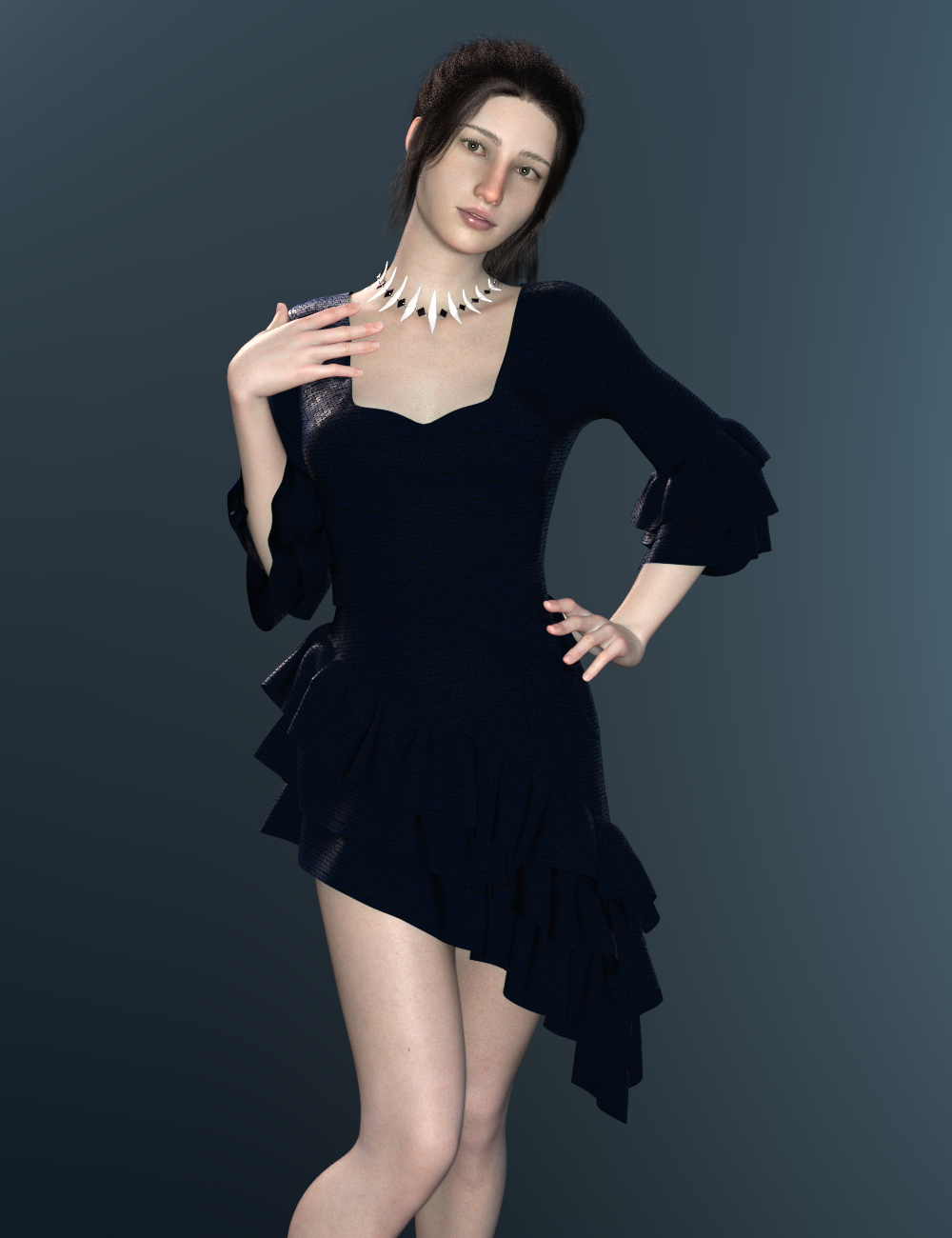
Candle light and pentagrams... cyber necromancy! I'm resurrecting this thread!
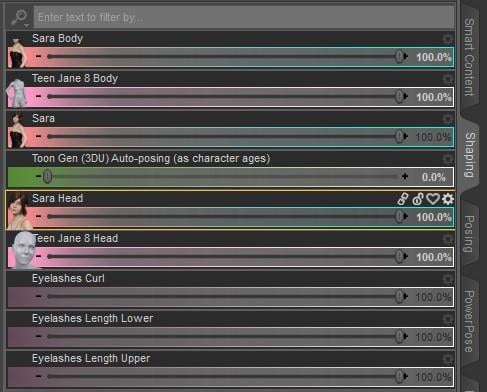
Can someone be so kind and check how much of Jane's morph Sara uses?
I usually see it by opening the morph files with a text editor, but I can't quite figure it out with her...
100%
 Please help - Importing to Unity - Morphs missing
Hey all, just me again. I'm back here because apparently DAZ support doesn't actually offer any support for the Unity bridge and just pointed me back at this forum, lol. Anyway, I'm oficially stuck at this point as I figured this was just a version issue, but I've tried several different versions of Unity with no luck at all. I checked the documentation for the bridge and they use 2019.4.0f1 so I downloaded this and created a fresh project and did a clean import of a G8 Female using the bridge and I still get 0 morphs, not even a blendshape option in the inspector. The morphs I apply to the figure are coming over on import, so it's like they are all just getting baked as part of the process. If it helps anyone at all troubleshooting wise, there's no morph data in the output of the DAZ bridge in unity, I'll attach a screenshot in case that's helpful at all.
At this point I would appreciate it if anyone could tell me what version of Unity they are using and what files/morphs they've been able to get this to work with because I'm lost at the moment. I'm also unsure if the version of the DAZ bridge that I'm installing with DIM is current or if I should be trying to build my own from the github repo. Sorry if I seem naggy on this I was just hoping to use this to streamline my dev process and I was excited to try it out.
Face Transfer UnlimitedI own Face Transfer Unlimited.
Why is it when I open the Face Transer tab it says I only have 3 saves left?
Thank you -
EDIT: I went ahead and bought this too
Face Transfer Shapes for Genesis 8
https://www.daz3d.com/face-transfer-shapes-for-genesis-8Daz 3D is part of

Connect
DAZ Productions, Inc.
7533 S Center View Ct #4664
West Jordan, UT 84084Licensing Agreement | Terms of Service | Privacy Policy | EULA
© 2026 Daz Productions Inc. All Rights Reserved.