-
Matching skin tones
I am working on a figure that is very pale (vampire). I want him to have wings but none of the wing presets avaialble for them match the color I am looking for exactly. How can I match the skin tones of the wings to the skin tone of the figure? I have tried various shaders but none come close and when trying to apply a skin morph intended for a figure (how I got his skin tone the way it is now) it doesn't work on the wings. They ether come out looking to metalic or bleached out. Any ideas?
Dynamic Surface Add On TutorialI'll set up a short video on how I do it in Modo a bit later today :) It should transfer to similar workflow in other programs
SereneNight's Sci-Fi Fun Thread 2Here's Juan Carlos 8. Overall, I really like this figure. He has a very nice skin, and morph, which is distinctive and different. If I had any critique, it would be that there is a fine white line on his upper lip that doesn't look natural, and i'm not really a fan of the cleft nose or the veritical nips. The dark skin however is lovely and natural-looking.
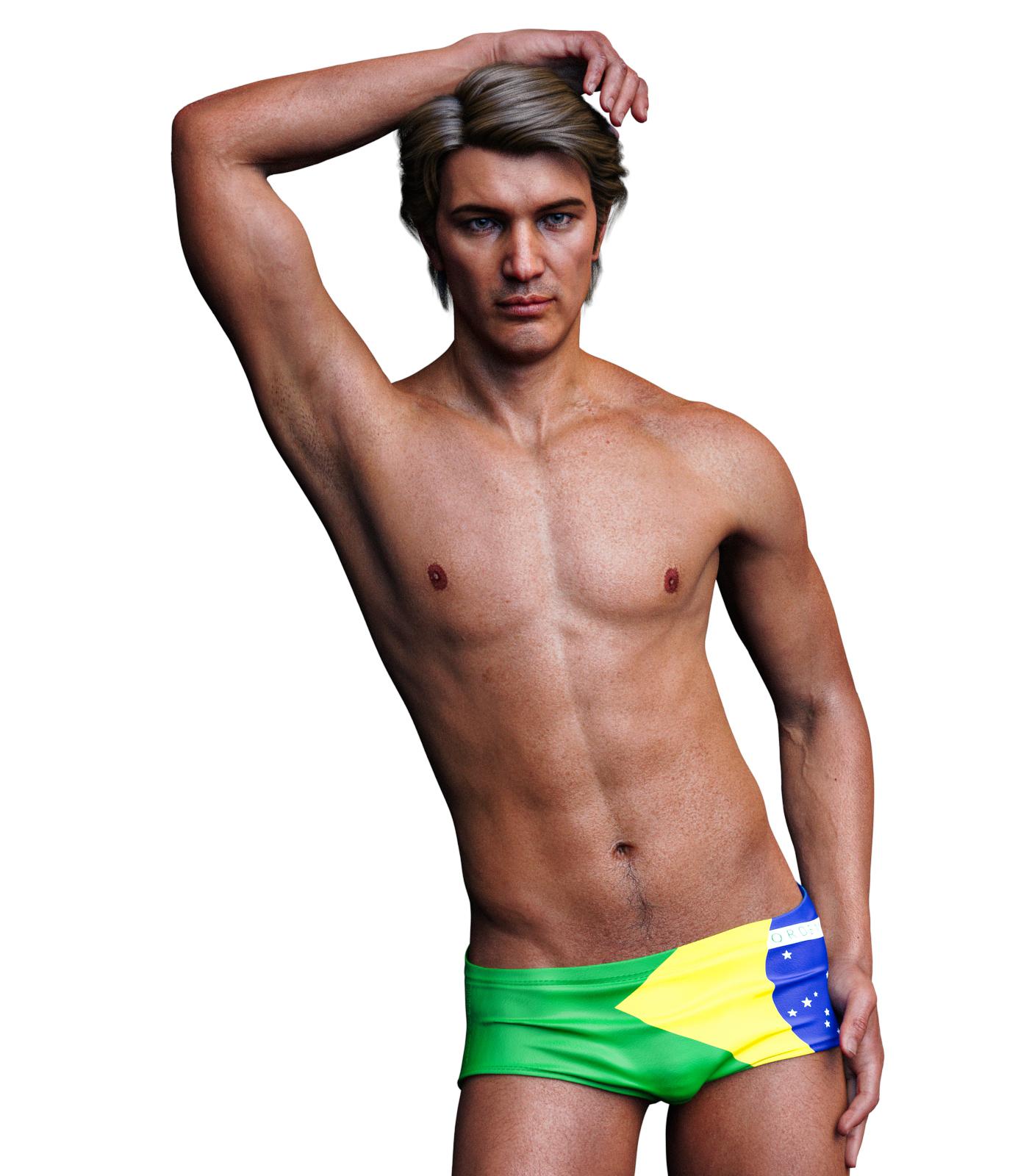 SereneNight's Sci-Fi Fun Thread 2
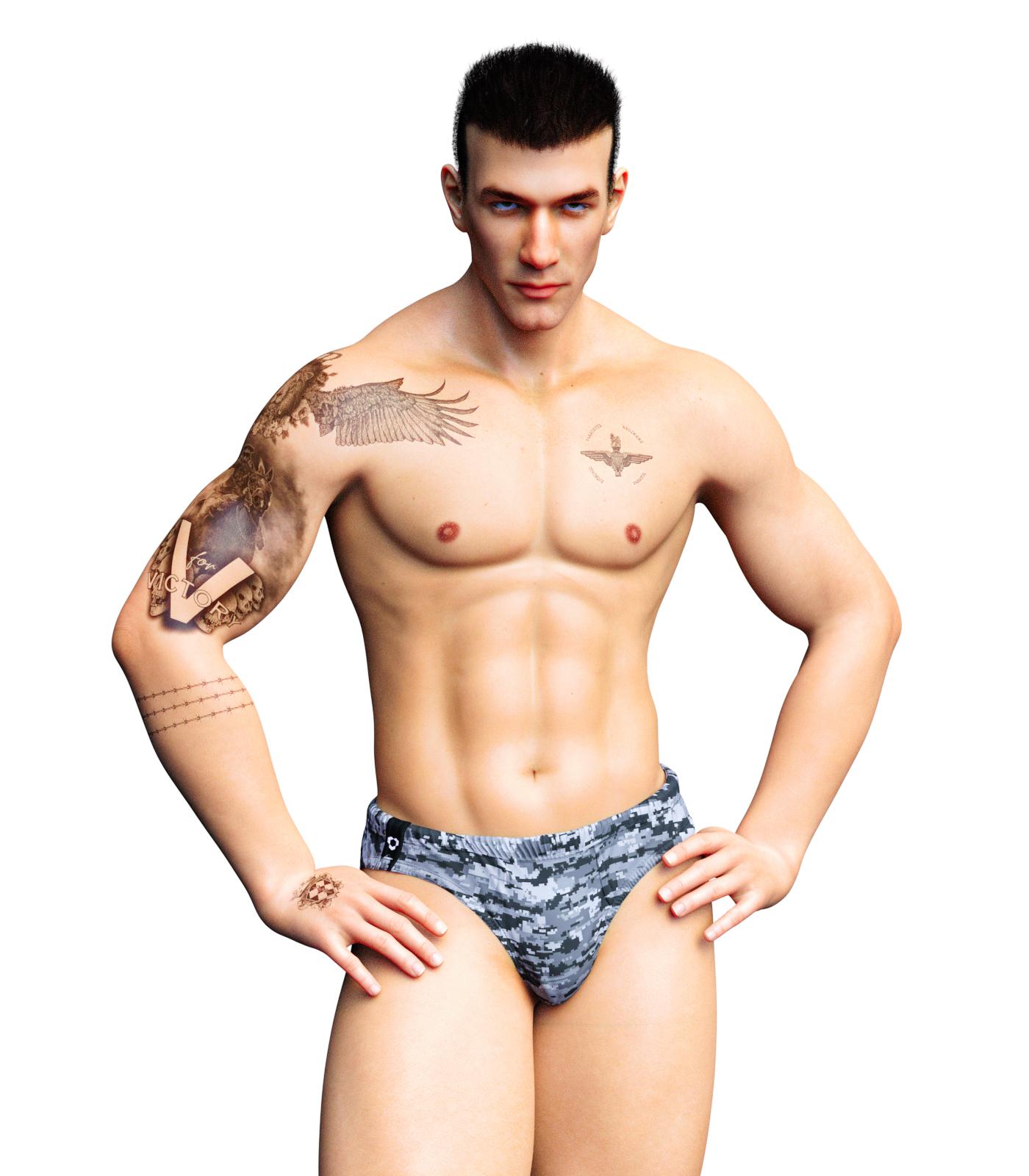
Okay, next up is Sithlordsims, very nice Falcon character. Falcon has a really nice looking morph, which reminds me of certain more realistic manga characters, some realistic tattoo options, and a custom shape. Because his tats looked kind of military to me, I gave him a shorter hair do.
The forum seems to have trouble posting the attached images and letting me imbed them like I used too... So I shall try.
 Auto Muscle Enhancer HD [Commercial]
Leemoon, He is starting to look good, to me it looks like there is still a lot of the recognizable Maxx in the head. I think you and Sigurd both commented that that character takes over very quickly, and I think I concur. There are ways to change the shape and feel of the head, you can use some of the Face Transfer tools, or go into the Head upper and lower rigging to manipulate all the little sub-bones in the face. That can be tedious though, and you have to keep track of the left and right settings. I use the ctrl-c and ctrl-v keystrokes to bounce back and forth, and a little asymmetry is never a bad thing! Regarding the hair the arm hair doesn't look quite as thick or dense as the other body hair? Might be just the lighting. Just what I am seeing. I sometimes put hair on, but because I seem to like blond hair, it doesn't hardly show up!
Thanks to you and Sigurd for the comments on the Soft Body Effects tutorial, that was a ton of work and discovery!
Keep em coming! TD
Any reviews on Nirv Sweet Pie Hair?BandoriFan said:
Mark_e593e0a5 said:
Having the same issue.... the hair looks good on the promo renders. But I am really diappointed by Fredda and Gou Luk, so I will no longer buy anything from those guys - at least until the known issues are fixed.
I don't have Fredda yet but the Gou Luk Bundle was one of the best things I got. I mean sure the character comes default with an expression but you get so many high quality clothes and accessories and makeups and the hair is nice too. The clothes can go so good with other sets and the shoes are especially high quality and come with many skin and lighting options. The socks have many versatile skins too. The dress also does and does pretty good with shaders too
For the longest time I was always learning something new about the bundle long after I got it
That's just the thing. No one cares about ugly stuff that doesn't work right. If it's ugly, no one would buy it, and if no one buys it, there won't be any complaints. But this stuff looks amazing in promos, and a lot of the stuff is fine, Fredda is a super cute morph, but there's stuff that's badly made, and that's the cause of disappointment.
Fredda is adorable!It is so strange. Some of Rarestone's previous products are amazing. The 200 morph packs are packed with unique shaping options. Many of the characters are great, and often packed with extra stuff. But the past few have been just a bit off. And it really does come down to that repeating gloss texture I mentioned earlier. The textures are clearly painted in a 2d application, so this results in seams across the UV. It is not visible on the other body textures, but with how the head UV is scaled differently than all other maps, it becomes quite visible there. It also makes the neck just look kind of bad and splotchy. From a user standpoint, the easiest fix is to swap these textures with another character. Most bump and gloss mats will work on different characters fine. Of course, this doesn't address the problem. Like I said before rarestone really needs to either use a merchant resource for these maps, or they need to use an application that can paint across the UV map. As for the hair, I don't even know where to begin. You can tell in the promos the hair isn't that good. Daz needs to up their QA game significantly and not let something like that in the store. The seam issue is one thing, but the hair is just plain bad. And Daz even pushed this product on the store page in its sale. I place the burden of quality squarely on Daz here. Ultimately they decide what is allowed in their stores, and if PAs don't get turned down, they will believe what they did is acceptable.New Face MoCap ComingThis is my 2 bits & the resources I know about for lipsynch I have book marked in case I needed something for lipsynch in one of my projects in the future..
For my needs I just use daz studio 32 byte version that comes with Mimic or lipsynce. what ever they are calling it these days. I am still using it on 4.10 32bit. i do not require much lipsynch in my animations to invest in something major. But there is some pretty good alternatives
If you have a xbox or use Interactive Kinetic on your PC? if so you can use Kinetic for great facial capture. downside is you need to buy the little face censors. but it will work on windows and Apple and I believe Linux too. But the censors are not all that cheap and the more details in your motions you want the more you will need of the censors. but you can get them here pretty reasonable. the censors come with compatible software. https://brekel.com/face_v2/
and I know some users at Animations World https://www.awn.com/ ( one of my favorite animations resources sites BTW ) they are using F-clone a markerless face captures software with some pretty good results. But its a pretty hefty price though. its does not use censors or special hardware or require a iphone and it does work for daz studio as well. works off any web cam or Kinetic capture as well. But the cost is like $135 for the indy version which is what you will really need.& what keeps me from buying it https://f-clone.com/
Then you can always try VUP on steam. I see a lot of people on YouTube seem to like it. you sign up for steam and only pay for the time you use it. I tried the demo of it and thought it a bit clumsy to use & did not transfer to or support DUF files either Daz 32bit lipsynch was better for my needs https://store.steampowered.com/app/1207050/VUPVTuber_Maker_Animation_MMDLive2D__facial_capture/
AIUTO...CHI CONOSCE L’ITALIANO? PARTE DODICIÈ vero che è diverso come tipo di approccio ma molti strumenti di Zbrush sono usati per fare i props che vedi nello store.
Ad esempio molti capelli, barbe ecc.. sono realizzati con Fibermesh in Zbrush.
Alcuni morph sono stati realizzati scolpendo i modelli base di Genesis/Michael/Victoria poi reimportati in DAZ e convertiti in morph.
Perfino i vestiti sono stati realizzati in Zbrush e poi esportati in DAZ.In Zbrush non si rigga, se lo si fa è solo per mettere personaggi in pose plastiche (il software non permette di editare le aree di influenza dei joint e dunque non permette un rigging accurato). Se è necessario il rigging, si esporta il modello e lo si fa con altri software (Maya, Blender, ecc..)
Holiday Gifts from Daz PAswatchdog79 said:
Naturally, the second freebie is amazing too: https://www.daz3d.com/sbibb-kitten-poses-and-morphI do have some scenes in mind with a kitten or two, and this will help me a lot.
Thank you FeralFey, Orestes Graphics and SBibb and Merry Christmas to you all.heart
Awesome, I'm really glad the kitten poses and morph will be helpful for you and your renders. Merry Christmas! :-D
cathan01_wwg1wga said:
Thank you, SBibb, for the Daz House Cat poses and kitten morph. Especially love the expressions. I also appreciate the other Christmas freebies. Thanks to you all and Merry Christmas.
Aww, I'm really glad to hear you like the poses and morph, and that you love the expressions. They were fun to make. Merry Christmas to you, too! :-D
Holiday Gifts from Daz PAsThank you, SBibb, for the Daz House Cat poses and kitten morph. Especially love the expressions. I also appreciate the other Christmas freebies. Thanks to you all and Merry Christmas.
Michael 4 and G8M compatibilities concerning cloth and posesManually pose the uniform to match the Genesis 8 male zero pose. Hide the figure (including its lashes), and if the uniform is in separate parts hide all bar one of those. Export as OBJ. Repeat for additional parts of the uniform if needed. Now import thsoe OBJs (using the same preset in the options dialogue) and you shoudl be able to use the Transfer Utility.
New characters and footwearSomething I've had as a problem is the "toes spread" pose control on my G8F is backwards. -100% widens them and +100% makes them come closer together. It makes shoes not fit properly in many cases because the shoe poses assume it's the opposite and so the toes and up sticking out of the sides of the shoes, flats or heels.
I don't know why this is happening to my G8F, I assumed I got a bad charcter morph that overwrote something or other. Anyway I recently got a new computer and installed everything from scratch - blank slate - and same problem. At least I'm aware of it so I just manually fix it.
One thing you can do is select the character and unhide hidden morphs and then selectively zero each one on the feet to see if it fixes anything. Some morphs do mess up the rigging a bit and don't have adequet corrective morphs. You may find you have a 'bad' one and you can just keep your eyes open for it.
New characters and footwearbluejaunte includes zero foot morph sliders for his characters. that's probably who you're thinking of.
j
Evelyn is really cute. Curious to see your test renders of her!helgi66 said:
If your asking about Evelyn by Cinnabar; I couldn't tell you. It's conflicting with another character called Evelyn (by Maelwenn) that was sold by Daz
and loads the Maelwenn morphs instead when I try to use it :(
Its really an issue. Why can't PA's name their morphs individually, like some do, e.g. SASE, Krashwerks, Mousso and others? Why does DAZ allow this on non-DAZ Original characters? I suppose DAZ has a set of rules for PA's. There are gazillons of characters for G3 and G8, so there has to be some naming convention to avoid morph conficts.
Alternatively, provide a means of renaming morphs easily inside Studio.... the not-so-great QC on DAZ side really affects the business model, in my opinion.
Michael 4 and G8M compatibilities concerning cloth and posesSetting: For a friend's WWII Diorama I need some dead soldiers (to 3D print them later). I found russian uniforms for Poser and Michael 4. I found poses for G8M. So I get Michael 4 into the uniform and it fits. I try to run the G8M pose on Michael 4 but it fails (distorted), of course. I try to fit the uniforms to G8M and it fits barely, I set the "import" from G2M, G, G3M original but with no satisfying result. G2M / Full dress works best, however.
So I looked for a transfer utility M4 (with cloth) to G8 (for the correct pose) but found only G2 to G8, not for older ones.
Is there a possibility like lock the pose of G8M, export it and set it to M4 with the fitting uniform? The M4 rig seems very similar to G8M but somehow...

Michael 4 with matching uniform applied, but pose displaced
G8M with matching pose applied, but uniform displaced
G8M: I tried to unfit the uniform and manually edit it in place, but once unfit it jumps to it's zero position, I edit it, I fit and it's the same like before.While I can hide the legs, body and everything hidden by cloth the hands are the problem as they stick out (the left one) completely displaced.
M4: The only solution that comes to my mind is to manually edit M4 to the G8M pose.
Are there other solutions than that?
New characters and footwearYeah, it's a problem with customized feet, autofit isn't particularly friendly to high heels. Flats seem to adjust and generally look OK.
I saw one PA's product in particular that advertized a zeroing of the foot morph for heels/shoes but I don't remember which one.
New characters and footwearmemcneil70 said:@MimicMolly, thank you for mentioning https://www.daz3d.com/shape-rigger-plus which I found I had but never used. I have also had issues with shoes, boots, hip areas but also some glasses warping on faces.
Do you think it can help the glass warping issue?
I am going to dig it out and try it on the next character that I can't fit clothes designed for it and which the clothes do not have proper sliders to adjust in the problem area.
According to this product, it mentioned that it makes sure the characters' bones are properly positioned. Which I suspect was the case for my G8F, because the script said it was "ready to rig".
Unless the head or eye morph isn't properly rigged, this script might not help with glasses. But it's worth a try. The script will tell you if it's properly rigged or not.
Holiday Gifts from Daz PAsI really like this freebie: https://www.daz3d.com/reindeer-irradiator-and-poses
Awesome, and I love that poses for both Genesis 8 and the new gnomes are included. And the morphing beam is included too. The choice of the name of the product made me chuckle, well played.

Naturally, the second freebie is amazing too: https://www.daz3d.com/sbibb-kitten-poses-and-morph
I do have some scenes in mind with a kitten or two, and this will help me a lot.
Thank you FeralFey, Orestes Graphics and SBibb and Merry Christmas to you all.
 AIUTO...CHI CONOSCE L’ITALIANO? PARTE DODICI
Crios said:
Kainjy said:
Crios said:
Una curiosità, visto che eravamo in tema di Patreon, ma se si iniziasse una campagna di Crowfunding per creare un character 3D completo (mesh, rig, morph e cosi via), secondo voi potrebbe avere successo?
Più che un character io mi butterei su dei morph o dei prop (tipo code, altre appendici del corpo, ecc..) compatibili con la libreria attuale. Purtroppo se fai un nuovo character poi tutti i vestiti e accessori non sono più compatibili e pertanto si dovrebbe ricreare una libreria da 0. Non so quanto possa convenire ad un acquirente pagare per avere un nuovo personaggio e rimanere senza vestiti compatibili.
No, ma la mia idea non era di creaer un personaggio umano.
Secondo me potrebbe non essere male anche produrre set di morph, anche molto specifici e combinabili su singole parti del corpo, e magari orientati su vari stili. Come, ad esempio, su manga/anime. Penso ci sia diversa gente che vorrebbe riprodurre i personaggi di una certa serie, ma non trova i morph adatti. Del tipo, sai, nello stile delle Clamp (li cerco da un pezzo) o di Toriyama, ecc. Per varie generazioni di figure, non solo l'ultima, che in molti usano ancora quelle vecchie. Penso che sarebbero apprezzati perché permetterebbero maggiori possibilità di creazione senza dover rifare da 0 la libreria.
Daz 3D is part of

Connect
DAZ Productions, Inc.
7533 S Center View Ct #4664
West Jordan, UT 84084Licensing Agreement | Terms of Service | Privacy Policy | EULA
© 2026 Daz Productions Inc. All Rights Reserved.