-
Saved Scene Errors
Messed up how? Has the morph been saved as a Morph Asset, or is it still embedded in the scene file?
Saved Scene ErrorsLately I've been having an issue where I load a saved scene, and my character morph is dialed out. If I proceed to dial in the morph, it messes up part of the character (face, hands, etc.). This is a custom morph, not an out of the box character. Has anyone else experienced this problem, and if so how was it solved?
Daz to Unity/Salsa ... Blend Shapes!!!I have tried both the Gen8 and Gen3 Male.
They both have the morph sliders in the Parameters panel and I have tested them.
But when I EXPORT and then Morph Export Rules and select the option provided (.CTRLVS Export) none of them turn up with a Yes for export in the Staging(assets to be exported) window below.
What am I missing????
Thanks
Orla Fae - Size changesMAB said:
This image could have been a promo because I did no post work on Orla Fae, but I did it after Orla Fae was submitted just for fun. As for sizing, for the in hands promo, I just scaled Orla Fae in fairy form down to 10% after her morphs and everything were applied and then did an animated play range to put her in the hands of the normal sized Orla human with her clothes draping to set nicely on the hands through the course of the animation. It was nothing more complicated than that. I'll see if I can make an image of the Daisy 8 version of Orla Fae. Orla Fae started as an addon for Daisy 8 but through the course of making her, I decided to make her her own custom character morph and that morph took over as the main character for the package and the Daisy 8 version became a bonus.
Bloody hell, that is good.
Exporting Just Clothing with MorphsSo far every morph I have needed to adjust has been there. That's awesome so thank you for looking in to this so quickly!
Inguinal Creases for Genesis 8 FemaleHey guys I was wondering does anyone know of a morph set that includes a inguinal crease slider. I saw someone a while back using such a slider but I forgot what they used and cannot find it anywhere. I am not looking to make a full muscular character just slightly toned in specific palces. Thanks.
Edit: Found it, it it's called iliac line.
Glute and Breast Control Genesis 8 (Commercial)@Zev0: Hi, is it possible to reset the morphs through the timeline? For example if you make a mistake in some frames and want to completely reset the R or L breast morph.
Please help - Importing to Unity - Morphs missingkinglord said:
DAZ_jesse said:
kinglord said:
DAZ_jesse said:
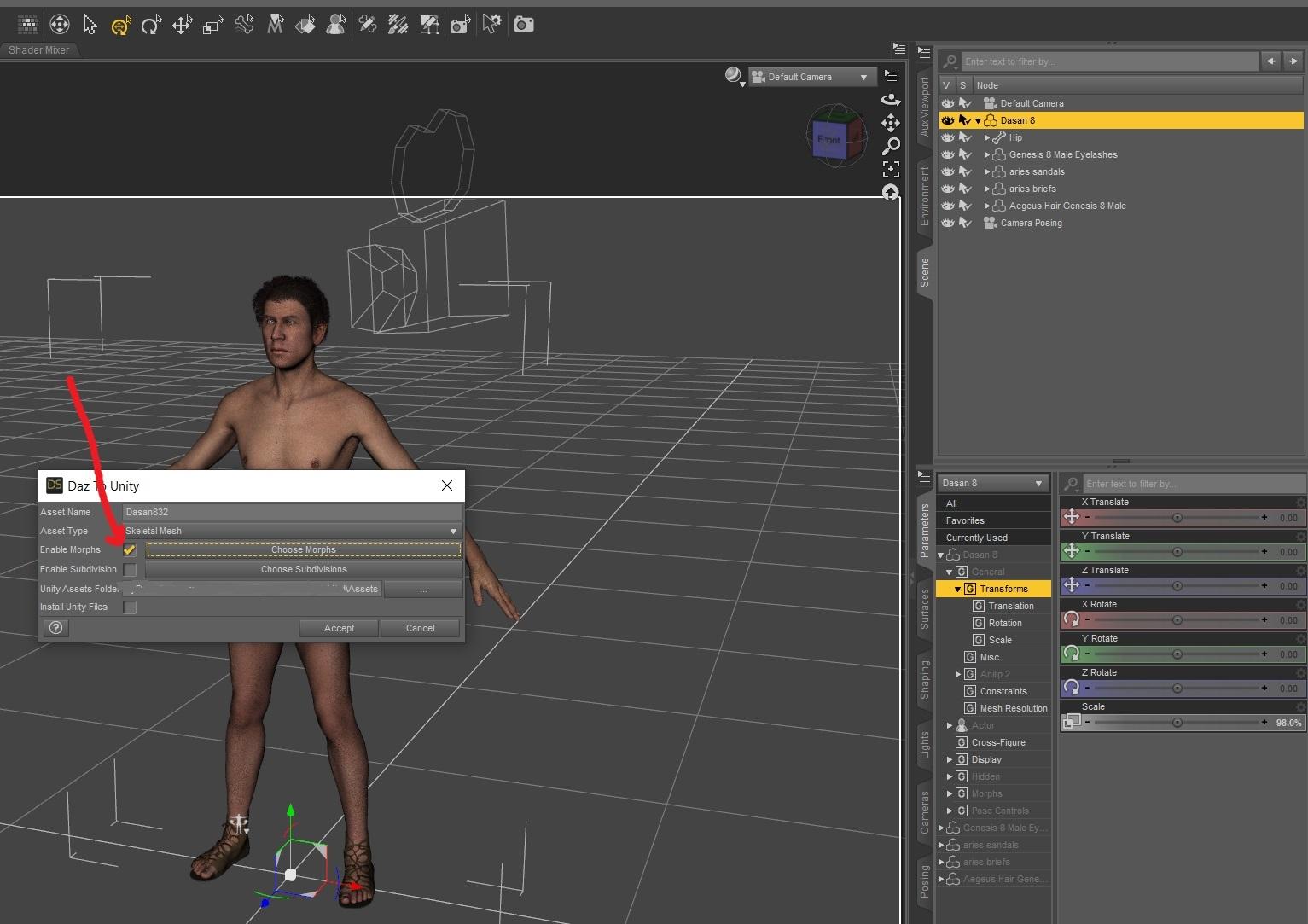
For morphs they do work on export, you need to ensure you export the morphs, in the Daz To Unity window check "Enable Morphs" then click "Choose Morphs", find the morphs you want, select them, and then hit "Add For Export".
You should end up with an asset like the following:

Thanks for the reply Jesse but this is exaclty what I'm doing and I'm not having any luck at all. When I export a character I add morphs from the list and they appear on the right in to export and I hit accept. I then finish the export to Daz and there are no blendshapes in my skinned mesh renderer. I've now tried this on a fresh install of unity and fresh install of DAZ trying to figure this out. Neither the Genesis 8 Female or Male models will export with any of the selected morphs. I have no trouble getting them in import using FBX exports so it's something with the bridge. I'm using the latest version of the recommened unity engine, 2019.4.15f1 so maybe it's a version problem. I'll reach out to tech support and see if they can help.
Can you tell me the exact asset and morph names you're trying to use (sounds like you tried the base genesis 8 figure), I'll see if I have the same problem.
For sure, I just loaded the Genesis 8 Basic Female figure and picked some random morphs, here is my list. When I use the bridge my blendshapes are empty. Just to double check I did look and the prefab does have import blendshapes checked so it should be loading if they're there. Thanks again for the help!
It is not enought to select morphs for the export, one need to select a checkbox "Enable Morphs" in Daz Bridge
and be sure that Daz scene was saved with some name (that name appears in Unity together with Daz3d_ prefix):
 Orla Fae - Size changes
This image could have been a promo because I did no post work on Orla Fae, but I did it after Orla Fae was submitted just for fun. As for sizing, for the in hands promo, I just scaled Orla Fae in fairy form down to 10% after her morphs and everything were applied and then did an animated play range to put her in the hands of the normal sized Orla human with her clothes draping to set nicely on the hands through the course of the animation. It was nothing more complicated than that. I'll see if I can make an image of the Daisy 8 version of Orla Fae. Orla Fae started as an addon for Daisy 8 but through the course of making her, I decided to make her her own custom character morph and that morph took over as the main character for the package and the Daisy 8 version became a bonus.
*Released dforce Sea Salt* CommercialO País das Maravilhas disse:
Também quero dar algumas dicas rápidas sobre esse cabelo em particular.
Este é um dos fios de cabelo que eu não recomendaria alterar as configurações de dinâmica se você estiver animando uma simulação. Deixe-os para sua própria sanidade :)
Se você estiver apenas usando a gravidade .. bater para fora .. deve se comportar perfeitamente.
Se você achar que seu cabelo está grudado demais no corpo, use o "Head Bend Back Morph". antes de simular. Também parece muito melhor depois de certas simulações.
Além disso, sempre me esqueço de adicionar uma predefinição especial para que o cabelo fique visível na janela de exibição da nvidia. Desculpe pessoal .. Eu honestamente nunca uso. Então, para aqueles de vocês que estão lutando para descobrir por que está ficando invisível na janela de visualização da nvidia:
Clique no cabelo em sua cena.
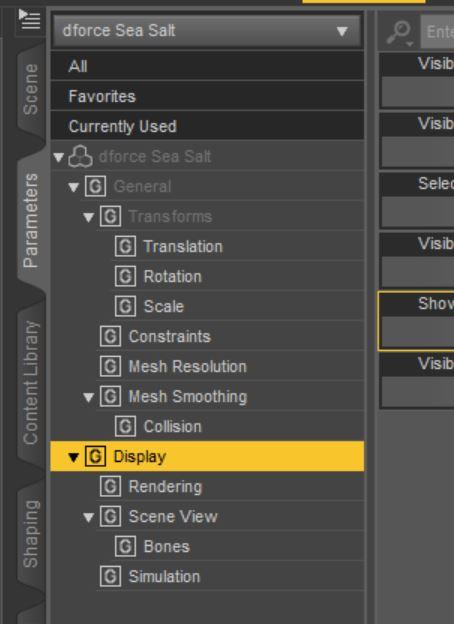
Clique na guia de parâmetros.
Role para baixo na guia de parâmetros e altere os lados da tesselação da linha da janela de visualização e altere de 0 para 3 .
Também me certificarei de adicionar a palavra cabelo aos meus produtos no futuro. São as pequenas coisas simples que sinto falta quando coloco essas coisas complicadas juntas.
Ok, estou tendo alguns problemas ...
1. Era um cabelo G3 tentando caber no G8. Eu tinha lido nos fóruns para pesquisar achados e perdidos e tentei aquele cabelo. Nenhum dos cabelos se chama G3 ou G8, então não há como saber qual é qual,
2. Não consigo encontrar os lados do Viewport LineTesselation
3. O MAIOR problema: Não há nada que diga Ator e nenhuma morfologia que eu possa encontrar.
Por favor ajude! Estou ansioso para experimentar este lindo cabelo!
Hi ,
Please, I bought dforce sea salt but it doesn't appear on Nvidia. When rendering to see the hair my computer crashes. How can I solve this?
Mod Edit :- to sort out the quote3D Art Freebie Challenge-December 2020-"Holiday Traditions" -Main Thread OnlyChristmas is a day of meaning and traditions
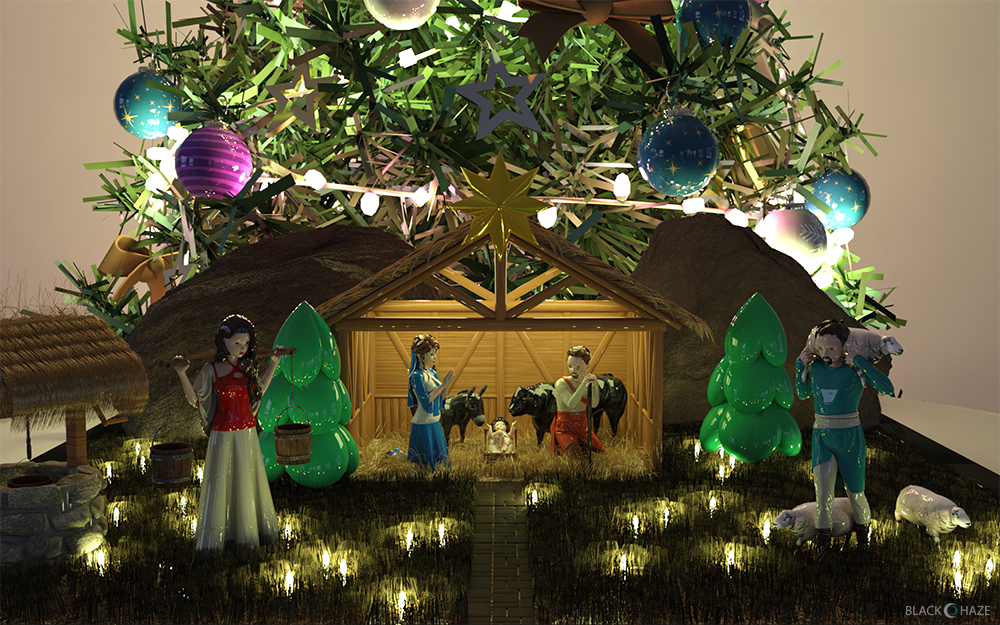
FREEBIES:
- Modular Madness - Stable Builder
https://www.renderosity.com/rr/mod/freestuff/?item_id=78946
- Darkest Dungeon - Sinister Structures
https://www.renderosity.com/rr/mod/freestuff/darkest-dungeon---sinister-structures---100-free/81060
- Texture: Wood 002
https://3dtextures.me/2018/03/29/wood-002/
- Texture: Forest Ground 002
https://3dtextures.me/2019/12/10/forest-ground-002/
- hay straw seamless texture
https://www.deviantart.com/dbszabo1/art/hay-straw-seamless-texture-275452457
- Christmas Star
https://www.renderosity.com/rr/mod/freestuff/christmas-star/83807
- HD Infinite Rock
https://www.sharecg.com/v/83765/related/21/DAZ-Studio/HD-Infinite-Rock
- Toon (or Toy) Christmas Tree
https://www.sharecg.com/v/20770/3d-model/Toon-(or-Toy)-Christmas-Tree- Iray Jewelry Shaders
https://sharecg.com/v/95893/browse/21/DAZ-Studio/Iray-Jewelry-Shaders
- Anime Head for Genesis 8 Female and Male
https://www.sharecg.com/v/88934/browse/21/DAZ-Studio/Anime-Head-for-Genesis-8-Female- dForce_French Twist Hair for Genesis 8 Female(s)
https://www.renderosity.com/rr/mod/freestuff/?item_id=81937
- Odalisque Dress for G8 Female (veil and top)
https://www.deviantart.com/noone102000/art/Odalisque-Dressfor-G8-Female-FREEBIE-TO-DOWNLOAD-840702552
- DForce Evening Dress G8
https://www.renderosity.com/rr/mod/freestuff/?item_id=83462
- Mage Trainee Outfit for G8F (coat)
https://sharecg.com/v/93854/gallery/21/DAZ-Studio/Mage-Trainee-Outfit-for-G8F
- Anne's Clothing - Room Shoes
https://sharecg.com/v/96340/gallery/21/DAZ-Studio/Annes-Clothing-Room-Shoes
- Prayer Pose Bundle 15 poses for V4/M4/K4
https://www.renderosity.com/rr/mod/freestuff/prayer-pose-bundle-15-poses-for-v4-m4-k4/63883
- V4/A4 Pose Transfer to G8F
https://www.daz3d.com/forums/discussion/448391/v4-pose-transfer-to-g8f- Everyday Hair Style for Genesis 8 Male(s)
https://www.renderosity.com/rr/mod/freestuff/everyday-hair-style-for-genesis-8-male-s-/80194
- FM SciFi Staff
https://www.renderosity.com/rr/mod/freestuff/fm-scifi-staff/78976
- Border Tribe Outfit for G8M
https://sharecg.com/v/94622/gallery/21/DAZ-Studio/Border-Tribe-Outfit-for-G8M
- Pose (Kneeling) 79 + Mirror pose
https://www.renderosity.com/rr/mod/freestuff/pose-kneeling-79-mirror-pose/86388- Ena hair (24 Days Of Christmas: 15th Day)
https://www.renderosity.com/article/23509/dec2020-24-days-of-christmas
- LoinCloth for Genesis 2,3 and 8
https://www.deviantart.com/noone102000/art/FREEBIE-LoinCloth-for-Genesis-2-3-and-8-772046168
- Pose (Dancing) 21 + Mirror pose
https://www.renderosity.com/rr/mod/freestuff/pose-dancing-21-mirror-pose/83147- Bull
https://www.most-digital-creations.com/bull.htm
- El Burro
https://www.most-digital-creations.com/el_burro.htm- Wishing Well
https://www.renderosity.com/rr/mod/freestuff/wishing-well/62345
- Yoke to carry buckets of liquids
https://www.deviantart.com/noone102000/art/FREEBIE-Yoke-to-carry-buckets-of-liquids-802971269
- Noelle Hair
https://www.renderosity.com/rr/mod/freestuff/noelle-hair/84483- Sheep
https://www.most-digital-creations.com/sheep.htm
- So-oldier Hair for G8M
https://www.renderosity.com/rr/mod/freestuff/so-oldier-hair-for-g8m/81424
- Pose (Standing) 23
https://www.renderosity.com/rr/mod/freestuff/pose-standing-23/78653- Fantasy Table
https://www.renderosity.com/rr/mod/freestuff/fantasy-table/83934
- Christmas Tree
https://www.renderosity.com/rr/mod/freestuff/christmas-tree/75962
- Contemporary Loft
https://www.renderosity.com/rr/mod/freestuff/contemporary-loft/77790
- HDRI: Snowy Park 01 (for HDRI Lighting)
https://hdrihaven.com/hdri/?h=snowy_park_01- Teal Iray Emissive Shaders
https://www.sharecg.com/v/94234/browse/21/DAZ-Studio/Teal-Iray-Emissive-Shaders
- Holiday Bulbs
https://www.renderosity.com/rr/mod/freestuff/holiday-bulbs---props-for-poser/53527
- Replicator for DAZ Studio (for scattering the "Holiday Bulbs")
https://www.sharecg.com/v/77603/browse/21/DAZ-Studio/Replicator-for-DAZ-Studio
PAID:- Tobyn HD for Genesis 8 Male
https://www.daz3d.com/tobyn-hd-for-genesis-8-maleIt's Raining Men 2020 Contest - And the Winners Are...Charles, after reading your reply and looking more at what the Squish morph set can do, I agree. We could certainly benefit from a male version of this! :)
Lee
Looking for the most beautiful female characters there are, help pls.The Blurst of Times said:
I learned how to cook because I like eating things that I like to eat.
Beauty is in the eye of the beholder, no matter what people try to force on you about what ought to be beautiful. At the end of the day, it's what you think (and thoughts ought not be crimes, even in today's degenerate times).
Learn how to cook for yourself, I say.
...I've been doing so for many years. Both with food and 3D characters.
I actually don't purchase many new characters (particularly variants on the base characters) unless they add something unique like custom morphs and/or sculpting to what I call my "gene pool". Most of what I purchase are various morph and shaping resources which go a long way to creating more individualised characters. I also use GenerationX2 to further add to the mix.
Back in the day, I even developed a viable teen and child character out of ol' Vicky 4, so "cooking up" my own characters is nothing new..
As to "beauty", yeah, very subjective. I particularly like Molly, Lily, and Liloo, for G3 Along with as Edie, Mrs Chow, and Mabel, for G8.
Feet HD Detail (Or Lack Thereof)Siciliano1969 said:
Hey Necriseye, sorry for the looooong delayed response! The HD morphs are from Babina. Here is Tilly with nice sole displacement by Flagg3d on Deviant Art. Not perfect but always trying to improve. You do excellent work by the way!
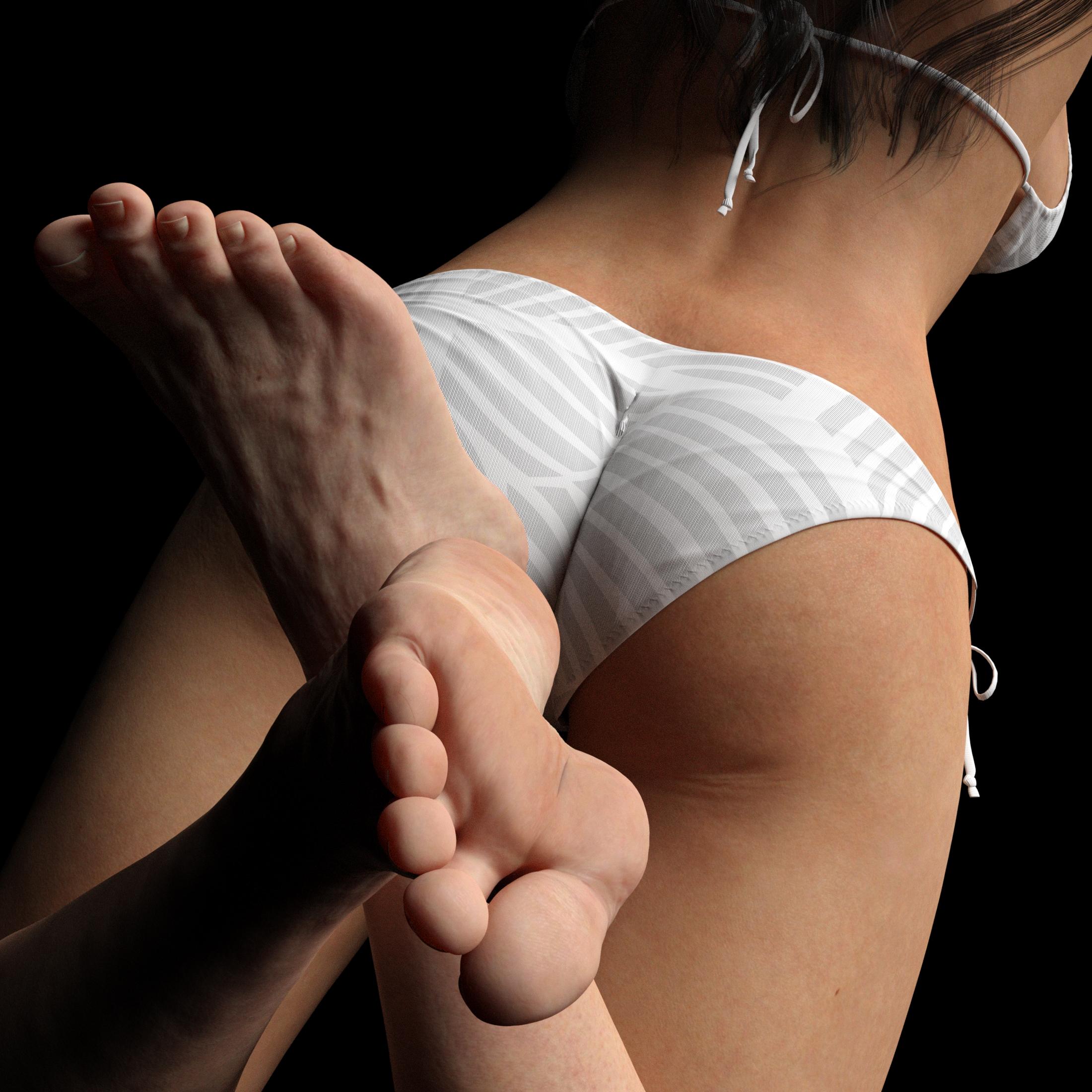
Excellent job Necriseye! I'm with you....I had to make my own foot morphs. I really don't like those grooves in the balls of the feet. Congrats to you on a job well done.
Hmm excellent job on the foot morph, particularly with the toes my friend. Glad other people are spearheading this issue with me, I felt pretty lonely for some time haha.
Is that hd detail your own or is it part of another morph? Would be great if an artist with access to the HD tool was working on this too.
Better late than never, thank you for getting back to me. Honestly that's quite interesting. The morph seems to have some merits, I'll have to look at it myself one of these days.
Looking for the most beautiful female characters there are, help pls.To be honest, I took a look at those models from those sites and they all seem to have generic DAZ female faces but with highly-stylized body proportions. Just pick whichever random character and then add up multiple breast morphs from various characters and body morph packs to make something similar.zilpha invades DAZ -PerttiA said:
No need to manually edit the *.duf files.
To fix any ill-behaving morphs (non-zero default value), do as follows;
1. Load your base figure or the developer version.
2. Select "Show Hidden properties" in the Parameters-Tab, drop down menu (right-click)
3. Zero the figure (Found in Parameters-Tab, drop down menu)
4. Memorize the figure (Found in Parameters-Tab, drop down menu)
5. File->Save As->Support Asset->Save Modified AssetsThis procedure will zero the default value in the ill-behaving morph/morphs, and while saving DS also shows you a list of the morphs it is changing.
Thumbs up for this fix :)
Update to Genesis 8 Figure Teased - Daz BlogPerhaps we're finally getting the unflatable functionality for the core figures.
Or a backwards-compatible Spuggles morph.
Or they've managed to reduce the polycount to Lara Croft original resolution
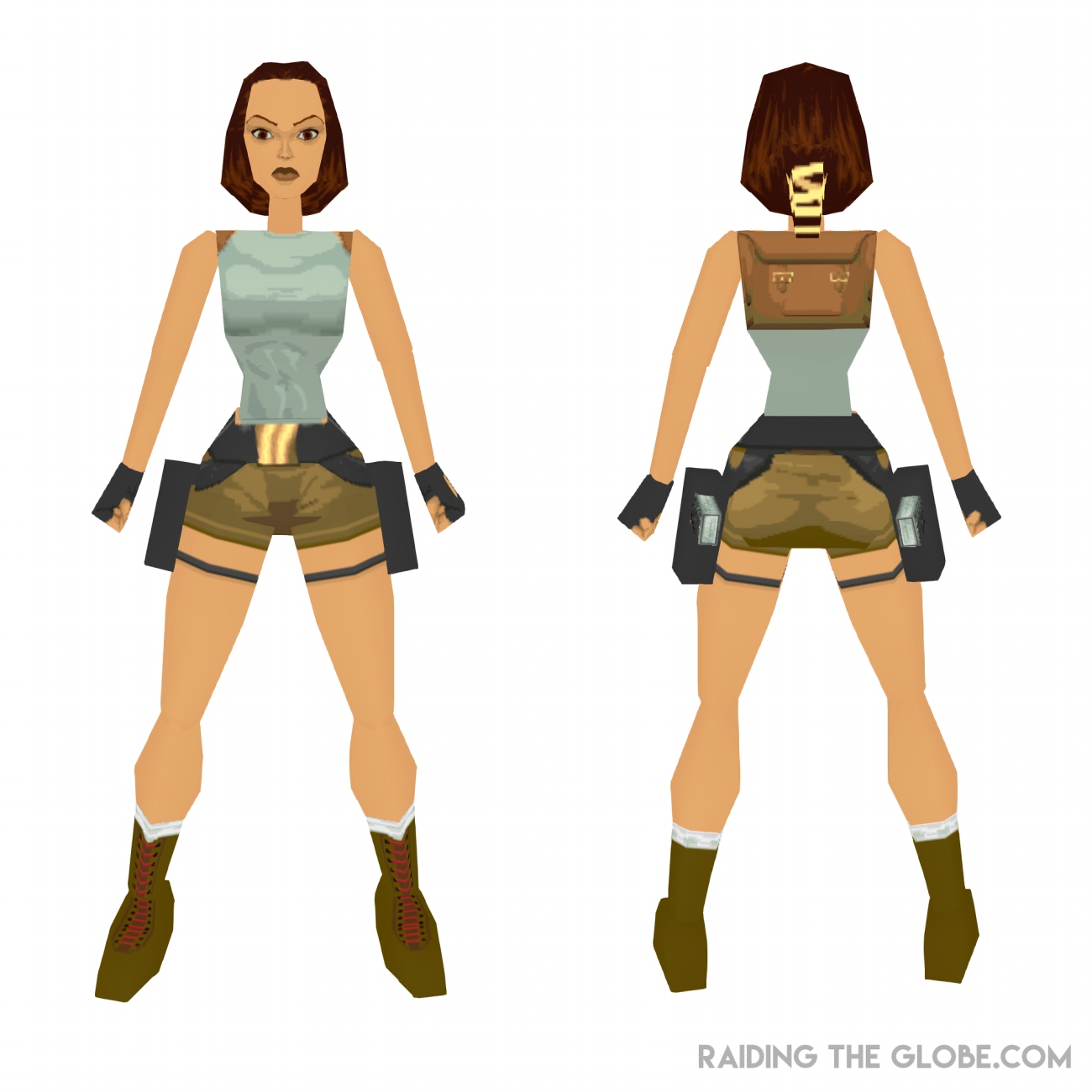
(don't mind me - just being silly in the lead-up to Christmas - finished my first term of teaching at a secondary school and the kids have been a bad influence on me, lol)
Looking for the most beautiful female characters there are, help pls.Sevrin said:
If you don't learn the basics, the best character morph and skin can end up looking like crap, and if you know what you're doing, you can make a middling character look amazing. There's no easy beauty button. A lot of people swear by bluejaunte's girls, but they're not really pin-up-ready out of the box.
What basics are we talking about? Cuz i've been using daz as a hobby for about a year now, watched a bunch of tutorials on youtube and the only thing that rings a bell to me when I hear "basics" is the 3 point light setup, I can do that but what other "basics" are there?
My morphs really slow down loadtimes while similar others seem fine -- Why?loopenox said:
PerttiA said:
The title of your post leaves one wondering...
How do you figure that your morphs are slow to load since, if you have saved them correctly, they will be read and the dials for them added everytime you open or load any G2 based figure.
They don't get read when you temporarily remove the folder with your morphs in it (for example data\DAZ 3D\Genesis 2\Female\Morphs\Author\morphpack1). In my case G2 loads blazing fast with my morph folder removed, loads alright with a couple and really chokes when I have like 15 of my morphs in it.
Well since we don't have your morphs, if you clear the log file, then load the figure with your morphpack ... then copy the log file and post it, maybe somebody reading it can determine what is going on ;-)
Looking for the most beautiful female characters there are, help pls.If you don't learn the basics, the best character morph and skin can end up looking like crap, and if you know what you're doing, you can make a middling character look amazing. There's no easy beauty button. A lot of people swear by bluejaunte's girls, but they're not really pin-up-ready out of the box.
Daz 3D is part of

Connect
DAZ Productions, Inc.
7533 S Center View Ct #4664
West Jordan, UT 84084Licensing Agreement | Terms of Service | Privacy Policy | EULA
© 2026 Daz Productions Inc. All Rights Reserved.