-
IRAY Photorealism?
charles said:
My bad 2019 looks like, had to find the original. 2020 has seemed doubly long. The chracter is Bridget HD so wasn't availble that long ago either. I hadn't heard of this Affinity Photo before but I'm looking at it now. The shadows and color variation is excellent. I haven't seen many good closeups of fingers with g8. Is part of your morph from the g8 the fingers? I see what you mean about the eyes. Maybe take the eyes from a standard g8 and replace them? I've been considering a test to replace the G8 eyes with something like this but haven't gotten to it yet. https://www.turbosquid.com/3d-models/human-eye-3d-max/747725
I have another character with problems eyes. Massively problematic eyes, where the eyesockets have a fold in them—the eyes are where my G3 to G8 transfers have failed. When I tried to zero out the eyes from the morph, it didn't work because they weren't in the right place an the eyelids didn't work right. Which means it's likely even brilliantly modeled external eyes won't work. It might be that the morph for this character (LY Jessenia HD switched to a G8 morph using Sickle Yield's technique) isn't so far removed from the character minus that morph that I can't fix it that way. I can probably change the morph tolerances to fix it. I hope :)
The hand/finger detail comes from a Daz base character HD pack, I think. The skin is also a Daz base character, one of the G8 East Asian/Polyneasian characters. I don't know about the northern European characters, but the darker skinned characters from Daz have outstanding skins, provided you don't want many "imperfections." I don't think they render/tone them in a way that shows off how much detail there is sitting there for extraction with the right lighting and postwork to bring it out*. Affinity Photo has some 32-bit-related bugs and a sometimes non-intuitive workflow coming from Photoshop, but I LOVE, LOVE, LOVE the toning workflow. You can really dial in the detail without it looking etched.
*Oh, wait, I do: I changed my shader settings a lot, in part using learnings from @JCade's work along with my own brown-skinned character expiramentation. Not that they couldn't adopt those settings.
IRAY Photorealism?charles said:
My bad 2019 looks like, had to find the original. 2020 has seemed doubly long. The chracter is Bridget HD so wasn't availble that long ago either. I hadn't heard of this Affinity Photo before but I'm looking at it now. The shadows and color variation is excellent. I haven't seen many good closeups of fingers with g8. Is part of your morph from the g8 the fingers? I see what you mean about the eyes. Maybe take the eyes from a standard g8 and replace them? I've been considering a test to replace the G8 eyes with something like this but haven't gotten to it yet. https://www.turbosquid.com/3d-models/human-eye-3d-max/747725
IMO the problem with Genesis eyes is less the geometry and more how iray handles refraction and shadows -
this model would not behave like this in iray
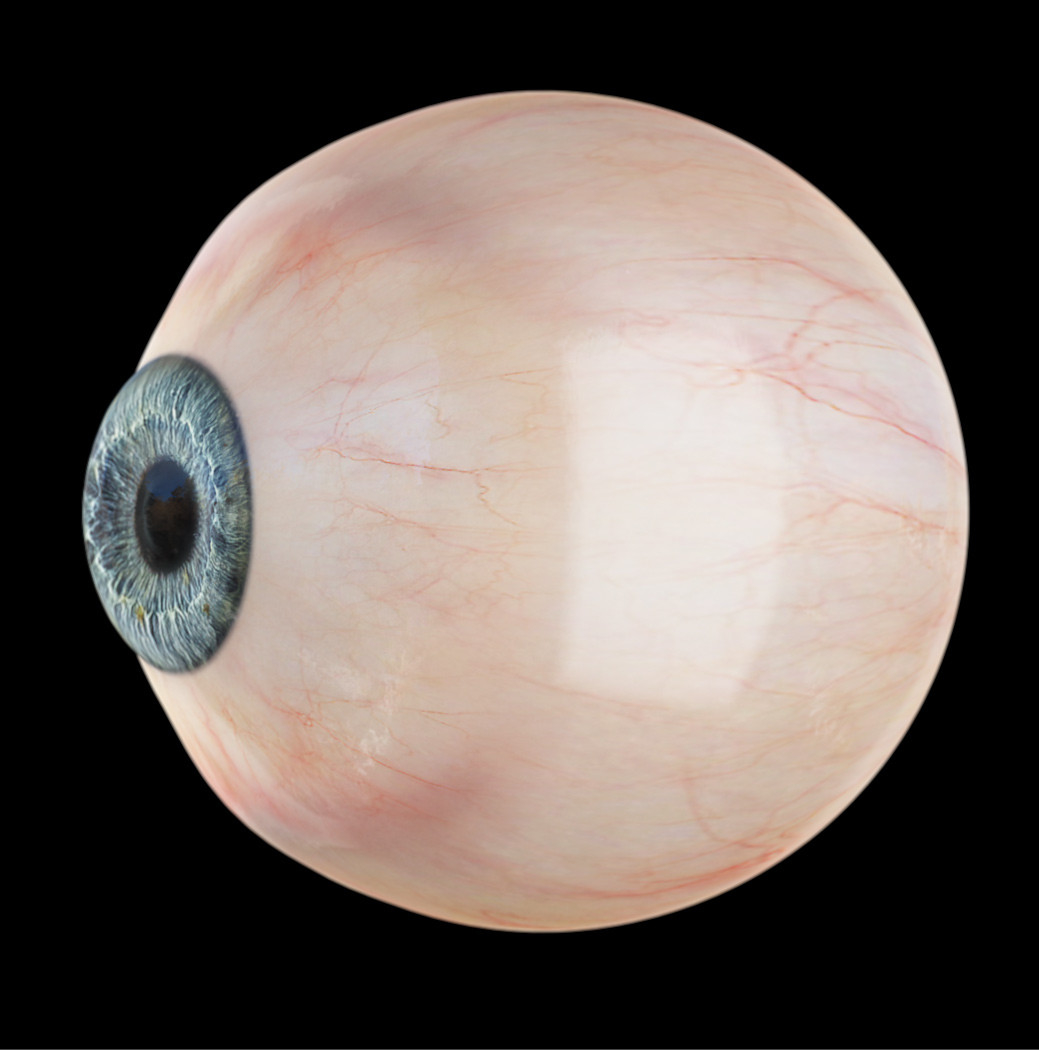
to get this sort of refraction in Iray you have to turn thinwalled off - at which point the cornea and eyesurface will cast massive shadows on the eye
thinwalled on
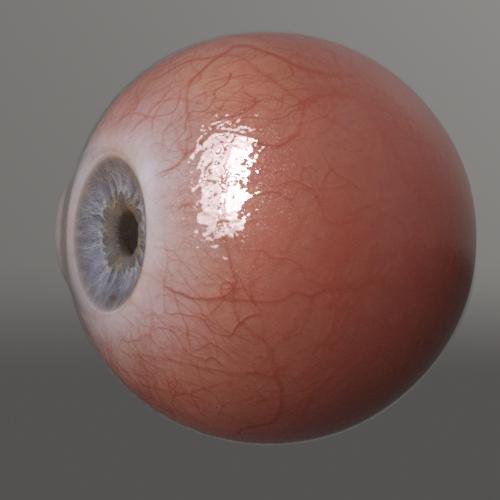
the refraction is sad
thinwalled off
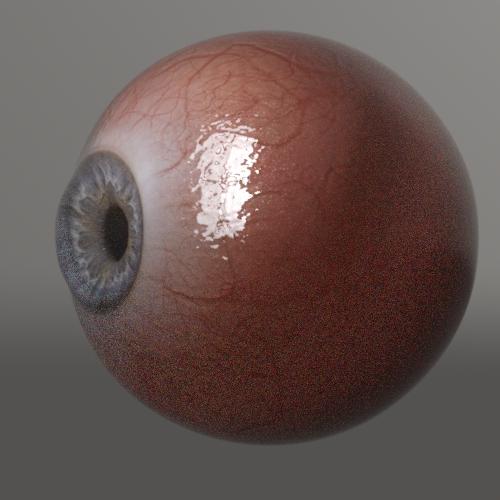
proper refraction but massive shadowing issues, and I swear it messes with the sss somehow (also it takes way longer to render)
Thinwalled on/off also effects how the light hits the iris proper refraction tends to make the eye look less flat and dead even when you're looking at it from the front
honestly I preferred the g3 eye setup with the cornea and sclera sharing a surface. You could turn thinwalled off and you got weird shadowing on the cornea but at least it wasn't also on the sclera
Props change size when parentedonix said:
This should not happen unless you transfer something from one figure to another.
parented figures should only change scale if you change the scale of the parent figure
if that's the case the problems may be that figure has looked scale parameter in which case unparenting or reparenting it will cause the size change
I often fix (lock) the scale of my (people) figures but not the props that they hold. WHat happens is the scale changes when going from unparented to parented.
IRAY Photorealism?aaráribel caađo said:


I think this is pretty convincing, especially when viewed up close. (I know @jCade has pointed out that such clean lipstick lines don't exist in nature, but they probably exist in retouched photos, including the one I used for a reference.) Alas, I've just realized the morph I made from a G3 character (or something else, but probably that) distorts her eyes so they aren't circles.
32-bit .exr's finished in Affinity Photo with a film LUT to emulate Agfa Vista 200 film and scanned ISO 100 film noise overlayed. Because that's how I roll my retro. Pose based on a Gal Gadot pose that exposed how G8 figures can't move their shoulders like famous Isreali actors. I had to crop off the weird arm distortion.
I don't mind that lipstick at all actually - I think the bit of noise you added probably helps. It doesn't look geometrially sharp (it doesn't look like you colored it by selecting the lip material zone and just tinting it)
I also really like the jewelry especially the rings
[Released] ManFriday's dForce Companion [Commercial]videoninja719 said:
is this a dforce maker or something. i am looking for something that can make a cloth from marvelous designer into dforce
With the imported item selected, Edit>Figure>Geometry>Add dForce Modifier : Dynamic Surface. Optionally you can rig it by having the item and the figure loaded (the clothing has to fit on the figure without modification) and using Edit>Figure>Transfer Utility, setting the Source to the figure and the imported object as the Target.
Shrinkwrapping a custom head to G8?prixat said:
Kelvin Jin, 'Shinteo' on DA has done a lot of conversions to G3/G8. He has recently been redoing the heads with Wrap3D.
He has a few tutorials on Youtube on his transfer methods and Wrap3D.
https://www.youtube.com/channel/UCSfrwEIKQ1Rh46HVaOniKiQ/videos
the OP ended up using R3DS's Wrap3D after all. (link)
3D Comic Book Tips And Picturesduckbomb said:
What software is everyone using? (Aside from Daz Studio)... I just got into this, and I have Photoshop, but couldn't find an easy/fast workflow for doing it in PS (maybe somebody knows of one?), so I bought a cheapo program -- Comic Creator Studio / Digital Comics Deluxe. (I have a problem with it recognizing new fonts I have installed, which makes it practically worthless... that and the fact that the panels don't seem to be adjustable. But otherwise I like how quick and painless it is for layouts and for speech bubbles, etc.)Your pages are looking great! I started using a software like that, in which I also could not change the font, however one thing you can do is simply create the pages and text you want and then replace all of the actual text in Photoshop. I know you mentioned this in a later post you made, but I just wanted to say that it is a viable way to do it if you liked the program otherwise. As for the panel options, we've only seen a few pages so I can't comment much on that, but from what I see it looks varied enough.
As for software, that's a tricky question... I used to play guitar as a day-job, and it's much like pedals and effects. There's always something new to try, and the artists you most admire will always be doing something slightly different than you. This causes you to think that you're either doing something wrong or that you could be doing something better, and the simple answer is that however you actually do it is the right way. Personally, I use PS for all post-effects and layout, and I do all of my text and bubbles in Clip Studio Paint. As far as my workflow goes, I might use 4 or 5 different programs to create my scenes, but in the end I always end up hitting the render button in DS, I always take all of my images and my masks to PS for post, and I always take that into CSP for bubbles. That way, no matter how chaotic my build process seems, I always know that at some point it gets super streamlined and easy for me to just focus on the final image.
Everybody does something different, and at the same time similar, so whatever keeps you actually creating and not sitting around wishing you were creating is the right answer for you.
Thanks for the info... yeah, I just installed CSP to try it out, and it sure is full-featured... a little too full-featured, if you know what I mean!
When I was looking through the directions for some stuff (maybe the different bubbles, or panels?) and it said "For more information, be sure to check out the 1000-page manual," that's when I went "Nope. Uninstall."
To fix my workflow, I will probably either manually fix all the text in Photoshop, or try to install this software on another machine AFTER getting the proper fonts installed first (but I fear I would also need to transfer all of my artwork for the panels, so may not be worth it)
I have also bought a Render Queue asset, because waiting 2-3 hours for some of these individual panels to render was a real killer (the photo-composited ones where I just render a single character have renders that took like 2 minutes, but the ones with multiple characters done all in a Daz environment were taking hours...)
Daz3d to Unreal Engine BridgeI see that you've added support for Environment Transfer on the version you have in the Unreal Marketplace. Will these new features be available on the free version in the Daz store?
IRAY Photorealism?My bad 2019 looks like, had to find the original. 2020 has seemed doubly long. The chracter is Bridget HD so wasn't availble that long ago either. I hadn't heard of this Affinity Photo before but I'm looking at it now. The shadows and color variation is excellent. I haven't seen many good closeups of fingers with g8. Is part of your morph from the g8 the fingers? I see what you mean about the eyes. Maybe take the eyes from a standard g8 and replace them? I've been considering a test to replace the G8 eyes with something like this but haven't gotten to it yet. https://www.turbosquid.com/3d-models/human-eye-3d-max/747725
Auto Muscle Enhancer HD [Commercial]Sigurd,
I definitely like the smaller hands and feet on this character. Looking back at some of the early postings in this forum about hands and feet sizes I built my own morph fix that resides in the AME folder. It basically scales down the hands and feet using the Hand and Feet Real World Propagating scale sliders, a small foot twist, shrug the shoulders up slightly, and then adjust arm length. You can ERC freeze and save a new property, or save it out as morph asset. Either way works equally well and saves work when starting from scratch. Mine exactly matches whatever % AME I dial in, I just dial in the fix at the same %. Depending on the character you can slide the fix in as much or little as desired.
Regarding the Filament, I too have had trouble swapping between Filament and Iray. The work around that seems to work is to go to Texture shaded in between. Don't think we are the only ones experiencing this difficulty. Seems to have something to do with Filament using the processor instead of the NVIDIA card. That is down a technical area I have no knowledge about!
I have been working and experimenting with emulating the AME on the G8F platform using 3 different vendors products! It involves a LOT of my tricks behind the curtain, but seems to be at a point where I am happy working on the G8F platform again. Might post something or some comparisons if folks are interested. TD
IRAY Photorealism?I think this is pretty convincing, especially when viewed up close. (I know @jCade has pointed out that such clean lipstick lines don't exist in nature, but they probably exist in retouched photos, including the one I used for a reference.) Alas, I've just realized the morph I made from a G3 character (or something else, but probably that) distorts her eyes so they aren't circles.
32-bit .exr's finished in Affinity Photo with a film LUT to emulate Agfa Vista 200 film and scanned ISO 100 film noise overlayed. Because that's how I roll my retro. Pose based on a Gal Gadot pose that exposed how G8 figures can't move their shoulders like famous Isreali actors. I had to crop off the weird arm distortion.
Need help saving morph/shapeI have combined several character morphs and found shapes I like and don't like. For example, I like the shape of the breast, but don't like the shape of the legs.
How do I only save the breast area shape?
Also, is there a way to use morph sliders but restrict the the morph to only part of the body. For example: what if I have base G8F and I want the hips of victoria.
Evelyn is really cute. Curious to see your test renders of her!i'm putting in a ticket for the cinnabar evelyn versus maelwenn evelyn & lynn morph load conflict. the only way i can get cinnabar's evelyn to load with the correct shape is to uninstall maelwenn's wonderful characters.
j
Merging Products TogetherGood news. IF you haven't yet used your free Christmas Gift code, I think this item was listed in the qualifying product page so one could get it free. That would explain why I cannot get it to show up in my Product Library 'cause that section of the server is probably a little busy right now.
https://www.daz3d.com/genesis-8-cross-figure-resource-kit I think this is what you want. {on sale too}
It's meant for use to convert clothing items between the figures.
However, female selected, over on the Parameters Tab there is the "Transfer to Genesis8Male" and there you go. One male with the female geograft still attached.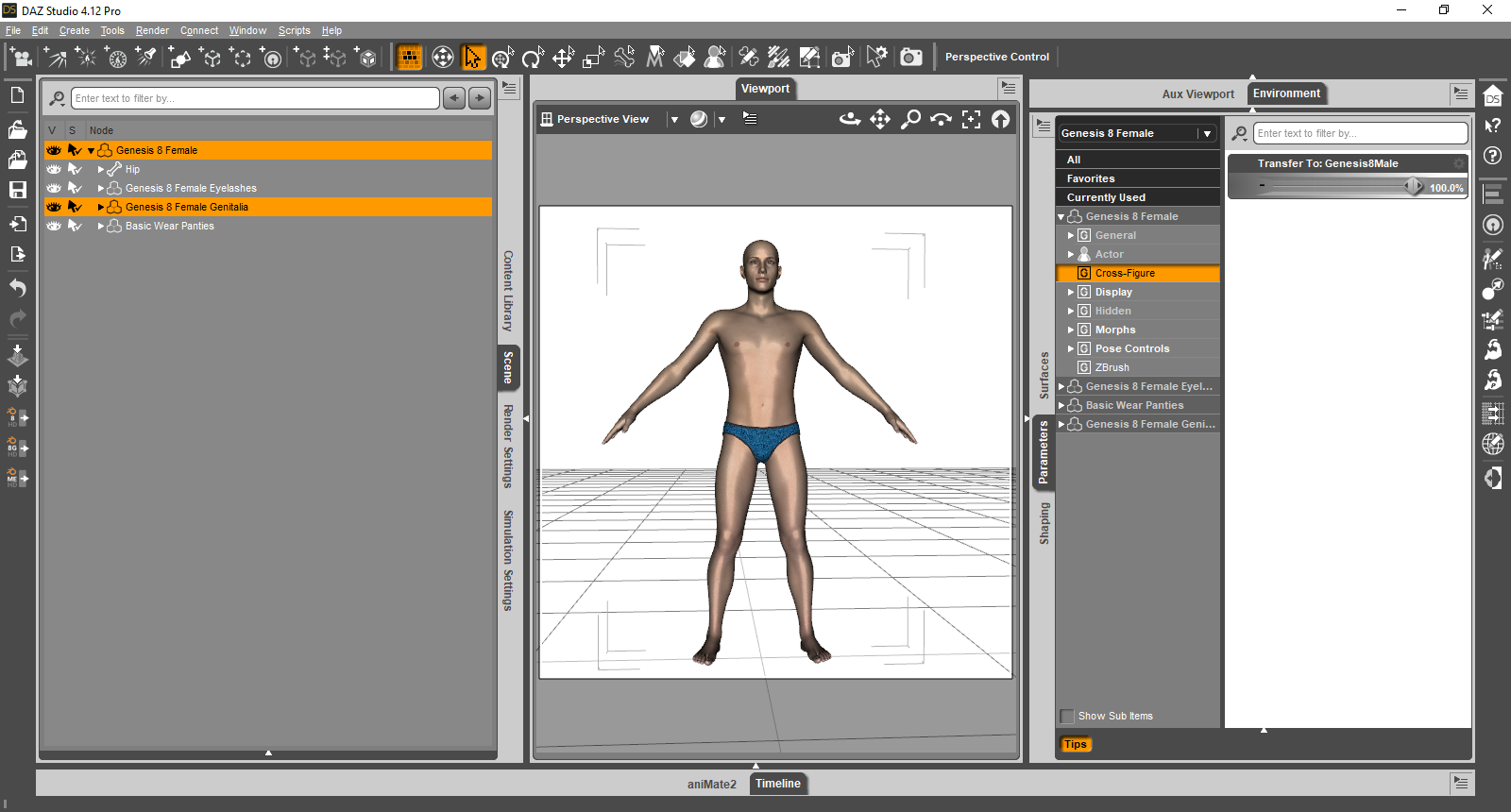 Props change size when parented
This should not happen unless you transfer something from one figure to another.
parented figures should only change scale if you change the scale of the parent figure
if that's the case the problems may be that figure has looked scale parameter in which case unparenting or reparenting it will cause the size change
G2 clothes convert to G8felis said:
martin36 said:
Thanks guys for reply. I really appreciate. I messing with but still have problem with... see attached pics. This is after transfer utility on g2 female figure :(
That is some rather hard poses to fit to without corrective morphs.
If it fits in the default pose, you could try add dForce to it, and probably a weight map to handle areas where dForce is acting weird.
 My models doesn't look like they should
arnon said:
One more question, as I found the misschief morph causing this and reset it to zero:
Still, whenever I start from a blank G8F the morph is always already dialed in. The morph overwrote the vanilla female figure. How can I get her back without resetting the values to zero?
Unistall the product/character that is causing the problem, its faulty.
Exporting V4 character to G8FThe best way imo, is to use Blacksmith Pro (or Texture Transformer, which is also part of Blacksmith Pro) from Rendo; I don't think it's the cheapest. It actually converts the textures over to the G3 UVs, which are compatible with G8, whereas the other method I'm aware off creates patches - if my understanding is correct.
I've used it many times.
I use (if I also want the shape), GenX and its plugins to transfer the morphs to G3, then XTransfer for G3 to G8.
Transfering them over is the only reason I bought a good number of V4, G1 and G2 products since the advent of Texture Transformer.
G2 clothes convert to G8martin36 said:
Thanks guys for reply. I really appreciate. I messing with but still have problem with... see attached pics. This is after transfer utility on g2 female figure :(
That is some rather hard poses to fit to without corrective morphs.
If it fits in the default pose, you could try add dForce to it, and probably a weight map to handle areas where dForce is acting weird.
No Pose Controls on Import [SOLVED]Same problem! No Pose Morph tag on import. Any solutions already?
Daz 3D is part of

Connect
DAZ Productions, Inc.
7533 S Center View Ct #4664
West Jordan, UT 84084Licensing Agreement | Terms of Service | Privacy Policy | EULA
© 2026 Daz Productions Inc. All Rights Reserved.