-
Help with Installing Products so they show in Smart Content
Leana said:
If there's no metadata included in the product install files then it won't show up in smart content when installed, that's normal. The metadata you manually created after install are not part of the install files, so it's also normal they don't appear when you reinstall the product.
It is possible to export the metadata you created so you have a backup you can reimport: https://www.daz3d.com/forums/discussion/comment/990669/#Comment_990669
I would suggest looking at this utility if you want to process a lot of files and create installers with metadata you can share: https://www.daz3d.com/content-wizard
The metadata IS there. I created the dsa and dsx files in Runtime/Support/ and added all the files to it as either functional assets or support assets as well as creating the manifest and supplement files. The zip file has to be formatted very specifically for DIM to recognise it, but it does and it installs without errors, but it doesn't seem to recognise or read the dsx file. Initially, I tried using a custom store (after adding the custom store to the database) and that didn't work, so I also tried using DAZ 3D as the store as well as using LOCAL USER. Nothing works. The SKU/ProductToken is a unique 8-digit number and I use one of the randomly generated GlobalIDs.
Help with Installing Products so they show in Smart ContentIf there's no metadata included in the product install files then it won't show up in smart content when installed, that's normal. The metadata you manually created after install are not part of the install files, so it's also normal they don't appear when you reinstall the product.
It is possible to export the metadata you created so you have a backup you can reimport: https://www.daz3d.com/forums/discussion/comment/990669/#Comment_990669
I would suggest looking at this utility if you want to process a lot of files and create installers with metadata you can share: https://www.daz3d.com/content-wizard
I Accidentally Deleted ALL the Smart Content MetadataWoo hoo! I reset the database and reimported the metadata! It worked! Thank you all for your help!!
Next time, I'll think twice before I try to declutter by categories tab.
THANK YOU THANK YOU THANK YOU!!
I Accidentally Deleted ALL the Smart Content MetadataI don't understand why it is happening.
The only suggestion I can come with is to first reset the database, and then re-import all metadata. It might be that your CMS somehow has gone corrupt.
Looking For List of Content Types for Studio and Poserfinding models on daz 4.22 prorichardson_laura14 said:
Hello,
ive had a look both on and off the programme for the files but we have had no luck at all. even my fiancee has had problems finding the files aswell. if someone could please provide a picture tutorial then that would be great
thank you
I manually install Renderosity content in Daz Studio (4.21) with some frequency. Hopefully, you still have the content’s zip files(s). If so, either extract the content into a new folder on your desktop or double click into the zip folders to explore where the folders were designed to be placed Once you know that, you can find the files in Daz Studio’s mapped folders under Das Studio Formats, Poser Formats, etc. in your Content Library. Attached is a screen capture of my Content Library.
Once you know the place(s) where the content is in your Content Library, navigate there in the Content Library. Right click on the folder where the content is located and select Create a Product from (second atttached image). Type in your desired name and click Accept. If the content is in more than one location (Figures, Materials, Pose, etc.), then repeat the Create a Product from process with each location. Once you have created a new product, then for each subsequent create product action for the same product name, type (or better yet, copy and paste) the product name that you created the first time into the Product Exists popup window and then click Yes. When done, you will have the product in your Products library and in Smart Content.
You’ll want to add a thumbnail for the product in your Daz Studio's Runtime/Support folder as well as edit/add metadata for Type(s) such as Prop, Hair, etc. and, separately, assign Categories to product assets.
Smart Content: filter by context doesn't show Wardrobe with Genesis or G8F selectedElor said:
I forgot, it did solve the problem with G8F, but is it normal for Genesis to not have any metadata ?
It should have "Genesis" as comptability base. If relevant you could also reinstall Genesis Starter Essentials.
Smart Content: filter by context doesn't show Wardrobe with Genesis or G8F selectedI forgot, it did solve the problem with G8F, but is it normal for Genesis to not have any metadata ?
Smart Content: filter by context doesn't show Wardrobe with Genesis or G8F selectedFollowing your advice did solve the problem, thank you.
According to the PA, who answered someone with the same problem in 2021, it was not something up his alley. Either no one bothered to open a ticket since 2021, or it's still waiting for a fix since then. Regardless, I opened one ticket too to ask Daz if it is possible to fix the product to avoid it messing with metadata it shouldn't change.
Smart Content: filter by context doesn't show Wardrobe with Genesis or G8F selectedBad metadata - let the vendor/store know, but in the emantime reinstall the Genesis 8 Starter Essentials.
I Accidentally Deleted ALL the Smart Content MetadataAssuming that you are using DIM to install, if you then in DIM click re-install, will that bring the metadata back?
I'm having problem with Importing obj from Marvelous Desginer as MorphJames said:
@crosswind
If you had time, could you see wether the exported obj from MD is back to quad or stay in tris.
I think the reason why the facet number is almost/twice the original, is due to the triangulation.
Could be in your MD version, somehow on export, the obj is back to quad.
Cos if it stays in tris, daz shouldn't/won't accept it, due to the difference of polygon number.
On my side, the exported obj from MD is in tris.
The exported OBJ from MD is always with triangulated mesh if you don't quadrangulate / retop it. In fact, the moment when you import garment OBJ into MD, it'll be trianglated because it's the prerequisite of using MD's simulation. So that's why the quadrangulation should be always done after simulation...if you make garments in MD.
For such a case of importing simulated OBJ back to DS as a morph, what matters is vertex count rather than polycounts.
Besides, we forgot to ask... what was DS version that you used...
I Accidentally Deleted ALL the Smart Content MetadataNot sure how you have deleted the metadata.
But have you tried in the Smart Content tab, click on the 3 bars in the corner and select Content DB Maintainance > Re-import metadata.
You can select that it shall reimport from all products. It will take a while.
I Accidentally Deleted ALL the Smart Content MetadataI was trying to organize the content I bought from a third party vender and I accidentally deleted the default categories in the categories tab. In so doing, I accidentally removed Smart Content's ability to organize the products I bought in the DAZ store automatically. Is there a way that I can restore this data? I tried unistalling DAZ and reinstalling it. This did nothing. Now my projects take hours to complete beacuse I have to hunt down the products individually. If anyone has a solution other than starting again from scratch, it would be appreciated. Thank you in advance!
Adding New ShadersADDING THE NEW SHADERS (Step 1)
Select the "CONTENT LIBRARY" pane,
Select "Daz Studio Formats"
Select "My Daz 3D Library"
Select "Shader Presets"(Now you need to select or create a directory where you want to dop your new shaders into)
Select an existing file or creat a new file for your new shaders.To Create A New Folder...
Right click "Shader Persets" and select "Create A Sub-Folder"
Name the new sub-folder and Accept.
Right click the new folder and select "Browse to Folder Location"To Use An Existing Folder...
Right click the existing folder and select "Browse to Folder Location"Select and drag all the new, zipped Shader files that you're adding to Daz, into this folder, Accept it and refresh the main directory.
(This part puts the shaders into Daz but not yet into the shader surfaces directory)
IMPORTING THE SHADERS TO THE "SURFACES" PANE (Step 2)Open Content Library tab
In Daz Studio Formats directory open My Daz 3D Library
Open "Shader Presets" directory
Select the file that has the shaders in it that you want.Select SMART CONTENT tab
Select the FILES tab at the top
Select "SHADERS" (or any existing catagory) from the menu
Select the catagory you want to add the new shaders too.Now left click. hold and drag the new shader file(s) in the CONTENT LIBRARY tab into the SMART CONTENT tab pane you selected as the destination.
"Asign Metadata" window will appear. Adjust as desired or select "Accept"
(The files in the Content Library should now reflect "Shader" status)Notes:
The easiest way I found to do this required moving the CONTENT LIBRARY tab on the left side of the screen and the SURFACES" tab on the right. Both panes could be open simultaneously and be moved back again after the process was completed.I'm having problem with Importing obj from Marvelous Desginer as Morphsometimes if a program doesnt like a specific obj for whatever reason, i use blender as intermediate converter. i.e., import to blender and export out again..
E.g., had some problems with an obj directly from daz not loading into Faceform, but putting the same obj into blender and then re-exporting it, it then loaded into Faceform fine.please help with lyered image issueLayered Images are created in daz Studio, using the Layered Image Editor, they are not a way to import layered image files from another application - which sounds to be what you are doing. Export just the tattoo as an image, and second image as a mask (white for the tattoo, black for bare skin, shades of grey for the transition) then select the Layered Image Editor option from the image picker menu in Daz Studio, add a layer for the tattoo into which you load the map and a second layer, which you set to mak, into which you load the mask image.
question about creating clothesThank you very much! Here is what it looks like in A pose:
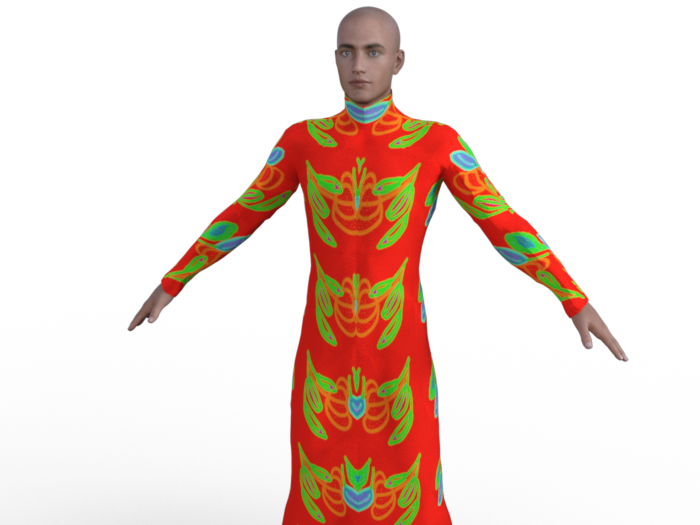
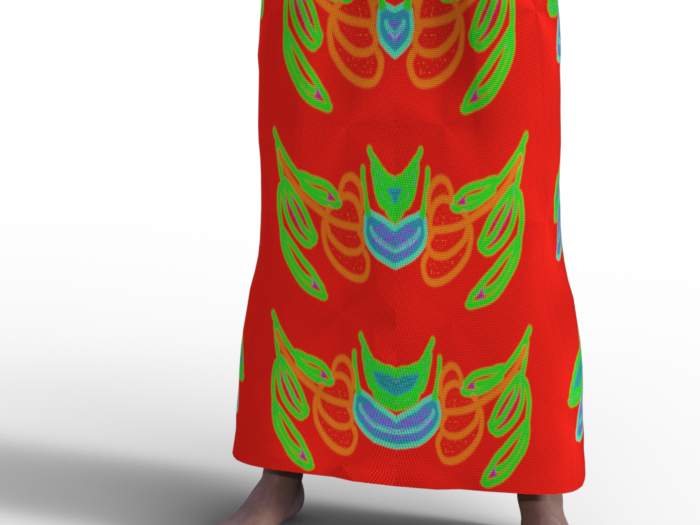
I is needed to zoom to see the normal map effect. Even here, it may be difficult to see...
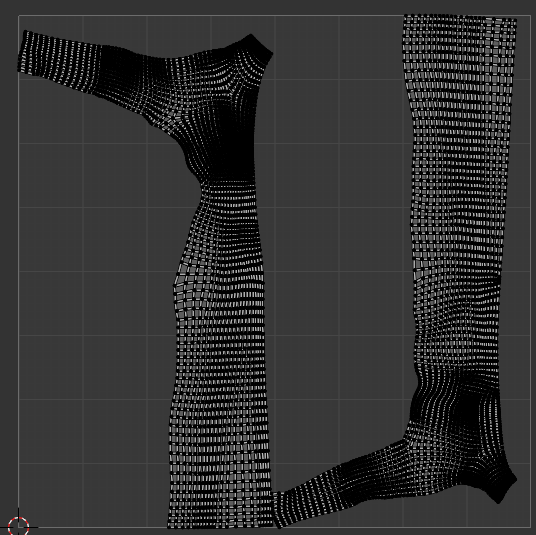
Here is screensjots og thje geometry and tghe UV (I din't know why, but I can't see the UV in DS, only in Blender):
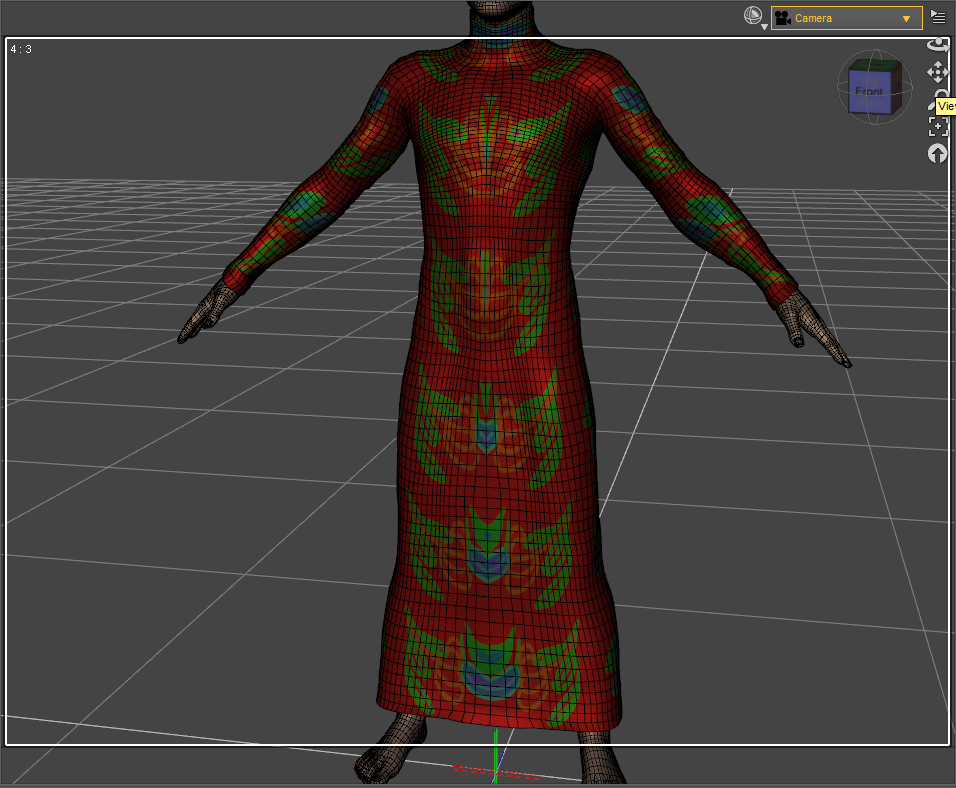

The "broken" part looks like a rigging issue, that might be as simple as hitting it with the smooth brush to correct.
You mean I should import back the cloth to Blender with the pose and correct the default directly on this pose? After that, would I have to import back to DS on this pose as a morph with Morph loader Pro?
1. With poses, you need to necessarily fix corrective morphs on the dress, like the "broken issue / mesh deformation" issue in your 1st screenshot... when Collar / Shoulder bend up, and/or add dForce capability as needed.
Could you tell me how to create a corrective morph, please? I never did that, so I don't know haw it wrks... For the Dforce, I tried to add Dynamic Surface, but it didn't fix the issue. What should I have to do?
3. As for the texture issue, where did you do UV Unwrap... Blender ? Better show its UV map, as well as how the texture looks in A-Pose...
For now, i didn't unwrap by myself, I let the default UV in Blender. More precisely, I don't know if it can help, but I originally create this cloth for MakeHuman, from the MakeCloth helper by combining the t-shirt and the skirt, and making some changes. But in fact, I had never been able to make it work in MH because the mesh was broken (much more than that!) already in the T-pose, and I had no knoledge enough to fix it. To use it in DS, I used the Wrap lattice node to adapt the shape to G8M (that is why I first used a T-pose on G8M). And to obtain the A-pose, I re-used again a lattince node to convert T-pose into A-pose. After that, I used a brush node in Wrap and I sculpted a bit in Blender to fix some issues from the conversion...
I don't know if it could explain the issues that I have now in DS...
Besides, I recommend a tutorial series from Mada: https://www.youtube.com/watch?v=Ii16tUmLzD8&list=PL2SdKrOTXeXA1qMgNE84AsM8_Wq63gOBF You better first of all understand the typical workflow of make clothing in DS...
Edit:
I am testing different pose, and I can see that there are iisues for many of them; for example:
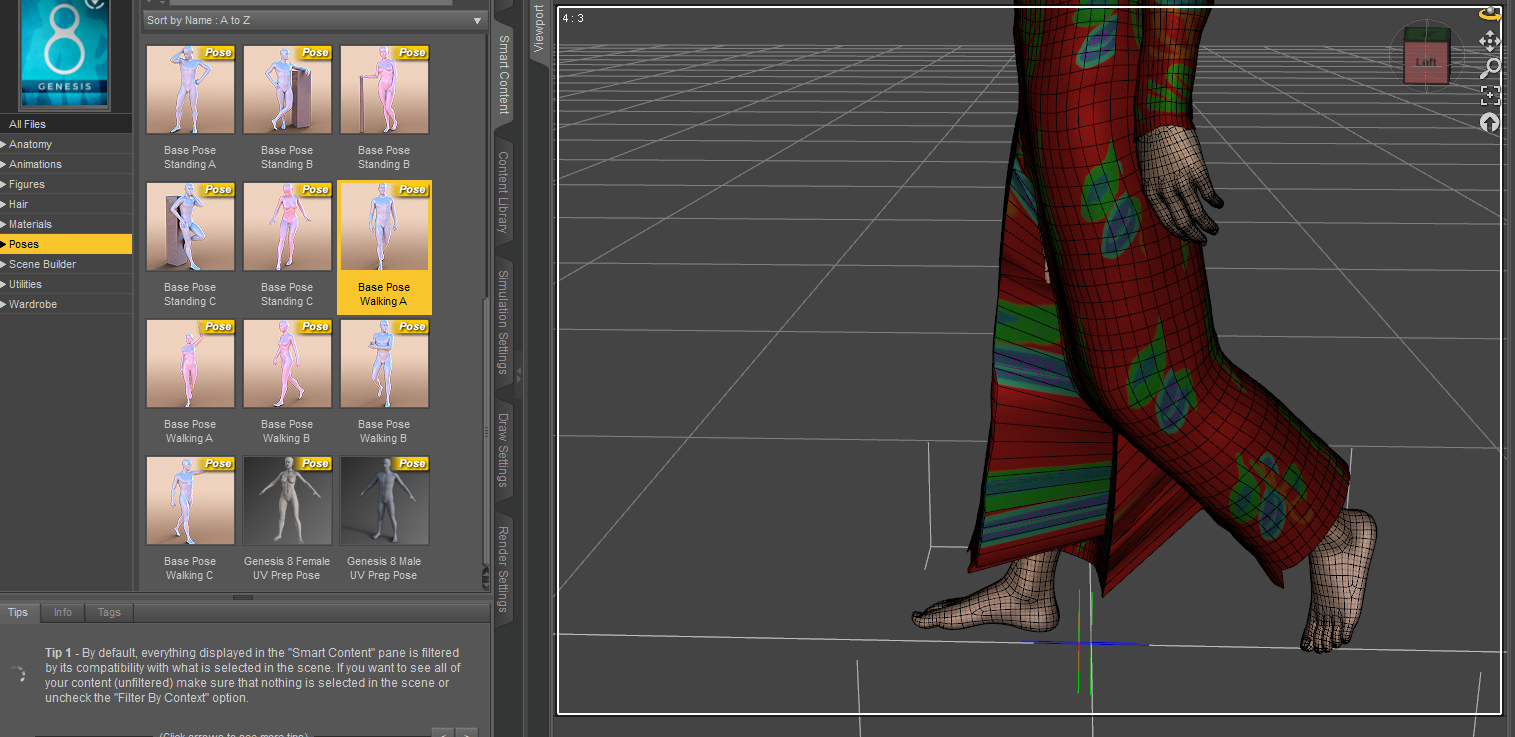
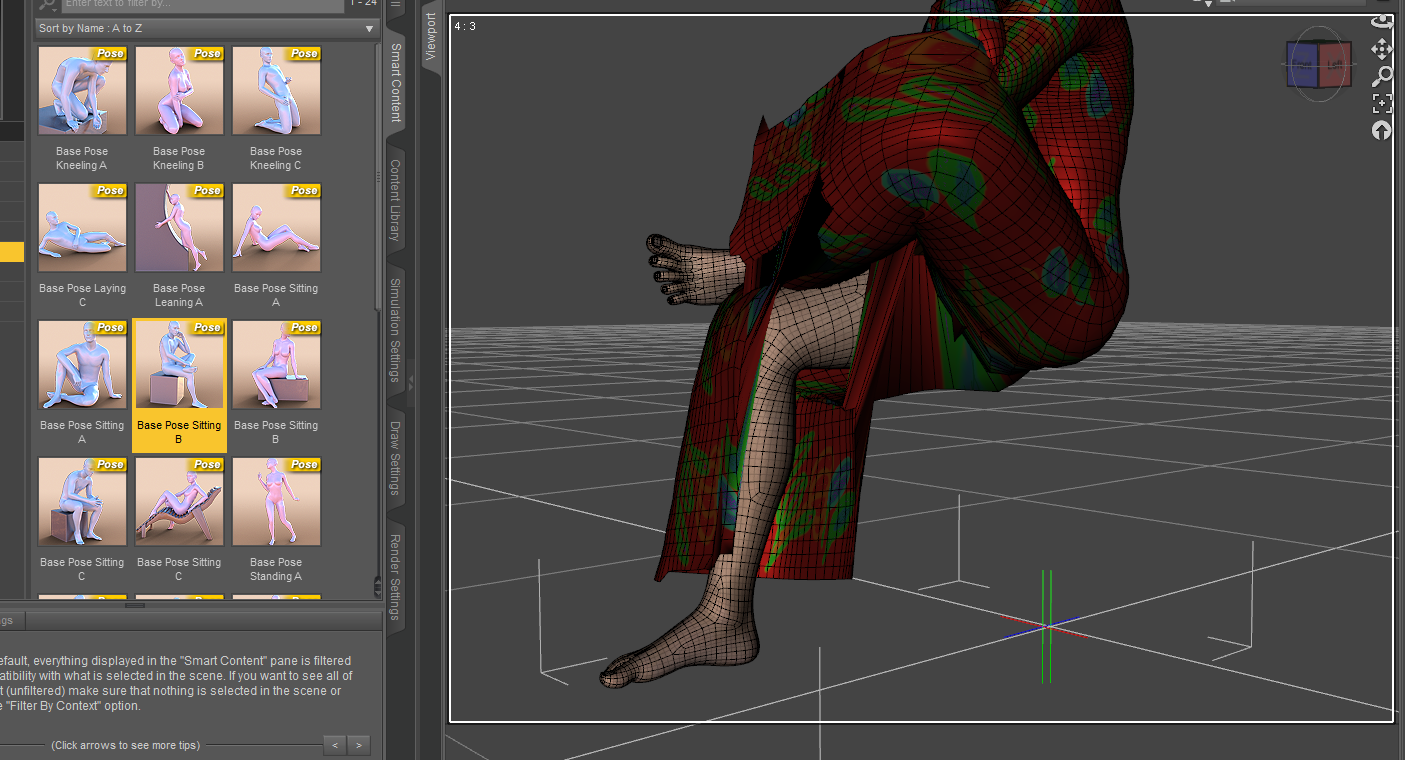
Do you think that i should create one corrective morph by pose, or would it be possible to fix all the issues in the same time?
Thank you very much! I will look at here!
I'm having problem with Importing obj from Marvelous Desginer as MorphDoing export from daz and import back (morph loader) immediately results no problem.
-----
The number of vertices of obj imported from MD to DAZ, is the same to the original.
The only difference is the number of total faces, which is double as the error suggested.
I'm having problem with Importing obj from Marvelous Desginer as MorphI realise the morph loader error mentions facet count, but does facet count even matter? I thought all that matters was vert count. (Edit: I tested by exporting primitive to blender and triangulating it and morphing it and it still loaded into morph loader pro, so triangulation is not inherently an issue)
Export obj from Daz
Import the exported obj into Daz
Check vert count in Node info - Are they the same? If not, you did something wrong.
If same, proceed to import into MD.
Immediately export from MD
Import the obj into Daz
Check vert counts in Node info - Are they the same?
Daz 3D is part of

Connect
DAZ Productions, Inc.
7533 S Center View Ct #4664
West Jordan, UT 84084Licensing Agreement | Terms of Service | Privacy Policy | EULA
© 2026 Daz Productions Inc. All Rights Reserved.