-
What can we do to improve the long load times of characters?
Richard Haseltine said:
If you hide morphs then they aren't read adn so DS doesn't take time setting up the channels and links - your solution works because the time is consumed as I stated, they are not conflicting accounts of the same phenomenon.
Do agree, but the point is they shouldn't be trying to calculate those links in the first place, if unused. Maybe I'm just misunderstanding how morph injection used to work and we're both saying the same thing.
It's almost like DAZ decided to prioritize pre-calculation of said links, to make turning morphs on/off quicker for the end user. Hence the move away from manual injection & power loader. But as the number of available products and content libraries grew in size over time, the decision began to penalize load times (as well as posing and animation). Maybe only significantly penalizing a small number of users with very large libraries.
What can we do to improve the long load times of characters?grimulkan_9cfbd329bc said:
volpler11 said:
Did some more poking.
The cache file is basically most of the files in "data\DAZ 3D\Genesis 8\Female\Morphs\...." mashed together with one important exception. The bulk of the data in those files are of two types: morph vertex delta and formula. The important exception is that morph vertex deltas are not included in the cache file and is loaded on demand when you change the slider. Formula data still make into the cache and can slow things down significantly.
This lead to one important observation: the load time is proportional to the number of files in the morph folder but not necessarily file size. If the file contain large amount of delta that is not included in the cache it will be fast to load. On the other hand if the file contain lots of formulas it will be very slow to load.
Edit:Also the morph file could be compressed which would make it smaller than it actually are.
This is gold (as is your thread)! Thanks.
When I switch between morph folder setups using my tool, I don't really see a lot of time being spent re-creating the cache. Maybe it's because the morphs are still expected to "be there", since they're just hidden, and the cache isn't modified? So maybe DAZ just doesn't bother loading the vertex data or truncates formula calculation if the file is hidden. Or maybe cache creation is only like 20% of the total load time so I didn't notice.
But your caching explanation explains why my 2nd G8F load in my original test loaded faster than the first. Also, I was parsing the wrong file (log) to try and figure load times, will try again with the cache file. Did someone write a tool for this once?
PDSmith said:
@Zilvergrafix I did the same method you used, then tried something else and found it works just as well and just as fast.
I right click on the individual morph folders, and in the parameters section I change the folder to hide, then apply. all folders and files are now hidden. (how many finger nail morphs do we need? )
Yup, that's what we've been discussing :) It's all a workaround though, I do think something like the old morph injection (like Taoz mentioned) from DAZ's side is the real way to fix this. Or better yet: follow some kind of tree structure to decide when to load morph vertex data or calculate formula relationships. If the "head" of a morph tree is unused, no need to read or calculate any of its children. This is basically what my tool does offline.
The downside is that the computer probably needs to do some work when you DO want to use a new (potentially complex) morph in your scene. I'd gladly pay that price and I think most people with a large library would.
Richard Haseltine said:
That is what is happening now. It's setting up the channels and links that make it work that takes the time.
I think it's still doing more than it needs to for unused morphs. If not, my simple script wouldn't fix the problem as easily as it does! It also does more than it needs to AFTER loading, like just rotating a limb or loading poses (which is also amplified by having autofollow items). Those problems disappear if the unused morph folders are hidden.
Quick summary of what I found in this thread:
- Turning of some options (like autofit) can reduce manipulation & animation/pose load times as though all those unused morphs weren't present, though it does not impact scene or figure load times. There's a script uploaded to do/undo that automatically. There's also an alternative workaround using a hidden fit clone which has the same effect (and doesn't need constant fitting/unfitting).
- Hiding morph folders is a non-destructive way to not load them; speeding up scene/figure loads in addition to the above. The 2nd (external) script I referred to analyzes the DUF scene file and automatically hides/unhides morph folders that are unused/used.
If you hide morphs then they aren't read adn so DS doesn't take time setting up the channels and links - your solution works because the time is consumed as I stated, they are not conflicting accounts of the same phenomenon.
Transferring CUSTOM morphs from G3 to G8?Sorry, I checked and I can't even transfer regular morphs... I thought I used a method that worked before, I fav'ed all current shaping parameters, am I missing something here?
Daz Studio 4.16[.0.x] Pro, General Release! (*UPDATED*)Kerya said:
Richard Haseltine said:
Ivy said:
Imago said:
Robinson said:
4.15, "Preparations toward migration to a considerably newer version of the application framework" - I really like the sound of that. Big job I know but not intractable.
I really hope this also means some bug fixes, especially for the animation tools.

Translations ~ Be prepared for Daz Studio to break more thing as they tell you its new and improved. Adding that transferring content that works currently , that something, somewhere, in the studio app break it, so you will not e able to use said content without buying some upgrade morph set, shader's, plugin's,autofit-tool, auto-rigger's,graphic card, computer etc,etc etc. Past experience has taught has that, but there is some good examples as reminders.
My Motto. "Hope for the best, but expect the worst, and back up everything just in case."

Daz is, by necessity, going to break plug-in in a forthcoming release to adderss compatibbility with Big Sur (and perhaps to lay the groundwork for other desired features, such as a scalable UI). However, the non-beta versions of DS have not broken plug-ins (that's since 4.5) and DS 3 did not break plug-ins during its run, nor did the later stages of DS 2 (barring the odd bug, which was fixed in every case). Content does not usually break, and if irt does (as with some shaders recently) the issue is fixed as soon as practical (sometimes Daz is hsotage to third parties, such as nVidia - as far as I know that is true of the current issue with volumetixcs and transparency).
Let's hope they give us permanent copies of the last version that is able to use the old plugins. A permanent copy of a working version ...
Sigh
There's a good chance they'll do what they did for DS4: switch to a new major version of DS, and keep the previous version available in Product library. Especially since they know some plugins can't be updated.
Transferring CUSTOM morphs from G3 to G8?Why wouldn't you be able to transfer them via transfer utility? The way you created your morphs is how all "official" morphs were created after all.
The Official aweSurface Test TrackMustakettu85 said:
wowie said:
The solution for an ear fix is an ear morph. Although that can be a potential jungle if you have lots of head/ear shapes you want to use. Didn't Mustakettu did an ear morph a while back? I forgot what was it for, probably Genesis.
I was working on it, but let's just say the low poly count in the ears kept on getting in the way. Should be a breeze for those who can work at least one subdiv level higher.Hmm, maybe I should file a feature request to update Genesis1 ears


 ? Hmm now thinking in terms of displacement...What can we do to improve the long load times of characters?
volpler11 said:
Did some more poking.
The cache file is basically most of the files in "data\DAZ 3D\Genesis 8\Female\Morphs\...." mashed together with one important exception. The bulk of the data in those files are of two types: morph vertex delta and formula. The important exception is that morph vertex deltas are not included in the cache file and is loaded on demand when you change the slider. Formula data still make into the cache and can slow things down significantly.
This lead to one important observation: the load time is proportional to the number of files in the morph folder but not necessarily file size. If the file contain large amount of delta that is not included in the cache it will be fast to load. On the other hand if the file contain lots of formulas it will be very slow to load.
Edit:Also the morph file could be compressed which would make it smaller than it actually are.
This is gold (as is your thread)! Thanks.
When I switch between morph folder setups using my tool, I don't really see a lot of time being spent re-creating the cache. Maybe it's because the morphs are still expected to "be there", since they're just hidden, and the cache isn't modified? So maybe DAZ just doesn't bother loading the vertex data or truncates formula calculation if the file is hidden. Or maybe cache creation is only like 20% of the total load time so I didn't notice.
But your caching explanation explains why my 2nd G8F load in my original test loaded faster than the first. Also, I was parsing the wrong file (log) to try and figure load times, will try again with the cache file. Did someone write a tool for this once?
PDSmith said:
@Zilvergrafix I did the same method you used, then tried something else and found it works just as well and just as fast.
I right click on the individual morph folders, and in the parameters section I change the folder to hide, then apply. all folders and files are now hidden. (how many finger nail morphs do we need? )
Yup, that's what we've been discussing :) It's all a workaround though, I do think something like the old morph injection (like Taoz mentioned) from DAZ's side is the real way to fix this. Or better yet: follow some kind of tree structure to decide when to load morph vertex data or calculate formula relationships. If the "head" of a morph tree is unused, no need to read or calculate any of its children. This is basically what my tool does offline.
The downside is that the computer probably needs to do some work when you DO want to use a new (potentially complex) morph in your scene. I'd gladly pay that price and I think most people with a large library would.
Richard Haseltine said:
That is what is happening now. It's setting up the channels and links that make it work that takes the time.
I think it's still doing more than it needs to for unused morphs. If not, my simple script wouldn't fix the problem as easily as it does! It also does more than it needs to AFTER loading, like just rotating a limb or loading poses (which is also amplified by having autofollow items). Those problems disappear if the unused morph folders are hidden.
Quick summary of what I found in this thread:
- Turning of some options (like autofit) can reduce manipulation & animation/pose load times as though all those unused morphs weren't present, though it does not impact scene or figure load times. There's a script uploaded to do/undo that automatically. There's also an alternative workaround using a hidden fit clone which has the same effect (and doesn't need constant fitting/unfitting).
- Hiding morph folders is a non-destructive way to not load them; speeding up scene/figure loads in addition to the above. The 2nd (external) script I referred to analyzes the DUF scene file and automatically hides/unhides morph folders that are unused/used.
What can we do to improve the long load times of characters?@Zilvergrafix I did the same method you used, then tried something else and found it works just as well and just as fast.
I right click on the individual morph folders, and in the parameters section I change the folder to hide, then apply. all folders and files are now hidden. (how many finger nail morphs do we need? )
Now to the test...loading characters don't error out, but the catch is you can't change those morphs on characters since Studio appears to not know what to do with the files since it can't see the file. From what I've seen here in the forum that is due to the DUF tells Studio where files are located during the load process but that's it.
The one folder I do not hide is the DAZ3d folder.
Heck in one test, I even hid the entire contents of the morph folder but the DAZ3d forlder and G8F and G3F each loaded in roughly 4 seconds and all my premade figures loaded in 8 or less seconds. I was originally up to 45 seconds for g3f load times, and 1 minute 34 seconds for g8f. and that's with nothing loaded, just the base figure. Load times with created figures would take up to 3 minutes.
Garage logic lesson learned here...
Unhide folders to make character.
Hide folders to later use them.
Late edit: This all works fine and great but you need to make sure you've turned on the option in Windows Explorer to see hidden files.
The completely gratuitous complaint threadSpent time manually re-creating some of the morphs on Dregon when moving him into Cinema. Obviously some weighting issues to be fixed, and I don't know why DAZ Studio's exporter/Bridge insists on forcing all joints into the same alignment though, which is VERY very veeery not-good when it comes to things like creature legs and arms or wings. Re-aligning every joint by hand sigh. I guess it's better than rigging it all from scratch though, but I wish it wouldn't do that. The Bridge now supports R23 natively but it also borked the Morph export :/
Would have had to do this one by hand either way though, since I only wanted it to affect the chest, not his whole body.
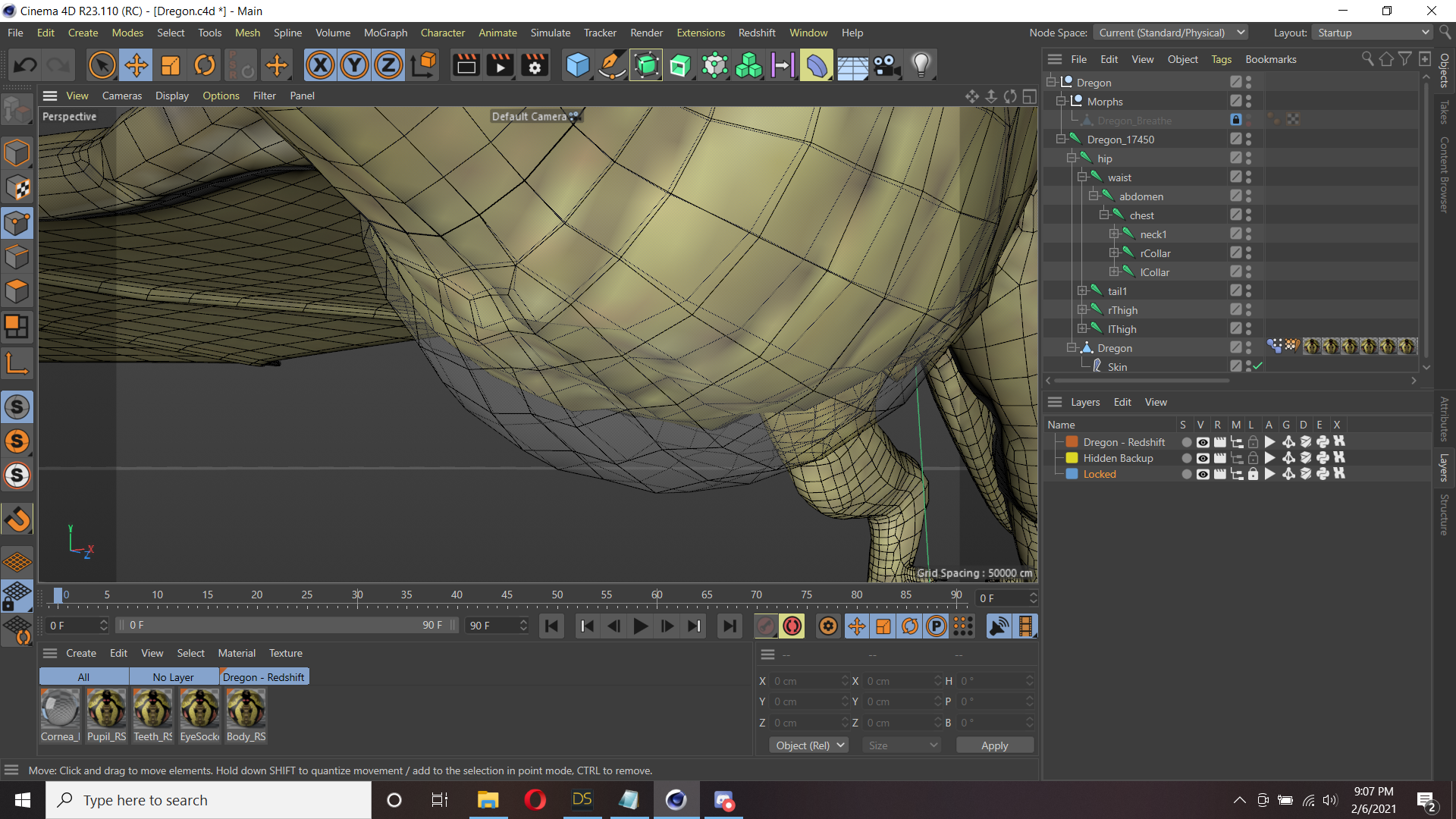
On an unrelated note I picked up Redshift when I re-subbed to Cinema. It's... Certainly different! Going to need to spend a while learning it it seems. Brings back memories to when I first used Indigo Render and how everything was so different to how I was used to things working~
The Official aweSurface Test Track
I was working on it, but let's just say the low poly count in the ears kept on getting in the way. Should be a breeze for those who can work at least one subdiv level higher.wowie said:
The solution for an ear fix is an ear morph. Although that can be a potential jungle if you have lots of head/ear shapes you want to use. Didn't Mustakettu did an ear morph a while back? I forgot what was it for, probably Genesis.
Transferring CUSTOM morphs from G3 to G8?Hi, I sculpted some custom G3 shapes with Blender, and saved them as assets so they appear in the library as a regular dials. As opposed to "official" dials, they can't be transferred via the transfer utility. Do you know another way to transfer them?
What can we do to improve the long load times of characters?Did some more poking.
The cache file is basically most of the files in "data\DAZ 3D\Genesis 8\Female\Morphs\...." mashed together with one important exception. The bulk of the data in those files are of two types: morph vertex delta and formula. The important exception is that morph vertex deltas are not included in the cache file and is loaded on demand when you change the slider. Formula data still make into the cache and can slow things down significantly.
This lead to one important observation: the load time is proportional to the number of files in the morph folder but not necessarily file size. If the file contain large amount of delta that is not included in the cache it will be fast to load. On the other hand if the file contain lots of formulas it will be very slow to load.
Edit:Also the morph file could be compressed which would make it smaller than it actually are.
What can we do to improve the long load times of characters?Taoz said:
One solution could be a variation of the old morph injection technology, where the morph automatically gets injected into the character as soon as you set the dial to anything but zero, and gets removed again as soon as it's zeroed. Or maybe a checkbox on each morph dial for injecting/removing the morph.
That is what is happening now. It's setting up the channels and links that make it work that takes the time.
The Official aweSurface Test TrackThe solution for an ear fix is an ear morph. Although that can be a potential jungle if you have lots of head/ear shapes you want to use. Didn't Mustakettu did an ear morph a while back? I forgot what was it for, probably Genesis.
Shader wise, there's a possibility with volume shaders. But I haven't worked out the details yet.
I've also re-optimize the specular/reflection code. It should be a bit faster on full scenes. Also lower the specular depth for abberation, so that may render faster.
As for the glowing crystal, this is what I did with two primitives (you can also use the geoshell trick).
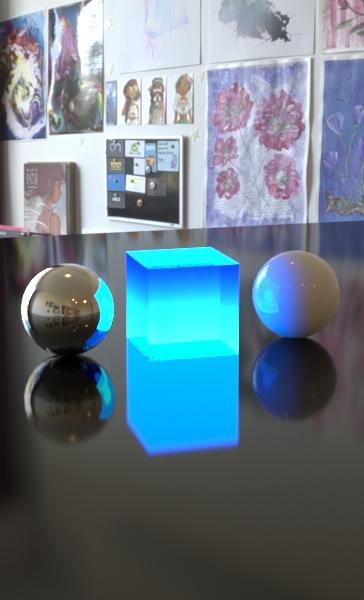
The emitter needs to be the one on the outside. You'll have to match the colors on both.
Using just the emitter.
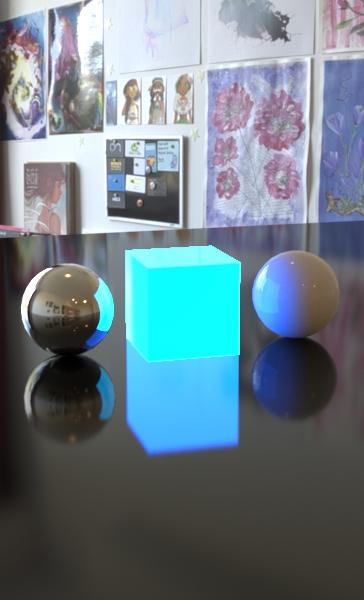 dividing a face to create a new morph - help!
Richard Haseltine said:
Will it work to completely remove the morph from the forehead, or are you going to need a gentle transition? If it;s OK select the areas you want to clear with the Geometry Editor (probably easiest using the list of Surfaces in the Tool Settings pane, then add any extras in the Face group to finish), right-click>Geometry Selection>Convert Selection>Convert to Vertex Selection (I did it that way as it made it easier to do the selection). Make the morph a Favourite by clicking the heart icon on ths slider, and un-favourite any other morphs. Right-click>Morph Editing>Clear Selected Deltas From Favourites.
That worked perfectly thanks very much
Making morphs available for all characters.How do I save a morph?
Leana said:
If you save your new morph as a morph asset it should be available when you load your base figure afterwards. Save it which a value of 0 or it will be applied automatically all the time!
What can we do to improve the long load times of characters?One solution could be a variation of the old morph injection technology, where the morph automatically gets injected into the character as soon as you set the dial to anything but zero, and gets removed again as soon as it's zeroed. Or maybe a checkbox on each morph dial for injecting/removing the morph.
Daz Studio 4.16[.0.x] Pro, General Release! (*UPDATED*)Richard Haseltine said:
Ivy said:
Imago said:
Robinson said:
4.15, "Preparations toward migration to a considerably newer version of the application framework" - I really like the sound of that. Big job I know but not intractable.
I really hope this also means some bug fixes, especially for the animation tools.
Translations ~ Be prepared for Daz Studio to break more thing as they tell you its new and improved. Adding that transferring content that works currently , that something, somewhere, in the studio app break it, so you will not e able to use said content without buying some upgrade morph set, shader's, plugin's,autofit-tool, auto-rigger's,graphic card, computer etc,etc etc. Past experience has taught has that, but there is some good examples as reminders.
My Motto. "Hope for the best, but expect the worst, and back up everything just in case."
Daz is, by necessity, going to break plug-in in a forthcoming release to adderss compatibbility with Big Sur (and perhaps to lay the groundwork for other desired features, such as a scalable UI). However, the non-beta versions of DS have not broken plug-ins (that's since 4.5) and DS 3 did not break plug-ins during its run, nor did the later stages of DS 2 (barring the odd bug, which was fixed in every case). Content does not usually break, and if irt does (as with some shaders recently) the issue is fixed as soon as practical (sometimes Daz is hsotage to third parties, such as nVidia - as far as I know that is true of the current issue with volumetixcs and transparency).
Let's hope they give us permanent copies of the last version that is able to use the old plugins. A permanent copy of a working version ...
Sigh
What can we do to improve the long load times of characters?Dunno is this info can lead to some improvement but:
I did a video of removing morphs to accelerate G8 load time, but don't worry I'm not publishig that video here for now.
my question for developers is this...
I remove my entire morphs (as an experiment), now I load some of my custom characters an Daz asks for missing morphs
is that a problem?, NO, nope, I removed manually, and they are safe on another Hard Drive, this is an experiment, I remark that.
my question is, IF Daz Studio knows what morphs do I need to load correctly my figure, listing them with no delay in nothing,

why not using that info in create a FINAL FILE (example, when your figure does not need more morphs available for modifications, my figure is perfect already) when we create Subsets or Character Presents or Shaping Presents with no need to load my 23Gb of Genesis8 morphs and only load that list of morphs needed to load my customized figure?, a final file is not an invent of mine and I know some softwares uses this kind of settings, dumb of me I can't remember which software I saw that feature.
Yes it sounds confuse and my rotten English can be more confused and very bad explaining situations but let me show an example, Imagine you do/create/replicate RYU from Street Fighter using only Genesis 8.1 male morphs and your result is this:

Obviously I don't need to make other modifications, I've made a perfect RYU replica with G8.1M not using original videogame assets.
and such file does not need my ton of other morphs because I don't need another morph for Ryu but the neccessary ones, that is a final file character, if such file format or feature would exists in DS no more loading your entire morph library, you only would load your subset or character Ryu in any scene and voila. a final file format only will recall your list of morphs neccessary to create my RYU. gotcha? capisce?, understood?, quedo bien claro lo que intento explicar?
Daz to Cinema 4D Update 1.1Good to see it naturally works in R23 now without manual workarounds; but now Morphs won't import :(
I've tried six different figures, not a single Morph is carried over and no Pose Morph tag is created.
Daz 3D is part of

Connect
DAZ Productions, Inc.
7533 S Center View Ct #4664
West Jordan, UT 84084Licensing Agreement | Terms of Service | Privacy Policy | EULA
© 2026 Daz Productions Inc. All Rights Reserved.