-
"Thiccest" Daz Model Found on DeviantArt!
plasma_ring said:
Big Girl Morphs is my favorite set for morphs like this (Boom Chicka that MimicMolly mentioned above is also fun).
Latonya 8 has a beautiful shape that works really well as a base, especially if you don't want visible muscle definition. The pic here is a combination of her morph, Big Girl Morph dials, and the Pear and Voluptuous Daz body morphs using Shape Shifter. I also shortened her torso since that seems to be one of the features that gives the character you posted her silhouette.

Yes, I've also noticed the effect of the artist shortening his model's torso
"Thiccest" Daz Model Found on DeviantArt!ae12systems said:
DustRider said:
As others have noted, you can achieve similar results yourself by combining character morphs and morph packages. Below is a quick example I cooked up. It uses a character that isn't "thicc" (Brianne from Renderosity), with Girl 7 for Girl 8 and the Genesis 8 Female Body Morphs (the Voluptuous and wheight morphs, along with several additional invividual hip, waist, chest morphs ... ohh fitness and bodybuilder too). The body/face in this image is no doubt not exactly what you are looking, but it should help to demonstrate that you could easily make your own by taking a character with the facial look you want, then modify it with the Genesis 8 Femalle Body Morphs, and possibly some of the morph packages others have mentioned above, and get exactly what you want.
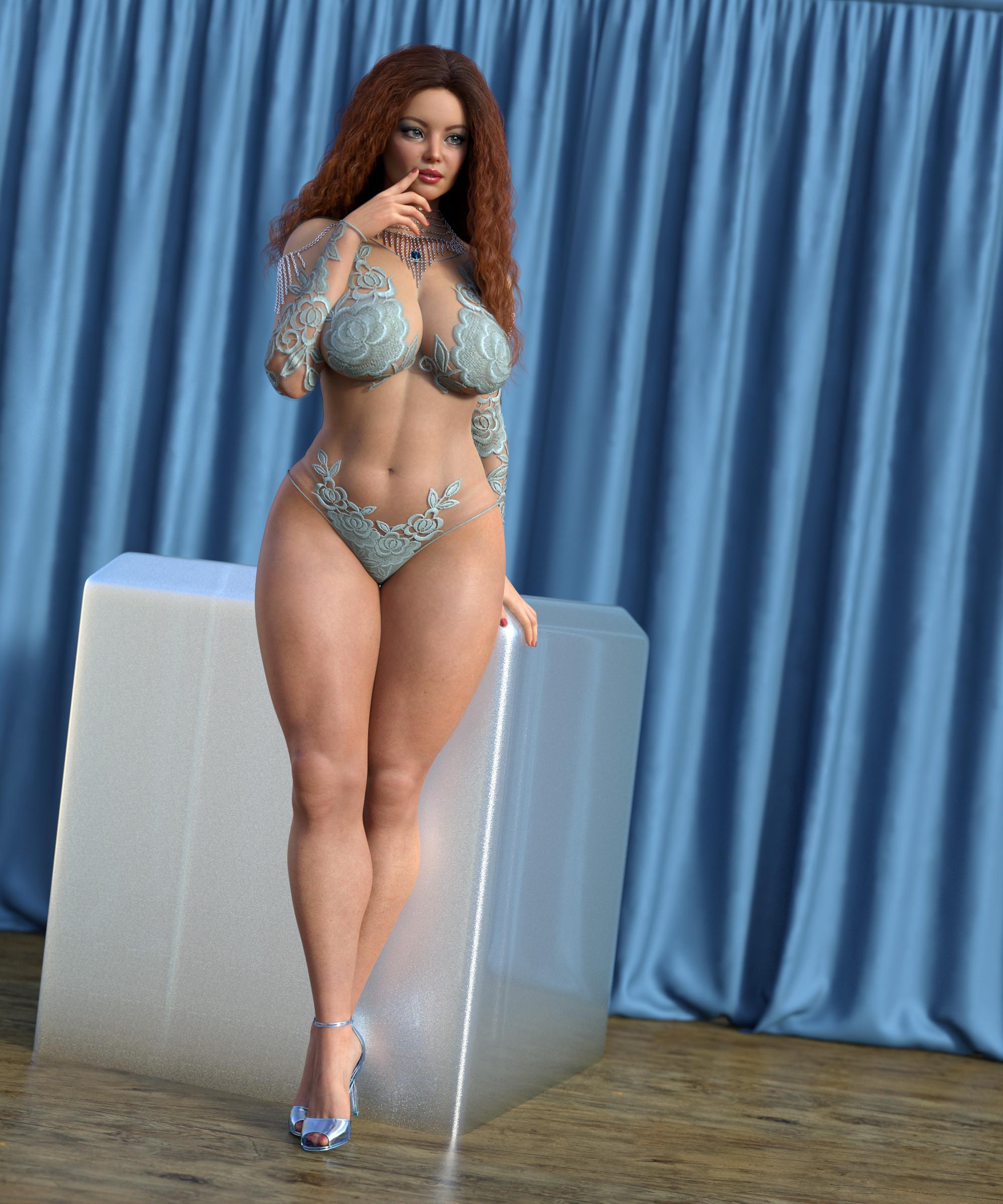
Nice... Now we're getting somewhere.
Glad it's sort of like what you were looking for. For reference, the figure with no voluptuous (was at about 70%) or weight (was at about 10%) added.
 "Thiccest" Daz Model Found on DeviantArt!
Big Girl Morphs is my favorite set for morphs like this (Boom Chicka that MimicMolly mentioned above is also fun).
Latonya 8 has a beautiful shape that works really well as a base, especially if you don't want visible muscle definition. The pic here is a combination of her morph, Big Girl Morph dials, and the Pear and Voluptuous Daz body morphs using Shape Shifter. I also shortened her torso since that seems to be one of the features that gives the character you posted her silhouette.
Growing Up for G8F causing missing genesis3female.dufThis was working fine yesterday, but suddenly today loading G8F says it's missing data/daz 3d/genesis 3/female/genesis3female.dsf. Fresh scene, restarted studio, and I've already tried uninstalling and completely redownloading G8F.
/edit - This appears to be caused by Growing Up for Genesis 8 Female as the issue stops when I remove it. I forgot I reinstalled it last night w/o testing it. I've edited the title to reflect this.
Log file:
2020-12-31 13:27:01.025 *** Scene Cleared ***
2020-12-31 13:27:02.726 WARNING: ..\..\..\..\..\src\sdksource\fileinput\dzassetdaz.cpp(5836): Could not find parent for modifier: CTRLMD_N_ZRotate_n20.
2020-12-31 13:27:02.726 WARNING: ..\..\..\..\..\src\sdksource\fileinput\dzassetdaz.cpp(1660): Failed to prepare modifier: CTRLMD_N_ZRotate_n20!
2020-12-31 13:27:02.728 WARNING: ..\..\..\..\..\src\sdksource\fileinput\dzassetdaz.cpp(5836): Could not find parent for modifier: CTRLMD_N_ZRotate_20.
2020-12-31 13:27:02.728 WARNING: ..\..\..\..\..\src\sdksource\fileinput\dzassetdaz.cpp(1660): Failed to prepare modifier: CTRLMD_N_ZRotate_20!
2020-12-31 13:27:02.756 WARNING: ..\..\..\..\..\src\sdksource\fileinput\dzassetdaz.cpp(1671): Failed to create modifier: CTRLMD_N_ZRotate_n20!
2020-12-31 13:27:02.756 WARNING: ..\..\..\..\..\src\sdksource\fileinput\dzassetdaz.cpp(1671): Failed to create modifier: CTRLMD_N_ZRotate_20!
2020-12-31 13:27:03.221 WARNING: ..\..\..\..\..\src\sdksource\fileinput\dzassetdaz.cpp(6843): Could not find target property for formula: chest:/data/DAZ%203D/Genesis%208/Female/Morphs/Zev0/Growing%20Up/chestLower_CTRLMD_N_ZRotate_20.dsf#CTRLMD_N_ZRotate_20?value in file : /data/DAZ%203D/Genesis%208/Female/Morphs/Zev0/Growing%20Up/JCMAbdoUChestLSide-sideFixLCombo.dsf
2020-12-31 13:27:04.570 WARNING: ..\..\..\..\..\src\sdksource\fileinput\dzassetdaz.cpp(6843): Could not find target property for formula: Genesis8Female:/data/DAZ%203D/Genesis%208/Female/Morphs/DAZ%203D/Expressions/eCTRLWink_HD.dsf#eCTRLWink?value in file : /data/DAZ%203D/Genesis%208/Female/Morphs/DAZ%203D/Victoria%208/eJCMVictoria8Wink_HDLv2.dsf
2020-12-31 13:27:04.571 WARNING: ..\..\..\..\..\src\sdksource\fileinput\dzassetdaz.cpp(6843): Could not find target property for formula: Genesis8Female:/data/DAZ%203D/Genesis%208/Female/Morphs/DAZ%203D/Expressions/eCTRLScream_HD.dsf#eCTRLScream?value in file : /data/DAZ%203D/Genesis%208/Female/Morphs/DAZ%203D/Victoria%208/eJCMVictoria8Scream_HDLv2.dsf
2020-12-31 13:27:04.577 WARNING: ..\..\..\..\..\src\sdksource\fileinput\dzassetdaz.cpp(6843): Could not find target property for formula: Genesis8Female:/data/DAZ%203D/Genesis%208/Female/Morphs/DAZ%203D/Expressions/eCTRLRage_HD.dsf#eCTRLRage?value in file : /data/DAZ%203D/Genesis%208/Female/Morphs/DAZ%203D/Victoria%208/eJCMVictoria8Rage_HDLv2.dsf
2020-12-31 13:27:04.577 WARNING: ..\..\..\..\..\src\sdksource\fileinput\dzassetdaz.cpp(6843): Could not find target property for formula: Genesis8Female:/data/DAZ%203D/Genesis%208/Female/Morphs/DAZ%203D/Expressions/eCTRLPain_HD.dsf#eCTRLPain?value in file : /data/DAZ%203D/Genesis%208/Female/Morphs/DAZ%203D/Victoria%208/eJCMVictoria8Pain_HDLv2.dsf
2020-12-31 13:27:04.585 WARNING: ..\..\..\..\..\src\sdksource\fileinput\dzassetdaz.cpp(6777): Could not find output property for formula: Genesis8Female:/data/DAZ%203D/Genesis%208/Female/Morphs/DAZ%203D/Expressions/eJCMPain_HD_div2.dsf#eJCMPain_HD_div2?value in file : /data/DAZ%203D/Genesis%208/Female/Morphs/DAZ%203D/Victoria%208/eJCMVictoria8Pain_HDLv2.dsf
2020-12-31 13:27:04.585 WARNING: ..\..\..\..\..\src\sdksource\fileinput\dzassetdaz.cpp(6843): Could not find target property for formula: Genesis8Female:/data/DAZ%203D/Genesis%208/Female/Morphs/DAZ%203D/Expressions/eCTRLHappy_HD.dsf#eCTRLHappy?value in file : /data/DAZ%203D/Genesis%208/Female/Morphs/DAZ%203D/Victoria%208/eJCMVictoria8Happy_HDLv2.dsf
2020-12-31 13:27:04.594 WARNING: ..\..\..\..\..\src\sdksource\fileinput\dzassetdaz.cpp(6777): Could not find output property for formula: Genesis8Female:/data/DAZ%203D/Genesis%208/Female/Morphs/DAZ%203D/Expressions/eJCMHappy_HD_div2.dsf#eJCMHappy_HD_div2?value in file : /data/DAZ%203D/Genesis%208/Female/Morphs/DAZ%203D/Victoria%208/eJCMVictoria8Happy_HDLv2.dsf
2020-12-31 13:27:04.594 WARNING: ..\..\..\..\..\src\sdksource\fileinput\dzassetdaz.cpp(6843): Could not find target property for formula: Genesis8Female:/data/DAZ%203D/Genesis%208/Female/Morphs/DAZ%203D/Expressions/eCTRLFear_HD.dsf#eCTRLFear?value in file : /data/DAZ%203D/Genesis%208/Female/Morphs/DAZ%203D/Victoria%208/eJCMVictoria8Fear_HDLv2.dsf
2020-12-31 13:27:04.599 WARNING: ..\..\..\..\..\src\sdksource\fileinput\dzassetdaz.cpp(6777): Could not find output property for formula: Genesis8Female:/data/DAZ%203D/Genesis%208/Female/Morphs/DAZ%203D/Expressions/eJCMFear_HD_div2.dsf#eJCMFear_HD_div2?value in file : /data/DAZ%203D/Genesis%208/Female/Morphs/DAZ%203D/Victoria%208/eJCMVictoria8Fear_HDLv2.dsf
2020-12-31 13:27:04.600 WARNING: ..\..\..\..\..\src\sdksource\fileinput\dzassetdaz.cpp(6843): Could not find target property for formula: Genesis8Female:/data/DAZ%203D/Genesis%208/Female/Morphs/DAZ%203D/Expressions/eCTRLExcitement_HD.dsf#eCTRLExcitement?value in file : /data/DAZ%203D/Genesis%208/Female/Morphs/DAZ%203D/Victoria%208/eCTRLVictoria8Excitement_HD.dsf
2020-12-31 13:27:05.224 WARNING: ..\..\..\..\..\src\sdksource\fileinput\dzassetdaz.cpp(6843): Could not find target property for formula: chest:/data/DAZ%203D/Genesis%208/Female/Morphs/Zev0/Growing%20Up/chestLower_CTRLMD_N_ZRotate_20.dsf#CTRLMD_N_ZRotate_20?value in file : /data/DAZ%203D/Genesis%208/Female/Morphs/Zev0/Growing%20Up/JCMAbdoUpperChestLSide-sideFixR.dsf
2020-12-31 13:27:05.224 WARNING: ..\..\..\..\..\src\sdksource\fileinput\dzassetdaz.cpp(6843): Could not find target property for formula: chest:/data/DAZ%203D/Genesis%208/Female/Morphs/Zev0/Growing%20Up/chestLower_CTRLMD_N_ZRotate_n20.dsf#CTRLMD_N_ZRotate_n20?value in file : /data/DAZ%203D/Genesis%208/Female/Morphs/Zev0/Growing%20Up/JCMAbdoUpperChestLSide-sideFixL.dsf
2020-12-31 13:27:05.230 WARNING: ..\..\..\..\..\src\sdksource\fileinput\dzassetdaz.cpp(6843): Could not find target property for formula: chest:/data/DAZ%203D/Genesis%208/Female/Morphs/Zev0/Growing%20Up/chestLower_CTRLMD_N_ZRotate_n20.dsf#CTRLMD_N_ZRotate_n20?value in file : /data/DAZ%203D/Genesis%208/Female/Morphs/Zev0/Growing%20Up/JCMAbdoUChestLSide-sideFixRCombo.dsf
2020-12-31 13:27:05.251 Begin Loading Character Addons...
2020-12-31 13:27:05.346 File loaded in 0 min 0.0 sec.
2020-12-31 13:27:05.347 Loaded file: Genesis 8 Female Eyelashes.duf
2020-12-31 13:27:05.356 Loaded Morph Deltas in 0 min 0.0 sec.
2020-12-31 13:27:05.357 Loaded file: PHMEyelashesLengthUpper.dsf
2020-12-31 13:27:05.357 Loaded Morph Deltas in 0 min 0.0 sec.
2020-12-31 13:27:05.358 Loaded file: PHMEyelashesLengthLower.dsf
2020-12-31 13:27:05.359 Loaded Morph Deltas in 0 min 0.0 sec.
2020-12-31 13:27:05.360 Loaded file: PHMEyelashesCurl.dsf
2020-12-31 13:27:05.373 Loaded Morph Deltas in 0 min 0.0 sec.
2020-12-31 13:27:05.374 Loaded file: PHMEyelashesLengthUpper.dsf
2020-12-31 13:27:05.377 Loaded Morph Deltas in 0 min 0.0 sec.
2020-12-31 13:27:05.383 Loaded file: PHMEyelashesLengthLower.dsf
2020-12-31 13:27:05.385 Loaded Morph Deltas in 0 min 0.0 sec.
2020-12-31 13:27:05.386 Loaded file: PHMEyelashesCurl.dsf
2020-12-31 13:27:05.388 Loaded Morph Deltas in 0 min 0.0 sec.
2020-12-31 13:27:05.389 Loaded file: PHMEyelashesExpand.dsf
2020-12-31 13:27:05.447 File loaded in 0 min 0.0 sec.
2020-12-31 13:27:05.448 Loaded file: Base MAT Eyelashes.duf
2020-12-31 13:27:05.450 Finished Loading Character Addons
2020-12-31 13:27:05.462 File loaded in 0 min 5.4 sec.
2020-12-31 13:27:05.467 Loaded file: Genesis 8 Basic Female.duf
2020-12-31 13:27:05.779 Could not resolve : "/data/DAZ 3D/Genesis 3/Female/Genesis3Female.dsf"
2020-12-31 13:27:06.141 Loaded image G8FBaseLegsMapD_1003.jpg
2020-12-31 13:27:06.340 Loaded image G8FBaseEyes01_1007.jpg
2020-12-31 13:27:06.528 Loaded image G8FBaseArmsMapD_1004.jpg
2020-12-31 13:27:06.680 Loaded image G8FBaseMouthMapD_1005.jpg
2020-12-31 13:27:06.877 Loaded image G8FBaseFaceMapD_1001.jpg
2020-12-31 13:27:07.143 Loaded image G8FBaseTorsoMapD_1002.jpg
2020-12-31 13:27:07.298 Loaded image G8FBaseEyelashes_1006.jpgFit Control for Genesis 8 (Commercial)
I have a lot of characters and morphs too. Is this thing still crashing or has it been fixed? I haven't tried it recentlyxyer0 said:I'd think the crashes would have to be due to a certain combination of morphs rather than the number of morphs---if even the former is the cause---as I own every G8F morph pack/kit in this store and many from Renderosity as well as having at least 650 G8F characters installed.
Contradicting statements. I don't think it's a combination of morph kits, but sheer number as my content library 'character' section exceeds that 650 by more than double, and that's not including the "HD" versions.
I counted characters as morphs (which they are); hence, no contradiction. But over 1,300 G8F's was not a number I considered. It's a wonder you can even load G8F.
Please help - Importing to Unity - Morphs missingrayluttermoser said:
Artini said:
I have no problem with sending different Daz characters over the bridge.
What is the reason you wish to send morphs to Unity?
From my previous trials, before the bridge come, exporting morphs creates a very big files on export.
What version of Daz are you using?
Morph export works fine in 4.12. But seems to be broken in 4.14 as I cannot get any morphs to work in Unity now.
Really suck that they broke this cool feature.
I am indeed using DAZ Studio 4.14! I feel silly now that I never thought that would be the issue, probably since they had all the adverts for the bridge up and running in promos during this time. I would love to test in 4.12 to see if it works, but I can't find any official downloads for the older version. Is there some place I can download an older version and give this a try since it seems to be the issue?
Parameters for Reiko smile?Those lists don't seem to include every morph dial though? They only seem to include .duf files like poses and mats. So if presets aren't included, you can't tell if the morph is available or not...
 My wishlist for 2021
^ Daz to commission Luthbel for a monthly male outfit set
^ More excellently morphed/skinned Core Figures like Juan Carlos 8, Holt 8, Millawa 8, Twosret 8, Celani 8, Kwan 8, Kayo 8, Valentino 8, Dasan 8, Alawa 8, Dain 8, Babina 8.
^ Daz Dog 8 Chihuahua OR a Daz Dog 8 Head and Body Morph Kit
^ A de-bugged store and Studio [sarcasm]
Parameters for Reiko smile?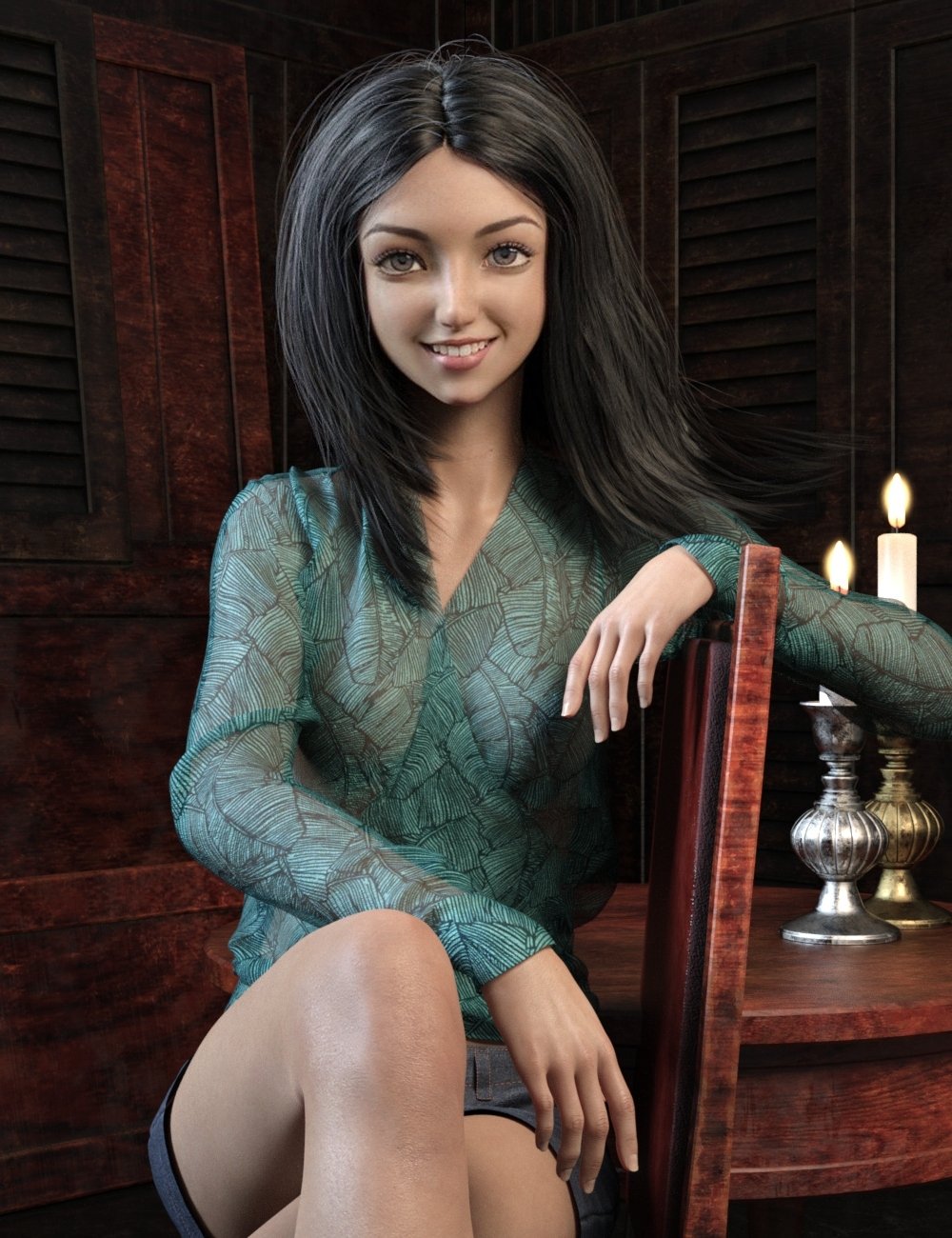
https://www.daz3d.com/reiko-for-genesis-8-female
So, this promo is the primary reason I got this character, however the smile is apparently not an included custom morph or expression pose.
I've tried dialing the default "Smile Open Full Face" morph, but that doesn't look right.Anyone have an idea what parameters were used for this image? If the vendor sees this, a product update including an expression pose or morph would be appreciated!
 Problem with Transfer Utility
Make sure you are working around the base figure, not a morph (or if you must have a morphed figure, in Transfer Utility set Current Shape to the morph used and then in the options enable Reverse Source Shape from Target).
zilpha invades DAZ -DKrieger said:
PerttiA said:
DKrieger said:
Yeah, and now I'm testing further and it seems that Zilpha is loading in on all Genesis 8 females. Not just characters I create, but when I load a base G8 from my library. SMH.
That is how the system works.
If a morph has been packaged with non-zero default value, it will be activated with all (past, present and future) figures that you open or load, no matter if the figure has been saved in a scene that was saved a year ago or started from the base figure at the moment.
The procedure a few posts up will fix the issue, if it is followed as it is written.
I don't know if you are trying to imply that this is a feature and not a bug.
Both, actually.
There's a bug in the way the character morph was saved, it has a default value which is not zero.
The fact that DS sets the value of the morph to their default value when it loads it is a feature, though.
"Thiccest" Daz Model Found on DeviantArt!Zilvergrafix said:
ae12systems said:
Hey there everyone. There's a Daz artist on DeviantArt from Korea, that has sculpted the most beautiful Daz Morph I've ever seen. I've tried asking him if he's selling, with no response. does anyone have any advice on how to achieve this? Here is some of his art work attached:
His DeviantArt Profile links:
I have my doubts of this "morph" being created on zbrush (unecessary when you have ton of morphs available achieveing the same goal), but you can do the same effect unlimit Voluptuous more than 1.0 in value..and Smooth does marvels with some value of 4-7 on the entire figure. (I use that for breasts)
there is a ton of morphs...in Renderosity, that can do the same or even better result, for the face just stick with some Asian model and dealing with some Zev0 morph parameters and voila.
No Zbrush? I hope you're right. Zev0's products have been one of my potential options for morphing as well, and I've been thinking about combining all the morph packages mentioned in this thread with Zev0's "Sape Shift."
"Thiccest" Daz Model Found on DeviantArt!DustRider said:
As others have noted, you can achieve similar results yourself by combining character morphs and morph packages. Below is a quick example I cooked up. It uses a character that isn't "thicc" (Brianne from Renderosity), with Girl 7 for Girl 8 and the Genesis 8 Female Body Morphs (the Voluptuous and wheight morphs, along with several additional invividual hip, waist, chest morphs ... ohh fitness and bodybuilder too). The body/face in this image is no doubt not exactly what you are looking, but it should help to demonstrate that you could easily make your own by taking a character with the facial look you want, then modify it with the Genesis 8 Femalle Body Morphs, and possibly some of the morph packages others have mentioned above, and get exactly what you want.
Nice... Now we're getting somewhere.
Product Cross Gender/Transgender -Transfer morphs (feature suggestions)ragde-42 said:
Really hope this product is done, will be very usefull on many ways, I like to create diferent species for my genesis models, with this product i will can do it for one gender and easy transfer it to the other one
looking forward for this product
Is still on plans for it?don't expect it this year
 Product Cross Gender/Transgender -Transfer morphs (feature suggestions)
Really hope this product is done, will be very usefull on many ways, I like to create diferent species for my genesis models, with this product i will can do it for one gender and easy transfer it to the other one
looking forward for this product
Is still on plans for it?zilpha invades DAZ -DKrieger said:
PerttiA said:
DKrieger said:
Yeah, and now I'm testing further and it seems that Zilpha is loading in on all Genesis 8 females. Not just characters I create, but when I load a base G8 from my library. SMH.
That is how the system works.
If a morph has been packaged with non-zero default value, it will be activated with all (past, present and future) figures that you open or load, no matter if the figure has been saved in a scene that was saved a year ago or started from the base figure at the moment.
The procedure a few posts up will fix the issue, if it is followed as it is written.
I don't know if you are trying to imply that this is a feature and not a bug.
The PA has made a mistake when packaging the morph for distribution, you can either fix the problem yourself (following the procedure showed here) or write a ticket and wait for the product to be fixed.
It is not a bug.
Mini Gallery - While the Gallery is Down3dOutlaw said:
I bought some year end conversion and morph tools to start making the move from G3F to G8F...yes, I have been going backwards until now.
This was a Lara Croft render in G3F (about to migrate to G8F) that I posted in the Lara Renders thread, before I saw the Mini Gallery. I do miss the old galleries, just for the point of seeing if I want to buy something based on actual user renders.That is a great scene, and your set really captures the front hall from the games.
Mini Gallery - While the Gallery is DownI bought some year end conversion and morph tools to start making the move from G3F to G8F...yes, I have been going backwards until now.
This was a Lara Croft render in G3F (about to migrate to G8F) that I posted in the Lara Renders thread, before I saw the Mini Gallery. I do miss the old galleries, just for the point of seeing if I want to buy something based on actual user renders. Problem with Transfer Utility
Hello,
I have created the clothes in Clo3d and exported as Obj, when I use the Transfer Used to fix the clothes to the avatar I get this error, I have tried many configurations, but it is not solved. Does anyone know what the error is?
Thanks a lot.
Auto Muscle Enhancer HD [Commercial]terry_duquette said:
Well I am surprised I am the first one to find this, right here in DAZ are some Beautiful Transgender clones. They are in this product:
G8 Cross-Figure Resource Kit by Daz Originals!
Billed as a way to move clothing and save it for the other figure, it no less has excellent Transgender clones, that look better than the ones I was using!
Attached pic shows G8F (in pink shorts) in the back with the baseline body builder at 100%.
Left front is G8M with AME/ASE at 85% with other settings at 40%
Right front is G8M with Josh texture, Teen Josie Morph, AME at 45%, Flex at 100%, Muscle Definition and Veins at 25%, upper and lower body at 15%, and my AME tweaks.
The Breast/Chest area doesn't appear to have the discontinuity that the other Transgender clone I was using exhibits (see page 24 of this thread and 3 posts back).
Hope that helps anyone looking to get into AME on a female platform.
Regards, TD
Good to know, TD. I was thinking of getting that to address my heels fit issue. To be clear, though, at the end of the day it's still *converted* G8M in the end product, right?
Daz 3D is part of

Connect
DAZ Productions, Inc.
7533 S Center View Ct #4664
West Jordan, UT 84084Licensing Agreement | Terms of Service | Privacy Policy | EULA
© 2026 Daz Productions Inc. All Rights Reserved.