-
Fast Rendering without IRay
you can also choose 3Delight if you prefer it and are used to it, it works the same as it did before iray was added, it even is a bit better.
you need lights for it if you don't have a headlamp.
Filament is in the drawstyles dropdown next to the camera selection in the viewport
 Fast Rendering without IRay
WendyLuvsCatz said:
you need to pick viewport in your render options,
if you have any lights not enabling a headlamp will give a very black render
click ctl and L together to enable it
Filament is a nicer drawstyle option
I don't see where Filiment is... Veiwport seems to be the default, so it's already selected.
In the old Daz Studio, it had a while background and the lighting was pretty close to what you see in the viewport.... in 4.15, it seems to have a transparent background? And the lighting is nothing like what you see before hitting "render". The auto headlamp really washes everything out.Fast Rendering without IRayyou need to pick viewport in your render options,
if you have any lights not enabling a headlamp will give a very black render
click ctl and L together to enable it
Filament is a nicer drawstyle option
Daz Studio Pro BETA - version 4.15.0.30! (*UPDATED*)jbowler said:
kyoto kid said:
Using the chipset graphics for the displays generally is sub par in performance and won't allow use of Iray view mode which I find very helpful and more workflow efficient particularly when dealing with lighting/tone mapping adjustments instead of having to run multiple individual test renders.
Iray preview works fine with a non-NVidia display driver; you just need an Iray capable graphics card, it doesn't have to be connected to the display. I have one monitor connected to the Intel UHD Graphics 630, it's a 4k portrait (DELL) monitor. The Titan XP gets used for dForce (forcing me to not use TCC mode, since dForce uses OpenGL and TCC mode doesn't support OpenGL). The 630 OpenGL performance is insufficient for dForce; I just couldn't get stuff done waiting for it. The XP also gets used for renders (of course) which are typically 4k too. On complex scenes there isn't enough memory on the XP for the full frame buffer and it gets sent back to the system DRAM; this doesn't seem to have a particularly bad effect on render time.
The XP is used for preview too; previews aren't directly to the screen because the calculations are linear; so far as I know Iray doesn't even attempt to support encoded (24-bit) pixels because, although the perf isn't necessarily that bad, the accuracy sucks to the point of total absence. 24-bit RGB only manages something like 3EV of accuracy at maybe +/-2%, which is ok for most final tone-mapped images but can't be used for intermediate calculations, or (IMO) images.
The net result is that the Iray preview takes pretty much the same amount of time regardless of where the display is. I use the preview for adjusting lighting; I typically work light-by-light at EV0 with tone-mapping disabled because then I can actually see what individual lights do (or, most of the time, don't do). I also use the preview for expressions; texture mapped expressions do not work for some reason. Filament seemed like it might help but even if I spend the time fixing "Filament Draw Options" to get Filament and Iray to match up the expressions are still different enough for me not to be able to get them right. For this latter case I might have to put up with lower perf; I've never connected a display to the XP so I don't know if it can redraw in real time; when I use it for expressions or in the rare cases I pan the scene while setting up lights I have a delay of a second or so during which I get smooth-shaded while the first pass of the Iray preview is prepared. Bear in mind that this is on a landscape 4k full screen so this is a preview with is 2k portrait - about 1080x1920 in practice.
dForce uses OpenCL, not OpenGL.
330ml Brown Glass Bottle and Broken BitsI was wanting to do a scene of a figure in a bottling plant, and needed some accessories. Turns out I couldn't find the shape of bottle I wanted as a freebie, so modelled my own after finding interface control drawings on the web for a range of sizes. The size I plumped for was the 330ml (same volume as a can of cola). These are often used for beer or similar <7.5% alcohol beverages. Because it was a bottling plant, and bottles break, I modelled one broken bottle. Thought other people may find them useful too.
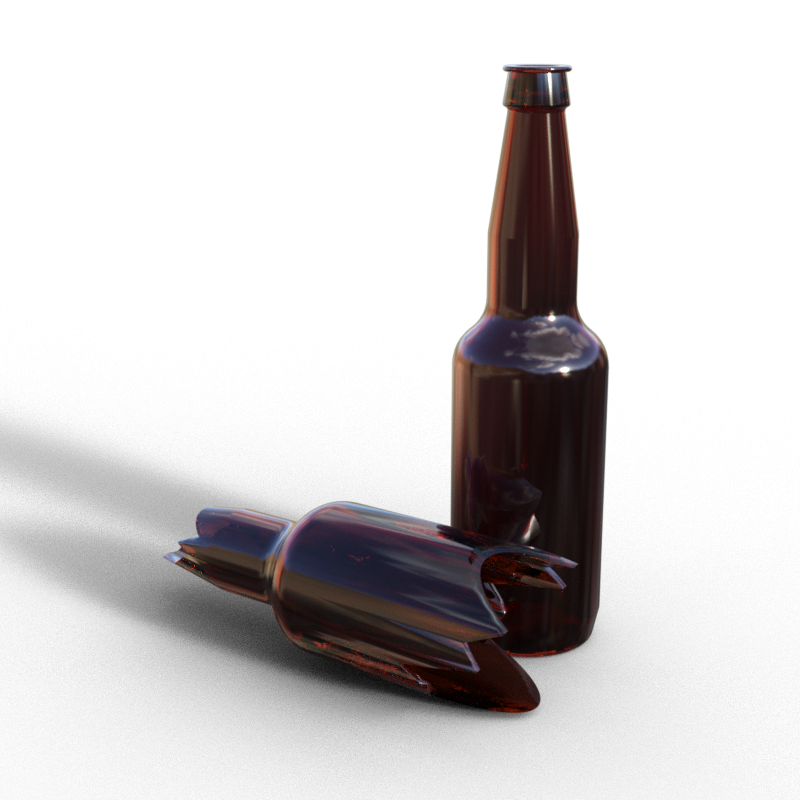
Anyway, the bottle was modelled in SolidWorks, saved as STL, converted to OBJ with my own program, texture mapped without label (didn't need one for my purpose) in UVMapper using a capped cylinder map, and then turned into a prop in DS. The glass shader is based on the default green glass DS iRay shader supplied with DS. The colour is changed to an orangy brown, which looks about right.
There are one or two quirks. The bottles are totally invisible in Filament preview mode, and they are not easy to see in any other preview mode apart from iRay preview. You have been warned! It may be an idea to turn the transparency off prior to working them in the scene, up to you.
Regards,
Richard.
[Title edited to reflect extra bits]
Daz Studio Pro BETA - version 4.15.0.30! (*UPDATED*)kyoto kid said:
Using the chipset graphics for the displays generally is sub par in performance and won't allow use of Iray view mode which I find very helpful and more workflow efficient particularly when dealing with lighting/tone mapping adjustments instead of having to run multiple individual test renders.
Iray preview works fine with a non-NVidia display driver; you just need an Iray capable graphics card, it doesn't have to be connected to the display. I have one monitor connected to the Intel UHD Graphics 630, it's a 4k portrait (DELL) monitor. The Titan XP gets used for dForce (forcing me to not use TCC mode, since dForce uses OpenGL and TCC mode doesn't support OpenGL). The 630 OpenGL performance is insufficient for dForce; I just couldn't get stuff done waiting for it. The XP also gets used for renders (of course) which are typically 4k too. On complex scenes there isn't enough memory on the XP for the full frame buffer and it gets sent back to the system DRAM; this doesn't seem to have a particularly bad effect on render time.
The XP is used for preview too; previews aren't directly to the screen because the calculations are linear; so far as I know Iray doesn't even attempt to support encoded (24-bit) pixels because, although the perf isn't necessarily that bad, the accuracy sucks to the point of total absence. 24-bit RGB only manages something like 3EV of accuracy at maybe +/-2%, which is ok for most final tone-mapped images but can't be used for intermediate calculations, or (IMO) images.
The net result is that the Iray preview takes pretty much the same amount of time regardless of where the display is. I use the preview for adjusting lighting; I typically work light-by-light at EV0 with tone-mapping disabled because then I can actually see what individual lights do (or, most of the time, don't do). I also use the preview for expressions; texture mapped expressions do not work for some reason. Filament seemed like it might help but even if I spend the time fixing "Filament Draw Options" to get Filament and Iray to match up the expressions are still different enough for me not to be able to get them right. For this latter case I might have to put up with lower perf; I've never connected a display to the XP so I don't know if it can redraw in real time; when I use it for expressions or in the rare cases I pan the scene while setting up lights I have a delay of a second or so during which I get smooth-shaded while the first pass of the Iray preview is prepared. Bear in mind that this is on a landscape 4k full screen so this is a preview with is 2k portrait - about 1080x1920 in practice.
re-Install of G8M starter Essentials ??AndyS said:
vwrangler said:
AndyS said:
Hi,
I see only one zip for both - 8 and 8.1
For female it installed properly (IM00042071-01_Genesis8FemaleStarterEssentials) and presents G8F and G8.1F.
After copying the content for male manually into the library, G8M and G8.1M were available, but a lot of morphs are not supported on G8.1.I have a 4.15 installation on a different PC in a different location. All additional morphs (G3 adopt, body, arms, legs morphs) work properly. Here I copied the starter essentials from to move them to my other location with 4.10. But DIM didn't accept the new male starter essentials as a new product to install. For female it worked.
So what do I have to do to let DIM accept the male 8 starter essetials as "a new/updated product"?If you say, there are different zip's for 8 and 8.1 - so what are the names of these zip files?
How can I download them from my product library of my account? And how to let DIM accept these to be newly installed?"Genesis8MaleStarterEssentials.zip" contains both G8M and G8.1M; there's only a single zip file that contains both products.
However: I may have misunderstood what your process was. Are you manually downloading the file from the online product library, putting it in your DIM directory, and then letting DIM unpack and install, or are you letting DIM do the entire process on its own, from download through install?OK,
so I originally had the old G8 (male and female) installed and working properly (current location with 4.10).
On my other location I did a trial installation of 4.15 to test with filament.
Now I thought it would be a good idea to copy the G8 starter essentials and install them on my 4.10 PC. So normally if I copy a new file to the DIM download directory, DIM recognizes this as new and "ready to install". But this only worked fine for the female once. For male it didn't do at all.So I deinstalled the G8 male starter essentials, removed the old zip and substituted it by the new one.
Now DIM doesn't show any G8 starter essentials anymore. Neither on the "installed" side, although the "IM00042071-01_Genesis8FemaleStarterEssentials.zip" and "IM00042071-02_Genesis8MaleStarterEssentials.zip" are in the download folder.Only to be able to play around with G8, I copied the content manually to my library.
Alternatevly: could someone send/link me installable G8 starter essentials, please?
No one hasanything differnt to the files in your account, and even if they did they would not be permitted to share.
You need to be a bit more precise about what you are doing if we are to be able to offer any advice.
re-Install of G8M starter Essentials ??vwrangler said:
AndyS said:
Hi,
I see only one zip for both - 8 and 8.1
For female it installed properly (IM00042071-01_Genesis8FemaleStarterEssentials) and presents G8F and G8.1F.
After copying the content for male manually into the library, G8M and G8.1M were available, but a lot of morphs are not supported on G8.1.I have a 4.15 installation on a different PC in a different location. All additional morphs (G3 adopt, body, arms, legs morphs) work properly. Here I copied the starter essentials from to move them to my other location with 4.10. But DIM didn't accept the new male starter essentials as a new product to install. For female it worked.
So what do I have to do to let DIM accept the male 8 starter essetials as "a new/updated product"?If you say, there are different zip's for 8 and 8.1 - so what are the names of these zip files?
How can I download them from my product library of my account? And how to let DIM accept these to be newly installed?"Genesis8MaleStarterEssentials.zip" contains both G8M and G8.1M; there's only a single zip file that contains both products.
However: I may have misunderstood what your process was. Are you manually downloading the file from the online product library, putting it in your DIM directory, and then letting DIM unpack and install, or are you letting DIM do the entire process on its own, from download through install?OK,
so I originally had the old G8 (male and female) installed and working properly (current location with 4.10).
On my other location I did a trial installation of 4.15 to test with filament.
Now I thought it would be a good idea to copy the G8 starter essentials and install them on my 4.10 PC. So normally if I copy a new file to the DIM download directory, DIM recognizes this as new and "ready to install". But this only worked fine for the female once. For male it didn't do at all.So I deinstalled the G8 male starter essentials, removed the old zip and substituted it by the new one.
Now DIM doesn't show any G8 starter essentials anymore. Neither on the "installed" side, although the "IM00042071-01_Genesis8FemaleStarterEssentials.zip" and "IM00042071-02_Genesis8MaleStarterEssentials.zip" are in the download folder.Only to be able to play around with G8, I copied the content manually to my library.
Alternatevly: could someone send/link me installable G8 starter essentials, please?
Camera Light Render Troubleswiseamphora_0dc4b2d2d4 said:
I was trying to do a render from a camera perspective looking out the window of a plane.
The trouble I'm having is the render was too bright, so the wall and window were opaque. What's even more challenging is the fact that whatever I do doesn't dial down the glare. I've tried
1) turning off the camera headlamp
2) shifting the positioning of the headlamp either outside the plane or in front of the camera
3) dialing down the headlamp's intensity
4) turning off auto headlamp for rendering, while keeping the environment's light intact
5) reposition the camera so it's not in something or going through something
6) established a pointlight in the room, tried dialing down its glow, and turning the camera's headlamp off
And yet, whatever I did still produces that same troublesome glare, making the wall of the plane too bright and the window so opaque that nothing outside it could be rendered.
I've tried everything I can think of, but nothing changed. Are there any suggestions on how to fix it and render what's outside the window properly?
Perhaps you are not using the correct preview draw style. If you are using Filament preivew, most scene will appear very bright, Try switching to Iray preview.
the skimpiest skimpwear in store?This is an interesting thread for sure, for science purposes of course ;-)
Thanks to previous posters for sharing their examples and/or impressions, I discovered some really nice outfits thanks to this thread (also picked some of them up in the mean time). Anyway, I really wanted to share but most of the stuff I knew about was already mentioned.
But today I discovered something in my content library, somewhat by accident: the chainmail bikini set! Each to their own but I think it's a very interesting outfit.
The materials are dated, they don't work well with Iray or Filament but only 3Delight. Another possible issue is that this isn't a set; you need to buy the pieces individually:
https://www.daz3d.com/chainmail-bikini-top-for-v4
https://www.daz3d.com/chainmail-tube-top-for-v4
https://www.daz3d.com/chainmail-bikini-bottom-for-v4
And they even made variants and extra's for the outfit such as the chainmail jewelry set, the tube top (which I used in my render) and the gloves. When I picked it up I had somewhat mixed feelings about this not being a complete set to purchase, but ever since I got more interested in 3D modelling myself (using Hexagon at that time) I quickly realized that the author had to put in quite a bit of work into this!
I'd also like to mention another variant from the same author: the chainmail top and chainmail skirt, I think those two also make a pretty cool skimpy outfit. But once again: not really useful for Iray and such, but I suppose you could always try to change the material and apply some texturing yourself.
Hope this was usefull for some of you!
New release PoseRecorder needs better product description!codecs are annoying and between my two computers some work or don't work entirely differently.
I never have solved issues in some programs
(iClone6 plays all mov files upsidedown and won't play mp4 on my Win7 for example using the K-lite one they recommended)
and simply cannot use some on one or the other, free codec packs are notoriously packed with Malware too.
I know this is little help, I too am having your issues on my Win7 PC but the Win10 one finally works with the right video (same one doesn't on Win7).
so many other glitches too, the DAZ strandbased hair vanishes a hundred or more frames in in animations for me too for exmple both in iray and Filament.

both computers
nobody else AFAIK has that issue.
 New release PoseRecorder needs better product description!
I do very few animations and when I do its just for fun. It took awhile to figure out the steps for this tool (as DAZ users can we really expect documentation LOL). Once I got it to work it created quick and easy if somewhat exaggerated facial movements. You get head movement too. I didn't have a timing adjustment issue but I had to keep the animation to under 30 secs. I think this tool will work well with Facegen Artist Pro. I had Daz Studio with Gen 8 Male loaded running while I was working with PoseRecorder... not sure if that is necessary. PoseRecorder wouldn't take my video from Iphone6 but when I converted it to Mp4 (I use Applian products) it accepted it on 3rd try. Make sure you nudge the timeline sticks in PoseRecorder until you see your timeline secs. For me trying to save a timeline of over a minute failed (program dissapears and empty file created). Make sure to mark the facial movements you want (they are not selected by default). You can save the duf animation file anywhere, I put it in the material file for Gen 8 Male as the vendor suggested. With Gen 8 Male loaded in DAZ Studio find the animation file in the content library and double click. The animation will show in timeline. You need to extract the audio from your source video (again I used Applian products) into a file format DAZ likes. You add it through edit - audio menu item. Then I rendered using filament/viewport option. For filament rendering, the WP Guru"s tutorial on Youtube was helpful esp. with correcting the lighting settings https://www.youtube.com/watch?v=88LuOEpYuSE . I posted a video I made with this tool on facebook ... I think it is public otherwise you can send me a friend request https://www.facebook.com/sooiiee.razorback/videos/553558562567144
Armed Virginia Sloop (info : free addon available now)I'd love to know too. Had the same problem with the Teuf-Teuf. I think it's due to 'Back Face Culling' and the normals pointing inwards rather than out. Can't solve the issue by using the Filament renderer for viewing either. There must be a way of turning the 'feature' off, but if so, I've not yet found it.
Regards,
Richard.
What will happen if I decide to downgrade to 4.12 ?You'll go back to a much older version of Iray.
And you'll see no difference on Iray speed. If you don't use Filament, G8.1 or PBR materials, and don't do complex animations then you would be good. But you'll want to switch up to the latest DS when they integrate Iray 2021.0.1 or later. Which is probably going to be DS 5.0. That said I know you use PWtoon and so you may still need an older DS installed to be able to work with that.
What will happen if I decide to downgrade to 4.12 ?G8.1 won't load morphs from G8, and the PBR shader won't render properly.
You'll go back to a much older version of Iray.
Filament won't be there.
Environment and Tonemapping parameters were switched to scene nodes in 4.14 IIRC, so they would be back where they were previously. That could cause problem if you try loading scenes you made in 4.14 or 4.15
4.14 and 4.15 included various fixes which would be lost.
You'd have to check if diffeo would work with 4.12 too.
[Released] MARSA Anaglyph3D [Commercial]JakeEdward said:
MARSA Anaglyph3D had to uninstall it then reinstall it manually.
I think I got it working now. Only really good for small pics around 512 by 512 ... had to install it manually
Stopped going into the loop and then 30 minutes later I had a 512 by 512 Was able to Adjust and she came out OK
Should mention at point of sale to ONLY install manually
Huh, I wonder if when you were uninstalling there were some old files still around in the connect directory?
For speed, I can do much larger files, but I have a 2080Ti. I would try using one of the fast render options (Texture Shaded or the Filament and use that for the preview no matter what) to make sure it is what you want and then do Iray for when you are ready to leave your computer for awhile. The script needs to render both the left and right images so it is double what you are used to.
Free Poser ItemsSempie said:
richardandtracy said:
FP said:
Byrdie said:
The sweater will probably work well enough though you may need to adjust the materials because they're set up for Poser not iray. The other product however would be useless in Daz because Studio and Poser have completely different lighting systems. That said, they're both free so you've nothing to lose but your time should you decide to download and play around with them.
Why offer a useless or difficult item to use? That's like my next door neighbor giving me a bicycle tire when I don't own a bike. They may have good intentions but it's ultimately pointless.Possibly because Poser users still come to DAZ for Victoria 4 and accessories, and they are still customers.
You bet. I almost exclusively buy old Poser compatible stuff. Stuff for V4, M4, Poser compatible sets and lighting sets. Don't have a big nVidia card, don't have a fancy new computer, can't use the recource hungry Genesis 8 generation. So I don't buy it. I have a 15 year old dual quadcore Xeon workstation with 36 GB RAM and a GTX 1050ti, and no budget to upgrade it.. Good for Poser 11, not for DS 4.12 with iRay. .DAZ started out as a Poser content website, you know. Before there even was a DAZ Studio. There would not even have been a DAZ if not for Poser. Happy that Jack Tomalin, David Brinnen, Forbidden Whispers & co still make some new Poser compatible stuff. Keep it coming. Most big sales are almost exclusively DS only, I see no reason to complain too much.
And don't worry; DAZ is putting most of its old Poser content in clearance, Soon, we'll all be gone...
Your old computer has the same graphics card as mine and three times as much RAM as I've got. I try to use Iray and it does work sometimes but it is a bit of a struggle. I keep looking for alternatives, Octane is just as bad on my PC, filament might be good if I can work out how to get Iray materials to look OK in it. I'm going to have a go at Unity and/or Unreal Engine, since they are designed as game engines I expect the renderers should be more speed optimised. But I keep coming back to Poser, I'm on version 12 and it renders nicely on my computer.
Free Poser ItemsCan't the IDLs be used with the Filament Render Engine?
Ape World for G8 [Commercial]roger4038 said:
In "Texture Shaded" the Gorilla looks very hairy. In NVIDIA Iray and in Filament (PBR) his hair is extremely short and with very thin spots. What am I doing wrong?
It was in the preview while working on the project in NVIDIA Iray and in Filament (PBR) that the Gorilla did not have enough hair. However, I now made a complete Iray render and in the completely rendered picture the ape is as hairy as he should be. He looks nice so this is not really an issue for me anymore.
Ape World for G8 [Commercial]In "Texture Shaded" the Gorilla looks very hairy. In NVIDIA Iray and in Filament (PBR) his hair is extremely short and with very thin spots. What am I doing wrong?
Daz 3D is part of

Connect
DAZ Productions, Inc.
7533 S Center View Ct #4664
West Jordan, UT 84084Licensing Agreement | Terms of Service | Privacy Policy | EULA
© 2026 Daz Productions Inc. All Rights Reserved.