-
Pale skin for men comparable to Mousso's beauties?
Thanks, everyone! This has all been really helpful.
I already own Prince Albane for G3 and was planning to use him for some of the bad guys in my project. But for my Love Interest, I wanted something a little more human. To that end, I think I will experiment with Altern8, since I already own that, and Dante from InTheFlesh, since he is free and does look pretty good. After that, I may pick up some of the figures you all have linked. A lot of them look *really* nice.
Spacious said:
The first is her default, next with 15% white additive blend in LIE on the translucency, and last with 15% additive also on the base mat.
I will definitely try this at some point as it sounds like a good idea.
I hope you all have a great week!
Edit: So it was only the morph of Dante that was free. Also, it seems like I can't use these InTheFlesh characters commercially, and since I do want to put my game on Steam when it's finished, I will have to go another route. (We need more emoji in the forums. The poop emoji would be perfect right now.)
Animation issues - hand and fingersLike I said its functioning they way it always has on my end. .I meant to ask is this happening using a regular genesis8 or the Genesis 8.1 I think there is some minor differences between the 2 genesis's but i thought it only effect facial expressions.
So the issue your having is If you start on keyframe zero and scroll the scrubber down 60 keyframes and create a keyframe by applying the fist dial morph . that when you scrub the dial agian it reset the hand dial?
That sure sounds like a reactions to a baked animation. .. You prolly have tried this but i have to ask. Did you try loading a new character thats different to test it maybe a gm3 and see if you have the same issue?
RetiredCatherine3678ab said:
I think you have to have the German Shepherd morph for Dog 8 for this to work.
Discovered that in applying my GSD larger ear preset it did not make larger ears - it made a smaller bulldog!!!
So I made a new icon for it and here you go.
If somebody does not have the GSD - please let us know if this works or not, if it does anything - thank you.

Cute!
Female characters not loadingRichard Haseltine said:
babybuick2691 said:
ShelLuser said:
Sounds like something could have gone wrong with your moving of the library. I mean... if you remove the external drive with the library and then still load your character then it doesn't look like you really moved the library at all. Where is that character data coming from?
I created all my characters using Daz Studio Genesis 3 and 8 characters. Daz Studio loads up from my C: drive and it has a copy of My Library located under users-public-public documents-My DAZ 3D Library. On my F; drive I have a My DAZ 3D Library with all my content. I copied the whole My DAZ 3D Library to the external hard drive. This is a fresh installation of Daz3D 4.15, so the only content is from the Daz Central installation. I installed default resources for Daz3D 4.15, character essentials, dforce essentials, face transfer, Octane render kit, and required PostgresSQL CMS and PostgresSQL CMS from Valentina CMS conversion. I did not have this issue with the 4.14 version, but 4.15 and the new 8.1 have cause these problems.
"it has a copy of My Library located under users-public-public documents-My DAZ 3D Library." - do you mean that literally?Having nested cotnent directories is highly likely to cause problems.
Yes, I have My DAZ 3D Library file under users-public-public documents-My DAZ 3D Library on the C: drive and a copy of the My DAZ 3D Library from my old system F: drive was not a problem in the past until I upgraded to Daz Studio 4.15. Please let me explain what occurred. My Windows operating system was having issues, and the hard drive was filling up (3TB) and had only 168GB space left. While my created characters were saved to an external hard drive, all the new content I purchased was going onto the C: drive. Since my Windows had to be replaced anyway, I made a copy of the My DAZ 3D Library before having Windows replaced on the computer. I only installed the necessary files using the DAZ DIMM installer and used the Content Directory Manager to connect the external My DAZ 3D Library. Again I did not have any problems until I upgraded to Daz Studio 4.15. Not sure why it is a problem now. I am trying to figure out how to keep from re-installing all 15,982 content over and end up with the same issue of only 168GB of space left. I just never could not figure out how to install the new content to another drive.
Auto Muscle Enhancer HD [Commercial]Nice inspirational work there Lee!!
So this is the G8.1F platform with the full Victoria 8.1 HD textures applied along with the full body vellus hair. This is Kitty Pryde converted from an X-Men video game. I thought if she works out with Wolverine, she naturally would need some AME/ASE treatment. This is D.Masters AME body (at 40%) with his Bicep and Bicep Flex morphs ported onto the G8.1F. I used the Musculature HD Alt Flex tools at 16%, with D.Masters bicep morphs, carefully ERC scaled. The AME body details are provided by the Massive HD, and an additional fine tuned bicep morph by yours truly! The trick is in the hand flex like D.Master does it. Full hand flex in tunes the bicep head only, and hand flex'd out adds Tricep morphs and tunes out about 1/2 of the D.Master bicep morphs. A little tricky, as I have been working on iterations like this for a while, and this is as close I have gotten to simulating AME on the G8.1 and G8F platforms (arms only) the rest of the muscle flexing is provided by the other product. There was no touchup to any morph or body part required after changing the poses, that, makes me Happy !! This makes clothes and costume fitting Soooooooo much easier! TD
Female characters not loadingSpacious said:
Is this maybe a problem with the new DAZ Connect not liking the official purchased content having just been copied to an external drive sometime in the past? Or the Connect reinstalling the content back to his C drive? It sounds like everything was working perfectly for "a long time" until he likely used the new Connect to get the new version to try the new figures and that's when his trouble started. Almost 1500 Daz characters probably would slow loading times down quite a bit, but shouldn't stop them entirely. It doesn't sound like there's nested content folders, I had to read through that description twice, but it sounds like maybe there are duplicate copies of an entire library of almost 1500 characters on two differnt drives and I'm sure that would cause all sorts of problems.
Did you delete the content out of the daz library on your C drive when you copied the whole folder to the external drive? If you didn't, absolutely DO NOT do that now because sounds like that's the only copy you've got working at the moment.
If I'm reading what you wrote wrong then just disregard my entire post here probably. If what I'm suggesting happens to be correct, hopefully Richard revisits this thread because he always seems to know exactly how to handle pretty much anything, in three sentences, once he really understands what's really going on.
I do not have 1500 characters on the C: drive just external. It seems that the data file on the external hard drive is the problem. While loading up slow is fine because along with the 1500 characters I have other content such as clothes, props, morph, etc from 2007. I was able to get it to work by making copies of the folders I used the most and putting them onto a 3rd drive but I am still having an issue with the data file. For some reason if I copy that folder the Daz female characters will not load.
Headshop 13 w Lovechildinfo_b3470fa520 said:
Catherine3678ab said:
thomasritzler said:
Hi I'm having serious trouble with headshop 13 with lovechild plugin.
The program works fine, it exports the .obj-file and texture content aswell. However, when I open DAZ, load a Genesis 8 Basic Female character, remove eyelashes (I also tried NOT removing the eyelashes) because I read somewhere that the eyelashes sometimes causes problems, and start Morph Loader Pro and find my .obj-file from the Headshop 13 software and try loading the morph - a popup appears saying "Geometry did not match, failed to create morph." I should also mention that I haven't been able to integrate the Headshop plugin into Daz Studio, I am forced to use Headshop as a stand alone program for exporting the .obj-file. I use Windows 10 Pro, Daz Studio 4.15.0.2.
Can anyone help med out?
Thanks
1. It sounds like you may have missed putting the figure to base resolution. And yes for the G8 figures, no eyelashes.
For the Windows edition, yes when you open D/S, under Edit there should be the option to start Headshop. Check through the provided readme instructions for installation.
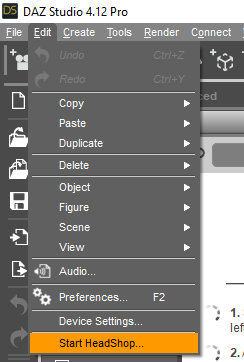
Little correction: You do not need to put the Genesis figure in "Base" resolution - the morphs will work also in "High" resolution
Unless they've changed something in the coding from previous editions, no. To make a morph from an .obj import via Morph Loader, one needs to have the receiver at base resolution.
Once the morph is made then certainly one can return the figure to high resolution.
If one makes it all through HeadShop one does not need to change the resolution or remove the eyelashes however I find helping the plugin doesn't hurt anything either ;-)
Celebrity Look-a-Likes for 3D figures part 3dragotx said:
PhilW said:
At the risk of plugging my own product, have you seen this?
Face Transfer Shapes for Genesis 8 | 3D Models and 3D Software by Daz 3D
I did this in response to seeing many requests for something that made the morphs out of the standard Face Transfer more generally usable and I think it does a good job, plus quite a lot of customisation possible to fine tune the results.
If you are using the Daz face transfer app, I'd rate this addon for it as an absolute requirement. It made a huge difference for me when I started using it.
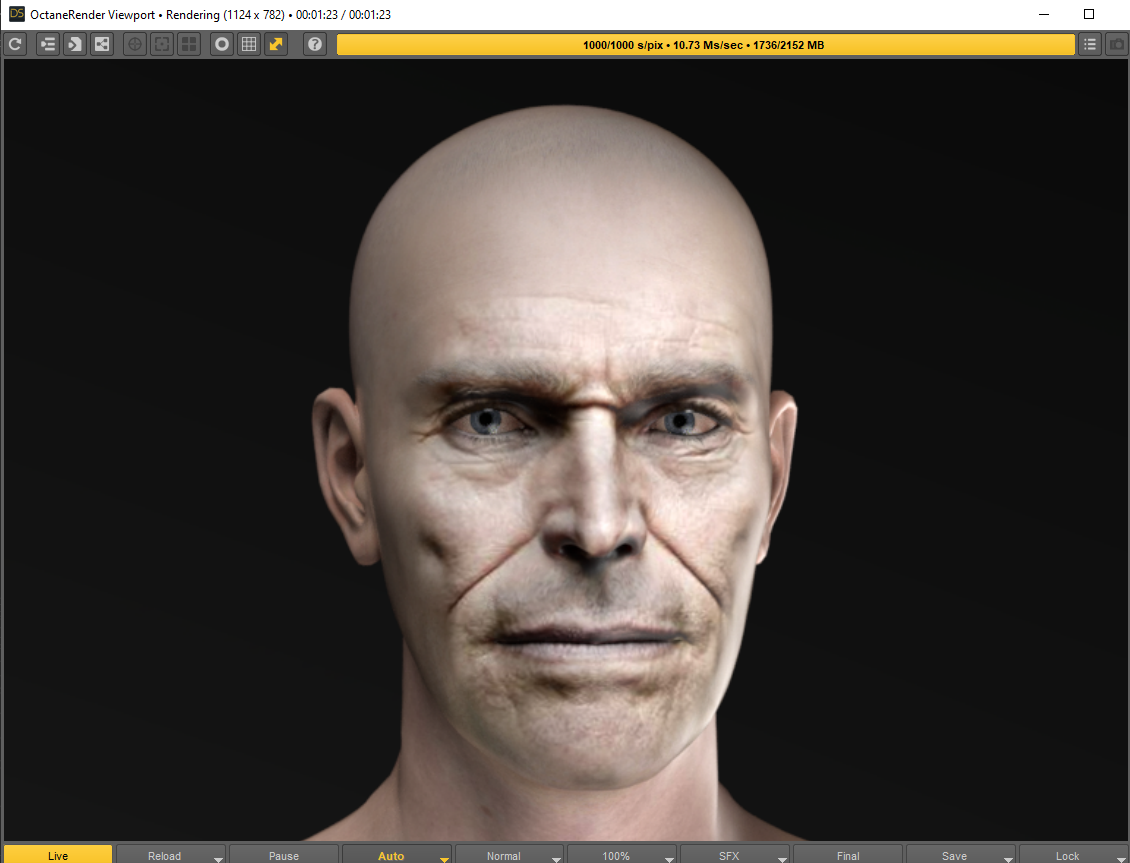
Agreed.After the face transfer using the addon makes a big difference. A must have for Face Transfer users. This was a quick Octane preview render not optimized yet.
 Headshop 13 w Lovechild
Catherine3678ab said:
thomasritzler said:
Hi I'm having serious trouble with headshop 13 with lovechild plugin.
The program works fine, it exports the .obj-file and texture content aswell. However, when I open DAZ, load a Genesis 8 Basic Female character, remove eyelashes (I also tried NOT removing the eyelashes) because I read somewhere that the eyelashes sometimes causes problems, and start Morph Loader Pro and find my .obj-file from the Headshop 13 software and try loading the morph - a popup appears saying "Geometry did not match, failed to create morph." I should also mention that I haven't been able to integrate the Headshop plugin into Daz Studio, I am forced to use Headshop as a stand alone program for exporting the .obj-file. I use Windows 10 Pro, Daz Studio 4.15.0.2.
Can anyone help med out?
Thanks
1. It sounds like you may have missed putting the figure to base resolution. And yes for the G8 figures, no eyelashes.
For the Windows edition, yes when you open D/S, under Edit there should be the option to start Headshop. Check through the provided readme instructions for installation.
Little correction: You do not need to put the Genesis figure in "Base" resolution - the morphs will work also in "High" resolution
Fur showing through clothingI've got Majestic Anubis for G8 Male with dForce hair.
My problem is the fur shows though any clothing I use, I've tried using the "expand all" morph for the clothing, however I don't really want to do this too much as they'll eventually look too loose on the model.
Any ideas? I read something about layers, but that didn't seem to work (or I did it wrong).
Using Daz Studio 4.15.0.2 Pro 64 Bit
Many thanks
To Rigify option messes up foot rotation of Daz To Blender BridgeHi people,
I am not sure if you guys face this problem but I think it is a common one of bridge.
Normally you want to enable rigify in Blender since it provides more control like better IK chains and facial rigging.
So Daz to Blender Bridge comes with this option called To Rigify.
It normally would not cause any trouble if your characters don't wear high heels.
However it causes big toubles for me. My character is a female wearing high heel boots so I made her boots and fit the boots in Daz 4.12 and transfer to Blender 2.9 using Bridge 2.1
Everything works fine until I hit To Rigify button.
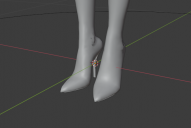 This is what I got with model just imported.
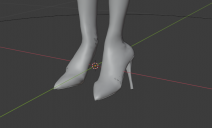 This is what I got after To Rigify. Reset to default pose doesn't correct this rotation.
I think the problem is that To Rigify function tries to fit foot rotation to a zero rotation template but I just can't figure out how to fix it. Any help is appreciated and thanks in advance :)
AIUTO...CHI CONOSCE L’ITALIANO? PARTE TREDICICerto ce ne vuole per rovinare V4, ho visto gli ultimi free items, con i morph per V4, ma sinceramente ci hanno messo l'impegno a farla brutta.
[Released] Character Converter from Genesis 3 Female to Genesis 8 Female(Now Conv JCMs) [Commercial]RiverSoftArt said:
ShadowSkillz said:
RiverSoftArt said:
ShadowSkillz said:
Good day, I used this tool to convert Rune 7, it seems to work, but the converted character only appears under content library pane and not the Smart content pane. Also when I check my "Rune G8 figure" I don't see the newly converted figures character slider but i do see all my other characters sliders. Am I doing something wrong or is this functioning as expected?
In case this helps, all my Daz3D content is on a seperate drive from my C, and the converted character is located here: V:\Daz3DStudio\Applications\Data\DAZ 3D\My DAZ 3D Library\People\Genesis 8\Female\Characters(G3F_to_G8F)
The converted character will appear in Smart Content (Files tab). The slider should be appearing too. What is your MORPHS path? I would expect to see something under data/DAZ 3D/Genesis 8/Female/Morphs/PRODUCT NAME/CHARACTER NAME, which when combined with the first path in Daz Studio Formats for the Content Directory Manager should be a valid directory:
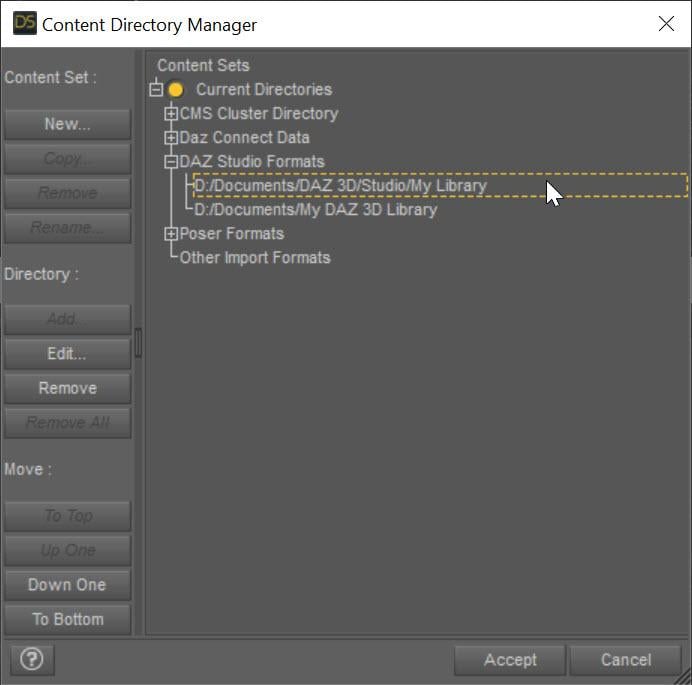
All the morphs including the CTRL morph for the character should be under there.
My morph location appears to be : V:\Daz3DStudio\Applications\Data\DAZ 3D\My DAZ 3D Library\data\Daz 3D\Genesis 8\Female\Morphs
I don't see anything for the converted character in the morphs folder and I don't see anything in the smart content tab. Did I set the wrong output directory location: V:\Daz3DStudio\Applications\Data\DAZ 3D\My DAZ 3D Library\People\Genesis 8\Female\Characters(G3F_to_G8F)
My Daz Studio Formats directory is :V:\Daz3DStudio\Applications\Data\DAZ 3D\My DAZ 3D Library
The Character preset directory is fine. We are looking for the morphs and CTRL. If you do a search in V:\Daz3DStudio\Applications\Data\DAZ 3D\My DAZ 3D Library\data\Daz 3D\Genesis 8\Female\Morphs for "*Rune*.*" nothing shows up?
Do you see the character in Smart Content (Files)?
Did a search and found some stuff for her under: V:\Daz3DStudio\Applications\Data\DAZ 3D\My DAZ 3D Library\data\Daz 3D\Genesis 8\Female\Morphs\DAZ 3D,ForbiddenWhispers,Luis Santos,Raiya\Rune 7 . Oh I see her under Smart Content (files section) I have only ever used Smart Content (products section), is that the only place she will show up? Admittedly I am not familiar with all the folder structures for Daz studio, had hoped the product would just do everything with me not having to know much...
I assume the morphs are in the wrong location, any ideas why, is it a bug or did I configure something wrong?
Dragkon for G8M [commercial]ShadowSkillz said:
Hope this discussion is still monitored, the product is awesome but the "Wrap wings" morph is broken, hope this can be fixed.
Yes...I can confirm that something did break.
You will still have to send in a support ticket, but I will begin to work on a fix, so that when I get the word from daz, I will be ready to submit it.
[Released] Character Converter from Genesis 3 Female to Genesis 8 Female(Now Conv JCMs) [Commercial]ShadowSkillz said:
RiverSoftArt said:
ShadowSkillz said:
Good day, I used this tool to convert Rune 7, it seems to work, but the converted character only appears under content library pane and not the Smart content pane. Also when I check my "Rune G8 figure" I don't see the newly converted figures character slider but i do see all my other characters sliders. Am I doing something wrong or is this functioning as expected?
In case this helps, all my Daz3D content is on a seperate drive from my C, and the converted character is located here: V:\Daz3DStudio\Applications\Data\DAZ 3D\My DAZ 3D Library\People\Genesis 8\Female\Characters(G3F_to_G8F)
The converted character will appear in Smart Content (Files tab). The slider should be appearing too. What is your MORPHS path? I would expect to see something under data/DAZ 3D/Genesis 8/Female/Morphs/PRODUCT NAME/CHARACTER NAME, which when combined with the first path in Daz Studio Formats for the Content Directory Manager should be a valid directory:
All the morphs including the CTRL morph for the character should be under there.
My morph location appears to be : V:\Daz3DStudio\Applications\Data\DAZ 3D\My DAZ 3D Library\data\Daz 3D\Genesis 8\Female\Morphs
I don't see anything for the converted character in the morphs folder and I don't see anything in the smart content tab. Did I set the wrong output directory location: V:\Daz3DStudio\Applications\Data\DAZ 3D\My DAZ 3D Library\People\Genesis 8\Female\Characters(G3F_to_G8F)
My Daz Studio Formats directory is :V:\Daz3DStudio\Applications\Data\DAZ 3D\My DAZ 3D Library
The Character preset directory is fine. We are looking for the morphs and CTRL. If you do a search in V:\Daz3DStudio\Applications\Data\DAZ 3D\My DAZ 3D Library\data\Daz 3D\Genesis 8\Female\Morphs for "*Rune*.*" nothing shows up?
Do you see the character in Smart Content (Files)?
[Released] Character Converter from Genesis 3 Female to Genesis 8 Female(Now Conv JCMs) [Commercial]RiverSoftArt said:
ShadowSkillz said:
Good day, I used this tool to convert Rune 7, it seems to work, but the converted character only appears under content library pane and not the Smart content pane. Also when I check my "Rune G8 figure" I don't see the newly converted figures character slider but i do see all my other characters sliders. Am I doing something wrong or is this functioning as expected?
In case this helps, all my Daz3D content is on a seperate drive from my C, and the converted character is located here: V:\Daz3DStudio\Applications\Data\DAZ 3D\My DAZ 3D Library\People\Genesis 8\Female\Characters(G3F_to_G8F)
The converted character will appear in Smart Content (Files tab). The slider should be appearing too. What is your MORPHS path? I would expect to see something under data/DAZ 3D/Genesis 8/Female/Morphs/PRODUCT NAME/CHARACTER NAME, which when combined with the first path in Daz Studio Formats for the Content Directory Manager should be a valid directory:
All the morphs including the CTRL morph for the character should be under there.
My morph location appears to be : V:\Daz3DStudio\Applications\Data\DAZ 3D\My DAZ 3D Library\data\Daz 3D\Genesis 8\Female\Morphs
I don't see anything for the converted character in the morphs folder and I don't see anything in the smart content tab. Did I set the wrong output directory location: V:\Daz3DStudio\Applications\Data\DAZ 3D\My DAZ 3D Library\People\Genesis 8\Female\Characters(G3F_to_G8F)
My Daz Studio Formats directory is :V:\Daz3DStudio\Applications\Data\DAZ 3D\My DAZ 3D Library
[Released] Character Converter from Genesis 3 Female to Genesis 8 Female(Now Conv JCMs) [Commercial]RiverSoftArt said:
ShadowSkillz said:
Good day, I used this tool to convert Rune 7, it seems to work, but the converted character only appears under content library pane and not the Smart content pane. Also when I check my "Rune G8 figure" I don't see the newly converted figures character slider but i do see all my other characters sliders. Am I doing something wrong or is this functioning as expected?
In case this helps, all my Daz3D content is on a seperate drive from my C, and the converted character is located here: V:\Daz3DStudio\Applications\Data\DAZ 3D\My DAZ 3D Library\People\Genesis 8\Female\Characters(G3F_to_G8F)
The converted character will appear in Smart Content (Files tab). The slider should be appearing too. What is your MORPHS path? I would expect to see something under data/DAZ 3D/Genesis 8/Female/Morphs/PRODUCT NAME/CHARACTER NAME, which when combined with the first path in Daz Studio Formats for the Content Directory Manager should be a valid directory:
All the morphs including the CTRL morph for the character should be under there.
My morph location appears to be : V:\Daz3DStudio\Applications\Data\DAZ 3D\My DAZ 3D Library\data\Daz 3D\Genesis 8\Female\Morphs
I don't see anything for the converted character in the morphs folder and I don't see anything in the smart content tab. Did I set the wrong output directory location: V:\Daz3DStudio\Applications\Data\DAZ 3D\My DAZ 3D Library\People\Genesis 8\Female\Characters(G3F_to_G8F)
My Daz Studio Formats directory is :V:\Daz3DStudio\Applications\Data\DAZ 3D\My DAZ 3D Library
[Released] Character Converter from Genesis 3 Female to Genesis 8 Female(Now Conv JCMs) [Commercial]ShadowSkillz said:
Good day, I used this tool to convert Rune 7, it seems to work, but the converted character only appears under content library pane and not the Smart content pane. Also when I check my "Rune G8 figure" I don't see the newly converted figures character slider but i do see all my other characters sliders. Am I doing something wrong or is this functioning as expected?
In case this helps, all my Daz3D content is on a seperate drive from my C, and the converted character is located here: V:\Daz3DStudio\Applications\Data\DAZ 3D\My DAZ 3D Library\People\Genesis 8\Female\Characters(G3F_to_G8F)
The converted character will appear in Smart Content (Files tab). The slider should be appearing too. What is your MORPHS path? I would expect to see something under data/DAZ 3D/Genesis 8/Female/Morphs/PRODUCT NAME/CHARACTER NAME, which when combined with the first path in Daz Studio Formats for the Content Directory Manager should be a valid directory:
All the morphs including the CTRL morph for the character should be under there.
Dragkon for G8M [commercial]Hope this discussion is still monitored, the product is awesome but the "Wrap wings" morph is broken, hope this can be fixed.
New ComputerHi,
I tried to look up this information but couldnt find anything really regarding my question. My old computer died last friday and I have to transfer everything to my new computer. Lucky for me my all my DazStudio were on a 2nd hardrive which will be transfered to my new PC. My main concern are 1) do i need to reinstall everything or i can just use my old already installed products. 2) I have over 80 customized character that I saved as scenes, if i need to reinstall everything, will they work without issue or I basically lost everything (this is my main concern). Thank you for your help!
Daz 3D is part of

Connect
DAZ Productions, Inc.
7533 S Center View Ct #4664
West Jordan, UT 84084Licensing Agreement | Terms of Service | Privacy Policy | EULA
© 2026 Daz Productions Inc. All Rights Reserved.