-
Where are the G9 8k textures?
ioonrxoon said:
Richard Haseltine said:
The different map sizes were discused in a couple of the Genesis 9 release threads. It was found that 8K base colour maps don't really do much, it's the detail maps that add the fine detail to the base colour at a lower (4K) resolution.
They may have been discussed in different threads, but that doesn't mean everyone read them. Just like half the issues on this site, this is what happens when Daz doesn't communiacate. They said G9 will come with 8k maps (and it's still advertised on character pages -"Included standard with the base Genesis 9 figure." - this is definitely NOT obvious to anyone that it refers to the detail maps, unless you actually know beforehand), so of course people expect them. When that changed, an official explanation should have been offered. It wasn't. They did it with this, they did it with editorial licenses and many others - most of the outrage and complaints wouldn't have happened with proper communication.
you are misinterpreting the Daz wording.
Genisis 9 MATERIALS are 8K using the new PBRsharer and Daz Studio LIE system. 8K normal map and 4k texture maps = 8K materials.
If you read the Victoria 9 product page is says : 8K HD Materials, Included standard with the base Genesis 9 figure - this is included free in the Genesis 9 Essentials package.
The Victoria 9 product page also says: 44 Texture, Normal, Roughness, and Sub-Surface Scatter Maps (96 x 96 to 8192 x 8192) - KEY WORDING is the word "to" mean not ALL texture maps are 8K.
If you look at Pixie 9 a Genisis 9 product it also has the language 8K HD Materials, Included standard with the base Genesis 9 figure - this is included free in the Genesis 9 Essentials package BUT the textures included are ALL 4K - 48 Texture, AO, Displacement, Normal, Roughness, and Transparency Maps (4096 x 4096)
nowhere did daz say Genisis 9 products include 8K skin texture maps, nor is it a requirement of Daz PA's to include 8K skin texture maps, there is 1 Genisis 9 product by a PA that has an addon pack of 8K skin texture maps (nicely provided to those that need or want, and those that do not do not need to take up hard drive space)
what I want is 8K normal map and new PBR shader for Genisis 8 and Genisis 3 products. With all the HD Addison for genesis 3/8 I'd like to just punch up what I already have.
Genesis 9 clothing questions & answersbarbult said:
A couple questions about templates:
- Why are there no breast adjustment morphs? There are morphs for many other body areas.
- Who is Nikolai9? He looks kind of chubby according to the morph. Why would he have morphs in the bodysuit template, but released characters like Michael and Victoria do not? Do they not need them, but he does because of his size?
I ignored this question up to now because I didn't want to draw more attention to a shape that's not released yet. Unfortunately this means that from now on upcoming shapes will have to go into the templates after the figure gets released, not before. With the templates so easily accessible there's no other way for me to prevent the shapes being posted in a public forum.
Yes he has morphs in the suit because he is very chubby, and there were some clothing distortions especially on the back.
The loosen morphs are aimed at helping with kitbashing, for example to fit items from different sets to each other - tops over pants etc. If you meant breast adjustment morphs to fix issues with the shrinkwrap effect - there are too many scenarios and should be a product by itself.
Can you identify the character used in this promo?I thought it was Victoria 8.1 https://www.daz3d.com/victoria-8-1Where are the G9 8k textures?Leana said:
The only 8K textures were the details maps, other textures were 4K.
Then why does it read different on Victoria and Michael than it does on the last four Daz Original G9 characters? V9 and M9 have something the last 4 G9 characters dont have.
Where are the G9 8k textures?ioonrxoon said:
hhglick said:
nemesis10 said:
Check the HD normal maps....
Those are not the textures that came with Victoria and Michael. Those were 8K, the last 4 releases have been 4K.
Don't know about M9, but V9 doesn't have 8k textures.
It says it does in the product listing.... last thing when it lists the textures... there are 8K textures there and on Michael, wher the other ones are only listing 4K textures.
Where are the G9 8k textures?hhglick said:
nemesis10 said:
Check the HD normal maps....
Those are not the textures that came with Victoria and Michael. Those were 8K, the last 4 releases have been 4K.
Don't know about M9, but V9 doesn't have 8k textures.
Nikolai 9 HDNikolai 9 HD has a good-looking morph, but the promos make his skin look like 8.1 instead of Victoria 9, Michael 9, or even Minerva 9. I'll be looking forward to some user renders. I've learned to wait at least a day; plus, I have to get my punch total up.
Anatomy Bundles, do they work with G8? Still worth getting?Thanks for the reactions folks, considering the age of the product and as I don't have the wear them all autofit clone product I'll wait until a deep sale before trying one of these bundles. I guess the starter bundle + Iray shaders would suffice follwowing Richard's method, or even odbob's method, no need to get Victoria 4 and Michael 4.
Where are the G9 8k textures?nemesis10 said:
Check the HD normal maps....
Those are not the textures that came with Victoria and Michael. Those were 8K, the last 4 releases have been 4K.
Where are the G9 8k textures?When all the talk of G9 started I thought a big selling point was the upclose 8k textures. Victoria had them but they were missing from almost every PA character. Then Michael had them and I thought maybe only the Daz Originals would have them. But the last 4 G9 characters were dropped with only 4K textures. I think to date only 2 PAs offered 8k textures and one of those was an add on option. What's going on? If this is a G9 feature why is it not being offered with G9 characters (especially those dropped by Daz Studio)?
Using V4/G3F Morphs on a G8FcaraTRON.7263 said:
Okay, so what I need is:
GenX base product to convert from V4 or M4
GenX addon for Genesis 3 to convert to Genesis 3 instead of Genesis 1
You need the GenX2 Genesis 2 add-on too, it’s required by the Genesis 3 add-on.
G3 to G8 converter to then convert the morph from Genesis 3 to Genesis 8
And if the morph is made for Genesis 3, I only need that third one.
That one or the character converter, yes.
Do I need anything else?
If you want just the morph, no. If you want to use the textures you'll need the legacy UVs products which enable you to use V4 textures on G3F or G8F
The "V4 to G8" one is this: https://www.daz3d.com/legacy-uvs-for-genesis-8-victoria-4
The "V4 to G3F" one is sold at Renderosity, the vendor wasn't selling at Daz yet when they released it.
Also, are those last two products that I linked in my original post indeed interchangeable, or is there a difference in what they do that's going over my head?
They essentially do the same thing, but use different methods to do it.
Anatomy Bundles, do they work with G8? Still worth getting?These are for Victoria 4/Michael 4. You could AutoFit the figures to Genesis, then AutoFit the results to Genesis 8 - but you would then losde the ability to adjust the bones separately and, asi recall, there iss ome noticeable distortion. Using the muscle maps would require a tool to enable fourth geneation maps to work, and there are no Iray settings.
Anatomy Bundles, do they work with G8? Still worth getting?So I've been looking at the anatomy bundles for a while, both the starter and the pro: Do these work with G8 and can I just get the Starter Bundle, or should I get the Pro as they were meant for Victoria 4 and Michael 4? Are these still worth getting? I find most assets that old aren't for me, but I've seen the Iray Shaders for the bundle so I guess it might be different with these items.
Hard light edges on skin/geometry - G9 (Solved)Here is an example with G8.1 and Victoria 8.1 HD material.
Left :
Body : default values, Normal map 1.0 and Detail enable ON
Panty : Bump map 1.0
Right :
Body : Normal map 0.3 and Detail enable OFF
Panty : Bump map 0.3
Is Beautiful Bends for G2F still available?takezo_3001 said:
FSMCDesigns said:
Doesn't appear to be, but there are these alternatives
=> https://www.daz3d.com/ultimate-natural-for-victoria-6-body <=
I enthusiastically recommend anything from K.H.Image studio, they make some truly accurate anatomical JCMs and by anatomical, I don't mean the genitals!
UN is specifically for Vicky 6, though, right? Would I be better off in this instance getting Ideal Beauty with its Gia 6 add-on? Or maybe use RiverSoft's product to convert her to G8 and get it over with. I can't believe these tools for legacy figures are still so expensive.
By illustration, the image on the left is the one initially posted above. In the one on the right, however, I've added a slight bit of muscularity overall, and then adjusted Gia's coracobrachalis (proximal to her armpits) and adjusted the long head of her triceps to fill out the area above her elbows a bit. It's slight, but makes the bends more natural.
Experimenting with ML Deformer in UE5.1UPDATED TO PUT USEFUL RESOURCES AT THE TOP
Useful information from the devs about using the ML Deformer tools
- https://forums.unrealengine.com/t/experimenting-with-daz-characters-and-the-ml-deformer/732897/2?u=mrpdean
- https://youtu.be/OmMi6E0EkQw?t=1904
Tools that currently support using Daz character with the ML Deformer workflow
- DazToUnreal (doesn't require additional software but currently doesn't support geografts): http://davidvodhanel.com/daz-to-unreal-mldeformer-support/
- DazToHue (requires Houdini but supports geografts): https://www.daz3d.com/forums/discussion/619356/daztohue-update-0-1-released
Anyone else experimenting with the experimental Machine Learning Deformer tech in UE5.1?
Based on my own experiments so far, it seems to do a good job at correcting the issues with linear skinning, without having to deal with all the JCM's.
Here are some screen shots of Victoria 8.1 for comparison.
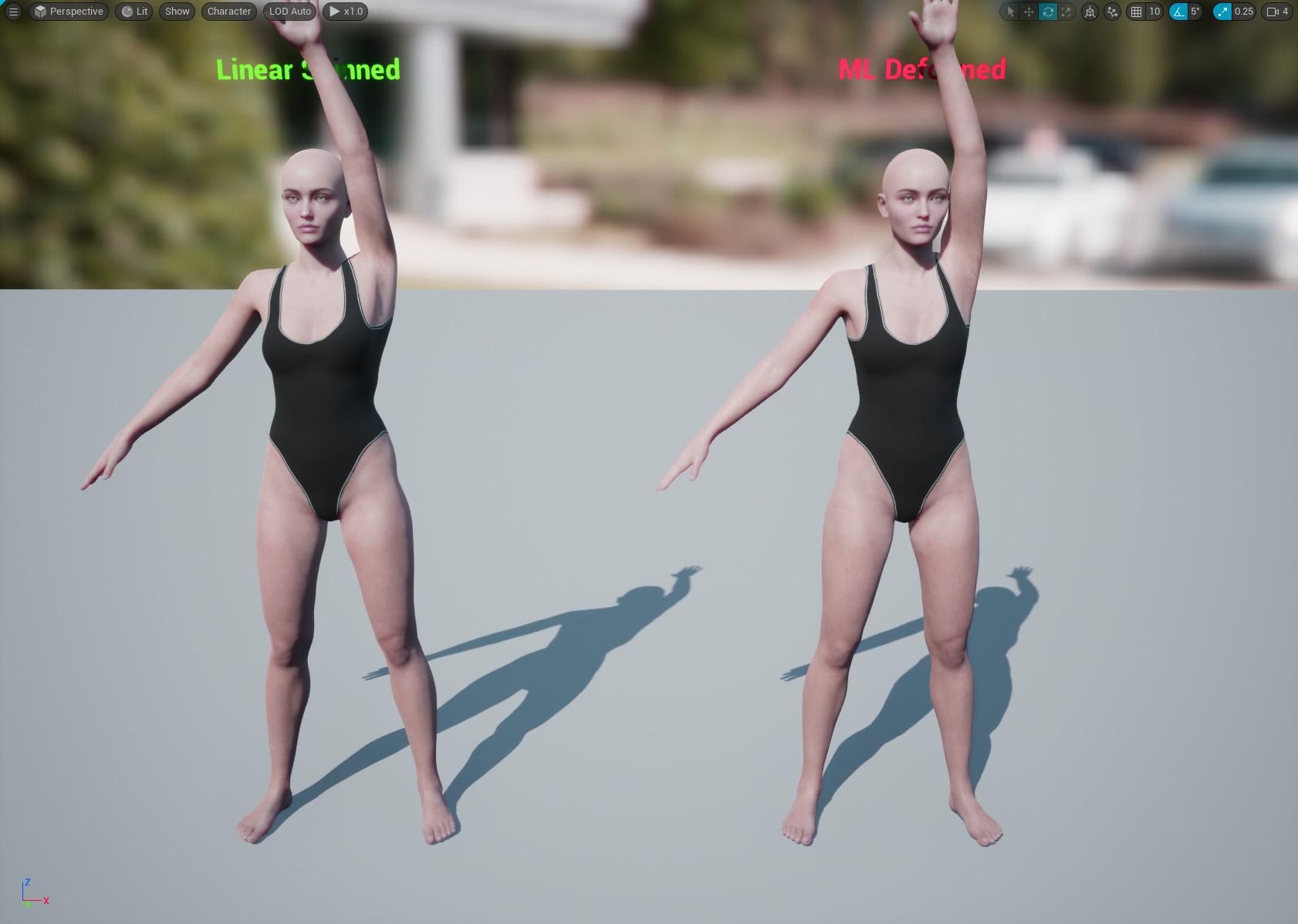
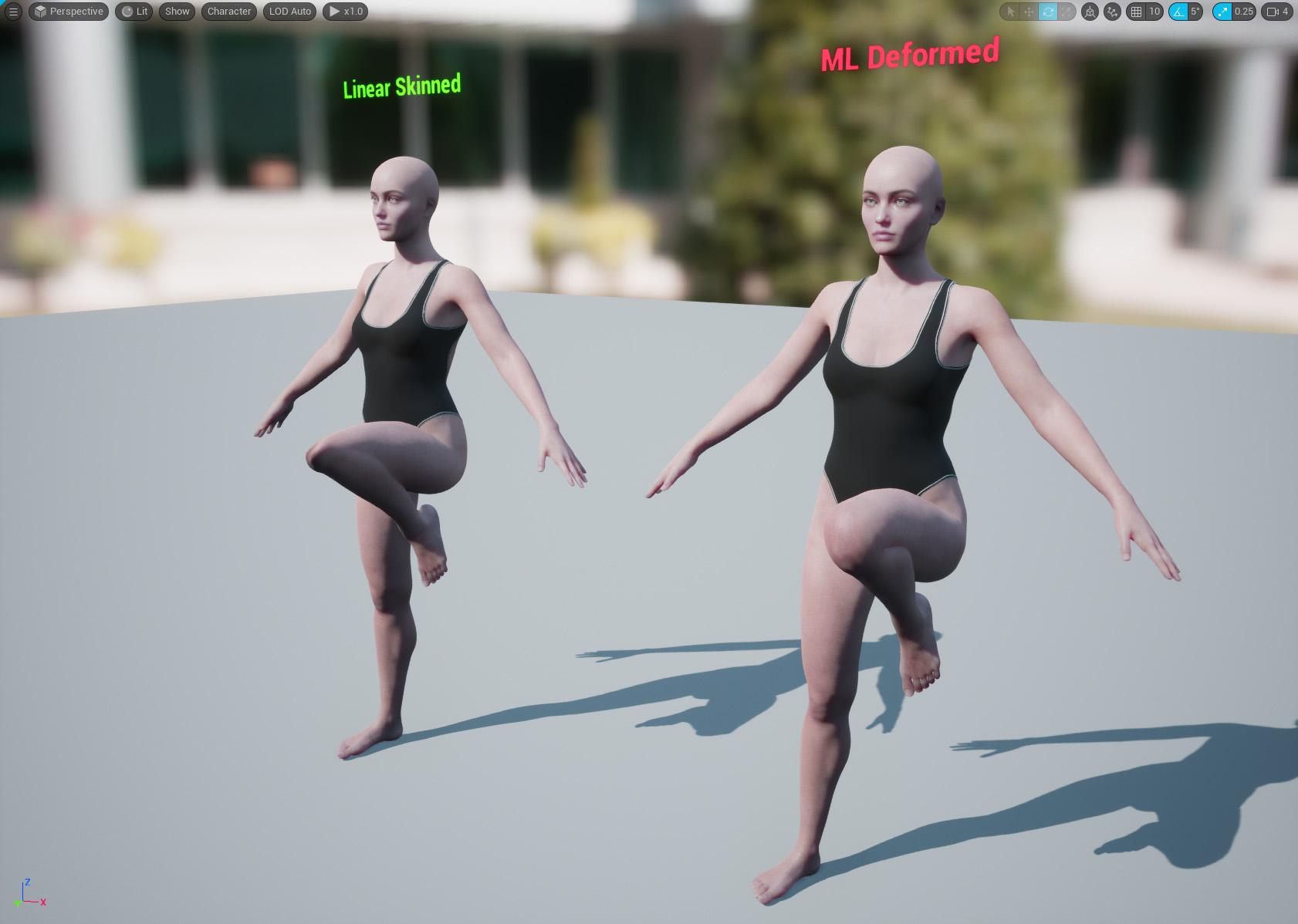
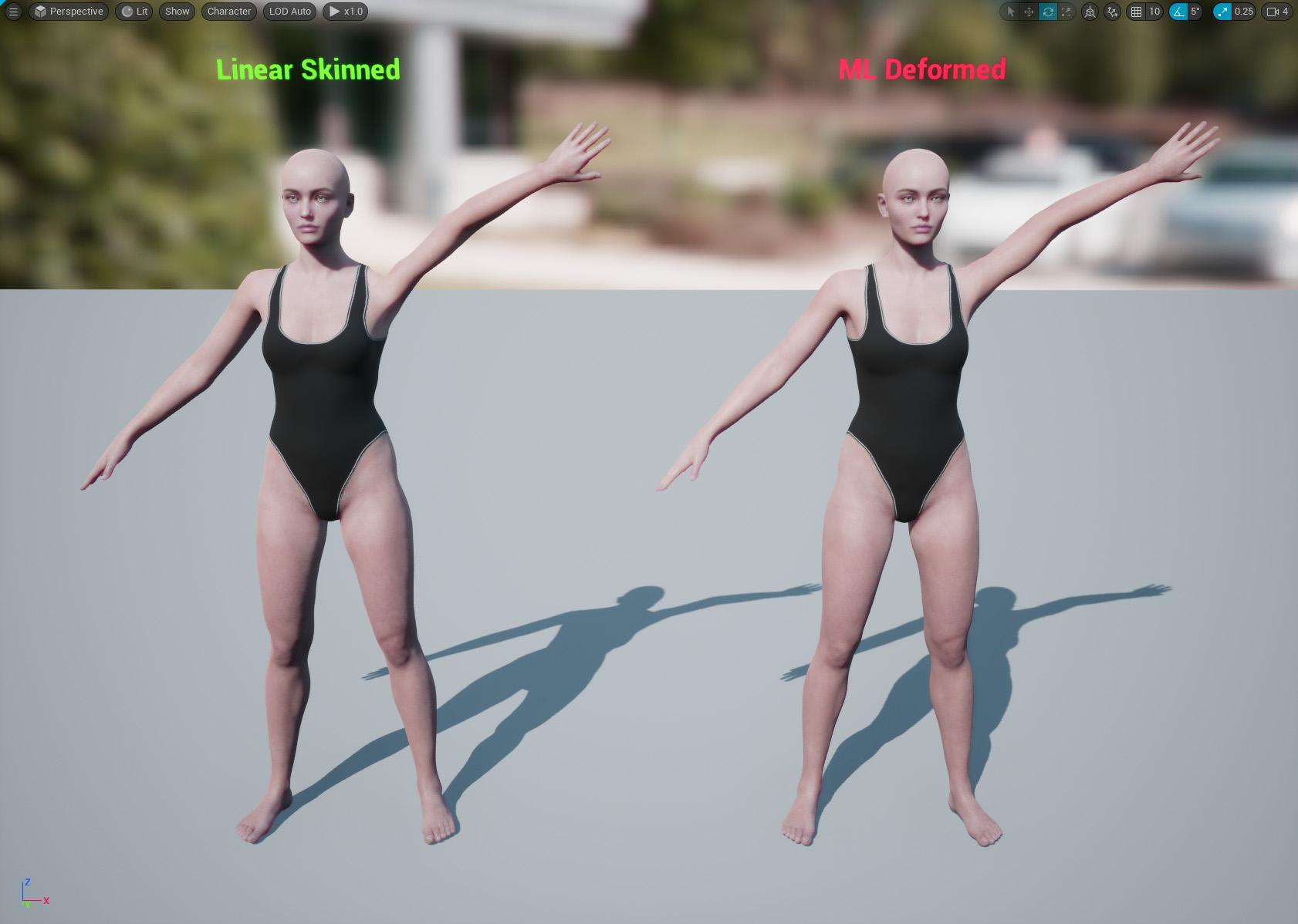
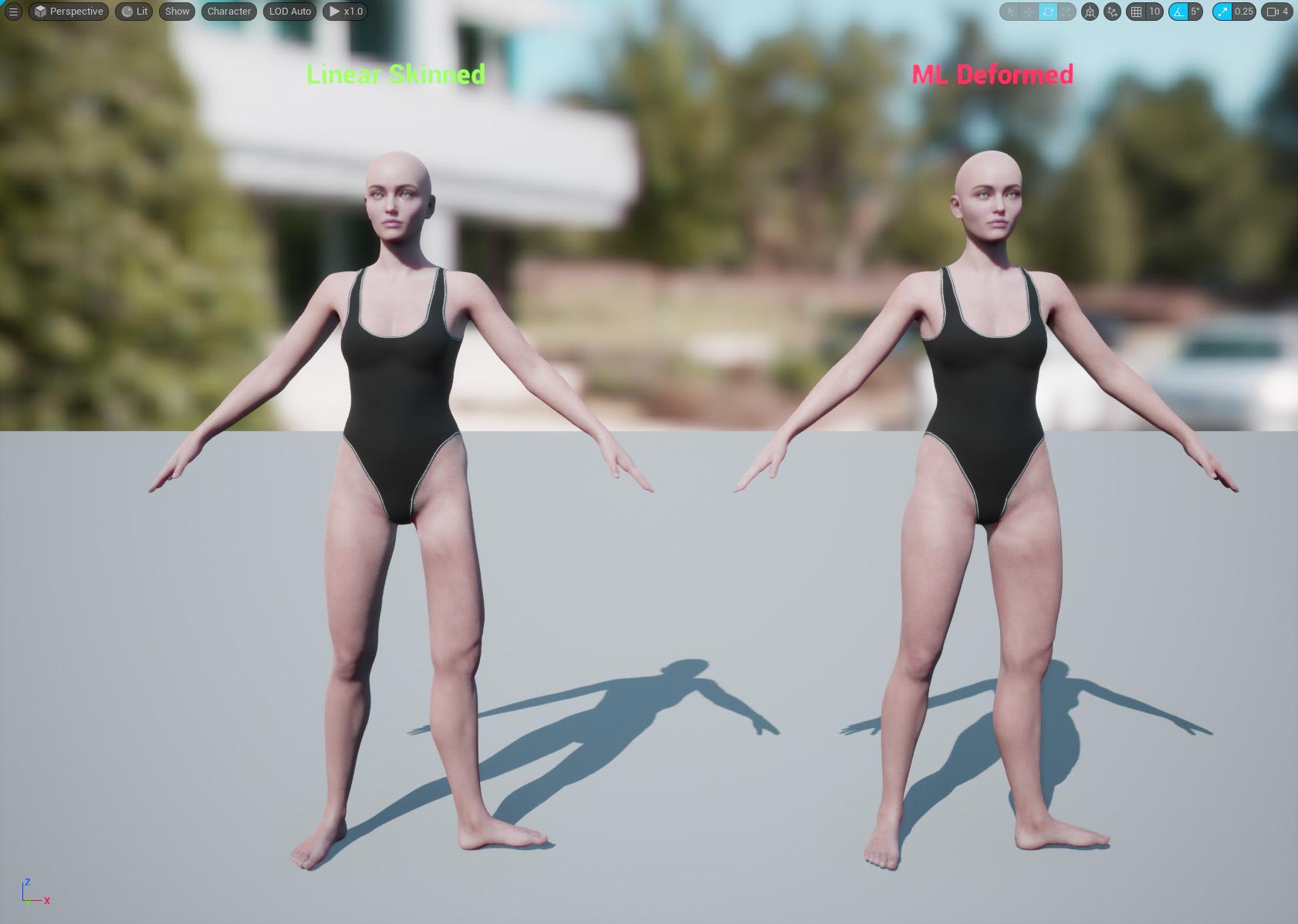
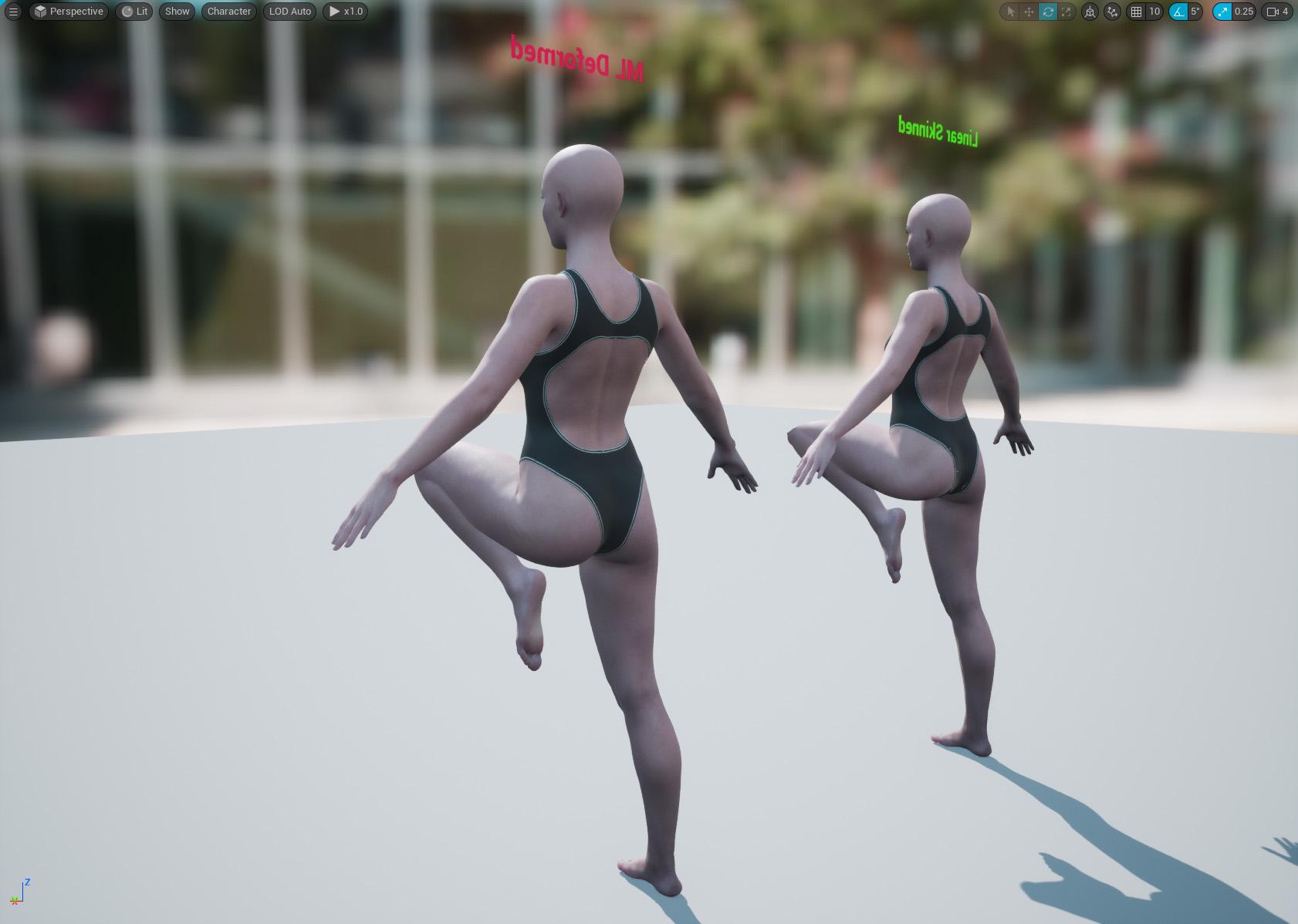
A couple of things I've noticed so far:
- It doesn't seem to capture the finer details, such as around the eyes when looking left/right etc. There are different training models with different settings (none of which are currently documented) so perhaps it's possible to caputure those finer details with different settings/models. I'm still experimenting with the different neural models and settings but it's a lot of trial and error until we get better documentation. Some JCM's might still be required for the finer details of facial animations.
- The maya plugin which EPIC released (which I'm not using) creates 50,000 poses by default however, I used less than 500 poses to train the model in the example above and still got good results. I think that's because I chose more deliberate poses to train with whereas the maya plugin just generates heaps of random poses.
If anyone else has been playing aorund with this, perhaps we can share what we've learned?
MimicMolly's Renders & WIPsMimicMolly said:
Haven't been rendering much since Pokemon Scarlet and Violet released. That game's exploring has taken up my time, as I try to fill out the Pokedex in Paldea (their version of Spain.)
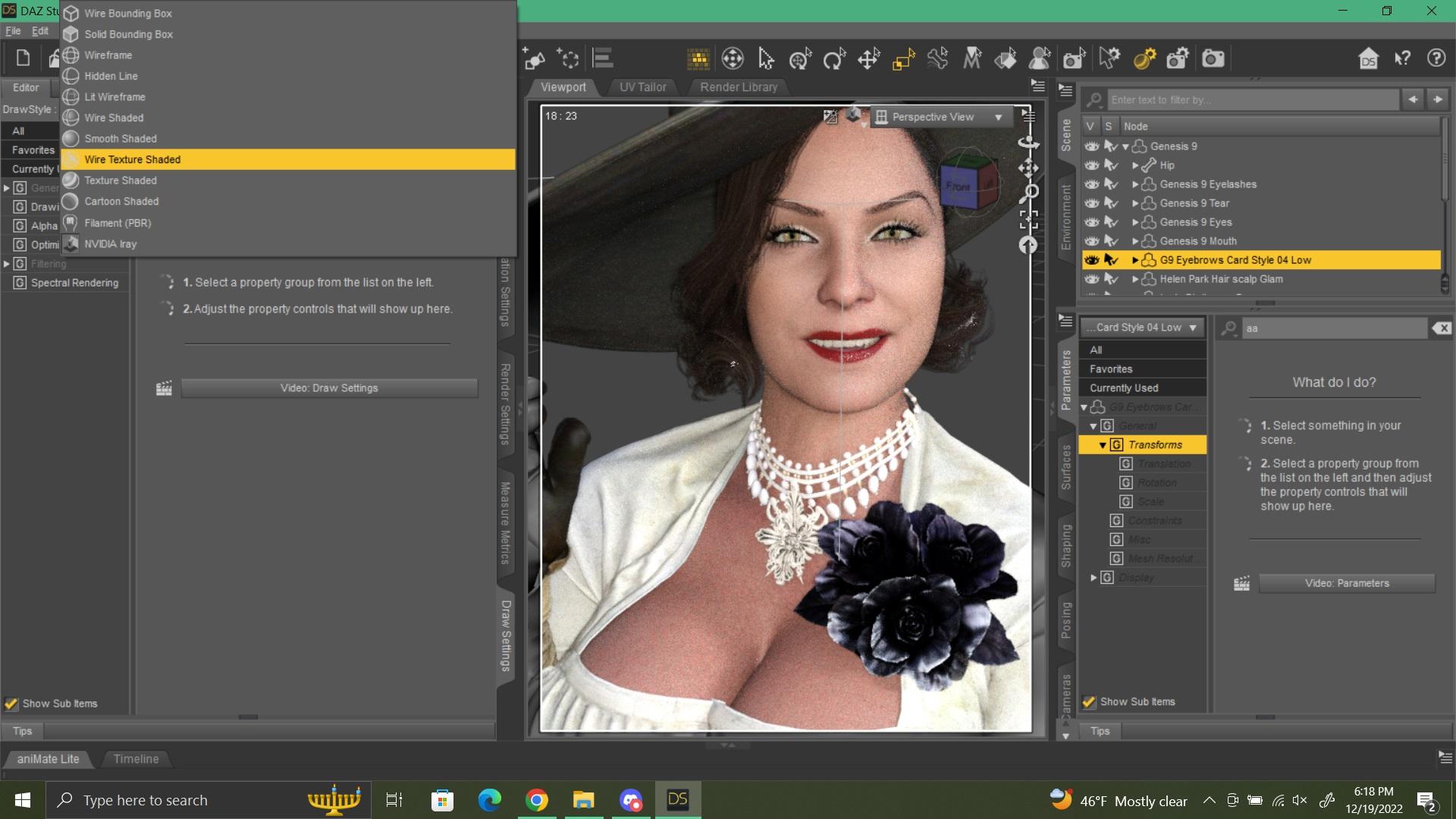
Anyway, this is a test render I did of Minerva 9's skin and makeup. I don't know how to feel about the script that applies it. I think DS will crash during the delay while it applies it. (Might just go ahead and buy that one makeup from Renderosity, if the site actually loads.) I had tried Minerva's makeup with the default/Victoria 8.1 skin and it looked decent. (I don't usually do outlandish makeup for my characters, so what came with Minerva is good.) This character is a transferred one from G8F.
Nicely done.
Is Beautiful Bends for G2F still available?FSMCDesigns said:
Doesn't appear to be, but there are these alternatives
=> https://www.daz3d.com/ultimate-natural-for-victoria-6-body <=
I enthusiastically recommend anything from K.H.Image studio, they make some truly accurate anatomical JCMs and by anatomical, I don't mean the genitals!
Using V4/G3F Morphs on a G8FThis post appears to describe a way of doing it without any conversion products at all, however that description begins with having an actual V4 figure in my scene, and I can't find how to do that. What product contains the "Victoria 4" figure? Should I be inserting a Victoria 4.2 Base figure instead? I'm uncertain whether that product would work for me currently, given that "Victoria 4" is its only Compatible Figure, and I don't appear to have "Victoria 4" as I can't find the figure to insert. Am I just being dense here? Is V4.2 "how you use V4 in Daz" (as opposed to Poser)?
Sorry if this is a really stupid question... -_-;
MimicMolly's Renders & WIPsHaven't been rendering much since Pokemon Scarlet and Violet released. That game's exploring has taken up my time, as I try to fill out the Pokedex in Paldea (their version of Spain.)
Anyway, this is a test render I did of Minerva 9's skin and makeup. I don't know how to feel about the script that applies it. I think DS will crash during the delay while it applies it. (Might just go ahead and buy that one makeup from Renderosity, if the site actually loads.) I had tried Minerva's makeup with the default/Victoria 8.1 skin and it looked decent. (I don't usually do outlandish makeup for my characters, so what came with Minerva is good.) This character is a transferred one from G8F.
Daz 3D is part of

Connect
DAZ Productions, Inc.
7533 S Center View Ct #4664
West Jordan, UT 84084Licensing Agreement | Terms of Service | Privacy Policy | EULA
© 2026 Daz Productions Inc. All Rights Reserved.