-
Studio bridge
ladydeath - I have used the Studio bridge with version 2.x, 3.x and 4.x with ryce 5.5, 6.0, 6.1, 6.3, 7.0 and 7.1. If I remember correctly, you have to re-install Bryce so that Studio can see it. If you have made any changes/additions to Bryce since you installed it, these will be over-written when you install anew. Best option rename the folder where Bryce is now installed, create a new folder with the initial name and install Bryce. Studio ought to see it now. If it is ok, delete the folder with the new installed Bryce and rename the other one back as before.
Example:
Current Bryce folder: MyBryce rename it to MyOldBryce
Create a new folder MyBryce and install Bryce again.
When Studio sees it, delete MyBryce and rename MyOldBryce back to MyBryce
Hope it helps and works ...Though I must add that I very seldom use the bridge. i usually export from Studio as Object (obj) and import it into Bryce.
Cant find my own scenes and presets in smart content tabThe path / folder of the usfer-facing files are stored in cms database. If you changed the file path or moved the files to other location with File Browser rather than Content Library, the link to the file would be broken... You have to:
- Set Content Type in Content DB Editor : Right-click on the folder in Content Library > Edit Metadata > set Type.
- Categorize the user-facing files: Select scene file(s), right-click menu > Categorize > Saved Files / Scene
- Go to: Content Library > Products > L > LOCAL USER, Ctrl + A to Select All (page by page as needed...), right-click menu > Remove Orphaned References... so as to remove those blank thumbnails with exclamation marks。
[Solved] Character Preset: How to set Eyelashes color using a Post Load script ?Bejaymac said:
One thing to check is what's in the H-MAT, are there material settings for other items in it, if so then that's why it's not working as Post Load wont use the MAT if there is.
I'm not sure if I checked the right section, but the scene section in the H.mat file is very similar to the one in Victoria 8.1 Mat file (with Eye brow instead of Eyelashes referenced in the later).
Here the scene section from my H.mat file:
"scene" : {
"nodes" : [
{
"id" : "Genesis8_1Female",
"url" : "name://@selection/Genesis8_1Female:",
"geometries" : [
{
"id" : "Genesis81FemaleGeom",
"url" : "name://@selection#geometries/Genesis81FemaleGeom:"
}
]
},
{
"id" : "Genesis8_1FemaleEyelashes",
"url" : "name://@selection/Genesis8_1FemaleEyelashes:",
"parent" : "#Genesis8_1Female",
"geometries" : [
{
"id" : "EyelashesCollapsed",
"url" : "name://@selection#geometries/EyelashesCollapsed:"
}
]
}
],crosswind said:
Post Load script works with both Mat and H.Mat presets. I see no issue from the settings in the screenshot that you posted... but in DS log you pasted, it tells another preset file : "Eyelashes.duf" rather than "Eyelahses (H.Mat).duf" that was set in Post Load script ...
I wonder if the character preset with Post Load scritp has been correctly saved... Can you open the character peset DUF file with Notepad++, and check if the path + file of the H.Mat Preset is correct (at the bottom of the file...) ?
Eyelashes.duf is the standard material file, I tested both but I initially looked at the log only when it was loading the standard materials preset. I also tested with a wrong file to see what was different in the log.
The log with the H.mat file is not very different (test done a couple of minutes ago):
[INFO] :: Prepare asset load (merge): /Presets/Characters/Materials/Eyelashes (H.Mat).duf
[INFO] :: Locking viewport redraw...
[INFO] :: Viewport redraw locked.
[INFO] :: Processing morph projection queue: Genesis 8.1 Female << Genesis 8.1 Female Eyelashes
[INFO] :: Morph projection queue processed: Genesis 8.1 Female << Genesis 8.1 Female Eyelashes
[INFO] :: Native format content directories: 23
[INFO] :: Poser format content directories: 4
[INFO] :: Other import format content directories: 0
[INFO] :: Begin asset load (merge): /Presets/Characters/Materials/Eyelashes (H.Mat).duf
[INFO] :: Determining missing assets...
[INFO] :: Setting textures...
[INFO] :: Creating materials...
[INFO] :: Applying animations...
[INFO] :: Setting up follow targets...
[INFO] :: Finished asset load (merge): 0m 0.23s - /Presets/Characters/Materials/Eyelashes (H.Mat).dufStandard mat file:
[INFO] :: Prepare asset load (merge): /Presets/Characters/Materials/Eyelashes.duf
[INFO] :: Locking viewport redraw...
[INFO] :: Viewport redraw locked.
[INFO] :: Processing morph projection queue: Genesis 8.1 Female << Genesis 8.1 Female Eyelashes
[INFO] :: Morph projection queue processed: Genesis 8.1 Female << Genesis 8.1 Female Eyelashes
[INFO] :: Native format content directories: 23
[INFO] :: Poser format content directories: 4
[INFO] :: Other import format content directories: 0
[INFO] :: Begin asset load (merge): /Presets/Characters/Materials/Eyelashes.duf
[INFO] :: Determining missing assets...
[INFO] :: Setting textures...
[INFO] :: Creating materials...
[INFO] :: Applying animations...
[INFO] :: Finished asset load (merge): 0m 0.27s - /Presets/Characters/Materials/Eyelashes.dufProblem loading HDRI from smart content/content libraryThat sounds wrong. I have that file and it should show a dialog box straight away asking if you want to save the current scene before it replaces it. Once you hit no it should complete within a few seconds.
Go to Help->Troubleshooting->View log file, delete the contents of that file (back it up elsewhere if you want) and save it. Then run that command again and when it stops doing something and/or after 30 seconds or so view the log file again and see if there is anything in there they may explain your issue.
This is what I get from running it
2024-07-30 21:49:10.825 [INFO] :: Prepare asset load (open): /Light Presets/Iray HDR Outdoor Environments/DTHDR-MauiA.duf
2024-07-30 21:49:10.825 [INFO] :: Locking viewport redraw...
2024-07-30 21:49:10.825 [INFO] :: Viewport redraw locked.
2024-07-30 21:49:10.875 [VERBOSE] :: Native format content directories: 3
2024-07-30 21:49:10.875 [VERBOSE] :: Poser format content directories: 3
2024-07-30 21:49:10.875 [VERBOSE] :: Other import format content directories: 3
2024-07-30 21:49:10.875 [INFO] :: Begin asset load (open): /Light Presets/Iray HDR Outdoor Environments/DTHDR-MauiA.duf
2024-07-30 21:49:10.885 [INFO] :: Clearing the scene...
2024-07-30 21:49:11.066 [INFO] :: *** Scene Cleared ***
2024-07-30 21:49:11.066 [INFO] :: Determining missing assets...
2024-07-30 21:49:11.067 [INFO] :: Setting textures...
2024-07-30 21:49:11.506 [INFO] :: Scanning for addons...
2024-07-30 21:49:11.506 [INFO] :: Creating node geometry...
2024-07-30 21:49:11.506 [INFO] :: Resolving legacy figures...
2024-07-30 21:49:11.506 [INFO] :: Processing scene data...
2024-07-30 21:49:11.511 [WARNING] :: QColor::setRgb: RGB parameters out of range
2024-07-30 21:49:11.512 [INFO] :: Sorting property groups...
2024-07-30 21:49:11.512 [INFO] :: Setting up follow targets...
2024-07-30 21:49:11.512 [INFO] :: Setting current camera...
2024-07-30 21:49:11.512 [INFO] :: Finalizing scene data...
2024-07-30 21:49:11.512 [INFO] :: Finished asset load (open): 0m 0.636s - /Light Presets/Iray HDR Outdoor Environments/DTHDR-MauiA.duf
2024-07-30 21:49:11.542 [INFO] :: Unlocking viewport redraw...
2024-07-30 21:49:11.542 [INFO] :: Viewport redraw unlocked.
2024-07-30 21:49:12.700 [INFO] :: Loaded image: DTHDR-MauiA.hdr
List of Products Used - script [Commercial]There is a Daz sample script that you can try, and it is free. You have to look in the Daz Studio log file for results, and there is no pretty interface, but I have used it successfully in the past. I believe it also relies on the database.
[Solved] Character Preset: How to set Eyelashes color using a Post Load script ?Hello,
I'm trying to create a character preset for Genesis 8.1 (I'm not sure it's different with other generations) and after watching a useful video by Josh Darling (thank you!), reading various messages in relation to Post Load (thank you @crosswind for your various tutorials!), I'm almost where I want to be: I'm currently able to load and set the color of the eyebrows (and understand why it didn't work initially…) but setting the color of Eyelashes is not working and I don't understand why I'm doing wrong.
Here is how my Post Load Settings currently look:
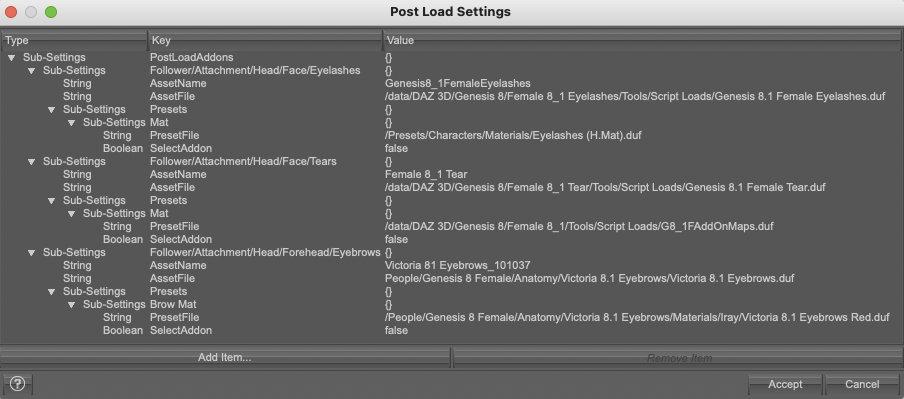
In this screentshot, I'm using H.mat preset, but I also tried with a standart material preset (setting the boolean to True). Both are stored in the My Library folder (located in my Documents folder on my Mac and Daz is authorized to access it).
Applying them manually works, but in both cases, when I'm asking the Post Load script to load either of them, the Eyelashes are keeping their default surface setting. I looked at the log and according to it, Daz does find the file, does something with it, seems happy with the result and continues to the next steps without raising any warning or error.
Here is what I think is the relevant portion of the log (in this case, using a standard material preset):
[INFO] :: Prepare asset load (merge): /Presets/Characters/Materials/Eyelashes.duf
[INFO] :: Locking viewport redraw...
[INFO] :: Viewport redraw locked.
[INFO] :: Native format content directories: 23
[INFO] :: Poser format content directories: 4
[INFO] :: Other import format content directories: 0
[INFO] :: Begin asset load (merge): /Presets/Characters/Materials/Eyelashes.duf
[INFO] :: Determining missing assets...
[INFO] :: Setting textures...
[INFO] :: Creating materials...
[INFO] :: Applying animations...
[INFO] :: Finished asset load (merge): 0m 0.21s - /Presets/Characters/Materials/Eyelashes.dufIf someone has an idea about what I'm doing wrong, I'm all ears
 tutorial for making obj in scene into props?
File>Import will bring an OBJ file in. You may need to try different presets to get the correct scale and orientation. You props should be UV mapped unless you are going to give them flat colours.
Clothing Morph Applies Weirdly After Importing From Blender. Straps look Weird too.If you want to keep DAZ orientation and change on import to blender, from DS keep X, Y, Z, and import to blender Forward -Z Up Y
Daz Studio 4.22[.0.x] Pro, General Release!vaaern said:
Here is the saved zip file
Thanks.
You may have a corrupt database. There are 2 ways of dealing with that. The easiet way:
Start DS, click on the hamburger icon on the Content Library pane (see attached screenshot). On that menu, click on Content DB Maintenance. Select the bottom option (Reset Database) and click Accept. You'll get a warning about the loss of user data. You can click Yes if you want. Click Accept. When it's done, restart DS, repeat the steps to display the Content DB Maintenance dialog, and select the 4th option Re-Import Metadata. Accept. This could take awhile.
If that doesn't fix it, repeat but do not export the user data.
LI EI Natural Pubic HairCoryllon said:
NorthOf45 said:
Coryllon said:
Is there a reason I have to uncheck "filter by content" and search for this?
There are no Compatibilities defined in the metadata, so Smart Content has no clue where it goes.
I would think that would be standard on all newer content. I haven't seen it NOT added on anything since Gen 1
Yes, you would think...
LI EI Natural Pubic HairNorthOf45 said:
Coryllon said:
Is there a reason I have to uncheck "filter by content" and search for this?
There are no Compatibilities defined in the metadata, so Smart Content has no clue where it goes.
I would think that would be standard on all newer content. I haven't seen it NOT added on anything since Gen 1
I need help. When I import to blender 2 characters with the same base the textures are damaged!!Hi, I'm NEW using Daz, I've only been using it for a few weeks but I only use it for character creation. For the workflow I use both plugins Daz To Blender bridge and diffeomorphic. But I prefer to only use diffeomorphic.
Now, when im importing a single character/figure, EVERYTHING WORKS PERFECTLY and without any problem...But when importing a second character/figure that I made using the SAME BASE that I made the first character/figure...Textures seems to be destroyed in this second character. The first character is left with intact textures while the second one usually has completely damaged textures. I have tried every method I could think, from importing a duf with both characters in the same scene, to doing it separately for each character, I have even used the Daz To Blender bridge and the fbx method. At the end is the same result. First character imported is fine meanwhile the second have broken textures. Sometimes even if I save the file, close it and reopen it again, it turns out that both characters have damaged textures.
I have been stuck with this problem for more than 2 days. And not knowing much english makes it more complicated. IN SUMMARY; I want to know how to import multiple characters from daz to blender using the same base in the characters and that the textures work well in all the characters. Since I plan to make an animation in blender and I want all the characters to look similar with only small changes.
The most similar forum I could find to my problem was the following one and it did not provide me with any solution: daz importer: importing daz characters to blender 2.8 - Daz 3D Forums
Finally, here are some pictures of how frustrating this problem is.LI EI Natural Pubic HairCoryllon said:
Is there a reason I have to uncheck "filter by content" and search for this?
There are no Compatibilities defined in the metadata, so Smart Content has no clue where it goes.
A shadow appears on the cube created with blender.That looks like an attempt to use smooth shading separately for each square, that's typical of low poly objects without custom normals. You can try to export/import custom normals, but I don't know if daz studio can handle it the same way as blender. Or you fix the geometry adding beveled edges at the borders, as well formed high poly objects do, this is the best solution.
My First Model. Now What?set UV map in HEX. Don't bother too much with materials, define shading domains.. Import the obj file (of the uv mapped model) into DS. Then use Geometriy Tool to assign Surfaces (for the different textures) and Face Groups (you may use them for rigging), Hint: Surface and Face Group dont need to be identical - often this is usefule, but there are other examples.
After the definition of Surfaces and Face Groups in the Geometry Editor use Save As and save as Figure/Prop. (If you like you can do this after assignment of textures to the surfaces in the Surface Tab of DS, otherwise you can do texturing and save as Scene).Orphaned products not find-able in Smart Content. How do I fix?A lot of products don't include metadata for smart content. A good example is the products recently transferred from Renderosity.
If you want them to appear in smart content you'll need to categorize them yourself, either manually or using content wizard
Clothing Morph Applies Weirdly After Importing From Blender. Straps look Weird too.For the axis, you need to decide if you want to change orientation when exporting from DS or when importing to blender. Now you are doing both. If you are keeping your blender import, you must set DS export X, Y, Z.
Regarding the pokethrough, are you sure both sides are fine in blender before export? What I saw was that you was doing X mirror, while having Y as mirror axis. And are the suit actually symmetrical (just to check)?
Clothing Morph Applies Weirdly After Importing From Blender. Straps look Weird too.felis said:
There is some inconcy in your export from DS and import to blender.
When the suit is in blender it has the symmetry axis as Y, it should be X. It looks to me as you are both modifing orientation out of DS and into blender, which probably are causing the rotation.
And when you then in blender mirror along X you get problems.
Yes. When the suit is imported into Blender it is lying flat Y axis. So I select X axis to load it upright. So I can work on it.
How to avoid this issue then?
Why is the suit tearing/poke-through so much when importing back into Daz? It had no tearing/poke-through before exporting.
MacBook Pro M2 crash - DAZ Studio 4.22Richard Haseltine said:
miked_8f630e0c87 said:
Sorry to hear you're having a similiar problem. But I can find no solution and no support from anyone. I reanimated an old intel iMac to get Studio to run but I'd love an update from Daz. Or at least an acknowledgement.
https://www.daz3d.com/forums/discussion/656716/daz-studio-4-22-0-x-pro-general-release#known_issues
Thank you Richard for that link. I am finding that just moving my mouse without clicking anything may cause a crash. Or just opening the D|S Beta 4.22.1.161. This is on a MacBook Pro M1 laptop. But if I keep at it, and get a settled screen, I can work. But, I just started having an issue the arrow keys, when I try to move down a series of lines in the Content DB Editor, when I am fixing metadata. (Looking for a Lost and Found entry or an error on the metadata line.) This is not consistent and just started yesterday. It happens on the Compatibility Base and Compatibilities tabs. Does D|S have an issue with a Logitech MX Master mouse? It will start crashing using arrow keys after doing okay, then it will just start working again out of the blue. I have found re-booting my computer may clear this, or not.
Mary
Smart Content: filter by context doesn't show Wardrobe with Genesis or G8F selectedAs I understand it, metadata started close to the beginning of G2. Some items from G1 did slip in and get metadata. But from my purchases of the G1 period, I have had to add metadata to many of those items. I even had to go so far as to modify the Scene Identification on at least one item. Although hair items may have metadata, as some of the best of G2 were released for Gen4, G1, G2, and some for G3.
What frustrates me is when it seems everything is correct, yet a few items can't be found based on the character's generation. But I have also found that a character's Smart Content metadata can be an issue. I periodically review it and add in the missing details.
Daz 3D is part of

Connect
DAZ Productions, Inc.
7533 S Center View Ct #4664
West Jordan, UT 84084Licensing Agreement | Terms of Service | Privacy Policy | EULA
© 2026 Daz Productions Inc. All Rights Reserved.