-
Daz Studio Pro BETA - version 4.15.0.30! (*UPDATED*)
it may be another issue, I was saving the same outfit as a support asset for Genesis 8 M & F and looking in Data it appears one overwrites the other
the is a 1KB dsf morph file for male and female but only one clothing dsf
I am now not saving support assets just scene subsets with autoadapted data files which are waaaaay bigger but work
I may not keep them after using the Unreal Bridge (already exported FBX for iClone)
I just have to accept autofitting on the fly in future I guess and saving scenes or subsets for use in DAZ studio
Radical distortion during morph or poseSo I just read the below post and saw it was posted a while ago....where are these settings in the new Daz3d? I am having issues with my figures stomaches wrinkling during poses such as sitting or squatting or kneeling, etc and have no idea how to fix it.
niccipb said:
Hi nowefg...
by default the Draw Manipulation subdivision is set to Delayed and the Skin Binding is set to Optimized... this is what causes that effect that you are seeing.
In the Tool Settings pane select the Universal Manipulator
Change the Subdivision to Persistent (On) and the Skin Binding to Full
This will now change the draw for all Manipulators and morph sliders
Now when you adjust the pose or a morph the transition will be smooth and accurate, but this does use more memory and if your OGL video card is slow, it could also cause lag in the viewport.
Hope this helps... :)
Import and export DAZ figures in Character Creator 3One way to do that would be to :
- Be sure that all your apps units are set to 1cm = 1unit
- Export a human custom morph as FBX from Character Creator
- From DAZ, Load a G8 male or female and File > Send to ZBrush (Base resolution)
- Now in ZBrush you have the Base DAZ G8. Load the CC3 exported FBX
- Use ZWrap to set points on both meshes so that the DAZ mesh takes the shape of the CC3 Mesh.
- Once the wrapping is done, use GoZ in ZBrush to send back the G8 now morphed.
And there you go. You have a G8 morphed into a CC3 character, already rigged and useable.
Daz to Cinema 4D Bridge - Meet the TeamI understand the frustration when most of these issues were given to us months ago but, I promise myself and @DAZ_vish are doing our best to figure out how we can support the community here.
I did do an update today Added an Option to choose which type of Bump you want when converting to Redshift.
Morphs should now work @scobb3_60a649a03a thanks for being patient with me :)
Also added options so you can choose which morph you want at export. Currently, there is a checkbox for the morphs you most likely want. AND JCMs, the morphs are coming in but, there will be in need of more work on the morphs but, I hope this helps out some of you :)
Lastly, I haven't tested this new update yet on Mac. Some directories changed so if someone could let me know that be awesome!
The newest update can be found here.
https://github.com/daz3d/DazToC4D/commits/develop
How long does it take you to load G8F?5 minutes exactly, with 712 G8F characters and a lot of morph packages installed, DS 4.15. Hardware 10+ years old - first gen Core 2 Quad 6600, DDR2 RAM and only HDDs. An i5-4690 CPU is over 4 times faster, so you have to take CPU speed into account too.
How long does it take you to load G8F?~3 seconds, with 60 G8F figures and a bunch of morph packs. Latest .13 beta.
I'm pretty sure it never touched the SSD - I rarely reboot and have a lot of unused RAM, so Windows keeps everything I use frequently in memory (caching might be the reason if your 2nd load is much faster than the first?),
How long does it take you to load G8F?I have a couple hundred G8F figures and morph packs. I use the latest Daz Studio.
58 seconds for default G8F.
46 seconds for Rory HD.
Getting Hands Dial Up poses for G3 to work on G8That didn't work either. I would at least like to know why these poses don't want to transfer. Does anyone have a guess?
How long does it take you to load G8F?This is an interesting pool of info! Thought I also just saw Zev0 mention working on something involving improving the way all morphs have always been linked or whatever, even when not needed. Man would that make a lot of people happy...
I have between 80-100 G8F Characters installed (many more than that not installed for these very reasons) and 40-50 separate Morph packs installed.
Daz 4.15
Win 10 x64, Meager and old i7-6700 @ 3.4 GHz, 16 GB RAM, all SSD Drives (System/Content separately)
32 Seconds
Vehicles: Real World EquivalentsTesseractSpace said:
Now if only I could find a Lotus Seven S II, like the famous KAR120C from The Prisoner series... (and a Patrick McGoohan morph, the clothes... the whole darn village. Pretty sure I could make Rover with dForce and a sphere...)
...there is a Lotus Super 7 over at Rendo.
Would love a model of the Village.
How long does it take you to load G8F?fred9803 said:
Richard Haseltine said:
It isn't just loadign the data, it's also processing it - the actual reading is a minor part of the process.
Is that processing done in system RAM?
From a programming standpoint, the data is pulled from the HDD or SSD into system RAM, and the DAZ Studio software works on it from there. However, it's probably a very "serial" process, which means you can't do a lot of tasks simultaneously (in "parallel"), you have to do them one-by-one. And that takes a lot of time.
I'm guessing each character is comprised of millions of vertices, and each morph changes each of the corresponding vertices, which means you're calculating millions and millions of vertices. And I suppose if you watch Windows 10 Task Manager as you're loading this stuff you'd see that not all CPU processing units are busy (I'm guessing), which means you can't do it in parallel.
So while RAM is fast, it's pretty much irrelevant to the process since DAZ Studio has to do tons of calculations internally, and I suppose that's limited by the software capabilities, not RAM speed.
Though it still seems awfully strange it can take 30 minutes for a character.
How long does it take you to load G8F?Have my library on a 2 TB external SSD. So hardware is not the limiting factor. After I had load times around the 10 minutes mark I started a regular process of uninstalling or at least moving files back and forth from my main library.
Currently: 44 seconds
This is with quite some characters (Vicky 7, 8, Charlotte 8, Aiko 8, Freja 8, Girl 7, 8), some figures from Jessai/Silver, Vicey3D, Addy, 3D Universe, Crocodile Liu, EichhornArt, Maddelirium, Maelwenn, Mousso, Rarestone, RawArt, Rhiannon, Sangriart, SASE (quite a lot) plus Morph Packs from Zev0, Soto, Dogz, Meipe and a lot of dress related morphs installed.
After just temporarily moving all subfolders but DAZ 3D from the Genesis 8/Female/Morphs folder to a different location: 6 seconds
After even moving the DAZ figures: 5 seconds
So yeah, having an eye on the data/Genesis 8/Female/Morphs folder (and the other main figure folders if you use them and have lots of characters/morphs) pays out. For the above mentioned I just moved those morph folders from me SSD-library to a spare one on the same drive. 2 GB of files but 1 second as the finder does not move files but only change references.
I still do not bother to optimize as long as I am < 1 minute. Once over I know it is time for some library optimization. Then as file moving is quicker than uninstalling via DIM I tend to keep figures I like available but uninstall all characters I won't use often.
Still wondering why DAZ is not adressing this as a top priority. DAZ wants people to buy characters. But the more you buy the more sluggish studio becomes. Connect is some way to adress this. But I don't like Connect very much. So if I have moved some morphs away and I load up a scene with characters/morphs currently not installed I rather refer to DIM or manually move back once I get the first error message during loading. Doing so does prevent the second error message from showing and loads the scene fine.
What I hate even more is the long time studio needs for closing a scene. Tend to force quit studio to avoid this.
How long does it take you to load G8F?Greg, what morph package caused your very long load times? I'm sure other people might want to experiment with removing just that one.
Genesis 8.1 / Victoria 8.1inquire said:
Well, could this work? Create two aliases (Macintosh term) or two shortcuts (Windows term) to the DAZ 3D folders, the ones containing the G 8.1 male or female Base Pose Head and Expressions folders. Then, perhaps just before rendering, do the expressions. Click on the alias or shortcut, and "hide" [perhaps by adding .SAV to the end of each folder] those two folders. Use all the G8 expressions you want. Then, render. And, of course, click on the alias (or shortcut) again and "unhide" those two folders.
Thus, these folders would not be hidden for very long and should not present problems when updates were being downloaded. And, if you did the expressions just before rendering, even if the scene should be worked on over several days, there should not be an occasion of lost expressions.
Would this not work, and without presenting problems, and with just a little bit of extra labor?
I should hurry to add that I had not read the two previous posts by jbowler and s_j_gregory above. I don't want them to think that I'm responding to their posts. This was just my idea.
Those posts and the whole load time thread is off topic; I'm going to post my numbers in the real load time thread. The long load time is not specific to G8.1 and my CMS directory fix for the load time doesn't help with the expression dummy files because they are in the same product as the files they dummy out; the only way to remove the dummies is to modify the Starter Essentials product.
I believe that DAZStudio does not reload expressions etc after the scene has been loaded; it would have to rebuild all the morph sliders if it found a change and, anyway, a substantial part of the information is loaded from the DSON cache. Even if it did reload on render relying on it doing so would not be good; there is no reason why a minor update to DAZStudio would not skip the reload, after all it would slow everything down unnecessarily if it happened.
IMO it is necessary to either work with the core product as shipped or to modify it and then commit to keeping it modified despite DAZ updates, and not complaining if a change in DAZStudio breaks the modification.
Getting Hands Dial Up poses for G3 to work on G8I know there is a Hands dial-up for G8 in the store, but I would rather not buy them all over again if I can avoid it. I tried transferring the pose dials via Xtransfer but they don't show in the parameters tab even though the morph files are there in data.
So then I tried applying a pose preset for G3 to a G8, intending to save the result as a new property dial after it took effect. But nothing happens when I attempt to do this.
Other poses for G3 work on G8 with some adjustments, so why doesn't this work?
Is there any way to get these poses to work on G8?
How to get Genesis 8 expressions working on Genesis 8.1I will look into this as soon as my current render finishes. I suspect they meant that you have to edit the property, then save that property as a morph asset, but I am not sure.
How long does it take you to load G8F?Wonderland said:
7 minutes and 38 seconds. I usually go make coffee or something to eat...
Wow . . . that would be enough to drive me to drink - hope you put a little Bailey's in there ;)
There was a time a while back (when I had less content) that G8F was taking 8+ minutes to load for me. Drove me crazy and I stopped using DS altogether because of it. Turned out to be one morph package that was the culprit. Never did find out exactly what the issue was, but un-installing it did the trick and got my load times back down to around 30 seconds.
- Greg
Sculpting new character morphs and using lip-synckromekat said:
Hi Folks,
I have been successfully using the Genesis 3 figures, along with store bought character morphs, and clothing for a number of animation projects, completed in C4D over the last few years. I have been exporting out to C4D as FBX, and more recently via the Cinema 4D Bridge script.
I have also been utilising the Lip-sync plug-in (via the 32 bit version) in all of these projects, with a surprising amount of success in over 26 languages. I have done manual lip-syncing previously, which is fine for short sections of speech, but with almost industrial levels of lip-sync required, an automated process is absolutely necessary! I've subsequently established a solid, functional work-flow between both programs, and would like to continue using it.However, for my next project, I am being asked to create bespoke/stylised cartoon like figures, which will still require an enormous amount of lip-sync to be generated. So, rather than trying to reinvent the wheel, I am hoping to utilise the existing system with my custom characters, which brings me to my questions!:
As I understand it, I can export any of the genesis base meshes in it's original form to Z Brush, where I can reshape/sculpt the existing mesh into a new form, keeping vertex count the same, and then reimport as a morph into Daz, readjust the rigging, and dial in like any store bought morph?
If I want to use the lip-sync system, what other steps do I have to look at, to enable this character to speak to the same level as the store bought ones?
Do I need to sculpt all new mouth shapes for the phonemes, or does some 'relative' magic occur between the base mesh/base morphs and a new character morph?
What about the mouth/face rig aspect - are these going to need to be tweaked for every phoneme as well?
For other expression morphs (smile, eyes closed, brows raised etc), I’m assuming I similarly create these in Z Brush on my re-sculpted figure, and also import back into DAZ for later use in Cinema 4D?
I have been using Gen 3 for all of the previous projects. It has a specific .dmc file which is used by the lip-sync system to control (as far as I can see) the actual values of each phenome, or expression for that base figure. If I use Gen 3 as the base, will this profile still be good as is, and relative to my new morph(s)?
Finally, would any of the other Genesis figures be a better option to use?, bearing in mind that I would still like the possiblity to use the C4D Bridge if possible.
Apologies for all the (probably daft!) questions - I have never really dived into the guts of Daz3D, so im unsure of how many of these aspects are automatically retargeted, and how much has to be created fresh, and reconnected!
Thanks in advance,
Adam :)https://www.daz3d.com/genesis-3--8-face-controls
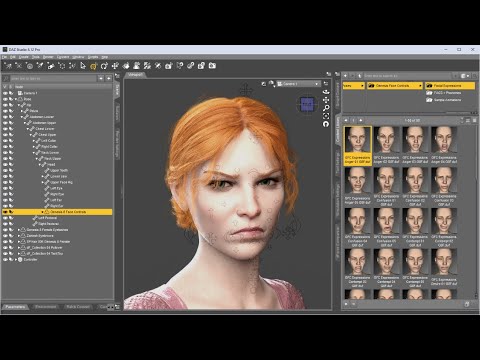
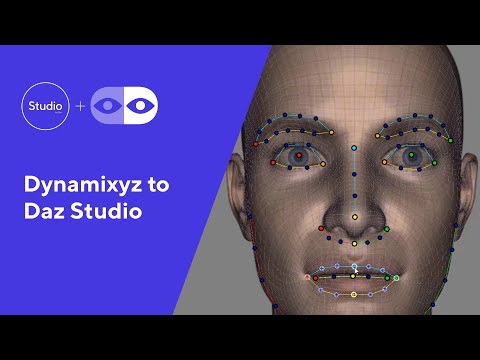
Lip-synching is no easy task in animating. Genesis Face Controls already has a whole set of phoneme poses, 52 in total. Automated solutions require a lot of time investment but you can always go the manual route. You can load an audio file in the timeline and then load in the phoneme poses manually one by one as you hear them in the audio.
Genesis 8.1 / Victoria 8.1jbowler said:
PerttiA said:
Bejaymac said:
Probably going to get cursed by some for this post, but what the hell, I have a thick skin

The two attached images were taken within seconds of each other, in the first you will notice I have the figure on the right selected, that's G8F, loaded using her DUF file. Notice the Shaping tab on the left doesn't show my user name anywhere, and the first morph is "Monique 8 Body".
Now look at the second image, in it I have the second figure selected, this is also G8F also loaded from her DUF file a few seconds after the first. With this one I added one of my character presets to it, now check the Shaping tab, suddenly my user name is there, and the first morph is now my character Samay.That morph DSF file isn't in the Morphs folder, as a result G8F has no idea it's there and never loads it when she's loading, the only way to get my character to load, is with a preset that knows where to find the DSF file.
IMHO this is how we should have been dealing with morphs since DS4.0, only the assets from the starter essentials and the head/body/expression morph packs should be loaded as a Genesis series figure is loaded, everything else should only be loaded using presets.
That last part will cause some of the cursing I mentioned, however the next part is probably going to cause even more

The problem with what I've done here is that you can't do this directly inside DS, it will always save the morph asset inside the figures Morphs folder. So you have to manually move files and do a spot of very minor editing of said files, in this case two pathways in the DSF file and one pathway in the DUF file.
Hmm... Going further with the idea... One could do the ultimate crime and save all the 'custom' assets (morphs/textures/expressions...) of the character in one and the same folder together with the character file and the 'custom' morphs would only be visible on that character...
If I do that it speeds up my load time for "Genesis 8 Basic Female" by a factor of 35; I go from 93.827 seconds to load the character with all my DAZ Productions content visible to 2.652s with just what I term "core" content, stuff for the environment but nothing actor-specific and just the G8 starter essentials (male and female).
I'm just using fully supported DAZStudio features to do this; I'm not hacking files or moving them around. All I'm doing is selecting which content installation directories the CMS sees. I get the same relative speed-up with and without the DSON cache but the cache itself speeds my load times in both scenarios by a factor of 1.58. Of course the DSON cache is more stable as well; the CMS does not have to update it every time I buy a new character :-)
I believe I can get this to work dynamically as well; i.e. I can start with no characters and, while building the scene, add characters one-by-one to the CMS until I have a CMS configuration specific to that particular scene (which I can save of course). I've yet to test this in practice but it seems like a logical extension of what I have already done.
Sorry but could you dumb this down for me. Are you creating runtimes for each character? You must have a lot if that is the case. And then as you build a scene you add more runtimes to your content library to access additional characters/content? Do you do the same thing for pose and/or expression sets? Somewhere a while back I read that there was no theoretical limit to the number of runtimes you could have in your content library but that the practiccal limit was about ten. I am not exactly clear what that would be in reference to but have you experienced any issues with the number of runtimes or any considerations from a hardware perspective and where you have your runtimes? (I have runtimes on HDs and SSDs and have not noticed any measureable difference. I typically have about six active in my content library at any given time.) Are you successful in adding a runtime with expressions say and them being available without restarting? I thought that was the central issue? And sorry for my ignorance - what is the DSON cache - you could point me somewhere if this is too pedestrian. (I might not know or I might not know I know.) Finally, how does one save a CMS configuration. It sounds perhaps you are under the hood well beyond my comfort zone and my earlier line of questions could reflect a complete misappreciation of your strategy. If this is tinkering with the DB, I guess i'm out because I have had some disquieting experiences with what must have been operator error. Thanks in advance.
Genesis 8.1 / Victoria 8.1PerttiA said:
Bejaymac said:
Probably going to get cursed by some for this post, but what the hell, I have a thick skin
The two attached images were taken within seconds of each other, in the first you will notice I have the figure on the right selected, that's G8F, loaded using her DUF file. Notice the Shaping tab on the left doesn't show my user name anywhere, and the first morph is "Monique 8 Body".
Now look at the second image, in it I have the second figure selected, this is also G8F also loaded from her DUF file a few seconds after the first. With this one I added one of my character presets to it, now check the Shaping tab, suddenly my user name is there, and the first morph is now my character Samay.That morph DSF file isn't in the Morphs folder, as a result G8F has no idea it's there and never loads it when she's loading, the only way to get my character to load, is with a preset that knows where to find the DSF file.
IMHO this is how we should have been dealing with morphs since DS4.0, only the assets from the starter essentials and the head/body/expression morph packs should be loaded as a Genesis series figure is loaded, everything else should only be loaded using presets.
That last part will cause some of the cursing I mentioned, however the next part is probably going to cause even more
The problem with what I've done here is that you can't do this directly inside DS, it will always save the morph asset inside the figures Morphs folder. So you have to manually move files and do a spot of very minor editing of said files, in this case two pathways in the DSF file and one pathway in the DUF file.
Hmm... Going further with the idea... One could do the ultimate crime and save all the 'custom' assets (morphs/textures/expressions...) of the character in one and the same folder together with the character file and the 'custom' morphs would only be visible on that character...
If I do that it speeds up my load time for "Genesis 8 Basic Female" by a factor of 35; I go from 93.827 seconds to load the character with all my DAZ Productions content visible to 2.652s with just what I term "core" content, stuff for the environment but nothing actor-specific and just the G8 starter essentials (male and female).
I'm just using fully supported DAZStudio features to do this; I'm not hacking files or moving them around. All I'm doing is selecting which content installation directories the CMS sees. I get the same relative speed-up with and without the DSON cache but the cache itself speeds my load times in both scenarios by a factor of 1.58. Of course the DSON cache is more stable as well; the CMS does not have to update it every time I buy a new character :-)
I believe I can get this to work dynamically as well; i.e. I can start with no characters and, while building the scene, add characters one-by-one to the CMS until I have a CMS configuration specific to that particular scene (which I can save of course). I've yet to test this in practice but it seems like a logical extension of what I have already done.
Daz 3D is part of

Connect
DAZ Productions, Inc.
7533 S Center View Ct #4664
West Jordan, UT 84084Licensing Agreement | Terms of Service | Privacy Policy | EULA
© 2026 Daz Productions Inc. All Rights Reserved.