-
How to remove freckles on victoria 9?
The texture is really good quality but the freckles take away any neutrality for the character creation, how to remove them?
[Solved] How to rig and save new clothes for GF9 AND Victoria 9?Another step towards the (probable) solution of the problem of this thread

I've created (like mentioned this morning) a new prototype of my garment (originally developed for the GF9 shape) of my garment for the G9 Base character (the one that shows up once you open the "Genesis 9" folder).
After I had rigged it with the "Transfer Utility" and saved it as a follower, I was able to load it - without any problems!! - for Victoria 9. Eureka! The garment also follows morphs such as "Body Thin", "Body Heavy", "Body Emaciated", "Proportion Height" or others.Yippie-Ya-Yay!
For a final test, I will create some "dialed" V9 models (size, weight, etc.) and check how the new garment behaves when loaded onto these characters (new scene for each test). When the garment stands this tests, I will (like promised) create a HTML or PDF tutorial.
[Solved] How to rig and save new clothes for GF9 AND Victoria 9?At 0:46 J. Darling suggests in his video that it is better to use the G9 base instead of a GF9 shape for rigging new clothes. Other users here on the forum (not here in the thread) have pointed out that it does not matter which shape (G9 Base, G9 Masculine, G9 Feminine) is used to model the garment. After my experience with the GF8 - and based on that advices - I used the G9 Ferminine shape. Hmmm ... OK - no comment on that advices

Even though J. Darling uses a tight-fitting garment and my garment prototype is extremely loose, I followed his instructions. For those who haven't seen the video yet: It's about "converting" clothes modelled for G9 Feminie shape back to G9 Base.
Due to my extremely loose clothing, I didn't really get a perfect fit for the G9 Base ... but for testing it was OK. After some file savings, exporting, re-importing and "transfer utilities", I finally have something that seems to fit Victoria 9 (even though the garment is modelled for G9 Base). It's the 1st day of the new year and normally the brain is a bit sluggish on this day. That's why I forgot what steps I took to save the garment.
I will try later today or tomorrow to create a new test prototype based on the G9 Base shape to provide you with more and better information.
1st conclusion of this thread: It seems to be "easier" (or at least better) for rigging to create new garments for G9 using the G9 Base (i.e. the first "character" that appears when you open the "Genesis 9" folder) than the "gendered" (morphed) versions like GF9 or GM9.
More information to follow soon - when my brain is working a bit better again
Thoughts about modeling clothes for G9Stupido3D said:
Is there any documentation anywhere about how making clothing for Gen 9 differs from Gen 8?
I imagine there might be discussions and info provided to PA's "behind closed doors" but not everyone who makes content or has ambitions to become a new PA will be privy to that information...Hi - and a happy new year to You!
I've opened a new thread on this topic. It's not solved or closed yet. You may already find some tips there that are useful for you. I suggest reading the thread from the beginning.
I promised to create a tutorial (HTML or PDF) when a (or "the") solution was found. You might want to bookmark the thread for that reason:
How to rig and save new clothes for GF9 AND Victoria 9?
[Solved] How to rig and save new clothes for GF9 AND Victoria 9?felis said:
Are you modelling towards G9 base or G9 female base?
If not G9 base you must use reverse source shape from target.
Hi felis,
I use the G9 female base for modelling and followed your suggestions from above. You mentioned that this simple way works well for you.
The only explanation I have at the moment as to why it doesn't work for me is: there must be a step that is so obvious that it is not mentioned or I do something (based on my experience with GF8) that is not recommended while dealing with GF9.
Here is a step-by-step explanation of how I implement your suggestion:
1) import the garment object made for G9 female base
2) Select Edit -> Object -> Transfer Utility ...
3) Select "Genesis 9" as source and set "Current" as Source Item Shape
4) Select the object as target and "Default" as Target Item Shape
5) Select "Bodysuit Loose Template" as Projektion Template
6) Under "Options" mark "reverse source shape from target", select "Fit to Source figure", "Parent to Source figure" and "Add Smoothing Modifier"
7) Put the Content Type to "Follower" and accept
8) Save the garment object as "Support Asset" -> "Figure / Prop Asset" with "Set Compatibilty Base" set to "Genesis 9" and "Set Compatible" with set to "Genesis 9 / Base" (thats the save preset for me)
And after all I get that botched garment from my Screenshots when I load it for Victoria 9
Happy New Year to you! I think this will be my last entry this year
Ok, So this is Gen 9If I can get a few more young white girls with the same level of realism offered by Victoria/Michael, Zev0's 200 Head Morphs & Fit Control, and Monique's body is va-voom, then I'll have what I need to use Genesis 9 for the character slot I have open. I hope Daz will hurry up before the crash.
AOBB's head morph Scarlett G9 for G9F based on Vivien Leigh. No materials nor textures.Scarlett G9 refers of course to Scarlett O'Hara from the movie "Gone With The Wind" (1939) - Vivien Leigh's most famous role and one she won an Oscar for. I even found in DAZ store the Scarlett O'Hara outfit from the beginning of the movie, so I obviously had to dress her in the "Southern Belle" clothes for the promos.


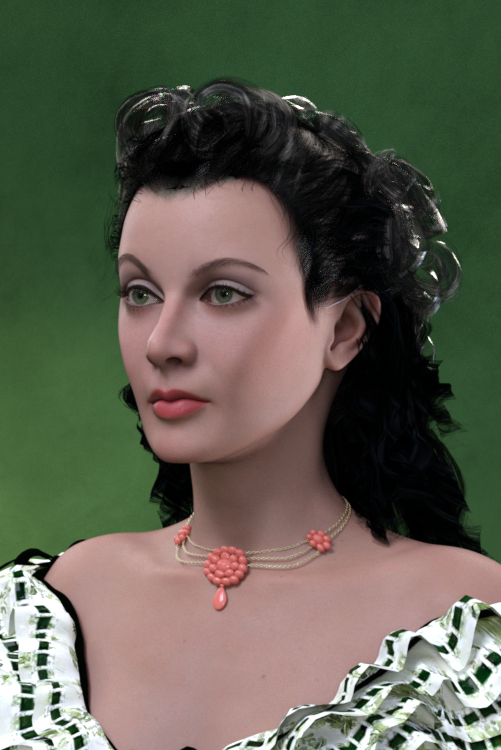
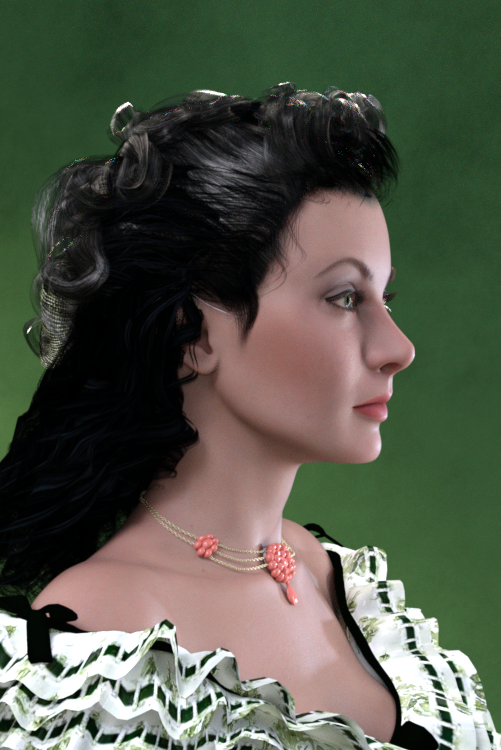
Assets used in promos:
Victoria 9 (body shape and makeup - foundation)
Lully's LIE Makeup (Renderosity)
Pen Hair G2F
Deeta Hair G2F
Southern Belle outfit G2F
BOSS Pro Lights
Wow, this was a difficult sculpt. It took me almost a month of every day "zbrushing" to get this likeness right. Every day I thought I already had it right just to look at the model appaled the next day. Now I think this is the best I can come up with and it is decent, so here you have it.
Non-commercial use only, please.
Enjoy, let me know what you think and of course - I am waiting for your renders with Scarlett!
Cheers,
AOBB
[Solved] How to rig and save new clothes for GF9 AND Victoria 9?Thank you very much for your suggestions - but I have not found a solution ... yet.
It's about 04.00 here in Germany and I like to start my working day with projects I still have to finish (I have to finish a new package today, test it and submit it to my provider). Therefore, just a few brief remarks. I will try to provide more information in the course of the day.
Tried your suggestion, but it don't worked for me. Can You really use a saved clothing object the way you described with GF9 Base AND Victoria 9 and other G9 "dialed" characters? In this case I must have missed something.
Thank you for your effort and the great explanation! Sounds like the good, old JCM stuff ... and that is something I have never needed for my GF8 projects. Is creating (or better: rigging) clothes for GF9, Victoria 9 etc. really that complicated? But maybe we are talking about different things. I will try to post some screenshots later today (via website link).
Thank you for your advice! I did a quick test - and the result was a little better (but the chest area still looks strange). Normally I try to avoid this "smoothing modifier" thing (or at least use very small values) because it slows down the programm / the display of a scene too much.
--------------------------------------
As mentioned earlier, I will provide more information later today.
[Solved] How to rig and save new clothes for GF9 AND Victoria 9?Here is my suggestion, which works for me:
- Load G9 Dev Load or G9 Base
- Import your OBJ
- Run the Transfer Utility and select the appropriate template that best fits the OBJ you have imported (probably loose bodysuit or loose long dress in your jumper example) and apply smoothing modifier. (I made a screenshot for you, but the forum is so broken it won't upload at this time.)
- The garment will now be be rigged and fit to G9 and parented to G9. Select that rigged parented garment in the Scene pane.
- Save as Figure/Prop Asset.
Daz Studio will use Auto Follow (not to be confused with Auto Fit) to make the garment fit unique character shapes like Victoria 9. This will be fairly successful for shapes that are not too extreme, like Victoria 9. It it doesn't fit perfectly, your recourse is to create your own custom morph for the garment to fit that particular character shape.
[Solved] How to rig and save new clothes for GF9 AND Victoria 9?Hi Pushee-Ri,
The problem is the auto-generated shape for Victoria9 on your clothing. As you know, when you load your clothing and then change the character's shape (say to Victoria 9), DS automatically generates the Victoria 9 shape for the clothing. Often, this autogenerated shape has issues (such as those described by you). To get around this problem, you need to 'fix' the shape in an external modelling program and then use Morph Manager to import and overwrite the Victoria 9 morph with your corrected version. What is super important is that you must use the exact name of the morph/shape that your are trying to replace. In this case, it would be "Victoria9_body_bs_Body" (without the parentheses). You will often have to do this 'fix' for many of the other shaping morphs that are dramatically different (i.e. Large Breasts, Voluptous, etc...) from the base shape if you want your clothing to look good on other characters.
If you own zBrush, this fix is pretty easy to do. Basically,
(1) load Genesis 9 base,(2) load your clothing,
(3) make sure both are set to base resolution.
(4) Change the shape of Genesis 9 base (to Victoria 9), so that the clothing also changes.
(5) "Send to zbrush" with deformation box checked (send both the figure and clothing at base resolution).
(6) in zbrush select the clothing (subtool) and make your corrections using a combination of the standard brush and smoothing brush. Note: I like to use the masking tool, so that I can have precise control over the regions that I change.
(7) GoZ back to Daz Studio where you will want to overwrite the original "Victoria9_body_bs_Body" shape in the clothing. Some of the tutorials you have watched should have the exact boxes to change on the import (Sorry, I am not in front of my Daz computer so I can't give you the specific details).
Note:
Once back in Daz Studio, I like to export out the corrected shape as an obj file (at base resolution). I do this step in case something goes wrong, or I want to make some additional small tweaks/corrections.
Make sure that no other morphs are active when you go to zbrush, otherwise these changes will be incorporated into that shape/morph and result in unexpected problems (i.e., weird shapes).
[Solved] How to rig and save new clothes for GF9 AND Victoria 9?This is my first entry. Therefore a friendly "Hello" to all participants and the moderation.
I have created many dresses for GF8: modelled for GF8 Base, imported, Transfer Utility ... and the dresses fit any character: Base, Victoria 8, Amira 8, Chelsea 8, Girly Hana 8 etc.... without any problem.
But the G9 is driving me crazy.
I have read Mada's thread https://www.daz3d.com/forums/discussion/597726/genesis-9-clothing-questions-answers/p1 several times and watched J. Darling's video back and forth ... but I have not found the final solution.
If some of the experts here can help me on the subject of "How to rig and save new clothes that fit G9 Feminine Base (incl. dialed Characers based on it) and Victoria 9", I will write a step-by-step HTML / PDF tutorial on it. Guaranteed!
My steps so far:
1. Created a garment (loose-fitting jumper) for G9 Feminine Base in Blender and imported into DAZ. Fits perfectly on the GF9 Base.
2. Used "Create Follower" from the G9 Developer Tools with the garment object selected. Still fits perfectly and follows even extreme poses.
This is where the problems start - no matter how I save the garment, it is "destroyed" when I want to use it with Victoria 9: I get poke throughs and the chest area is pulled closer to the body and pulled down at the same time. I tried the following:
3 A) Just saved the garment right after "Create Follower" as usual as "Figure/Prop Asset". Ouch!
3 B) Used the "Transfer Utility" (Source Gf9 as "Current") after "Create Follower" and saved. Screech!
3 C) Just used the "Transfer Utility" (Source Gf9 as "Current") and saved. Ew!
It seems that I have overlooked or forgotten 1 or 2 steps. I hope the experts here can help me connecting the dots.
Some addtitional information:
DAZ Version 4.21.0.5
all Updates loaded
distributable projectThanks in advance!
Update 02.01.22: Scroll down the page to my entry, which starts with a big "Solved", if you're curious about the solution
Ashendun Hair issue.Found the problem. It's not the version of Studio, it's not the hair. It's the Growing Up morph and Autofit. On any character, you reduce the age, then the problem occurs. I use that a lot because of the unrealistic size of G8 (and G7, G5, etc...)
The only answer is to avoid Autofit and manually fit the hair. I have to admit, I have gotten used to it after all the years of fitting hairs on characters all the way back to Victoria 2.
..Joe
Genesis 8(8.1) vs Genesis 9 and 3Between these four generations I noticed how even G9 runs more smoothly on an animation playback. I could have a fully clothed Victoria and no frame skipping. Slowing down aniblocks for G3 was so smooth too. G8 is a nightmare in that regard.
Would anyone think it possible that Genesis 8 would get updates for us users who've invested so much in content that perhaps it could be optimized as well as G9 and G3?
Old .daz scene can't find empty morphs - how to locate or recreate? [SOLVED]I'm trying to load an old .daz scene, probably saved out from Daz Studio 3.1 or earlier, from a PC long ago retired. I have a copy of most of the data, but apparently missed a few key files.
I'm working from a newer PC, with relatively fresh installs, including I think all the relevant assets. For simplicity, I'm working only with a very simple scene that was basically just Victoria 4.2, with a texture and some unmodified morphs injected, as that was my starter scene that most of the rest are based on.
It failed to load correctly when I attempted to load it into Daz Studio 4.21, so I installed Daz Studio 3.1 again to try my luck there. That also fails with similar errors. The key error messages seem to be related to some missing empty morph files, such as:
Unable to find file for storable: data/blMilWom_v4b_68498/hip/modifiers/morphs/EMPTY-HipsCrest_0.dsd'
I've done a ton of experimentation and scouring the internet for solutions, but nothing I've found yet seems to quite fix this. I've read that somehow you can use DS 3.1 to regenerate missing .dsd and other files for the data folder. Is that what I need to do here, and if so how?
Deformations between higher res HD Morph and Geograft figure need advise for better transitionI have tried adding the subD property to my geograft. It still seems to have an odd line of deformity that seems to be the same line that is used for creating the geograft. I have tested this myself using Genesis 9 with the Victoria 9 HD morphs on and a geograft I created as a replacement for the arm. Its the same arm geometry I just made it into a geograft instead to be used as an example.
I'm having trouble uploading the images to the forum for some reason.
The line is even more pronounced with higher levels of subdivision. I had suspected that it is due to the way that the HD Morphs are deforming the mesh in a different way than the Geograft geometry since the Geograft Geometry doesn't have an HD Morph to it. Or maybe I need to do something else to accomodate the higher resolutions?
Steps taken
Export G9 at base resolution with Zeroed shape in obj and import to blender.
Remove all polygons except for the arm and export to obj.
Import the arm as obj and apply subD to the imported arm.
Use transfer utility to transfer rigging from G9 to the arm.
Go into geometry tools and select the geograft faces on G9 corresponding to the faces that will be replaced by the arm's edge and assign for grafting.
Add the faces for the rest of the arm for hiding and assign for auto hiding.
Unfit and fit the arm to G9 figure.
Apply the PBR Skin shader to the Arms surfaces.
Copy the G9 surfaces to the Arm figure.
Apply Victoria 9 HD Morph
You should be able to see the line deformation that happens to align with faces used for the grafting.
This should allow you to reproduce the issue, but hopefully others may provide some more suggestions on how to fix this or how to mitigate this. Crossing fingers that someone in the forum might know.
Skins suddenly rendering very darkThanks for replying, to answer your questions, I am using 4.15 and yes, it seems to be affecting most of my characters. I can lower the translucency and they will render with a lighter tone but render with a greyer looking skin tather than a natureal pink. The Translucency weight is showing up at 0.65
One of the figures that is affected is Fred Winklers Paloma https://www.daz3d.com/fwsa-paloma-hd-for-victoria-7
One of the figures I have found that isn't affected is Jessaii's Midori https://www.daz3d.com/midori-for-aiko-7
I am currently at work, but when I get home I can take some screenshots to show what I am experiencing
Just me or are most of the clothes for Genesis 9 broken?Thank you both for replying.
I'm using Daz Studio 4.21.0.5 Pro.
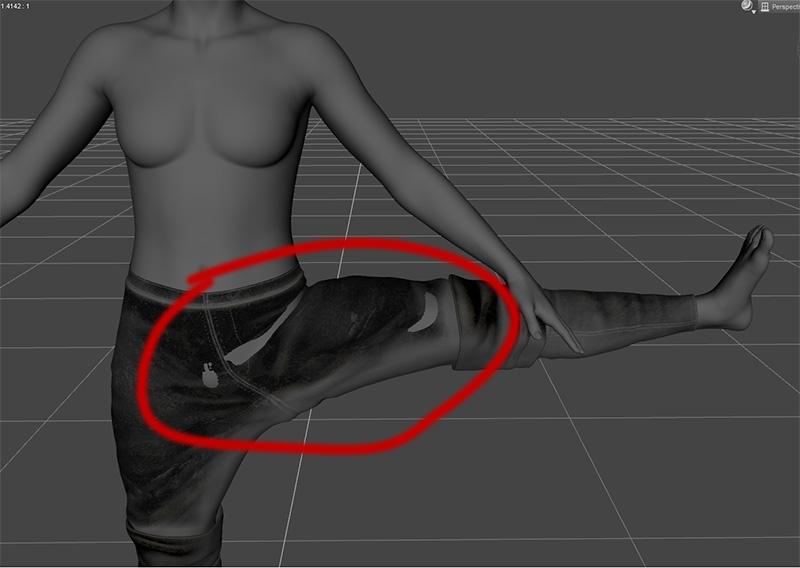
It happens on the base gen 9 figure although it's even worse when I apply the Victoria 9 morphs to it.
Base gen 9 figure:
With Victoria 9 morphs applied:
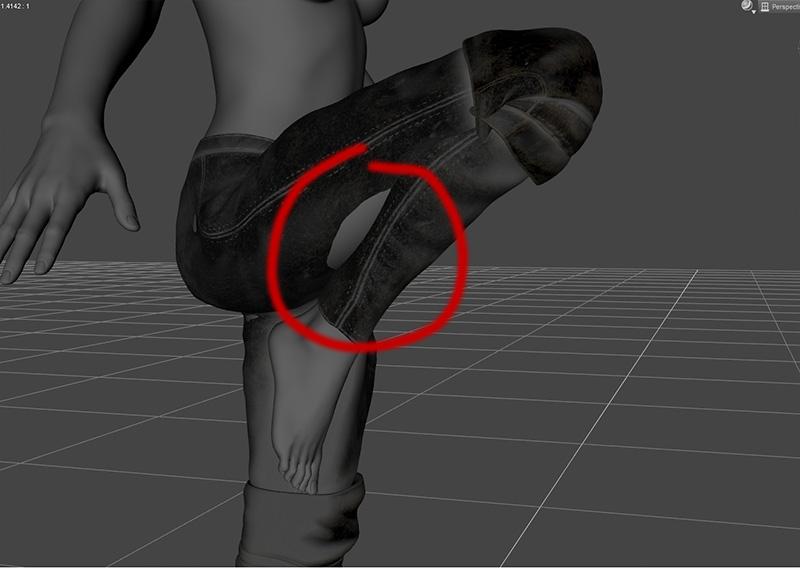
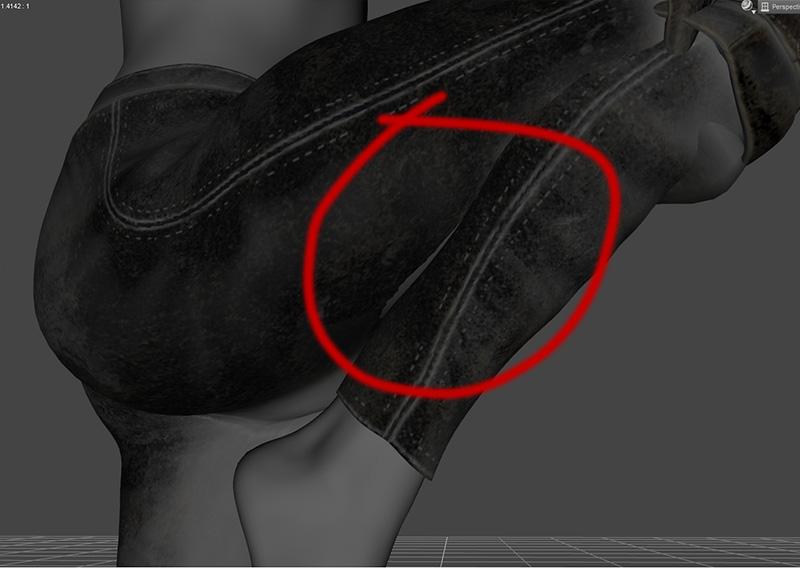
Adding a smoothing modifier does help (thanks for that tip Korentin), but it doesn't fix the problem completely as the body still clips through on some poses:
 Using V4/G3F Morphs on a G8F
I still haven't purchased the Victoria 4.2 figure or a V4 clone, as I won't need them if I end up going the more expensive route (right?), but I've attempted to use this method for G3F; both for its own sake, and to test whether I might be able to apply it to V4. I can't get it to work. Here's what I'm doing.
- Load both a G3F and G8F figure into the scene, and move them apart so I can see both at once.
- Adjust the G3F's arms to roughly match the pose of the G8F.
- Apply a G3F morph to the G3F figure.
- The closest thing to the initial "convert to weight mapping" step seems to be to select the G3F and go Edit->Figure->Rigging->Convert to Weight Mapping; doing that gives the error message "A figure with Parametric Joint Parameters must be selected to perform this action," which I'm currently interpreting to mean that this step doesn't apply to G3F, only V4.
- Click in empty space to not select anything (I suspect this is irrelevant but I'm noting it just in case) and go to Edit->Figure->Transfer Utility.
- Source : Scene Item : Genesis 3 Female and Target : Scene Item : Genesis 8 Female
- I don't know what to select for either of the "Item Shape" fields, but I've tried a few different permutations and it doesn't appear to make a difference.
- Set Distance Tolerance to 0.60
- Leave the two checked boxes in Projection Options as checked; I'm not sure whether I'm supposed to uncheck these, but again I think I've tried it both ways and it doesn't make a difference.
- Uncheck everything under General Options except for "Morph Targets."
- The instruction "to the right choose ALL" doesn't seem to apply, I don't know what this is talking about.
- Uncheck everything under Post Transfer Options.
- Click Accept.
The result of all of this is that nothing happens. I'm guessing that either I'm doing something fundamentally wrong, this method doesn't apply for G3F (in which case I don't know what I should be doing instead), or I haven't found the correct combination of options for "Item Shape" which the instructions don't mention.
I'd really rather not have to buy all of those transfer products as an overhead for using the morphs I want - I could buy at least 5 actual products that I actually want for the amount that they collectively cost - and I definitely don't want to buy them if it turns out that I can manage without them and just haven't figured out how. Is this method workable? Is there a better one? Can someone please help me out here? Thanks very much.
Just me or are most of the clothes for Genesis 9 broken?I've tried many different pants for Victoria 9, including the Daz Official ones, and with almost all of them the body clips through the pants on many different poses.
I've checked that the pants are set to Fit to the character.
I'd upload an example but the Attach a file function seems to be currently broken.
Is anyone else having this problem?
New Genesis, New Sales Thread: Report Issues Here "Reporting Only"Muneman said:
Today, the Victoria 9 Medieval bundle and its items are no longer listed New, but are not currently discounted as part of the storewide sale. Is there any chance of those items being adjusted to be included?
Are you referring to the Buy the Sleigh Ride Bundle to get an EXTRA 85% OFF* up to 5 Daz Original Bundles? If so, I doubt it. The Crow 8.1 Mega Bundle has not been included either and hasn't been new for a few days.
Daz 3D is part of

Connect
DAZ Productions, Inc.
7533 S Center View Ct #4664
West Jordan, UT 84084Licensing Agreement | Terms of Service | Privacy Policy | EULA
© 2026 Daz Productions Inc. All Rights Reserved.