-
Animating VDB's from Embergen
the limitation is DAZ studio itself I would say
fortunately there are bridges
I have simply used Sagan to export obj sequences from studio for Carrara's DCG obj series importe, huge folder of files but they are HDmorphed with Dforce simulated clothing and Carrara loads one each frame from that cache so not particularly heavy unlike a series of morphs, no issues with huge .car files over 4GB either
Blender also does obj sequence exports and can export VDB as a series of meshes, a handy option for Carrara
Animating VDB's from EmbergenWendyLuvsCatz said:
I have made VDB sequences in Blender with particles and Carrara with the volumetric clouds and the Octane plugin and can attest to the crazy file sizes
not tried recently but they looked like crap in DAZ studio

yeah I prefer Particle Illusion
Huge file sizes and I don't think they look nearly as good as ActionVFX stock footage. Hard to beat those Pro techniques!
Animating VDB's from EmbergenI haven't yet, but I'm going to build a system like the way ThePhilosopher did his animated clouds to make my own animated fire and magical effects system.
Edit - on second thought, I'll probably just use my usual methods of Particle Illusion, Carrara, and ActionVFX for fire and magical effects, since I never add those until post anyway.
Animating VDB's from EmbergenOh... and Carrara has a pretty decent solids physics simulator. Two, in fact. The original one and Bullet was added in either 8 or 8.5
Those can emit as well.
Animating VDB's from EmbergenSomething a Lot more fun for me than VDB in Daz Studio is Carrara's Particle Emitter.
In Carrara, we can load image sequences and/or avi for anything that accepts an image input, like textures, for example. Even without an animated map, the particle emitter works fantastic for making magical effects, fire, smoke... and we can place real geometry or simple primitives or... for the particles to react with. Like deflect, attract, repel and divide, stop, all manner of things.
Particle Illusion seems a lot easy to work with because it renders in near real-time until we start generating too many particles. Carrara doesn't have that great of a working visual feedback - but good enough to be able to see what's going on.
Where Carrara excels vastly over Particle Illusion is that Carrara has many Many modelers from text to terrains. From metaball to splines. Primitives to vertex ploygons, etc., Even formulae!
That said, Carrara's particle emitter can emit from any object in the scene. For example I used the old Daz Troll as a Balrog and emitted fire spewing from the troll itself. Very cool and very fun!
Animating VDB's from EmbergenI have made VDB sequences in Blender with particles and Carrara with the volumetric clouds and the Octane plugin and can attest to the crazy file sizes
not tried recently but they looked like crap in DAZ studio
yeah I prefer Particle Illusion
Animating VDB's from EmbergenI love using Carrara for rendering my own VFX elements, and now that Particle Illusion is free, that opens up a whole new world of creative freedom.
 Remixing your art with AI
Thanks for the tips, Wendy.
Just wonder if any other program would help, like
Carrara, 3D Coat or some of Realusions programs.
After last big crash of my Windows computer and necessity to reformat it,
I am not installing any programs, than really needed for my hobby.
Guess, need to take a chance.
Carrara Community Art Gallery - Show us your Renders!!!Used CI in this image
( Carrara Intelligence )

 Daz Central Ending - New Enhanced Install Manager
I never realized how much I absolutely loathe having to install everything manually until I started using DIM.
Before I actually used it, I was kind of okay with the fact that without it I could still install manually using the downloaded zip files instead of the installers we used to get. Same as installing from other marketplaces.
The first time I fired up DIM and started installing batch queues... it was night and day Game Changer!!! I've been hooked ever since.
To AllenArt's point, back when I first finally tried it, I really had to. Genesis 1 was going through changes as they worked out compatibility with Carrara and I believe DSON for Poser. Simply copying new files over the existing folders didn't work. Genesis was getting borked and the forums lit up like Christmas trees.
Completely obliterating my Daz Library directory and starting over using DIM not only fixed it, it has shown me that this is a Much better way!
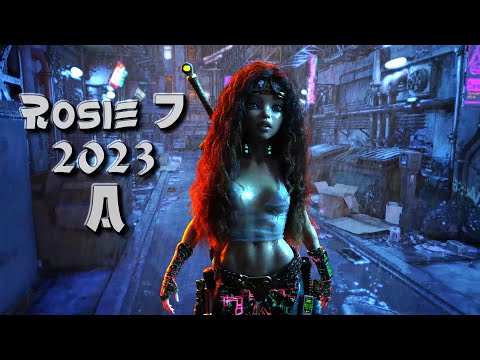
Linday appreciationIt was Linday's Classic Long and Curly Hair with dForce that got me to finally discover how to really animate in Daz Studio. If it wasn't for that hair, I'd likely still be animating in Carrara instead.
Thanks Linday! I'm on a Really Fun Trip!!!
 Daz Central Ending - New Enhanced Install Manager
Dartanbeck said:
RAMWolff said:
Dartanbeck said:
For my Legacy-Style Poser content that I was so used to using in Carrara, I was able to quickly and intelligently create all of the separate "Runtimes" I used for organization and I left all DUF format content to install to the default My Daz 3D Library.
So cool! If I wanted to relocate anything from one Runtime to a different one, I can easily do so in DIM simply by uninstalling the product(s) and installing again to the preferred path.
~snip~
Big Fan of DIM - user since it first came out.
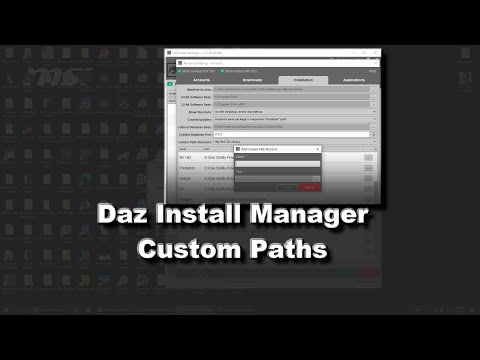
My I bother you for a little tutorial on how to do that? I've often wondered if I can direct DIM to install into seperate "My Library" or "Runtime" locations.
Absolutely! Coming right up!
Here you go, my friend!
If this doesn't fully answer what you need, let me know. :)
 Daz Central Ending - New Enhanced Install Manager
RAMWolff said:
Dartanbeck said:
I remember when DIM was first being introduced and I was skeptical at best - but with the Genesis 1 extensions and such being changed to help make the whole thing compatible in the (then) up-and-coming Carrara 8.5 Pro, it was kind of essential, otherwise we'd get incorrect files remaining on our system as the updates rolled out - so I gave it a try.
Wow. It blew me away as my skepticism immediately dissolved into vague memory.
For my Legacy-Style Poser content that I was so used to using in Carrara, I was able to quickly and intelligently create all of the separate "Runtimes" I used for organization and I left all DUF format content to install to the default My Daz 3D Library.
So cool! If I wanted to relocate anything from one Runtime to a different one, I can easily do so in DIM simply by uninstalling the product(s) and installing again to the preferred path.
Since then, DIM has improved and my use of it is nearly a daily thing. When I want to find the texture folder for anything, I type it into DIM, Show Installed Content, click on a texture and it takes me to the folder!
It's also very fast. Installing is a breeze and the database features ROCK!!!
Big Fan of DIM - user since it first came out.
My I bother you for a little tutorial on how to do that? I've often wondered if I can direct DIM to install into seperate "My Library" or "Runtime" locations.
Absolutely! Coming right up!
Daz Central Ending - New Enhanced Install ManagerDartanbeck said:
I remember when DIM was first being introduced and I was skeptical at best - but with the Genesis 1 extensions and such being changed to help make the whole thing compatible in the (then) up-and-coming Carrara 8.5 Pro, it was kind of essential, otherwise we'd get incorrect files remaining on our system as the updates rolled out - so I gave it a try.
Wow. It blew me away as my skepticism immediately dissolved into vague memory.
For my Legacy-Style Poser content that I was so used to using in Carrara, I was able to quickly and intelligently create all of the separate "Runtimes" I used for organization and I left all DUF format content to install to the default My Daz 3D Library.
So cool! If I wanted to relocate anything from one Runtime to a different one, I can easily do so in DIM simply by uninstalling the product(s) and installing again to the preferred path.
Since then, DIM has improved and my use of it is nearly a daily thing. When I want to find the texture folder for anything, I type it into DIM, Show Installed Content, click on a texture and it takes me to the folder!
It's also very fast. Installing is a breeze and the database features ROCK!!!
Big Fan of DIM - user since it first came out.
My I bother you for a little tutorial on how to do that? I've often wondered if I can direct DIM to install into seperate "My Library" or "Runtime" locations.
more....Wacky Modelling ~ In Carrara ~Stezza said:
lol

The Carrara cube is a wacky thing
it flits from bough to bough
and builds its nest in a Christmas Tree
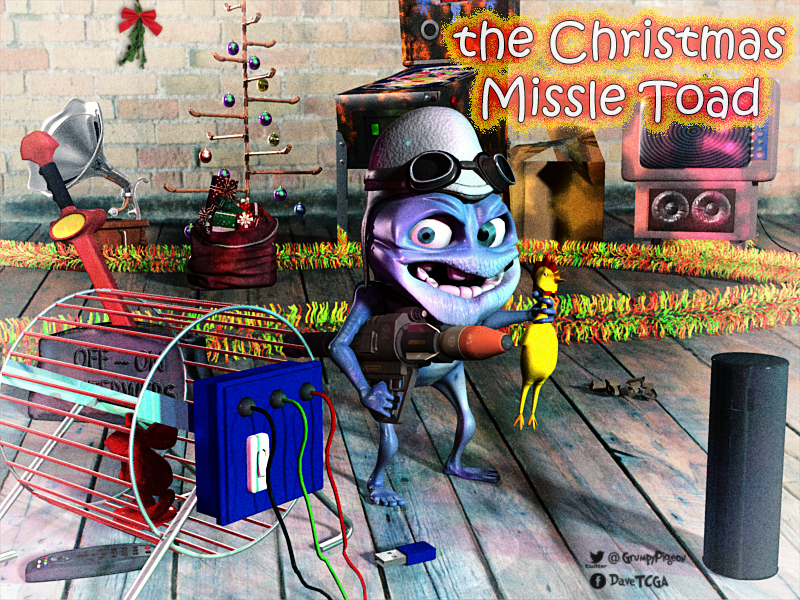
and whistles like a cow......The Christmas Missle Toad!
 Kick Ass!!! Ankle!!!Is AI killing the 3D star?
Clarification. A program like Daz Studio or Poser or Carrara or Bryce or Blender or... can be used for both a quick setup, and for adding detail. I did not mean to imply that it was only for the setup. To me the issue is the role of text vs graphics in AI prompts. Anything that is hard to describe with words, or needs consistency, can benefit from a 3D program that models, poses, or renders assets.
Off Topic Thread #2Stezza said:
Diomede said:
The Arkansas Museum of Fine Arts opened recently. Is across the street from my condo. Am looking forward to appreciating some non-computer art (and some computer art also).
is yours the one with all the flowers hanging over the railing?

we know you haven't got a car so it must be the one with the pushbike hanging on the railings
Stezza, I bought a car again now that I no longer live in a walkable city. But yes, I have a balcony and a bicycle.
Wendy, I am hoping an entire wing of the new fine arts museum gets devoted to Carrara. But so far, no one is asking me any questions. One of my neighbors is a volunteer, so instead I am the one asking questions.
more....Wacky Modelling ~ In Carrara ~Stezza said:
lol
today is cute Carrara cube cat day! with Carrara fur

modelled a cheeky cat and a lever thingy for turning the interwebs off and on
both morphed and I boned the cat!

Groovy !!!
Product Development for 2024 - Bryce 24 and Carrara 24kyoto kid said:
...I loved Carrara's shader tab as it was much more intuitive to work with than the format adopted by Daz's Shader Mixer/Builder which reminds me more of a bowl of noodles that was spilled on the floor.
I've been working with node-based shaders for a couple years now, and Houdini is entirely node-based, and I can't make heads or tails of Shader Mixer. It is uniquely opaque in my experience.
Product Development for 2024 - Bryce 24 and Carrara 24...I loved Carrara's shader tab as it was much more intuitive to work with than the format adopted by Daz's Shader Mixer/Builder which reminds me more of a bowl of noodles that was spilled on the floor.
Daz 3D is part of

Connect
DAZ Productions, Inc.
7533 S Center View Ct #4664
West Jordan, UT 84084Licensing Agreement | Terms of Service | Privacy Policy | EULA
© 2026 Daz Productions Inc. All Rights Reserved.









