-
Recommended method for two dforce collision sources?
AFAIK, dForce collides with everything in the scene unless it's hidden.
What you're describing sounds more like the smoothing modifier, which only accepts one collision target. In that case, I think you need to export the mesh and reimport it as a morph with "Reverse Deformations".
Frustrated; Loading Times Are Ridiculous!!That would be a clever idea and way to go, wouldn't it? Alas, DAZ put a roadblock in there as this will lose all correction morphs possibly needed to not warp areas of the character when posed. Learned it the hard way. The issue of this thread is one of the most frequent problems users run into since G3 but daz doesn't ssem to feel inclined to help this in any way until now. I just stopped putting money into anything that would emphasize this issue. In Germany we say "vote with your feet" Some say it relates to stomp as hard that you be heard, some say it is "walking out of the store with no business" but the idea is a democratic process. The problem here is you most likely hit PAs rather than DAZ....In my experience, for single shots it's pretty easy to make your own correction morph if you need to, and that you usually don't need to.
Anyone know anything about the Studded Jeans outfitI used the transfer utility to fit it, I only bought it because it was in a sale last year very cheap
dForce Classic Long Wavy Hair Winging Out Ward!!!Yes, you need to simulate everytime you want to render in Daz studio... you can save if you really want to: https://www.daz3d.com/forums/discussion/382306/what-are-the-different-ways-to-save-a-dforce-hair-simulation and https://thinkdrawart.com/how-to-save-a-daz-studio-dforce-frame-as-a-morph. Seriously though, cut down on the coffee.... It took me 30 seconds to find this answer.... politeness is appreciated.
Anyone Male to Female clothing transfers available?Hey all! There are a couple of awesome barbarian outfits only available for Genesis 8 Male that I would have loved to have on genesis 8 female for some Red Sonja/barbarian insprired renders. I was wondering if any tools exist or products on the daz store that you guys know of that allow me to transfer male clothing to be used on females.
Thank you!
Daz Studio 4.16[.0.x] Pro, General Release! (*UPDATED*)s_j_gregory said:
I've not graduated to saved scenes yet; still dealing with saved characters. So far I have re packaged 86 G8F characters and (re) installed them using DIM. I am working out my (Content) directory structure and Downloads and ManifestFiles folders so as to have something manageable: I was noticing DIM (and I) was having problems with too much content in one folder. At this stage, having gotten through the 86 above, I am at the point now where I am dealing with characters I like. So far, thirty-five of these have versions I have customized. (about more 100 still to go!!) Sometimes my customized versions load without problems; sometimes they load missing files because I have shared a MAT or something. Those I understand. I'll try to explain what I don't understand. When I load one of my custom characters and it missing morphs, I zero pose and clean the timeline as suggested, resave - it reloads without missing anything. But after I have done a bunch, if I go back, reinstall one that was not missing files and reload it, it will be missing files again, from the more recently uninstalled content. It might be too early to say but I think the upside of all of this is that when I am complete I will have much lower system load. For instance reduced RAM consumption - so far a G8F character is using about 500 MB less RAM than when I started. I am not sure I can say load times are improving. The down side looks like, when I am all done uninstalling content, that I will have to reload all of my custom characters (and scenes) one at a time to be sure to eliminate the missing (morph) file annoyance - or just get used to it.
I find the whole thing completely weird. I've loaded recent scenes where characters turned into blocks; Christy Turlingon converted into Marvin the Android sort-of-thing. I just loaded a scence I'd saved on 12/4/2017, the only character was Akame. DAZStudio warned me about all the missing textures, I went to DIM, de-installed Akame from "G8Figures-Unused" and reinstalled to "G8Figures-Core" (the latteer being in the set that DAZStudio can see) and everything, but everything, was hunky dory. Then I loaded a more advanced version of the scene from 2/5/2018 and I got four missing .dsfs, a few Victorias and some nails; I ignored those and everything looks fine (I guess I may have lost Akame her nails). I also guess I didn't have that much content in 2017, but I'm not sure; it's all weird.
Frustrated; Loading Times Are Ridiculous!!margrave said:
You could always export the converted character, reload it as a single morph for G8, then uninstall the converted character. That way, you should only have to load a single morph rather than a whole bunch of converted G3 morphs.
That would be a clever idea and way to go, wouldn't it? Alas, DAZ put a roadblock in there as this will lose all correction morphs possibly needed to not warp areas of the character when posed. Learned it the hard way. The issue of this thread is one of the most frequent problems users run into since G3 but daz doesn't ssem to feel inclined to help this in any way until now. I just stopped putting money into anything that would emphasize this issue. In Germany we say "vote with your feet" Some say it relates to stomp as hard that you be heard, some say it is "walking out of the store with no business" but the idea is a democratic process. The problem here is you most likely hit PAs rather than DAZ....
Daz Studio 4.16[.0.x] Pro, General Release! (*UPDATED*)jbowler said:
s_j_gregory said:
jbowler, I have been working away at reinstalling G8F characters. I don't have this completely nailed down yet but...There is more to the missing files than just the timeline. It could be that some developer's characters are more inclined to record morphs than others when saved as a scene subset. I have not been able to see yet which one(s), but I think that is what I am seeing. The opposite is also true. Some characters, that use a parent's head and body morphs, will load without a missing files error/warning. Ex. Audrey 8 HD will load without error whether her parent, Bridget 8, is installed or not when in reality she requires the head and body morphs from Bridget. I did not expect that.I use the timeline a lot, pretty much always, for dForce handling so I've just assumed that the dependencies come in as a result of creating keyframes. I seem to be able to remove them by deleting the keys on the timeline, but of course that doesn't mean that's why they got there.
I've also noticed that there are dependencies there that are not always reported. If I want to be really safe I load the scene once using my "Everything" CMS directory set then merge the same scene in over the top with my "Default" CMS directory subset; this normally makes it obvious if there is a geometry error.
I've not graduated to saved scenes yet; still dealing with saved characters. So far I have re packaged 86 G8F characters and (re) installed them using DIM. I am working out my (Content) directory structure and Downloads and ManifestFiles folders so as to have something manageable: I was noticing DIM (and I) was having problems with too much content in one folder. At this stage, having gotten through the 86 above, I am at the point now where I am dealing with characters I like. So far, thirty-five of these have versions I have customized. (about more 100 still to go!!) Sometimes my customized versions load without problems; sometimes they load missing files because I have shared a MAT or something. Those I understand. I'll try to explain what I don't understand. When I load one of my custom characters and it missing morphs, I zero pose and clean the timeline as suggested, resave - it reloads without missing anything. But after I have done a bunch, if I go back, reinstall one that was not missing files and reload it, it will be missing files again, from the more recently uninstalled content. It might be too early to say but I think the upside of all of this is that when I am complete I will have much lower system load. For instance reduced RAM consumption - so far a G8F character is using about 500 MB less RAM than when I started. I am not sure I can say load times are improving. The down side looks like, when I am all done uninstalling content, that I will have to reload all of my custom characters (and scenes) one at a time to be sure to eliminate the missing (morph) file annoyance - or just get used to it.
How do I find a completely shapeable figureThese are the basic head morphs to start with. They all have matching Body Morph packages.
Genesis 8 Male Head Morphs
Genesis 8 Female Head Morphs
Genesis 3 Male Head Morphs
Genesis 3 Female Head Morphs
Genesis 2 Male Head Morphs
Genesis 2 Female Head Morphs
Genesis Evolution: Head MorphsHow long does it take you to load G8F?
That sounds exciting. I wonder if that will include support for multi-threaded loading. That would be really cool.margrave said:
I opened Daz and immediately loaded a G8F Dev Load, which took about 70 seconds.
Then I opened two Dev Loads and two base G8F loads. All took roughly 90 seconds.
Presumably the additional twenty seconds was removing the previous geometry from the scene.
Texture usage has absolutely no impact at all, it seems.
I have a few hundred G8F characters and some morph packages, mainly Zev0 morphs and Esid & FenixPhoenix's wounds and scars series. I never buy poses or expressions, so I'm fairly clean in that area. Just the offcuts I get from pro bundles.
I read an interesting article by the WP Guru. It claims Daz is built on a fifteen-year-old application framework, Qt4, but they can't upgrade to a newer version because the scripting engine was deprecated. So basically, every single Daz script would become useless. Since application frameworks like Qt are typically responsible for cross-platform file I/O, it's possible the extremely screwy loading is just due to the aging dinosaur of a framework Daz is based on.
However...
https://www.daz3d.com/forums/discussion/463926/daz-studio-pro-4-15-highlights
If you go to the release notes, all the way at the very bottom, in the post dated March 18th...
Preparations toward migration to a considerably newer version of the application framework (i.e., Qt)
It seems like they're gearing up to make the transition. I wonder if the coders haven't been furiously scrambling to implement a new scripting system so that all our scripts don't crap out once they make the change. Hopefully this'll make Daz more stable, reliable, and--most importantly--quicker.
How do I find a completely shapeable figureThere are many morph packages available to help with the shaping. You will probably want to start with the appropriate basic Head and Body Morph packages for the generation of interest (Genesis, Genesis 2 Male & Female, etc.) Many of the add-ons build on those basic alterations to make preset characters, some add more adjustments, sometimes quite specific. Of course, you are not limited to the presets, you can control each parameter individually for an infinite variety.
How long does it take you to load G8F?I opened Daz and immediately loaded a G8F Dev Load, which took about 70 seconds.
Then I opened two Dev Loads and two base G8F loads. All took roughly 90 seconds.
Presumably the additional twenty seconds was removing the previous geometry from the scene.
Texture usage has absolutely no impact at all, it seems.
I have a few hundred G8F characters and some morph packages, mainly Zev0 morphs and Esid & FenixPhoenix's wounds and scars series. I never buy poses or expressions, so I'm fairly clean in that area. Just the offcuts I get from pro bundles.
I read an interesting article by the WP Guru. It claims Daz is built on a fifteen-year-old application framework, Qt4, but they can't upgrade to a newer version because the scripting engine was deprecated. So basically, every single Daz script would become useless. Since application frameworks like Qt are typically responsible for cross-platform file I/O, it's possible the extremely screwy loading is just due to the aging dinosaur of a framework Daz is based on.
However...
https://www.daz3d.com/forums/discussion/463926/daz-studio-pro-4-15-highlights
If you go to the release notes, all the way at the very bottom, in the post dated March 18th...
Preparations toward migration to a considerably newer version of the application framework (i.e., Qt)
It seems like they're gearing up to make the transition. I wonder if the coders haven't been furiously scrambling to implement a new scripting system so that all our scripts don't crap out once they make the change. Hopefully this'll make Daz more stable, reliable, and--most importantly--quicker.
Daz Studio 4.16[.0.x] Pro, General Release! (*UPDATED*)
Jbowler, I have been working away at reinstalling G8F characters. I don't have this completely nailed down yet but...There is more to the missing files than just the timeline. It could be that some developer's characters are more inclined to record morphs than others when saved as a scene subset. I have not been able to see yet which one(s), but I think that is what I am seeing. The opposite is also true. Some characters, that use a parent's head and body morphs, will load without a missing files error/warning. Ex. Audrey 8 HD will load without error whether her parent, Bridget 8, is installed or not when in reality she requires the head and body morphs from Bridget. I did not expect that.jbowler said:Richard Haseltine said:
jbowler said:
I believe that Frame 0 is a fake; keys are reported and behave as though they are there even though the key isn't actually recorded in the scene (or scene subset) file. I have suspicions but I haven't had time yet to prove or disprove them.
I'm not sure what you mean here
It is as I said (i.e. I just tested it); the keys are not recorded in the scene file even though in memory (i.e. on the timeline) there are keys for every property that exists on Frame 0. This is why simply inserting a G8F and saving the scene doesn't actually link the scene to every G8F morph, dialable pose and expression you have installed, just the ones that are set to something (the keys have to be recorded for those).
This does not apply to any other frame (well, I only tested frame 30 ;-) Creating a key frame there permanently links the scene file to everything G8F (etc) installed on the system, as well as blowing up the scene file size; I went from compressed 125KByte for a sceen with the default on Frame0 and a sitting pose on Frame 30 to 392KByte if I created a keyframe on 30. The uncompressed size (for the scene subset - I have yet to find out how to write an uncompressed scene) went from 1756KByte to 6245Byte. I verified that after creating the keyframe on frame 30 DAZStudio was writing default values for character morphs.
Ironically Frame 0 does actual seem more like a proper keyframe as a result; everything has a default value, even deleting the properties as I suggested above doesn't stick (they come back when the scene is reloaded). I don't think that happens with other frames; adding new properties (by installing or making visible new packages/morphs) results in a default value on frame 0 but, I think (not tested) not on any other "keyframe". It would be really nice if DAZStudio supported keyframes properly (e.g. at the Object level or even the Scene level); then Key+ would just be a waste of time for most of us...
Frustrated; Loading Times Are Ridiculous!!Seiginotora said:
Are you kidding? That's just soul crushing. I did in fact pick up RiverSoftArt's V4 to G8F convertor because I wanted to transfer at least my main characters to G8F. I only have three of these characters converted, but the characters in question who're taking a long time to load weren't converted; they're still 100% G8F, and yet they still take a while to load.
But if it's RiverSoftArt that's causing this... does this mean I have to scrap these characters I've converted and start over from scratch? I am nowhere near talented enough to convert V4 textures to G8F models manually. If that's the case this sort of thing will set me back quite a bit in terms of trying to get my webseries out on time.
Not necessarily. You could always export the converted character, reload it as a single morph for G8, then uninstall the converted character. That way, you should only have to load a single morph rather than a whole bunch of converted G3 morphs.
Frustrated; Loading Times Are Ridiculous!!Easy to test, locate your converted characters and any morphs related to them, move them out of G8 morph folders to see how much of an effect it has on loading times.
Note, the first time after changes to morphs, DS updates the cache file accordingly so it can take even longer. The second time you get the true effect of the changes.
Although, I don't think there is that much of a problem with characters converted from V4 to G8 as they don't share any characters/morphs like G3 and G8 do. Converting G3 characters to G8 has caused the G3 morphs also to move over, which has resulted in G8 having double versions of the same morphs with different addresses and such, which confuses DS
Frustrated; Loading Times Are Ridiculous!!Are you kidding? That's just soul crushing. I did in fact pick up RiverSoftArt's V4 to G8F convertor because I wanted to transfer at least my main characters to G8F. I only have three of these characters converted, but the characters in question who're taking a long time to load weren't converted; they're still 100% G8F, and yet they still take a while to load.
But if it's RiverSoftArt that's causing this... does this mean I have to scrap these characters I've converted and start over from scratch? I am nowhere near talented enough to convert V4 textures to G8F models manually. If that's the case this sort of thing will set me back quite a bit in terms of trying to get my webseries out on time.
V4 hair on G8 posing questionIs it possible after using the conversion to g8 for a V4 hair (which works really well, BTW) to pose the hair? Simple things like bangs or back longer, front to back, etc. I don't see those morphs unless I show hidden objects, yet they still don't do anything regardless of how mucg I slide the dials.
Somethimes I want things like wind blows, and they seem unavailable, yet they were in the original morph set. Oh, this is also for hair like G3 hair on G8 after auto fitting it.
Thanks,
..Joe
Post your DAZ to Unreal rendersEye with FACS poses and morphs.
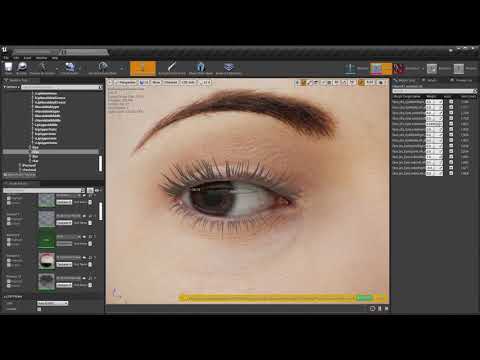
Somebody can help me understand how morphs and parameters work in daz? Those "add, multiply" etc things?
I want to reproduce genesis8.1 FACS in UE4, but I'm not sure how they are calculated and how to export them. I made a thread here: https://www.daz3d.com/forums/discussion/480501/how-to-find-which-morph-is-used
How to find which morph is used?That's an ineresting idea. But there is so many of those files... I wonder if that would be possible to do it using javascript api? I mean disable the morph part or the pose part without changing real files? Then I export them as fbx, like i do now.
What I'm trying to do is to export those morphs and those poses separately then use them in UE4 same way they are used in Daz. I don't know Daz very well, but as far as I can see there are parameters with morphs and poses, then there are formlas which define how one parameter drives another. So if you could export those poses, morphs and formulas you could reproduce the same in UE4. So far I just did the eyes and it looks pretty good. But I never know if I'm doing same thing as Daz or not. Now with those dsf files it's more clear, still the formulas are pretty obscure for me. If you could export them somehow, like driven keys or something that would be great.
How long does it take you to load G8F?Long load times for character presets isn't just strange, it's down right weird, not to mention worrying.
There are only three real differences between loading the G8F base and a custom character, the morph deltas being loaded, the add-ons being loaded (eyelashes etc), and the textures.
Poor color profiles on top of dealing with 500k+ ERC could explain the load times, easy way to check if it is, set the viewport to "smooth shaded" and load in one of the suspect character presets.
In smooth shaded DS only reference the textures, it doesn't actually load any of them, so if the load time drops to something similar to the G8F base, then you know it's the textures that are the issue.
Daz 3D is part of

Connect
DAZ Productions, Inc.
7533 S Center View Ct #4664
West Jordan, UT 84084Licensing Agreement | Terms of Service | Privacy Policy | EULA
© 2026 Daz Productions Inc. All Rights Reserved.