-
AIUTO...CHI CONOSCE L’ITALIANO? PARTE QUATTORDICIQualcuno mi spiega la differenza fra l'Advanced Morph Loader e il Pro? Quando uso l'Advanced l'Erc Freeze no va, con il Pro invece si.Morph Master
Thank you @matew and Elor. I had the computers off yesterday afternoon due to extreme weather and the weak electrical wiring system in my apartment. I have downloaded the updated manual. Much appreciated.
I will set up a practice scene and see how I do with morph master today. It is my 'quiet' day of the week.
Mary
dForce ArchmageArchmage has the same problem that Morph Master had with the toggle for setting favorites not working. I uncheck Add to Favorites and Save Settings. The dforce Archmage 02 Morph Extractor still marks every created morph with the heart favorite icon.
 dForce Archmage
The lines in the hair are Iray Curves. That is how most dForce hair in the store is structured. Once a PA converts a Strand-Based hair to dForce, it is no longer editable by users with the Strand-Based hair editor in Daz Studio. I don't see anything unusual in the structure of this hair, as shown in your capture of the Scene Info data. For example, I have attached the Scene Info for Juneau Hair dForce Strands.It is certainly possible for users to create morphs based on dForce simulation of Daz hair products based on Iray Curves. I have done it many times. I believe I even commented on that in the Morph Master forum thread. I have not tried it with Archmage.
Note that Linday dForce Hairs usually use the "cloth based" dForce system That does not use Iray curves, but uses normal polygonal geometry and the normal cloth based dForce simulation.Morph MasterElor said:
The script opening the manuel doesn't work on MacOS for some reasons I don't understand.
This one does work on Mac on the other hand:
If someone wants to have a fix on their Mac, they can download the snippet and in any tool capable of editing text (like TextEdit), just search for:
Relative/path/to/a/file.txt
and replace it with (for Morph Master)
Scripts/matew/Morph Master/Morph Master 20 User Guide.pdf
Then save Display_Document_Dynamic.dsa and move it somewhere inside your Daz library (it's likely safe to replace Morph Master 20 User Guide.dsa but I didn't test it).
Here's the updated Morph Master 20 User Guide.dsa that uses Elor's snippet:
https://mega.nz/file/hZ8SmDoJ#ttqCm-HCiFiYldaSFysfrjq-N9WkfUGFxF38oijUzlA
I hope it will work on your Mac.
Rigging the characterPlease don't post images with nude, textured figures (and do please use something like the Snip and Sketch tool to take screenshots, rather than taking a photo of the screen).
How was the character created? I suspect you exported the model with attachemnts and at high-resolution, which stops it from loading as a morph - for a morph the vertices that define the model must match thos of the base figure. The only real fix in that case is to export the base mesh and use your modeller's tools to make it match the shape you previously created, at which point you can load it as a morph.
Can someone please make more modular hair models?Leana said:
Spamakopita said:
Leana said:
Spamakopita said:
Modular hair is probably the easiest type of hair to do
I doubt that (at least if you want to create a product to sell), because instead of having one full hair to create, morph and make materials for you now have multiple pieces to take into account and make work together.
On thing that comes to mind for example is ensuring that the extra pieces adjust well enough (and realistically enough) when the base hair is morphed to fit the character's head or for movements, which is not that easy because unlike conforming items, parented items don't adjust to the parent's morphs.
See my comment above for clarification. I'm talking about this type of hair, not something that interacts with the neck/shoulders:https://www.daz3d.com/dforce-strand-based-build-your-updo-mega-hair-pack-for-genesis-9
Not having to interact with the neck or shoulders doesn't change the need to have the pieces "follow" when the base hair is morphed to fit a character.
For the record, the hair you linked to is not just a base hair with parented props, as noted in the description all the pieces are conforming. Which means that OOT basically created around 20 different rigged figures including some with custom bones, and with dozens of adjustment morphs each. That's a lot of work, and I'm not even counting the pre-built options and all the materials. Granted, they've been creating hair for years so they likely have an optimized workflow, but still.
Yes, OOT has conforming pieces in this hair but you wouldn't have to other than the base, right? You don't have to have little strands coming down and you can easily parent various buns or braids that don't need to move other than adjusting size/position.
Can someone please make more modular hair models?Spamakopita said:
Leana said:
Spamakopita said:
Modular hair is probably the easiest type of hair to do
I doubt that (at least if you want to create a product to sell), because instead of having one full hair to create, morph and make materials for you now have multiple pieces to take into account and make work together.
On thing that comes to mind for example is ensuring that the extra pieces adjust well enough (and realistically enough) when the base hair is morphed to fit the character's head or for movements, which is not that easy because unlike conforming items, parented items don't adjust to the parent's morphs.
See my comment above for clarification. I'm talking about this type of hair, not something that interacts with the neck/shoulders:https://www.daz3d.com/dforce-strand-based-build-your-updo-mega-hair-pack-for-genesis-9
Not having to interact with the neck or shoulders doesn't change the need to have the pieces "follow" when the base hair is morphed to fit a character.
For the record, the hair you linked to is not just a base hair with parented props, as noted in the description all the pieces are conforming. Which means that OOT basically created around 20 different rigged figures including some with custom bones, and with dozens of adjustment morphs each. That's a lot of work, and I'm not even counting the pre-built options and all the materials. Granted, they've been creating hair for years so they likely have an optimized workflow, but still.
dForce Archmagematew said:
jksafe said:
Hey, mate!
I just picked up your product from the store. I can't get the looping to work with one of my hairstyles.
https://www.daz3d.com/dforce-strand-based-beach-style-long-hair-for-genesis-9
Do you have any tips on what I could be doing wrong? I tried a couple of other hair products, and they worked fine. This one just won't create a morph.
Hey, jksafe!
I just tested this hair myself, and I couldn't get it to work either. I don't know what's wrong with it. When trying to copy and paste the geometry back, I get a "geometry mismatch" error that makes no sense.
And the problem isn’t limited to dForce Archmage. I tried creating a morph using DAZ Studio’s standard tools, with Morph Loader Pro, and encountered the same error. Moreover, ManFriday's Mesh Grabber also refuses to work with this asset.
So this isn’t a bug in dForce Archmage, but rather some kind of incompatibility at the DAZ Studio level itself.
Sorry, but I really don’t know what I can do here. Still, thanks for uncovering the issue.Thanks for the answer. My luck to find the one asset that doesn't work... ^^
Morph MasterElor said:
The script opening the manuel doesn't work on MacOS for some reasons I don't understand.
This one does work on Mac on the other hand:
If someone wants to have a fix on their Mac, they can download the snippet and in any tool capable of editing text (like TextEdit), just search for:
Relative/path/to/a/file.txt
and replace it with (for Morph Master)
Scripts/matew/Morph Master/Morph Master 20 User Guide.pdf
Then save Display_Document_Dynamic.dsa and move it somewhere inside your Daz library (it's likely safe to replace Morph Master 20 User Guide.dsa but I didn't test it).
Thank you for this information, Elor!
Morph Mastermemcneil70 said:
@matew, I bought Morph Master the other day and just finished watching both videos and had no issue with your accent. I will be watching the in-depth one a number of times as advised by @barbult because it is fast and like a weather person zipping a radar map of severe thunderstorms you don't know where to put your eyes to catch what/where. And my two ginger cats decided they needed attention constantly during my study.
Now I was on my MacMiniM4 and I cannot seem to open the User Guide. Is there a trick to it? Or is it only able to be opened on a Windows computer?
The log file showed:
2025-06-24 07:33:02.386 [INFO] :: Script executed successfully: /Volumes/Spawns Work/Users/Mary/My DAZ 3D Content/Scripts/matew/Morph Master/Morph Master 20 User Guide.dsa
But no guide appeared.
I also tried Morph Master 02 Manage Collision.dse and the log reads:
2025-06-24 07:38:52.210 [INFO] :: Loading script: /Volumes/Spawns Work/Users/Mary/My DAZ 3D Content/Scripts/matew/Morph Master/Morph Master 02 Manage Collision.dse
2025-06-24 07:38:52.215 [WARNING] :: Script Error: Line 10
2025-06-24 07:38:52.215 [WARNING] :: TypeError: Result of expression 'oNode' [null] is not an object.
2025-06-24 07:38:52.215 [WARNING] :: Stack Trace:
<anonymous>()@/Volumes/Spawns Work/Users/Mary/My DAZ 3D Content/Scripts/matew/Morph Master/Morph Master 02 Manage Collision.dse:10
2025-06-24 07:38:52.216 [WARNING] :: Error in script execution: /Volumes/Spawns Work/Users/Mary/My DAZ 3D Content/Scripts/matew/Morph Master/Morph Master 02 Manage Collision.dse
Now I just clicked on Morph Master 01 Preferences & Setup.dse and it popped up without issue. So does that indicate I must fill in those areas first before any other work can be done? It the tutorial online, it was mentioned well into the lesson, not at the first as required.
Sorry about the confusion, maybe this is answered in the User Guide I can't access.
Mary
Hi, Mary!
Thank you for purchasing Morph Master!
It's really strange that you can't open the PDF manual on a MacBook. There are only two lines of code involved, and DAZ Script is claimed to be cross-platform. That means the scripting language itself doesn't differentiate between Windows and macOS—there’s no “do it this way on Windows, do it another way on Mac” logic in it.
Since the User Guide isn’t opening, try right-clicking on it – “Browse to File Location” – and manually open the Morph Master 20 User Guide.pdf file. Alternatively, just navigate to
(Your Daz Library) > scripts > matew > Morph Master > Morph Master 20 User Guide.pdf.
If you run into any trouble, feel free to PM me and I’ll send you the User Guide by email.Sorry for the inconvenience.
Before launching Morph Master 02 Manage Collision.dse, make sure you’ve selected an object in the scene that has a Collision Parameter you want to work with.Thanks for the info. Thousands of people have bought Morph Master, but you're the first to let me know that the help file doesn’t open on a MacBook.
Morph MasterThe script opening the manuel doesn't work on MacOS for some reasons I don't understand.
This one does work on Mac on the other hand:
If someone wants to have a fix on their Mac, they can download the snippet and in any tool capable of editing text (like TextEdit), just search for:
Relative/path/to/a/file.txt
and replace it with (for Morph Master)
Scripts/matew/Morph Master/Morph Master 20 User Guide.pdf
Then save Display_Document_Dynamic.dsa and move it somewhere inside your Daz library (it's likely safe to replace Morph Master 20 User Guide.dsa but I didn't test it).
Can someone please make more modular hair models?Leana said:
Spamakopita said:
Modular hair is probably the easiest type of hair to do
I doubt that (at least if you want to create a product to sell), because instead of having one full hair to create, morph and make materials for you now have multiple pieces to take into account and make work together.
On thing that comes to mind for example is ensuring that the extra pieces adjust well enough (and realistically enough) when the base hair is morphed to fit the character's head or for movements, which is not that easy because unlike conforming items, parented items don't adjust to the parent's morphs.
See my comment above for clarification. I'm talking about this type of hair, not something that interacts with the neck/shoulders:https://www.daz3d.com/dforce-strand-based-build-your-updo-mega-hair-pack-for-genesis-9
Can someone please make more modular hair models?richardandtracy said:
I think it's because making realistic hair has to be treated as a whole.
If you think of real people with hair pieces added, when they stick a bit in, it does affect the existing hair by bulking it up, pushing it sideways or distorting it in some way. This is exceedingly difficult to do in a model as you'd have to put in many, many interacting morphs. And with hair vertex numbers being stunningly high (4-9 million are figures I've seen), that's a lot of work for the person who does it.
The hair models for polygon hair tend to be made up in many strips, as shown in the clay render image below:
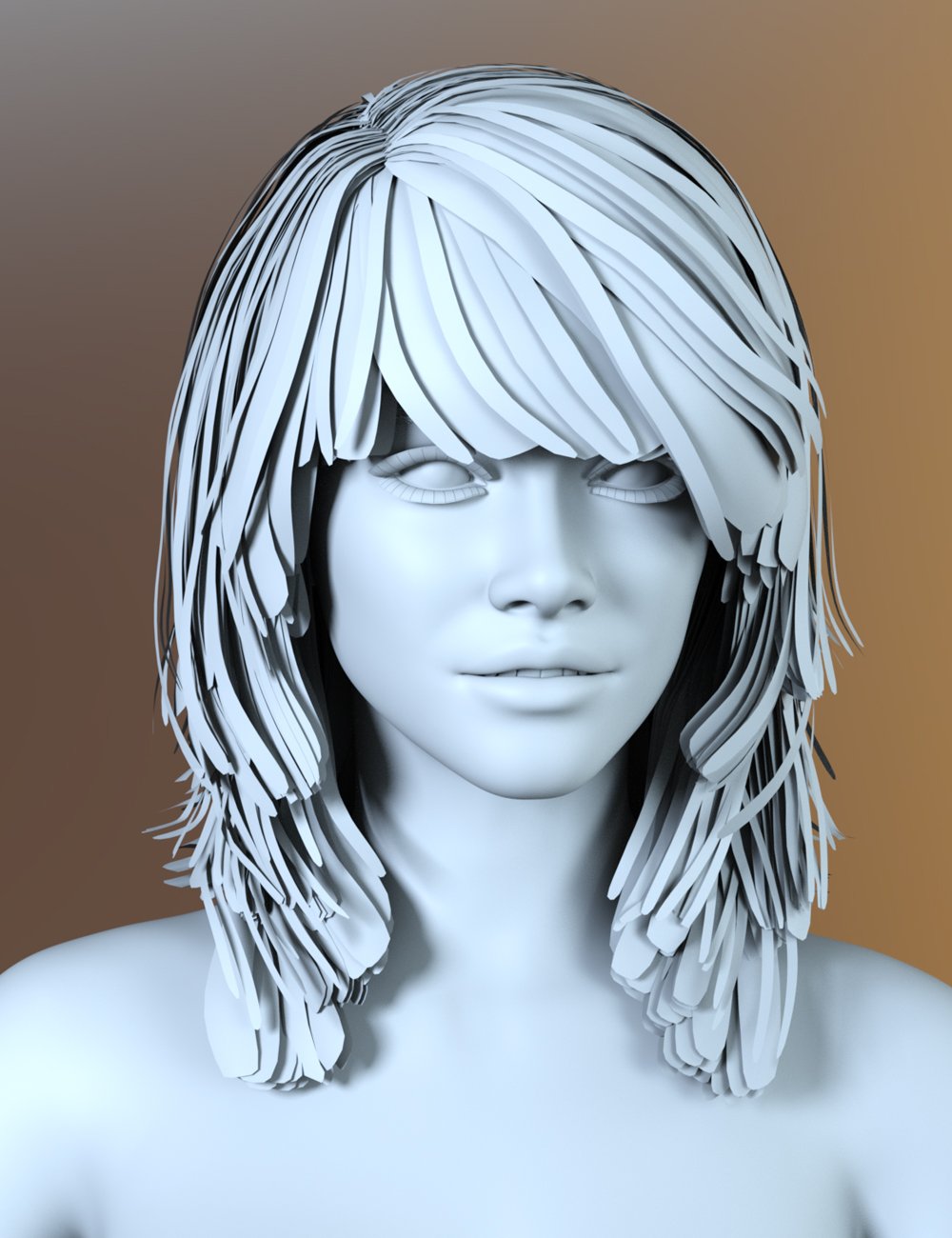
Each of these will need a morph for every movement caused by the hair pieces added. That's a lot of work and time from the person doing it. And as the idea of 'More bang for your buck' is to ensure it is done at a lower cost. So, either the PA invents a quick way to do it, or their earnings for the time they spend drops catastrophically, and they don't/won't want to do it - bringing us back to the siuation we're in. The PA gets a rate per hour that they can just about live with and we get less versatile, but still very realistic hair at a cost we can afford that sorta reflects the time required to make the model.
It's always instructive to do something like this yourself. If you can find a way of doing it that no-one else has discovered, you deserve to get a good wack from it. Otherwise, doing it is an instructive way of finding out the effort hidden behind the models we see. I've done a few hundred freebies over at renderosity, 60+ are models, none are clothes or hair, and I really admire the PA's who take on the huge modelling task of hair. I really don't want to try it myself (yet).
Regards,
Richard
To be more clear, I'm talking about done-up modular hair of this type: https://www.daz3d.com/dforce-strand-based-build-your-updo-mega-hair-pack-for-genesis-9. Not hair that interacts with the neck/shoulders.
All it takes is a base, or a couple types of base that don't need many morphs and don't need to interact with anything below the head. Then slap on your ponytail, braid, buns, or whatever that can be parented. Out of Touch does a great job with this but I'm surprised more people havn't done something similar considering how much creative potential there is. Buns don't need posing, and braids/ponytails shouldn't take as much work to rig/pose as loose hair that goes to the shoulders.
dForce Archmagejksafe said:
Hey, mate!
I just picked up your product from the store. I can't get the looping to work with one of my hairstyles.
https://www.daz3d.com/dforce-strand-based-beach-style-long-hair-for-genesis-9
Do you have any tips on what I could be doing wrong? I tried a couple of other hair products, and they worked fine. This one just won't create a morph.
Hey, jksafe!
I just tested this hair myself, and I couldn't get it to work either. I don't know what's wrong with it. When trying to copy and paste the geometry back, I get a "geometry mismatch" error that makes no sense.
And the problem isn’t limited to dForce Archmage. I tried creating a morph using DAZ Studio’s standard tools, with Morph Loader Pro, and encountered the same error. Moreover, ManFriday's Mesh Grabber also refuses to work with this asset.
So this isn’t a bug in dForce Archmage, but rather some kind of incompatibility at the DAZ Studio level itself.
Sorry, but I really don’t know what I can do here. Still, thanks for uncovering the issue.Can someone please make more modular hair models?Spamakopita said:
Modular hair is probably the easiest type of hair to do
I doubt that (at least if you want to create a product to sell), because instead of having one full hair to create, morph and make materials for you now have multiple pieces to take into account and make work together.
On thing that comes to mind for example is ensuring that the extra pieces adjust well enough (and realistically enough) when the base hair is morphed to fit the character's head or for movements, which is not that easy because unlike conforming items, parented items don't adjust to the parent's morphs.
Can someone please make more modular hair models?I think it's because making realistic hair has to be treated as a whole.
If you think of real people with hair pieces added, when they stick a bit in, it does affect the existing hair by bulking it up, pushing it sideways or distorting it in some way. This is exceedingly difficult to do in a model as you'd have to put in many, many interacting morphs. And with hair vertex numbers being stunningly high (4-9 million are figures I've seen), that's a lot of work for the person who does it.
The hair models for polygon hair tend to be made up in many strips, as shown in the clay render image below:
Each of these will need a morph for every movement caused by the hair pieces added. That's a lot of work and time from the person doing it. And as the idea of 'More bang for your buck' is to ensure it is done at a lower cost. So, either the PA invents a quick way to do it, or their earnings for the time they spend drops catastrophically, and they don't/won't want to do it - bringing us back to the siuation we're in. The PA gets a rate per hour that they can just about live with and we get less versatile, but still very realistic hair at a cost we can afford that sorta reflects the time required to make the model.
It's always instructive to do something like this yourself. If you can find a way of doing it that no-one else has discovered, you deserve to get a good wack from it. Otherwise, doing it is an instructive way of finding out the effort hidden behind the models we see. I've done a few hundred freebies over at renderosity, 60+ are models, none are clothes or hair, and I really admire the PA's who take on the huge modelling task of hair. I really don't want to try it myself (yet).
Regards,
Richard
dForce ArchmageHey, mate!
I just picked up your product from the store. I can't get the looping to work with one of my hairstyles.
https://www.daz3d.com/dforce-strand-based-beach-style-long-hair-for-genesis-9
Do you have any tips on what I could be doing wrong? I tried a couple of other hair products, and they worked fine. This one just won't create a morph.
Eye blink problemThat looks as if a shape is applied that does not have a corrective morph or a corrective morph is aplying when it should not. Do you have The Age installed?
Morph Master@matew, I bought Morph Master the other day and just finished watching both videos and had no issue with your accent. I will be watching the in-depth one a number of times as advised by @barbult because it is fast and like a weather person zipping a radar map of severe thunderstorms you don't know where to put your eyes to catch what/where. And my two ginger cats decided they needed attention constantly during my study.
Now I was on my MacMiniM4 and I cannot seem to open the User Guide. Is there a trick to it? Or is it only able to be opened on a Windows computer?
The log file showed:
2025-06-24 07:33:02.386 [INFO] :: Script executed successfully: /Volumes/Spawns Work/Users/Mary/My DAZ 3D Content/Scripts/matew/Morph Master/Morph Master 20 User Guide.dsa
But no guide appeared.
I also tried Morph Master 02 Manage Collision.dse and the log reads:
2025-06-24 07:38:52.210 [INFO] :: Loading script: /Volumes/Spawns Work/Users/Mary/My DAZ 3D Content/Scripts/matew/Morph Master/Morph Master 02 Manage Collision.dse
2025-06-24 07:38:52.215 [WARNING] :: Script Error: Line 10
2025-06-24 07:38:52.215 [WARNING] :: TypeError: Result of expression 'oNode' [null] is not an object.
2025-06-24 07:38:52.215 [WARNING] :: Stack Trace:
<anonymous>()@/Volumes/Spawns Work/Users/Mary/My DAZ 3D Content/Scripts/matew/Morph Master/Morph Master 02 Manage Collision.dse:10
2025-06-24 07:38:52.216 [WARNING] :: Error in script execution: /Volumes/Spawns Work/Users/Mary/My DAZ 3D Content/Scripts/matew/Morph Master/Morph Master 02 Manage Collision.dse
Now I just clicked on Morph Master 01 Preferences & Setup.dse and it popped up without issue. So does that indicate I must fill in those areas first before any other work can be done? It the tutorial online, it was mentioned well into the lesson, not at the first as required.
Sorry about the confusion, maybe this is answered in the User Guide I can't access.
Mary
Daz 3D is part of

Connect
DAZ Productions, Inc.
7533 S Center View Ct #4664
West Jordan, UT 84084Licensing Agreement | Terms of Service | Privacy Policy | EULA
© 2026 Daz Productions Inc. All Rights Reserved.










