-
Achieving family resemblance across genders without pen and paper
Frinkky said:
If you make the discerning feature/s out of a morph pack that has both male and female counterparts just dial in the same features on each character (eg. https://www.daz3d.com/200-plus-head-and-face-morphs-bundle-for-genesis-8-female-s-and-male-s or the Genesis 8 Head Morphs male/female sets).
I have that exact product already Frinkky. And that was my method. Hence the pen and paper to keep track.
Lazy best describes what I am. But thanks, otherwise a good suggestion.
Achieving family resemblance across genders without pen and paperThank you all for the tips some really good suggestions here. Things I didn't even know were possible like transfer morphs, makes sense actually. Good shout j cade.
Those transgender morphs
As for a store products, this might be a good excuse to get the Dial Fusion add on https://www.daz3d.com/dial-fusion-for-genesis-2-to-81
As if I ever needed an excuse to spend in the store.
I would create the characters from one gender making a headmorph then dial in perhaps 20% mum and 50% dad and the rest their own look since I'm not going for an identical match just similarity. More a facial similarity than anything else.
I LOVE the goblina16der_9ecbf630c5 said:
There is no way to load the morphs on to G8, they won't show up in the parameter dials so there is no way to load them that I can see.
Inside the installation file, are the morphs located in G8M or G8.1M morph folders?
Morph sliders...I've got too manyCan anyone help me with either hiding or should I just uninstall morphs that I don't use often or ever? I have probably 200+ breast sliders that give me the same result as about 12-20, but I can't remember which packs I've got installed or which ones I've used.
Sell me on Blender animation over Studio'smargrave said:
marble said:
It seems to me that exporting to Blender for animation has one big drawback - and I think this has been discussed elsewhere (I know I have asked about it in other threads): clothing.
The problem as I see it is that there is no way to animate a clothed figure unless it is conforming clothing with no possibility of draping. Otherwise you have to turn it into Blender cloth and use the cloth sim which is another learning curve in itself and, from what I understand, no better than dForce, especially for imported clothing. So animating naked figures or super-heroes with skin-tight suits is about all you can expect to work with.
Again, I'd like to be mistaken but I believe that @Padone has a request logged for Thomas to look at this issue for Diffeomorphic.
Given all the skimpwear in the store, I doubt that's much of a problem.

Though I haven't tried animating Daz characters with anything but conforming clothing, I've seen other ways to do it. Many ripped video game models use bones to control hair and clothing. There's also the Data Transfer modifier, which supposedly acts like Daz's projection maps, allowing one mesh to follow another--though it's quite a fearsome beast and I've yet to crack it.
FWIW, I find Blender's cloth sim to be more robust than dForce. dForce is more user-friendly since most of the heavy lifting is done by PAs, but Blender has more options to tweak, more kinds of force fields than a wind node, and full integration with the rest of the sims. If you want, you could have falling rain particles and a cloth sim dress both be affected by the same wind force field, and use Dynamic Paint to make the rain droplets dampen the dress by acting as a wet map. It'd take a hell of a lot of tweaking, simulation time, and material set-up, but you could do it.
That dynamic paint idea sounds amazing! I need to learn dynamic paint, that's one thing I've never really delved into.
Just the HD details of SimonWM's "Hercules HD for Genesis 3 Male", without increasing G3M's size?It looks like that editing my morph asset with ERC Freeze fixed the problem. Thank you, Frinkky. I got what I had asked for.
I also found out why figure Hercules HD is more aestheticly defined than figures Hercules SD and Genesis 3 Male when they all have the morph "Hercules Body HD" dialed at 100%: Hercules HD's SubDivision Level and Render SubD Level (Minimum) is set to 3. In comparison to Hercules SD and Genesis 3 Male, their SubDivision Level and Render SubD Level (Minimum) is set to 1 and 2, respectively. Therefore, setting Hercules SD figure's or Genesis 3 Male figure's SubDivision Level and Render SubD Level (Minimum) to 3 will have their muscular body be as aestheticly defined as Hercules HD.
Art of the Promochris-2599934 said:
There's some awsome renders (and products) in this thread. In the future, could you include a link to the product page in the entries you make? Or at least name the product. This is the second thread I've seen praising that promo of the cloak with all the morph dials, but I'm still none the wiser as to what product it is!
It's this one - the way FirstBastion links the images, if you hover over the image you can see the SKU id of the product (in this case 68599) and plug it into the store search box.
Is there a Metropolis robot "Maria" for either G3F or G8F?Whaddya know - I already OWNED that one! Even though it's evocative of "Maria," turns out it really is a long way from her actual lines. I may need to create a morph or prop to get her mecha-Roman nose. Still, with a bit of mixing and matching from a couple other outfits, she looks plausible from 20 feet ...
Octane Render Hair problemsmaker1 said:
Did you apply a collision setting against your character ? Generally black marks are due to interpenetration between the hair and head
I do not believe so, I simply created the character and that is what showed when I applied the SideB hair. I noticed this happens with a lot of the hair in Daz3D. This is a character created using face transfer, however, the problem occurs with the basic Genesis 8 characters also. Do I need to apply a collision and if I do how would I apply the collision?
Sell me on Blender animation over Studio'smarble said:
It seems to me that exporting to Blender for animation has one big drawback - and I think this has been discussed elsewhere (I know I have asked about it in other threads): clothing.
The problem as I see it is that there is no way to animate a clothed figure unless it is conforming clothing with no possibility of draping. Otherwise you have to turn it into Blender cloth and use the cloth sim which is another learning curve in itself and, from what I understand, no better than dForce, especially for imported clothing. So animating naked figures or super-heroes with skin-tight suits is about all you can expect to work with.
Again, I'd like to be mistaken but I believe that @Padone has a request logged for Thomas to look at this issue for Diffeomorphic.
Given all the skimpwear in the store, I doubt that's much of a problem.
Though I haven't tried animating Daz characters with anything but conforming clothing, I've seen other ways to do it. Many ripped video game models use bones to control hair and clothing. There's also the Data Transfer modifier, which supposedly acts like Daz's projection maps, allowing one mesh to follow another--though it's quite a fearsome beast and I've yet to crack it.
FWIW, I find Blender's cloth sim to be more robust than dForce. dForce is more user-friendly since most of the heavy lifting is done by PAs, but Blender has more options to tweak, more kinds of force fields than a wind node, and full integration with the rest of the sims. If you want, you could have falling rain particles and a cloth sim dress both be affected by the same wind force field, and use Dynamic Paint to make the rain droplets dampen the dress by acting as a wet map. It'd take a hell of a lot of tweaking, simulation time, and material set-up, but you could do it.
Art of the PromoThere's some awsome renders (and products) in this thread. In the future, could you include a link to the product page in the entries you make? Or at least name the product. This is the second thread I've seen praising that promo of the cloak with all the morph dials, but I'm still none the wiser as to what product it is!
Texture used in P3D's The Look Face Morph ResourceYou can use G8 textures on G8.1 with no problem. With that said, the texture looks like Katherina's but the morph is not.
SOLVED Seeking Non-Stylised Boy G3 or 8 Age 6-10Hi all, I need a real boy morph other than Growing Up, primary school age. Any suggestions for appropriate loose clothing would help.
Daz Orphaned ProductsI have also problems with the smart content. I got more and issues lately with orphaned procucts (all installed via DazCentral), missing icons, duplicated icons pointing to the same file location etc. Under DB maintenance I tried to re-import the metadata which made it even worse (more duplicates and orphaned product...). Then I reset the DB and re-imported the metadata but I still have issues with many Lost and Found entries (even if some seem properly categorized and installed they appear also in Lost and Found). I couldn't find a solution to fix for example the issues with the morph extensions, however the morphs seem to be all there under the Parameters tab. To uninstall it via DazXentral and re-install it does not fix it.
Any ideas to fix my smart content lib? Thanks in advance for your help.
Texture used in P3D's The Look Face Morph ResourceAnyone knows what texture was used in The Look Morph Face Resource main promo by P3Design?
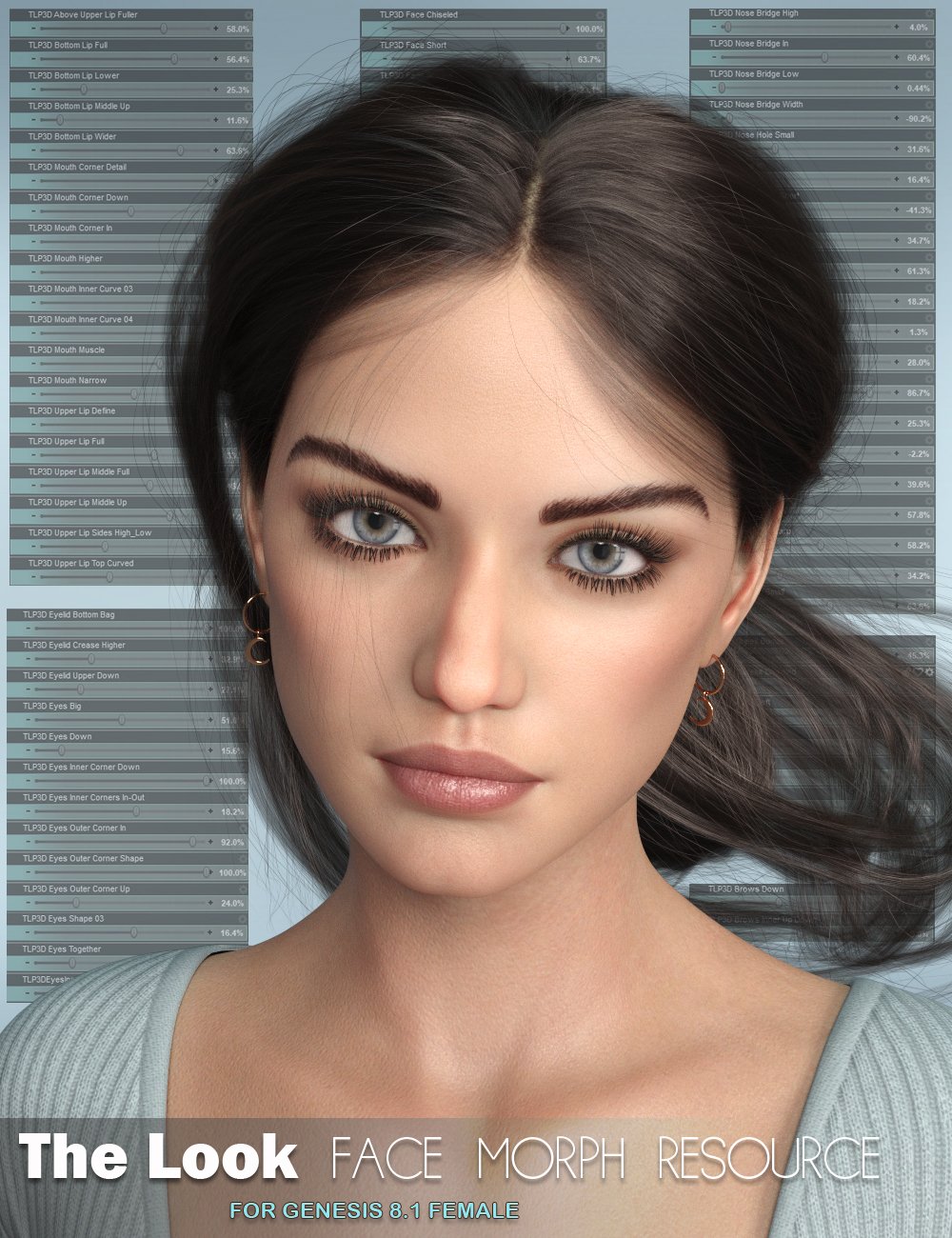
Is it P3D Katherina HD or Genesis 8 Female?
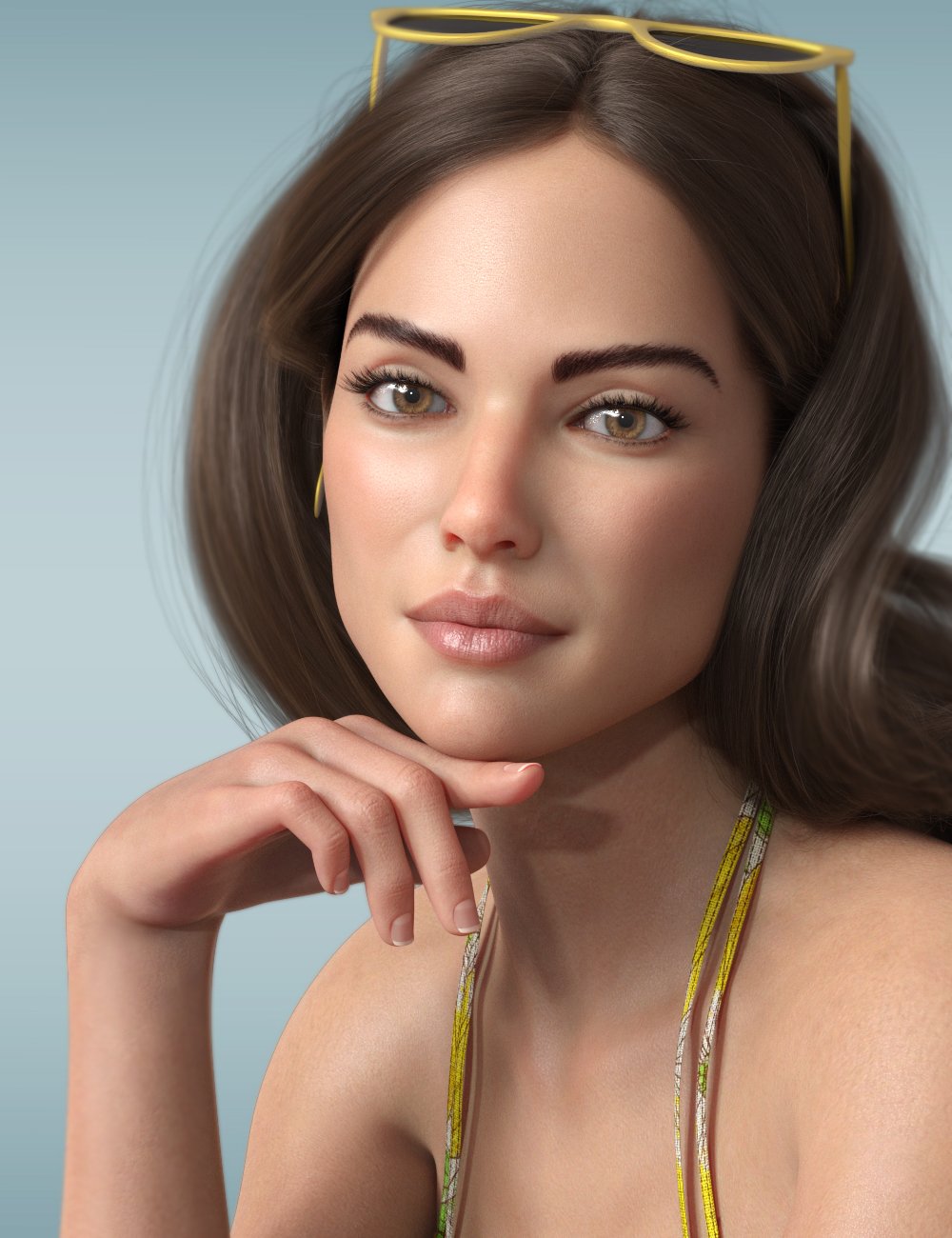
The morphs are described in the promo, but the texture is such a HUUUUUGE part of that fabulous look...
Amazing product, btw!
Thanks
I LOVE the goblindaveso said:
I suppose though, you could get a nice male crotch bulge with dforce pants if you had them attached.
A simple "bulge" morph often gives better results than trying to use clothes with the geograft.
Achieving family resemblance across genders without pen and paperyou can also use the transfer utility or various other transfer tools to transfer morphs from one gender to another - I actually dial in bits of male morphs on fermale characters a lot
Achieving family resemblance across genders without pen and paperIf you make the discerning feature/s out of a morph pack that has both male and female counterparts just dial in the same features on each character (eg. https://www.daz3d.com/200-plus-head-and-face-morphs-bundle-for-genesis-8-female-s-and-male-s or the Genesis 8 Head Morphs male/female sets).
Achieving family resemblance across genders without pen and paperMimicMolly and Luciel both have good methods. I do something similar to Molly's method, myself. For figures that share the same base, you could use a common morph for them and then just make adjustments so they don't look identical. For example, if your father character's head is based on Michael 8's head at 50%, have the sons all have the Michael 8 head dialed in at some percentage to give them some features in common, and then add whatever other morphs on top that you like.
Another option would be to use a gender-swapping morph and do essentially as Luciel suggests by building your characters on your preferred base and then dialing in the opposite gender shape to change them from male to female or vice versa. I think there's a way to do it manually within Daz Studio without any extra products. It came up a lot when the Genesis 8 Female came out before the male counterpart. This thread might have some advice you could use. There are also some things in the store that could help you do it, like this one. There's also a freebie called Transgender Genesis 8 by agentunawares over on DeviantArt, which is basically the same, just without all the extra morph options. If I remember correctly, it's just two morph dials, one for G8M and one for G8F, that give them the overall shape of the opposite gender. Good luck! I hope you figure out a method that works for you. :)
I LOVE the goblindaveso said:
i'm still confused why people not using 8.1. is it becasue of having to upgrade to 4.15? Otherwise, the 8.1 male and female are free.
I use 4.15, but don't use 8.1 when I can avoid it because the powerpose templates are still broken, and it needs workarounds to do some basic 8 stuff.
Also, the new UV layout is a bit pointless, and vellus hair is only needed in extreme closeups, so there isn't really much point over the normal base other than for women with dangly bits.
But if they fixed all the powerpose/missing morph problems, then it would be more tempting.
Daz 3D is part of

Connect
DAZ Productions, Inc.
7533 S Center View Ct #4664
West Jordan, UT 84084Licensing Agreement | Terms of Service | Privacy Policy | EULA
© 2026 Daz Productions Inc. All Rights Reserved.