-
I'm Sorry, Filament. I guess you really do Rock!!!
WendyLuvsCatz said:
yeah it might be wishful thinking on my behalf but iray didn't fare much better on the distorting
There isn't any refraction in your images. And iray of course supports full refraction. Refraction is when light bends inside glass, so you see distorted images looking trough.
Again, filament doesn't support refraction at all. As for eevee it gets some support for refraction but it's limited.
I'm Sorry, Filament. I guess you really do Rock!!!I love using it for setting up my animations!
On my Saved Character scene files, I include a Group called Render Options, where I keep my Environment, Tone Map and Filamant render option nodes.
I set up my Filament options to my needs so it's always ready to go.
After simulating my Classic Long and Curly dForce Hair, by Linday, and it looked great, I had to come in here and start this thread.
It does have some game-changers in it that (so far) disallow me from actually using it as a beauty-pass render engine that I've noticed After starting this thread, but I still love using the engine!
I'm Sorry, Filament. I guess you really do Rock!!!Nope, filament totally ignores refraction it's not supported at all, that is, the material is always thin walled. Unless you mean reflection that's of course supported. Also seems to ignore the glossy color that I didn't expect.
As for eevee it gets some support for refraction too.
 AIUTO...CHI CONOSCE L’ITALIANO? PARTE TREDICI
Roberto said:
Salve a tutti, premetto che sono nuovo di Daz, ho provato a fare un rendering, a parte che ci ha messo 2 ore e passa a realizzarlo, alla fine mi sono trovato delle macchie bianche, da cosa possono essere state generate? Problemi di settaggio?
In allegato l'immagine.
My pc:
Intel i7, 2,60 GHz, 16 Gb Ram, scheda video GTX 1650 con 4GB ramBenvenuto!

Da quel che posso vedere, sembrerebbe una reflection map sbagliata. Vedo che quei riflessi corrispondono alle lentigini per cui direi che ci ho azzeccato. Prova a cambiare la reflection map nel tab Surfaces, poi scegli il viso e cerca "refl" nel quadro di ricerca in alto nel tab, prova a cambiare la texture con una diversa o abbassa il valore dello slider.
Oppure applica un nuovo set di materiali, sempre dal tab Surfaces->Prests->Feminine.
Quanto al tempo, hai usato IRay? E' normale, quel motore scassato richiede parecchio tempo, specie se hai una GPU poco potente.
La tua GPU è buona ma per IRay hai bisogno di schede High-End con parecchia VRAM altrimenti ci passi la vita con le scene grosse (e se le texture sono pesanti, nemmeno ci riesci), per questo io uso 3Delight, molto più veloce e affidabile. Diversamente puoi utilizzare Filament che usa i materiali di IRay ma è MOOOOOLTO più veloce. Richiede qualche accorgimento nel setup (le luci per esempio) ma i risultati sono piuttosto buoni, sebbene sia ancora ad uno stadio iniziale di implementazione.
I'm Sorry, Filament. I guess you really do Rock!!!Filament is fine with transparency especially refraction, it's cutout opacity maps that are the issue
I'm Sorry, Filament. I guess you really do Rock!!!The major drawbacks of filament from what I can see, it's the lack of global illumination that's unacceptable for a pbr engine even a real time one, and it can't handle transmapped hair that's unacceptable for daz assets. That said it's not that you can't use it or something. Below some settings that may work fine enough for the HDRI and some occlusion, you have to unlock the occlusion power.
As for eevee it can handle GI and transparency fine, othen than other things.
 I'm Sorry, Filament. I guess you really do Rock!!!
Knowing that I was going to try for a Filament render, I saved the Iray version off first, so that I could mess it up really good without worrying.
First thing was to Create > New Filament Draw Style Node (or whatever it's called)
There are several ways to reign down the over-blown lighting.
- Filament Node Environment Lighting Scale (Drag this slider by hand) - this one is for the HDRI in the Iray Environment Node's Dome
- Filament Node Scene Lighting Scale (Drag this slider by hand) - this one is for actual lights in the scene
- Adjusting a few of the settings in the Iray Environment/Tone Mapping Nodes - Note: Some things are ignored entirely by Filament
Shaders -
I don't have enough time to get too in-depth here, but:
Texture Maps - Some nodes of a shader work well with Filament, except that Filament will ignore any sort of map - So only use colors or values
So when we see ultra-powerful scattering going on, go into the shaders and tone them down beginning with removing the maps and lowering the value or darkening the color
Alternatively - leave the map in, since it's being ignored anyway. I don't do this, but you can.
Transparency - I thought for sure that I was told that Transparency doesn't work in Filament. It does, but I think it ignores maps here as well - so if you need something transparent, try using a nice transparent shader, knowing that it will make the entire surface of that material transparent. Remember: If we need to create new material zones to differentiate here, we can do so with the Geometry editor, then make one transparent and the others not, etc.,
For advice on creating new material zones: The Material Zone~ Geometry Tool Tutorial & Shaders (Awesome tthread by Novica!)
I was amazed at how well the bump maps work in Filament when I zoomed way in on Rosie 5, who uses V4 Elite: Reby Sky maps.
Because of the use of V4 maps (I think, because I've seen this behavior in earlier beta versions of Carrara), I need to untick "Create Fast MipMaps" in the Filament Node, which gives her a more bumpy, less glossy appearance at a distance, which I really kind of liked! It made her look kind of like I drew her with really good art tools.
Although I haven't tried it yet, I think we can resolve this by going in and tweaking the shaders for Filament.
I'll report back later when I have more time, and after I've experimented further.
The Big reason for the first post and this thread, is because of how nice it has been simulating hair in dForce, creating animations, etc., etc., all in a really decent looking render - in real time!!! So Cool!!!
Cheers all
I'm Sorry, Filament. I guess you really do Rock!!!bytescapes said:
It might be a lot to ask, but if you ever had the time and energy to document what you've learned about working with Filament, I think people here might very much appreciate it.
"Time" being the hardest part of that equation for me.
I will be getting there though!
I do love it! So I'll probably try to fully document how I tweak everything by hand to make it start to pop!
Like going from Carrara to Daz Studio, which takes considerable effort to forget about looking for similarities, Filament is an excellent 'addition' (nobody's forcing us to use it - why disable it?) to the toolset that requires a bit of 'thinking outside the box' tinkering to figure out how to make it look really good - and some scenes might be difficult to ever get to that stage.
It's hard to explain briefly other than that - so I will try to do some in-depth looks at this 'faster-than-the-eye-can-see' render engine.
I'm Sorry, Filament. I guess you really do Rock!!!marble said:
Dartanbeck said:
I'm sorry for hating you so quickly.
I just though that you were what you were, and were set up to just work right out of the box - silly frickin' me!
What a great little renderer you are!
All I had to do was to rotate the dome a bit differently than usual (for Iray), make a few tweaks here and there - kinda noting along the way which things you ignore, and... Wow! You can really do some fun, can't you?!!!
Perhaps you might like to post a few renders. Sorry for my scepticism but I have yet to see a Filament render that I would be happy with (I'm talking about those others have posted, not my own efforts). I've since disabled Filament which is sad because I had such high hopes that it would be the DAZ Studio answer to Eevee.
I have pretty much given up on discussing it with others though I use it a lot myself along with lots of other software most would find not realistic enough.
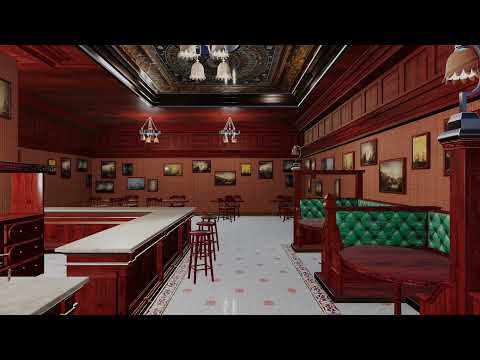
I like that I can render a 2160 UHD animation in less than a half an hour and pop it up on Youtube with an Audio library tune just to maintain viewership.
if I don't upload something every week when I finally do I get barely any views so it's fodder and some like to listen to music with something to look at, there are a lot of channels which just do this with one unoriginal image and Audio library tunes too, at least mine is something I rendered.
I don't care if people like it or not because they rarely get any dislikes compared to stuff I put lots of effort and time into.
this was my last video for just that purpose.
 I'm Sorry, Filament. I guess you really do Rock!!!
I think DAZ 3D should create a dictionary of iRay to Filament shader material conversion presets and then inturn develop a Filament to USD PBR material dictionary exporter (for Unity, UE4 (UE4 is a DAZ 3D sponsor come to think of it), Blender; particularly Blender & UE4).
I'm Sorry, Filament. I guess you really do Rock!!!Dartanbeck said:
I'm sorry for hating you so quickly.
I just though that you were what you were, and were set up to just work right out of the box - silly frickin' me!
What a great little renderer you are!
All I had to do was to rotate the dome a bit differently than usual (for Iray), make a few tweaks here and there - kinda noting along the way which things you ignore, and... Wow! You can really do some fun, can't you?!!!
Perhaps you might like to post a few renders. Sorry for my scepticism but I have yet to see a Filament render that I would be happy with (I'm talking about those others have posted, not my own efforts). I've since disabled Filament which is sad because I had such high hopes that it would be the DAZ Studio answer to Eevee.
I'm Sorry, Filament. I guess you really do Rock!!!It might be a lot to ask, but if you ever had the time and energy to document what you've learned about working with Filament, I think people here might very much appreciate it.
Daz Studio Update Coming Soon! Other Big Updates on the HorizonI believe the only "Mac-only" feature mentioned as coming in DAZ Studio is Filament (they said that they did have it working back when they announced the Pre-Beta); they mentioned that they were working on making DAZ Stadio m1-native, but its success is not a given at this point, as far as I know (but I'm hopeful).
They did tell us that we would lose some plug-ins, but I assume that most would probably be updated. Yes, it's sad if we lose some we count on, but that's been ongoing since day one, really, as some developers stop supporting the product for one reason or another. I believe that in a year or two we'll be mourning a favourite plug-in or two, but celebrating ones that were updated or new ones that become new favourites. It's evolution in action.
As to "big changes", there's always a chance that they'll update 3Delight, or hopefully at least keep it going, but my hopes are that they'll add a rendering engine or two; my first choices would be Cycles and Evee; for anyone porting their characters to Blender, being able to set up character textures and shaders in DAZ Studio and have them move into Blender without any need for adjustment would be too cool.
-- Walt Sterdan
I'm Sorry, Filament. I guess you really do Rock!!!I'm sorry for hating you so quickly.
I just though that you were what you were, and were set up to just work right out of the box - silly frickin' me!
What a great little renderer you are!
All I had to do was to rotate the dome a bit differently than usual (for Iray), make a few tweaks here and there - kinda noting along the way which things you ignore, and... Wow! You can really do some fun, can't you?!!!
Daz Studio Update Coming Soon! Other Big Updates on the Horizona small part of my wishlist which might as well be toilet paper is
- vertex colours (like Zbrush polypaint or Mandelbuber3D mesh has for examle no UV mapping needed)
- a robust FBX importer that does rigging (I suspect that is undesired though) otherwise at least a Blender bridge back
- obj import as separate meshes when an obj has them
- better cutout opacity map rendering for Filament
- ambient glow for filament if not emission
- target tracking, animation paths
Purpose of BlenderAs I see it the power of cycles vs iray is its better denoiser that alone makes the rendering much faster. Then cycles is also better for animations since it supports motion blur while daz studio doesn't. Another advantage of cycles is much faster sss skin shaders for characters. The weak point of cycles is caustics that are almost inexistent. So for rendering realistic architecture iray is better, not that iray gets wonderful caustics but better than cycles anyway. As for eevee vs filament there's no match, eevee is way better as for global illumination and effects.
So at a glance cycles and eevee are better for characters and animation, while iray is better for architecture.
As for using cycles with a powerful cpu honestly I don't see the advantage over iray. I mean iray can work with the cpu too, the same as cycles.
Free tickets to Enter the Metaverse Conference and a Free NFTI'm going to apply a bit of critical thinking here based on my own experiences in VR and with Daz Studio - I don't speak for Daz.
Yes the Filament engine is in Daz. Does that make it VR compatible? No. For an experience to run smoothly in VR the model has to be optimised, materials combined and texture sizes reduced etc. You also can't run VR on a potato computer and not get sick because of frame rate drops. Yes some of us would be able to do it. Is there a big enough userbase that also owns a headset to justify the expense of pulling programmers away from other tasks working on DS like making it Mac compatible etc? Is it going to sell more models? I highly doubt that.
Why are they spending the time on NFTs instead of Studio? None of the people working on NFTs are involved in developing anything in Daz Studio. They are not taking anything away from Daz3D or Studio, its a parallel development - not one or the other.
Free tickets to Enter the Metaverse Conference and a Free NFTnumerous people have asked for viewport VR for DAZ studio
with the Filament engine this is fully plausible
has DAZ even considered it?
I am not in any way against VR and the Metaverse
I wish I could afford a VR headset in fact and have looked into it often as I could use it with the other 3D apps I have that support it, Twinmotion in particular
Daz Studio 5 development update@veba79: ...indeed.
Yeah, Daz will need to figure something out that works if Iray goes totally into the dustbin. Not really wild about Filament from what I've seen as it seems more well suited for game development and animation rather than high quality illustration work.
@ Imago: Already have a system upgrade priced out and in the works for W11 with a Ryzen9 5900X, 64 GB of memory (upgradeable to 128), and an RTX 3060 (the latter which I already have) for IRay rendering.
The only mention of Daz3D the article I read was credit for the Albert Mansion that was used in one of the sample images rendered in RedShift. Nothing mentioned about OptiX and any plans for Daz.
Daz Studio 5 development updatekyoto kid said:
...so wondering now about the future of Iray and Daz.
I have been on the Nvidia Reddit page and there is mention of a new realtime engine branded as "Optix" that Nvida has rolled out.
There was also a reply to a comment I made regarding Iray that mentioned Nvidia was going to "depreciate" the render engine in favour of the new one. The new OPtix is also said to support only W10 on up The concern is how will this affect GPUs, drivers. and of course Daz. Will they continue run Iray even after it is obsolete as they have been doing with 3DL? Will they drop Iray and move to the new Optix engine (they already have Filament as their "realtime" engine)?. That would pretty much say that Daz will abandon anyone who isn't on W10 or higher (something I believe in the past was said wouldn't happen). Will the old 3DL be the only render engine available if that occurs (in spite of just about every product today being released with only with PBR materials)?
Not a surprise, IRay was obsolete just after six months its launch.
 Only DAZ Studio and Iclone are stubborn enough to have kept them until now.
Just hope the new engine is compatible with IRay standards. Or simply jump to 3Delight, you can easily convert any IRay materials to it if you like.
As for me, nothing would change, I'm on 3Delight and I will stay with 3Delight, unless Filament gets fixed and becomes a full render engine.
About Windows, just upgrade your PC! The SSD I have on my pc is with me since Windows 7... I simply updated it to the new releases and versions and everything worked fine. It passed from 7 to 8, then 8.1 and now 10... And when Uncle Bill fixes Windows 11, it will be on my SSD.
Daz 3D is part of

Connect
DAZ Productions, Inc.
7533 S Center View Ct #4664
West Jordan, UT 84084Licensing Agreement | Terms of Service | Privacy Policy | EULA
© 2026 Daz Productions Inc. All Rights Reserved.










