-
BD Oshun
Has anyone bought that product yet? The morph looks interesting but I'm uncertain about the maps. The pore structure and colour variation just seems too uniform, like the skin of the cheek has been cloned all over the face with little regard for the different skin structure. Also the lips seem to have been hit with a random noise layer.
Or is it just the promo images?
https://www.daz3d.com/bd-oshun-and-her-outfit-for-genesis-8-female
How to use Face Transfer with Genesis 8.1 CharactersI'm not especially familliar with Face Transfer, but assuming that it doesn't work normally with 8.1, then the thing to do would be to use it as directed with 8.0 and transfer to 8.1 the same way you would transfer any other character.
GenX2 Update / Genesis 3 Add-On [Commercial]Hello fellow renderers, I am completely aware of the reasons why it will be hard to get support on this product but unless there is an alternative it is the only hope I have. While I have created successful transfers of characters scultped from G3F morphs to G3M I recently stumbled into the "circular" problem.
I gathered some morpphs I had transferred from G3M to G3F but even afetre disabling all morphs from the GenX tab as well as moving the folder from the morphs location the problem persists. What i have found is tha not only my created characters are listed as cicular, it also applies to Littlefox' Star2 which is the main reasin going through all this as I am creating toon characters. But that was a dead end, too as even afeter saving a character without any Star related dials it would show up as circular morph. Loading a saved character and reading the values from it will throw the "not all morphs were found on this figure" error. The only solution would be to export via morph loader Pro - but iunfortunately this will lose the neccesary JCMs on reimporting. So i am somewhat stuck with creating skins, assets and all that pesky work each time I create a character, any hint would be highly appreciated.
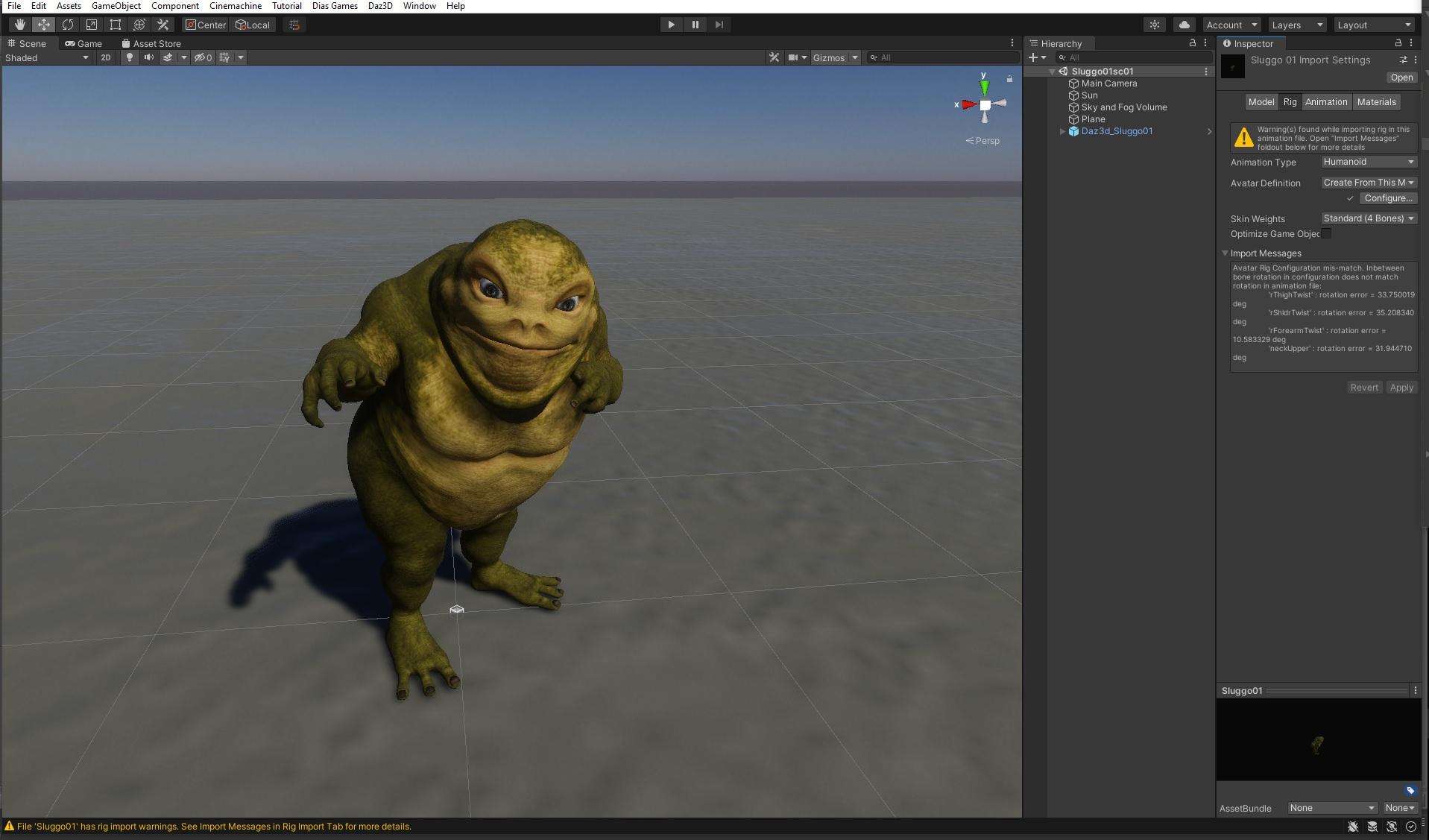
Daz to Unity not workingJust tested with Sluggo - https://www.daz3d.com/sluggo-for-bullwarg-hd
and it still works for me.
Actually, I did not know, that Daz to Unity bridge transfer posed characters,
so I can render them in Unity directly - how cool is that.
 Daz to Unity not working
Artini said:
You need to save the scene in Daz Studio before using Daz to Unity bridge.
Choose item/character in Daz Studio, open Unity Hub, create or open the project, preferably with High Definition RP.
Go back to Daz Studio, be sure that the item/character is still selected.
Go to: File, Send To, Daz to Unity
Put checkmark in "Enable Morphs" if you wish to send morphs over the bridge
During first transfer put checkmark in "Install Unity Files"
In the field "Unity Assets Folder" click on ... and browse to the Assets folder of the project in Unity, to select it.
Click "Accept", wait until conversion is finished in Daz Studio, then switch to Unity editor view.
Click on "I made a backup..." in Unity, if you get such pop up.
Wait until transfer is finished and enjoy your item in Unity.
Still doesn't work. I saved the item then saved as "Scene" as well and still no Unity option.
Daz to Unity not workingYou need to save the scene in Daz Studio before using Daz to Unity bridge.
Choose item/character in Daz Studio, open Unity Hub, create or open the project, preferably with High Definition RP.
Go back to Daz Studio, be sure that the item/character is still selected.
Go to: File, Send To, Daz to Unity
Put checkmark in "Enable Morphs" if you wish to send morphs over the bridge
During first transfer put checkmark in "Install Unity Files"
In the field "Unity Assets Folder" click on ... and browse to the Assets folder of the project in Unity, to select it.
Click "Accept", wait until conversion is finished in Daz Studio, then switch to Unity editor view.
Click on "I made a backup..." in Unity, if you get such pop up.
Wait until transfer is finished and enjoy your item in Unity.
The best way to bring Iclone 7 and Character Creator 3 content to Daz Studio@kevinsanderson,
Compositing as you describe is not really a good solution for a variety of reasonsThe native Iclone render engine is frankly rubbish compared to Iray unless the OP $$$Purchases$$ the Iray plugin for Iclone..another expense.
And even then matching the lighting, cameras etc will be a compositing nightmare hardly worth the effort IMHO.
That said, it is possible to mix two similar Character eco systems like Iclone/CC3 and Daz if you are willing to combine them in a third environmmentfor final renders, such as a Game engine or another 3DCC, Like Blender.
Both Daz studio and CC3 have dedicated exporters for Blender now.
Daz studio has Daz2Blender and Thomas Larsons "Diffeomorphic"and DS default FBX export.
CC3 pipeline has an FBX to Blender export preset and there is a free addon by a Reallusion user
( Victor soupday),That imports animated FBX figures into Blender and auto sets up the skin shader nodes and recreates the skin paramters interface ,from Iclone, inside Blender.And we all know about the excellent Genesis import /conversion capabilities of the Daz2Blender and Diffeo addons
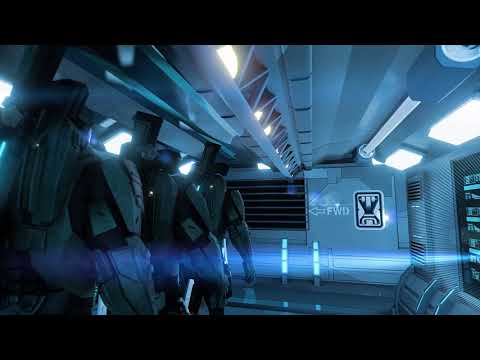
Now to show that I am not a person who comes into threads and offers theoretical solutions that I have not actually tried myself, I present this video.The armed guard on patrol is a legacy Daz millenuim man 3 (Mike3 reduced resolution) .
as well as the Figure who runs around the corner and is Blasted back into the corridor.Both imported to Blender via Standard FBX from Daz studio because they are very low poly and are covered
head to toe so good skin detail etc is moot.Also Daz Mike 3 accepts BVH files directly from my Old but powerful ,Endorphin ragdoll simulation software,
instead of the complicated multi-step process that would be involved in converting Endorphin motion Data to Iclone via 3DXchange retargeting.
The "hacker" seated at the terminal is imported from CC3 as well as the armored "Spartans"
the environment, I built in Blender( like all of the CC3 clothing /armor weapons)However the environment/props could all have been easily imported from Daz studio content ( via Diffeo etc )
for those who are not skilled content creators like myselfSo yes... the OP has viable pathway for leveraging his Reallusion investment as well as his Daz content investments
If he/she is willing add the mighty Blender to the Pipeline

because trying to bring usable Iclone/CC3 assets back into Daz studio is frankly a non starter IMHO
What if I used Poser as an intermediary between Reallusion and Daz Studio?
I have no knowledge about Poser 12's ability to import the FBX Avatars from Iclone3DX or CC3 pipeline but you could ask over at Renderosity or the poser forum here at the Daz site.
But if you do not already have Poser it will be at least another $250 USD on top the money you have spent on Reallusion and be assured poser has ZERO support of facial mocap ( Rokko etc) and its animation tools are a decade behind the Default options in Daz Studio to say nothing of Iclone
But understand this:
FORGET any notion of transferring Character morphs from CC3 Avatars to Genesis 8 short of reproducing them in a sculpting/modeling program and loading them with the morph loader tools in Daz studio proper.
@kevinsanderson honestly, no false modesty, but Blender does not need me to make it "look good"
it only needs users to learn its powerful,professional toolset and it will easilyimpress.Blender is extremely stable and major gaming companies , (like Ubisoft),have adopted it as their game asset creation tool.
Anyone seeking to completely re-create the Daz Studio user experience in Blender is going to be frustrated.
but that mindset will cause frustration if trying to migrate to ANY major 3DCC or game engine.Even Daz Does not promise this with their various export plugins
They ,Rightly, assume that the various end users are reasonably knowledgable in the target programs(Blender,Maya,UE4,C4D etc)After installing Mabel 8, loading every other character, is loaded Mabel 8 too. SOLVED !I tried 2 ways:
1) load Chamelon Rose, zeoing Mabel, then saving as character preset, with a new name, in a folder where i save my assets, clear the scene and load the new preset. It works, the character is loaded correctly.
2)load Chamelon Rose, zeoing Mabel, then saving as Support Assets>Morph assets (with all properties selected) with new name. It doesn't work. There is a new directory with my name in the path C:\daz-studio-4.12\data\DAZ 3D\Genesis 8\Female\Morphs, but in the menù i find same characters that behave in the same manner, they load mabel too. (The name of the directory is Daz-studio-4.12, but sotwaRE I USE IS DAZ Studio 4.15.)
The first way works, but it means that i have to do this for every character and then keep the new and old presets (I don't know how to uninstall safely a character, having fear to do disaters).
How to save the assets that works to correct the damaged preset?. For example I used Chamelon Rose for this test and now i have the original one, with property (skin colour etc) that appair damaged, and another that load correctli, but is the base complete character, without choses (but appling them after, behave correctly).
How i can "transfer the corrected parameters on the original character, to "clean" it and set to its original parameters.?
I think I did something wrong saving work, because the characters are beautiful and loaded correctly first time. Then, maybe saving scene or pose presets or other, i have involuntary mixed characters.
There is a way to reset any character to original assets, deleting changes? Reinstall them could work?
Thank you
emanuela1
Morph Loader Pro Not Working... Suggestions?Hmmm... I just managed to successfully import a morph into DAZ with Morph Loader Pro. I still need to do further testing, but here is what I did to get this to work finally...
- I removed the geografts as suggested by Leana. (Thank you Leana!)
- I then realized that DAZ was automatically adding two items to my scene, named "Tonemapper Options" and "Environment Options". I removed them from the scene so that I was left with only the Genesis 8.1 Female. I was erroniously thinking that DAZ would only export the items I had selected in my scene, but DAZ instead exports everything in a scene regardless of what is selected. Feeling stupid I am.
- I made sure to select again the "Import as morph target only" option when importing the figure mesh (OBJ) into Rhino 3D. This imports an entire OBJ file as a single mesh and ignores grouping, texture coordinates, and normals included in the file. It maintains the vertex and face counts and orders. In the past I've been able to leave this option unchecked. ...Part of the further experimentation needed.
Script / report on which morphs are used in a custom character?HamEinar said:
I am surrendering to the bog-down of investing too much money in assets and was wondering if it is possible to see which morphs are used in any given custom character (i.e. when I load one of my characters I can get some kind of list of morphs used) to be able to remove excessive morphs not used? I know I can go into shaping and look at "currently used" - but this is not very intuitive when it comes to some muscle morphs etc. which are not labelled "XYZ Muscle Morphs: Arm size".
Many times I buy a new character simply because I like the materials, and thus I can live without any morphs from said character as long as I still keep the materials.
If I understand the issue correctly, character morphs (including some expressions and poses) are the reason Studio is crawling to a halt.
The older D3D (Dimension 3D) 'content gatherer' utility from the DAZ Store might help you in a couple of ways, as it will not only help you identify morphs that are used (non-zero) in a custom DS figure, but it will also let you create a zipfile content-library/runtime containing all of the elements in a duf scene-file (and, only those elements) with their dependencies. You can create a dedicated figure runtime/content-lib for your figure/character and outfits/props/hair. (and other figures, and buildings/environment too, if you wish).
Basic use of the tool is to first build your scene and your custom figure in DS, save it as a 'duf' from DS, then use the standalone 'gatherer' utility to generate a new zipfile content-library of all of the elements in that duf file. This new zipfile collects everything needed to re-create the scene, and preserves the DS content-library format so that it can be extracted and used natively in DS.
There are few hints of note: It will not include morphs that are not explicitly used (sliders set to zero are ignored), so collections of the default morphs that we kind of expect to be there, like the DAZ visemes and other simple/standard adjustment morphs won't be included with your figure unless they are explicitly used (non-zero sliders) in your figure when you save it in the scene duf-file.
Two simple fixes (if you use this utility): Either set all of the morphs that you may wish to include with your custom-figure to non-zero, even if slightly (e.g. 0.00001), before you use the 'gatherer' tool.
The other method is to create a minimal gatherer file (content-lib/runtime) for just your custom figure (as-is), load that as a library in DS's library system, then install any other standard morph-sets you want to have available (e.g. expressions, DAZ std for visemes and 'typical' adjustments) *into that new runtime/content-library* (that's my approach).
To invert the logic/approach for the same effect, build your perfect figure, and 'gather' it into a zipfile. Then create a new minimal basic/standard base figure library/runtime as you normally do in DS - with only the additional morphs/expressions that you want your custom figure to have available, then merge your new custom figure zipfile content into the new minimal 'standard' figure content-library you just created. You can use that in DS, and you can also save it for future projects/reference and uses.
It's kind an unusual way of thinking in DS, as most folks have a single (huge) runtime/content library, I have hundreds. Every project is based on a general DS resource library and at least one project-custom library that contains only the elements needed in that scene. A typical project includes 3 or 4 thematic figure-centric and/or scene-centric library folders, all of which are kept 'pure' and backed up for future use and project re-visits, where having the scene, resources, and DS program versions be exactly as they were originally rendered is critical to getting the same render characterstics in a later scene creation session.
DAZ did not design their DS system for this sort of production workflow at all, and in fact, make it really difficult to work this way, but my runtimes are minimal, responsive, and reproducable, at the expense of some redundancy in my libraries and hassles managing DS versions. Occasionally I wish I had easier access to some resource that isn't easily available in these stripped runtime-libs, but with a bit of planning, I don't run into this very often, and I can add/install those new resources into the given environment if needed easily enough.
Finally, you can be pretty certain that none of this approach will coordinate very well with the DS connect or smart-content that DS uses nowadays, but if you're comfortable doing a bit of "extraction and merging surgery" on your content libraries, you can create truly minimal, but complete, figure runtime/content libraries for your figures or projects. You can also 'gather' and archive multiple figures (and props/resources) into a complete project runtime/content-lib zipfile for completed projects (e.g. animations/stories) that use multiple characters, but contain none of the extra stuff you don't want to include.
The author of the gatherer utility passed away a while back so this tool may someday become incompatible with DS duf files. I mention the tool it because I like it, and I know that it works in DS 4.11. Others may be able to confirm that it works with duf files from the current versions.
YMMV,
--ms
The My Bucket's Got a Hole In It Complaint thread..yeah, looking to get a 2 TB to transfer my Daz content and scene library to. The current drive will the be used for storage.and my DIM install backup.
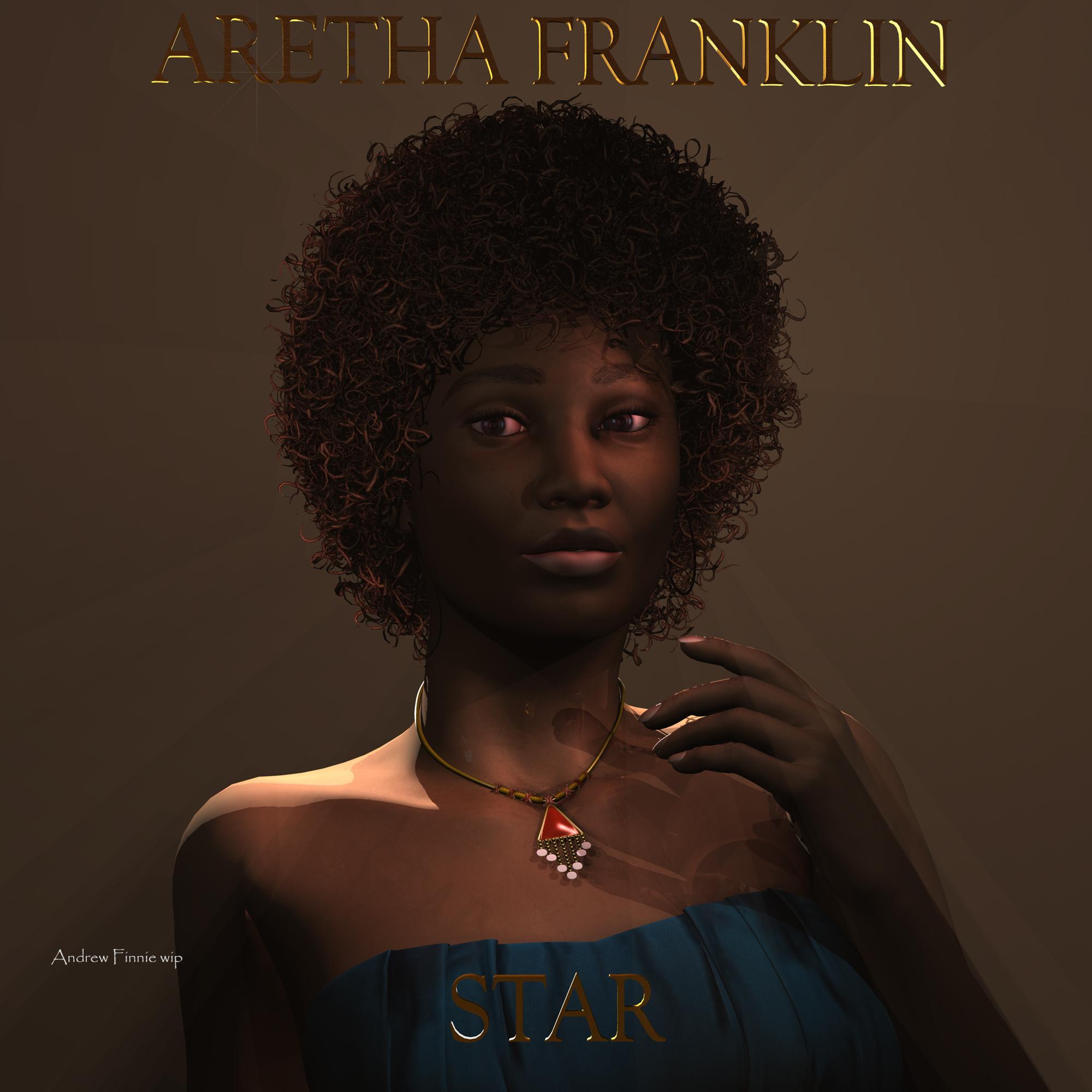
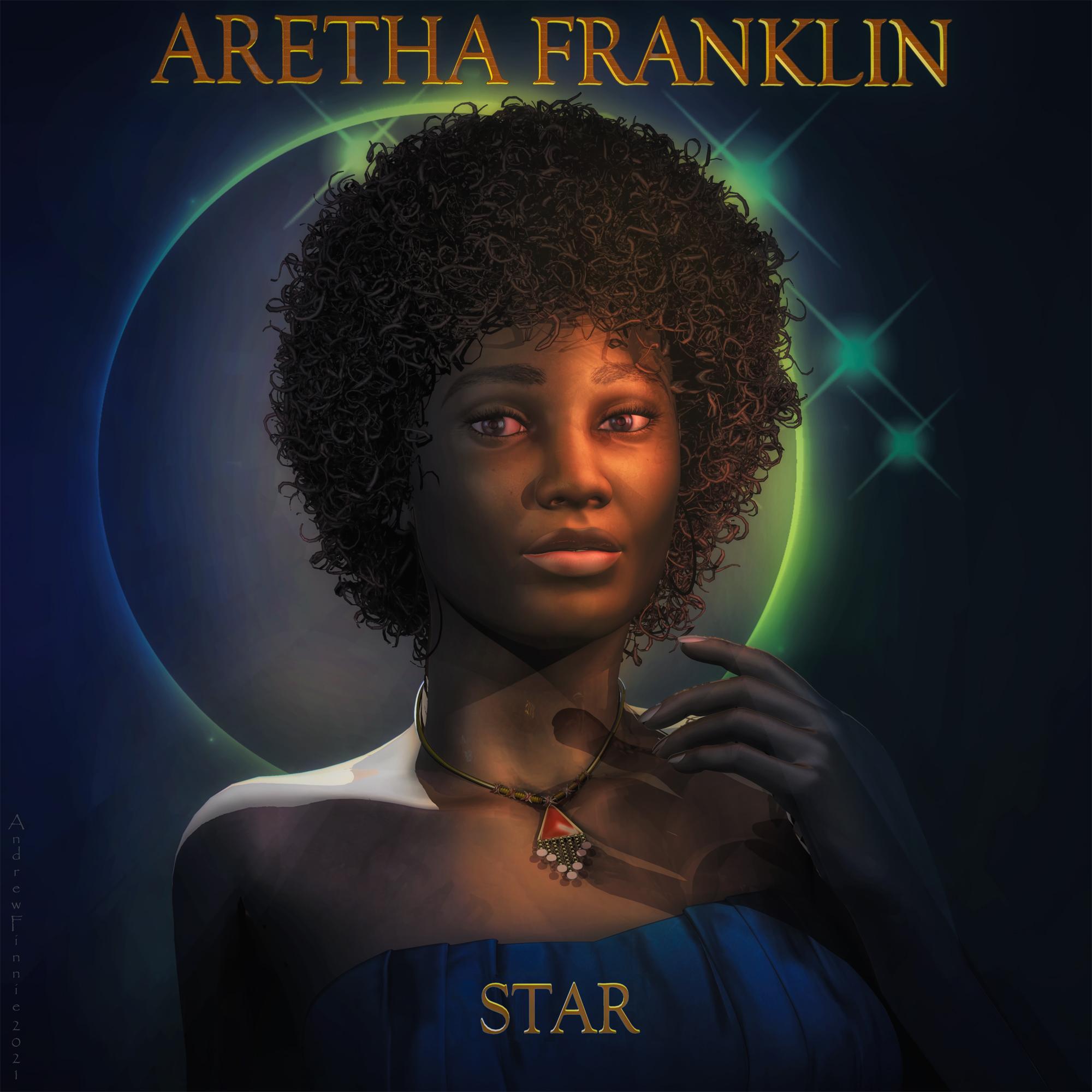
Carrara Challenge #57 - Album Cover (WIP thread)This fuzzy hair if you have it (Beautiful black hair styles) , it won't render till you remove the aplha channel in the texture room.
V4 with some daz shop textures and a random daz morph (elite?)
Pre and Post. I decided to move the word "Star " a little in post work - which was a PITA.
Used to adding text in ps so this is a good learning experience
And Thanks to stezza who taught me how to to select the contents of a layer in photoshop .....!!!
Aretha was looking a little crosseyed - hopefully i fixed it up in post.
Used PhilW's excellent bright eye's produce for the corneal highlights - then tidy them up in post
pre post
post post
 Morph Loader Pro Not Working... Suggestions?
@Leana... Pardon my ignorance, but would the geografts you are refering to be the "Genesis 8.1 Female Eyelashes" and the "Genesis 8.1 Female Tear". If not then I'm afraid I don't know what you are refering to. I did try removing those two items without any success as far as the Morph Loader problem goes. Still stuck and clueless.
I did also try installing the "Daz Studio Pro BETA - version 4.15.0.14" as an experiment, but that was of no help with the Morph Loader Pro prblem.
how to save a separate genesis with only couple morphs and pose controls?for example, i have the genesis baby morph and troll morph active.
i want to save a standalone baby troll with jut a few pose controls.
i have to be doing it wrong, renaming folders back and forth.is there a right way to do it?
loading a fresh install of genesis witout all the morphs loads so fast.
was thinkin install only those 2 morphs for saving the trol baby then remove the morphs from the main genesis. and just keep swapping the morphs around until i have a small runtime of 'pedestrians'
i prolly have to do a bake the bones cause of the scaling.
is it better to save the 2 morphs as 1 cumulative morph asset?
does saving a character subset embed the morphs and pose controls?
i dont know what to do ...Thanks
Laggy Genesis8twitchew said:
Hi everyone. I've had a problem for a while with very slow posing and unresponsive morph sliders and posing on G8F. I finally appear to have fixed it this morning after many months, so I thought I'd share. The symptoms are that the lower neck bend slider is on G8F is incredibly unresponsive, taking seconds, sometimes 10s of seconds, to respond at all. And setting a pose on G8F - custom or vendor provided - is extremely slow. I've been waiting to get a shiny new laptop, with 64g of ram, 8 i9 cores, a 2tb SSD and a fast graphics card with 8g of VRAM, as I figured (foolishly) that this would fix everything. Well, it fixed a lot, and is very nice for real time rendering in iRay, but it didn't fix this. I've slowly been uninstalling characters and morph packages over the last 48 hours - no change. I then removed the morphs and data associated with 2 character conversion tools from G3F, by Riversoft. Bingo - everything is working *very* fast again. Neck bends are ok, setting a pose is 100x faster - takes a second or less instead of a minute or more. The products that produced this apparently problemmatic morph data are https://www.daz3d.com/hair-converter-from-genesis-3-female-to-genesis-8-female and https://www.daz3d.com/character-converter-from-genesis-3-female-to-genesis-8-female both by Riversoft - generally, I've loved his products, so not blaming anyone - maybe I just reached a tipping point removing stuff, but it was a drastic change when I removed these conversion morphs. Hope this helps someone! Incidentally, I'd only converted one hair product and 3-4 characters with these tools, so it wasn't as if they were adding megabytes of morphs...
how did you remove the riversoft morphs, just rename and move the folder?
Same I want to know too.
Morph Loader Pro Not Working... Suggestions?OK... I've been away from DAZ Studio for several years due to illness. In the past I had no trouble working with Morph Loader Pro to create character morphs (albeit I was using older versions of Daz Studio and modeling software, such as Modo and Rhino 3D). However, now... no matter what combination of export and import settings I use Morph Loader Pro always gives me the error "Warning: Geometry did not match, failed to create morph". I'm working with Daz Studio 4.15 and the Genesis 8.0 and 8.1 Female figures. I'm starting to think I may need to reinstall Daz Stuio. Another problem I've run into is that Shaders in the Presets library under the Surface tab will not apply to objects in my scene. Oddly, though, Shaders I create and save in Save Files under Presets will apply. Just something else that is making me lean towards reinstalling Daz Studio. Its all just getting very frustrating. Help Please! :-)
I can get Morph Loader Pro to work without issue on my older system with slightly olderr versions of Studio and my modeling software. My newer system is a more robust workstation with better xeon prossessors, more memory, and a much better Nvidia Quadro graphics card.
Note: I always set the figure's resolution to "Base" before exporting or importing.
Settings I'm Using:
__________________________________________
Daz Studio 4.15 Export Options...
- File Type: OBJ
- Axis Conversions - Unchecked
- Convert From DAZ Studio To: DAZ Studio (1 unit = 1cm)
- Ignore Invisible Nodes: Checked
- Use Bone Welds - Unchecked
- Remove Unused Vertices - Unchecked
- Triangulate N-gons - Unchecked
- Write UV Coordinates - Checked
- Collapse UV Tiles - Unchecked
- Write Normals - Checked
- Write Faces: - Checked
- Write Polylines - Checked
- Write Separate Objects - Checked
- Filter Objects - Unchecked
- Write Groups - Checked
- Write Surfaaces - Checked
__________________________________________
Rhino 3D 7.0 Import Options ...
- Import OBJ groups as - Groups
- Import OBJ objects - Checked
- Import as morph target only - Checked (Also tried it unchecked)
- Reverse group order - Unchecked
- Ignore textures - Checked
- Set display color from OBK material color - Unchecked
- Map OBJ Y to Rhino Z - Unchecked
- Split 32 bit textures into separate files - Unchecked
__________________________________________
Rhino 3D 7.0 Export Options ...
- Save as type - OBJ
- Save surfaces, polysurfaces and extrusions as - Polygon mesh objects (Note I have not altered the figures mesh other then moving vertices,not have I added anything.)
- Save surface trim curves as - Curves (Only option available)
- End of line character - Windows (CRLF) (I'm working on a Windows system)
- Significant digits - 17
- Export material definitions - Unchecked
- Use display color for objects with no material set - Checked (Only option)
- Convert white space in material names to underscores - Checked (Only option)
- Map Rhino Z to OBJ Y - Unchecked
- Wrap lon lines - Checked
- Export Rhino object names - Do not export object names
- Export Rhino layer/group names - Groups as OBJ groups
- Merge nested group/layer names - Unchecked
- Sort by OBJ groups - Unchecked
- Vertex welding - Unmodified
- SubD meshing - Unchecked
- NGons - Preserve
- Export texture coordinates - Unchecked
- Export vertex normals - Checked
- Export vertex colors - Unchecked
- Export open meshes - Checked
- Use render meshes - Unchecked
__________________________________________
Daz Studio 4.15 "Morph Loader Pro" Import Options...
- Convert From DAZ Studio To: DAZ Studio (1 unit = 1cm)
- Axis Conversions - Unchecked
- Load Morphs for - Primary Figure (Vertex Only)
__________________________________________
Again, the above settings work perfectly on my old system with a previous version of DAZ Studio (with Genesis 3 figures) and Rhino 3d, but willl not work on my newer system with DAZ Studio 4.15 (with Genesis 8) and Rhino 7.0. Anyone have any suggestion on what might be going wrong?
Thank you.
Genres You'd Like to See in the Store?Daz studio already has quite good smart content search, so why wouldn't you use that one? At least for me it would be much better alternative than those suggested in orginal post. Just use normal categories we already have in studio, like the most used ones
- Environment
- Figures
- Hair
- Lights
- Poses
- Props
- Scripts/Utilities
- Shaders
- Shaping ( I mean morph sets )
- Transportation
- Wardrobe
For bigger categories I'd like to see subcategories like for example wardrobe could have pants, shirts, skirts, dresses, footwear etc. or for figures animals, creatures and people. At least for me that would be much more helpful, and you already have all that data in smart content.
How to use Face Transfer with Genesis 8.1 CharactersDoes anyone know how to make the faces created with Face Transfer work with Genesis 8.1 characters?
Genres You'd Like to See in the Store?..unfortunately with many of those sites, it's not just the price. SOmetimes it is the quality, for exampe, when I was searching for a concert hall grand piano I saw some pretty awful stuff some of which was not at all "affordable" by our standards nor would probably pass Daz QA. There are also file format as well as usage restrictions to be concerned about.
Daz cannot directly import formats like .3ds, .MAX (which is proprietary), .C4D, .and .STL. Collada, which is supposed to be compatible with Daz, also has its issues. More often than not, you have to go into a modeller to make the conversion (usually to .obj) and even then it's not a sure bet the materials will transfer properly, particularly if there is no UV file provided. That may be one thing for a freebie. So it can be a lot of work (and I'm not even counting cleaning up errors like reversed polys and ngons [particularly an issue with Sketchup models]) . Not sure I care to pay 75$ - 100$ for a model I need t do spend a lot of time converting and fixing on to get it to work in Daz.
Hard Subdivision for ZBrush TransferImport the OBJ using the same preset as you used in the export dialogue, then use Edit>Figure>Transfer Utility to rig it (set the Source as the original figure, the Target as the imported OBJ, and I can't recall which boxes you need to check to get morphs etc. across). However, the Genesis figures are designed to bend first, then haev SubD applied, so you will get nasty scrunching at the joints and may well have other issues.
Daz 3D is part of

Connect
DAZ Productions, Inc.
7533 S Center View Ct #4664
West Jordan, UT 84084Licensing Agreement | Terms of Service | Privacy Policy | EULA
© 2026 Daz Productions Inc. All Rights Reserved.