-
NVidia 40 vs 50 Series
RiverMissy said:
Richard Haseltine said:
RiverMissy said:
Yes, I am finding that the 4000 series cards are about gone and I am having trouble putting together what I want. This is really not going well. Thanks for all the input. I am truly appreciative!
I am thinking of moving my 2080Ti to a new machine for display and DS4 and getting a 50x0 card for DS 2025, but even the 50x0s were still not readily available when I last looked - and of course I am lucky to have a still pretty good older card to consider using for this.
I buy HP machines and it's hard to get anything other than 50X0 cards. I will be looking elsewhere.
So, if I understand everything that has been written, Iray and 3Delight are going bye bye basically. If I get a 50X0 card based machine then I can still use everything but I will have to render in Filament at the moment. Meaning I can load things as old as Cookie or new as Gen9 but would need to use Filament and or maybe Filatoon shaders and render in Filament?
Iray is still present, but if you want to use it with a 50x0 series card you will need the DS 2025 Alpha (for rendering, at least - you could do the rest in DS 4). 3Delight has never been in DS 2025, and the next DS 4 update will remove it (so you will need to back up your current installers if you want to keep access).
Will the convert from 3Delight to Filament and or the Iray to Filament work? I am trying to figure out how to make this work. I realize that most scripts and add-ons will not be working. Otherwise I need to work hard at getting a 40X0 card based machine and not using new stuff until I get a newer computer in a few years after all of this shakes out.
NVidia 40 vs 50 SeriesRichard Haseltine said:
RiverMissy said:
Yes, I am finding that the 4000 series cards are about gone and I am having trouble putting together what I want. This is really not going well. Thanks for all the input. I am truly appreciative!
I am thinking of moving my 2080Ti to a new machine for display and DS4 and getting a 50x0 card for DS 2025, but even the 50x0s were still not readily available when I last looked - and of course I am lucky to have a still pretty good older card to consider using for this.
I buy HP machines and it's hard to get anything other than 50X0 cards. I will be looking elsewhere.
So, if I understand everything that has been written, Iray and 3Delight are going bye bye basically. If I get a 50X0 card based machine then I can still use everything but I will have to render in Filament at the moment. Meaning I can load things as old as Cookie or new as Gen9 but would need to use Filament and or maybe Filatoon shaders and render in Filament?
Will the convert from 3Delight to Filament and or the Iray to Filament work? I am trying to figure out how to make this work. I realize that most scripts and add-ons will not be working. Otherwise I need to work hard at getting a 40X0 card based machine and not using new stuff until I get a newer computer in a few years after all of this shakes out.
MimicMolly's Renders & WIPsOne final render for the day, because I wanted to use another "Christmas in July 2025" Freebie, before it vanished. (So another render where one of the items used is labeled as "Inactive" in the DAZ 3D Items Used section. Though, I think this one will most likely pop up later, elsewhere.) DAZ Galleries link [x].

Unlike my OC or Braxus or even Caius, I will not be doing a photoset of Calypso!Kelpie. The scene never wanted to light up no matter how many lights I kept trying to fit into The Alchemy Chasm.
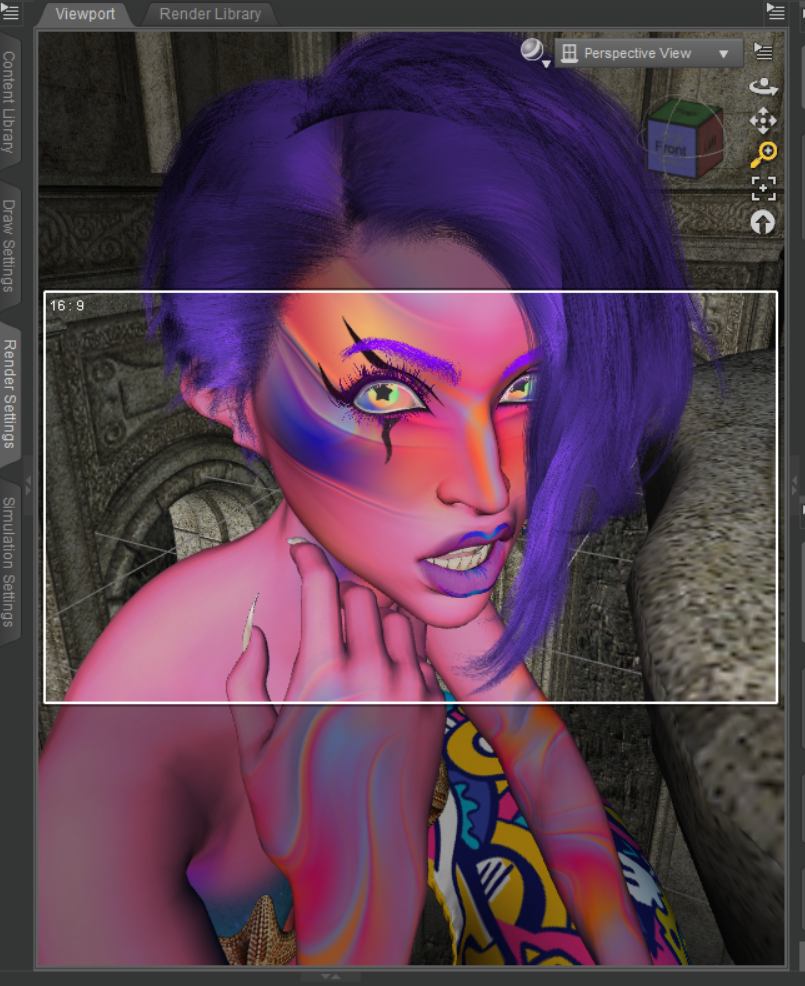
I also noticed that TMHL Kelpie for Genesis 9, has no forum topics, before my comment. So I might as well use this forum post of mine as a review. I had her on my wishlist for a while, because I sometimes feel like I need an extremely colorful character. She "base" character shape also reminded me of an AprilYSH character, who tend to be very pale. She's one of those characters who's download files are very compressed (184 MB) and then get bigger once installed (218.7 MB, according to DIM.) It's something to keep in mind, if you're concerned about space, like I am. It's why Caius lives in my SSD now, but he's nearly 1 GB. Kelpie's only flaw is that her fantasy ears are a part of her head shape, so they cannot be applied to other characters. But, she comes with a nearly identical head shape that has normal ears (the only difference). The one thing that surprised me, because I wasn't expecting it, is that her fantasy looks hot pink in the Texture mode and Filament mode of the Viewport. (The attached screenshot just shows the Texture view. It also shows the star-shaped pupils that can hardly be seen in the finished render RIP.)
 Daz Studio 2026 Beta - version 6.25.2026.6423! (Updated March 09, 2026)
Testing on the latest Alpha (6.25.2025.19807) - I tried Puppeteer/Timeline playback of animation while in Filament and in Texture Shaded using a full clothes G8 figure with hair in a 120 frame animation (30 fps).
Filament: Playback of the timeline is still slightly more laggy than in DAZ 4.2x
Texture Shaded: Playback has been the smoothest I have seen in a long time. While it is still not realtime 30 fps - it is an improvement of past playback benchmarks.Also noticed that the usage of Puppeteer is also more laggy. When doing a preview or record on Puppeteer, the "target" lags more behind the movement of the mouse.
Will the animation playback (in Filament) and puppeteer performance continue to see improvements?
Forgot to add - spacebar (key binding for play/stop timeline) when the timeline has focus does not work properly. You need to click outside the timeline in order for spacebar to respond. Will this be fixed? This has been an ongoing issue for nearly a decade.NVidia 40 vs 50 SeriesRiverMissy said:
kpr said:
If you need to buy now, buy a 4-series GPU. Put $10 away a week and in 12-months - if/when Daz 2025 is stable - buy a Gen-5 (or by then 6) GPU. You won' need to swap other components to make that change. If you can get a machine with slots for 2 GPUs, do that. You can have both Series-4 and Series-5/6 running in the same machine.
Or hang on until Daz 2025 is a pucker release and stable then get new PC with a 5, or 6 series gpu (but then you can't use Daz v4)
As Richard put, chances are some Daz 4.xx things won't work - and won't get free updates, if updates at all - in Daz 2025. You can keep Daz 4 and install Daz 2025 and have both running on same machine (or, at least, I've not seen it typed anywhere that you can't <-- IF you have BOTH Series 4 and Series 5 GPUs).
My computer is 8 years old and I don't really want to test fate much longer. I am on an insufficient fixed income like many other people so getting more than one computer would be difficult. I don't know that I would feel comfortable adding a second card to a system and it looks like the 40 series and 50 series cards have quite different requirements. Time marches foward and unfortunately leaves us with difficult choices. From what I read Daz 4.?? Will not run on 50 series GPU's. Did I misunderstand that?DS 4 cannot support a version of Iray that will use 50x0 cards, which tends to be a dealbreaker - however, the application itself will work and things like dForce and Filament will use the 50x0 cards
Just got a notice about 3Delight being retired.....Imago said:
N-RArts said:
I always saw Filament as 3Delight's replacement.
Yes, it could be... But they don't want to make it a fully functional render engine.
At the moment Filament (as I know) lacks of proper lights/shadows management, reflective surfaces and emissive materials. It's super fast and quite good for toon/Anime... But we need something more.
In 3Delight I can do a lot of things that are impossible in both IRay and Filament, that's the worst part.
I don't believe Daz has given any indication that Filament is seen as a 3Delight replacement.
Just got a notice about 3Delight being retired.....N-RArts said:
I always saw Filament as 3Delight's replacement.
Yes, it could be... But they don't want to make it a fully functional render engine.
At the moment Filament (as I know) lacks of proper lights/shadows management, reflective surfaces and emissive materials. It's super fast and quite good for toon/Anime... But we need something more.
In 3Delight I can do a lot of things that are impossible in both IRay and Filament, that's the worst part.
Skin Builder 8 Merchant Resource for Genesis 8 Female (Commercial)p0psie said:
After further investigation into what was going on with my failure to get any successful results from Skin Builder 8, I finally managed to overcome my issues. They seem to have been caused by a combination of user error and slightly less-than helpful UI design and user manual info. I re-read the manual (plus comments in this thread), discovered I'd forgotten to go to the end tab of the UI ("Utilities") and then the "Save Skin and Material Presets" tab (which is buried beside the selected-by-default "Camera" tab), and set up paths for the final files and Material Presets. Once these were set up, I stopped getting the missing files messages.
It would have been more intuitive to use the utility if all the path setup requirements were a) located in a common tab in the UI - preferrably so they're the first thing the user sees (rather than there being one temp path to be set up in plain sight in the first tab, then a series of others to be set up in a hidden location in the Utilities tab), and/or b) these paths were filled with default paths from the outset, rather than the utility just falling over if they're not set by the user.
The only outstanding minor issue I had was that during the process the view render changed from Filament to Texture Shaded when I used Skin Builder's auto-generated camera to preview the figure.
But I am relieved that I got it all working in the end, and I can see how useful this will be to me as I continue to expand my own original character library, so a long-overdue thank you to the authors!
This just gets more odd. I had directories present for each of the functions you describe, but they were the default program assigned ones. When I created separate folders on a different drive, I was able to get the utility to generate skin with lips and ears correctly for the first [and only] time. Now, if I try to generate a different skin, it pops up the same errors as before. Looking in the log file - it works, until it doesn't:
2025-07-22 18:17:42.232 [INFO] :: Apply Legs: Diffuse Color
2025-07-22 18:17:42.404 [INFO] :: Loaded image: BGBlender.jpg
2025-07-22 18:17:42.407 [INFO] :: Saved image: C:\Users\Luke\AppData\Roaming\DAZ 3D\Studio4\temp\181742.dsi
2025-07-22 18:17:42.409 [INFO] :: Loaded image: 181742.dsi
2025-07-22 18:17:42.597 [INFO] :: Loaded image: BGBlender.jpg
2025-07-22 18:17:43.235 [INFO] :: Loaded image: limbs legs dark.jpg
2025-07-22 18:17:43.923 [INFO] :: Loaded image: limbs legs light.jpg
2025-07-22 18:17:44.569 [INFO] :: Loaded image: limbs legs white.jpg
2025-07-22 18:17:44.909 [INFO] :: Apply Arms: Diffuse Color
2025-07-22 18:17:45.077 [INFO] :: Loaded image: BGBlender.jpg
2025-07-22 18:17:45.081 [INFO] :: Saved image: C:\Users\Luke\AppData\Roaming\DAZ 3D\Studio4\temp\181744.dsi
2025-07-22 18:17:45.082 [INFO] :: Loaded image: 181744.dsi
2025-07-22 18:17:45.297 [INFO] :: Loaded image: BGBlender.jpg
2025-07-22 18:17:45.791 [INFO] :: Saved image: C:\Users\Luke\AppData\Roaming\DAZ 3D\Studio4\temp\d6_181737.png
2025-07-22 18:17:46.078 [INFO] :: Loaded image: limbs arms dark.jpg
2025-07-22 18:17:46.868 [INFO] :: Loaded image: limbs arms light.jpg
2025-07-22 18:17:47.600 [INFO] :: Loaded image: limbs arms white.jpg
2025-07-22 18:17:47.975 [INFO] :: Failed to load image: H:\A\Sketches\DAZ Studio\SB8\181736&&SB&&_Torso_1002.png
2025-07-22 18:17:47.975 [INFO] :: Operation failed
2025-07-22 18:17:47.975 [INFO] :: Error: Couldn't find layer image: H:/A/Sketches/DAZ Studio/SB8/181736&&SB&&_Torso_1002.png
2025-07-22 18:17:47.975 [INFO] :: Failed to load image: H:\A\Sketches\DAZ Studio\SB8\181736&&SB&&_Torso_1002.png
2025-07-22 18:17:47.975 [INFO] :: Operation failed
2025-07-22 18:17:47.975 [INFO] :: Error: Couldn't find layer image: H:/A/Sketches/DAZ Studio/SB8/181736&&SB&&_Torso_1002.png
2025-07-22 18:17:47.976 [INFO] :: Failed to save image: H:\A\Sketches\DAZ Studio\SB8\181736&&SB&&_Torso_1002.jpg
2025-07-22 18:17:47.976 [INFO] :: Operation failed
2025-07-22 18:17:52.279 [INFO] :: Saved image: C:\Users\Luke\AppData\Roaming\DAZ 3D\Studio4\temp\d7_181739.png
2025-07-22 18:17:52.698 [INFO] :: Saved image: C:\Users\Luke\AppData\Roaming\DAZ 3D\Studio4\temp\d8_181742.png
2025-07-22 18:17:56.100 [INFO] :: Saved image: C:\Users\Luke\AppData\Roaming\DAZ 3D\Studio4\temp\d9_181744.png
2025-07-22 18:18:06.550 [INFO] :: Failed to load image: H:\A\Sketches\DAZ Studio\SB8\181736&&SB&&_Face_1001.png
2025-07-22 18:18:06.551 [INFO] :: Operation failed
2025-07-22 18:18:06.551 [INFO] :: Error: Couldn't find layer image: H:/A/Sketches/DAZ Studio/SB8/181736&&SB&&_Face_1001.png
2025-07-22 18:18:06.551 [INFO] :: Failed to load image: H:\A\Sketches\DAZ Studio\SB8\181736&&SB&&_Face_1001.png
2025-07-22 18:18:06.551 [INFO] :: Operation failed
2025-07-22 18:18:06.551 [INFO] :: Error: Couldn't find layer image: H:/A/Sketches/DAZ Studio/SB8/181736&&SB&&_Face_1001.png
2025-07-22 18:18:06.552 [INFO] :: Failed to save image: H:\A\Sketches\DAZ Studio\SB8\181736&&SB&&_Face_1001.jpg
2025-07-22 18:18:06.552 [INFO] :: Operation failed
2025-07-22 18:18:06.559 [INFO] :: Failed to load image: H:\A\Sketches\DAZ Studio\SB8\181736&&SB&&_Legs_1003.png
2025-07-22 18:18:06.559 [INFO] :: Operation failed
2025-07-22 18:18:06.559 [INFO] :: Error: Couldn't find layer image: H:/A/Sketches/DAZ Studio/SB8/181736&&SB&&_Legs_1003.png
2025-07-22 18:18:06.560 [INFO] :: Failed to load image: H:\A\Sketches\DAZ Studio\SB8\181736&&SB&&_Legs_1003.png
2025-07-22 18:18:06.560 [INFO] :: Operation failed
2025-07-22 18:18:06.560 [INFO] :: Error: Couldn't find layer image: H:/A/Sketches/DAZ Studio/SB8/181736&&SB&&_Legs_1003.png
2025-07-22 18:18:06.560 [INFO] :: Failed to save image: H:\A\Sketches\DAZ Studio\SB8\181736&&SB&&_Legs_1003.jpg
I wondered if changing the save directories might solve the issue, no luck. This is just weird... I know the utility can work now as it's done it once. I don't know why it is back to not working again.
MimicMolly's Renders & WIPsHere is how the bangs look. The character is my G9 self insert with Olympia 9's skin and this particular hair was converted to G9 with Riversoft's converter. It is a boneless hair, so I need to figure out how to add bones to it.
Anyway, this iray render is actually the brown as the Base Color, but everything else -- translucency and glossy is the Harley design I did. I also forgot to mention that I made a scalp texture for the Harley design that has a bit of root showing. Though I don't think it is visible here.

This other render is the Filament render without any Filatoon shaders applied because I wanted to show you the brown I did, which would be the one that gets the flowers added to it. Though I was originally planning to make it brown with blonde tips. I am just surprised that it looks 3Delight.
 Skin Builder 8 Merchant Resource for Genesis 8 Female (Commercial)
After further investigation into what was going on with my failure to get any successful results from Skin Builder 8, I finally managed to overcome my issues. They seem to have been caused by a combination of user error and slightly less-than helpful UI design and user manual info. I re-read the manual (plus comments in this thread), discovered I'd forgotten to go to the end tab of the UI ("Utilities") and then the "Save Skin and Material Presets" tab (which is buried beside the selected-by-default "Camera" tab), and set up paths for the final files and Material Presets. Once these were set up, I stopped getting the missing files messages.
It would have been more intuitive to use the utility if all the path setup requirements were a) located in a common tab in the UI - preferrably so they're the first thing the user sees (rather than there being one temp path to be set up in plain sight in the first tab, then a series of others to be set up in a hidden location in the Utilities tab), and/or b) these paths were filled with default paths from the outset, rather than the utility just falling over if they're not set by the user.
The only outstanding minor issue I had was that during the process the view render changed from Filament to Texture Shaded when I used Skin Builder's auto-generated camera to preview the figure.
But I am relieved that I got it all working in the end, and I can see how useful this will be to me as I continue to expand my own original character library, so a long-overdue thank you to the authors!
I want to buy a script or tool that can bake an iray decal to the base textureI love using iray decal nodes, they really are so much easier and faster to use than LIE or geoshells. But now that I am using Filament almost exclusively for my renders, I can't use them. But if a script or tool could somehow map the iray decal to the texture it is applied on, and then bake it to a single texture, then I could use it in again Filament. Is it posible to write a script that does this?
Just got a notice about 3Delight being retired.....Cam Fox said:
Also, is there any proposed replacement coming for 3Delight?
- Non-PBR stylized rendering
- Scriptable custom shaders / Shader customization with RSL/OSL
- Custom render passes (depth, normals, shadows, specular) for compositing (Iray can do some of this in PBR as canvas output)
- Deterministic rendering (no flicker along animation frames)
I always saw Filament as 3Delight's replacement.
NVidia 40 vs 50 SeriesRendering in Iray is the issue, do you do that? Note that there will soon be a DS update that removes 3Delight if you use that, so you will want to back-up the current installers - see https://www.daz3d.com/forums/discussion/737346/just-got-a-notice-about-3delight-being-retired#latest
If you do use Iray then DS 4 does not and cannot support the 50x0 cards for rendering 9they should be fine for dForce simulation and Filament) while DS 2025/6 does but is in an Alpha stage and will not currently support DS 4 plug-ins nor some scripts - plug-ins, and some scripts, will need updating once it is in a stable state but of course some developers are no longer around to do the updating.
Will FilaToon work on Genesis 8 figures or before?Filatoon can be used on anything.
There are two big threads on FilaToon with lots of tips:
https://www.daz3d.com/forums/discussion/704951/anime-toons-and-filatoon-shader-q-a/p1
https://www.daz3d.com/forums/discussion/704931/filatoon-cell-shaded-rendering-with-filament/p1
This one is about filament more generally: https://www.daz3d.com/forums/discussion/445567/filament-tutorials-shaders-lights/p1
There are also utilities to help convert a scene to Filatoon:
https://www.daz3d.com/easy-filatoon
https://www.daz3d.com/v3d-filatoon-converter-manager-and-tools
Released : "V3D Speech Bubbles Generator Pro" (Commercial)yes, there is a super easy way :
select your bubble. Go in surfaces editor tab. select the main surface and look at what is written top of the list of properties : either Iray Uber (then this is an Iray material), or Filatoon something (then this is filament).
What you see for the "Circle" might be a real shader mistake or a simple relabelling issue when I made the package. If it is a shader mistake, you simply have to apply the shader you want corresponding to the render engine you want.Just got a notice about 3Delight being retired.....Cam Fox said:
Does anyone know how this will affect purchased assets themselves? The stated reason for removing 3Delight is "due to the conclusion of our licensing agreement."
- Does that imply that 3Delight assets will disappear from the store?
- Will purchased assets disappear from My Account / DIM as well?
- What about assets that contain both Iray/3Delight versions?
- What is the recommended way to efficiently locate and backup any potentially affected assets? (I already back up all DIM downloads)
It won't affect your purchased items, you just won't be able to render with 3DL anymore in newer versions of DS.
It's already the case in DS2025 alpha, which doesn't have 3DL included : the products themselves still load, materials still apply, and the "3DL to Iray" automatic conversion for standard shaders still exists so you can render them with Iray or Filament for example.
Most 3DL items will likely remain available in the store since they can work with Iray with a bit of fiddling. Products like custom 3DL shaders (eg pw shaders) or lights (eg uber lights) won't work anymore since they only worked with 3DL, so those might be retired.
Daz Studio 2026 Beta - version 6.25.2026.6423! (Updated March 09, 2026)Richard Haseltine said:
Is the camera/view away from world-centre? I find things go wonky quite quickly (dark, and the camera rotate/orbit doesn't work as expected until another move, such as mouse-scroll zoom, kicks it). The issue has been reported but I have no idea what dependencies fixing it may have.
No, I'm aware of that bug too and it has been extensively reported. These days I put the scene at world centre and the camera at the required distance. I don't use sports, or purient, photog focal lengths either; I typically aim for 80mm (35mm equivalent).
The issue might have already existed because turning "on" preview lights under the "Windows" menu would invariably zap the scene in a camera view. I don't do that (well, I've learned to turn off preview lights when it happens). What is happening now and is completely reproducible is that a scene with a camera with **no** headlight (none of my cameras have headlights, all my lights are in the scene) no longer renders in the "textured" camera view if the camera itself is not "visible in viewport".
It really is that simple. Simple. Simply a bug.
The same annoying insect bites in "Universal" view, whatever that is, but not in "filament" or "Iray".
Daz Studio 2026 Beta - version 6.25.2026.6423! (Updated March 09, 2026)jbowler said:
Richard Haseltine said:
neilroy1965 said:
I noticed that the Texture view is black all the time. I noticed in this release that is partially fixed, but you have to either be using your normal viewport view, no camera, or, when you are using a camera view, the camera cannot have the visibility switched off. If you switch it off, as I prefer to do so I don't see it in the viewport or see the lines, the scene will appear black. Click the visibility icon in the scene view so it is visible, and when viewing through a camera, it will be okay, though it looks a little light now, with less contrast than it used to be.
Hiding the camera also hides its headlamp.
All, yes **all** my cameras have the headlamp switched off. The "texture" view is still lacking in illumination. There is plenty (somewhat excessive) with "Universal" and a lot (a little too much) with Filament but it is, of course, perfect with Iray (since I carefully adjusted it to be so :-)
Is the camera/view away from world-centre? I find things go wonky quite quickly (dark, and the camera rotate/orbit doesn't work as expected until another move, such as mouse-scroll zoom, kicks it). The issue has been reported but I have no idea what dependencies fixing it may have.
There are a plethora of view modes all of which seem to be slower than the original, crude and cartoonish, DS4 texture shading. Maybe just do a fast version of smooth shaded (texture shaded was always very much faster) and add a bit of computed colour from the way complicated texture maps? Interactive editing does not require or **benefit from** the darned lighting; I can fix that in Iray when I have everything in position! So just give be crude, undivided, surfaces that I can move round PDQ and call it "EDIT".
(c) John Bowler
Daz Studio 2026 Beta - version 6.25.2026.6423! (Updated March 09, 2026)Richard Haseltine said:
neilroy1965 said:
I noticed that the Texture view is black all the time. I noticed in this release that is partially fixed, but you have to either be using your normal viewport view, no camera, or, when you are using a camera view, the camera cannot have the visibility switched off. If you switch it off, as I prefer to do so I don't see it in the viewport or see the lines, the scene will appear black. Click the visibility icon in the scene view so it is visible, and when viewing through a camera, it will be okay, though it looks a little light now, with less contrast than it used to be.
Hiding the camera also hides its headlamp.
All, yes **all** my cameras have the headlamp switched off. The "texture" view is still lacking in illumination. There is plenty (somewhat excessive) with "Universal" and a lot (a little too much) with Filament but it is, of course, perfect with Iray (since I carefully adjusted it to be so :-)
There are a plethora of view modes all of which seem to be slower than the original, crude and cartoonish, DS4 texture shading. Maybe just do a fast version of smooth shaded (texture shaded was always very much faster) and add a bit of computed colour from the way complicated texture maps? Interactive editing does not require or **benefit from** the darned lighting; I can fix that in Iray when I have everything in position! So just give be crude, undivided, surfaces that I can move round PDQ and call it "EDIT".
(c) John Bowler
Daz Studio 2026 Beta - version 6.25.2026.6423! (Updated March 09, 2026)neilroy1965 said:
I noticed that the Texture view is black all the time. I noticed in this release that is partially fixed, but you have to either be using your normal viewport view, no camera, or, when you are using a camera view, the camera cannot have the visibility switched off. If you switch it off, as I prefer to do so I don't see it in the viewport or see the lines, the scene will appear black. Click the visibility icon in the scene view so it is visible, and when viewing through a camera, it will be okay, though it looks a little light now, with less contrast than it used to be.
Hiding the camera also hides its headlamp. In any event, see http://docs.daz3d.com/doku.php/public/software/dazstudio/6/change_log#6_25_2025_16207 - the active camera is not being drawn so it shouldn't get in the way.
I was using the filament view, which I like, but it doesn't seem to take into account any spotlights or even camera lights, which is annoying. If that alone was fixed, I would use it all the time. But with some fiddling with the Filament settings, you can get it to look pretty nice for scene building and it is plenty fast enough.
Oh, and one last thing, the reason why I recommended the Game Ready Drivers over the Studio Drivers, at least until the Studio drivers are updated, is because with certain CPUs, in my case, a Ryzen CPU, you can get a black screen and Windows is unusable. If you don't have a Ryzen CPU, you may be fine. I installed them, and had to jump through some hoops, go into safe mode and use some software to uninstall the Studio Drivers then install the Game Ready Drivers in order to even get back into Windows normally again. I have been keeping an eye on the Studio Drivers to get updated, then I will install them as I agree, they are the better choice, once they are updated.
If you do have the same issue I had with Windows going black on you, I used the ChatGPT app on my phone and asked it what to do, and it gave great, step by step advice on solving the issue without problems. I knew what to do, it's just been many years since I last had to.
Daz 3D is part of

Connect
DAZ Productions, Inc.
7533 S Center View Ct #4664
West Jordan, UT 84084Licensing Agreement | Terms of Service | Privacy Policy | EULA
© 2026 Daz Productions Inc. All Rights Reserved.