-
New Year, New Sales Thread: Report Issues Here "Reporting Only"
lorraineopua said:
24 hour and wishlist sale is giving me an oops page
it will have ended at 11:59 pm daz time is utah which i think is central or mountain..
SOLVED: "File does not exist"It was implemented alongside the encryption system. it still has the advantage that updates require downloading only the files that haev changed, not the whole zip, which is good for people with limited bandwidth; it also forces lower-case for file names, which may help people trying to run DS on Linux; all files are in a single folder for each product, which simplifies both trouble-shooting and modification; because there is no DIM/Daz Central involvement there are no manifests with hard paths needing updating, just copy the database to a new system and the content will be available even if the directory names and locations have changed.
DIM will not install on Windows 11frank0314 said:
valiant_01 said:
Hi all,
I did a fresh reinstall of Windows 11 and I now cannot install DIM. When I install I get random error each time I try. Sometimes I get nothing, it just will not install. I have checked other program installers and they work fine, it is just DIM that will not install.
Any ideas> (Thanks in advance).
What error messages is it giving you?
Multiple Errors, different each time I try to install. Many are "TK" or "Namespace" related, so I installed Python to see if it would help... it did not. Sometimes, when I try to install, A blank window appears with the name of the install file as the header.
I have also run chkdsk (for Hard Drive) and checked my memory integrity, all are good. I have no other issues installing other programs, just DIM.
I have got to tell you all, I am stumped...
EDIT: I shut off Smart App Control, no difference/it did not work. I am not getting BSoD's, the file just throws errors or does nothing when I try to install it. I am using an SSD Drive.
EDIT 2: I was able to find a download file for DazCentral. I installed DazCentral, no issues. I was able to install DazStudio with Central. I still cannot install DIM. Any assistance is welcomed.
[Released] Turbo Loader for Genesis 8 and 8.1 [Commercial]joealotofthings said:
At this point should I uninstall daz and all G8 content and then attempt to reiunstall all of it? I have five years worh of scene files, content installs, content uninstalls, upgrades, and more since the last time I uninstalled and reinstalled daz. With scenes files exception I am sure there are a good deal of leftover files with improper uninstall when installing through Daz itself and the DIM. I have not used Daz Central for installs/uninstalls.
I digress... should I uninstall Daz and All g8 content and then reinstall?
No. I wouldn't do that. After running Reset Content Directories, you might try selectively reinstalling stuff that is giving you problems. Since you use DIM, you could try reinstalling G8F, the G8 Starter Essentials, and see how it is. Then any other products you are having problems with
UltraScenery - new(er) territory [Commercial]barbult said:
We are finally making headway toward solving your problem, now that you found that you have a duplicate Ultrascenery folder in Daz Connect.
- Boo! Hiss! Daz Connect!!!! All UltraScenery product need to be uninstalled from Daz Connect. They do not work when in Daz Connect folders. If Daz Studio finds UltraScenery files in Daz Connect folders, it will use those files instead of the DIM installed versions. So, when you install an updated version with DIM, it is ignored, and the old Daz Connect one is used instead, with no warning to you whatsoever. You might have many old UltraScenery files in Daz Connect, like the one you found. I thought you had already uninstalled UltraScenery from Daz Connect based on previous discussion here. What did you do to clean that up previously? to Properly uninstall a product from Daz Connect, you should right click on the product in Daz Studio and select uninstall. Did you do that, or just delete some file from the hard drive or???? We need to know to help clean this up once and for all. Personally, I became so unhappy with the Daz Connect, I uninstalled everything ever installed by it, and I reinstalled those products with DIM. My Daz life has been imuch better since getting rid of Daz Connect. Its advantages were far outweighed by the disadvantages for me. Just look what it has done to you!
- Yes, you need to get rid of E:\My Daz Connect Library\data\cloud\1_67835\environments\landscapes\ultrascenery, but the right way to get rid of it is to uninstall the product, not just delete the file. If you cannot do that because of previous actions (asked about in question 1), I guess you can try just deleting that entire E:\My Daz Connect Library\data\cloud\1_67835 folder. But there will likely be other folders that need to be removed for other UltraScenery products you installed with Daz connect way back when.
- If you did not install Accelerator for UltraScenery for Daz Studio 4.5+ with DIM before, I don't know how you got the plugin installed. Maybe you installed it with Daz Central???
There are still mysteries to unravel. but we can get there. Don't get too discouraged.
So,here is what I recommend at this point:- Find the UltraScenery - Realistic Landscape System product in Daz Studio in your Smart Content Products. Right click on the product icon.
- Select Uninstall if that option is available. If it is not available, and instead it offers to install or update STOP! and do not select those.
- If Uninstall was not available, close Daz Studio and go to your E drive and delete the whole E:\My Daz Connect Library\data\cloud\1_67835 folder.
- Open Daz Studio and try UltraScenery. If you can't find it, open DIM and reinstall it.
- Try UltraScenery again.
- Does it work now?
I eagerly await your results.
The game's afoot, Holmes!
Responding to your comments in order.
- Boo, as you very properly say, hiss! Daz Connect has used me poorly and led me astray. I thought I'd purged everything from Daz Connect too! I really did. I set Studio offline, uninstalled everything , deleted the files, then reinstalled it with DIM. But I never suspected that Connect, the scoundrel, had stuffed the files under a mattressl. Now you've armed me with superior information, however, so I'll go ahead and follow your guidelines of course.
- E: Drive is my main Daz content repository, so I don't think I'd have the strength to delete the whole lot and retain the will to live. I'd prefer to go in and winkle out the offending articles one by one; in the first instance at least. It's less drastic, if rather more painstaking.
- I'm magic. (That, or, yes - I probably installed it via Central.)
I probably won't get another opportunity now to go through this all properly until the weekend, so I shall have to keep you in suspense a little while longer.
Thank you again, as always.
John
[Released] Turbo Loader for Genesis 8 and 8.1 [Commercial]At this point should I uninstall daz and all G8 content and then attempt to reiunstall all of it? I have five years worh of scene files, content installs, content uninstalls, upgrades, and more since the last time I uninstalled and reinstalled daz. With scenes files exception I am sure there are a good deal of leftover files with improper uninstall when installing through Daz itself and the DIM. I have not used Daz Central for installs/uninstalls.
I digress... should I uninstall Daz and All g8 content and then reinstall?
UltraScenery - new(er) territory [Commercial]We are finally making headway toward solving your problem, now that you found that you have a duplicate Ultrascenery folder in Daz Connect.
- Boo! Hiss! Daz Connect!!!! All UltraScenery product need to be uninstalled from Daz Connect. They do not work when in Daz Connect folders. If Daz Studio finds UltraScenery files in Daz Connect folders, it will use those files instead of the DIM installed versions. So, when you install an updated version with DIM, it is ignored, and the old Daz Connect one is used instead, with no warning to you whatsoever. You might have many old UltraScenery files in Daz Connect, like the one you found. I thought you had already uninstalled UltraScenery from Daz Connect based on previous discussion here. What did you do to clean that up previously? to Properly uninstall a product from Daz Connect, you should right click on the product in Daz Studio and select uninstall. Did you do that, or just delete some file from the hard drive or???? We need to know to help clean this up once and for all. Personally, I became so unhappy with the Daz Connect, I uninstalled everything ever installed by it, and I reinstalled those products with DIM. My Daz life has been imuch better since getting rid of Daz Connect. Its advantages were far outweighed by the disadvantages for me. Just look what it has done to you!
- Yes, you need to get rid of E:\My Daz Connect Library\data\cloud\1_67835\environments\landscapes\ultrascenery, but the right way to get rid of it is to uninstall the product, not just delete the file. If you cannot do that because of previous actions (asked about in question 1), I guess you can try just deleting that entire E:\My Daz Connect Library\data\cloud\1_67835 folder. But there will likely be other folders that need to be removed for other UltraScenery products you installed with Daz connect way back when.
- If you did not install Accelerator for UltraScenery for Daz Studio 4.5+ with DIM before, I don't know how you got the plugin installed. Maybe you installed it with Daz Central???
There are still mysteries to unravel. but we can get there. Don't get too discouraged.
So,here is what I recommend at this point:- Find the UltraScenery - Realistic Landscape System product in Daz Studio in your Smart Content Products. Right click on the product icon.
- Select Uninstall if that option is available. If it is not available, and instead it offers to install or update STOP! and do not select those.
- If Uninstall was not available, close Daz Studio and go to your E drive and delete the whole E:\My Daz Connect Library\data\cloud\1_67835 folder.
- Open Daz Studio and try UltraScenery. If you can't find it, open DIM and reinstall it.
- Try UltraScenery again.
- Does it work now?
I eagerly await your results.
UltraScenery - new(er) territory [Commercial]johnbuckeridge said:
Richard Haseltine said:
barbult said:
Richard Haseltine said:
johnbuckeridge said:
barbult said:
I've edited this about 10 times! It is so confusing.
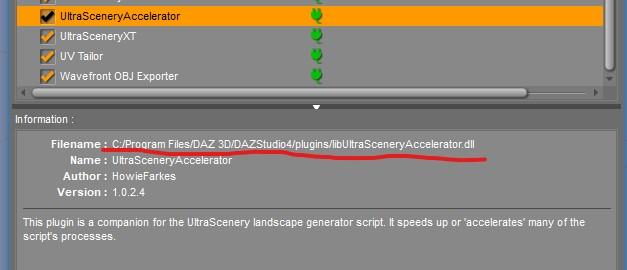
All of my Daz Studio plugins are installed by DIM into a plugins folder in an entirely different path than yours, @johnbuckeridge. I think Totte led us to the problem. We need to figure out why your Accelerator is in a different path. Maybe you have an old version in different path??????? (Oops, I also posted and image from the Public Build version of DS.I've added the General Release plugin path image now.) I don't know if your plugin path is a valid path or not, or why mine is so different. Maybe it is because my DIM Applications settings path is different and was setup 12 years ago. Your path may be a more recent default location for plugins.
General Release plugin path
Public Build (Beta) plugin path
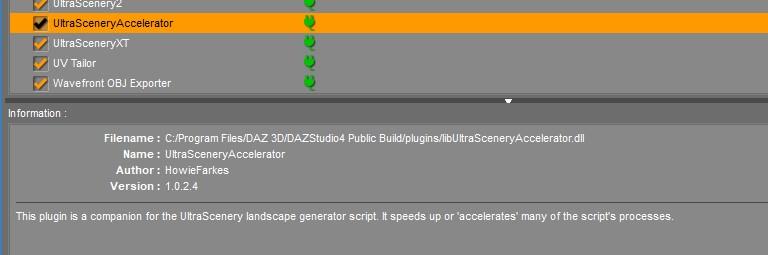
So, from what I can see, where we differ is that your path element is /Program Files/ whereas mine is /Applications/64-bit/ Otherwise everything else looks the same. My system was set up just over three years ago - the beginning of my Daz journey - and Accelerator would have been installed rather later than that. Maybe that accounts for the difference?
So I'm wondering what I should try next: would you recommend I try moving the location?
The path difference is Daz Central deault (you) vs. DIM/standalone default.
Thank you, Richard! I never used Daz Central, so I needed this reminder of how it changed default library locations. I wonder if John's DIM settings now match those Daz Central settings, or if DIM is now installing to a different path. So now we have Daz Connect, Daz Central, and DIM involved while we are trying to locate possible installations in different locations. DIM should match Daz Central, but we all know it didn't when Daz Central was first released.
DIM will not, by itself, change the Daz Central paths (nor vice versa) but of course they can be overridden.
Good morning, all (UK time!) Barbult, Totte and RichardHaseltine - thank you all so much for your tireless input and detective work. I'm pretty sure the whole problem stems from my heady youth (three years ago!) when I just piled everything in either through Daz Connect or Daz Central, in happy ignorance of the tech.
So. Following Barbult’s questions in order
(1) For some reason, I hadn’t reinstalled Accelerator for UltraScenery for Daz Studio 4.5+ (Win 64-bit). I’ve just put it in, though, added to Accelerator for UltraScenery. Pic shows how it looks in plugins menu now.
(2) Totte is quite right and I’ve found two copies of UltraSceneCreator.dse – pathways are;
-F:\DAZ TRANSFER\My Daz 3D Library\Environments\Landscapes\Ultrascenery (which, from what Barbult was saying, sounds like the right one)
-E:\My Daz Connect Library\data\cloud\1_67835\environments\landscapes\ultrascenery
Presumably you’re going to tell me to delete one of those, but obviously I’ll wait for further advice.
Again, I cannot say how grateful I am for all your help.
Forgot to add picture!
UltraScenery - new(er) territory [Commercial]Richard Haseltine said:
barbult said:
Richard Haseltine said:
johnbuckeridge said:
barbult said:
I've edited this about 10 times! It is so confusing.
All of my Daz Studio plugins are installed by DIM into a plugins folder in an entirely different path than yours, @johnbuckeridge. I think Totte led us to the problem. We need to figure out why your Accelerator is in a different path. Maybe you have an old version in different path??????? (Oops, I also posted and image from the Public Build version of DS.I've added the General Release plugin path image now.) I don't know if your plugin path is a valid path or not, or why mine is so different. Maybe it is because my DIM Applications settings path is different and was setup 12 years ago. Your path may be a more recent default location for plugins.
General Release plugin path
Public Build (Beta) plugin path
So, from what I can see, where we differ is that your path element is /Program Files/ whereas mine is /Applications/64-bit/ Otherwise everything else looks the same. My system was set up just over three years ago - the beginning of my Daz journey - and Accelerator would have been installed rather later than that. Maybe that accounts for the difference?
So I'm wondering what I should try next: would you recommend I try moving the location?
The path difference is Daz Central deault (you) vs. DIM/standalone default.
Thank you, Richard! I never used Daz Central, so I needed this reminder of how it changed default library locations. I wonder if John's DIM settings now match those Daz Central settings, or if DIM is now installing to a different path. So now we have Daz Connect, Daz Central, and DIM involved while we are trying to locate possible installations in different locations. DIM should match Daz Central, but we all know it didn't when Daz Central was first released.
DIM will not, by itself, change the Daz Central paths (nor vice versa) but of course they can be overridden.
Good morning, all (UK time!) Barbult, Totte and RichardHaseltine - thank you all so much for your tireless input and detective work. I'm pretty sure the whole problem stems from my heady youth (three years ago!) when I just piled everything in either through Daz Connect or Daz Central, in happy ignorance of the tech.
So. Following Barbult’s questions in order
(1) For some reason, I hadn’t reinstalled Accelerator for UltraScenery for Daz Studio 4.5+ (Win 64-bit). I’ve just put it in, though, added to Accelerator for UltraScenery. Pic shows how it looks in plugins menu now.
(2) Totte is quite right and I’ve found two copies of UltraSceneCreator.dse – pathways are;
-F:\DAZ TRANSFER\My Daz 3D Library\Environments\Landscapes\Ultrascenery (which, from what Barbult was saying, sounds like the right one)
-E:\My Daz Connect Library\data\cloud\1_67835\environments\landscapes\ultrascenery
Presumably you’re going to tell me to delete one of those, but obviously I’ll wait for further advice.
Again, I cannot say how grateful I am for all your help.
UltraScenery - new(er) territory [Commercial]barbult said:
Richard Haseltine said:
johnbuckeridge said:
barbult said:
I've edited this about 10 times! It is so confusing.
All of my Daz Studio plugins are installed by DIM into a plugins folder in an entirely different path than yours, @johnbuckeridge. I think Totte led us to the problem. We need to figure out why your Accelerator is in a different path. Maybe you have an old version in different path??????? (Oops, I also posted and image from the Public Build version of DS.I've added the General Release plugin path image now.) I don't know if your plugin path is a valid path or not, or why mine is so different. Maybe it is because my DIM Applications settings path is different and was setup 12 years ago. Your path may be a more recent default location for plugins.
General Release plugin path
Public Build (Beta) plugin path
So, from what I can see, where we differ is that your path element is /Program Files/ whereas mine is /Applications/64-bit/ Otherwise everything else looks the same. My system was set up just over three years ago - the beginning of my Daz journey - and Accelerator would have been installed rather later than that. Maybe that accounts for the difference?
So I'm wondering what I should try next: would you recommend I try moving the location?
The path difference is Daz Central deault (you) vs. DIM/standalone default.
Thank you, Richard! I never used Daz Central, so I needed this reminder of how it changed default library locations. I wonder if John's DIM settings now match those Daz Central settings, or if DIM is now installing to a different path. So now we have Daz Connect, Daz Central, and DIM involved while we are trying to locate possible installations in different locations. DIM should match Daz Central, but we all know it didn't when Daz Central was first released.
DIM will not, by itself, change the Daz Central paths (nor vice versa) but of course they can be overridden.
UltraScenery - new(er) territory [Commercial]Richard Haseltine said:
johnbuckeridge said:
barbult said:
I've edited this about 10 times! It is so confusing.
All of my Daz Studio plugins are installed by DIM into a plugins folder in an entirely different path than yours, @johnbuckeridge. I think Totte led us to the problem. We need to figure out why your Accelerator is in a different path. Maybe you have an old version in different path??????? (Oops, I also posted and image from the Public Build version of DS.I've added the General Release plugin path image now.) I don't know if your plugin path is a valid path or not, or why mine is so different. Maybe it is because my DIM Applications settings path is different and was setup 12 years ago. Your path may be a more recent default location for plugins.
General Release plugin path
Public Build (Beta) plugin path
So, from what I can see, where we differ is that your path element is /Program Files/ whereas mine is /Applications/64-bit/ Otherwise everything else looks the same. My system was set up just over three years ago - the beginning of my Daz journey - and Accelerator would have been installed rather later than that. Maybe that accounts for the difference?
So I'm wondering what I should try next: would you recommend I try moving the location?
The path difference is Daz Central deault (you) vs. DIM/standalone default.
Thank you, Richard! I never used Daz Central, so I needed this reminder of how it changed default library locations. I wonder if John's DIM settings now match those Daz Central settings, or if DIM is now installing to a different path. So now we have Daz Connect, Daz Central, and DIM involved while we are trying to locate possible installations in different locations. DIM should match Daz Central, but we all know it didn't when Daz Central was first released.
UltraScenery - new(er) territory [Commercial]johnbuckeridge said:
barbult said:
I've edited this about 10 times! It is so confusing.
All of my Daz Studio plugins are installed by DIM into a plugins folder in an entirely different path than yours, @johnbuckeridge. I think Totte led us to the problem. We need to figure out why your Accelerator is in a different path. Maybe you have an old version in different path??????? (Oops, I also posted and image from the Public Build version of DS.I've added the General Release plugin path image now.) I don't know if your plugin path is a valid path or not, or why mine is so different. Maybe it is because my DIM Applications settings path is different and was setup 12 years ago. Your path may be a more recent default location for plugins.
General Release plugin path
Public Build (Beta) plugin path
So, from what I can see, where we differ is that your path element is /Program Files/ whereas mine is /Applications/64-bit/ Otherwise everything else looks the same. My system was set up just over three years ago - the beginning of my Daz journey - and Accelerator would have been installed rather later than that. Maybe that accounts for the difference?
So I'm wondering what I should try next: would you recommend I try moving the location?
The path difference is Daz Central deault (you) vs. DIM/standalone default.
the island of lost and foundI have an ungodly amount of Daz store purchases in my lost and found. I have tried both the D central and DIM.\ to try to install. What am i doing wrong or is ther a reset to fix?
Graffiti Street SceneWhich have you checked - Product Library, DIM/Daz Central, Daz Studio? It has install types listed which should mean there are files set to be downloadable, but that doesn't always work.
Getting on the 9 train, or notZicon said:
G8 was a struggle the moment you wanted to move away from tall/muscular men and tall/big-breasted women.
This is not true at all...
... I have also used G8 to make short big breasted women.
(I should however probably accept that the overall Venn diagram between "Matt has done it" and "super easy, barely an inconvenience" is not necessarily one with a large central overlap).
There's Always Another Sale Thread -- Discussions Only Pt 3joanna said:
The featured artists from today don't show the base discounts unless you put items in the cart which is annoying. If they're 60% off, why aren't they just marked down as such? One less incentive to put stuff in the cart, I suppose. Sometimes it really feels like I'm being discouraged from shopping.
On the brighter side, a few days ago, I got Olivia 9 HD (yes, one of those G9 figures that had HD included as was initially communicated as standard when G9 was released) in Lightning Deals for $4.20. I immediately bought her, even though she wasn't even on my wishlist.
Olivia's skin is a favourite of mine that I initially use for many of my characters. Would love to see more skins in a similar vein. Plenty of white skins in the store and a decent number of black and East Asian skins, but not many that suit characters with a heritage somewhere between the Southern Mediterranean, North Africa and South East Asia. I'm not sure that Olivia is supposed to sit there either - I think she may be mixed heritage North/Central American - but her skin is pretty adaptable to characters from somewhere in - or with links to - that rather large and underrepresented region.
[Solved] New PC - DS not installing error ?didn't work for me either. and daz central no longer available?
Relocating My DAZ 3D Libraryfelis said:
I don't know Daz Central, only DIM (my undertsnading is they should use the same path, unless you manually have changed it).
So what path is listed in DIM for installation (you can find it under the gear icon > Advanced settings > Installation (I think))?
And is that path defined in Daz Studio in your content libraries?
Thank you for this. And yes, I believe from Richard that where DIM goes, Central will follow. I thought it easiest to attach a screenshot of the current installation data.
The Sky is Falling Complaint Thread...one of the very few good reasons summers here are relatively dry (save for all the wildfires), as there are few if any of those little winged vampires trying to frain your life force..
Speaking of fires, we have fortunately been experiencing more of an "onshore flow" the last several days which has kept the temperatures reasonable and smoke pretty much on the other side of the Cascades.. The bad part, it is all heading toward the central and eastern part of the country.
We are actually supposed to get a bit of wet stuff on Monday but mostly just here in the western valleys but mostly light, barely enough to wet the streets and make them nice and slick with all the oil buildup on the surface. Could be "fender bender city" tomorrow.
Relocating My DAZ 3D LibraryI don't know Daz Central, only DIM (my undertsnading is they should use the same path, unless you manually have changed it).
So what path is listed in DIM for installation (you can find it under the gear icon > Advanced settings > Installation (I think))?
And is that path defined in Daz Studio in your content libraries?
Daz 3D is part of

Connect
DAZ Productions, Inc.
7533 S Center View Ct #4664
West Jordan, UT 84084Licensing Agreement | Terms of Service | Privacy Policy | EULA
© 2026 Daz Productions Inc. All Rights Reserved.