-
Celebrity Look-a-Likes for 3D figures part 3
jedijudd said:
Is there any Zoe Saldana morphs? There is a recent one for v4 at rendo but it does not work in daz
Both are more takes on her in her role as Gamora than her herself, so results may vary. Could've sworn I knew of others that are straight up of her, but apparently not.
PS: @jedijudd care to name the V4 morph for her you saw? Technically V4 assets can be fully utilized in current DS - there's just a lot of hoops you hhave to jump through.
The Newest Evolution Is Here: The Daz Season Pass!...I agree with the majority of your post. Back on page one I stated my reasons for not being interested in the pass
That said:
I have grown bored of all the "beautiful people" figures and characters being released, and actually found Brooke to be somewhat refreshing (had she not been 8.1 I might have purchased her). True, I'm in a minority of those who actually prefer figures and characters who tend to look more like actual people you'd see everyday instead of more runway models/pinup girls and hunks. To this end I usually purchase a fair amount of morph, shaping, and other merchant resources along with resorting to a lot of "dial spinning" to create more "unique" characters (the "road map" of morphs and shapes used for a couple of the main characters in one of my stories would make the Shader Mixer look intuitive).
The only reasons I have Vicky5, 7 and 8 is because I got the latter two free on a loyalty banner and the former as part of a bundle (along with Mike5) for purchasing Carrara 8.5. I did purchase Vicky4 as at the time, she was the only Gen4 female character, but later supplanted her with Steph4 who was more petite with a stature and proportions closer to that of an average RL woman. As I've mentioned my disappointment has been that until G8, there have been very few "interesting" or "everyday" characters available and mostly rehashes of the same old core figures.
Of course, I also have the same views on clothing content. Too much "sexy" stuff . Unfortunately my skill at modelling is rather limited, well below what is needed to create clothing.
Dial Fusion for Genesis 2 to 8.1 (Commercial)Zev0 said:
The way G8 and 8.1 works is morph content saved on G8 will show on 8.1, but stuff saved on 8.1 will only show on 8.1. It's just how it's designed. I'm sure there must be a way to manually edit the data info to get it to show but I have not tried yet.
Ok, that is good to know for the future. Thank you for the quick reply, and also thank you for all your amazing must have products!
Vertigo ponytail rendering with odd squigglesThank you for your suggestions. I've dialed the adjustment for forehead, as well as various head settings to fill out that squiggle space, but now I've dialed so much that the character doesn't really look like what I want, hehe. I'll try some more, but it may be that this morph and this hair just don't go well together like I want.
Dial Fusion for Genesis 2 to 8.1 (Commercial)The way G8 and 8.1 works is morph content saved on G8 will show on 8.1, but stuff saved on 8.1 will only show on 8.1. It's just how it's designed. I'm sure there must be a way to manually edit the data info to get it to show but I have not tried yet.
Dial Fusion for Genesis 2 to 8.1 (Commercial)Hi, I really enjoy using Dial Fusion. I have a question dealing with GF8 and GF8.1 morphs. My saved GF8 body morphs are available on my GF8.1 character and will load just fine when I load up a character. However for GF8, I can not see any of my saved GF8.1 body morphs and have them show when loading a GF8 character. Since the same morphs I am dialing are used on both GF8 and 8.1, I thought that I might be able to go to the female8.1 data morph folder and copy it to the female 8 data morph folder and see if it loads, but was unsuccessful. Is there away to have my GF8 character use my saved dial Fusion morphs that were saved when dialing in a 8.1 character?
something to dial down g8fs bottom heaviness?The standard body morph kit has plenty of dials to do what you're asking:
something to dial down g8fs bottom heaviness?theres a bunch of g8 characters i would like, but the hip to shoulder ratio is over abundant on the bottom.
is there a morph resource or or a character with custom morph to dial down the hips, glutes, and thighs?
thanks.
Trying to find a characterI don't think I've seen the skin or the morph here, but then I didn't see everything
Figure look alike for Charlize Theron wanted.Sevrin said:
Matt_Castle said:
To offer an opposed viewpoint, I've not been very impressed with any of the Sangriart morphs I've bought. The initial likenesses are good, but I find the morphs seldom work well with expressions - something about the way in which they're morphed that makes the overlayed expressions look unnatural.
Not saying that you're wrong, but expressions can be tricky with most sculpted characters.
Adding to what Sevrin says, everyone has different expressions and muscle use changing the way you "know" the celebrity. It's not a Sangriart problem, it's trying to find the correct expressiveness to make it convincing. You can't do "default smile morph" and expect it to be the smile you know from the celebrity, you have to tweak and fine tune.
Vertigo ponytail rendering with odd squigglesNot all heads are the same. The Adjust Forehead slider on the hair should allow you to clear up the forehead.
This happens with many hairs. Most hairs have morph sliders that will let you deal with this problem. The worst option is increasing Scale, but sometimes there are no other options.
Diffeomorphic Morphs malfunctioningHi;
I apologise if this isn't the right place for this but I'm having some major issues with the diffeomorphic plugin. Essentially, everything works fine up until the moment I reopen my file. I have a file with 3 characters that I transferred to blender using Diffeomorphic. I then used the morph loader to import all the facial morphs, expressions etc. to the characters. These all worked fine initially. However, when I then close and reopen my file, the morphs are no longer present. The only morphs that are present for some weird reason are the brow compression and afraid expression morphs. What's weird though is that these now "invisible" morphs still take effect. I am creating an animation and therefore had keyframed them when they were still working. So they're obviously still there, they just don't appear in the menus anymore. Trying to reimport the morphs results in the "ugly face deformation" that has appeared on several forums. The issue isn't relating to auto importing python scripts as this is selected in the settings tab. Sometimes I can fix this issue by either restarting blender and the morphs randomly re-appear (this is rare though) or creating a new scene, importing a new character into blender, loading morphs and then appending my malfunctioning scene into this new scene. However, this only works sometimes and takes a lot of time. I also sometimes get an error (that I've attached in the text file). Also this issue only seems to happen with these particular characters in this file. Setting up the scene from scratch however and recreating the animation would require far too much time. Can anyone help? Thanks
help identify figureHi there! That's actually Dolb's shape transferred over to Genesis 8 Female via Transfer Utility, and it's using his skin textures. I'm afraid that I didn't save the shape after the renders, so I'm not sure if it's 100% Dolb or if I also added some Edie 8 into the mix for the body shape. I would imagine using a transgender morph like AgentUnaware's one that's available on DeviantArt on Dolb would produce a similarly-shaped character, as Molly suggested. The baby is indeed made with Tobyn 8, Gage, and Dolb all mixed together, though I don't remember at what values. He's also got Dolb's skin on him.
transfer/copy morphs to same gen characterI think you can copy and paste morphs from one figure to another in the Parameters Pane, but I don't have Daz Studio available to try it out at the moment. Off the top of my head, here are two other options:
You could save a Shaping Preset using the one that has all the morphs and then apply that to the second one. Select the morphed Genesis 8 Male in your scene and go to File > Save As > Shaping Preset. You'll get a menu showing all the available morph options, and you'll want to have all the ones used in your character checked. Any morph that's checked will be saved at its current value (if you've got a nose shape dialed in, it will be saved at whatever % it's used at; morphs you haven't used will be saved at 0%), so you can get away with checking off everything, but keep in mind that if your saved preset has "Head Shape A" saved at 0%, and your new character uses "Head Shape A" at any strength, the preset will affect that and reset it to 0% as it adds in your morphs. It's best to go through the menu and check only the morphs that you've used if you're not planning to start with a completely unmorphed G8M for your second character. Does that make sense? Once you click Accept, you have a handy preset that can be used to apply your chosen morphs to any Genesis 8 Male character.
Alternatively, you could save your morphed guy as a Scene Subset. This would basically save a copy of Genesis 8 Male with all your adjustments. You can even choose to save hair, clothes, or other wearables along with him so that they all load together. When you load the new scene subset, you would get a new Genesis 8 Male will all your changes already applied.
Vertigo ponytail rendering with odd squigglesI don't know what forum is best to post this question. If this is the wrong one, I'll move it to wherever a moderator points to.
I have an issue with Vertigo Ponytail. Or perhaps with the combination of Vertigo and Sienna HD.
I load Sienna, do some simple and small changes to her morph, load the hair and the right mats, then use dials to make my desired expression. When I render, however, I get some fairly odd squiggles on the model's forehead. They kinda look like dust on a camera lens.
I've tried on another model, and there was no problem. There's no problem when I load the hair on the Sienna model, it happens after I've done adjustments to the morph as well as expressions.
I don't even know where to start to trouble shoot this. Does anyone have any tips?
help identify figureAt a guess, it's Dolb combined with Growing up morphs for the kid, and either transfered to G8F or combined with a female morph for G8M.
help identify figureI was reviewing some stuff I have and can't figure out what figure is the female in this image. I suspect it might be a special morph but of what? while we are at it how about the kid?
3D Art Freebie Challenge-April 2021-"Spring Forward" -Main Thread Onlyrichardandtracy said:
My entry is going to take a while to develop, as I need to track links down for the freebies, a number of which I've had for a couple of years & I hope they are still available. I have listed all the items in the image and will fill the links in over the next few days and remove this paragraph when I'm done. I also have to upload the 'spring things' freebie.
The image is called
The First Annual 'Springing Forward' Race
[Report extract from the local paper] 'The race was to see who was the fastest person to use the 'Spring Things' (for want of a better name) to cover 100m. This is the first time the event has been run, so it was not as popular as the organisers hoped, and there were only four entrants. Maybe next year's event will be better attended, as all competitors and audience enjoyed the event enormously. At the start of the race there was not a lot of agreement over how to use the 'Spring Things', and one competitor thought that bouncing backwards would be the best way. However instant disqualification awaited her - it was the 'Springing Forward' race, after all, and the clue was in the name.. Standing on the 'Spring Things' took care and co-ordination (even with the competitor's shoes were glued to the spring board) which didn't come easily to any competitor. After a shaky start Alysha in lane 4 took a commanding lead and won by a good 20 meters, with Ki in lane 6 coming in fractionally ahead of Vicky in lane 5 after abandoning her novel rabbit hop method 5 metres from the start line and catching Vicky up at the 90 metre point. All competitors fell over at least twice and were helped onto their springs by members of the audience. Alysha's prize was a small replica of the strange obilisk that appeared in the woods this January, and she goes home secure in the knowledge she won the daftest race in the sporting calendar.'
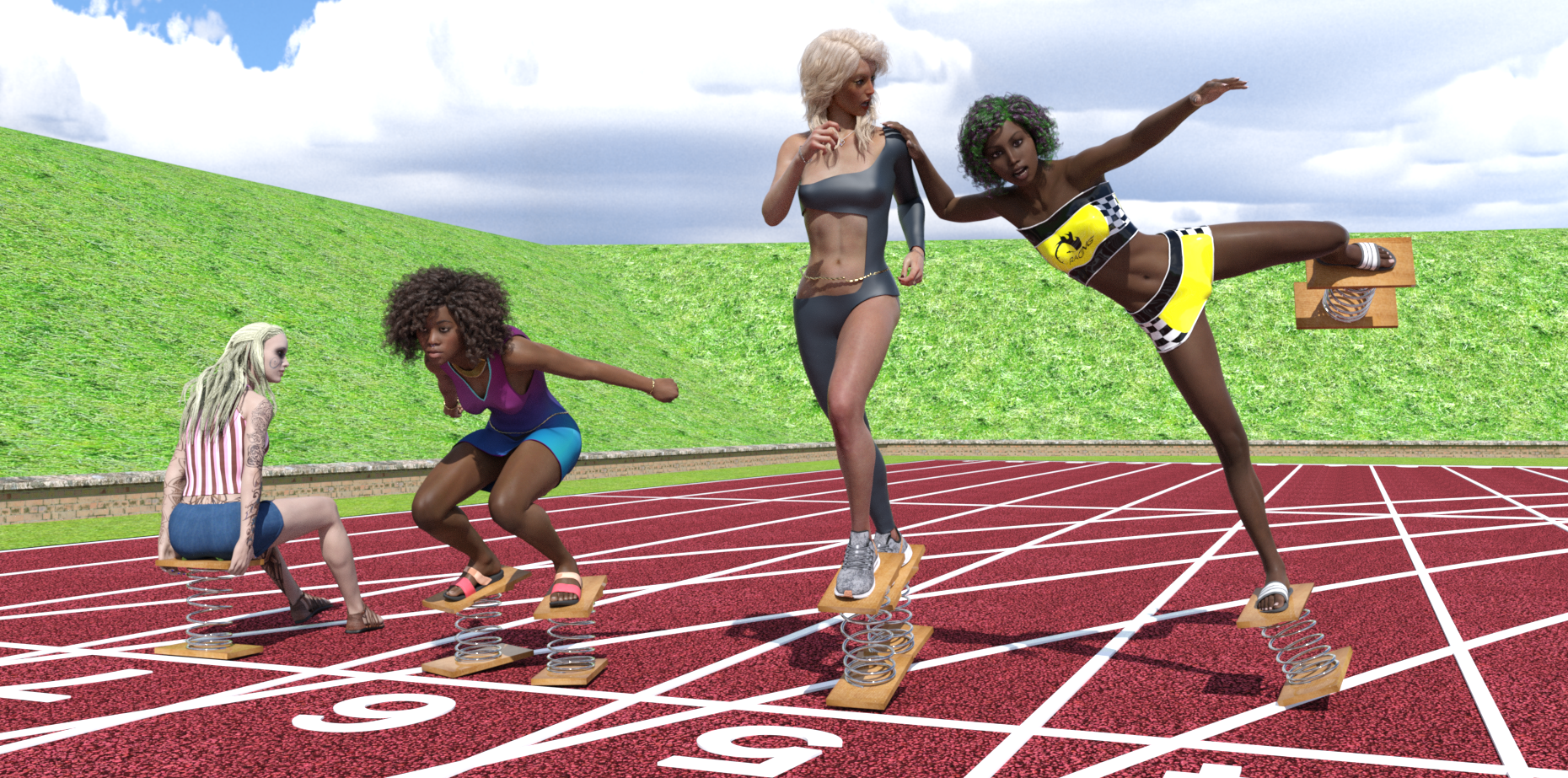
Free Items, from Background first, then figures Left to Right
HDRI: I think it's this one: https://hdri-skies.com/shop/hdri-sky-024/ will update link if I'm wrong.
Athletic Ground: https://www.renderosity.com/freestuff/items/88078/athletics-ground
Spring Things: Not available all month so may not count, see forum thread: TBA
Left Figure in Lane 7:
G3 character: TBA (Came with hair, shoes & texture)
Left figure top & shorts: https://www.wilmapsdigitalcreations.co.uk/view_product.php?id=393
Centre Left Figure in Lane 6:
Character: https://www.renderosity.com/freestuff/items/85911/ki-for-genesis-8-female Modified by no-count G8 body morphs (https://www.daz3d.com/genesis-8-female-body-morphs) and paid for Aniyah skin texture (https://www.daz3d.com/aniyah-for-darcy-8)
Clothing: Dress by Most Digital Creations: TBA Hmm beginning to wonder if it wasn't an LE dress. Will have to refer to the original file on my other computer. If it was an LE dress, I will replace the image.
Shoes: Amy_Aimee https://www.deviantart.com/amyaimei/art/Sandals-01-and-02-for-G8F-758862757
Wrist & Waist ropes: https://www.deviantart.com/noone102000/art/Odalisque-Dress-FREEBIE-TO-DOWNLOAD-822900201 (Warning mature content)
Eyebrow piercings: https://www.renderosity.com/freestuff/items/83703/piercing-gaze-for-genesis-8-females
Necklace: Aiy_Aimee https://www.deviantart.com/amyaimei/art/My-Heart-Necklace-for-Genesis-8-Female-729010047
Pose: Started out as Stretch Pose 11 from: https://www.renderosity.com/freestuff/items/87700/g8f-athletic-stretching-11-to-15
Centre Right Figure in Lane 5
Wrist & Waist Ropes: https://www.deviantart.com/noone102000/art/Odalisque-Dress-FREEBIE-TO-DOWNLOAD-822900201 (Warning mature content, already mentioned for Ki)
Necklace: https://www.deviantart.com/amyaimei/art/My-Heart-Necklace-for-Genesis-8-Female-729010047
Clothing: Dance by MostDigitalCreations: (Free Subscription Download) https://www.most-digital-creations.com/g8f_dance.php
Clothing leather shader: https://www.deviantart.com/tom2099/art/Iray-car-related-shader-presets-megapack-539622361
Shoes: Genesis Nike Airzoom https://sharecg.com/v/97066/browse/21/DAZ-Studio/Nike-Air-Zoom-for-G1
Pose: Started out as Warm-Up 02 from: https://www.renderosity.com/freestuff/items/87721/g8f-warm-up-1-5
Engagement ring: https://www.renderosity.com/freestuff/items/73938/diamond-heart-ring-obj-version with DAZ Uber glass, silver & gold shaders applied, turned into a prop (barely visible).
Tummy button piercing: https://www.renderosity.com/freestuff/items/82573/alternative-sig-suit-piercings-for-g8f (barely visible at this resolution)
Right Figure in Lane 4
Character: https://www.renderosity.com/freestuff/items/83613/alysha-for-genesis-8-female modified by G8F body morphs a little. Texture included in freebie.
Clothing: Racer Girl by MostDigitalCreations (Free Subscription Download) https://www.most-digital-creations.com/g8f_racer_girl.php
Shoes: Amy_Aimee https://www.deviantart.com/amyaimei/art/Sandals-01-and-02-for-G8F-758862757 (already mentioned for Ki, both pairs of sandals come in the same freebie)
Pose: Started out as one of the kicking poses from https://www.renderosity.com/freestuff/items/82812/poses-morphs-props-heavy-hitters-for-g8f, but I modified it so much I can't even recognise the original any more.
Paid For Items
Miranda Hair (centre-left and right characters) https://www.daz3d.com/miranda-hair-for-genesis-3-8-female-s
Aniyah for Darcy 8 Texture (centre left character) https://www.daz3d.com/aniyah-for-darcy-8
TritiumCG Custom Character Morph (centre right character)
CB Guilia texture hue & lightness modified (centre right character) https://www.daz3d.com/cb-giulia-hd-for-genesis-8-female
Robin Hair (centre right chatacter) https://www.daz3d.com/robin-hair-for-genesis-8-females
No Count Items
G3F & G8F Base.
G8F Female Body Morphs https://www.daz3d.com/genesis-8-female-body-morphs
Unseen Obalisk prize given to Alysha: https://www.renderosity.com/freestuff/items/87671/obalisk
Possibly the 'Spring Thing' due to not being available all month.
Regards,
Richard.
All The Links Check Out Plz Move To Entries Thread
DAZ freezing sometimesHello,
since a few weeks, DAZ Studio is freezing and not responding on a couple of events when before (without changing any hardware or software) it was really responsive and smooth. Until now I used very bland scenes, but still now, when I select a character or another bone, daz freezes for about 5-10 seconds. The same for when I select a category in the smart content tab and the list is loading or when I scroll through the shapes tab and the morphs load. Is there a way how I can speed things up again? Is there a limit to the amount of content I should have installed? I use DAZ exclusively on SSD, that should not be a problem. The task manager says nothing special when those freezes occur, from 1-10% cpu and hdd usage.
Is there some really heavy load content I can uninstall, or is it the textures, the morph shapes? Please I want to work and create smoothly again, it is not possible to work with it atm.
Trying to use "The Look" facial morphs - no idea how to access the tool!TheKD said:
They are morph dials, not click presets I think.
As shown in the promo pictures.
Daz 3D is part of

Connect
DAZ Productions, Inc.
7533 S Center View Ct #4664
West Jordan, UT 84084Licensing Agreement | Terms of Service | Privacy Policy | EULA
© 2026 Daz Productions Inc. All Rights Reserved.