-
Celebrity Look-a-Likes for 3D figures part 3
jedijudd said:
RayDAnt here it is https://www.renderosity.com/freestuff/items/88248/v4-zoe-saldana-zbrush-morph-for-poser usually have no problems with v4 morphs in daz but this one does not work
Looking at the files included in the zip, it uses PMD injection. That doesn't work in DS.
3D Art Freebie Challenge-April 2021-Winners Announced "Spring Forward" -Entries Thread OnlyThe image is called
The First Annual 'Springing Forward' Race
[Report extract from the local paper] 'The race was to see who was the fastest person to use the 'Spring Things' (for want of a better name) to cover 100m. This is the first time the event has been run, so it was not as popular as the organisers hoped, and there were only four entrants. Maybe next year's event will be better attended, as all competitors and audience enjoyed the event enormously. At the start of the race there was not a lot of agreement over how to use the 'Spring Things', and one competitor thought that bouncing backwards would be the best way. However instant disqualification awaited her - it was the 'Springing Forward' race, after all, and the clue was in the name.. Standing on the 'Spring Things' took care and co-ordination (even with the competitor's shoes were glued to the spring board) which didn't come easily to any competitor. After a shaky start Alysha in lane 4 took a commanding lead and won by a good 20 metres, with Ki in lane 6 coming in fractionally ahead of Vicky in lane 5 after abandoning her novel rabbit hop method 5 metres from the start line and catching Vicky up at the 90 metre point. All competitors fell over at least twice and were helped onto their springs by members of the audience. Alysha's prize was a small replica of the strange obilisk that appeared in the woods this January, and she goes home secure in the knowledge she won the daftest race in the sporting calendar.'
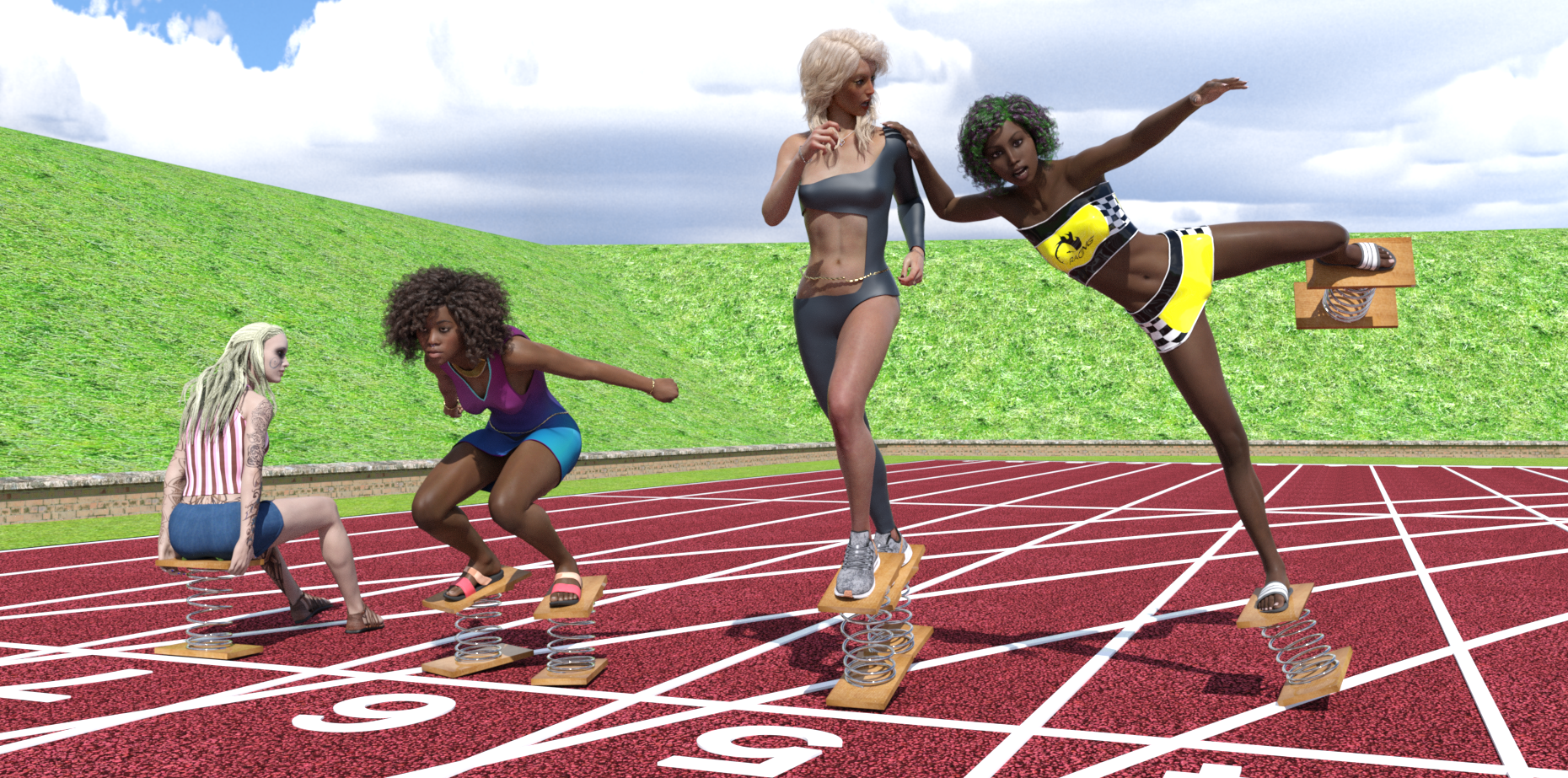
Free Items, from Background first, then figures Left to Right
HDRI: https://hdri-skies.com/shop/hdri-sky-024/
Athletic Ground: https://www.renderosity.com/freestuff/items/88078/athletics-ground
Spring Things: Not available all month so may not count, see forum thread: https://www.daz3d.com/forums/discussion/488846/freebie-spring-thing
Left Figure in Lane 7:
G3 character: Aeion the Pict Warrior https://www.renderosity.com/freestuff/items/76611/aeron-the-pict-warrior-character-for-v7-with-bonus-hair (Came with hair, shoes & texture)
Left figure top & shorts: https://www.wilmapsdigitalcreations.co.uk/view_product.php?id=393
Centre Left Figure in Lane 6:
Character: https://www.renderosity.com/freestuff/items/85911/ki-for-genesis-8-female Modified by no-count G8 body morphs (https://www.daz3d.com/genesis-8-female-body-morphs) and paid for Aniyah skin texture (https://www.daz3d.com/aniyah-for-darcy-8)
Clothing: Dress by valmont59 https://www.renderosity.com/freestuff/items/86688/free-dress-for-g8f
Shoes: Amy_Aimee https://www.deviantart.com/amyaimei/art/Sandals-01-and-02-for-G8F-758862757
Wrist & Waist ropes: https://www.deviantart.com/noone102000/art/Odalisque-Dress-FREEBIE-TO-DOWNLOAD-822900201 (Warning mature content)
Eyebrow piercings: https://www.renderosity.com/freestuff/items/83703/piercing-gaze-for-genesis-8-females (Barely visible even at full size)
Necklace: Aiy_Aimee https://www.deviantart.com/amyaimei/art/My-Heart-Necklace-for-Genesis-8-Female-729010047
Pose: Started out as Stretch Pose 11 from: https://www.renderosity.com/freestuff/items/87700/g8f-athletic-stretching-11-to-15
Nose ring: Freebie by prefoX on Renderosity. Unfortunately it seems to be unavailable now.
Centre Right Figure in Lane 5
Wrist & Waist Ropes: https://www.deviantart.com/noone102000/art/Odalisque-Dress-FREEBIE-TO-DOWNLOAD-822900201 (Warning mature content, already mentioned for Ki)
Necklace: https://www.deviantart.com/amyaimei/art/My-Heart-Necklace-for-Genesis-8-Female-729010047
Clothing: Dance by MostDigitalCreations: (Free Subscription Download) https://www.most-digital-creations.com/g8f_dance.php
Clothing leather shader: https://www.deviantart.com/tom2099/art/Iray-car-related-shader-presets-megapack-539622361
Shoes: Genesis Nike Airzoom https://sharecg.com/v/97066/browse/21/DAZ-Studio/Nike-Air-Zoom-for-G1
Pose: Started out as Warm-Up 02 from: https://www.renderosity.com/freestuff/items/87721/g8f-warm-up-1-5
Engagement ring: https://www.renderosity.com/freestuff/items/73938/diamond-heart-ring-obj-version with DAZ Uber glass, silver & gold shaders applied, turned into a prop (barely visible).
Tummy button piercing: https://www.renderosity.com/freestuff/items/82573/alternative-sig-suit-piercings-for-g8f (barely visible at this resolution)
Right Figure in Lane 4
Character: https://www.renderosity.com/freestuff/items/83613/alysha-for-genesis-8-female modified by G8F body morphs a little. Texture included in freebie.
Clothing: Racer Girl by MostDigitalCreations (Free Subscription Download) https://www.most-digital-creations.com/g8f_racer_girl.php
Shoes: Amy_Aimee https://www.deviantart.com/amyaimei/art/Sandals-01-and-02-for-G8F-758862757 (already mentioned for Ki, both pairs of sandals come in the same freebie)
Pose: Started out as one of the kicking poses from https://www.renderosity.com/freestuff/items/82812/poses-morphs-props-heavy-hitters-for-g8f, but I modified it so much I can't even recognise the original any more.
Paid For Items
Miranda Hair (centre-left and right characters) https://www.daz3d.com/miranda-hair-for-genesis-3-8-female-s
Aniyah for Darcy 8 Texture (centre left character) https://www.daz3d.com/aniyah-for-darcy-8
TritiumCG Custom Character Morph (centre right character)
CB Guilia texture hue & lightness modified (centre right character) https://www.daz3d.com/cb-giulia-hd-for-genesis-8-female
Robin Hair (centre right chatacter) https://www.daz3d.com/robin-hair-for-genesis-8-females
No Count Items
G3F & G8F Base.
G8F Female Body Morphs https://www.daz3d.com/genesis-8-female-body-morphs
Unseen Obalisk prize given to Alysha: https://www.renderosity.com/freestuff/items/87671/obalisk
Possibly the 'Spring Thing' due to not being available all month: https://www.daz3d.com/forums/discussion/488846/freebie-spring-thing .
Ki's nose ring by prefoX. Shame that.
Regards,
Richard.
Freebie 'Spring Thing'It's a pleasure to see you again Catherine.
Thank you all for your comments. But please be aware that when I say "Quick and Dirty" for the morphs, I do mean it. For the compression morph I scaled the spring by 90% in the Y axis, making the wire cross section a little oval, then moved the top board down to meet the spring.
The rotation morphs were made by selecting the vertices in the top board, spring and top face of the lower board and rotating 2.5° about the origin, meaning the lower board distorts a bit rather than the spring. Nothing more sophisticated than that.
Anyway, I do hope they are useful for daft little jobs.
Regards
Richard.
Celebrity Look-a-Likes for 3D figures part 3RayDAnt here it is https://www.renderosity.com/freestuff/items/88248/v4-zoe-saldana-zbrush-morph-for-poser usually have no problems with v4 morphs in daz but this one does not work
Brooke 8.1... Yes, finally ! ! !It has to with her shape not following the generic G8F shape down there. Just like with any morph, when a clothing item auto follows the surrounding mesh gets distorted. With Brooke, it's just more noticable because of how her belly and hips are shaped.
The best way to avoid the issue would be to use dForce cloths, so that things are draped more realisticaly.
Brooke 8.1... Yes, finally ! ! !So in a lot of images of Brooke her panties fit weirdly. I am just wondering if it is the clothing or something, going on with her groin, but they bulge out or cling in a weird way.
This is not a criticism, but I am wondering if the morph is not playing well with the underwear or if there is a cause for this.
Brooke 8.1... Yes, finally ! ! !ziatonic said:
phatmartino said:
@ziatonic Pretty sure it's this: https://www.daz3d.com/long-wet-hair-with-dforce-for-genesis-8
Thanks. Though hers looks a bit shorter, perhaps they used a morph. You would think a premier character would have the "Assets Used" at the bottom.
They never do
Digital Clothing into Real Life PicturesPlease put the Viewport into Smooth Shaded drawstyle if you are going to show a nude figure (even without its anatomical elements).
In order to use the Transfer Utility the target item has to line up with the Source figure, as loaded. It looks as if the jacket is loading at ground level. Use the tools in DS to place the jacket correctly on the zeroed figure, then hide everything but the jacket, export as OBJ, and reimport the OBJ (making sure you use the same preset in the options dialogue) - that will bake the adjustments in, after which the transfer utility should work as expected.
Brooke 8.1... Yes, finally ! ! !phatmartino said:
@ziatonic Pretty sure it's this: https://www.daz3d.com/long-wet-hair-with-dforce-for-genesis-8
Thanks. Though hers looks a bit shorter, perhaps they used a morph. You would think a premier character would have the "Assets Used" at the bottom.
Best animation software to work with DazBlender is free, which is already a big plus, and it has very capable animation tools, to the point it's been used in feature films, as well as advanced simulations beyond just a cloth sim.
On the downside, the bridge is still woefully incomplete. The rig doesn't have the proper bone orientations, and only the diffuse materials transfer over. You can export morphs, but I haven't bothered to test that since the other issues make it a moot point.
That said, the devs frequently post updates in the Blender forum, so I'm confident these issues will get ironed out sooner or later.
Digital Clothing into Real Life PicturesHey guys. I'm kinda new on the 3D world and i started on DAZ for my college project. Im trying to put digital clothes into .jpg pictures of people.
My line of thought is the following: creating a daz character with the same pose as the model in the picture, apply the clothes on the model and render the clothes without the Genesis being visibe. So that way i can paste on top of the jpg on photoshop. Do you guys think this works?
So i downloaded a Puff Jacket as an .obj and im trying to fit on my genesis 8. Im trying to use the Transfer Utility to try to make it fit using these configs. but instead of fitting at the dorso, it fits the legs of the genesis 8.
Am i doing something wrong? Also, if you know a better way to apply digital clothing on pictures i'll be thankful
Identifying modelHello everyone,
Does anyone know which model is used in this promo art (product is Jenny Wild Summer Hair by RPublishing & Neftis)?

I feel like I can see a hint of Nikolina for G8F (https://www.daz3d.com/nikolina-for-genesis-8-female) in this model, but after closer inspection it clearly doesn't fit.
If you can differentiate texture / morph, that would be stellar ;)
Thanks in advance for any help!
Vertigo ponytail rendering with odd squigglesKhoyan said:
Thank you for your suggestions. I've dialed the adjustment for forehead, as well as various head settings to fill out that squiggle space, but now I've dialed so much that the character doesn't really look like what I want, hehe. I'll try some more, but it may be that this morph and this hair just don't go well together like I want.
You shouldn't need to make any changes to the shape of the model's head, only to the morph settings of the hair.
Another thing to try is to add a Smoothing Modifier (Edit > Object > Geometry > Add Smoothing Modifier) to the hair if it doesn't have one already
Celebrity Look-a-Likes for 3D figures part 3RayDAnt, the morph is in the Rendo freestuff.
200 Plus Head and Face morphs for Genesis 8 (Commercial)Zev0 said:
Hi Guys. I messed up something in the update that went live recently. I accidently inverted the Jaw Depth Morph when I updated the products. What this means is all presets that use this morph have its strength appearance flipped. There will be an official update but here are the corrections for those who do not want to wait.
https://drive.google.com/file/d/1wZ5F_cHooz2nmkCNIdcHAwCiFPQim_yn/view?usp=sharing
https://drive.google.com/file/d/15ZkKm738iqqxzrh5PVopw210gP0STy-1/view?usp=sharing
Thank you for these corrections. Why was there a DIM update a few days ago? Did it have something to do with G8.1?
Using daz Studio with render farm?Ivy said:
Don't see Daz on their list of supported apps.
here is a whole lisrt of iray render farms https://rentrender.com/iray-render-farms/ look for the daz icon for software match.
personal I like RenderRev render, https://www.revuprender.com/ I have used them a couple of time for projects and always had great service. they are USA based 200mbps highspeed data transfer they use a remote virtual desk top so everything stays put on your own PC , & you can load any software using GPU rendring not just daz but Maya and blender as well as carrara , awesome support to walk you through the set up process to get you started . . $1 pre core minute for starting price. with $200 min requirement. to connect. Just have your scene tested and ready to go before connecting to the server and its much cheaper if you spend your time testing rendering on a render farm server its going to add up fast I do my test renders on my PC and save it before starting VDP to connect to the iRAY servers.. . I just used these guy for a commissioned animation back in February. It did cost me just under $600 for a 12 minute film but the cost went to the client. so keep track of your render times.
GOOD LUCK

Found this thread and, unfortunately, REVUPRENDER doesn't seem to be operating now. I realize the limitations of Daz studio with respect to distributed rendering, but I would very much appreciate any leads on resources that have a really bad-ass rendering station available for use to assist in getting Daz renders done.
Thanks
Freebie 'Spring Thing'Don't know what to call this other than a 'Spring Thing'. It's a mad idea that came to me and may be useful if you have a similar mad idea. It's a prop consisting of two boards with a spring between. I added three quick and dirty morphs to compress the spring and bend it relative to the bottom board. The morphs should probably be restricted to 400% or less. For an idea how to use the spring thing, take a look here: https://www.daz3d.com/forums/discussion/comment/6671831/#Comment_6671831
If you need to fit it to someone's feet, the easiest way to do it will be to rotate the 'Spring Thing' by 180 degrees about the Z axis, put the character with legs and feet straight down, then translate the 'Spring Thing' to the sole of the characters foot/shoe and then parent the prop to the foot. Now you can pose the person. It's much easier than posing the figure and then trying to fit the 'Spring Thing'to the foot.
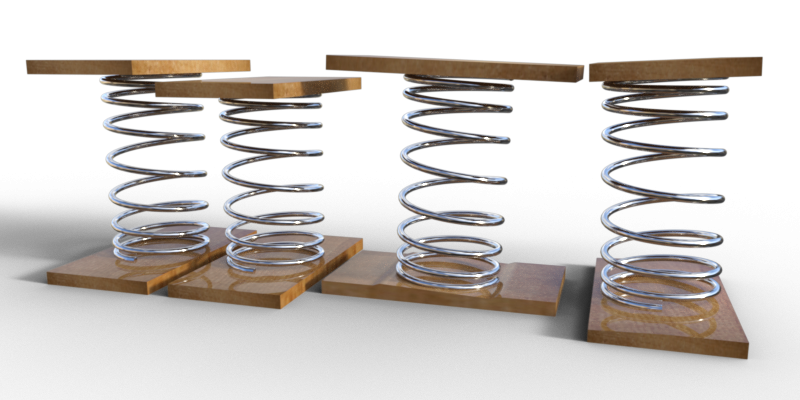
From left to right, default position, compressed 100%, rotated about X 100%, rotated about Z 100%. The rotation morphs are 2.5 degrees, while the compression morph is 3cm. The spring is 30cm long, 16 cm external diameter with 1cm diameter wire. The boards are 2cm thick, 34cm long and 18cm wide. There are 16624 facets, 9750 Vertices and two material zones. The boards are texture mapped using a very simple 'Current View Orientation' mapping in three different orientations. The spring relies simply on the metallic shader for its look. Two maps are included, the wood diffuse map and the wood displacement/bump map. The maps may already be present on your machine if you have my Rigged Wall and Door Prop.
Hope it's useful,
Regards
Richard
Celebrity Look-a-Likes for 3D figures part 3jedijudd said:
Is there any Zoe Saldana morphs? There is a recent one for v4 at rendo but it does not work in daz
Both are more takes on her in her role as Gamora than her herself, so results may vary. Could've sworn I knew of others that are straight up of her, but apparently not.
PS: @jedijudd care to name the V4 morph for her you saw? Technically V4 assets can be fully utilized in current DS - there's just a lot of hoops you hhave to jump through.
The Newest Evolution Is Here: The Daz Season Pass!...I agree with the majority of your post. Back on page one I stated my reasons for not being interested in the pass
That said:
I have grown bored of all the "beautiful people" figures and characters being released, and actually found Brooke to be somewhat refreshing (had she not been 8.1 I might have purchased her). True, I'm in a minority of those who actually prefer figures and characters who tend to look more like actual people you'd see everyday instead of more runway models/pinup girls and hunks. To this end I usually purchase a fair amount of morph, shaping, and other merchant resources along with resorting to a lot of "dial spinning" to create more "unique" characters (the "road map" of morphs and shapes used for a couple of the main characters in one of my stories would make the Shader Mixer look intuitive).
The only reasons I have Vicky5, 7 and 8 is because I got the latter two free on a loyalty banner and the former as part of a bundle (along with Mike5) for purchasing Carrara 8.5. I did purchase Vicky4 as at the time, she was the only Gen4 female character, but later supplanted her with Steph4 who was more petite with a stature and proportions closer to that of an average RL woman. As I've mentioned my disappointment has been that until G8, there have been very few "interesting" or "everyday" characters available and mostly rehashes of the same old core figures.
Of course, I also have the same views on clothing content. Too much "sexy" stuff . Unfortunately my skill at modelling is rather limited, well below what is needed to create clothing.
Dial Fusion for Genesis 2 to 8.1 (Commercial)Zev0 said:
The way G8 and 8.1 works is morph content saved on G8 will show on 8.1, but stuff saved on 8.1 will only show on 8.1. It's just how it's designed. I'm sure there must be a way to manually edit the data info to get it to show but I have not tried yet.
Ok, that is good to know for the future. Thank you for the quick reply, and also thank you for all your amazing must have products!
Daz 3D is part of

Connect
DAZ Productions, Inc.
7533 S Center View Ct #4664
West Jordan, UT 84084Licensing Agreement | Terms of Service | Privacy Policy | EULA
© 2026 Daz Productions Inc. All Rights Reserved.