-
Genesis 8 in Carrara
i saved the zip files to my external drive. everything in my runtimes needs tweaking. i bought poser 11, havent tried it yet. dont want to distract from my movie.
theres a couple of v4 m4 skins i'll use on g2. never actually used the #4 ufvs on g2, no idea if it looks good.
save a few hairs i feel nostalgic about. ones with braids in it.
is there a way to do braids in carrara dyn hair?saving sets to carrara. all the ant farm, old faveral. nightshift, kibaretto, merlin
making a dedicated library of food and furniture.
sorting out weapons by type.mebbe some old v4 clothes will look renewed with some pbr shaders.
i was looking a whole bunch of new pbr add on texture sets for daz outfits. amazing looking. never saw them before last night.do you save your g characters as stanalone figures in carrara?
strip out unused morphs. i'll need some breathing simulation morphs, flexes, throat movement,
the pre face rigged ones need expression morphs.face rig changed everything. i can still use the clothes on g3, g8.
i need to get busy with the hd morph plug in. start setting them up. tear myself away from playing with thdri domes. its like pistachios, cant stop. lol. mann i blew some moola on hdri sets. iwth the sales got em for like 10bbux a set. some of them only came with 5. doh. anything by DimenstionT is worth it. my eyes cant see a difference between a 4k and a 16k. hdri makes a big diff to how the pbr shaders look. some look dull and lifeless. some are so vibrant is like woah!
need a fresh cuppa to get started today. one last browse of the sale. check out the cuties.
Superheroes Rebooted - Renders AssembleGeoffreyHawkins said:
3dLux said:
GeoffreyHawkins said:
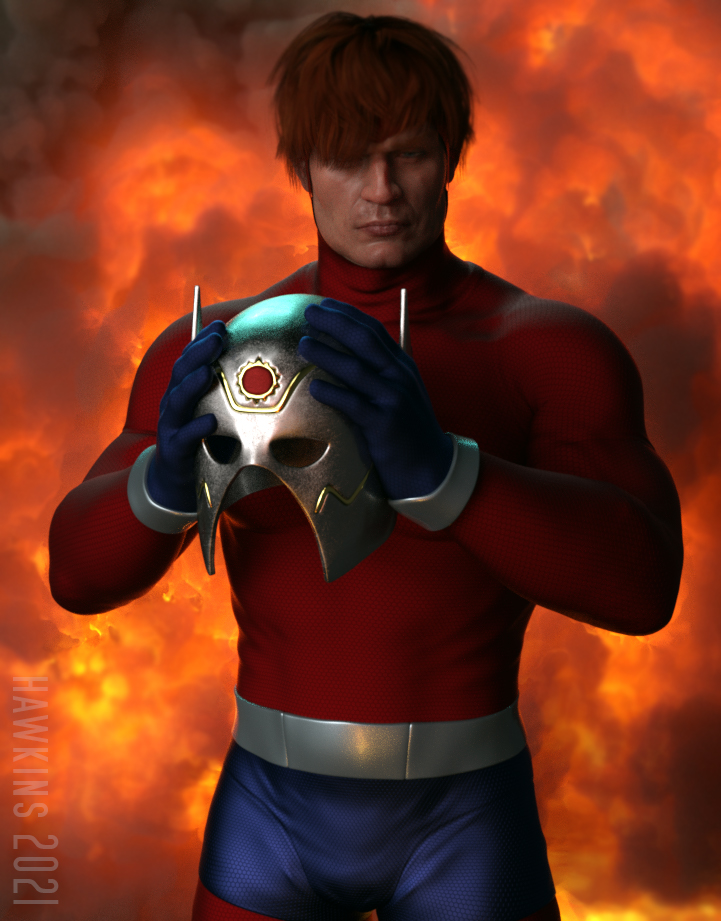
Orion of the New Gods.
This is amazing: it's Jack Kirby's creation come to life!


Is this a custom morph?
Thanks! Just some dial spinning. When all was said and done, my son looked at it and said "Nathan Fillion!"
Your Barda is amazing! Awesome work!
Now that you mention what your son said, you're right!
 It makes sense that Mother Box would give him a face like that
  Props also for making him the OG "Dog of War" version and not the 1976 superhero nor modern "update"
  You don't mess with The King's designs That said there's good and great: like Roy Thomas told Jim Starlin after seeing the first iteration of Thanos (who was more like Metron at that stage):
 Thanks on Barda: she's a buffed Ophelia 7
MetaHuman Creator - an Insane Level of Competition...Faux2D said:
Unreal Engine is a game engine and game engines can do a lot of things... if you know how to code. If you're using a game engine for movie-making it's because of resources not functionality. Something like Clarisse or Houdini far exceeds what Unreal has to offer in this regard. For me the time resource involved in getting Unreal to do what a professional movie software does is better spent in actually learning the professional software instead.
People who are not influencers seem to be underwhelmed about MetaHuman particularly its lack of customization. The faces are indeed highly realistic but there's not much room for customization. Most characters end up looking very similar to one another. This is part due to their decission to add limits in their customization so as not to break the rig underneath, and part to their premade faces which all have almost identical facial skeletal proportions. You can look at all the faces created with MH then compare that with the level of customization a game like Black Desert Online offers. Or you can look at 3dscanstore to see what I'm talking about: MH doesn't create a realistic life-like face, it creates a plausible realistic face.
I want to point out that I'm not against MetaHuman. I'm again just repeating what the developers themselves said MetaHuman is for: getting a baseline for a realistic character to later be customized accordingly. Each project has a mock-up phase which is where MH will prove to be an invaluable resource. Plus the level of realism of MH is the highest I've ever seen which means they've essentially set a new standard in the industry. A mediocre 3D artist today was a top-tier professional 3D artist 10 years ago. Because MH is free they've essentially turned every realistic character artists from a pro-level to a medium-level in less than a year. These people are all concerned across the board.
You also have to becareful with this type of license if you make over 100k you have to pay licensing which could end up being considerably more costly then what you have made on the project, It's ok if you sell a million copies at top dollar but if you don't make enough money from your development after you have put it on the market and it just scrapes 100k your up for a cost of the license fee because regardless you grossed over 100k and your now liable to make payment for use of the software.
At this stage i have enough DAZ3D morphs and chararcters plus i can just use Face Transfer unlimited if i need original features for morphs, as for body features again daz3d has many morphs covering all generations which all export via the unreal plugin. You may have to port some stuff in indiviually to get the best resualts.
Mod edit :- To sort out the quote
Installation Problem with Genesis 8 Male/Female ExpressionsOkay, stupid me, I didn't look close enough in the product description to see they were morph dials and not poses. Didn't catch the dials in the parameters tab initially as they didn't create a subfolder in Expressions and the dials did not have any specific product identifiers.
Thanks for responding and getting me on the right track.
I want to wear a tie.Nice to meet you.
The clothes I bought didn't have a tie, so I made one and put it on with a transfer, but it shifts when I pose it. What steps do I need to take to get it to follow?Some questions about teeth morphsTooth deformations are sadly common and very annoying.
I find that many of them can be corrected with the Teeth Scale All morph from these free sets:
https://sharecg.com/v/94074/gallery/21/DAZ-Studio/InTheFlesh-Merchant-Morphs-for-G8F-Vol.-1
https://sharecg.com/v/94004/gallery/21/DAZ-Studio/InTheFlesh-Merchant-Morphs-for-G8M-Vol.-1
MetaHuman Creator - an Insane Level of Competition...Personally i think DAZ3D has a better layout and understanding to the product then Unreal, while i have registered for a look at the new meta human i don't see much difference in some of the highly detailed models in daz3d iray, really comes down to how you render something and the scale you have the textures set to, upclose with zero back ground most of the daz3d collection models are highly detailed but lose that detail as more is added to the scene, i see this meta human creator as new gimmick which pretty much does the samething as Face Transfer which works fine when using normal Iphones, the better the iphone the better quality picture the editior has to copy onto the model, these metahumans look like people that have had pictures taken of there bodies from all angles in a studio, seen it on BBC news documentry along with that Lavic guy that designs a few things here at DAZ3D, They basical do a face transer but take a picture from every angle of your body then composite it in 3d making a super realistic version of the skin and shape too mold onto a blank model. the setup i have seen had quite alot of cameras setup to take rapid shots of the body like slow motion capture frame by frame, you may want to add how the skin ripples with movement in more detailed models by taking a series of shots as the body moves rather then try and shape it manually to a bodies movement.
Vertigo ponytail rendering with odd squigglesmargrave said:
Some other things to try:
Change "Instance Optimization" in the render settings. Although this turns instancing on/off, for some bizarre reason it also adjusts the transparency settings in the scene. You can sometimes clear up material issues (black eyes, orange skin, hairline pokethru) just by changing it to something other than "Auto".
Turn the scalp surfaces's opacity to 0. Sometimes you can get away with not having it, though other times it'll make the character's head look kind of balding.
Add a smoothing and/or push modifier to the scalp. This will enable the scalp to conform to the head, eliminating pokethru in some cases. You can use a negative value for the push modifier to make it shrink.
Theres more then one way to skin a Cat so to speak, some hair pieces don't have a scalp to hide in a file tree leaving a leaking dye stain look on the forehead, i found the mega updo hair pack suffers from this issue, if you use certain pieces it looks like someone spilled dye all over the forehead and parts of the hair, most times theres a scalp you can hide, Sometimes if i can't find a setting i may be able to use an opacity shader to hide it if it can't be turned off.
I'll give the instance Optimization a try next time to see if it clears some of these issues without having to use a body morph slider... Some cases it comes down to how the piece may have been converted to a particular genesis, i find when converting hair or outfits that using gen 2 not 3 is the better option to have meshs fit, if you use 3 it works maybe but doesn't sit right on a gen 8 scalp, these are just a few issues when using hair pieces.
MetaHuman Creator - an Insane Level of Competition...i do agree which the current level of customization of MH is really poor i even told that in one post, it's really limited in his current state and i'm not even talking about the "body" where it's near 0 you only have 3 type of bodies with 3 sizes and 0 customization for then.but indeed the face customization for exemple compared with daz is much poor, what i feel which make MH stands is the level of "customization of the skin with a lot of detials to be added and for basically 0 where in daz to achieve the same level you have to expend some $$, they really need to improve a lot.
The experiments my colleagues have done with MH reveal a fantastic feature that offers almost unlimited customization: When applying a morph to a MetaHuman, the joints/bones adjust to the new shape. This means is an artist need only to approximate the proportions of their desired character and then apply a blendshape in Maya to get the exact shape they need without breaking the rig. Combined with the industry-standard UV configuration, we have all the tools we need to "sculpt" or own unique characters outside of the Creator app. When I found out about this, I was all in. Most people are overlooking the real value in Metahumans is the fantastic facial and body rig. It's not the realistic faces that got me to commit to MH, it's the multi-thousand dollar facial rig and body with 700 corrective joints! As someone who personally paid for FACS facial scans and a Snapper's rig, I can tell you that rigging is by far the most costly part of the character development pipeline.
Why does my Genesis 8 female look like this now?music2u4u said:
OK...I have examined every single dial in all the morphs for all G8 characters and all of them are set at zero. Tons of them. I just scrolled the entire list of them.
For future reference, you can easily see if any morphs are dialed in by clicking on "currently used" at the top of the left side of parameters. It does sound like there is a morph that is loading with your figure (Some characters are accidentally sold with the morph set to load at 100% instead of zero. Once you find the culprit, you may want to submit a ticket), but I can't see the pic you uploaded of your G8 for some reason. If you don't see anything dialed in, maybe try unhiding hidden morphs by right-clicking on the parameter tab, going to preferences, and selecting "Show hidden properties."
Also, your G3 doesn't look right to me. She has kind of a babyface and button nose there. The regular G3 looks a bit older and has a larger nose with a higher ridge. Your G3 also has a smaller waist.
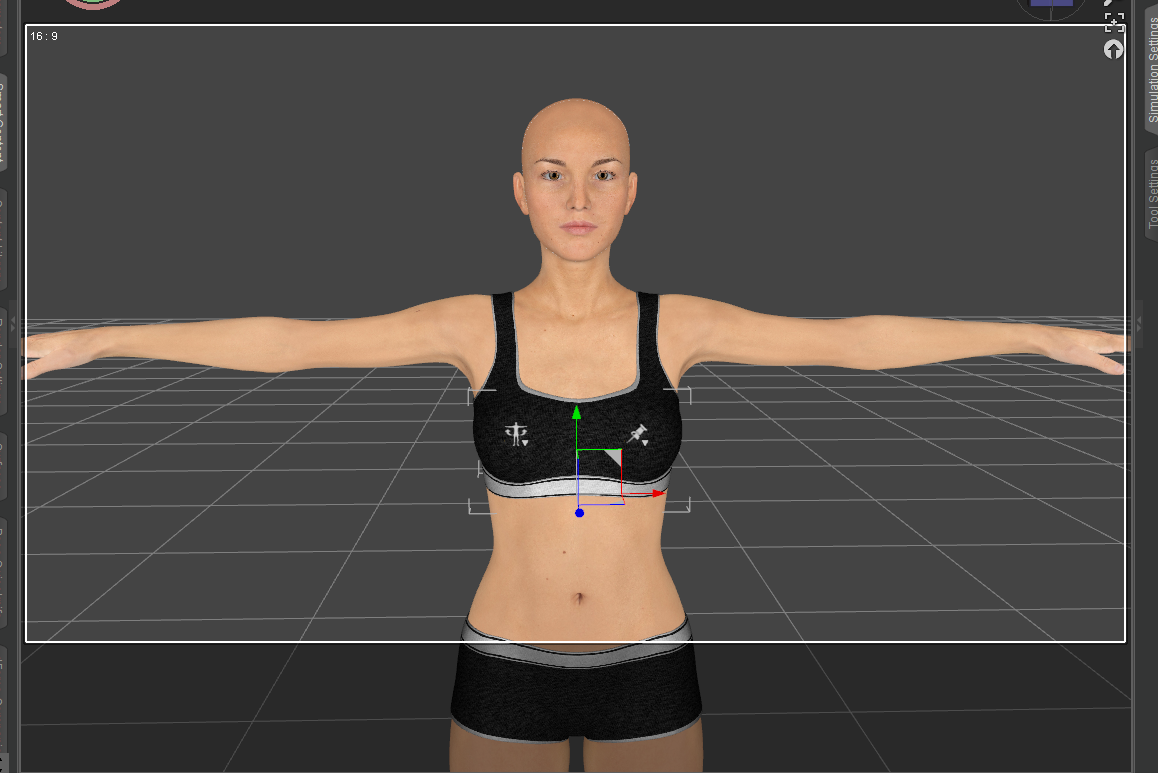 Morph Slider doesn't work anymore after loading a new figure.
Hello there !
I'm using Daz Studio Pro 4.15 and I'm running into a problem since a few hours now.
I'm using a Transgender morph ( https://www.deviantart.com/agentunawares/art/Transgender-Genesis-8-723851486 ) on my females Genesis 8. Basically, I never use Genesis 8 Male, I only use Female and then apply this morph when I want the figure to be male. It saves a LOT of time and effort for my usage.
But today, this morph is acting very odd. When I close Daz completely and open the first figure with this morph applied, it will work. Although, when as soon as I'll load in another (or even the same figure) the morph won't work anymore. I can move the slide but the only thing it will really do is move the breasts up and down a bit.
To fix that, I need to close Daz and open the figure I want. But once again, as soon as I'll open another figure it'll break the slider / morph.
Any ideas on how to fix that ?
Thanks !
Genesis 8, 3 and 2 in Carrara Alt MethodSo my method is to do all of this heavy morph lifting in Daz Studio, then create the character I want and save as a Character Preset. Now it loads in both Studio as well as Carrara - unlike how I used to build my characters.
Holy Cuda Cores, Renderman! My GPU has tripled in price!Torquinox said:
Sure. It's okay to limp along with substandard hardware, even though we all know the latest products are more resource intensive than ever. Maybe some of us are tired of limping along.
...I'm one of those who has been doing so, my system is around 9 years old now, it's still DDR3 with PCIe 2.0 expansion slots, I've about hit the upper limit of how far I upgrade it, save for adding an SSD to transfer my Daz content library to. It has a 6 core Xeon 5660, 24 GB of 1333 DDR3, a Maxwell Titan-X GPU, and a new 850w PSU. The BIOS does not support an NvME PCI SSD and not sure if a PCIe 4.0 GPU card would even work in a 2.0 x 16 slot (still researching that). I stopped updating Daz at ver. 4.12.0.47 as it has been incredibly stable while newer releases were buggy (so no G8.1 with the special PBR skins), and as I understand, 4.15 automatically uses OptiX acceleration on older GPUs which takes more VRAM and memory, so no AI-denoising.
As long as Nvidia doesn't abandon Iray support for Maxwell generation GPUs I'll be OK. Then again that would only occur within a new update of the Daz software so I should be OK.
In spite of that, compared to the 32 bit notebook I used for nearly five years, it is a major improvement and for now I, am content even though heavy scenes still take a bit of time to render (though no where near as bad as in CPU mode).
[tutorial] how to "work around" fix the double down export issue of geografity stuffsDavid Vodhanel said:
I just want to point out that you should save a copy of your character before deleting geometry if you go that route. I've found that trying to modify the character after deleting geo doesn't usually work well (at least back when I tried it).
yeah without any doubts, this is why i told which you only do that if you absolut know what you are doing, if you already aware of any issue it can get like you told have a copy just in case and those stuffs, the most pratical stuff is just hidden the mesh and allow the transfer do that, normally it don't get any issue, the only problem on that is which "any bones" which where connected to that mesh part for exemple legs will remains as "extra", then for "perfomance and optimization the ideal would be remove those "extra bones", but again you only do that if you really know what you are doing and they not gonna mess wit anything otherwise leave then as they are if have some "extra bones" is not that really a issue for your project.
the real issue without any doubts still the bug which looks like can't be really fixed.
Export MD (CLO3D) Clothes to DAZ3D , and posing.HELP I AM WILLING TO PAY TO DRESS MY AVATAR
Hi guys, I've been reading on the daz forum for a while. I try desperately to dress my avatar with clothes created on clo3d but as soon as I do the "transfer utility" the dress wrinkles everything and "tears". Anyone who thinks they can dress up an avatar (Genesis 8) by making the clothes look real, soft and fall well on the body, so that animations can also be done, please contact me10 poses for Mick Standalone FigureLeana said:
Faeryl Womyn said:
Mick is not a stand alone figure, he is a character morph of G8 & G8.1 Male
Sorry, but no. As mentioned on the product page, Mick is not a G8 character but an original figure.
The pack also includes a version of his accessories made for G8, but Mick himself is not G8.Ignore previous message.
?? How do I spawn a deformed prop from a finished DForce drape ??Thank you for your prompt reply.
Looks like I am confusing DForce with another draping program which had a 'convert to static prop' option. Will use the brute force OBJ/morph option going forward.

Much appreciated
?? How do I spawn a deformed prop from a finished DForce drape ??Hide everything but the item, make sure the resolution is set to Base, File>Export as OBJ, clear the simulation, then Edit>Object>Morph Loader Pro, select the OBJ (and make sure the preset is the same as used for export). There isn't a built-in spawn option, though you could certainly make a feature request for one (via a Techncial Support ticket).
Superheroes Rebooted - Renders Assemble3dLux said:
GeoffreyHawkins said:
Orion of the New Gods.
This is amazing: it's Jack Kirby's creation come to life!
Is this a custom morph?
Thanks! Just some dial spinning. When all was said and done, my son looked at it and said "Nathan Fillion!"
Your Barda is amazing! Awesome work!
AIUTO...CHI CONOSCE L’ITALIANO? PARTE TREDICISilvhe said:
Kainjy said:
Silvhe said:
Raga ma si può sapere che stracavolo hanno fatto a capelli e cappelli vari? Ho l'uniforme da soldato americano della II guerra mondiale per G8m, quando faccio indossare l'elmetto con "fit to" a G8m senza morph funziona, se applico appena il morph della faccia l'elemtto esplode

Soluzioni?
Le cause possono essere 2:
- il morph è particolare (tipo corna che sbucano dalla testa o applichi la faccia di un mostro/alieno) e allora il cappello non riesce a seguire bene la superficie della testa perchè pensato per avere una testa simile a quella base del G8M
- il cappello ha dei morph che magari prima non aveva (alcuni prodotti vengono aggiornati dagli autori stessi che fanno variazioni/correzioni e magari hanno scazzato qualcosa)
La soluzione migliore è quella di
- prendere il tuo cappello quando hai il tuo G8M privo di morph,
- esportare il cappello (da solo)
- applicare il morph al tuo G8M
- reimportare il cappello come mesh
- Imparentarlo al joint della testa
- Salvare il tuo cappello come nuovo asset (senza usare il Transfer Utility)
Così avrai un nuovo cappello che non si deforma con la faccia... discorso analogo per i capelli. Ovviamente usa i parametri di scala per ingrandire/ridurre il cappello a seconda della forma della testa.
Grazie per la risposta, ho risolto imparentando semplicemente capelli e cappello alla testa. Il metodo che indichi è senz'altro effciace, lo userò in attesa che facciano uscire una versione corretta di DS
Anche io uso quel metodo ogni tanto, ma non con i prodotti dello store. Lo faccio solo con terze parti o cose che creo io di mio.

Non vedo perchè gli utenti debbano fare tutta quella fatica se il prodotto funzionava correttamente e poi smette di funzionare a causa di un aggiornamento della suite. Sembra quasi di stare sui mec, ma almeno lì la colpa è di eppol!
Ho fatto noto il problema del Autofit sul forum, ma visti i risultati con le segnalazioni degli altri bug, mettetevi l'anima in pace e fate rollback a 4.12.0.86.
Daz 3D is part of

Connect
DAZ Productions, Inc.
7533 S Center View Ct #4664
West Jordan, UT 84084Licensing Agreement | Terms of Service | Privacy Policy | EULA
© 2026 Daz Productions Inc. All Rights Reserved.