-
Skin Texture change in animation time line how to do it?
For example, I am trying to morph Landon 8 into the Lycan over a set of keyframes and it works as expected transition is smooth the change from one pose at zero to the final position works fine have adjusted to parts don't clip through each other, however, no matter what I try If I set the Landon textures at the first key and the Lycan skin and hair partway through the animation the Lycan overwrites the Landon textures at the start of the animation. Anyone have any ideas for this or would be so kind as to point me at a guide on how to do this, Google hasn't turned anything up. I must be overlooking something simple steps wise, have been trying to scale the hair and its length through the sequence and using keyframes but looks like its all or nothing. Many thanks in advance
Migrating DAZ over to new machineTo an extent, you can just copy data directories over and point Daz at them, but I don't know if Windows will have issues looking at Mac files. (I haven't tried this in a while.)
Clean install is good in theory, but when you have terrabytes to transfer, it's sometimes better just to copy over the old.
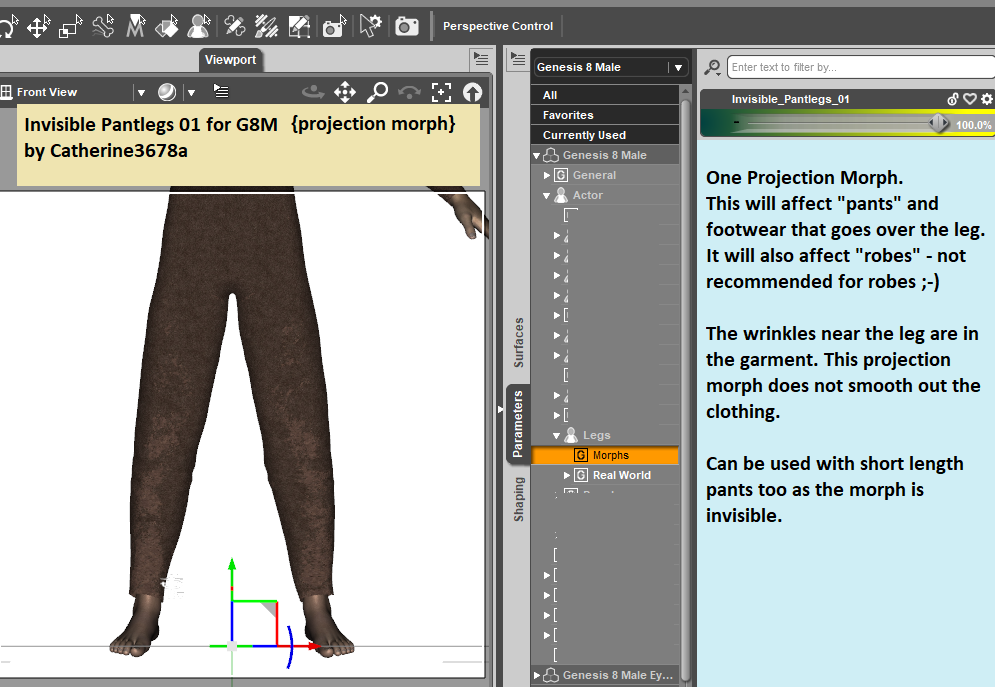
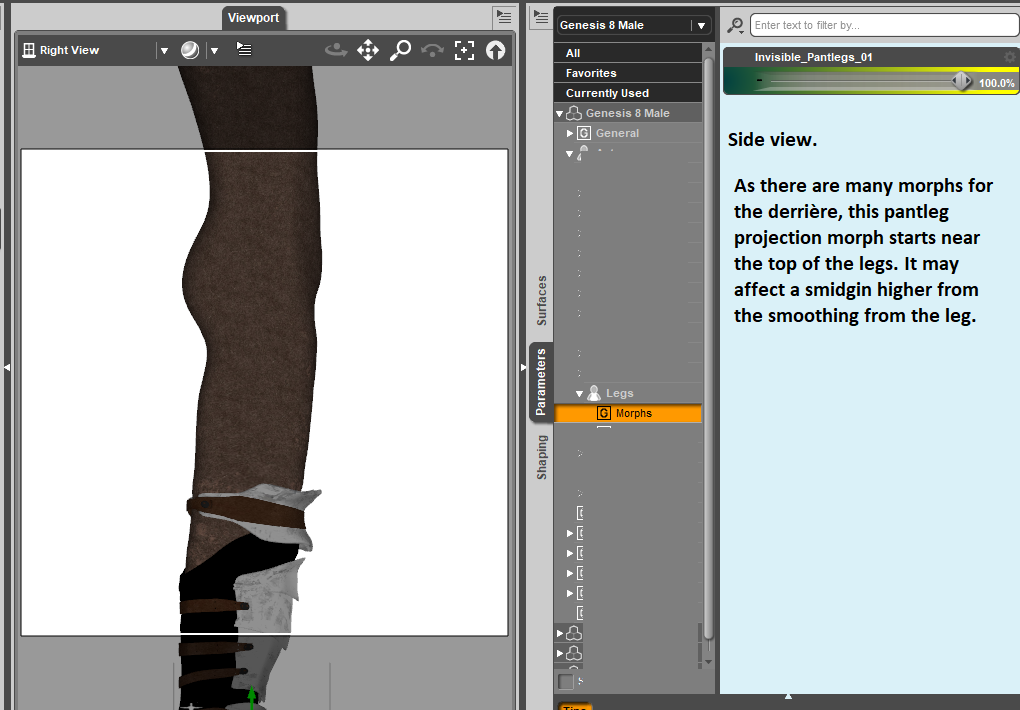
Invisible Pantleg Bulge 01 {Projection Morph}Testing out an idea here: when applied to the figure, G8M, it will project the morph into the clothing that is affected by the legs. Generally speaking, the pants as well as any footwear that goes over the leg. Works well enough with several clothing items. It is not recommended for "robes" ...
Sigh, the attachments come and go and come and go .... here's the link for the upload at sharecg.com. {link retired}
eta: The updated one is available at Renderosity. {I don't recall if the one attached is the updated one or not and as the forum has been quirky of late, I'm leaving it be.}
 The My Bucket's Got a Hole In It Complaint thread
Subtropic Pixel said:
kyoto kid said:
...non complaint: Put in the order for the 2 TB SATA III SSD and the 3.5 to 2.5 adapter for the drive bay which will hold both the C & D drives as it was "payday" and I had a discount coupon offer good until tomorrow Should be here within the week and finally I'll have a much more zippy content library (getting a lot of wait times lately as the current drive is filling up as a good portion non library/runtime related stuff that will remain on the HDD when it gets moved to the "E" slot.
Nice on the new drive. Now, since I'm the "backup loon", I have a tip to share with you and anybody who might use the backup program Macrium:Reflect. This could apply to other backup programs too, so whatever backup method you use, take a moment here.
Whenever you add a drive, move partitions from one physical drive to another, change drive letters, or hide/reveal drive letters in your partitioning software, you should ALWAYS go back into your backup program afterward and make sure that your backup "jobs" still point to the drive letters/partitions that you expect them to.
Many many times, I've made drive changes to one of my systems with ultimately NO DIFFERENCES at the end of the process. For example, my C drive is still my C drive, but it just sits on a different physical drive now than it did before. Or my P drive is still my P drive and still contains my DAZ library, but it's not at the end of physical device 2, it's at the beginning of physical device 3.
And I'll go into Macrium:Reflect and will see that my C drive backup is now backing up F drive instead. And P drive backup backs up drives J and K instead, while my F drive backup job is pointing to a drive partition identifier that doesn't translate to any valid drive partition, meaning that that job will fail upon next execution.
It's easy enough to fix this, and I do. But that's always a step I do whenever I just messed around with physical or logical drive partitions: Check my backup jobs. Or else I might no longer be backing up C drive, a content drive, or my documents drive. Yikes!
It's a simple "best practices" check and may only take you 5 minutes to complete, depending on the backup program you use. But I highly recommend taking that time and doing it right.
Good luck with the data transfer and getting your new drive up and running.
...thanks, and good advice on the backup targets.
Duplicate Formulas - possible solutionRon Knights said:
In 20+ years of using DAZ products, I haven't encountered any Duplicate Formulas. Am I lucky, or what?! It seems this problem has existed for decades. Any such problem should be easily fixed in a very short time. What's going on here.
Most of the time it's a clash between two properties with the same name - usually two characters from different stores. The issue doesn't show up unless both are installed. it doesn't affect older figures (if a similar issue happened in Victoria 4 the second morph injected would simply replace the first) and it obviously does require two characters with the same name - since Genesis 8 has already had a longer life than previous Genesis generations it's more likely to crop up - and it also depends on there being ERC links. Fixing the issue is a matter of renaming one or both of the character properties involved.
Invisible Bulges for G8MTorquinox said:
Should be interesting. Thanks! Mostly, though, it seems that men's 3d pants don't fit the figures like real pants. They fit more like tights. Not sure more bulging will fix that. O_o
Want more straight leg away from the body?
Update: here you go.
The My Bucket's Got a Hole In It Complaint threadThat game was called Oregon Trail. Pretty much everyone who played it "died of dysentery." So no, it wasn't you. It was just a hard game.
The next time your phone's storage is too full, try closing some chrome tabs and deleting your unused apps. A reset is overkill. You can also delete unwanted photos and transfer the ones you want to keep to the cloud.
Complaint: My arm hurts like hell. Feeling very crappy all over as well. Don't want to get out of bed today.
Tanlines for Genesis 8.1?I use a Genesis 8 geoshell product from the other store by ShanasSoulmate...
https://www.renderosity.com/rr/mod/bcs/tanlines-for-genesis-8-female/127753/Should work on any skin.
You just have to do the geoshell transfer between G8F and G8.1F, and it should work just fine.Jazz 8.1 discussionMaybe his head morph could be used for an Arab or Indian character.
Jazz 8.1 discussionI was tempted by the clothing until I realized that there were no real promo shots. Just front, back and untextured. I'm thinking they probably don't look good in the field.
I like the hair and will probably get that.
The head is ok but it seems to float in a grey area between toon and realistic.
The body looks pre-pubescent to me. Elijah 7 was rail thin but it looked like he'd been through puberty. This guy's body looks like it's never seen a drop of testosterone.
The HD morph shows some detailing in the face and limbs but it looks like they skipped over the torso entirely.
I've held out for a long time but I'm starting to believe the conspiracy theories that Daz is attempting to deliberately tank sales of male characters and clothing.
Jazz 8.1 discussionI like his head morph, I don't think he looks toon (not that I would mind that). He looks kind and I think he does bring something a little different to the gene pool.
His skin seems fine, if not all that special.
His body morph is... really bad. And not because he's skinny. Elijah 7 is a skinny dude and has a much more interesting body morph.
Jazz 8.1 discussion
LOL *high five* (and I was on sarcastic mode when I said they were counterparts)Frinkky said:CHWT said:
Frinkky said:
Whilst I'm all for options for the 'bnd' (bloke next door), eg. not an olympic swimmer, gladiator or some other fitness freak, it's almost like they forgot to finish the torso here - it looks like a toon. Even the HD morph seems to neglect this area. It is not a suitable counterpart to Jacqueline.
Nah they are counterparts (see the resemblance: the 2008 movie Get Smart)I didn't say they weren't, I said that he is not suitable.
Steve Carell looks like a human being and not a cartoon character, even next to Anne Hathaway.
Jazz 8.1 discussionxyer0 said:
CauriB said:
I like him. Here's a quick render of him in Cycles, added some muscles to buff him up a bit.
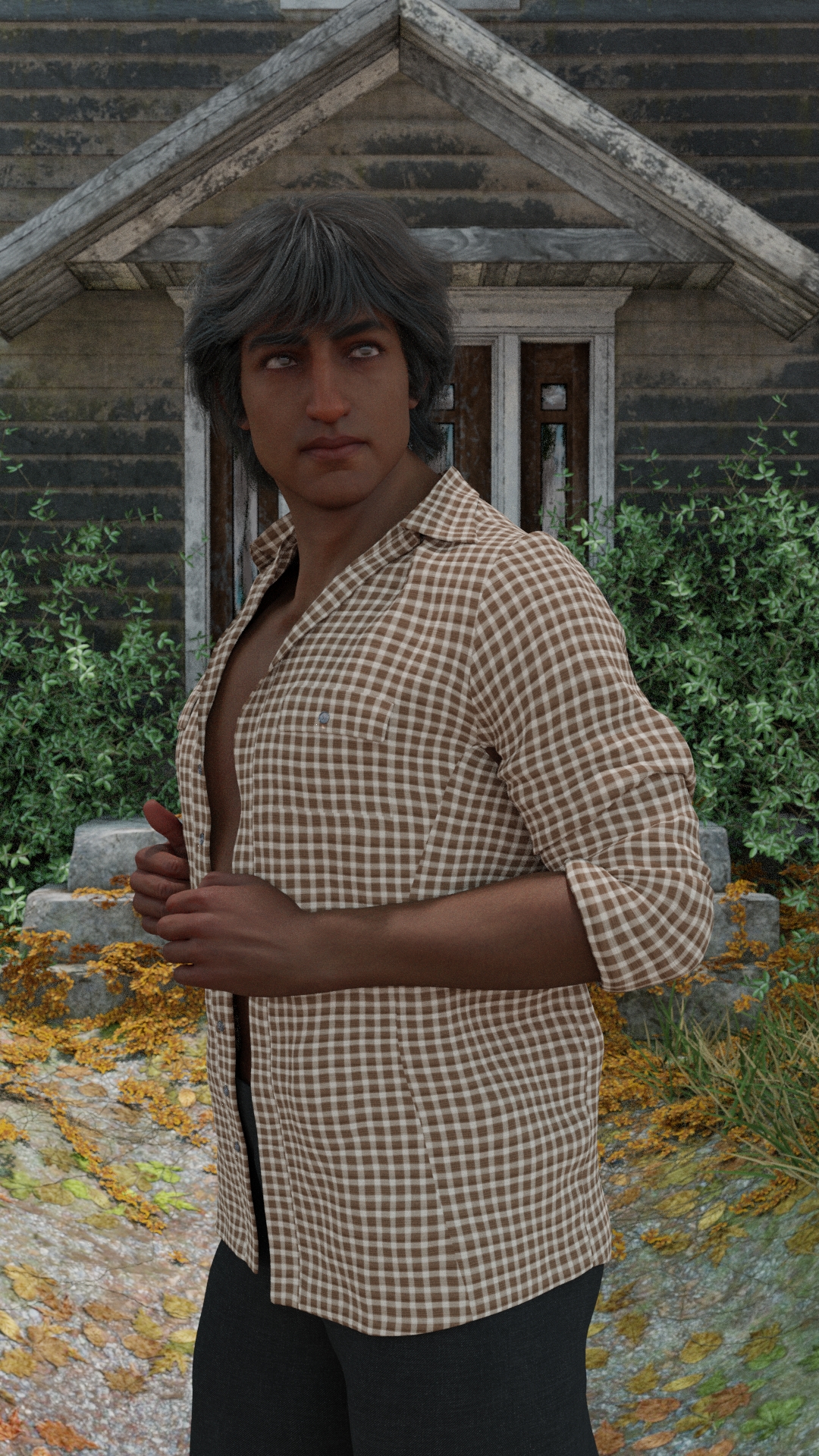
@CauriB Great job! You saved his papadum. He needs the Bollywood hair to frame his face, I guess. But he's still too Pixar for my tastes. If I may ask, did you morph his face a bit?
No morphs on the face :-)
Jazz 8.1 discussionCHWT said:
Frinkky said:
Whilst I'm all for options for the 'bnd' (bloke next door), eg. not an olympic swimmer, gladiator or some other fitness freak, it's almost like they forgot to finish the torso here - it looks like a toon. Even the HD morph seems to neglect this area. It is not a suitable counterpart to Jacqueline.
Nah they are counterparts (see the resemblance: the 2008 movie Get Smart)I didn't say they weren't, I said that he is not suitable.
Steve Carell looks like a human being and not a cartoon character, even next to Anne Hathaway.
Jazz 8.1 discussionCauriB said:
I like him. Here's a quick render of him in Cycles, added some muscles to buff him up a bit.
@CauriB Great job! You saved his papadum. He needs the Bollywood hair to frame his face, I guess. But he's still too Pixar for my tastes. If I may ask, did you morph his face a bit?
Jazz 8.1 discussionThe Blurst of Times said:
A simple shot with less going on, showing the body... presented without comment.
The head morph is a nice enough addition to the gene pool. The body is -- as you carefully did not say -- so non-descript as to be . . . unworthy of comment.
I think I just broke my own brain.
Duplicate Formulas - possible solutionPerttiA said:
It should be noted that if you make changes to your morph folders, either by adding, removing or editing the morph files, the next time you load the figure, the load time is longer because DS updates the useless cache file.
That might explain the random deviations. I was thinking that DS might be busy importing metadata or updating the database, but the instances seemed too random.
Duplicate Formulas - possible solutionIt should be noted that if you make changes to your morph folders, either by adding, removing or editing the morph files, the next time you load the figure, the load time is longer because DS updates the useless cache file.
[Released] Character Converter from Genesis 2 Female to Genesis 8 Female [Commercial]MGMOZ said:
I have been trying to solve an issue with the Male equivilent of this G2 to G8 Converter.
I have tried following the directions suggested on this the Female equivilent but all attempts have failed.
In every attempt, I end up with three characters on screen, the G2 character (turned off), a RSCloneGenesis2Male with the Genesis 8 character with it's head way off to the left!
I am about to give up on this product but decided to try one last time via this forum.
What am I doing wrong??
Why you have 3 characters at the end I don't know without seeing why the script crashed. However, the head to the left is a common error where you had moved one of the figures before running the script. The converted morph works to push the head over to where you placed the figure. You need to delete BOTH the clone and all the morphs and run again. On first run, the script creates a clone (and never recreates it). You need to delete the clone so the script will regenerate it. It is located at C:/Users/USER NAME/AppData/Roaming/DAZ 3D/Studio4/CharacterConverterMorphs.
Duplicate Formulas - possible solutionFurther experimentation has lead me to a retraction, a correction, and a couple of additional tid bits.
The highpoints first:
1. The G8F load time reported in the error log takes into consideration the human interaction time required to click the "Ok" button on the Duplicate Formula error. In other words, the load time clock keeps ticking while waiting for the error to be cleared. In hindsight this is obvious, but just didn't occur to me at the time. The DF errors still have an impact on load times, just not as dramatic as I first thought they were.
2. DS seems to have a variance of load times on G8F from anywhere between 30 seconds to a minute. I haven't been able to determine what might be causing this, but I wanted to mention it. I usually do multiple loads just to make sure I am not seeing one of these blips.
3. Having two video cards seems to have an impact on G8F load times. Which isn't something I would have expected.
4. Missing Target warnings has an impact on the load times, but usually not as dramatic as the Duplicate Formula errors. I say usually only because there are a few products with a lot of these warnings that do have a significant load time impact.
With that out of the way, here is the new data I found. LT stands for Load Time.
5 minutes 48 seconds LT: 2 Video cards, Duplicate Formula errors present (and babysat).
4 minutes 48 seconds LT: 1 Video card, Duplicate Formula errors present (and babysat).
2 minutes 49 seconds LT: 2 Video cards, no Duplicate Formula errors.
3 minutes 25 seconds LT: 1 Video card, no Duplicate Formula errors.It's interesting that having two video cards makes LT worse with Duplicate Formula errors and better without. Babysat means that I waited for the error message to appear and clicked it as fast as I could. Removing as much of the human interaction time as possible.
A couple of comments about my hardware / software set up. I have an external secondary video card that I can turn on and off. So the system and software is exactly the same when the video cards are switched. I have somewhere between 650 and 750 G8F character / morph packages installed. Which should explain why the LT would be this long at all.
For the Duplicate Formula errors, I have three products that have these issues. Two of them have conflict with one other product. The other one I haven't been able to determine the conflict. I'm not going to name the products as it is irrelevent because you have to have both conflicts installed to experience the error.
Daz 3D is part of

Connect
DAZ Productions, Inc.
7533 S Center View Ct #4664
West Jordan, UT 84084Licensing Agreement | Terms of Service | Privacy Policy | EULA
© 2026 Daz Productions Inc. All Rights Reserved.