-
VR and Motion Tracking etc.
Hi team,
Just want to check but do you have a plan to implement a feature to edit in the VR space? What is the latest?
It would be awesome if you have a plan to support scenarios like below...
Best scenario;
- Support Oculus, dive into the VR world and adjust various settings such as posing, gravity, wind, outfits, cameras, lights
- Support an App like the Live Link Face to morph
- Load and analyse a video and match motions, lightings etc.
Better;
- Support Oculus controllers to edit in 3D
Good;
- Provide an option (monthly subscription) for us to edit on the cloud to have more rendering power.
Importing EmotiGuy to UnityOk, I have realised that the converter is not necessary.
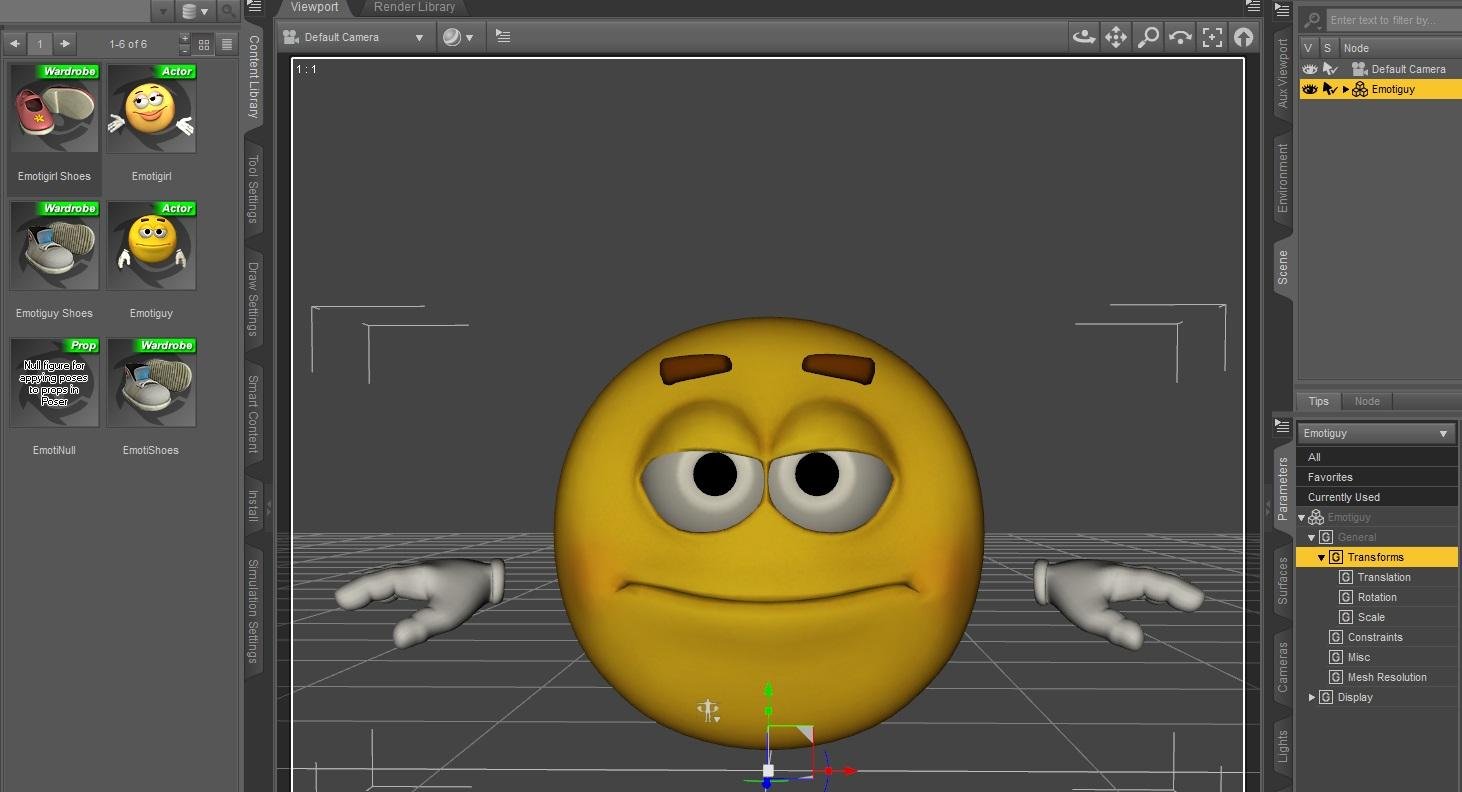
Here are the steps while using Daz to Unity bridge from Daz Studio 4.15 Pro to HDRP project in Unity 2020.3.4 f1

1. Load Emotiguy to Daz Studio and save the scene under the name, you will recognize later on - for example Emotiguy01
2. Select Emotiguy in the Scene view
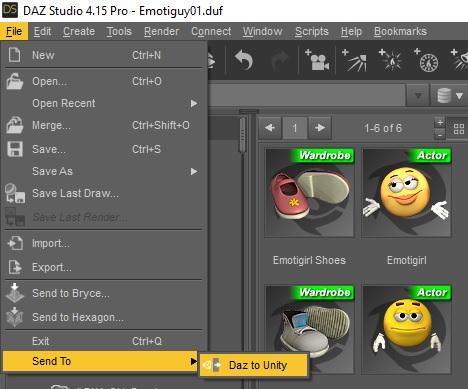
3. Choose "Send To" -> "Daz to Unity" from File menu
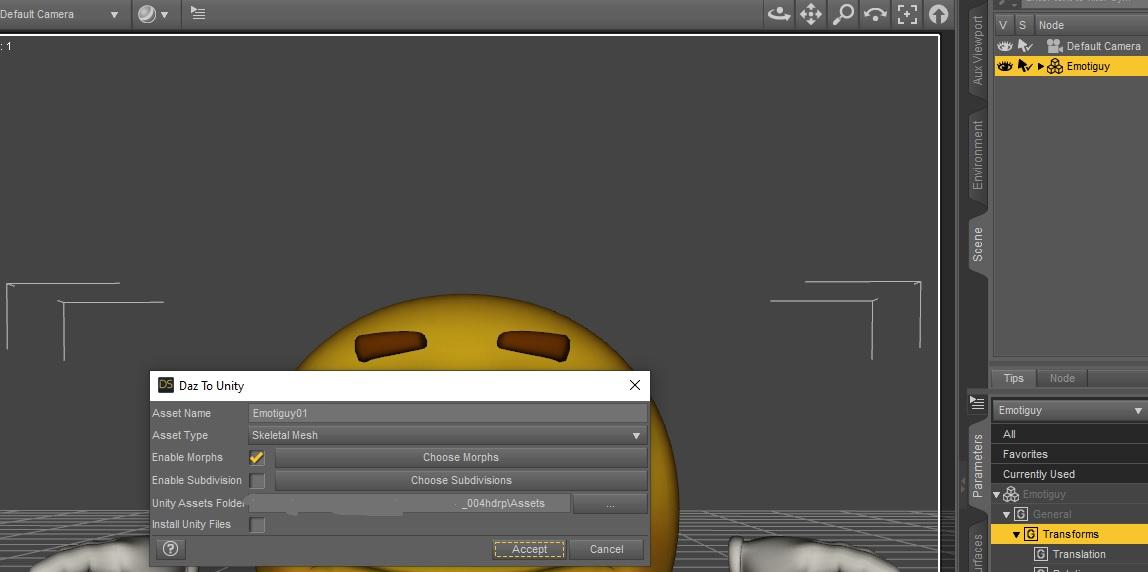
4. In the window with Daz To Unity, you could check "Enable Morphs" and then click on "Choose Morphs", but it did not worked for me
5. Still in the same window, browse to the Assets folder with your HDRP Unity project
6. Put the check mark on "Install Unity Files", if it is your first transfer to your project in Unity (I have already transfered items from DS earlier, so I unchecked it)
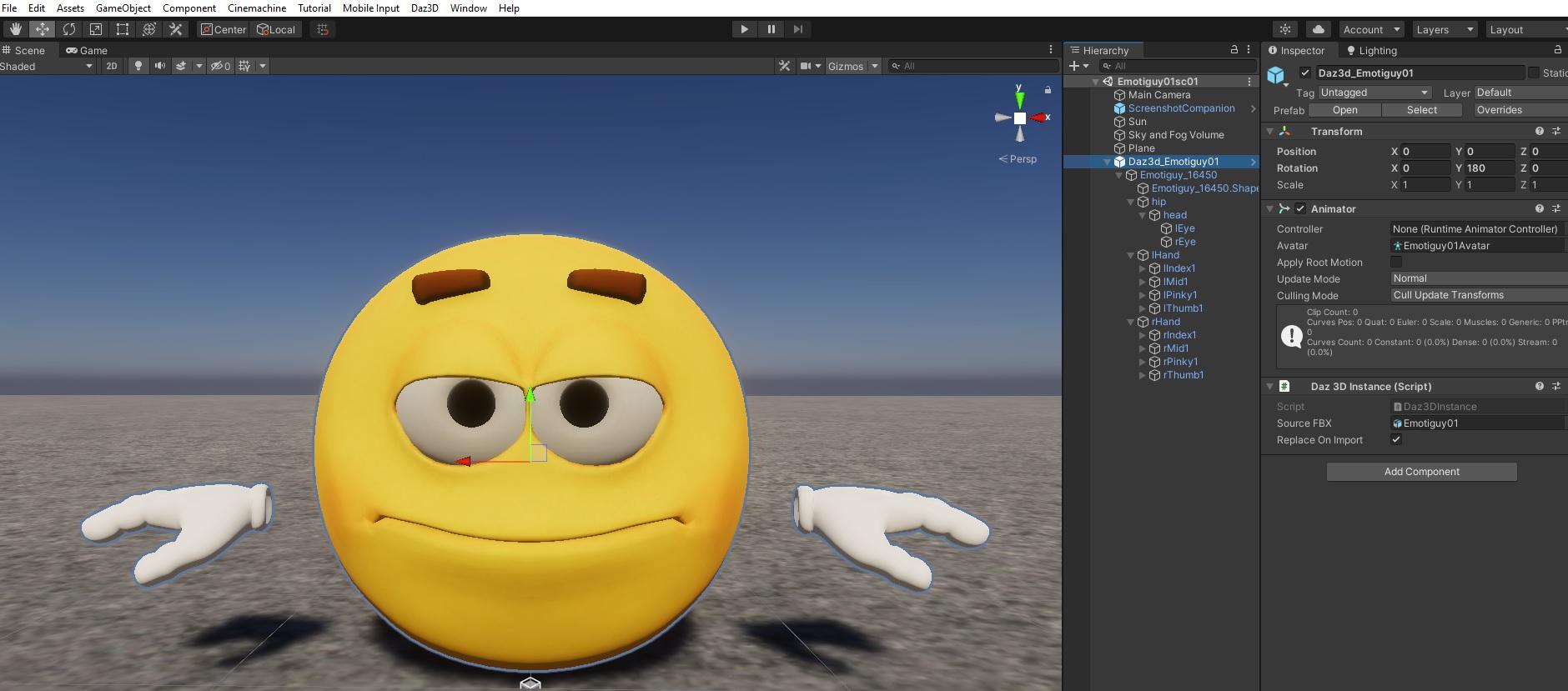
7. Switch to the Unity and you will see soon the converted Emotiguy in the scene.
 AIUTO...CHI CONOSCE L’ITALIANO? PARTE TREDICI
Guardate che NON tutto può essere usato in Dforce. Alcuni vestiti non sono "fatti" per essere "cambiati" in vestiti Dforce eh. Dipende dal PA, non da DS.
E per alcuni capelli che cambino per via dei morph, dipende da come sono fatti, molti non hanno intere liste di morphs all'interno, non è semplice inserire tutti (troppi forse) morphs dentro dei capelli . dipende dal PA, non da DS...e lo so, sono ripetitivo ma è così.
Subsurface Scattering not working G8F?IceCrMn said:
Save a shaping preset so you don't lose it.
Select the character you want to save
File>Save as>Shaping preset
Then you can apply that preset to a new Jacqueline,or any 8.1 for that matter.
Should work on 8.0 figures as well.
You can also apply the broken Jacqueline's shape a new Jacqueline in the same scene.
Select the broken one.
Click "Edit" on the toolbar.
Edit>Copy>Copy FigureSelect new Jacqueline.
Click "Edit" on the toolbar.
Edit>Paste>Paste Figure ShapeStudio will appear to freeze while it reshapes the new Jacqueline.
Starting with different base characters can give different results.Experiment with this sometime if you want to see what it looks like.
Sometimes Studio just doesn't work right and requires a restart to get it going again.
I have strange issues when I've been running it for hours on end.Lights don't work, cameras won't work, all kinds of strange things.
A restart normally gets it sorted out and back going right again.
Thank you, that is a very useful tip. It did seem to help to transfer the morphs to a new figure. I've no idea why that old figure suddenly broke like that!
NFT and the Future of Digital Contentplasma_ring said:
[snip]
It sucks! This could be good, virtual avatars and the internet as an MMO could be good--that's basically been my Dream Internet since the 90s! It's just irrevocably tainted for me by knowing the people pushing it hardest actually have enough money to shape the future of the world with a "Let's just do it and be legends, man" level of unearned confidence in their own wisdom. When industries move fast, it typically means nobody is stopping to think about collateral damage.
It's called 'pump-n-dump' for a reason. The ones that started it and have the bigest stake want to do everything they can to make others want to buy into it. So you have a couple of them 'selling' an NFT for sixty-nine million to each other to make others think they want/need in as well. But most of us don't have patrions or friends with millions to throw at 'tokens' for links to something they won't actually own. When we shine a light on things we find the tokens cost real money - as does transfering that token, the only ones certain to make money at the ones selling you the cyrpto coins/NFT/transfer (and if your token doesn't sell for enough, you lose money.)
Talk it up big as far as it will go, then sell off what you can before the bubble pops. Then if it doesn't disappear you buy some of it back cheap and start talking it up again - there are always new fool to ride the next bubble (until it too pops!)
Subsurface Scattering not working G8F?So I loaded a second Jacqueline and SSS works fine on her! Problem is, the broken one has all my custom morph settings and shaping that took hours so... not sure what to do
 Selling base characters without their additional morphs
Oh no, which characters did you buy? M3 had some good ones, there were a couple that I adored. The Breathtaking Bishounen morph pack was a staple for me, and Kaleya's Ash'ale from over at Rendo. There have been some great advances but M3 was baby's first digital Ken doll, and I have a soft spot for him.
Those M3 characters should have a warning somewhere in big bold font about how they require morph packs that are no longer sold, and that they will not work if you did not purchase those morph packs in the past. I also ended up buying some characters where it turned out that the requisite morph product for it was no longer available (M4 Enhanced/Mina). That situation was even more complicated because the product I bought was a DO, but the required morphs were a PA product that Daz hadn't bought out the rights to. Fortunately it was all super cheap stuff since I forgot to return it, whoops.
I've run into other related issues, too. A G2M outfit was distributed missing either eight or ten (I forget which) out of the twelve advertised movement and adjustment morphs for the skirt. Got told that it's old and they're not gonna bother fixing it, thanks for the money. It's still in the store, promising twelve adjustment morphs and only delivering a fraction of them.
Daz's willingness to sell older content is high, which is AWESOME and I buy a lot of it. Some great legacy stuff out there. Less awesome is how their willingness to support the old content that they sell is non-existent to the point that they won't even update product pages for accuracy. Doesn't help that the "required products" section is still screwed up from November, too.
Selling base characters without their additional morphsicprncss said:
Best solution is to return the bases and purchase the Genesis iconic shape set. It will give you the shape of M3 with the versatility of Genesis.
I already have the (Gen 3) Iconic Shapes pack for Genesis. I just didn't have them installed.
I've tried loading the characters onto the V3 shaped-Genesis, but Daz is still looking for the V3 head and body morphs.
icprncss said:
The V3 Digital Beauty bundle is on flash sale. It contains the V3 head and body morphs. I cannot find a listing for the M3 morphs.
Oh, I missed that
(added it to wishlist instead). icprncss said:
V3 comes with a male morph in the morph packs.
I didn't know that.
Thank you for looking. I would never have thought about checking a bundle.
 Why so many high heels
And you can't just flatten the heels in Daz and hope for the shoes to work. The shape of the sole often distorts when you bend it far enough to be flat. You really have to haul the boots into a modeling program and make a flats morph from the existing geometry. That's more a statement of fact than a complaint. I've heard the idea floated that boots can have variable heel lift, but that is a fair amount of extra work to make the morphs needed to achieve that and to account for changes in heel shape relative to height. You probably need/want extra fit poses for the character, too. It's never easy.
Plugin does not work in C4D R23Some of the code has been updated for R23 - for instance, the DRAWFLAGS_NO_REDUCTION has been removed and they tried to change floats for integers, but the script still does not run.
I still can't get files to transfer. OIn the C4D side it says 'nothing to import'. On the DAZ side when trying to run the script, the screen flashes but does not go through the prep process. Any thoughts?
Daz to Unreal EngineI would like to know what the time line for this is? It seems like many of the added features of Daz do not include Ma users. For instance, face transfer would be one. As a person who uses both Daz and Unreal on the Mac/Apple platform it would be great to see this sort of functionality extended to us as well. So, will there be a Daz to Unreal Engine soon?
Thank You
SC
Jazz 8.1 discussionStylized figures? I'd rather do that myself. I mix existing figures with things like 3d Universe's Toon Generations or Lady Littlefox's Star 2.0. I think another PA created a toonify morph/script? By using a common base for toonification, I can get a consistent look & feel in my stylized figures.
I think a lot of recognizable "Daz figure" work tends to be in pr0n games with raw render output. Does that bother me? No.
The quality issues are a concern, however. They've been a concern for a while. There are many questions about the content of the store (like the increasingly conversative attire), but quality concerns are something that cuts across all of our interests.
I've got another Jazz render in the works. I don't honestly know how much I'll use him after this contest. Of the 3 so far, I'll probably use Jacqueline the most.
If there are fewer contest entries for me to compete against, I am okay with that this time.
 How do i insert a Facegen Modeller Face in a Daz Character
The Facegen product comes with a set of starting maps of a head. First, you'll need to find the set for your DS model base. If you have built a model body etc of your own, you are SOL.
In any case, you can download the mapping you need, just look up the download for the model base you wish to use as your template.
Case one: You've designed your own model\rigging\mapping set
This is a tough one, but not impossible. You will have to use python or another compatible scripting language to do this quickly, but you can do this by hand and slowly if you're not practiced at programming. The idea here is that you will not be exporting your native model, but a base model that has been fitted to your form using a difference morph creator (which calculates the differences and generates body and face morphs accordingly), or using a hand tool to create each morph on the base model to get it to match your native model. Once you've converted them, you can save the model and await the overlay of the face. At this point, if you haven't downloaded the faceset for facegen that matches the base model, you should do so. Install the base set into facegen and open it. Now you can create your new face in facegen, using whatever method you find capitol among its toolset. Now you should be able to export the face to DAZ studio. Technically, the Artist version of facegen has the ability to do this directly, but you can utilize the same tools I describe above to match your native face to the modelled face, and tie it all up into a nice morph set.
Case Two: You are using the base model set
Download the base model face set from Facegen that matches your base model in DS. Using this set, you should be able to get a face design from the Facegen app. There are two ways this can work from here on. If you have the Artist version of the Facegen software, you will have the ability to export to a DS compatible format, and it should work as a morph for the base face. If you have the Modeller set, you have access to the capability, but not so directly. You can download the artist version and run a fully functional trial (no watermark) in order to export the face, but you may have to reinstall every time, and you'll have to mess with your registry values to wipe a few things. Not fun. If you have both versions as a package deal, which they have pushed in a few instances, you should be alright, create the face in modeller, open it in artist and export to DS. If neither of these fits you, you'll export something you can import into DS as an object or garment, then you'll either use a script to map the morphs for the base face, or you'll morph it yourself. Technically, the object should contain the same mapping information as the base face, but the sizing measurement standards may be different. If so, you can also reset those for the object in hexagon or other software, then copy them and paste them over the mappings of a copy of the base face, save that from hexagon to ds. This can get slow, but it can work.
Personally, I prefer Reallusion software to facegen. They have an addon that allows you to import and export to different modelling software and they can mold their power to your pipeline. Facegen is more for the still life, and can be very helpful when creating still imagery or concept, but other than that, it just has too many limitations.
Do the clothes for the Genesis 3 females work for the Genesis 8 females?Autofit is a DS feature which will automatically attempt to convert conforming items made for figure A if you fit them to figure B.
It's launched automatically when you fit the clothes if it detects that they were made for another figure and will ask you which figure it was made for and what type of item it is.
It works in two steps: first it adjusts the shape of that item so it fits the target figure, then it rigs it automatically.
First step uses "clones", which are a special type of morph which tell DS how to adjust the mesh from the various source figures to your target figure. Each figure of the Genesis line includes a few clones by default, and you can get more from various products or freebies.
Second step uses "projection templates", which are basically default rigs corresponding to various types of items. Again, figures have a few default templates included, and more can be added.
Hylas' cornerLonesome Cowboy said:
thanks for the shaping preset. It works as far as i own the morphs :-)
the vanishingpoint-site seems to be repaired.
How did you transfer the M4-Morphs to G8.1M ???
Face Mojo [Commercial]This is a FANTASTIC app-- works exactly as advertised in Daz Studio. I'd LOVE to be able to use it in Unreal Engine, but I am absolutely stumped as to how to make this happen. I tried exporting from Daz, but that only seems to work with animations as keyframes on the timeline. Unreal DOES read blend shapes and morph targets, but I'm not really sure how to get that information into Unreal.
I've also experimented using Live Link Face with Genesis 8 models in Unreal, and I hate it. It's just not as articulate as Face Mojo is, but I simply CANNOT GET IT OUT OF DAZ! I love the results of Face Mojo, and I love the speed and efficiency of Unreal Engine. How the heck can I get these two things to work together?!Invisible Pantleg Bulge 01 {Projection Morph}nabob21 said:
I'm soory, but I'm not clear on what this morph does. Can you explain it a little more?
Thanks.
Put a skin tight clothing figure on the legs, select G8M, apply the invisible morph. The pant legs will no longer appear to be skin tight, but straighter and wider within reason. I did smooth it back to figure near the groin and ankles so regular shoes and other morphs for the groin area should not be adversely affected.
Car wrecks & accident morphsmaikdecker said:
RGcincy said:
Sven used dForce to do these crashes.No details on how are given.
My guess would be tons of weightmap editing and then using a timeline to have objects ramming them poor cars... at least that was I would try to do..
Actuallly, these were some of my first experiments with dForce and I quickly found out that destroying things was a lot more fun than draping clothing:) No I didn't use weight maps IIRC. Just set up the animations, added the dynamic surfaces, run a number of test sims with various dynamic strength on tires, windshields and car bodies etc. Probably adjusted the other dynamic properties as to not mash things up completely. Then picked the frame I liked the most, made morphs of them, re-positioned the cars and adjusted morph strength separately for each bone, well something along these lines. Frankly, those renders are kinda fun but for realistic results...not so much:)
Importing EmotiGuy to UnityI do not know, but if you will find how to do it, please share your method here.
Below is my render from Unity, after transfer Emoti Girl using Daz to Unity bridge.
I have waited for this bridge so long, so now there is no reason for me, why not to use it.
 please help me find these hair products
This OOT hair has a windblown morph that looks a bit like that one in the middle. I don't think that's the same hair, but if you're looking for something similar, it might be a good starting point.
Daz 3D is part of

Connect
DAZ Productions, Inc.
7533 S Center View Ct #4664
West Jordan, UT 84084Licensing Agreement | Terms of Service | Privacy Policy | EULA
© 2026 Daz Productions Inc. All Rights Reserved.