-
Where does Face Transfer save your Morphs to?
Simple enough question. Where does face transfer save your morphs to?
I made a character and want to tweak the morph using an external tool but can't find where it's been saved to.
Anyone figure out how to get a sweet, but seductive smile with Victoria 8.1?All these smile morphs make her face look bizarre.
I was wondering if any of you guys figured out how to get V8.1 to have a sweet, but sexy & seductive smile?
There's this ugly line that forms right inbetween the eye and the top part of the cheek when she smiles, it doesn't look good. Thank god for Zbrush, I can fix this with Zbrush, but that means I need to create a Zbrush morph patch for every expression.
New or Returning Anime Models for Genesis 8Hi
I'm making a morph of Hiro 5 for G8M...
The image is a preview of the morph at 0-25-50-75-100%.I'm sending the product to DAZ to see if they would pubblish it.
Correcting pJCMThighSide_85_L with morph loader pro missing stepLzy_2239363 said:
Thanks for the comments I've upldated the original post with the screen shots
@ lilweep, I'm pretty happy its the correct morph, see the screen grabs. It look s like the bone is overdriving the morph. I've always loaded corrective morphs ove the top of the morph they are designed to replace at 100% so I dont think thats the issue, but I'm clearly missing something. @ Catherine I've skimmed your guide (thank you btw!), one question, are you loading your morphs with the figure posed or zeroed?
With morphs fixing issues I leave the figure/clothing posed; use "reverse deformations" when loading the morph corrections.
However for the replacement pFBM, in the clothing the one I'm remaking I dial out so that the replacement morph will do the entire job. As it is loaded, the program dials the new morph back in to 100%. [figure/clothing remains posed throughout]
For making the pFBM replacements, be careful with the renaming steps. I'm not an expert at this. In my tutorial I'm making real morphs and using those to replace the generated morphs. I think some people rather than making replacement morphs, use the 'deltas only' to change the existing pFBM in the clothing, and then save them out properly of course. And for those situations the original pFBM would be left dialed in as only changes are being added to it.Whichever way works for you is fine AFAIK.
Correcting pJCMThighSide_85_L with morph loader pro missing stepThanks for the comments I've upldated the original post with the screen shots
@ lilweep, I'm pretty happy its the correct morph, see the screen grabs. It look s like the bone is overdriving the morph. I've always loaded corrective morphs ove the top of the morph they are designed to replace at 100% so I dont think thats the issue, but I'm clearly missing something. @ Catherine I've skimmed your guide (thank you btw!), one question, are you loading your morphs with the figure posed or zeroed?
Correcting pJCMThighSide_85_L with morph loader pro missing steplilweep said:
Catherine3678ab said:
Lzy said:
Hi, is there a correct method for overriding the pJCMThighSide_85_L /_R JCMs? I've exported the mashed mesh at base resolution with the pose in place and corrected both the left and right sides. I've then created a blend map spliting the garment between left and right sides. I've then used morph loader pro:
Name: pJCMThighSide_85_L
Property Group: Hidden correctives
Overwrite Existing: Deltas only
Attenuate By: The Afformentioned blend weight.
The morph loads without error but the when I pose the figure left side to 85 it overdrives the morph so the garment looks like its doing a high kick.
I've not had this problem before correcting other morphs, but I'm clearly missing some critical step when its a morph driven by a bone?
Help.... Please...
Thanks In advance!
Each leg requires its own morph. Something in here might help: https://sharecg.com/v/97315/view/3/PDF-Tutorial/Making-pJCMs-for-Clothing
I cant actually picture what the OP is describing (because i lack reading comprehension and I only help people if they post pictures) but i think the OP said they used a weight map to attenuate by, so theoretically they dont need to make separate morphs if they attenuate on import via morph loader pro.
They are talking about a figure doing the splits. There's an excellent video on YouTube covering the topic of weight maps.
Correcting pJCMThighSide_85_L with morph loader pro missing stepi think their problem is they probably mislabelled their Thigh bend morph as their thigh side morph.
Load the .obj thigh side morph into Daz using obj import (instead of by morph loader pro) and see what it looks like by itself.
Correcting pJCMThighSide_85_L with morph loader pro missing stepCatherine3678ab said:
Lzy said:
Hi, is there a correct method for overriding the pJCMThighSide_85_L /_R JCMs? I've exported the mashed mesh at base resolution with the pose in place and corrected both the left and right sides. I've then created a blend map spliting the garment between left and right sides. I've then used morph loader pro:
Name: pJCMThighSide_85_L
Property Group: Hidden correctives
Overwrite Existing: Deltas only
Attenuate By: The Afformentioned blend weight.
The morph loads without error but the when I pose the figure left side to 85 it overdrives the morph so the garment looks like its doing a high kick.
I've not had this problem before correcting other morphs, but I'm clearly missing some critical step when its a morph driven by a bone?
Help.... Please...
Thanks In advance!
Each leg requires its own morph. Something in here might help: https://sharecg.com/v/97315/view/3/PDF-Tutorial/Making-pJCMs-for-Clothing
I cant actually picture what the OP is describing (because i lack reading comprehension and I only help people if they post pictures) but i think the OP said they used a weight map to attenuate by, so theoretically they dont need to make separate morphs if they attenuate on import via morph loader pro.
The My Bucket's Got a Hole In It Complaint threadNon-complaint: Wheee... My primary machine "Saturn" that I use for DAZing is now hardware complete. Yay! It's only taken 21 months and three case swaps.
 Finally it has a suitable graphics card. And ooh, ooh, it has an RGB light too.
 Too bad that it's in a case with no window. The RGB front fans show through the air grill, but everything inside hides its glory.
Not a good photo, but a record for posterity before it gets enclosed in the dark and shoved under the desk again.
Now, to get busy and open up my secondary machine ("Janus") to transfer the old GTX-1660 graphics card from Saturn into it to replace the native on-board graphics. Wheee... fun all day.
 Correcting pJCMThighSide_85_L with morph loader pro missing step
Lzy said:
Hi, is there a correct method for overriding the pJCMThighSide_85_L /_R JCMs? I've exported the mashed mesh at base resolution with the pose in place and corrected both the left and right sides. I've then created a blend map spliting the garment between left and right sides. I've then used morph loader pro:
Name: pJCMThighSide_85_L
Property Group: Hidden correctives
Overwrite Existing: Deltas only
Attenuate By: The Afformentioned blend weight.
The morph loads without error but the when I pose the figure left side to 85 it overdrives the morph so the garment looks like its doing a high kick.
I've not had this problem before correcting other morphs, but I'm clearly missing some critical step when its a morph driven by a bone?
Help.... Please...
Thanks In advance!
Each leg requires its own morph. Something in here might help: https://sharecg.com/v/97315/view/3/PDF-Tutorial/Making-pJCMs-for-Clothing
Dial Fusion for Genesis 2 to 8.1 (Commercial)hansolocambo said:
One of the (many) things that's really impressive is the fact that sliders are created on the fly and instantly visible without the need to restart DAZ (which is ultra annoying)
Do you please know a way to kind of manually "refresh" DAZ without restarting to make new sliders (morphs, etc) visible ?
Scripting - write a script to create the properties, insert the morph deltas if need be, and establish the ERC links.
Using Marvelous Designer to refit clothes across generations?CHWT said:
Hmm, I originally thought about importing a different generation base figure as avatar in MD, drape the clothing, export clothing as obj, then importing obj clothing into DS and use transfer utility to transfer target figure rigging into the obj clothing.
transfer rigging is imperfect.
why not just use marvelous designer to sim the clothing and then import in the final sim...? (And then dont do anything else that would ruin the sim, like transfer rigging)
How to transfer morphs to non-autofitting clothes?If the morph is set with the "auto follow" tag it should get projected into the clothes automatically.
Using Marvelous Designer to refit clothes across generations?
Awwwww, thank you! You are the best!Faeryl Womyn said:You can bring in different base models, however I'm currently waiting for an answer about bringing in already made clothes to MD and refit as you suggested. As soon as he gets back to me I will let you know.
Ok while I'm waiting I found some information for you and yes you can bring obj's into MD as a garment and make them fit.
https://www.marvelousdesignerhelp.com/viewtopic.php?t=519
for this video you should read the comments...

This gives very good instructions on how to do what you asked.
Got an answer back and he doesn't use Marvelous Designer to refit clothes...
my goto method is to just use the autofit feature . Sickleyeild & RiverSoft have provided clones for G3F going back to V3 and for G8F going back to V4.
If that doesn't work my next method is in Daz to pose and shape the source figure to match close to the pose and shape of the target figure.
Add the clothes to the Source figure, Export the clothes OBJ (tweak if desired in Blender)
Use the Transfer Utility to convert the clothe to the Target figure.
Then Update the Base Geometry of the Transferred clothes the saved OBJ.
This work only with Weighted mapped target figures. Non-weight mapped Source figures and clothe need to be coveted to weighted mapped to work. This way will retain the original morphs of the clothes[Released] Look At Me Pose Control [Commercial]RiverSoftArt said:
Artini said:
Are you saying, that Look at Me is better than its second version, regarding its work with Genesis 8.1?
That's interesting.
No, they are the same. 8.1 does not have a couple of the properties that Look at Me I or II need to work with the eyelids.
What does this mean exactly? Does it means Look At Me II doesn't function correctly with Genesis 8.1F? I'm currently using LAMII with Genesis 8.1F, and i noticed the eyes always seem to look just below the camera, instead of directly at it, even with Adjust Eyelids unchecked. I'll do more testing with just Genesis 8.1F/Victoria8.1F default. Has everything worked fine on your end with LAMII and G8.1?
I was using LAMII with the head locked, so only the eyes move.
Edit: It seems if I unlock the head, then the re-adjustment causes the eyes to look at the camera just fine again. There's some kind of process here I need to follow. I'll figure it out.
Edit: if anyone does have any issues, you can use the Eye Look Up-Down morph to make the characters eyes look up more.
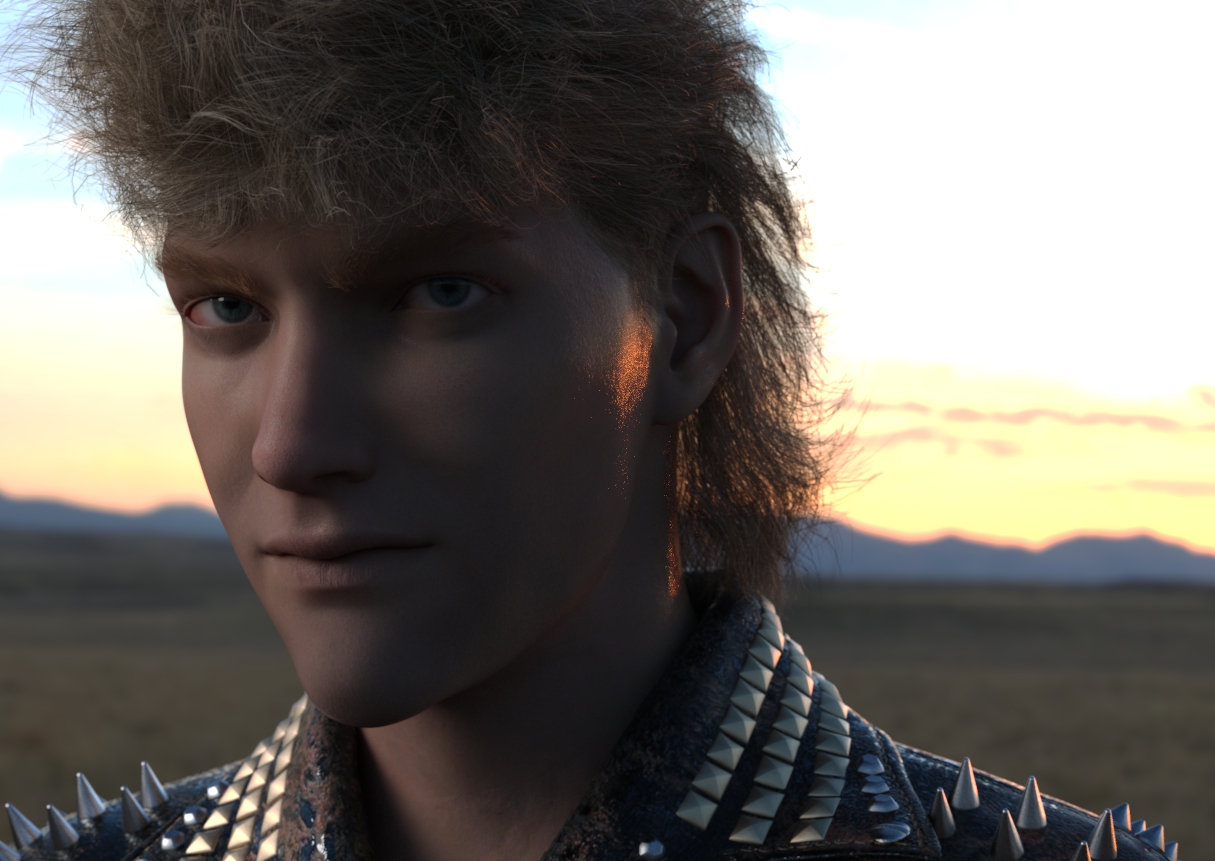
Darwins' Schtuff Pt DeuxFacial morphs done, will go back a third time for the HD version later. Tweaked the skin shader a bit too far- now he needs a bit more gloss. lol Will fix that and move onto checking the UV/textures of the eyes to make sure they line up (haven't done that yet) and then the HD version of the facial features. Oh, and the brows are done, with textures/shaders, but not saved yet. Ended up adding a bit of a third actor to blend his features out a bit more for my 80's Actor face morph.
 Star Trek Builders Unite 8: THE REBOOT
randym77 said:
Good start, but I think her face needs to be squarer. Your morph is a little too long and thin, IMO. I think her eyes are rounder, too.
For first season hair...I like ali's HR-099. It used to be for sale at Renderosity, but is now available only at his own site, Mankahoo.com. (Just because of the way Rosity used to remove anything that didn't sell a certain number of copies per month.) It's cheaper at his site, and he sometimes has 50% off sales.
Thanks for the suggestions. This is a Genesis 8 dialed-in head morph, my first attempt. I'll give her the suggested tweeks. I've put the hair in my bookmarks and will wait for a sale. HR-99 is for V4, but I can still work with it.
Using Marvelous Designer to refit clothes across generations?You can bring in different base models, however I'm currently waiting for an answer about bringing in already made clothes to MD and refit as you suggested. As soon as he gets back to me I will let you know.
Ok while I'm waiting I found some information for you and yes you can bring obj's into MD as a garment and make them fit.
https://www.marvelousdesignerhelp.com/viewtopic.php?t=519
for this video you should read the comments...
This gives very good instructions on how to do what you asked.
Got an answer back and he doesn't use Marvelous Designer to refit clothes...
my goto method is to just use the autofit feature . Sickleyeild & RiverSoft have provided clones for G3F going back to V3 and for G8F going back to V4.
If that doesn't work my next method is in Daz to pose and shape the source figure to match close to the pose and shape of the target figure.
Add the clothes to the Source figure, Export the clothes OBJ (tweak if desired in Blender)
Use the Transfer Utility to convert the clothe to the Target figure.
Then Update the Base Geometry of the Transferred clothes the saved OBJ.
This work only with Weighted mapped target figures. Non-weight mapped Source figures and clothe need to be coveted to weighted mapped to work. This way will retain the original morphs of the clothesAhmunet Duplex PupilsHi ;-)
After applying the morph go into the materials folder and apply the mumy materials "Ahmunet All Mummy A Skin Only" or "Ahmunet All Mummy B + Glyphs" and it loads up the eye textures with the mummy textures ;-)Star Trek Builders Unite 8: THE REBOOTGood start, but I think her face needs to be squarer. Your morph is a little too long and thin, IMO. I think her eyes are rounder, too.
For first season hair...I like ali's HR-099. It used to be for sale at Renderosity, but is now available only at his own site, Mankahoo.com. (Just because of the way Rosity used to remove anything that didn't sell a certain number of copies per month.) It's cheaper at his site, and he sometimes has 50% off sales.
Daz 3D is part of

Connect
DAZ Productions, Inc.
7533 S Center View Ct #4664
West Jordan, UT 84084Licensing Agreement | Terms of Service | Privacy Policy | EULA
© 2026 Daz Productions Inc. All Rights Reserved.