-
V4 ++ shapes how does one make them work?
Thanks Jan, I clicked on V4 icon this time to open her (in daz) but same thing icons dont do anything
Richard, i installed through daz central, where are the "power loader files" to be found? where do i instal those? when i put V4 in IM search Z(to be istalled tab) nothying is there for V4 (I guess that means they are installed?)
/Runtime/Libraries/!AZ/ in the content directory you installed to (i dont know if they are installed here, i just clicked install in daz central
in the image is thefodler you said to go to but there i do not see !AZ-0 im really stuck
Why does DAZ STUDIO do this?Richard Haseltine said:
phazdvideo said:
Richard Haseltine said:
As long as the thumbnail is in colour the product is isntalled, but if it is isntalled through an external method and you have logged into your account through Daz Studio (which is entirely optional) then it will show as available for isntallation through Daz Studio. You would not usually want to install both ways, the files go to different places so it is duplicating the disc usage, and if you do isntall through Daz Studio the other instalaltion's files become redundant. It's up to you which method you use.
So I use Daz Central and I'm logged in.
I haven't installed anything twice, does this mean I can just leave the products as they are?
Yes, they will function without installing through Daz Studio. But if you are not going to install through Daz Studio there is really no reason to work online - even if you are going to install through Daz Studio you don't need to be permanently connected.
It connects online automatically, even when I disconnect it'll just reconnect everytime I boot it up. There's no harm in working online right?
Why does DAZ STUDIO do this?phazdvideo said:
Richard Haseltine said:
As long as the thumbnail is in colour the product is isntalled, but if it is isntalled through an external method and you have logged into your account through Daz Studio (which is entirely optional) then it will show as available for isntallation through Daz Studio. You would not usually want to install both ways, the files go to different places so it is duplicating the disc usage, and if you do isntall through Daz Studio the other instalaltion's files become redundant. It's up to you which method you use.
So I use Daz Central and I'm logged in.
I haven't installed anything twice, does this mean I can just leave the products as they are?
Yes, they will function without installing through Daz Studio. But if you are not going to install through Daz Studio there is really no reason to work online - even if you are going to install through Daz Studio you don't need to be permanently connected.
Why does DAZ STUDIO do this?Richard Haseltine said:
As long as the thumbnail is in colour the product is isntalled, but if it is isntalled through an external method and you have logged into your account through Daz Studio (which is entirely optional) then it will show as available for isntallation through Daz Studio. You would not usually want to install both ways, the files go to different places so it is duplicating the disc usage, and if you do isntall through Daz Studio the other instalaltion's files become redundant. It's up to you which method you use.
So I use Daz Central and I'm logged in.
I haven't installed anything twice, does this mean I can just leave the products as they are?
Why does DAZ STUDIO do this?phazdvideo said:
Hey guys,
I've noticed in my smart content tab, all of my purchases are giving me the option to "install" them when they're already installed..
Why is this the case?
Thanks
That is because you are logging in to DS and DAZ Connect inside DS is telling you that the content is not installed with DAZ Connect (to another location, taking double the space on your drive)
If you are using DAZ Install Manager (DIM), DAZ Central or manual installation for your content, there is no reason to log in/sign in to DS
problem need help thankyouMight need some more info here. When exactly does Daz become unresponsive for you? During the render, or when attempting to load Genesis or a project? How many morphs do you have installed? If your Genesis character has a ton of morphs, it may take awhile to load into the scene, giving the appearance of unresponsiveness, but after enough time it will come up. If you want to significantly cut down on these load times, you have to go into your Daz content library and manually remove morphs. Or if you've installed content via Daz Central, simply uninstall unused morphs through there.
Male Clothing Content Dead?kyoto kid said:
frank0314 said:
scorpio said:
kyoto kid said:
...the one factor Europe has over the US is better transportation alternatives than the car. So it's quite possible to live in a smaller town with lower costs but still be able to get around.
...
Not neccassarily true at all. I live 7 miles outside a major city and my rents are higher than the city and puplic transport is terribly. Its also very expensive to travel on public transport in the majority of the UK.
Yeah it may be cheaper if you live in the city than the burbs, but how well do you get along with crime which is typically on even given year 300% higher than in the burbs. I'd gladly pay extra for being safe. At one time I had 3 jobs to be able to afford it but it was worth it knowing my family was same. There is only one side of the city here where there is less crime and the crime rate is about 100% more than it is here in the burbs. If I wanted to buy a house here in the burbs I'd pay at min $110,000. In the city the avg going rate is around $35,000-$50,000, why, crime
...sounds totally the opposite form what has been happening here in Portland since the late 90s. Many people on low incomes were pushed out of the central neighbourhoods to the burbs if not even outskirts. With that transition, crime and violence actually increased in a number of suburban areas as gangs re-staked their territories there. In spite of the increase in hearing what sounds like gunfire where I live, it has still been relatively safe compared to what I see on the news in the outer areas..
Part of the recent issue with gangs returning to the central area now and then is that the downtown is still seen by many as a place to avoid unless absolutely necessary That never used to be the case here until all the protests (some which turned violent) peaked in 2020 and homeless issue got out of hand afterwards leaving the city centre looking like a ghost town with boarded up shop fronts and encampments in different areas. .A number of businesses also closed for good due to the pandemic, leaving behind vacant buildings that have become targets for taggers. None of this is causing a decline in housing costs in the area though (just received notice of a rent increase where I live).
As tough as it is on the budget, I'm consigned to staying where I am as the area has a very high "walkability" rating and transit is very accessible. Without a car (which I cannot afford on my income) I could never live out in the burbs even here where we have one of the better transit systems in the nation
We just got a rent increase the other day too. Going up $25 again. We'd find somewhere else to go but this company that just bought our complex owns all the complexes in town now.
DazCentral won't install Daz studioI had to close Daz Central and reopen and click install every time it puased, eventually it did finish.Where can I get 4.16 without Daz Central? (and access Metamixer)Where can I get Daz 4.16 without Daz central? I would like to try the new Metamixer tool.
Brand New InstallationPerttiA said:
Don't quite know, how that comment should be read Richard...
Take a new user that has no knowledge of the workings of DS and/or the installers, or even a user that has been dormant for a few years.
The user comes to the site and sees the heading "Download Studio", which leads to the user installing DAZ Central for the purpose of installing DS and the content, the user does as instructed and starts up DS for the first time just to be adviced to log in to DS, which the user does as one thinks it is required.
Once the DS has been started with the user logged in, DAZ Connect starts updating metadata for the products and flags products not installed by DAZ Connect, suggesting the user should install them again inside DS for everything to be correct, resulting in the user installing the content the second time to another location that doesn't work with all the products and with the added bonus of decrypting the downloaded files sometimes failing and rendering the product non functional.
The same applies even when the user knows to use DIM for installations, but doesn't know/understand the effects and consequences of logging in to DS.
Nowhere within the process, is the user given any warnings about logging in or explained that if the user wants to use DAZ Connect for installing content, they should not use any other methods (DIM/DAZ Central/manual installation) for the same task, at least not for the same products.
Sorry, I missed this earlier. I have absolutely no issue with those cautions/explanations - but you didn't give them initially, just a blanket don't do this. Better to say what the differences are without the outright condemnation.
Brand New Installationmagog_a4eb71ab said:
PerttiA said:
Don't quite know, how that comment should be read Richard...
Take a new user that has no knowledge of the workings of DS and/or the installers, or even a user that has been dormant for a few years.
The user comes to the site and sees the heading "Download Studio", which leads to the user installing DAZ Central for the purpose of installing DS and the content, the user does as instructed and starts up DS for the first time just to be adviced to log in to DS, which the user does as one thinks it is required.
Once the DS has been started with the user logged in, DAZ Connect starts updating metadata for the products and flags products not installed by DAZ Connect, suggesting the user should install them again inside DS for everything to be correct, resulting in the user installing the content the second time to another location that doesn't work with all the products and with the added bonus of decrypting the downloaded files sometimes failing and rendering the product non functional.
The same applies even when the user knows to use DIM for installations, but doesn't know/understand the effects and consequences of logging in to DS.
Nowhere within the process, is the user given any warnings about logging in or explained that if the user wants to use DAZ Connect for installing content, they should not use any other methods (DIM/DAZ Central/manual installation) for the same task, at least not for the same products.
I don't recall having that issue when I installed Daz a few years ago and seem to remember there being an option to use one or the other, so maybe they changed some stuff in regards to that. I forget the process I did to install Daz, but I do know that I used DIM since I have nothing from Daz Connect. What I need to figure out is how to set DIM up to install Daz Studio itself on the OS drive and install all content on the storage drive. I also want to keep the DIM product packages on the storage drive. I'm not sure if DIM would store them on the OS drive by default or if there's a setting to change this. I did find this:
but nothing regarding how to set the install directories for smart content & other content (i.e. My Daz Library/smart content & My Library/renderosity content). Granted, DIM does not handle non-smart content, but I'm pretty sure some part of the installatioin process creates & sets the directory for it.
Go to your installation tab to make the changes and select the paths. Yes you can download DIM and then install DS. https://www.daz3d.com/install-manager-info
Brand New InstallationRichard Haseltine said:
Install Manager is certainly better than Daz Central if you wish to customise paths as you do. Daz Connect, however, is also an option for the content and you should take the advice of people on hobby-horses with a pinch of salt.
I've never used Daz Connect so I can't say I'm biased towards/against one or the other, but I haven't experienced any major issues with DIM. Any problems I've had was due to how the install packages were prepared. One is as good as the other depending on user preference & skill level in using the software.
Brand New InstallationPerttiA said:
Don't quite know, how that comment should be read Richard...
Take a new user that has no knowledge of the workings of DS and/or the installers, or even a user that has been dormant for a few years.
The user comes to the site and sees the heading "Download Studio", which leads to the user installing DAZ Central for the purpose of installing DS and the content, the user does as instructed and starts up DS for the first time just to be adviced to log in to DS, which the user does as one thinks it is required.
Once the DS has been started with the user logged in, DAZ Connect starts updating metadata for the products and flags products not installed by DAZ Connect, suggesting the user should install them again inside DS for everything to be correct, resulting in the user installing the content the second time to another location that doesn't work with all the products and with the added bonus of decrypting the downloaded files sometimes failing and rendering the product non functional.
The same applies even when the user knows to use DIM for installations, but doesn't know/understand the effects and consequences of logging in to DS.
Nowhere within the process, is the user given any warnings about logging in or explained that if the user wants to use DAZ Connect for installing content, they should not use any other methods (DIM/DAZ Central/manual installation) for the same task, at least not for the same products.
I don't recall having that issue when I installed Daz a few years ago and seem to remember there being an option to use one or the other, so maybe they changed some stuff in regards to that. I forget the process I did to install Daz, but I do know that I used DIM since I have nothing from Daz Connect. What I need to figure out is how to set DIM up to install Daz Studio itself on the OS drive and install all content on the storage drive. I also want to keep the DIM product packages on the storage drive. I'm not sure if DIM would store them on the OS drive by default or if there's a setting to change this. I did find this:
but nothing regarding how to set the install directories for smart content & other content (i.e. My Daz Library/smart content & My Library/renderosity content). Granted, DIM does not handle non-smart content, but I'm pretty sure some part of the installatioin process creates & sets the directory for it.
Brand New InstallationDon't quite know, how that comment should be read Richard...
Take a new user that has no knowledge of the workings of DS and/or the installers, or even a user that has been dormant for a few years.
The user comes to the site and sees the heading "Download Studio", which leads to the user installing DAZ Central for the purpose of installing DS and the content, the user does as instructed and starts up DS for the first time just to be adviced to log in to DS, which the user does as one thinks it is required.
Once the DS has been started with the user logged in, DAZ Connect starts updating metadata for the products and flags products not installed by DAZ Connect, suggesting the user should install them again inside DS for everything to be correct, resulting in the user installing the content the second time to another location that doesn't work with all the products and with the added bonus of decrypting the downloaded files sometimes failing and rendering the product non functional.
The same applies even when the user knows to use DIM for installations, but doesn't know/understand the effects and consequences of logging in to DS.
Nowhere within the process, is the user given any warnings about logging in or explained that if the user wants to use DAZ Connect for installing content, they should not use any other methods (DIM/DAZ Central/manual installation) for the same task, at least not for the same products.
Brand New InstallationInstall Manager is certainly better than Daz Central if you wish to customise paths as you do. Daz Connect, however, is also an option for the content and you should take the advice of people on hobby-horses with a pinch of salt.
Brand New InstallationTwo thing to start with; Do not use DAZ Central and never log in to DS.
The DAZ Install Manager is considered the best tool for installations
Male Clothing Content Dead?frank0314 said:
scorpio said:
kyoto kid said:
...the one factor Europe has over the US is better transportation alternatives than the car. So it's quite possible to live in a smaller town with lower costs but still be able to get around.
...
Not neccassarily true at all. I live 7 miles outside a major city and my rents are higher than the city and puplic transport is terribly. Its also very expensive to travel on public transport in the majority of the UK.
Yeah it may be cheaper if you live in the city than the burbs, but how well do you get along with crime which is typically on even given year 300% higher than in the burbs. I'd gladly pay extra for being safe. At one time I had 3 jobs to be able to afford it but it was worth it knowing my family was same. There is only one side of the city here where there is less crime and the crime rate is about 100% more than it is here in the burbs. If I wanted to buy a house here in the burbs I'd pay at min $110,000. In the city the avg going rate is around $35,000-$50,000, why, crime
...sounds totally the opposite form what has been happening here in Portland since the late 90s. Many people on low incomes were pushed out of the central neighbourhoods to the burbs if not even outskirts. With that transition, crime and violence actually increased in a number of suburban areas as gangs re-staked their territories there. In spite of the increase in hearing what sounds like gunfire where I live, it has still been relatively safe compared to what I see on the news in the outer areas..
Part of the recent issue with gangs returning to the central area now and then is that the downtown is still seen by many as a place to avoid unless absolutely necessary That never used to be the case here until all the protests (some which turned violent) peaked in 2020 and homeless issue got out of hand afterwards leaving the city centre looking like a ghost town with boarded up shop fronts and encampments in different areas. .A number of businesses also closed for good due to the pandemic, leaving behind vacant buildings that have become targets for taggers. None of this is causing a decline in housing costs in the area though (just received notice of a rent increase where I live).
As tough as it is on the budget, I'm consigned to staying where I am as the area has a very high "walkability" rating and transit is very accessible. Without a car (which I cannot afford on my income) I could never live out in the burbs even here where we have one of the better transit systems in the nation.
Male Clothing Content Dead?...true the UK is rather expensive pretty much anywhere you go, which is why it is only on my list of places I'd like to visit, but not necessarily live the rest of my retirement years in.
The states were pretty much like that too, more expensive in the burbs and less so in the city until a couple decades ago when in a number of major cities (like here in Portland) started gentrifying inner neighbourhoods and engaging in a lot of upscale development which resulted in a "reverse migration" from that of the 1950s and 60s when everyone was leaving the central environs for a quieter and in some cases, cleaner, safer life.
The rail transport system in eh UK has experienced, to put it mildly, a few issues since it was privatised in the 1990s, with such matters as higher and higher fares, poor quality service, and poor reliability (sometimes trains simply wouldn't show up when they were scheduled to).
Windows 11 - file doesn not existThat sounds like you are logging in/signing in to DS and DAZ Connect has been up to it's usual mischief.
There is no need to log in/sign in to DS, unless you specifically want to install content with DAZ Connect within DS and if you do, whatever gets installed/updated by DAZ Connect, overides any content installed by the other methods (DIM/DAZ Central/Manual Installation). DAZ Connect does not use the same paths to install content that the other methods use, so the content will also be installed twice.
I wish DAZ didn't make logging in/signing in to DS look like a necessary step, as it has caused a lot of grief amongst users that do not understand how the system works (waiting for head patting for my words
 )dForce HD Elven Royal Armor [commercial]
leo04 said:
Am I supposed to see this? Where are the materials? Installed with DAZ Central
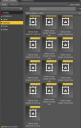
Hey Leoo4,
Thanks for bringing this up .... No, normally you should see something like this:
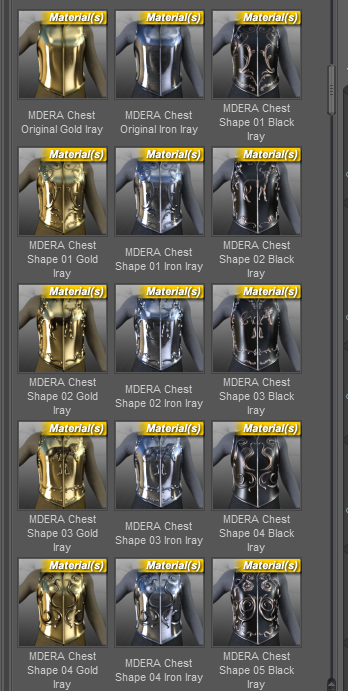
The problem is not with the product itself but it is packed wrong for distribution (the metadata show wrong files). I rarely use the smart library so I hadn' t see it so far, so thanks for the heads up ...
I am testing the whole bundle right now and as I can see this happens to all the items, and not only to the male chest armor .... I will send a ticket to DAZ about this and I am working to find a temporary solution ... stay tuned ...Sorry for the inconvenience!
Thanks for the comment
- Mike
Daz 3D is part of

Connect
DAZ Productions, Inc.
7533 S Center View Ct #4664
West Jordan, UT 84084Licensing Agreement | Terms of Service | Privacy Policy | EULA
© 2026 Daz Productions Inc. All Rights Reserved.