-
Daz Studio and Linux
loopenox said:
By the way, Moté, would going that route also affect the normal viewport? Studio sometimes freezes on me when I there's a lot going on in the viewport. Rarely in standard textured shader mode but usually after seconds of manipulating things when in Filament. For example I can provoke a crash really easily by having some items in the scene, then switching to Filament and then wildly moving a light source around or rotating the environment map. This reliably freezes the window in just seconds and happens at some random point even when working normally so I pretty much can't use Filament at all. It's just too frustrating when you know that any click could be the last of the session and especially annyoing if your scene files are so big that they take a while to load again after a crash. Luckily non-Filament viewport Studio works quite reliably and stable.
So, I wonder if your discoveries may also solve some problems with the normal viewport...
One of the people who did that awesome work had the same problem. I didn’t, but my scenes were relatively simple. Sadly, it didn’t fix this problem, apparently. Maybe having a more up-to-date system allows to avoid it (as I run on Archlinux, and he was on Ubuntu), but I can’t say without further testing. I could only advise him to not use Filament ^^’ (For me, it’s really ugly when I try Filament, so it’s ok to not use it, for you I don’t know) Maybe Daz 5 will help, as I think I read somewhere they are working on the Filament renderer to make it more useful.
Daz Studio and LinuxBy the way, Moté, would going that route also affect the normal viewport? Studio sometimes freezes on me when I there's a lot going on in the viewport. Rarely in standard textured shader mode but usually after seconds of manipulating things when in Filament. For example I can provoke a crash really easily by having some items in the scene, then switching to Filament and then wildly moving a light source around or rotating the environment map. This reliably freezes the window in just seconds and happens at some random point even when working normally so I pretty much can't use Filament at all. It's just too frustrating when you know that any click could be the last of the session and especially annyoing if your scene files are so big that they take a while to load again after a crash. Luckily non-Filament viewport Studio works quite reliably and stable.
So, I wonder if your discoveries may also solve some problems with the normal viewport...
What's causing these shader artifacts?I'm getting these weird pixelated artifacts around the edges of my mesh:
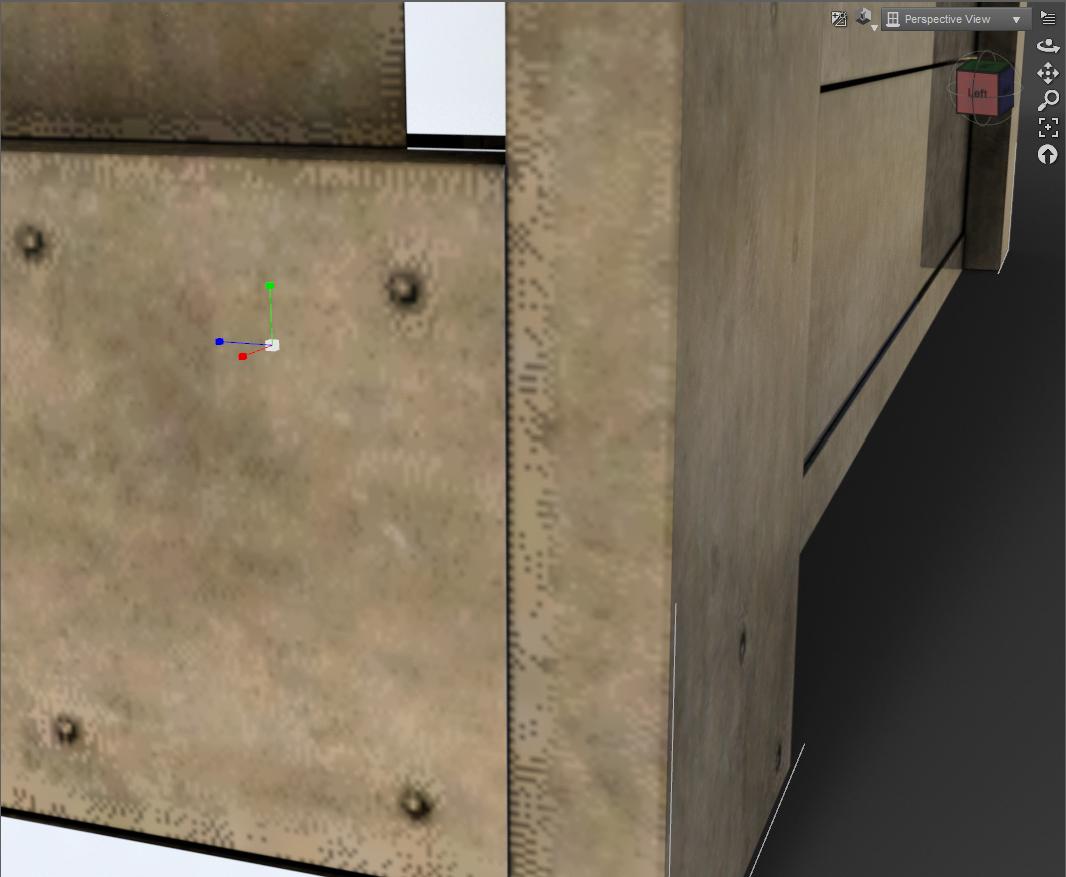
They are not there in the non-raytraced views. They are also not on the texture map itself. Here is the texture shaded view:
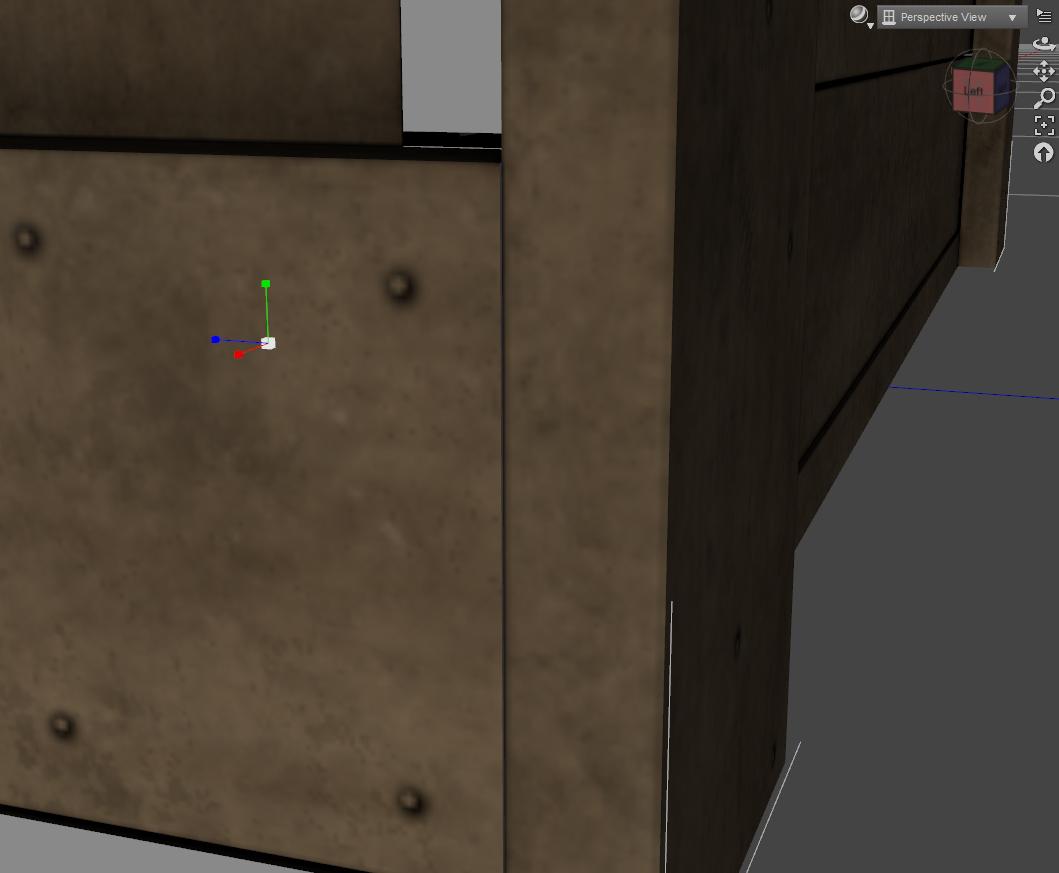
And here is Filament: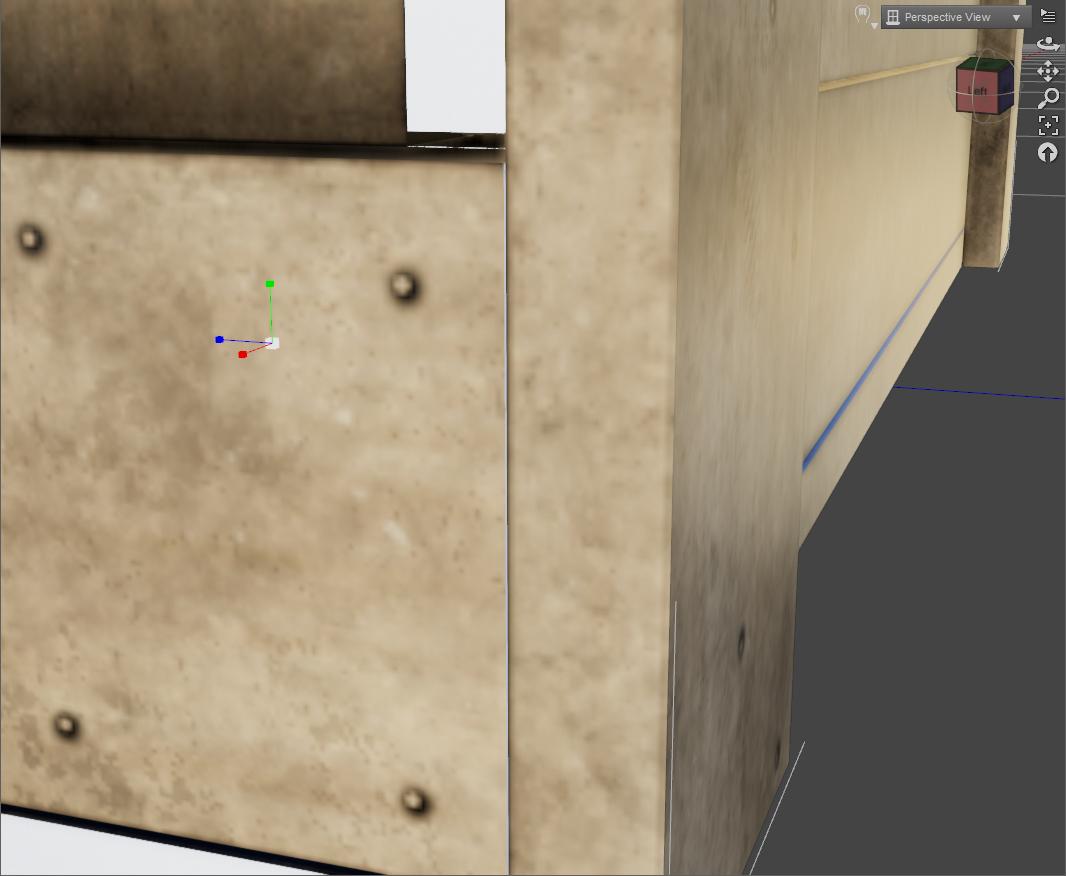
Does anyone have any idea what's causing this?ETA: I have the latest nvidia gpu driver, running on an RTX 2070 Super. I have taken the texture map into photoshop, and examined it closely, and these artifacts are not present. I have adjusted smoothing in every possible way, even turning it off, and nothing works. Ditto for corners across materials. I have the latest version of Studio, and I have restarted it, and my PC, to no avail.
NVIDIA vMaterials 2.0.0 Shader Presetsrichardandtracy said:
I have copies of 4.10, 4.11, 4.12, 4.14 and 4.15 on my machine and they all live quite happily next to each other. I do manual installs into the directory of my choice and as I install the new one I put it into a different directory from any of the others. Must admit I don't keep the installation file, maybe it'd be wise. The only thing I have noticed is when I use dForce in a different version from the last, I get a notification that 'an old level of dForce has been detected' and the dForce kernel is re-compiled. I use few G8.1 figures, none the less I don't have many problems with 4.15. The biggest thing is that it seems to crash if I exited last time with a filament preview, and then it bombs out next time when I re-load the same scene. If I switch to texture shaded before the final save & exit, next time no crash.
My PC dates to 2013, and it became mine in 2019 - it had been my PC at work and was replaced in 2019 and I was given first dibs on it, otherwise it was going to be skipped. I have put in a bigger HDD for the data, added a further 8Gb of RAM to get to 24Gb and a GTX 1060 card. Otherwise it's my old work machine. And being Win7, is now isolated from the net.
Regards,
Richard
well, this is news to me! i knew you could have parallel installations of 1 "actual" DS version plus 1 beta-public version, i had such a setting. but full versions parallel? absolute news! good to know. i should see if i can do sth of that kind.. IF i can get support files ~
can you specify what you exactly mean by "different directory", i.e. what your configuration/paths look like?
i've been annoyed about not being able to use dforce for eons. in the end, i have accepted, maybe wrongfully, that my intel cpu was not able to be updated, period. because i tried a while ago, and then recently after a comment exchange again, to update or reinstall specific drivers that microsoft, for a stupid reason i can't understand, has deleted from the intel package. back then at least the automatic update utility could be installed, even if apparently, it was no use whatsoever, i don't remember. this time before i discovered that i had already istalled it, i downloaded it, and it gave an err msg, couldn't be installed. then i realized it already was there, and also that it couldn't install jack. when it sends me to the intel or was it MS page, it just keeps sending me from one page to the other and back, in the browser there's another err msg, and after a while i'm sick of it. a pity because there's a very thin chance that after all, maybe i could do dforce, but all those stupid utilities and install stuff can't work properly. it confuses me since i barely understand or rather not really, what i'm doing and why, and it goes on my nerves when the usual recommanded way to do things doesn't work as expected, and sending me from one page to the other and then back to square one transforms me into a screaming cussing wreck...
hmm yeah filament, i don't remember if that was one of the things listed as crash sources, possibly. not very interested, i already have ressources issues in iray view, which i love but don't use until i really have to check how it looks in iray, sometimes a "quick" render is even less lagging. i didn't read in details, as soon as i saw user of older machines having issues i bailed immediately. point is, since i didn't know you can install several DS full versions in parallel, i was afraid not to be able to downgrade again to a version like 4.11 which works fine for me.
i'm really surpised at your specs! might be a tad better than mine (however, i didn't catch if you had a desktop or a laptop, which might make quite the difference), but still i guess people would classify it as an old machine too, and see there, it seems you're happily working with it with success. interesting. well, i can't add anything to mine - i mean i'm not even sure it's possible technically, but i have no money whatsoever for ram or even less a gpu, been in survival mode for months... still, good to know there is hope for old machines. maybe some day i'll have the balls to attack this...
NVIDIA vMaterials 2.0.0 Shader PresetsI have copies of 4.10, 4.11, 4.12, 4.14 and 4.15 on my machine and they all live quite happily next to each other. I do manual installs into the directory of my choice and as I install the new one I put it into a different directory from any of the others. Must admit I don't keep the installation file, maybe it'd be wise. The only thing I have noticed is when I use dForce in a different version from the last, I get a notification that 'an old level of dForce has been detected' and the dForce kernel is re-compiled. I use few G8.1 figures, none the less I don't have many problems with 4.15. The biggest thing is that it seems to crash if I exited last time with a filament preview, and then it bombs out next time when I re-load the same scene. If I switch to texture shaded before the final save & exit, next time no crash.
My PC dates to 2013, and it became mine in 2019 - it had been my PC at work and was replaced in 2019 and I was given first dibs on it, otherwise it was going to be skipped. I have put in a bigger HDD for the data, added a further 8Gb of RAM to get to 24Gb and a GTX 1060 card. Otherwise it's my old work machine. And being Win7, is now isolated from the net.
Regards,
Richard
Filament - no shadows, raytracing issuesFilament works fine when it comes to textures etc. But it refuses to create any shadows (I have followed tutorials, applied raytracing etc in the shadow settings.) Adjusting parameters in Tone Mapper options, Enivoroment node options and Filament Draw options makes no difference to the image. Another quirk is that if I change to another viewport, I can only reactivate Filament viewport if I reset my workspace layout. Not sure it that's related to my problem with shadows. Any advice would be appreciated, thanks.
Daz Studio components Download/Install FailedRichard Haseltine said:
cgidesign said:
In newer DS versions the tonemapper, environment, filament nodes might not load by default.
In that case do it by hand:

They will also be created if you render or enable a PBR Drawstyle for the Viewport.
Am I understanding correctly that the Environment tab that use to be on the left is no longer used? I can still create the Environment tab where I was use to finding it in 4.10, but its completely blank. It seems that this was replaced by nodes and is instead found on the right side under the Parameters tab after selecting the respective node in the Scene box.
Daz Studio components Download/Install Failedcgidesign said:
In newer DS versions the tonemapper, environment, filament nodes might not load by default.
In that case do it by hand:
They will also be created if you render or enable a PBR Drawstyle for the Viewport.
Daz Studio components Download/Install FailedIn newer DS versions the tonemapper, environment, filament nodes might not load by default.
In that case do it by hand:
Filament missing in recent public betaFilament uses the whatever is running display to render as you render using viewport
it can be bigger, I do 4K filament renders on my 2K monitor but it still needs to be running in the viewport to render like openGL, Wireframe etc do.
So it is dependent on the specs for what is powering the viewport not your graphics cards
I use it with integrated Intel graphics but you may have something different running your display
Filament missing in recent public betaGave up on getting the 2 Nvidia cards to work and left the 306012GB Black card and removed the other. I also removed and reinstalled the Nvidia drivers and now filament works again.
Somehow using the display card for rendering seems to slow down the rendering. When I was experimenting with the 2 card situation and the OpenGL file. The older version of studio rendered quickly. Now the same scene seems a bit sluggish. I may have to optimize the GPU settings.
Anyone still using a GTX 1060?WendyLuvsCatz said:
PerttiA said:
WendyLuvsCatz said:
yeah I get a gigabyte less VRAM to play with in the 4.15 beta than 4.11 but it still works OK.
I wonder if this is the first time we get some indication on how much VRAM the emulation of RTX functions in software actually reserves...
That would mean that the users of GTX cards with 6GB VRAM (GTX 1660) on W10, would be limited to about 1.5GiB of VRAM for geometry and textures = Not much
is certainly related,
since 4.12 I believe the Optix prime no longer has an option to be disabled which is what makes animated renders difficult for me in 4,12+
and yes it only affects GTX users
the first frame will fit, then it goes to GPU
I have 2- GTX1080 Ti's 11.5 gig each gpu's. & unfortunately with GTX gpu's any driver over 436.30 The Optix-prime Accelerator is always on. & is why I stop, updating gpu drivers beyond 436.30 for my render rig. I do have a copy of the latest version of daz 4.16 for some new plugins & shaders i bought and render in 3dl which does seem to render faster than daz 4.12 3dl. Plus I will play with filament once in a while .
But I only use daz 4.12.0.86 to render iray with. IMO its at least 10x faster than 4.16 that has the updated 472.12 driver. The older 436.30 driver I believe was the last optimal driver for the GTX 1080-ti's. all the drivers beyond 436.30 were designed for the RTX gpus which left the Optix-prime Accelerator option as always on for all the GTX cards to make up for the lack of Retracing that the RTX cards have . So the 436.30 NVIDIA driver. is really the optimal driver for older GTX gpu's. So if you have daz 4.12 .0.86 version or later like ds4.11 & roll your driver back to 436.30 you will see a substantial increase in your performance onr your gtx gpu. the Downside 436.30 drivers will not work at all in 4.14 thru 4.16 to render iray. But Filament will use the 436.30 driver in OpenGL alright. so I recommend a back up copy of 4.12.0.86 or later versions. if you have a GTX gpu. Because GTX gpu's are not much good for anything after daz 4.12.0.86 public build Its more NVIDIA fault than daz's
On my win11 laptop I have a gtx 1070 8 gig gpu with the up to date 472.12 driver. which is useless to render iray with it, Seriously it be faster to crate a image with a paint brush
You can try rolling back your driver and see if it works for you as well as it does for me, there is nothing to loose. https://www.nvidia.com/Download/driverResults.aspx/151275/en-us Or WIN 7 users https://www.nvidia.com/Download/driverResults.aspx/151274/en-us
Edited for spelling sorry I am very dyslexic
"VIEWPORT : Complete Guide to Optimizing your Realtime Experience with DAZ Studio" CorrectionI just wanted to make a correction for some "newbier" people to Daz getting and watching this tutorial.
During the videos Ken firmly sticks to saying that emissive lights work in Filament because the dome itself is an emissive light, but never actually shows them working and as far as I know they don't (the dome works but not meshes using the Iray shader with the Emissive parameter turned ON) even this has been confirmed by Daz people, if I remember correctly. No idea if it's something that will be added in the future but at the time I'm posting this, they still don't work.
I think it's important to make the correction because even at the end of the videos someone participating in the webinar was showing that they didn't work, but Ken insisted that something else was wrong, which I think will just frustrate and confuse people. I don't use Filament that much precisely because of that and I tend to use mesh lights a lot, even so I had to pause the videos to test it again to see if I was doing something wrong or maybe it was updated. But no, they still don't work.
Digital Art Live probably should add something in there making that correction.
(Or if I'm wrong, please let me know how to make them work)
Loading/creating screen light has changed !!Which Drawstyle are you using? I think you may have Filament in the bluish one, and I think you are switching between activity tabs when you see the other - which is using a different Drawstyle. You see/set the Drawstyle through the sphere icon next to the camera/view picker button (it probably says Perspective View or Camera 1).
Seeking 3D modeling help of Medici Lions for next Kingsman MovieHeadwax said:
good point Wendy - re eula. I wonder if i made a real sculpture by hand using renders of a daz object as a reference would that be against the Eula?
@Stezza, I'm impressed!
I know we are derailing Yofiel's thread but he isn't likely to find someone here who can make him a bespoke Medici lion anyway, at least not without a reference we can legally use
(photographs belong to the photographer) unless there happens to be one in a park in Newcastle you can take happy snaps from all angles of

it's a very interesting question
sculpting the DAZ one would be like a 3D print I imagine with you and your hands and chisel being the 3D Printer and the clay or stone the filament
they only license their stuff for 2D works
you can sculpt one for personal use (stick either side of your baustrade) but not sell it
You can paint one of course
I know CNC routers making cutouts has even been suggested in other threads as being not allowed under the EULA and sewing clothes to look like DAZ clothes can only be if both inspired by similar things.
Not a PA's unique design (same as stealing a fashion designer's idea) as DAZ model is just wearing the clothes
so many typos, so many edits
Black streaks in hair when trying to change color.Mattymanx said:
NotLuna said:
Sevrin said:
Good things to know would be:
The name of the hair
The name of the shader presetSome hair props have multiple surfaces, because some people like streaks. It's important to apply shaders to all of the layers to obtain even colouring. Not knowing what hair or shaders are involved makes it difficult to make any more detailed suggestions.
This is the hair: https://www.daz3d.com/dforce-classic-blowout-hair-for-genesis-8-and-81-females
And this is the shader preset: https://www.daz3d.com/fsl-realistic-hair-shaders-for-iray-and-filament
Are you rendering in Iray or Filiment? Are you using the correct shaders from the set for the render engine you are using?
Im rendering in Iray and yes.
Black streaks in hair when trying to change color.NotLuna said:
Sevrin said:
Good things to know would be:
The name of the hair
The name of the shader presetSome hair props have multiple surfaces, because some people like streaks. It's important to apply shaders to all of the layers to obtain even colouring. Not knowing what hair or shaders are involved makes it difficult to make any more detailed suggestions.
This is the hair: https://www.daz3d.com/dforce-classic-blowout-hair-for-genesis-8-and-81-females
And this is the shader preset: https://www.daz3d.com/fsl-realistic-hair-shaders-for-iray-and-filament
Are you rendering in Iray or Filiment? Are you using the correct shaders from the set for the render engine you are using?
Black streaks in hair when trying to change color.Sevrin said:
Good things to know would be:
The name of the hair
The name of the shader presetSome hair props have multiple surfaces, because some people like streaks. It's important to apply shaders to all of the layers to obtain even colouring. Not knowing what hair or shaders are involved makes it difficult to make any more detailed suggestions.
This is the hair: https://www.daz3d.com/dforce-classic-blowout-hair-for-genesis-8-and-81-females
And this is the shader preset: https://www.daz3d.com/fsl-realistic-hair-shaders-for-iray-and-filament
Surface editor changes not registering/workingThe Viewport will update only if using the nVidia iray, or possibly Filament, Drawstyle.
Problems since recent windows updatesno idea, Carrara seems OK but I am having those issues in lots of other software, Chrome Browser seems the worst
Unreal engine, Twinmotion and DAZ studio all seem affected at times, I assumed was just my Win10 computer being it's usual annoying self, my Win7 perfectly OK
in Twinmotion on a simple scene just changing terrain sculpt brush my RAM shot up to 32GB and I couldn't do a thing for about 10 mins for example
and yes my gizmo vanished in DAZ studio 4.16 beta at one point and switching viewport fixed it, Filament seems the issue there, D|S 4.11 is fine
this makes me think it is an openGL issue
Daz 3D is part of

Connect
DAZ Productions, Inc.
7533 S Center View Ct #4664
West Jordan, UT 84084Licensing Agreement | Terms of Service | Privacy Policy | EULA
© 2026 Daz Productions Inc. All Rights Reserved.