-
Anyone else having problems with products not installing past 50%?
Hi,
Is anyone else finding that when they try and download products bought at the Daz store they just stop at 50%. I've had several products where this has happened over the last week or so. If I use Daz Central it gets to 50% then switches back to the green install button. If I click it again it appears to install up to about 70% then goes green again and is back to 50%. I I try with IM it gets to around 50% then gives the message "Install failed."
Is anyone else having similar issues, or knows how to fix it?
Thanks for any help,
Lossow
When will the Unreal Bridge be Officially updated?Hi, I'm just curious, but is the Unreal Bridge going to be 'Officially' be updated and avaiable through Daz Central?
I know you can download the betas and all on Github, but I just wanted to know if that is going to happen.Installation not working properly (edit: G2 content not showing or broken)Hi again,
Thanks a lot for the detailed how to! I'm now at a point where I reinstalled manually, checked my folders, checked the paths provided to both Daz studio and central, understood that the issue with the obj might come from how I exported it in other apps.
What remains is the lack of morphs showing in the shaping tab. Say, if I load a G2 character and it shows correctly to the eye and doesn't ask to repair any errors, I still can't see the applied morphs in the shaping tab. Nor checking every tab, neither in the currently used tab. In the currently used tab, not one morph is present while the character is effectively loaded and selected. This might be why I can't see the .dsf I'm trying to use after I put it in the correct folder. If that isn't enough information, I'll try to recreate the situation with some free asset I'll find and post screenshots that would eventually be needed.
Anyway, I am very grateful for those answers,
Paul
Installing all Daz Studio assets in one go with Daz CentralHi All, I checked the Daz Central FAQ, but could not spot anything covering this one.
I've got a LOT of assets bought over the years, and I'm doing a fulkl reinstall of everything after a windows crash.
Is there a simple way to select absol,.utely everything for installation, and leaving it to chug away?
Thanks,
Nick
Moving DAZ Studio Files from one drive to another Windows 10Back on 10/01/2022 I posted the question titled Uninstalling/ Reinstalling DAZ Studio Windows 10 and got great advice from Richard Haseltine as always (thank you, Richard). My motive was to clear up space on my C: Drive (475 GB capacity) by moving all DAZ stuff to my D: Drive (1.8 TB capacity).
Turns out that uninstalling and reinstalling DAZ Central and Studio from Disks C to D didn't work, as all the user (and, presumably, asset) folders seem to still be on the C: Drive. The consequence being that my limited C: Drive memory keeps getting eaten up whenever I install a new asset.
The pathway is Local Disk (C:) > Users > user > Documents > DAZ 3D.
So my question is: is there anything to stop me moving all the DAZ user and asset folders from C to D as well, or am I going to screw everything up? Will DAZ Studio still know where to go looking for everything?
Many thanks.
missing itemsCorrect now? (took it from one of your posts)
And while we are at it, do you know the DAZ Central default path (is it the same as DIM)?
Daz Studio not installingI had this problem on a fresh build I got before xmass. I eventually was able to install it with daz manager, but then the installation broke and I got the nvidia rendering or previewing causing instant crash error. So I tried to uninstall, but it couldn't be found when windows 10 would take me to the apps uninstall install manager page. I was able to uninstalll manager and central, but not studio or hex. So I ended up deleting it manually. I then reinstalled central and tried to reinstall studio which is back to failing to install. Always erroring out and reverting to the 57% point when reinstall is tried. Still trying.
Is there easy way to uninstall a manually installed product, if you have the original zip/rar file?Which is why they developed DIM and Central so you don't have to install manually. That always been a drawback on every place that uses zips. Thats not any one companies fault. It's the nature of zips. It's the general risk you take with installing manually.
Installation not working properly (edit: G2 content not showing or broken)Hi, since yesterday I was able to install it properly doing it without using Daz Central.
Unfortunately, I still can't access most of my content. If I add a model manually, (I drop data, people, runtime, documentation,... in My Library), only an empty documentation folder appears when I hit refresh in Daz.
These tests were made with G2F on v4.16, windows. Any idea?
Thanks in advance.
missing itemsSorry for the mistake regarding Connect and Central. I fixed it in my post.
missing itemsConnect is the Daz Studio install - are you perhaps thinking of Daz Central?
You cannot place files manually in the Daz Connect data directory in any event, though that isn't its default location. The default location for user files, which can also be used for third-party content, is in the user's own Docuemnts folder - /Documents/Daz 3D/Studio/My Library/.
Do note that for older content, such as Victoria 4 and Michael 4, any morph expansion need to be merged into the main figure installation rather than a different location.
missing itemsExtract the zip you got and copy it's content to the corresponding folders of DAZ's library:
Example of how it works if you normally install your DAZ content with DIM (DAZ Install Manager)
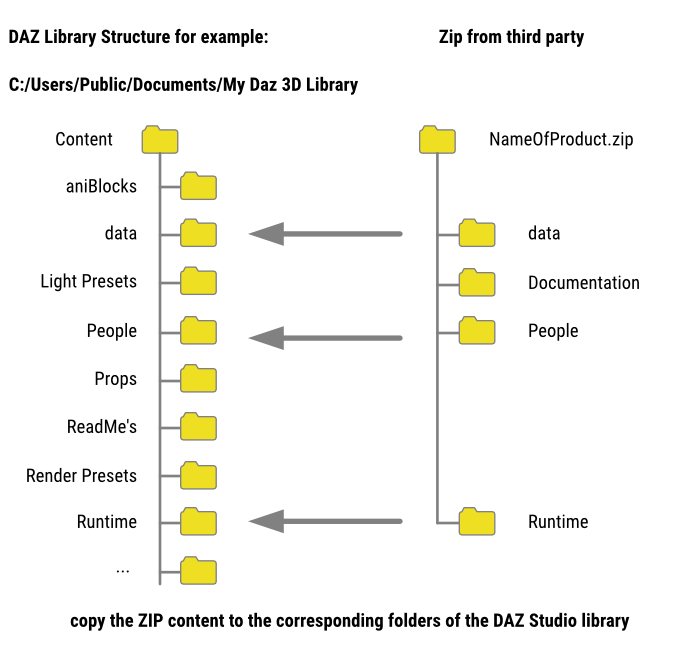
Be aware that there can be three different library locations depending on which install method you use to install content you buy from DAZ. For users this can lead to a lot of confusion and problems. My recommendation if you are unsure what to do. Use DIM to install content from the DAZ site and never use DAZ Studio's internal Connect install function or the Central install. Once you got more experienced mix and match as you like

Default location of DAZ libraries:
If you use DIM (DAZ Install Manager): C:\Users\Public\Documents\My Daz 3D Library
If you use DAZ Studio (DAZ Connect) Install: C:\Users\Public\Documents\Daz 3D\Studio/My Daz Connect Data
If you use DAZ Central Install: sorry, I don't know.
Installation not working properly (edit: G2 content not showing or broken)Hi, I have been using Daz in my pipeline as a hobbyist for a while now, but had to uninstall and reinstall as I wasn't able to find my custom morphs anymore in the shaping tab.
As I installed it, I had to close and relaunch Daz central dozens of times until I could get to 100%. Then, same thing for the different Genesis base bundles. Now that Genesis 2 and 8 are installed, waiting for the rest, a pop up tells me that the file doesn't exists when I open the base Gen 2F model. I then have to drag and drop the duf for it to work, while Gen 8 opens normally. Once I'm there, I can't find my custom morphs anyway. I have to admit that I don't even know where to look to begin fixing all this, so I am hoping you will accept to help me.
Thanks for your time,
A fellow Daz enthusiast
Uninstalling/ Reinstalling DAZ Studio Windows 10You don't need to move the application to place the content in a different location - the content never be in the application folder. Anyway, if you installed through Daz Central or Install Manager that is where you need to go to find the Uninstall option if you do still want it.
DIM content database/post PostgreSQL CMS I've had it with this thingexternal hard drive, using a usb to plug in. its never been an issue until the the 4.16 update
I'm not as angry as I was just...disappointed in this software now. I had to roll back my computer to before I updated daz. because after the 4th clean install it wouldn't let me uninstall it and despite disconnecting my external daz was setting pathways to e: and F drive. despite at the time of the 4th clean install my internal c drive was the only connected drive(0 externals hooked up) i tried to install again because i couldn't even log into dim or central and was just going to say screw it one last ditch effort was my roll back...which somehow broke it evenfurther. not only could i not open dim/daz despite it being installed all of its files were gone. this program i just...i don't get it. there is no reason it should have broken this badly ;(
Black Is Beautiful IILOL, thanks Hylas...
I do like Darcy also. That's a lot of cuteness to combine Tika and Darcy.
...
Post-apocalyptic mood now. (Specifically, "Twilight: 2000"... a tabletop roleplaying game set in the shattered remains of Central Europe devastated by WW3 (including a limited nuclear exchange between NATO and a fictional Soviet Union that didn't collapse in the 90s).)
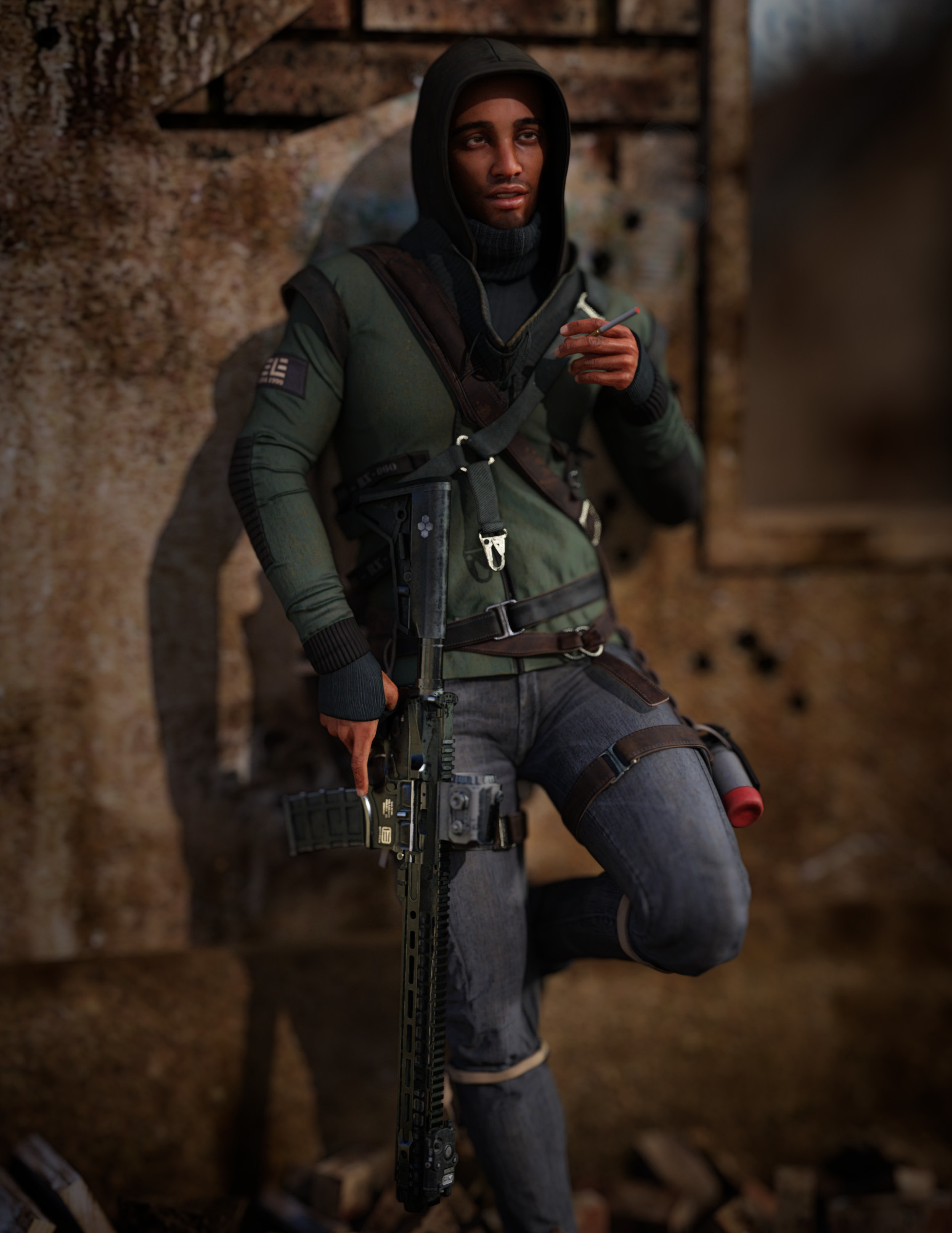
I'm not a big fan of Silas 8, but I finally sat down and worked with a piece of him. Started from Genesis 8.1 base, added some Silas (including skin), a big helping of Saiyaness' Fiore because I like his shape, other dials, also Pablo 8.1. Part of the inspiration was Javier Bardem's Anton Chigurh ("No Country for Old Men"), so I wanted a little Latin flavor.
I used Luthbellina's Dystopian outfit, but I swapped in an American rifle... Polish's ASL-19 Tactical Rifle, which I think is based on the LVOA-C (that is: Low Visibility Operations/Applications Carbine, or LVOA-C). It's a variant of the M-4 Carbine with a distinctive barrel shroud. I used other Polish gun props to swap out the existing optics and add a laser. (You can actually do a lot of customizing with some of the guns in the store... Polish and Porsimo are both good at including attachments as extra props.)
 Adena Hair for Genesis 8 and 8.1 Female
Good afternoon, DAZ.
I seem to be having trouble finding and installing the Adena Hair for Genesis 8 and 8.1 Female that I purchased today. It is not appearing in Daz Central or Daz Install Manager. There is also no way to manually download and install it.
Product info here: Adena Hair for Genesis 8 and 8.1 Female | Daz 3D
Any assistance would be appreciated.
DIM content database/post PostgreSQL CMS I've had it with this thingyou know studio is really starting to piss me off. I have tried every single fix I could find on the internet and nada zip 0 north a single one works. I have done a fresh install so many times in the last 3 days it's not even funny. I have tried using DIM I have tried the central I've tried manually installing, turning off the firewall, turning it on, and making sure it's allowed in the firewall. Getting this program to work should not be this much of a problem studio is basically giving me the middle finger.
now I am on an old i3. I have 800 gigs of memory so I have to use an external which neither dim or central will let me. Oh, yea sure I can set the file path there. but it won't let me set the DIM content database to the external. I've even tried doing it from inside Daz with dim/central close and both pretty much say hahaha f you no it MUST be on located in your c drive.
The second problem no matter what I do studio will simply not locate the cms. I've tried changing the port in Daz/changing the location/directing it to the location. But again no dice. If, even on a fresh install with 0 changes made to locations studio and cms won't play nice why not build the stupid thing into the program its self so we don't have to fix it every time there is an update to studio??
And trying to get official support is a pain in the ass so we need to rely on community support. I need help fixing this dumb thing before I say f it and let all the money I spent on products go down the drain and find something that works better than this.
Qiaolian HD for Genesis 8.1 Female skin toneHi team, I have just purchased Qiaolian HD for Genesis 8.1 Female but am having an issue with the skin mat. If I apply the character from Content Library and don't apply any skin mat, it's acceptable but a very light skin. If I then apply the skin MAT she turns completely white, see pic.
If I load from Smart content the same happens, a completely white skin. Don't know how to contact the artist, Emrys, so am hoping someone here will be able to help.
BTW, I installed via Daz Central so all files should be in the right place
Thanks
Content Manager?I'm using Monterey on an iMac. Everything was going along great with DAZ Studio until yesterday when it refused to load up. I didn't do anything to the computer between when it was working and when it wasn't. I uninstalled the copy and downloaded 4.16 but it refuses to install giving me an error message of content manager couldn't be installed. I'm just trying to track down the problem. I uninstalled and reinstalled until my heart hurt. I even downloaded the updated IOS, but still to no avail. Am I the only sad DAZ user who can't play with all the goodies she bought over Christmas? If anyone has any ideas why I can't bring up the app, I sure would appreciate being pointed in the right direction. Also, DAZ Central has never worked on my Mac. I'm just not sure what is going on. Thanks in advance for any advice, Denise
Daz 3D is part of

Connect
DAZ Productions, Inc.
7533 S Center View Ct #4664
West Jordan, UT 84084Licensing Agreement | Terms of Service | Privacy Policy | EULA
© 2026 Daz Productions Inc. All Rights Reserved.