-
How Can I Save Morph Limit Properties With The Morph?
Catherine3678ab said:
If you made the prop, saved the prop, then made the morph and saved the morph ... then you should have in the data folders the prop data as well as one morph data.
If you made the prop, made the morph, saved the prop; then maybe changed the morph but whatever, saved the morph ... unless you saved it back to EXACTLY the same place the first morph landed, the old one works and the new one is ignored. Solution is simple, delete the old morph. [Close D/S before editing anything in the data folders]It's the first time I've seen somebody using commas to make folders, we've been using slanted lines. Also, like, if this has been working for you fine, but normally morphs are placed elsewhere on the Parameters Tab - like under Morphs. For some types of morphs it really does matter where you put them - for example if one wants them appearing also on the Shaping Tab, they must be somewhere under Actor.
If you want the morph to load "fixed" to one particular setting, the min and max values need to be the same. Then a little above on the right-side of that Parameters Tab dialogue is a square to check to "lock" the settings.
Thanks so much, Catherine.
Yes, the data folder path for my revised morphs somehow became different from the data path for the original set, and thus my revisions to the morphs were ending up in a different place in my file structure, rather than replacing the original morphs. I just deleted my entire data folder (it was at a special path just for this model, so it was not the data folder for the general asset library) and started over. This fixed it.
I don't know what it would mean to make folders using commas. I don't try to make folders by using commas. I have not seen any folders being created from my use of commas. The commas are just characters inside the folder names.
Clothing acting in strange waysYour obsevation that it looks like it's removing and then adding the smoothing modifier is exactly correct. DAZ suspends those operations as you're changing your viewport orientation. It's standard behavior that it sounds like you've just never noticed. Possibly it's also suspending the "Fit Morph" as well, and that's why it's so noticable now. I don't have any experience with "Fit Morph", but if it's adding any kind of morph or adjustment to make clothing fit better it would definitely add to the overall size of the scene.
Aeon Soul's EVERYDAY 2 clothing series for Genesis 8: explanation of every product + FAQsmikeh64_8a4c605250 said:
I bought "Everyday 2 Daily Poses and Clothes Vol.3" and "Customize vol 2 for Everyday 2" and am confused about using/accessing them and also getting many missing textures warnings. I bought them from Daz3D.com, and installed using both DazCentral and I also tried manually installing so I do think I have them correctly installed.
The first odd thing is that to load the shirt or pants I need to go to the poses folder to find them (seems like they should be in the clothing folder?). Then attempting to load any textures or presets I get a bunch of missing texture warnings (see an example below).
My guess is that I am missing a prodcust that is required, but it seems like the description of these products is that nothing is required for the for the poses and clothing product (obviously the customize package requires a clothing package).
And with the base shirt/pants loaded (again, from the poses folder?), most poses and pose dials create crazy intersections and poor fit - not even close to fitting.
Are we required to have other products for these to work?
I have watched your Youtube videos and they didn't help much - it seems you need to make a very basic step-by-step instruction video, not just go over all the poses.
Here is an exanmples of the missing textures error:
runtime/textures/aeonsoul/everyday2/ed2classic/evrdayclsc_basecolor.jpg
...Hi, so let's see:
1. the clothes included in the poses+clothes packages (which are all standalone and do not require additional purchases) are found in the poses folder because they are optimized to be used with the poses.
Also because the original G8 female is found under clothing and we wanted to make sure these were in different places evenYou should have a read-me file in that same folder that explains what to do to use them as regular clothing garments, but essentially to use them as regular clothes, you have to activate the "JCMs controller" button included under parameters, for both garments.
That option is off by default because it would otherwise distort the clothing from the intended pose-matching morph.
2. we meant to go through all the everyday 2 products and see if there was some compatibility issues + update the requirements for products and compatibility, but haven't done it yet.
As they are now, the two customize packages are only fully compatible with the original Everyday 2 clothes G8 female and/or male, however we decided we can update them to be fully compatible with everything else that released later (that is the various poses+clothes packages), which we had not planned yet when we first released the clothes and customize add-on.
This kind of update usually takes a while to go through Daz, but we can arrange something for you in the meanwhile if you'd like.
3. The crazy intersections and poor fit you mention, do these happen with G8 base or with custom characters only?Thanks,
ASWant to load 8.1 without "all" of 8's morphs? minitutMaking the G8 base expressions (and any expressions that are using them) work on G8.1 requires removing dummy/placeholder expressions that are installed to G8.1 morph folders - These dummy/placeholder expression files have no other function than to prevent the base G8 expressions from loading.
The dummy/placeholder files are located in;
...\Data\DAZ 3D\Genesis 8\Female 8_1\Morphs\Daz 3D\Base Pose Head\ (255 files)
...\Data\DAZ 3D\Genesis 8\Female 8_1\Morphs\Daz 3D\Expressions\ (24 files)
...\Data\DAZ 3D\Genesis 8\Male 8_1\Morphs\Daz 3D\Base Pose Head\ (255 files)
...\Data\DAZ 3D\Genesis 8\Male 8_1\Morphs\Daz 3D\Expressions\ (24 files)Please make sure you are removing the files from G8.1 morph folders and not G8 morph folders.
Poke-Away or similar for Genesis 8? **Answered**Cora Regina said:
Hm, if dForce is involved then a projection morph might be more helpful. May be worth giving SY's Clothing Fit Helpers a look. It looks like those products use a combination of projection morphs on the figure, that then transfer to the garments so they can also be adjusted independently? I don't own them yet (wishlisted) so I'm not entirely certain how it would work with a simulation, and it's a bit difficult to tell from the description.
I will say that I've simulated things that I've used the Fit Control morphs on without issue, but while I own Wise Wizard, I've ironically used all the pieces together very rarely. You'd think that they'd have the collision order and offsets specifically set up for it. Is one body part passing through another during the animation and dragging the clothing with it, something you could pin down in the timeline and make some positioning adjustments to avoid? I'm forever having to do that with long garments, feet, and floors. Also hands that want to take the shortest route from Point A to Point B, which happens to be through the torso, which collides with the gown, which...
Thanks again for the valuable input, food for thought. I have run this simulation many times now, I am not a stranger to timeline simulations, but this set is proving very difficult in the poses I have tried (typical wizard legs apart, arms up casting poses). I am about to rerun it and see if I can get Fit Control to help, turns out I have it installed and forgot all about it.
 Poke-Away or similar for Genesis 8? **Answered**
Hm, if dForce is involved then a projection morph might be more helpful. May be worth giving SY's Clothing Fit Helpers a look. It looks like those products use a combination of projection morphs on the figure, that then transfer to the garments so they can also be adjusted independently? I don't own them yet (wishlisted) so I'm not entirely certain how it would work with a simulation, and it's a bit difficult to tell from the description.
I will say that I've simulated things that I've used the Fit Control morphs on without issue, but while I own Wise Wizard, I've ironically used all the pieces together very rarely. You'd think that they'd have the collision order and offsets specifically set up for it. Is one body part passing through another during the animation and dragging the clothing with it, something you could pin down in the timeline and make some positioning adjustments to avoid? I'm forever having to do that with long garments, feet, and floors. Also hands that want to take the shortest route from Point A to Point B, which happens to be through the torso, which collides with the gown, which...
A lot of times I end up having to tweak poses to allow for a little more space between body parts than was originally intended, to give the simulation breathing room. Some simulations run smoothly, and then there are the ones with multiple layers and major position changes that are a fiddly mess.
Poke-Away or similar for Genesis 8? **Answered**Fit Control + the add-ons are my favorite for making those adjustments, and also counteracting the shrink wrapped look (with some help from DeCrackifier ofc). They're not projection morphs but rather morphs that the utility loads on demand into clothing items fit to the figure in question, so that each individual item can be adjusted independently (for layering) rather than pushed outward all in one bunch. Plus you don't end up slowing load times for figures by having a slew of morphs you may not need.
https://www.daz3d.com/fit-control-bundle-for-genesis-8-females-and-males
https://www.daz3d.com/fit-control-add-on-for-genesis-3-and-8-bundle
You could also try something like the RSSY Ultimate Clothing Fixer (which allows you to pick adjustments you want and saves them as morph assets for you), or Sickleyield's Clothing Fit Helpers (G8M here: https://www.daz3d.com/sy-clothing-fit-helper-genesis-8-male).
I do kinda miss the simplicity of Poke-Away, but Fit Control offers really specific fine tuning areas. Great for tugging things out of the nooks and crannies lol.
Catty 8.1 Gender Fluid Bundlelilweep said:
i love the morph. more PAs need to make realistic morphs.
the textures could be improved a lot...
I agree! Love the body and face sculpt. So glad Daz is making more realistic morphs! Hope more PA's will follow.
Want to load 8.1 without "all" of 8's morphs? minitutRichard Haseltine said:
Most people want access to their full morph library. The main adjustment people have been maming has been to enable the loading of the Genesis 8 expressions. it is, however, useful to have the route to the opposite described for those who will find it useful.
So what do we doctor to allow Genesis 8.1 to load expressions for the original Genesis 8?
Clothing acting in strange waysHello. When I move around on the viewport, my model's suit develops poke throughs everywhere. When I stop moving, the poke through stops. It looks exactly like when you add collision and smoothness simulator, except that I haven't messed with those settings and they're at the default value.
I've used this model and this clothing before without issue. The only change is that I've added something called "Fit Morph", which adds fitting morphs. I don't think I can blame this either, because I've used it before without any problem.
It's also bloated my scene save file. It's a scene with one bald gen 8 character with no background or props, and taking about 110 MB of spaceRecreating a character - any ideas on used presets, character or hair based on photo?chris-2599934 said:
Funny looking girl. From what we can see, her breasts appear to be bigger than her head. Oh well, that's deviantart for you.
I'm guessing that shape is achieved by mixing and matching several morphs - a teen morph for the head, a very-much-not-teen morph for the body. Probably some more dials spun on top of that. Personally, when I want a young looking character, I dial in a little Teen Josie or some other teen character in my runtime.
What was the blonde hair?
It's this one: 2021-09 Hair for Genesis 8 and 8.1 Females | Daz 3D
Yeah, the body does not match the face so it doesn't matter.
The artist replied that he uses a mix of daz and photoshop to achieve the image but does not answer clearly on what pre-asset he uses (especially the character which he is using one). So I guess I have to play with the dials and find out myself ...
Catty 8.1 Gender Fluid BundleIf anoyne gets a chance to post a picture of the Modern Realness Outfit (ugh, that sounds so bad) on a different character I'd appreciate it. Seems like a pretty high quality item, but I don't like the way it fits the character, and I can't figure out if it's the morph or the outfit.
Recreating a character - any ideas on used presets, character or hair based on photo?
FSMCDesigns said:I'd like to know as well, nice face morph. If it's on DA, just ask the artist what they used.
So far, unfortunately the artist hasnt replied to my request ..
I tried age control but it didn't worked so far. Their faces are too narrow and slim.
Default Daz Studio vs Maya head shape
Hey drzap,drzap said:there are at least 2 work-a-rounds for this problem. What you are experiencing in Maya is the pure basemesh. You are not comparing apples to apples. Unless you dial down your viewport in DS, you won't ever see what the basemesh really looks like. Anyways, here are the workarounds that I use:
1. Export a hi-poly OBJ (usually subD4) and bake it as a displacement map to your Maya rig. I bake vector displacements in Zbrush or Mudbox. I use this method when I want to use the micro details already on the HD Daz asset (HD morphs).
2. Export hi-poly OBJ (usually subD2 or 3) and use it as your render mesh. You can transfer animation by means of UVblendshapes. I do this when I'm transferring micro-details from other sources or making my own.There is also a third possible way: a piece of software published by a friend of mine called Kinetic Motive has a feature that reportedly automatically bakes the HD morph from Daz into your Maya rig. I haven't tried this feature to confirm it, but you might want to try it out. Good luck.
/edit/ I neglected to provide you with links for the tools used in these methods. SeUVblendshapes plugin is essential to my Maya animation pipeline: https://scottenglert.com/seuvblendshape/
Kinetic Motive is my pal's facial animation plugin. Here is his webstore: https://gumroad.com/kineticmotive. ; He has a website too, but I can't find it at the moment.
And these are some renders of Daz figures using this method in Maya:

https://www.deviantart.com/bad-uncle for more images (figures are unclothed)
I used method #2 in the above examples. If you have any questions about how to employ some of these techniques, feel free to hit me up on Skype.
I have seen Kinetic Motive's video on youtube regarding subdivision morphs a long time ago and could never figure out which product is the right product on his gum road.
This is the video I'm thinking of:
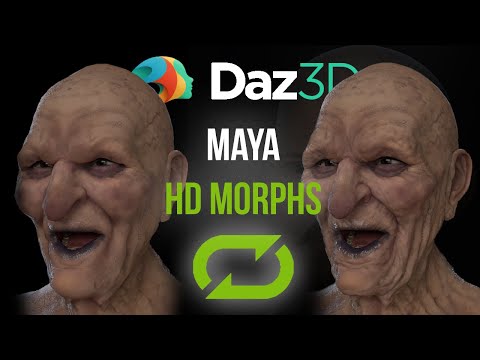
I usually use the displacement workflow but I would prefer to start from a subdiv1 mesh in some cases. You also mentioned another workflow that I recently experimented with:
1. Import G8 figure
2. Subdivide mesh
3. Import higher res mesh as obj
4. Setup blendshape.
This works technically but I noticed the blendshape is losing a lot of details. Given that Maya blendshape are not made to transfer details at higher mesh density levels I guess this is not an error of Maya but simply blendshapes are not made for this.
I have purchased the seUVBlendshape plugin but haven't played with it much yet. From the demo video it seems this is more meant to transfer deformations from a low poly mesh to a high poly mesh and not transfer details between 2 high poly meshes.
Ever since I saw Kinetic Motive's demo on their product I wanted to test this but what is the product and where can I buy it? Is this integrated into one if the face rig products?
Recreating a character - any ideas on used presets, character or hair based on photo?Funny looking girl. From what we can see, her breasts appear to be bigger than her head. Oh well, that's deviantart for you.
I'm guessing that shape is achieved by mixing and matching several morphs - a teen morph for the head, a very-much-not-teen morph for the body. Probably some more dials spun on top of that. Personally, when I want a young looking character, I dial in a little Teen Josie or some other teen character in my runtime.
What was the blonde hair?
AIUTO...CHI CONOSCE L’ITALIANO? PARTE TREDICIMuscleman said:
è colpa nostra...XD....dei PA dico....mettiamo di tutto affinché troviate i sn prodotti :p Sorry!!!
Dubito sia tutta colpa vostra, Muscleman.
 E' il sistema che è frantumato... Cerchi "the girl" e ti escono set di pose per The Freak 3. Hanno tolto un sacco di belle opzioni che il vecchio motore aveva tipo "show only owned" o la possibilità di avere tutti i risultati in una sola pagina.
Sempre parlando dello store, vedo che alla DAZ sono sempre più confusi... Hanno fatto il diavolo in otto per avere due figure distinte per i sessi per evitare che le donne fossero troppo mascoline e gli uomini troppo femminei e adesso fanno il diavolo in sedici per proporre figure e morph per far sembrare gli uomini donne e le donne uomini.

E il nostro Lenio è disperso e si perde la festa.
3D Art Freebie Challenge-June 2021-"Dream Vacation" -Main Thread OnlyJackyBrown said:
3D Art Freebie Challenge June 2021 "Dream Vacation"
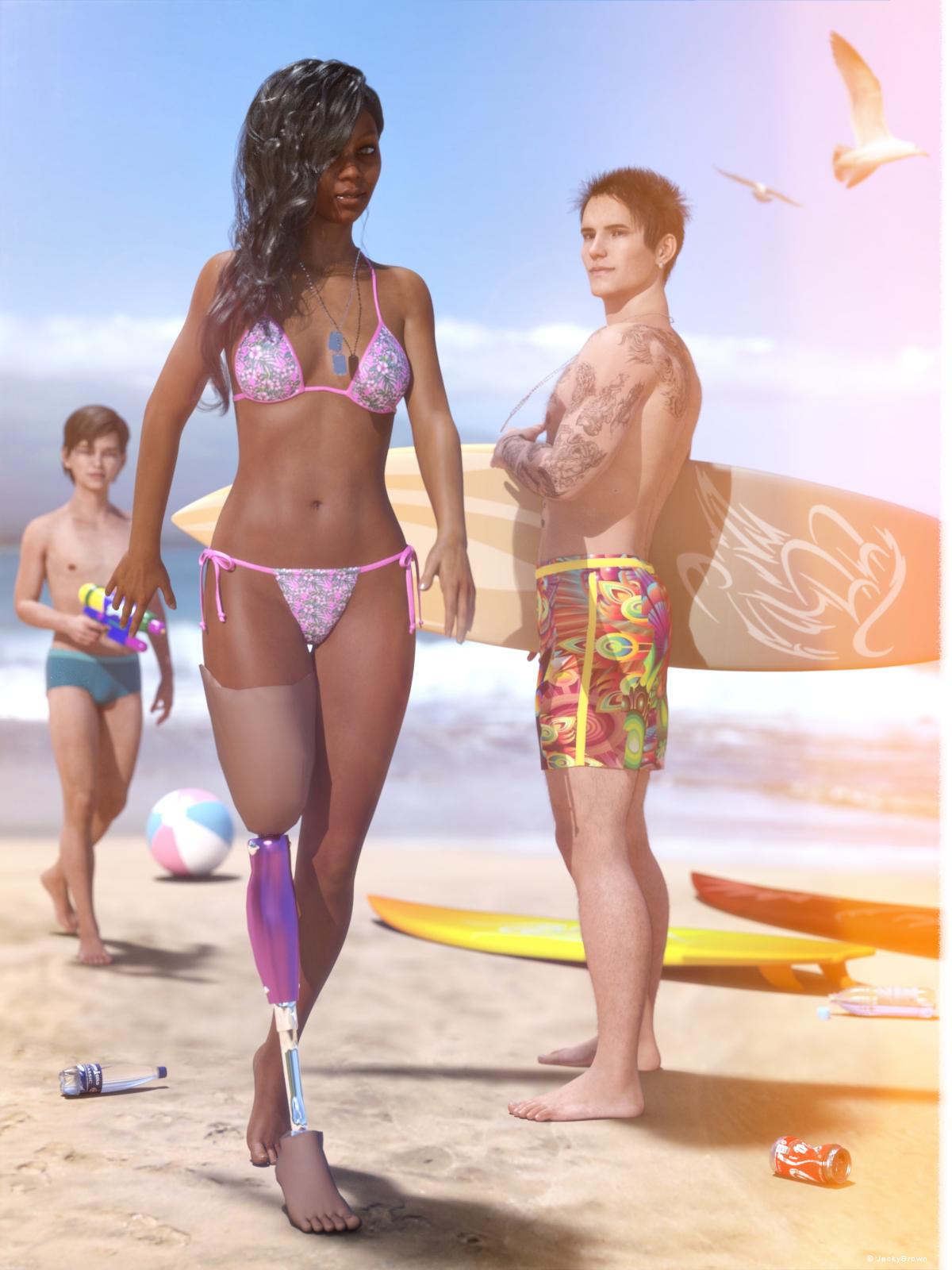
This is my third (and last) render for this month, because what's a dream vacation without at least one day at the beach? :)
[Best watched at full size for details.]
"Dog tags..."
Starring: Tiana, Walther and Walther 2.0
The tale:
Before Tiana lost her right leg on a secret mission in Iraq, her dream (vacation) was to surf in Maui, Hawaii. She was one of the best female surfers, but after the loss of her leg it was no longer possible to surf independently. Now that she's on vacation in Maui after years of rehab, she would love to try to get back on the water on a surfboard...
Walther has been suffering from PTSD since he returned from Iraq, he has the feeling that he will never be able to feel affection and love again because of the things he has seen there and that leads him to severe depressions. Until today, when he saw Tiana and immediately noticed that she also wears dog tags, he felt an enormous connection and warmth for her inside and after years a smile appeared on his face again...Soundtrack:
Tiana's choice:
Everly Brothers - All I Have To Do Is Dream (© 1958) https://www.youtube.com/watch?v=tbU3zdAgiX8
And Walther picked:
Iron Maiden - Infinite Dreams (© 1988) https://www.youtube.com/watch?v=HAGdPQPD7p8
COUNTABLE FREEBIES: (Alphabetic order)#01! 33 Eyes Materials for the Genesis 8 + 8.1 people by LevKornowska
https://www.renderosity.com/freestuff/items/88372/33-eyes-materials-for-the-genesis-8-81-people **#02! Bad Hair Day GM8 by MysticArtDesign
https://sharecg.com/v/97548/browse/21/DAZ-Studio/Bad-Hair-Day-GM8 **#03! Beach-Pant for G8M by kalhh
https://www.renderosity.com/freestuff/items/88738/dforce-beach-pant-for-dazstudio-iray-genesis-8-male **#04! Crushable Can by TrekkieGrrrl
https://www.sharecg.com/v/18196/poser/Crushable-beer-can **#05! Dante DMC5 Free Eyebrows for Genesis 8 Male by InTheFlesh
https://sharecg.com/v/94753/gallery/21/DAZ-Studio/Dante-DMC5-Free-Eyebrows-for-Genesis-8-Male **#06! Drinks by klausdbg
https://www.sharecg.com/v/74240/gallery/5/3D-Model/Summer-IV-Drinks **#07! ED's Brick Shader (Iray) by Edheldil3D
https://www.deviantart.com/edheldil3d/art/Freebie-ED-s-Brick-Shader-Iray-788871766 **#08! G8M Walther 2.0 by Ruslanomar
https://sharecg.com/v/97276/gallery/21/DAZ-Studio/G8M-Walther-2.0 **#09! Hawaiian Floral Prints Seamless by RedEyeCat
https://redeyecat.wordpress.com/2014/06/07/its-a-tile-lollapalooza/ (First item)
[Used on String Bikini for Victoria 6]#10! Iray car related shader presets 'megapack' by Tom2099
https://www.deviantart.com/tom2099/art/Iray-car-related-shader-presets-megapack-539622361 **#11! Leg Prosthetics Pack G3F by MinaBlanche
https://sharecg.com/v/91248/gallery/21/DAZ-Studio/Leg-prosthetics-pack **#12! LT Blade Outfit G3F by UltimateClash
https://www.renderosity.com/freestuff/items/82554/lt-blade-outfit **
[Dog Tags]#13! Private Beach by Redviper2012
http://viper2012.s602.xrea.com/x/ (item 8)
[Beach ball, Watergun]#14! REAL Hairy for Genesis 2 Male ***FREE*** by MikeyFTL
https://www.deviantart.com/mikeyftl/art/REAL-Hairy-for-Genesis-2-Male-FREE-859328094 **#15! Seagulls clipart by HiClipart
https://www.hiclipart.com/free-transparent-background-png-clipart-ybvkw#16! Side Swept ROse Hair (G3F,G8F) Part 1&2 by zoro_d
https://www.renderosity.com/mod/freestuff/side-swept-rose-hair-g3f-g8f-part-1/79533 **
https://www.renderosity.com/mod/freestuff/side-swept-rose-hair-g3f-g8f-part-2/79534 **#17! STRONG for G8M Character Morph & Pose by Mar3D
https://www.renderosity.com/mod/freestuff/strong-for-g8m-character-morph-amp-pose/82833 **#18! SY 200 Morphs for Genesis 8 Head and Body by SickleYield
https://sharecg.com/v/91888/view/21/DAZ-Studio/SY-200-Morphs-for-Genesis-8-Head-and-Body **#19! Tiana for G8F by RenderGuyNY
http://www.sharecg.com/v/88548/gallery/21/DAZ-Studio/Tiana-for-G8F-%5Bsome-nudity%5D **#20! Walther 2.0 simple hair for G8M by Ruslanomar
https://sharecg.com/v/97283/gallery/21/DAZ-Studio/Walther-2.0-simple-hair-for-G8M **
NO-COUNT ITEMS:++ Basic Wear G8M by Daz Originals
--- Bone Earrings for G8M by TwiztedMetal
++ DAZ Studio Iray HDR Outdoor Environments by DimensionTheory [Maui used]
--- Free Iray Outdoor Lights by Dreamlight
++ String Bikini for Victoria 6 by Mada, Sarsa
++ Surf's Up Outfit and Board by SarsaPURCHASED/PAID FOR ITEMS: None 100% Freebies
*1 E-mail address required
** Registration required
#x! Countable Items (Bold ones are used by me for the first time I think.)
--- No longer available freebies
++ Free with DAZ Studio (or the Essentials)
$x. Purchased/Paid For Item
Rendered with DAZ Studio 4.10.0.123 (nVidia Iray)Other free software used: GIMP v2.10.24 and Irfanview 4.57
Postwork: used the AltaLux Image Enhancement Filter (Effect) by Stefano Tommesani that comes with Irfanview and some filters (oa) that come with GIMP.
"Dog tags..."
All freebies approved, please move to entries!
3D Art Freebie Challenge-June 2021-"Dream Vacation" -Main Thread Only3D Art Freebie Challenge June 2021 "Dream Vacation"
This is my third (and last) render for this month, because what's a dream vacation without at least one day at the beach? :)
[Best watched at full size for details.]
"Dog tags..."
Starring: Tiana, Walther and Walther 2.0
The tale:
Before Tiana lost her right leg on a secret mission in Iraq, her dream (vacation) was to surf in Maui, Hawaii. She was one of the best female surfers, but after the loss of her leg it was no longer possible to surf independently. Now that she's on vacation in Maui after years of rehab, she would love to try to get back on the water on a surfboard...
Walther has been suffering from PTSD since he returned from Iraq, he has the feeling that he will never be able to feel affection and love again because of the things he has seen there and that leads him to severe depressions. Until today, when he saw Tiana and immediately noticed that she also wears dog tags, he felt an enormous connection and warmth for her inside and after years a smile appeared on his face again...Soundtrack:
Tiana's choice:
Everly Brothers - All I Have To Do Is Dream (© 1958) https://www.youtube.com/watch?v=tbU3zdAgiX8
And Walther picked:
Iron Maiden - Infinite Dreams (© 1988) https://www.youtube.com/watch?v=HAGdPQPD7p8
COUNTABLE FREEBIES: (Alphabetic order)#01! 33 Eyes Materials for the Genesis 8 + 8.1 people by LevKornowska
https://www.renderosity.com/freestuff/items/88372/33-eyes-materials-for-the-genesis-8-81-people **#02! Bad Hair Day GM8 by MysticArtDesign
https://sharecg.com/v/97548/browse/21/DAZ-Studio/Bad-Hair-Day-GM8 **#03! Beach-Pant for G8M by kalhh
https://www.renderosity.com/freestuff/items/88738/dforce-beach-pant-for-dazstudio-iray-genesis-8-male **#04! Crushable Can by TrekkieGrrrl
https://www.sharecg.com/v/18196/poser/Crushable-beer-can **#05! Dante DMC5 Free Eyebrows for Genesis 8 Male by InTheFlesh
https://sharecg.com/v/94753/gallery/21/DAZ-Studio/Dante-DMC5-Free-Eyebrows-for-Genesis-8-Male **#06! Drinks by klausdbg
https://www.sharecg.com/v/74240/gallery/5/3D-Model/Summer-IV-Drinks **#07! ED's Brick Shader (Iray) by Edheldil3D
https://www.deviantart.com/edheldil3d/art/Freebie-ED-s-Brick-Shader-Iray-788871766 **#08! G8M Walther 2.0 by Ruslanomar
https://sharecg.com/v/97276/gallery/21/DAZ-Studio/G8M-Walther-2.0 **#09! Hawaiian Floral Prints Seamless by RedEyeCat
https://redeyecat.wordpress.com/2014/06/07/its-a-tile-lollapalooza/ (First item)
[Used on String Bikini for Victoria 6]#10! Iray car related shader presets 'megapack' by Tom2099
https://www.deviantart.com/tom2099/art/Iray-car-related-shader-presets-megapack-539622361 **#11! Leg Prosthetics Pack G3F by MinaBlanche
https://sharecg.com/v/91248/gallery/21/DAZ-Studio/Leg-prosthetics-pack **#12! LT Blade Outfit G3F by UltimateClash
https://www.renderosity.com/freestuff/items/82554/lt-blade-outfit **
[Dog Tags]#13! Private Beach by Redviper2012
http://viper2012.s602.xrea.com/x/ (item 8)
[Beach ball, Watergun]#14! REAL Hairy for Genesis 2 Male ***FREE*** by MikeyFTL
https://www.deviantart.com/mikeyftl/art/REAL-Hairy-for-Genesis-2-Male-FREE-859328094 **#15! Seagulls clipart by HiClipart
https://www.hiclipart.com/free-transparent-background-png-clipart-ybvkw#16! Side Swept ROse Hair (G3F,G8F) Part 1&2 by zoro_d
https://www.renderosity.com/mod/freestuff/side-swept-rose-hair-g3f-g8f-part-1/79533 **
https://www.renderosity.com/mod/freestuff/side-swept-rose-hair-g3f-g8f-part-2/79534 **#17! STRONG for G8M Character Morph & Pose by Mar3D
https://www.renderosity.com/mod/freestuff/strong-for-g8m-character-morph-amp-pose/82833 **#18! SY 200 Morphs for Genesis 8 Head and Body by SickleYield
https://sharecg.com/v/91888/view/21/DAZ-Studio/SY-200-Morphs-for-Genesis-8-Head-and-Body **#19! Tiana for G8F by RenderGuyNY
http://www.sharecg.com/v/88548/gallery/21/DAZ-Studio/Tiana-for-G8F-%5Bsome-nudity%5D **#20! Walther 2.0 simple hair for G8M by Ruslanomar
https://sharecg.com/v/97283/gallery/21/DAZ-Studio/Walther-2.0-simple-hair-for-G8M **
NO-COUNT ITEMS:++ Basic Wear G8M by Daz Originals
--- Bone Earrings for G8M by TwiztedMetal
++ DAZ Studio Iray HDR Outdoor Environments by DimensionTheory [Maui used]
--- Free Iray Outdoor Lights by Dreamlight
++ String Bikini for Victoria 6 by Mada, Sarsa
++ Surf's Up Outfit and Board by SarsaPURCHASED/PAID FOR ITEMS: None 100% Freebies
*1 E-mail address required
** Registration required
#x! Countable Items (Bold ones are used by me for the first time I think.)
--- No longer available freebies
++ Free with DAZ Studio (or the Essentials)
$x. Purchased/Paid For Item
Rendered with DAZ Studio 4.10.0.123 (nVidia Iray)Other free software used: GIMP v2.10.24 and Irfanview 4.57
Postwork: used the AltaLux Image Enhancement Filter (Effect) by Stefano Tommesani that comes with Irfanview and some filters (oa) that come with GIMP.
"Dog tags..."
New! Novica & Forum Members Tips & Product Reviews Pt 14vwrangler said:
certaintree38 said:
dForce Lighthouse Keeper has a nice coat. I was disappointed when I realized it didn't have an open morph, but I was able to use primitives along an animated timeline to dforce it open a decent amount. I like the pipe as well.
Here it is with some different shaders and after being dforced.
@certaintree38, I think you may have deleted your attachment after you put it into the post body. when you do that, you completely delete the image from the page, and the only one who might be able to see it is you.
Thanks for the heads up. Yeah, I can still see it.

Okay, I re-added the image. Please let me know if it goes missing again.
New! Novica & Forum Members Tips & Product Reviews Pt 14certaintree38 said:
dForce Lighthouse Keeper has a nice coat. I was disappointed when I realized it didn't have an open morph, but I was able to use primitives along an animated timeline to dforce it open a decent amount. I like the pipe as well.
Here it is with some different shaders and after being dforced.
@certaintree38, I think you may have deleted your attachment after you put it into the post body. when you do that, you completely delete the image from the page, and the only one who might be able to see it is you.
Daz 3D is part of

Connect
DAZ Productions, Inc.
7533 S Center View Ct #4664
West Jordan, UT 84084Licensing Agreement | Terms of Service | Privacy Policy | EULA
© 2026 Daz Productions Inc. All Rights Reserved.