-
Matt Castle's Freebie thread (NEW: Additional fits for Elysion Grace Suit)
Genesis 8 Centaur dForce Clothing Aids
Matt_Castle said:
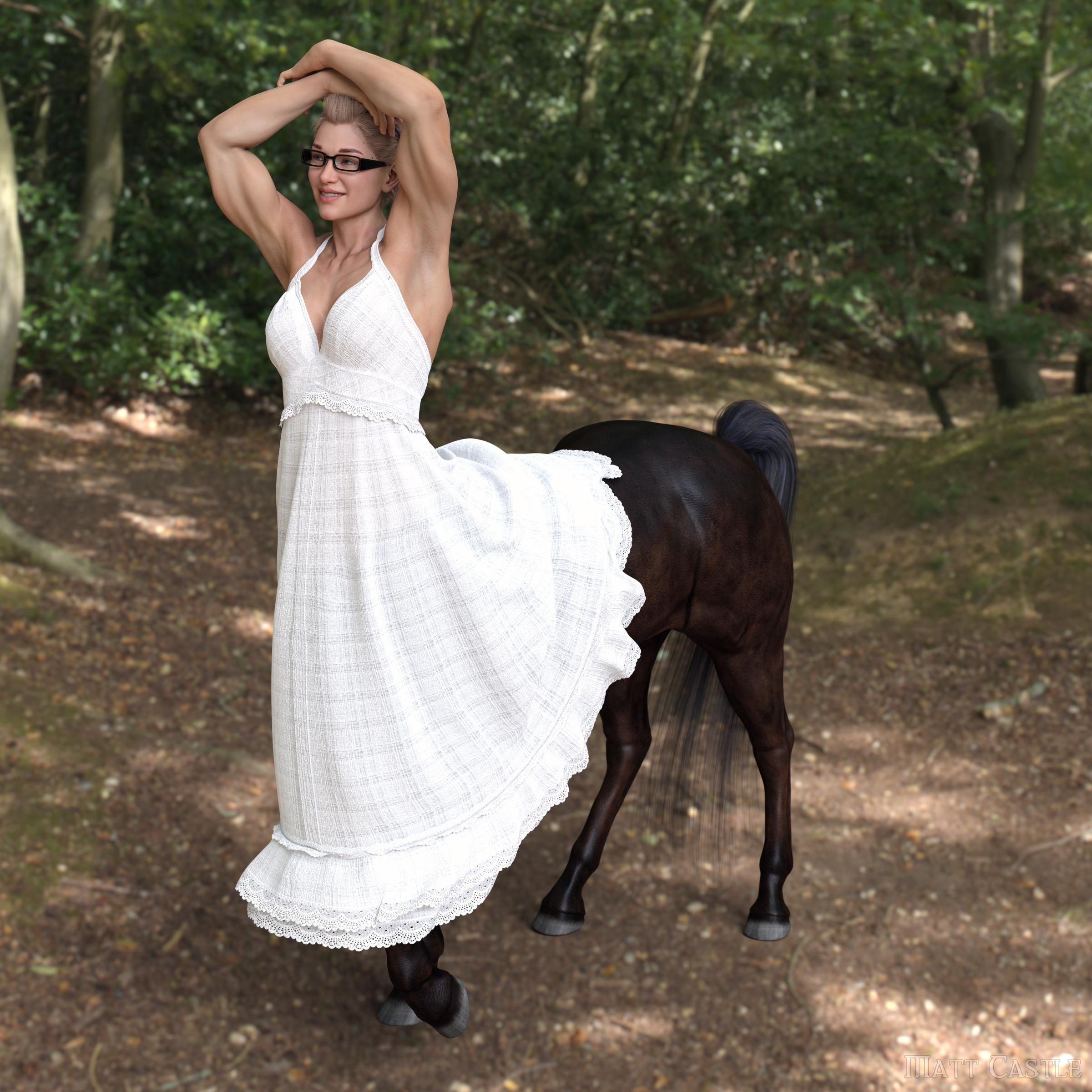
This pack includes morphs to help simulate dForce dresses, skirts and long t-shirts to fit Daz3D's Genesis 8 Centaurs, hopefully considerably increasing the clothing available to these figures.
As a bonus, there is also an additional projection morph included for the Female Centaur that should dial in automatically with RawArt's Annicellea morph, to correct the issues she has with clothes that cross the geograft boundary and improve the overall clothing fit on her morph. This should also function well with non-dForce clothing, but note that it will need to be manually dialled out in the parameters of most geografts. (It has already been disabled for the centaur geograft).
Download links:~~~~~
CHANGELOG:
V1.0 (2021-10-07): Female Centaur morphs
V2.0 (2021-10-17): Male Centaur morphs added~~~~~
FUTURE DEVELOPMENTS:
Probably nothing more for this pack, but I am looking into making JCMs to increase the flexibility of the centaurs.
~~~~~
INSTALLATION:
As usual for manual installation of Daz Studio content, the "data" folder included should be installed at the base level of a Daz Studio content directory.
For reliability of installation, everything has been packaged as one to make it more foolproof, but if you don't have one or other of the products this supports (Genesis 8 Female Centaur, Genesis 8 Male Centaur, Annicellea for Genesis 8 Female Centaur), then do a search in the extracted package and remove the following folder names (and their children)
To remove the:
... Female Centaur morphs, search for "G8Female Centaur"
... Male Centaur morphs, search for "G8Male Centaur"
... Annicellea projection morphs, search for "Annicellea"~~~~~
USAGE:
There should be three accessible sliders on the Female Centaur geograft under Actors/Simulation/StrangeMatter:
- Centaur Clothing Sim 1
- Centaur Clothing Sim 2
- Centaur Clothing Sim 2 AdjustThe two main Clothing Sim options fold up and move the centaur body in different ways, and may work better for different purposes. However, fundamentally, the intention is that they move the Centaur Body out of the way of the clothing at the start of the simulation.
They require timeline simulation (i.e. "Frames to Simulate" must be set to one of the Animated options. This is particularly true as the centaur geografts do not have a memorised pose by default, and don't respond properly to "Simulate from Memorised Pose", which should be off).
This should be started from a zeroed pose at Frame 0 with one or other of the simulation sliders set to 100%.
The desired pose should be set at Frame 30, with the simulation sliders faded out to 0%"Centaur Clothing Sim 2 Adjust" is used to move the centaur body backwards and forwards in conjunction with the "Sim 2" slider in order to correct any clipping in the starting frame of the simulation. It is set up to fade out with the main slider, so its effect will only be apparent when the Sim 2 slider is active and it does not need to be manually keyframed by the user.
~~~~~
PERMISSIONS:
I give permission to store, access, use and modify this content for personal and/or commercial renders. Credit is not required, but is appreciated.
Redistribution of the morphs included in this package is however not permitted in either original or modified form without my express permission; if you want to share it with someone else, send them a link to my original download page!
Blender SculptingI am changing over to Blender to do my modeling and sculpting and I wanted to know how to reproduce the workflow that I did with Zbrush. With Zbrush I can use the Zbrush bridge to send a character and clothing, make some changes like fixing clipping that may happen when clothes overlap, hit the goZ and create the morph without losing any of the pre existing morphs on the object back in Daz.
I am now changing over to Blender and Diffeomorphic to export my scene to Blender to use the sculpting. It appears that I have to export as an obj and the use Morph Loader Advanced to create the morph. This will create a new mesh hence losing all the morphs from the original mesh. Is is possible to recreate the GoZ ability?
How to imitate faces especially eyes like these?Hello, I am trying to make characters resembling these BDO characters, but unfortunately I'm having a really hard time finding characters with similar facial features or morph packs that would allow me to do these. The main thing giving me trouble is the eyes, it seems like many BDO characters have more slanted and wider eyes than most of the face morphs I can find for Daz. Any help would be greatly appreciated.
Easy FilaToon [Commercial]memcneil70 said:
nonesuch00 said:
3Diva said:
nonesuch00 said:
3Diva said:
noshobawolf_f994bf986d said:
Ok. Let me say not any specific complaints about the product. What I am talking about is being able to do something with it. That is not a product problem. Sorry if what I said came across wrong.
Oh! That's a relief! lol :) I am not sure what is meant by "do something with it" - something specific that someone was trying to do? Or just not able to do anything with it? I would love to see what face book page and post you guys are talking about. I don't normally use face book so a link would be appreciated.
As for doing American comic book style, I think that's achievable.
Here are a few different styles that I think could work with a comic.
I think if people play around with the different presets, they can find a large variety of different styles can be made. :)
From where did that Superman morph, custom, and hair come from please? The hair especially. Your Easy Filatoons works perfect.
All of that is custom. Thank you for the comment on Easy FilaToon - That's nice of you to say! :) It put a smile on my face!
Custom? OK, that's great work. I appreciate you letting me know so I won't be looking for that hair in the store, there as ssoo many!
Could you substitute https://www.daz3d.com/k-nicky-hair-for-genesis? ;
Yes, thanks! I even have it already.
Character/Morph Identification - OutoftouchCan anyone help identify the character and skin used in the main promo for these Outoftouch hairs?
OOT Ammy and OOT Sarah.
Easy FilaToon [Commercial]nonesuch00 said:
3Diva said:
nonesuch00 said:
3Diva said:
noshobawolf_f994bf986d said:
Ok. Let me say not any specific complaints about the product. What I am talking about is being able to do something with it. That is not a product problem. Sorry if what I said came across wrong.
Oh! That's a relief! lol :) I am not sure what is meant by "do something with it" - something specific that someone was trying to do? Or just not able to do anything with it? I would love to see what face book page and post you guys are talking about. I don't normally use face book so a link would be appreciated.
As for doing American comic book style, I think that's achievable.
Here are a few different styles that I think could work with a comic.
I think if people play around with the different presets, they can find a large variety of different styles can be made. :)
From where did that Superman morph, custom, and hair come from please? The hair especially. Your Easy Filatoons works perfect.
All of that is custom. Thank you for the comment on Easy FilaToon - That's nice of you to say! :) It put a smile on my face!
Custom? OK, that's great work. I appreciate you letting me know so I won't be looking for that hair in the store, there as ssoo many!
Could you substitute https://www.daz3d.com/k-nicky-hair-for-genesis? ;
Mechasar's Characters Catalog: Who's next? (commercial)I've run into a bit of a bug with the G8.1 version of Beverly that I thought I should pass on, and I wasn't entirely sure if I'd be able to coherently explain it to customer support.
All of her JCMs are set to have her combined character controller as their master, rather than being driven by her individual body and head morphs.
This means that if a user dials in her "Beverly Body" morph separately (without using the combined "Beverly" controller), none of her body bend correctives will function. Or, other combinations such as if you dial in her combined controller but then dial out her head morph, her eye/smile JCMs will continue to affect the result.
I believe most of these should be altered to have her separate Body morph as their master instead, (excepting probably the head bend, eye close and smile JCMs which should probably have her Head morph as their master).
(I've already made the changes in my install - took me a couple of minutes swapping around drivers in Property Hierarchy - but I'm passing it on for the benefit of others).
Marahzen's Musings on Creating Characters (and other matters)
I am continuing to dial in my skin settings. This is only a slight evolution from the last new Tai render, but this is the first time I have done this male character in this way. Both have their own textures, but the skin settings are the same. There's always room for improvement but I am liking this for my characters whose skin tone is suited by it.
The textures are created as noted above - original diffuse textures from Face Transfer 2; Photoshop to remove eyebrows and fix eyelids, then to create translucencies for each; and Materialize to create the rest of the files.
MimicMolly's Renders & WIPsI'm working on and off with my drawn characters that are heavily referenced off of DAZ renders.
Anyway, one of my newest character purchases was Ashcroft HD for G9 because he reminded me a bit of my OC Giacomo (at least his G9 version). In my written stories, Giacomo is a young man who wanted to become a jester, but he was actually supposed to be a bard, so more of a singer than comedian. His DAZ version has proven itself to be a very versatile character actor. I can dress him up in anything and he instantly changes...can't explain it, but I think it's cool and it's made me love him even more.
But the problem with my G9 Giacomo is that his original shape required a Renderhub character (a G9 Astarion), who was a combined head and body morph. So this limited Giacomo's "use" for me, because a lot of the aging/de-aging morphs (if I wanted to see an "old man" Giacomo or child Giacomo), they seem to look better when a head-only shape is used. And also, because one of his main shapes is only "supported by auto-follow" there's a chance I may not be able to quickly fix up any poke-through in clothing before rendering. Having a head-only shaping preset solves a lot of these problems for me.
Since I'm not paranoid about other people stealing my OC, I'm going to share the new head shaping preset I just whipped up that uses Ashcroft (it was successful.) The fuschia/hot pink G9 is the original morph. The gray one is the new one. It is a simple mix.
(If you actually do recreate him based off this screenshot, please tell me. I'd love to see other people's takes on him. Others' renders would probably do my OC more justice since he's not going to be rendered on my potato-PC. XD)

As always, any character that I can use to recreate my OCs is always a good buy that I'd wholeheartedly recommend. Though, I still need to try out Ashcroft's skin and other stuff he comes with but his head shaped looked like it'd work and it did.
I'm keeping both the original shaping preset and the head-only one. Although there's very slight differences that clearly don't match up, as seen on the screenshot, they're small enough that a viewer (of my renders) won't notice a difference. Especially, when I do FilaToon stuff.
Easy FilaToon [Commercial]3Diva said:
nonesuch00 said:
3Diva said:
noshobawolf_f994bf986d said:
Ok. Let me say not any specific complaints about the product. What I am talking about is being able to do something with it. That is not a product problem. Sorry if what I said came across wrong.
Oh! That's a relief! lol :) I am not sure what is meant by "do something with it" - something specific that someone was trying to do? Or just not able to do anything with it? I would love to see what face book page and post you guys are talking about. I don't normally use face book so a link would be appreciated.
As for doing American comic book style, I think that's achievable.
Here are a few different styles that I think could work with a comic.
I think if people play around with the different presets, they can find a large variety of different styles can be made. :)
From where did that Superman morph, custom, and hair come from please? The hair especially. Your Easy Filatoons works perfect.
All of that is custom. Thank you for the comment on Easy FilaToon - That's nice of you to say! :) It put a smile on my face!
Custom? OK, that's great work. I appreciate you letting me know so I won't be looking for that hair in the store, there as ssoo many!
Trying to identify the Offit in this image of Clove. Thanks in advanceMaybe this one with the sleeves hidden (I didn't see any morph to hide them and I don't have the product to check myself, so no guarantee it's how they got that result):
https://www.daz3d.com/dforce-seven-seas-outfit-for-genesis-8-females
Link for the render:
https://www.daz3d.com/clove-and-wytch-accessories-for-posey-and-petunia
Fit Control un-distort Add-On for Growing Uphttps://gcdn.daz3d.com/p/107430/i/voairyounghdforgenesis904daz3d.jpg
Here's a prime example. Since it's always this area, always in connection with age morphs or sculpts and always the same pattern a projection morph would fix it. Zev0, your type of job?Let's appreciate/discuss today's new releases - more ongoinger threadWendyLuvsCatz said:
I seriously want an inflate spherical morph for G9
with little nubby hands and feet,
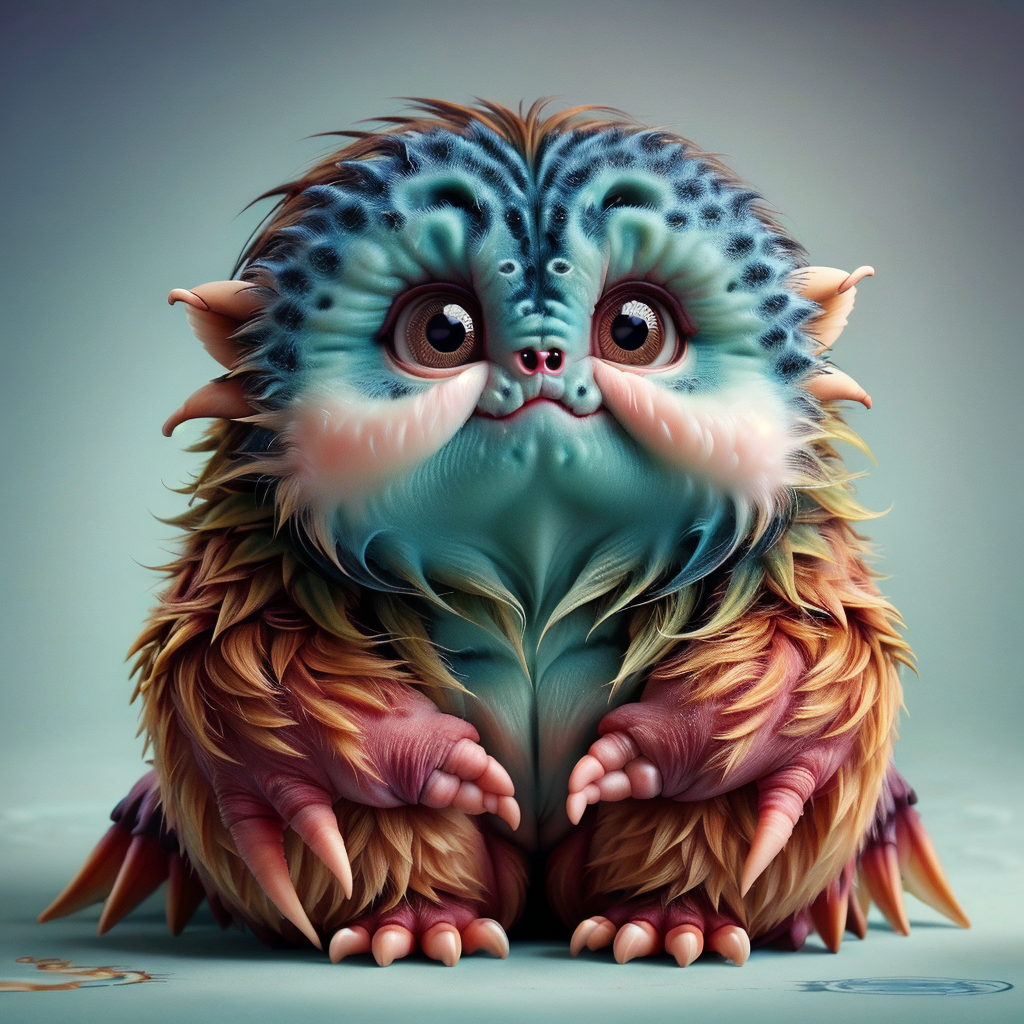
Will a little critter do ?
 Let's appreciate/discuss today's new releases - more ongoinger thread
I seriously want an inflate spherical morph for G9
with little nubby hands and feet,
Easy FilaToon [Commercial]wsterdan said:
3Diva said:
wsterdan said:
3Diva said:
I'm a bit late in announcing this - But it looks like the Daz3D team was able to track down the issue that Mac users were having with a couple of the scripts in Easy FilaToon. They've released an update for Easy FilaToon. If you're on Mac, please update your download of Easy FilaToon and let me know if the "Base Feminine" and "Base Masculine" scripts now work for you! :D
These two scripts are in the very top folder of Easy FilaToon (found here: People >> Genesis 9 Toon >> Easy FilaToon). The scripts are the "Easy FilaToon - Base Feminine - APPLY FIRST" and "Easy FilaToon - Base Masculine - APPLY FIRST" scripts, with pink and blue icons, respectively. They should now work for Mac users, but if they don't, please let me know and I'll get in touch with the Daz3D team again. Hopefully they'll work ok for you guys now!
Thank you everyone who's supported this product! You all are awesome and I couldn't be happier with the response that Easy FilaToon has received! :D You all made my year!
Second, it applies anime toon morph extras to the figure, where I guess I was just expecting it to make an outline and apply the skin settings, but that's just me misunderstanding. That said, it did a great job on it and is very useful and I'm going to use it a lot going forward.
Hi, Walt! The Base Feminine and Base Masculine Scripts should definitely be applying the outline plus an Easy Filatoon shader preset as well as dialing in the Anime shape at 60%. Is it not applying the toon outline and Filatoon shader preset?
It is, no worries! I just didn't realize it would also add the Anime morphs, but that's just because I didn't fully study up on the product. It's great, I love the additions, so no worries! The bottom line is that I'm an even bigger fan than I was before.
Thanks again for this amazing product, I totally love it!Oh that's really good to hear! Thank you, Walt! :D I'm very glad it's working as intended then!
Easy FilaToon [Commercial]nonesuch00 said:
3Diva said:
noshobawolf_f994bf986d said:
Ok. Let me say not any specific complaints about the product. What I am talking about is being able to do something with it. That is not a product problem. Sorry if what I said came across wrong.
Oh! That's a relief! lol :) I am not sure what is meant by "do something with it" - something specific that someone was trying to do? Or just not able to do anything with it? I would love to see what face book page and post you guys are talking about. I don't normally use face book so a link would be appreciated.
As for doing American comic book style, I think that's achievable.
Here are a few different styles that I think could work with a comic.
I think if people play around with the different presets, they can find a large variety of different styles can be made. :)
From where did that Superman morph, custom, and hair come from please? The hair especially. Your Easy Filatoons works perfect.
All of that is custom. Thank you for the comment on Easy FilaToon - That's nice of you to say! :) It put a smile on my face!
The Romance of Certain Old Clothes: Historical Outfits CollectionCOMIXIANT said:
But what I was saying about the vendors losing sales and making it hard to find stuff [...]
I think a lot of assets suffer from this, particularly historical ones.
While the main meat of my setting is set in an alternate 2018, I often render flashback scenes to younger versions of the characters. (Which can potentially be quite a long way back, given my mythological cast)
It's often a right pain to nail down outfits from the right decade of the 20th century (or quite possibly even the right century for stuff further back), particularly when you need several to flesh out a full scene.
Many of the things in this recent scene were not described by their era (or even vague terms like "retro" or "vintage" or any of that), and I had to do a lot of manual searching, and in some cases make edits to get them to look more appropriate (adding a flare morph to the dungarees however was very effective).
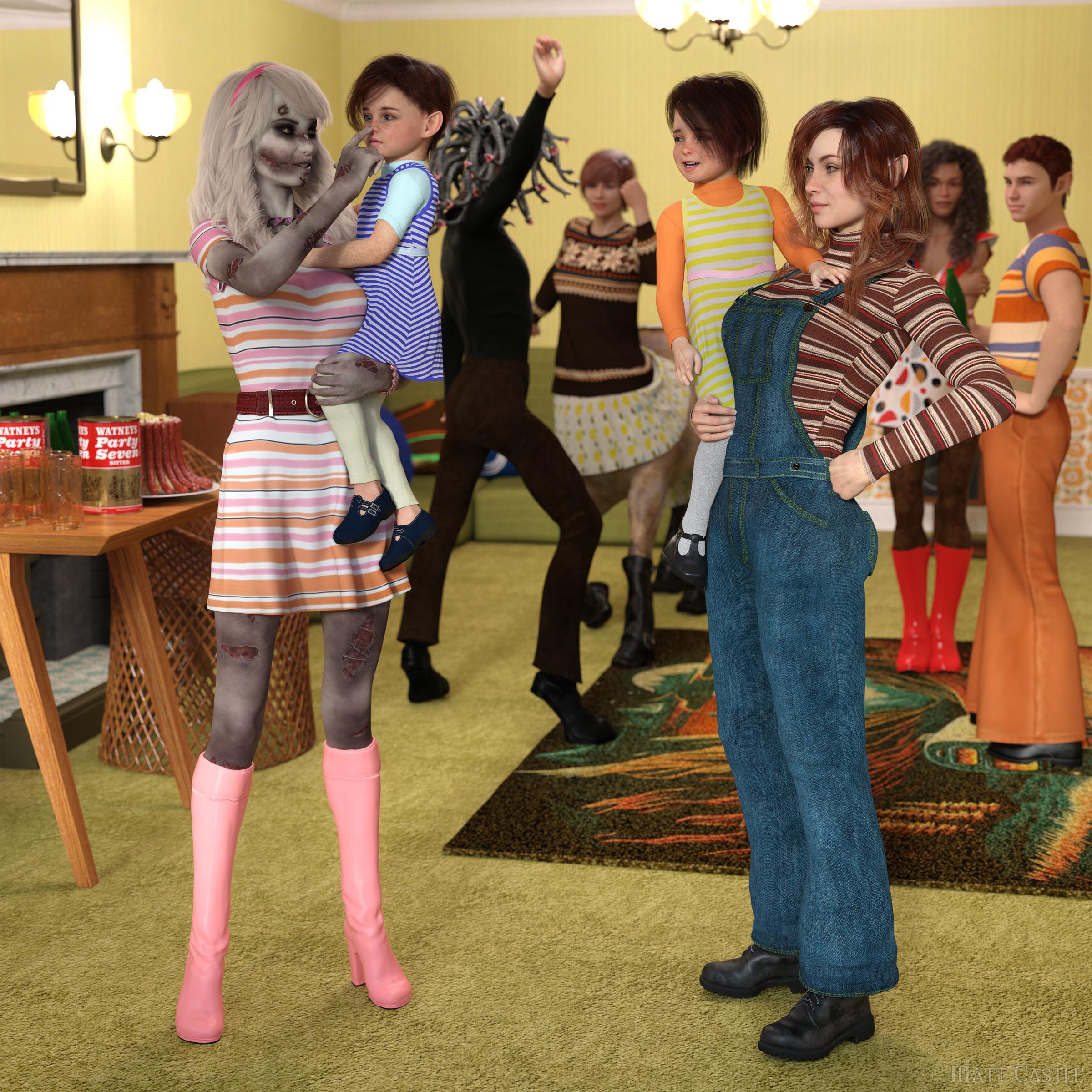
I guess a broad "historical" filter seemed good enough to start with, but within that category you could really quite reasonably have anything between Ancient Egypt and the earlier years of this millennium. (Hell, Daz has existed long enough that things that clothing assets that were contemporary when they came out are now a different era of fashion). Also theoretically pre-history too, given there's really no other category to throw Stone Age hunter outfits into.
Easy FilaToon [Commercial]3Diva said:
wsterdan said:
3Diva said:
I'm a bit late in announcing this - But it looks like the Daz3D team was able to track down the issue that Mac users were having with a couple of the scripts in Easy FilaToon. They've released an update for Easy FilaToon. If you're on Mac, please update your download of Easy FilaToon and let me know if the "Base Feminine" and "Base Masculine" scripts now work for you! :D
These two scripts are in the very top folder of Easy FilaToon (found here: People >> Genesis 9 Toon >> Easy FilaToon). The scripts are the "Easy FilaToon - Base Feminine - APPLY FIRST" and "Easy FilaToon - Base Masculine - APPLY FIRST" scripts, with pink and blue icons, respectively. They should now work for Mac users, but if they don't, please let me know and I'll get in touch with the Daz3D team again. Hopefully they'll work ok for you guys now!
Thank you everyone who's supported this product! You all are awesome and I couldn't be happier with the response that Easy FilaToon has received! :D You all made my year!
Second, it applies anime toon morph extras to the figure, where I guess I was just expecting it to make an outline and apply the skin settings, but that's just me misunderstanding. That said, it did a great job on it and is very useful and I'm going to use it a lot going forward.
Hi, Walt! The Base Feminine and Base Masculine Scripts should definitely be applying the outline plus an Easy Filatoon shader preset as well as dialing in the Anime shape at 60%. Is it not applying the toon outline and Filatoon shader preset?
It is, no worries! I just didn't realize it would also add the Anime morphs, but that's just because I didn't fully study up on the product. It's great, I love the additions, so no worries! The bottom line is that I'm an even bigger fan than I was before.
Thanks again for this amazing product, I totally love it!Easy FilaToon [Commercial]wsterdan said:
3Diva said:
I'm a bit late in announcing this - But it looks like the Daz3D team was able to track down the issue that Mac users were having with a couple of the scripts in Easy FilaToon. They've released an update for Easy FilaToon. If you're on Mac, please update your download of Easy FilaToon and let me know if the "Base Feminine" and "Base Masculine" scripts now work for you! :D
These two scripts are in the very top folder of Easy FilaToon (found here: People >> Genesis 9 Toon >> Easy FilaToon). The scripts are the "Easy FilaToon - Base Feminine - APPLY FIRST" and "Easy FilaToon - Base Masculine - APPLY FIRST" scripts, with pink and blue icons, respectively. They should now work for Mac users, but if they don't, please let me know and I'll get in touch with the Daz3D team again. Hopefully they'll work ok for you guys now!
Thank you everyone who's supported this product! You all are awesome and I couldn't be happier with the response that Easy FilaToon has received! :D You all made my year!
Second, it applies anime toon morph extras to the figure, where I guess I was just expecting it to make an outline and apply the skin settings, but that's just me misunderstanding. That said, it did a great job on it and is very useful and I'm going to use it a lot going forward.
Hi, Walt! The Base Feminine and Base Masculine Scripts should definitely be applying the outline plus an Easy Filatoon shader preset as well as dialing in the Anime shape at 60%. Is it not applying the toon outline and Filatoon shader preset?
Is this a bug in Diffeomorphic or am I being stupid?That is the way I have been doing it so far, it works in terms of the body morphs and most of the face, the issue seems to be the eye blinking that distorts with the standard morph. In DAZ there is a JCM called EyeBlinkLeft and EyeBlinkRight applied that gives the eyelid a better shape, that is present in the anime morphs section of blender but it dosent apply at the same time as the standard blink morph, and when I set it manually it has no effect. If I find the shape key for it and force a value to it then the morph looks a bit better, not perfect but better.
I know this is quite a specific action, I just figured I must be doing something fundamentally wrong for it to be the only detail that dosent work as intended,
Daz 3D is part of

Connect
DAZ Productions, Inc.
7533 S Center View Ct #4664
West Jordan, UT 84084Licensing Agreement | Terms of Service | Privacy Policy | EULA
© 2026 Daz Productions Inc. All Rights Reserved.