-
Mars madness?
mding said:
NotAnArtist said:
Hylas said:
...
I'm a bit confused that this years March Madness hasn't started yet, but perhaps that's a good thing for my wallet!
We need good things for our wallets these days! Let's make this a feel-good thing!
I went wild on sales over the last 2 years, (relative to my sub-poverty-level income). I finally have about all I could ever need for book covers, corny jokes, animation ideas... (except a computer to render them)...And we still see some very good sales here. I just picked up the PW Nirvana Space Station at 67% off a few days ago. This is good!
Of course it wouldn't be the same for newer people here who haven't yet compiled a large base of props. It's bad timing, for sure, when you add the economic crises, poor GPU availablity, Daz3D's inability to improve Filament up to its possibilities as a good alternative to Iray's demand for those GPUs, etc. Those factors have stung me big-time, so I understand the pressure on newer hobbyists that this would be.
But things go in cycles, right? I'm putting more effort these days into studying aspects of DS that I never had time for until now. I want to be ready for better times. Learning Blender 3D is an option, as well. (I've already modeled a "Gopher Plant" and a spider web - very encouraging for an old guy like me).
So hang in there folks! Things will improve here, and if not, something better will come along. That's capitalism, right?
Absolutely agree, and would like to add that postwork can do a lot for people with bad hardware like me!
Postwork yes! Mandatory for me now, too. No matter how small the scene. I've gathered GIMP tutes for that... Can't afford anything else:-)
> But still, only a low-cost hi-quality renderer will make me happy! Until then, no more big spending here, sales or no sales.Mars madness?NotAnArtist said:
Hylas said:
...
I'm a bit confused that this years March Madness hasn't started yet, but perhaps that's a good thing for my wallet!
We need good things for our wallets these days! Let's make this a feel-good thing!
I went wild on sales over the last 2 years, (relative to my sub-poverty-level income). I finally have about all I could ever need for book covers, corny jokes, animation ideas... (except a computer to render them)...And we still see some very good sales here. I just picked up the PW Nirvana Space Station at 67% off a few days ago. This is good!
Of course it wouldn't be the same for newer people here who haven't yet compiled a large base of props. It's bad timing, for sure, when you add the economic crises, poor GPU availablity, Daz3D's inability to improve Filament up to its possibilities as a good alternative to Iray's demand for those GPUs, etc. Those factors have stung me big-time, so I understand the pressure on newer hobbyists that this would be.
But things go in cycles, right? I'm putting more effort these days into studying aspects of DS that I never had time for until now. I want to be ready for better times. Learning Blender 3D is an option, as well. (I've already modeled a "Gopher Plant" and a spider web - very encouraging for an old guy like me).
So hang in there folks! Things will improve here, and if not, something better will come along. That's capitalism, right?
Absolutely agree, and would like to add that postwork can do a lot for people with bad hardware like me!
TexAnim 2022 0414 - Animate texture maps and .VDB Volumetrics
Ze Link : https://sites.google.com/site/mcasualsdazscripts/texanimfords3
texanim exists since ... a long time ago and the last update apparently was in may 2012, ah the springtime, bring it on
What's New in TexAnim 2022
texAnim 2022 retains all of texanim 3.02,'s functionnality
texAnim 2022 includes a timer that inserts a delay between changing textures and rendering the scene,
this is needed mostly for OpenGL and Filament renderers which need time to display scene changes in the 3D Viewport
texanim now works for old shaders that have non-standard maps like the "Normal Map" on the DSDefault shader
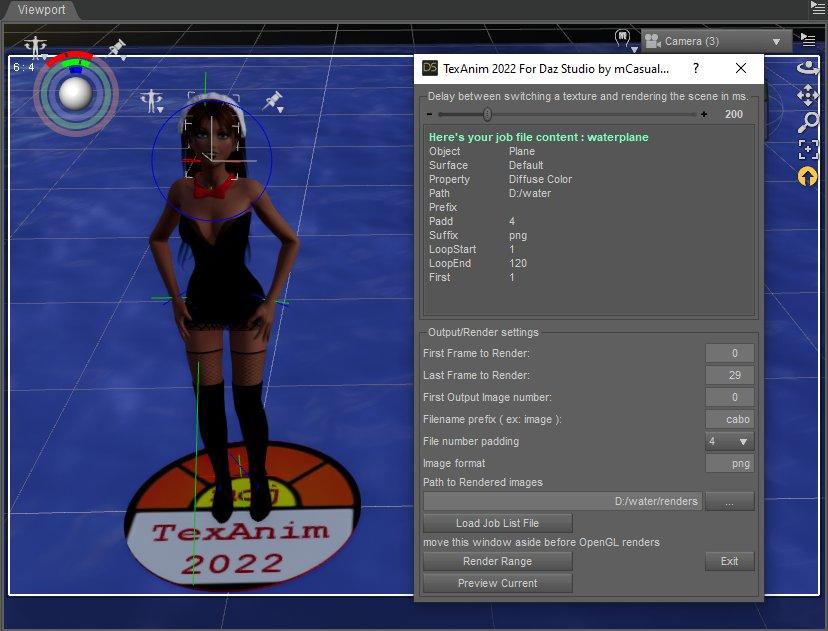
texanim 2022 Now displays your loaded "job file"
notice in the job shown in the image below that i left the "prefix" entry blank, not a blank space
i typed Prefix[Tab][Enter]
because my normal map images were named 0001.png 0002.png .... 0120.png
So for a good TexAnim Experience ( ha ) you have to type your job file without invisible blank space
so you type it like : Prefix[TAB]theprefixofmymapfiles[ENTER]
where theprefixofmymapfiles is the prefix of your map files
my 2010 video presenting texAnim in action, 2010 do we even remember 2010

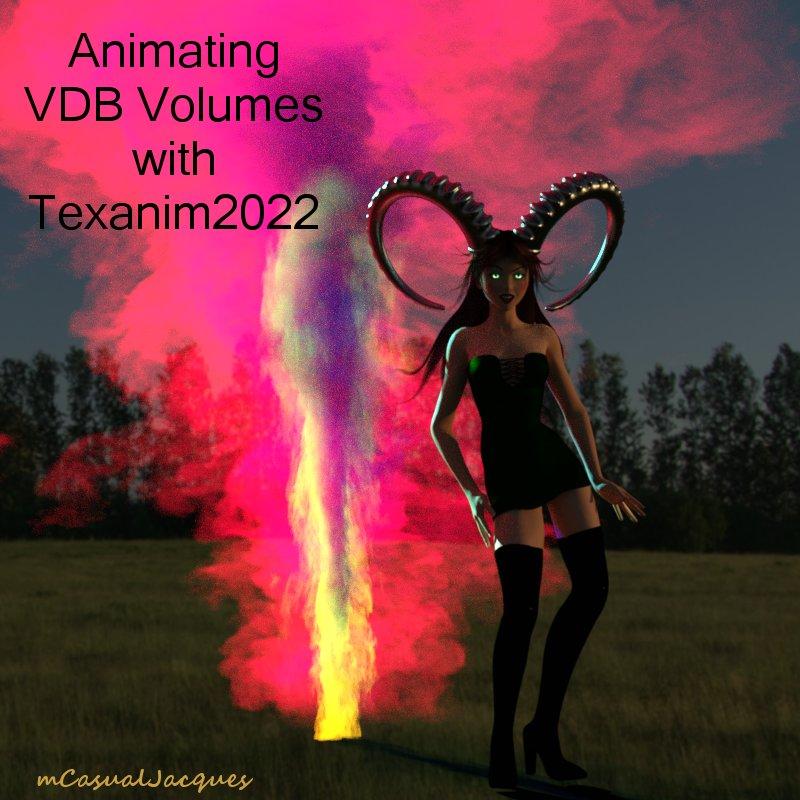
NEW ! Tutorial
Rendering Animated VDBs in Daz Studio
https://sites.google.com/site/mcasualsdazscripts5/TexanimVolumetricsTutorial
 Mars madness?
Hylas said:
...
I'm a bit confused that this years March Madness hasn't started yet, but perhaps that's a good thing for my wallet!
We need good things for our wallets these days! Let's make this a feel-good thing!
I went wild on sales over the last 2 years, (relative to my sub-poverty-level income). I finally have about all I could ever need for book covers, corny jokes, animation ideas... (except a computer to render them)...And we still see some very good sales here. I just picked up the PW Nirvana Space Station at 67% off a few days ago. This is good!
Of course it wouldn't be the same for newer people here who haven't yet compiled a large base of props. It's bad timing, for sure, when you add the economic crises, poor GPU availablity, Daz3D's inability to improve Filament up to its possibilities as a good alternative to Iray's demand for those GPUs, etc. Those factors have stung me big-time, so I understand the pressure on newer hobbyists that this would be.
But things go in cycles, right? I'm putting more effort these days into studying aspects of DS that I never had time for until now. I want to be ready for better times. Learning Blender 3D is an option, as well. (I've already modeled a "Gopher Plant" and a spider web - very encouraging for an old guy like me).
So hang in there folks! Things will improve here, and if not, something better will come along. That's capitalism, right?
iray camera clipping not in Filament renderAs I understand Filament is built on top of OpenGL, so it shares a lot of it's quirks. I've noticed that the Texture Shaded OpenGL preview window clips everything much closer to the camera than Iray does, and would imagine that would be the same for Filament. You may be able to adjust this behaviour with Focal Distance since that seems to change quite a bit in many situations when objects are close to the camera.
anyone know what wrong with my viewportPlease put some clothes on the figure or zoom in to show only the ehad and shoulders.
Your Viewport is using the Filament Drawstyle - see the lightbulb icon next to the Camera/View picker button - which does tend to be over-bright by default. You can adjust its settings in the Parameters pane by selecting the Filament Options Node, or you can justs witch to another Drawstyle by clicking the lightbulb icon.
NO IRAY PREVIEW OR ABILITY TO RENDER SINCE 420 UPDATESince the update installed I have not been able to render or preview in IRAY. The only thing it allows me to do is render and preview in Filament. I have updated my drivers and still not able to render. Is there someone else who had this issue if so how did you reslove it ?
Iray Environment settings conspicuously absentThe settings will not appear until you add an Environment Options node from the Create menu or do a render. The same is true of the Tone Mapper and Filament options
iray camera clipping not in Filament renderI had an interesting phenomenon occur, my Filament render where the camera narrowly avoids clipping the foot of the bed renders black in iray.
I was confused and thought my driver crashed at frame 330 or something but then I found in iray viewport it clips the foot of the bed but Filament it does not.
this is the Filament render video BTW

I have now slightly translated the camera for iray but wonder why it is different
Cat ZeusWendyLuvsCatz said:
I grabbed the sphinx, will be good for Filament I bet

...same here.
Viewport brightness - resolved (thanks guys)Okay, Richard Haseltine, this was very useful. The type of view abouve the cube icon at the top had a small icon next to it..
The area was too bright because I had that visual styl it set on = filament (PBR)
It was a really dumb question but yeah, jsut started re-learning everything. It will come back.
Ghost Lights - What's happening, and what's next.none of this is going to change anytime soon and it is affecting PC gamers too

I am now thinking very hard about any new purchases and whether I can at least adapt them for Unreal Engine, Carrara or other software
THAT DOES NOT RELY ON A NVIDIA CARD
 even though I do have a now considered old 980ti and cannot afford anything better
 I don't like the attitude of DAZ at all,
yes I keep several versions of D|S including the latest beta
(I have been zipping up installed betas with all the plugins in the program files folder before upgrading which has proved a lifesaver)
BTW Kindred Arts, I have done renders of all your sets I own in other software so no issues there and use your Glass for Filament a lot
 Lots of stuff now broken
WendyLuvsCatz said:
I think now would be a darned good time for DAZ to impliment more of Filament's features such as emissive surfaces and improve the cutout opacity
it is opensource after all and not subject to the whims of a video card company
And most importantly and that should be the north of the heart of the developers: my CPU* stays 20ºC cooler when I use filament instead Iray

(*My 2012 GPU is a bad joke and is not Nvidia)
Strand dForce hair with Iray shader - how to convert to 3Delight?Richard Haseltine said:
You can render usign Iray on a CPU, it's just slow (and doesn't have the AI denoiser). Its behaviour isn't exactly the same, but there is a 3Delight shader for the strand-based hair, though I've not really tried it.
OK, where is that default 3DL shader for strand hair, can it be applied separately on any hair, if provided Iray shaders don't work? I would render in Iray on CPU, if rendering time wasn't so frustratingly slow, and I can't even render small quiick previews in viewport without waiting for Iray thinking and computing shaders each time. So I prefer old simple 3Delight. But I found that in latest beta DS 4.20 or in latest update of Genesis 8.1 something is wrong with 3DL shaders. It seems to be more Genesis update fault, but updated Genesis 8 works nice in oldest DS 4.6 and gives me render errors in new DS 4.20. So maybe hair rendering issues come from the same source. I remember when I installed DS 4.20 first time, I played a bit with old G3 and unupdated G8 and they looked in 3DL and test-rendered as always, even faster. Later, literally a day ago, I updated Genesis 8 Essentials to get 8.1 and found them rendered black (Genesis 8 Female) or white (Genesis 3 Female) in 3Delight Mode, though in OpenGL viewport mode they look nice as always. So far I tested some props and found no issues with them, only with Genesis, because they have specific skin shaders.
To test it, I found the easiest and only (so far) hair which looks almost the same in all modes - Iray, 3DL and viewport, and even after conversion to 3Delight (it was dForce Corporate Hair) and I rendered it with a Genesis Female Base in different modes. Here is a quick collage showing the result of the test - in short in IRay and viewport OpenGl renders all looks OK, but in 3Delight Render mode G8F lost her textures and became pitch-black, and even old G3F (not updated at all) is rendered blank (white). Filament render doesnt works at all on my system. In outdated DS 4.6 with old 3Delight and no Iray, all figures, even Genesis 8.1 keep textures, although new Iray and PBR shader are interpreted wrongly and too glossy. So I feel the problem roots either in new beta 3Delight engine, or in my GPUs working with that engine. How to fix it, what is going on? Can I return old basic Genesis 8 and add support for Genesis 8.1 manually in file folders? What files are specifically related to 8.1? Or it's a bug of the beta release?
Cat ZeusWendyLuvsCatz said:
I grabbed the sphinx, will be good for Filament I bet
Thank you for purchasing! Good luch with your experiments!
Cat ZeusI grabbed the sphinx, will be good for Filament I bet
Lots of stuff now brokenI think now would be a darned good time for DAZ to impliment more of Filament's features such as emissive surfaces and improve the cutout opacity
it is opensource after all and not subject to the whims of a video card company
Shortcut key to toggle Iray PreviewI does not have one by default. You can edit in Window>Workspace>Customise, right-click on the Filament entry on the left under Viewport Drawstyles
Shortcut key to toggle Iray PreviewWhat is the keyboard shortcut for the filament style?
Render settings lost environment menu but restore default not put backDiomede said:
Thank you, that worked.
But when I create a new scene, it is still created without environment or tone mapper nodes. I was under the impression that they were part of default scenes and if you deleted, Studio would put them back. Makes me wonder what non-obvious other default settings are missing.
it changed when Filament was added though that might have just in addition rather than the cause of the change
Daz 3D is part of

Connect
DAZ Productions, Inc.
7533 S Center View Ct #4664
West Jordan, UT 84084Licensing Agreement | Terms of Service | Privacy Policy | EULA
© 2026 Daz Productions Inc. All Rights Reserved.