-
Was the V4 Era the Golden Age of Creativity?
One thing I do not miss about the V4 era is creating FBMorphs or even partial morphs because with FBMorphs you had to morph outside the F'in body part seams, which was a right pain in the backside and I'm glad that we progressed far from that archaic method; genesis was/is a godsend for Partial and FBMorphs!
Plus the joint bends were truly horrific, and to try and make morphs for them was too much of a hassle to even make the attempt, so thank F we're done with that era, at least from a character creation standpoint!
But yeah, there was no denying the impact that V4 has made, due to both the Daz and Poser community having a hand at creating content for V4, I do curse the idiot (Who will remain nameless) who was instrumental in throwing a wrench into both the poser and Daz community's continued creative cohesion by denying any further Genesis to poser content, and no I'm not talking about Dson as that was a bandaid for a gaping wound!
Head Shape tweak morph for G8F&MHave you ever noticed that the genesis 8 ears have this weird sort of crease where they meet the skull? Probably not, because you're probably way more well adjusted than I am.
Here's a morph that fixes it anyway. It also tweaks the skull shape slightly so that the head gets a bit wider behind the ears, I don't know if all skulls do that, but mine definitely does, so now Genesis' does too.
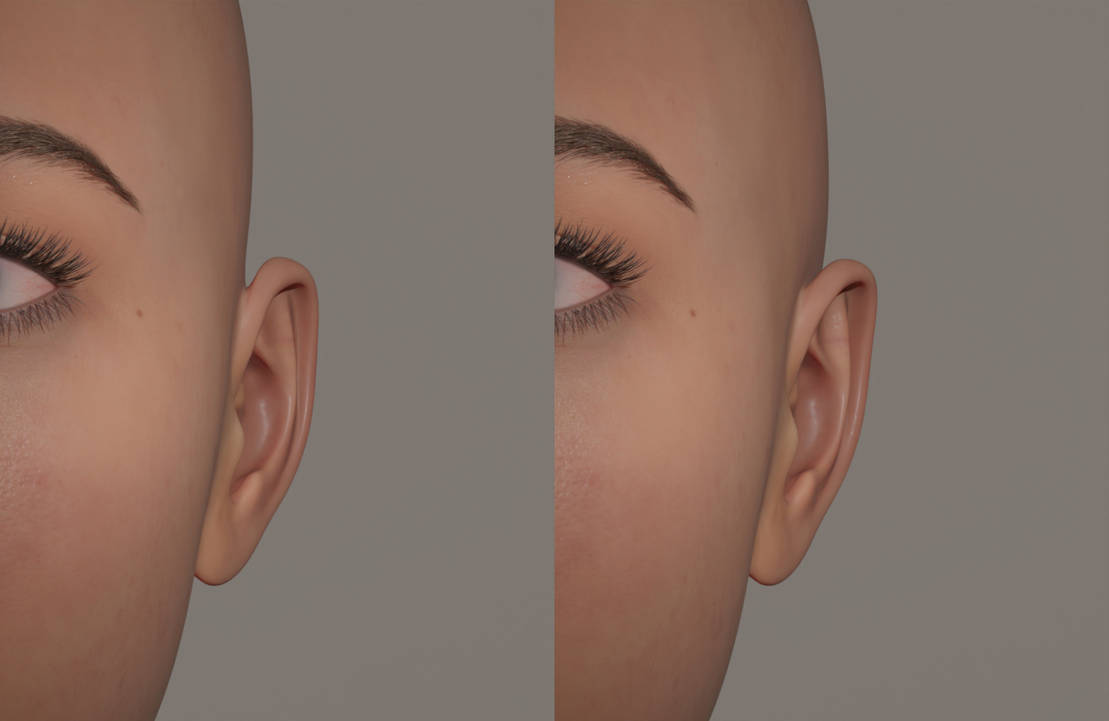
Genuinely this has always bothered me deeply, every time I sculpt a morph I fiddle around with the ear shape, so I figured it was easier just to make a morph that I could start from
Question on ZBrush and Morph Loader Proj cade said:
If you're still having issues with this - I don't have that much experience with zbrush, but have dealt with similar things with blender, and one trick I've always found to fix this sort of thing creating another morph to compensate.
basically something in the process somewhere is doing something to the mesh but its doing it consistently and in the same way. So you export out two morphs from zbrush one with your morph, and another that you haven't done any sculpting on whatsoever, since the second morph you haven't sculpted on has all the other steps it should have the exact same unwanted deformation as your morph minus what you sculpted, so you set the unsculpted morph strength to -1 and it cancels out the all the other deformation leaving only what you want.
hopefully what I wrote wasn't completely unintelligible
Thank you! I didn't have a chance to work on it today, so I'll take a look over the weekend.
Question on ZBrush and Morph Loader ProIf you're still having issues with this - I don't have that much experience with zbrush, but have dealt with similar things with blender, and one trick I've always found to fix this sort of thing creating another morph to compensate.
basically something in the process somewhere is doing something to the mesh but its doing it consistently and in the same way. So you export out two morphs from zbrush one with your morph, and another that you haven't done any sculpting on whatsoever, since the second morph you haven't sculpted on has all the other steps it should have the exact same unwanted deformation as your morph minus what you sculpted, so you set the unsculpted morph strength to -1 and it cancels out the all the other deformation leaving only what you want.
hopefully what I wrote wasn't completely unintelligible
Daisy HD for Genesis 8.1 Female conflicts with Daisy for Genesis 8 FemaleBTW, I wanted to create a body morph that affected the face and a head morph that has the same level of body weight as genesis 8.1 female so people could use the head with other bodies and not look out of place. However, The quality control did not let me do that for some reason. So i Included in the "Hidden" a slider that makes her face skinner to match the genesis 8.1 female weight so you can you daisy's head with other bodies.
Daventaki's Den-Renders and ReviewsReview for a couple of things I have picked recently.
Trix Hair- Curly hairstyle with fits for both G8F, G8M, G3F and G3M. It includes several colors in both iray and 3dl. It has quite a few morphs for adjustment and look. I really like it.
Swank Pantsuit- full body suit that is dforce. It has several texture options which are nice. It has only a few adjustment morphs and it has a thickness morph for after the simulation to make the seams area thicker (does cause lose of some detail along the edges). It dforces well, I did cause it to explode when the actor clipped through the body. it worked well with the timeline simulation.
Siobhan character- cute freckle faced character, her skin looks good. She comes with several makeup options: with blush and without, multiple eyeliner, lip and nails materials. Her skin does have a sheen to it. Just an FYI the materials are found in the G3F folders only the apply morphs for G8F.
Other items used: Boss Pro Light Set and shoes from Nola Cocktail Dress outfit.

Closeup of face no postwork done.
 XTransfer Module 1- Genesis 3 to Genesis 8 Morph Converter (Commercial)
Sometimes conversions just don't work out. Go into the data folder (should be library/data/DAZ 3D/Genesis 8/Male/Morphs/XTransfer) and delete the Robbus morph, and try again. Robbus uses the base G3M UV, so no conversion is necessary for the materials.
XTransfer Module 1- Genesis 3 to Genesis 8 Morph Converter (Commercial)Don't know why the above happens. I don't think the materials transfer over with this product. There are some separate conversion products, for taking the materials and transferring them over. Also, in the case of Genesis 3 to 8, if it uses the base Genesis 3 or the basic Michael 7, I think the materials can just be applied to Genesis 8. But, there are some special cases where the artist has done something different. At least, that's what I think. I'm not an expert.
XTransfer Module 1- Genesis 3 to Genesis 8 Morph Converter (Commercial)inquire said:
It should be right under "Characters," before you click on any of the individual characters. Is it not there?
I found it in another folder! Thanks anyways!
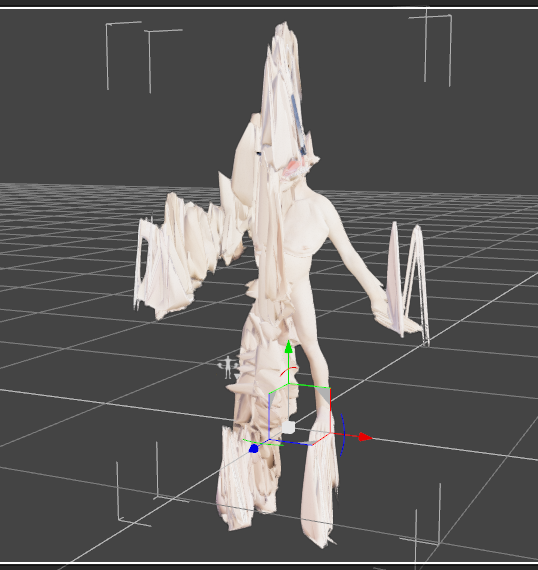
I have another problem now though. I transfered "Robbus Goblin HD for Genesis 3 Male". Once I go to the sliders and try to use him he turns into this. On a sidenote, what is the recommended approach to transfer over the materials?
 Question on ZBrush and Morph Loader Pro
blue said:
By the way, you said your motivation for using Zbrush was because you cant isolate parts with Mesh Grabber
You actually can isolate parts when importing via Morph Loader Pro. You can paint a weight map or some other random map to mask out the part you want the morph to apply to. Then in Morph Loader Pro you can Attenuate By that map.
Honestly, that sounds even more confusing. As long as ZBrush behaves, masking and morphing is much quicker than using Mesh Grabber, at least for me. I just use Mesh Grabber for smaller stuff because I'm entirely too lazy to go through the process of exporting to .obj and opening in ZBrush etc...becuase GoZ only works (as it should, it seems) a fraction of the time.
Want to load 8.1 without "all" of 8's morphs? minitutActually I like to have access to all the morphs at times but wish they could be loaded into the figure "as called for" ... then the figure could load quickly and be changed also quickly enough because loading 2 or 3 morphs [main morph and adjusting morphs] shouldn't take too long.
As an option I might add.
Question on ZBrush and Morph Loader ProBy the way, you said your motivation for using Zbrush was because you cant isolate parts with Mesh Grabber
You actually can isolate parts when importing via Morph Loader Pro. You can paint a weight map or some other random map to mask out the part you want the morph to apply to. Then in Morph Loader Pro you can Attenuate By that map.
Want to load 8.1 without "all" of 8's morphs? minitutRichard Haseltine said:
Most people want access to their full morph library. The main adjustment people have been maming has been to enable the loading of the Genesis 8 expressions. it is, however, useful to have the route to the opposite described for those who will find it useful.
this may sound flip, but it's not intended such.
Do most users really want access to their full morph library all the time? Really?, or is this prevailing logic simply 'self evident' and yet completely incorrect?
I believe it's context dependent: I build and then I use - separate modes.
When I "build", I want it all, and the speed costs of my entire resource-base are to be expected. Once built, I isolate the completed figures into dedicated runtimes and then I "use". Otherwise I'm waiting for 98% of stuff that's not relevant to my current scenes, which is an expensive and frustrating waste of resources and time.
Some viseme and expressions are kind of a grey-area hybrid when animating since they augment the base figure, but the overall premise is sound, and the additional resources are relatively minimal.
Given the numbers of tools created for, and the repeating commentary on this issue, I question the self-evident nature of the base assertion and the DS development paradigm that has driven this software package for years.
To wit, I have at least 6 distinct dedicated runtime/libraries designed to optimize the usage of my project's figures: minimal, daz-O-only, animation, per-figure, and figure building. It took time to build/manage/maintain, but It works for me, and I only do it because I have to, in order to save time.
In this model, no more than 5% of my total DS usage time involved having all of my morphs available. My typical animation session includes 10-20% of my morph collection at most. Fast/Functional.
As others have indicated, perhaps this idea will gain a footing in the next DS iteration. Hopefully the devs will hear the users on this - even if only available on an advanced tab.
It's obvious that my efforts are wholly impractical for most casual still-image generating DS users, but the assumption that "having it all at your fingertips at all times" is equally questionable - at least to my thinking.
feedback encouraged,
--ms
Transferring V4 morphs to G8F/G8.1FSickleYield said:
Now all the morphs that were injected on V4 are on G8, but they are there as many different body components. You have to put in the same value for all of them. If I were invested in this I'd probably select them all and freeze their ERC for a given full body morph to make a dial,
What you will have is one valueParm as the master dial, 60+ alias dials where the targetGeom used to be, and 60+ targetGeom in the body, usually under Morphs/Imported, which are all hidden, and the same again for every other morph you convert.
One addition would be not to save any of that crap, instead once the morph has been tranfered export it as an OBJ, then use Morph Loader to add it to a clean copy of G8F loaded into a new scene.
Why don't some Morphs Appear in the To Export Morphs List?Interesting. well. But how come even i have one that makes the genitalia shirnk or grow. I would think that is a morph, and it still doesn't appear in Unity.
Ok UPDATE 7/14/2021, i've moved to using HDRP projects and transferring morphs using DAz to Unity bridge and now all , everysingle morph for the genitalia appears in the list as exportable. So i add them, and yet they don't appear in Unity at alll. Even the ones that do seem to be morphs. Like the ones that make the Genitalia larger, i would think that is a morph that is not a Pose control i would think, it doesn't appear in Unity.
Any idea why?
Show Us Your Iray Renders. Part VIIIj cade said:
A couple clean portraits

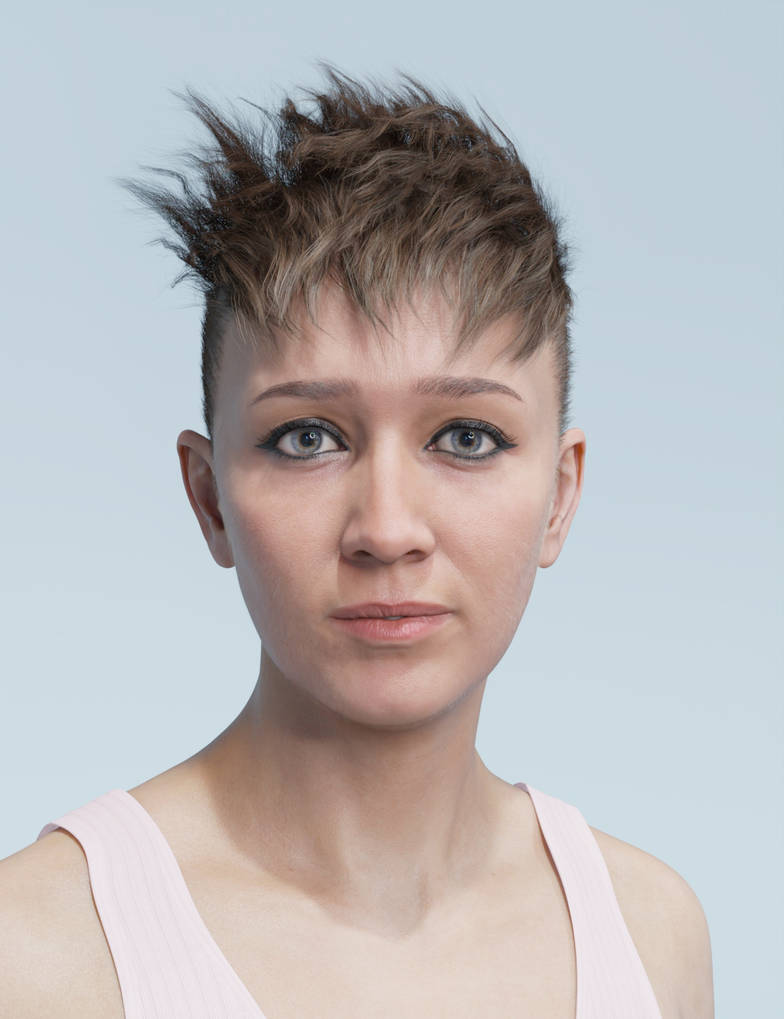
What is the morph/morphs used on the first image? The face is really really stunning.
3090 Here I Come?Saxa -- SD said:
marble said:
Unfortunately, the lag in loading figures into DAZ Studio is not because of slow drives but, as I understand it, the number of morphs. Still, being able to access all those morphs quickly must make a difference.
Initially the figures, morphs etc are loaded into memory from harddrive. So NVME should make a diff for all. But yeah, figure itself is minute in size. Each morph has deltas for each morph, compund that with tons of moprhs and your computer reads and reads all these deltas.
When done loading, your Mem takes over, assuming evrything fits.. Supposedly many AMD CPUS like/prefer/optimized for 3600 mhz Mem. So that's what I bought. Surprised really that 3k mem is really the standard still. DDR5 is coming, but mass consumption seems far behind ie affordable ram.
I think I might go for higher clocked memory above the 3200 that I listed above.
Question on ZBrush and Morph Loader ProMeneerWolfman said:
If you're referring to the upper arm and the lat colliding when the arm is brought close to the torso you need to be concerned with three parameters:
- Shoulder Bend into the body
- Collar Bend into the body
- Shoulder Front/Back behind the body
That's where I usually get the mesh collisions. Granted, if the guy in the attached picture is who you're trying to fix, I don't think you need anything too extreme. It also looks like you're getting that collision from the shoulder front/back going backwards.
My recommendation would be to zero the pose, draw the shoulder bend in for both arms, export to zbrush, use symmetry (you might as well fix both arms at the same time). Hide all the polys except for around the armpit area and then use smooth at about 5-10 to just smooth the mesh you see poking through the arm so it's not colliding as badly. Export the obj twice, once for the left arm and once for the right.
** Before you export the body, dial out any hd morphs, that can cause issues when bringing back in. Also make sure you don't have any morphs favorited, this will be important when bringing back into daz **
Then import that morph back into daz with reverse deformations using the below:
I would import the left arm morph first, that will of course trigger the right lat to smooth out too. So change to geometry editor mode with vertex selection. Then in edit mode in the parameters, favorite the left arm morph and then right click the left arm moph and choose "select morph vertices". Then will highlight all the verices the morph impacts. Switch the selection tool to lasso and then select the right side vertices and then right click and choose "Morph editing -> Clear Selected Deltas from favorite". This will remove the right side morphed vertices. You can unfavorite the morph at this time.
Then with the left arm morph still turn on, morph load the right side morph with reverse deformations. This will give you a symmetrical set of jcm's.
As far as rigging the jcm parameters, I would do a set of three "1st Stage" controllers for the morphs as:
- .34 max value for the shoulder bend being drawn all the way into the body
- .33 max for the collar bend being drawn all the way into the body
- .33 max value for the shoulder front/back going all the way
That should give you a pretty robust coverage without having to make separate jcm's for the individual joint bends.
Thanks - I will try to figure out what that all means tomorrow!
3090 Here I Come?marble said:
Unfortunately, the lag in loading figures into DAZ Studio is not because of slow drives but, as I understand it, the number of morphs. Still, being able to access all those morphs quickly must make a difference.
Initially the figures, morphs etc are loaded into memory from harddrive. So NVME should make a diff for all. But yeah, figure itself is minute in size. Each morph has deltas for each morph, compund that with tons of moprhs and your computer reads and reads all these deltas.
When done loading, your Mem takes over, assuming evrything fits.. Supposedly many AMD CPUS like/prefer/optimized for 3600 mhz Mem. So that's what I bought. Surprised really that 3k mem is really the standard still. DDR5 is coming, but mass consumption seems far behind ie affordable ram.
3090 Here I Come?outrider42 said:
melissastjames said:
outrider42 said:
That the price is better than it was during 2020 doesn't mean it is a fair price, but it is your choice. I have tried to grab a EVGA 3090 numerous times with Hotstock's app and have yet to succeed.
BTW, for piece of mind I highly recommend adding one of the extended warranties they offer on the card. Compared to the price, the extra warranties are nothing. Last time I checked, it was $30 for an extra 2 years (so 5 full years) or $60 for an extra 7 (for a full 10, yes 10 years). The warranty covers pretty much everything, and you can even sell your card and transfer the warranty to the buyer. This means you can ask a whole lot more for your card compared to others because not many 2nd hand cards are going to offer a warranty. They also cover the the length of the warranty, too. If they replace the GPU, the replacement is also under warranty, no matter how many times you may need a replacement for the duration of your warranty period. EVGA also offers a higher tier warranty package that will express ship a replacement to you before they even receive your defective one, which is really good for people who have jobs that depend on their PCs and cannot afford to be down for long. If that describes you, then you should look into this extra warranty, too.
I don't want to sound like some shill for EVGA, but it really doesn't get better than that. As someone in the repair business this is one of the most generous warranties around, especially for the asking price. I also personally dealt with EVGA myself, when my 1080ti died thanks to a storm surge. I bought that 1080ti used off ebay, and had no issue whatsoever getting the RMA setup, so I can prove from my own experience that yes they absolutely do honor 2nd hand purchases or 3rd or 4th for that matter. The tech I spoke to was awesome, and I was pretty impressed with how everything was done. After dealing with all these other tech companies for over a decade this was just...refreshing, and the experience fully converted me to EVGA. I had heard good things about their customer service, but actually experiencing it was eye opening.
I already ordered it and I didn't see an option for a separate warranty, unless that's something I buy directly from EVGA before registering. If not, I guess I'll just have to live with their standard warranty...it's not like I really use cards longer than a few years anyway. The 1080TI I have now is the oldest card I've ever kept.
I just don't think the price is going to come down this year. Or even next year. Or like. Ever. So I figured it was time to just do it. My system has been running for 4 years next month and it's time for something new given that scenes I could render a year ago in Daz, I can't anymore because of how each time a new version comes out, the performance gets worse. I'd also like to be able to game at 4k again, and CyberPunk 2077 told me that was a pipe dream unless I got a big daddy card. I just got tired of waiting. I can't sit and watch notifications 24/7 to jump on fresh inventory and I refuse to sit there and listen to some YouTube channel when I'd rather be listening to Spotify. So I paid a premium...thankfully not as much of a premium as I would have paid only a couple months ago.
Yes, you go to EVGA and buy the extended warranty direct from them. I believe you get the option when you register the card. The 3090 is a huge upgrade, so you may not need another for a while. Who knows how the market will be after another 2-4 years. Will we ever be able to buy GPUs again? I really don't know, I am feeling pretty negative about the market like you, as crypto is not ever going away. The warranty hedges the bets so in case you are stuck with the card for longer than you wish to be, you will not have to sweat out that extra time worried about if your $2700 card will make it.
Also, because the 3090 uses 100 more Watts, I have great concerns about its longevity. Heat is a serious enemy, and even with the best cooling solutions they will generate a lot of it over the years. GDDR6X is new and unproven itself, with 24 1gb chips all around the thing. Any one of these could have a failure, giving you all these extra points of failure compared to other GPUs that only have a few chips of memory.
The faster RMA option also works for the general warranty period as well, so this option may be of interest even if you don't get an extended warranty.
Good point. I'll definitely be buying the extended warranty when I register it. EVGA's RMA process is why I stick with them. My 980TI bricked a couple months out of warranty when we tried installing it in my husband's system after I got the 1080TI setup and they were nice enough to RMA it. Sadly, the replacement card failed in my husband's system, which leads me to believe that there is something up with his system overall...which is why he's still using a 970 (it's a micro-atx which I HATE because it's too goddam small to do anything with, but it has more than enough power so I have no clue but I have a hard time believing they'd send a replacement brick. Never again will I let him install a computer into a $%@# shoebox, lol.)
Daz 3D is part of

Connect
DAZ Productions, Inc.
7533 S Center View Ct #4664
West Jordan, UT 84084Licensing Agreement | Terms of Service | Privacy Policy | EULA
© 2026 Daz Productions Inc. All Rights Reserved.