-
SereneNight’s Sci-Fi Fun Thread 3
Yes I think you are right. I'll check that out tomorrow.
 Also michael 8.1 seems to have some height baked into his morph.Daisy HD for Genesis 8.1 Female conflicts with Daisy for Genesis 8 Female
Daz really needs to assign each PA a prefix the must use on each morph to distinguish them from another PAs. Offsite products could still be an issue, but at least Daz's own products won't.
Also, the thigh gap for such a robust stature seems extreme - unless that is just the pose (promo). can someone clarify? Thanks.
SereneNight’s Sci-Fi Fun Thread 3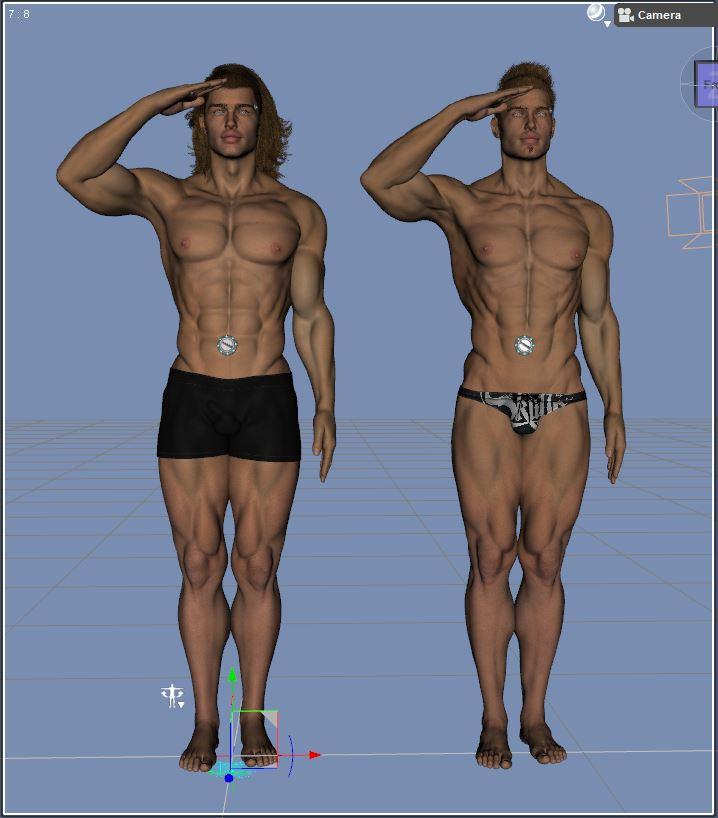
Original Boyd (short hair), is on the right, new Boyd is on the left.
The structure of the G8.1 version is slightly different. Things I've noted: the pecs are bigger. Also, there is a 'underarm gap' for lack of a better term in the new figure. Also, the bends of G8.1's body seem better. The Eyebrows are different in a way I have not figured out. For example, the skin there is different, and the brows did not quite match up.
To compensate for the crunchiness that occurred in M8's head morph on M8.1, I reduced the head shape to 60 percent and then dialed in some Torment. This ballooned the lips, so I had to do a bit of work, to reduce them slightly.
I also attempted to dial down the muscularity so Boyd 8.1's pecs aren't so... Balloony.
As far as the skin he uses Garett's skin, but I applied the shaders of another g8.1 skin. It turned out okay, except for the dingus, which I spent a lot of time, color matching.
Hmm. One thing, I think Mike 8.1 has some baked in height.
SereneNight’s Sci-Fi Fun Thread 3Original Boyd 8 and Owen had Michael 8 at 100 percent.
I find Michael 8 (original) head morphs do some odd things with the expressions on Genesis 8.1's heads, so a straight morph, while looking similar, also did not perform as well as I'd like in the expression department, and there is something for lack of a better term, 'crunchy' which occurs with M8's head on 8.1 at 100 percent. So I wanted to see if I could reduce that problem while still achieving close to the same look.
So I discovered, that M8'1s and M8's body is pretty much nearly identical. M8'1 is slightly shorter, but when enlarged appropriately, they basically are the same shape. There is some differences in the neck region, but you can see when I juxtapose 8.1 and 8.0 they are virtually identical bod-wise. (Original M8, is the lighter whereas 8.1 is the darker tanned one).
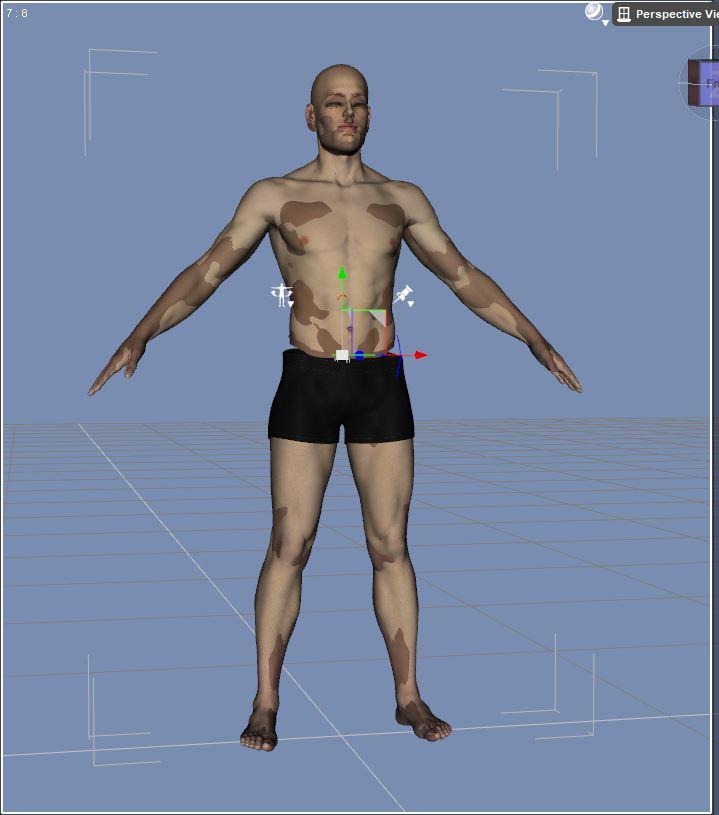
So, for New Boyd, I dialed out all of M8's body and used M8.1's body. Since they appear to be the same. I also used M8.1's HD morphs, at least until I find ones I like better.
One of the happy coincidences that occurred from the Michael 8.0 extraction, is that clothing appears to fit him better. There is less poke through than with Michael 8.0
Obviously, Michael 8.1's head was not really a viable option, not only for reasons but simply that dialed in, his head made Boyd look terrible.
K12 Education Questionbarbult said:
Even if you eliminate the texture and morph concerns, it will only take a few seconds for a student to start posing the naked characters in compromising positions.
They will do that even with stick figures
 Star Trek Builders Unite 8: THE REBOOT
For characters I couldn't find in my source I have used face transfer. For example that's how I made Janice Rand.
Star Trek Builders Unite 8: THE REBOOTFleetAdmiral01 said:
lwaves said:
FleetAdmiral01 said:
Worf is still in the future but.....
Aslo should I go ahead and make Tasha Yar?
I've been meaning to ask you this on your DA page but as it was kinda mentioned here, I figured this place was good.
Do you plan on releasing your ST crews for G8 at some point?
I'm not going to ask when, just the if of it. I've been tempted to give Wrap3 a go myself but tutorials for G8 are scarce. If you're going to release them down the line, there's no point in doing them myself. I can try other figures.
I also back up the posts saying yes to Tasha. Hopefully we'll see a DS9 crew one day too, I'd love an Ezri Dax figure. :-)To answer your question I'm still working on learning how to package things up. If I were to release what I have right now it would just be the raw OBJ files and you would have to load them up manually via Transfer Utility and Morph Loader Pro (and I just recently learned there is third step to fix weird positioning of the eye controllers on some characters - fit rig to shape) .
If I do release them it'll be after I have all the main crews. So TOS/TNG/DS9/VOY/ENT so far I only have TNG/TOS/Discovery.
Cheers for the reply and that's understandable, even though you said you were fairly new, I didn't realise you were that new to all this.
I have your raw rip files from TOS and Discovery (from another forum) which are very useful to me, so it would be greatly appreciated if you continue releasing them in the meantime. Not sure if you've released the raw rips from TNG yet. I've been having some good results with Face Transfer and might continue down that route. :-)
[Released] dForce2Morph [Commercial]This will be a great time saver. Through trial and error (mostly error, I admit), I worked out a manual way to do this when trying to get clothing untidily dropped on the floor, and saved the deformed meshes as OBJ files, then used morph loader to turn into morphs. I wondered as I did it whether it was possible to automate the process and cut my error prone self out of doing it while at the same time speeding it up. Seems like it was possible, just not by me. Fantastic idea.IRAY Photorealism?Okay I've added bump to it, so if anyone wants to experiment with my cornea/eye moisture shader have at it.
It is released as is and unsupported, If you have any extra questions, feel free to ask and I'll do my best to explain but I am not going to do a full walkthrough and explain every single thing about it.
the main shader setting you might want to tweak is refraction roughness - the rougher it is the more smoothly it will transfer light, but the more it will blur the underlying texture. I have set the min and max to the range where it works without too many issues - if you get weird shadows up the roughness a bit from the default until they go away.
Reflection weight controls the strength of the reflections set it to 0 and you just have refraction with no shine.
known limitations
- much slower to render
- not see through in viewport. you will just see grey
- does not like point and spot lights with the geometry set to point (don't use them any way because they're physically innaccurate)
- in general, the smaller the light source the more the shader will struggle (this is where you might need to turn up refraction roughness) HDRIS on the otther hand generally work well
- will darken the underlying surface a bit no matter whart you do
the easiest way to compensate for the darkening of the underlying surface is to take your sclera/iris texture and use the layered image editor and add it to itself. 2 layers both with the same eye texture with the upper one seet to add usually with its strength set to around 50%. The strength will depend on how big your light sources are. Smaller light sources you will need to brighten things more. (and yes this means if you change your lighting you may need to change the material to compensate)
also included is a comparison render in some actual nice lighting - here the proper refracted version is actually lighter than the default

 Star Trek Builders Unite 8: THE REBOOT
lwaves said:
FleetAdmiral01 said:
Worf is still in the future but.....
Aslo should I go ahead and make Tasha Yar?
I've been meaning to ask you this on your DA page but as it was kinda mentioned here, I figured this place was good.
Do you plan on releasing your ST crews for G8 at some point?
I'm not going to ask when, just the if of it. I've been tempted to give Wrap3 a go myself but tutorials for G8 are scarce. If you're going to release them down the line, there's no point in doing them myself. I can try other figures.
I also back up the posts saying yes to Tasha. Hopefully we'll see a DS9 crew one day too, I'd love an Ezri Dax figure. :-)To answer your question I'm still working on learning how to package things up. If I were to release what I have right now it would just be the raw OBJ files and you would have to load them up manually via Transfer Utility and Morph Loader Pro (and I just recently learned there is third step to fix weird positioning of the eye controllers on some characters - fit rig to shape) .
If I do release them it'll be after I have all the main crews. So TOS/TNG/DS9/VOY/ENT so far I only have TNG/TOS/Discovery.
Was the V4 Era the Golden Age of Creativity?
As someone who was around in the era it has one insurmountable sticking point for me. I see v4 and creativity and my brain immediately goes "wait. The era where I was limited to shaping my figure by whatever morphs the clothing maker decided to add as fits was a golden era of creativity? Because man did that make me feel incredibly creatively stymied." There were (incredibly painful and clunky) work around and things started to improve at the very end, but did find it incredibly creatively limiting. Genesis came with automatic auto follow for morphs, not having to deal with injecting morphs (it was also much easier to make morphs for, I don't think it's a coincidence that this is the era I started making my own morphs, which I would consider an expansion of my creative abilities) I jumped on Genesis train immediately and never looked back. And it really primarily was because I found it much easier to match my creative vision. As an example: I loved Stephanie 4. I probably used her more as a morph for Genesis, than I did as a morph for v4. Frequently with clothing I had transferred to Genesis from v4 as well. Steph 4 came out very late in the v4 era, so almost no clothing had fits for her. It was genuinely easier for me to transfer her and v4 clothing to Genesis to get them to actually fit her. Tldr while there is stuff from the era I have nostalgia for, I have very little for the era itself, almost entirely because I found it an era of creative frustration.Torquinox said:Masterstroke said:
PerttiA said:
There's no argument in the technology having advanced tremendously since V4 era, but that's not what's being discussed here.
I dont think anybody claims V4 was technologically better than the current models, far from it, so there's no point in kicking the dead dog, that's not even on the table.
I disagree. It is exactly, what is discussed. Great for you, when it was all fine for you and you were happy with what you have got.
The frustration for me at that time has been a fact, and it blocked all the creativity.
I remember wondering, when we will be having better tools and content in all those stores.
Sorry, I just don't consider thousends of -Victoria 4 as a pixie on a mushroom in a forrest- renders as the golden age of creativity.I understand that frustration. I am coming at it from an after-the-fact perspective. For me, she's still fun because I have just about every enhancement ever made for her along with newer versions of DS and some content made well after her heyday ended. If I had suffered along for years and years as the products developed, I would likely feel differently about it. I do think there is more to the content than pixies on a mushroom, but that's quibbling.
Naturally, the newer figures and their content have a lot to recommend them. The part that I find a little frustrating is that we still have not escaped the need for aftermarket helper morphs and enhancements, even on the latest figures. Also, I'm a little alarmed that recent content has become very heavy, downloads increasingly measured in Gb instead of Mb. My next computer definitely gets bigger harddrives!
K12 Education QuestionEven if you eliminate the texture and morph concerns, it will only take a few seconds for a student to start posing the naked characters in compromising positions.
3D Art Freebie Challenge-July 2021-"Wild Wild West" -Main Thread OnlyBronzeDragon said:
My entry for the month is a bit different, an unusual take on the heat in the wild west.
Well, the contest is heat in the wild west, ok, you got it. It's really wild out there now. So we have a woman crawling across what used to be a lake bed in 120+ degree heat, no rain, no water of any kind, except the bottle she is headed for. Fires raging all around, sparks flying, grass and trees dead or dying. The West of 2021 is here, probably from now on.
Title: Parched and on fire
Items used:
Free items:Dead horse skeleton - https://sketchfab.com/3d-models/horse-skeleton-eaca504567604e879b8ab2cf2763025e
Lotion bottle - https://www.deviantart.com/poses17/art/Lotion-Bottle-Freebie-Prop-612435609
Path - https://www.renderosity.com/freestuff/items/88082/path-in-the-dunes-daz3d-iray-obj-and-maps-included
Grass - https://www.renderosity.com/freestuff/items/88095/grass-as-grass-can-be-daz3d-iray-
Figure morph - https://www.deviantart.com/checkertoo/art/Phantom-For-G8F-Dl-858507130
Hair - https://sharecg.com/v/97504/browse/21/DAZ-Studio/Short-Bob
Puma - https://www.most-digital-creations.com/puma.htm
Flames - https://www.deviantart.com/smida460/art/Freebie-SmidA-Magical-Flames-Iray-792443927
Pose - https://www.deviantart.com/cptn0bvious/art/Wrestling-Low-Blows-for-G8F-849840325
Dust - https://www.deviantart.com/squarepeg3d/art/Prop-Dust-Mote-Cloud-875458221
Dirty Skin - https://www.renderosity.com/freestuff/items/87636/swt-warfront-dirty-skin-for-g8f-and-g3f
Purchased items:Clothes - https://www.daz3d.com/badlands-roamer-outfit-for-genesis-3-female-s (I believe I got this in a free starter set during one of the sales events, but I can count it as purchased)
No count items:Creepy Trees - https://www.renderosity.com/rr/mod/bcs/lisas-botanicals---creepier-trees/146113/ (was a freebie but no longer is - hivewire3d virus contest spring/summer 2020)
Base Genesis 8 Female
Background image - must have been free since I don't buy backgrounds.
Post processing done in PSPx6 and ON1 Effects 2019 (free)
Hope you like the real world of the western US in the summer of '21.That's wild for sure. I love the post-apocalyptic feel to it. Really excellent work.
Geoshells and LIEThe thread Margrave linked has an explanation as well as the attachment of the online read-me. I'm copy-pasting the explanation here and adding the readme file.
Thank you for purchasing our products. The process is that you need to apply the Geoshell or Geoshells werables (depending on if you're also going to apply the blood) first.
This product makes more sense if you apply it from the Content Library Pane rather than the Smart Content Pane since it has been organized in a way to help you apply things in the correct order (though I've tried naming things to follow that order. So you'll find the product in the following path within your content library
DAZ Studio Formats > My DAZ 3D Library (or Connect) > People > Genesis 8 Male > Materials > FenixPhoenix > Gunshot Wounds.
There you will find several folders with the correct order of how to apply things. You can find the readme with instructions here: http://docs.daz3d.com/doku.php/public/read_me/index/80852/start You may need to refresh several times for it to show up.
I've downloaded that as a PDF which I'm attaching here for easier access.
Basically, you should NOT apply any of the materials/LIE presets to the character. Instead, you should apply the SubDivision & Geoshell wearables to the characters. Then you would apply the materials (skin color), LIE Presets to the appropriate Geoshells.
Here's a simple rundown of the process:
- Apply a subdivision to your character (you can do this once you're ready to render), but remember that the higher the subdivision, the better the wound morph will look.
- Apply "MGW 01.1 Wound Geoshell Wearable" to your character.
- Select the Geoshell Wearable (which will be invisible) and apply "MGW 01.1 Wound Geoshell Dark (or Light or Midtone) Skin Iray Material" (choose the skin color that best describes your character). You can go back and apply another skin color afterward, so don't worry too much about this choice.
- Apply the "MGW 02" wound LIE Presets (as many as you'd like) to the Geoshell.
- That's it!
- If you want to apply the Blood, you'll do the same but process but you would need to load the "MGW 01.2 Blood Geoshell Wearable", select that and apply the appropriate presets to that one. The Blood presets also have utilities to apply if you want to make the blood glossier or lower displacement to avoid clothing pokethrough.
BTW, the dials you mention correspond only to the actual morph (geometry) that would apply to the base character. Shaping presets have been included for convenience, but you can select your character and apply the dials directly if you want. Keep in mind that you'll need to increase the subdivision level (maually or using the scripts provided) in order to visualize the changes.
Let me know if you have any more questions or if something wasn't clear! :)
PS: Since I've been seeing enough threads of people confused with this product. I'll see if I can create a proper readme (linked inside the product) and update the product next weekend.
Daisy HD For Genesis 8.1 Female - CommercialArtini said:
... but something is wrong with her left eye.
Could you please fix that.
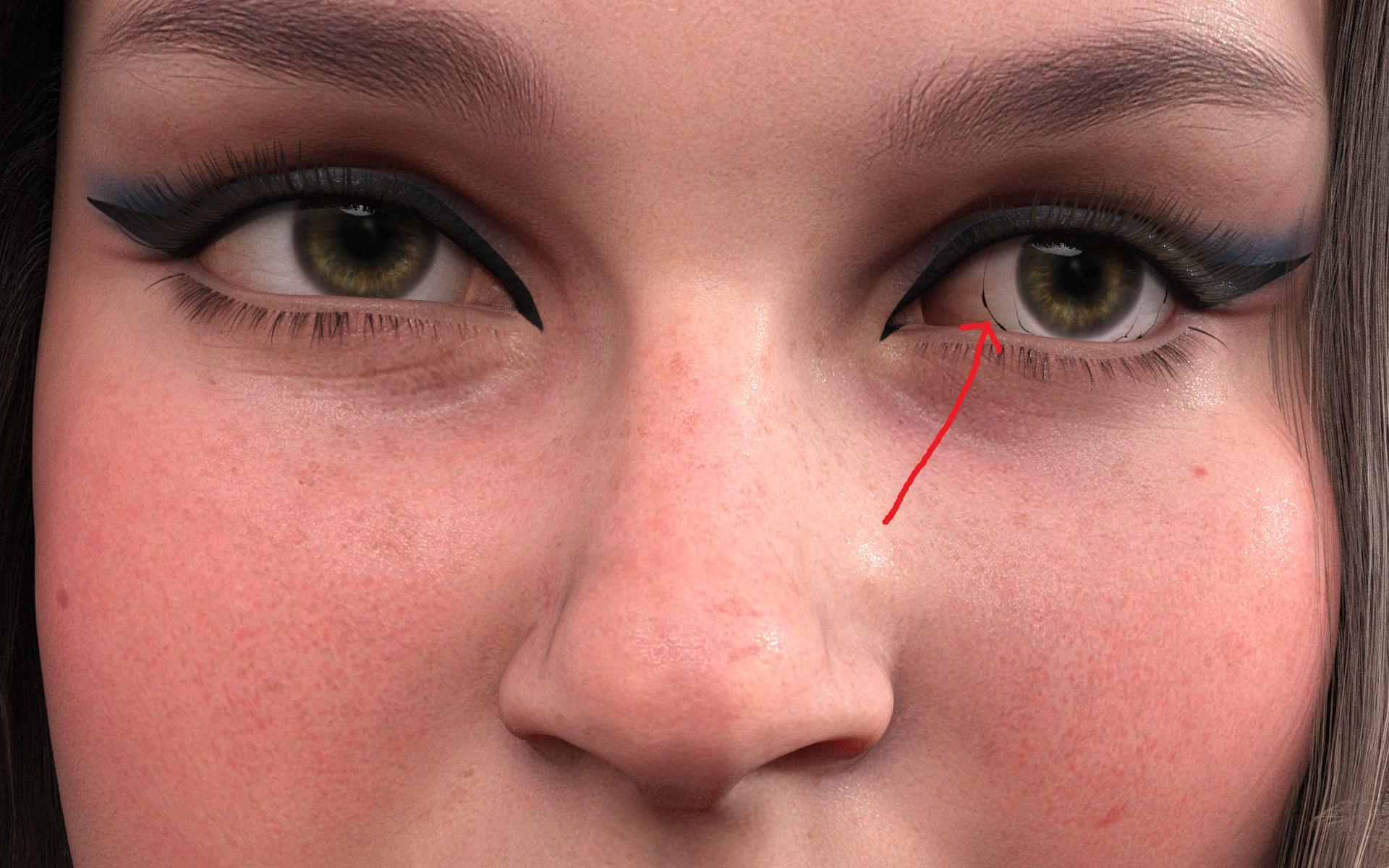
Thank you for letting me know. This is a really weird glitch. I've contacted Daz because apparently, it's a problem with Daz no with the morph because I created the morph and it only affects the body so this shouldn't happen. But fear not I'M MAKING SURE THESE ISSUES GET RECTIFIED. <3
Daz Studio File and Folder Structurenonesuch00 said:
If DAZ 3D had a formal folder, library, and metadata structures that were documented in writing that data could actually be used by a script to check if the new products comply. It's not difficult. The metadata and the folder names should have a lot of overlap for the higher level genre classifications.
I would like the ability via a global check box to have morphs unloaded but still listed in the Shaping Tab such that I could then check the morph sets I want to load on a case by case (product by product) basis. Likely, when unchecked, DAZ Studio loads morphs as it loads them now in DS.
In addition to the folder structure, the same problems with placement of stuff not following the established "standard" can also be seen in Parameters with the morph dials...
Daz Studio File and Folder StructureIf DAZ 3D had a formal folder, library, and metadata structures that were documented in writing that data could actually be used by a script to check if the new products comply. It's not difficult. The metadata and the folder names should have a lot of overlap for the higher level genre classifications.
I would like the ability via a global check box to have morphs unloaded but still listed in the Shaping Tab such that I could then check the morph sets I want to load on a case by case (product by product) basis. Likewise, when unchecked, DAZ Studio loads morphs as it loads them now in DS. Such a system work better with proper metadata.
Yes, PAs should have vanity folder but only one per metadata classified genre as there are countless "casual" and other types of generic clothing and other things. How many Santa Clauses do we have? Christmas Trees? Pumpkin products? And heavy forbid swords and graveyard products?
What's reasonable is we can't expect DAZ 3D to go rename files and folders and move them around now, after the fact, for 70K and more products, for some new organization scheme. This has to be done with CMS and metadata embedded in (all) the product files.
Permanent Installation of Assetskarl said:
Thank you everyone for the advice! Okay, I have read everything here and in any old help guides and other forum threads, tried to make sense of a procedure that should work. There are a few questions along the way, but in general have I got this set of instructions right? Any errors? Have I missed anything? I feel like this should be something Daz tells you, rather than having to piece it together from different web pages, forums, wikis and help guides!
The issue for me is that I don't just want to install assets on the D:; I want a fresh install of Daz Studio (e.g. if I reinstall Windows or get a new PC) to be able to find and use those installed assets exactly as before I reinstalled Windows, so I don't have to download and install the assets all over again.
---
STEP 1: PREPARATION
Uninstall all my current stuff so I can start fresh.
Use Daz Central to uninstall Daz Studio and content, then uninstall Daz Central through Windows.
I may still have to do manual cleanup, since it's made overly complex by Daz Studio not having its own installer:
https://helpdaz.zendesk.com/hc/en-us/articles/360055963392-How-do-I-uninstall-delete-Daz-Studio-STEP 2: INSTALL DIM
Download and install DIM from https://www.daz3d.com/install-manager-info/
Run it, login, but tick "Work Offline" (so I can set my preferences).
STEP 3: SET UP DIM
Then follow the instructions at http://docs.daz3d.com/doku.php/public/software/install_manager/userguide/configure_install_manager/tutorials/settings_for_install_manager/start
Downloads info:
"In the top right corner is a small Gear icon. This is where you access your settings."
"Downloads - Allows you to set the location to save your downloaded files"
"The Downloads and Installation pages are where most of your customization will take place. In Downloads, you tell the application where to save the files you download from your store account.
"Download To Where - Click the “ … ” browse button and choose the location you want the application to save any content installers it downloads from your account. This can be on your local drive, or an external location."So I set this as a location on my D:, so it will survive Windows reinstalls etc. Maybe a folder called Daz Downloads.
Installation info:
"Installation - Allows you to set and add Content (Runtime)install paths"
"Once you have your location added, switch over to the Installation Page… "
"If you use one program and have a single location set for content installation, you will see “Recommended Folder”."
"To change the Recommended Folder location, click the “…” browse button next to the path in the list. Browse to the new location."
"Any added locations will now be available in the Install To: drop-down selection above."Again, I set this as a location on my D:, so it will survive Windows reinstalls etc. Maybe a folder called Daz Content.
[Question 1: I will have pointed DIM at the content, do I then have to do something similar in Daz Studio? e.g. one comment said "If you go to the Content Library and right-click "DAZ Studio Formats", you can add a folder on your hard drive alongside your main content library. I presume you can also use this to switch your main content library, but I've never done it that way. I'm not sure if there's some special handling required for the default content folder."]
You can use right-click to add or remove locations, you can't actually edit them. Edit>Preferences>Content tab>Content Directory Manager is the better choice if you are wanting to edit paths, or to handle mutliple settings at once.
You can also download this script (using the link above the code) and drag it itno the Daz Studio Viewport to copy the path from Install Manager into DS (that won't remove other paths, though). http://docs.daz3d.com/doku.php/public/software/dazstudio/4/referenceguide/scripting/api_reference/samples/file_io/install_manager_config_import/start
STEP 4: DOWNLOAD CONTENT
Make sure I am now “Working Online”. [Find some option to go back online now it is set up.]
The “Ready to Download” tab should be populated with everything I bought on the Daz Store, plus Daz Studio and some freebie starter content.
Daz Central had only let me download items one at a time (if I tried to download multiple items it cancelled previous ones and only downloaded the last one I ckicked on) but DIM should let me select and download multiple items, or even just set everything off at once.
I should untick "Install after Download" (or it will bog my PC down doing too much at once, better to break the task up.)
DIM should then download and keep everything in the D: location I set above, Daz Downloads.
STEP 5: INSTALL DAZ STUDIO AND BASICS
Open the “Ready to Install” tab once I have downloaded everything (or a batch I then want to install, with the rest to be downloaded and installed later).
There will be a list of downloaded but not installed items.
In the drop-down at the bottom of the window choose the D: location I set up earlier for installs, Daz Content.
[Question 2: "Install Product Updates to their respective “Installed To” path(s) - When checked, will install updates to their currently installed location." Do I tick this, or not?]
Generally yes, you would uncheck it if you wanted to keep the updated files in a new content directory. However, I don't think the option would matter in most situations.
"Checking the “Delete Installer Once Installed” will do exactly that. When you install a file, its Zip file will immediately be deleted from your computer. Be sure to Uncheck this box if you want to keep a copy of your Zips! "
Since I'm not 100% sure yet (having not tested it) that the installed content will carry over if I reinstall Windows or get a new PC, for now leave this unticked. The downside is that all content takes up twice the HDD space - once for the downloaded zip, once for the installed version in a different folder. But, if I reinstall Windows and Daz can't find the installed content, I could hopefully get DIM to see the doanloaded zips and install them. It would take some time, but be quicker than also having to download them. And, if I later found that this process worked perfectly without ever needing to use the zips again, then from then on I could delete them after installing content.Then install Daz Studio this way. (I wish DS just had its own installer; and all the DIM stuff was just built in to Daz Studio, so there was only one piece of software to deal with!)
STEP 6: INSTALL OTHER CONTENT - ASSETS
Then install any assets I want, possibly in batches, similar to the procedutre in STEP 5.
[Question 3: What does DIM do when it finds files that will over-write others on installation? Does it keep one (which? biggest, newest?), or both? If I install zips manually this issue seems to occur quite often, with files with the same name and path in different products.]
It keeps track of pre-installed files, so that unisntalling a product doesn't break whichever pre-existing product placed the file. It does, however, update the file as far as I know - theer can be only one file with a given name and location.
"Once you have installed your products you will see them in the “Installed” pane. You can also check this pane to see if the product installed Metadata. If so, there will be a checkmark underneath the “Smart” column, letting you know it will show under “Smart Content” in DAZ Studio 4 and higher."
[Question 4: So, presumably, some items but not all will appear in the Smart Content pane in Daz Studio; for others I'll need to look in some other area of Daz Studio to find the content?]
Most items will have metadata, but some may not have user-facing files (e.g. morph sets may add new sliders to the figure without haing any presets to click). If there are properly installed products which don't have the data to appear in database-driven views but which do have user-facing files you should still be able to find them in the Content Library pane under daz Studio formats (or Poser formats) and then the content directory name.
At the end I should have my assets installed on the D: (Daz Content), and a second path with the downloaded pre-install backup zips of the assets on the D: too (Daz Downloads).
STEP 7: TEST CONTENT IN DAZ STUDIO
Maybe do this after installing a few items at a time. Check I can find them in Daz Studio, that they show up as Smart Content if applicable, that they load and work okay, that there are no problems that might require a refund.
STEP 8: REGULAR BACKUPS
I do a full backup of my D: regularly. So this would mean I am also backing up the downloaded asset zip files in one folder (Daz Downloads), and the installed Daz assets in another (Daz Content) - doubling the storage requirements but meaning I am covered for a few potential scenarios.
[Question 5: since I want to be able to reinstall Windows/get a new PC, do fresh installs of DIM and Daz Studio, then point them at the already downloaded and installed content, is there anything else I need to back up? i.e. Do DIM and Daz Studio use some kind of metadata/profiles.ini/database/settings file(s) that need backing up too (to be restored on the fresh Windows)? I worry that I could point the fresh Daz Studio and DIM installs at the existing folders and it still not work, and the programs are unable to use the content because it turns out there was some other file that told it what was installed, and without that it can't "see" the installed content. That worry comes from DIM Wiki notes such as:
"Install Manager will not 'see' files saved in locations not mapped within the application, nor will it see files downloaded via other applications or manually."
"Since Install Manager can only track products it has managed (downloaded), you will not be able to see any files that may have been saved to the same location. For example, saving zip files from a store other than DAZ3D. "
So, is there anything else I need to back up if DIM and Daz Studio are installed on my C:?](In an ideal world any metadata/profiles.ini/database/settings file(s) required so the software can "see" content in subfolders, would be stored in the actual root folder of the content, so you could back them all up together, and pointing a fresh install at that folder would work perfectly.)
Install Manager uses the manifests folder to store details of what it installs. The database is in the folder listed in Edit>Preferences>CMS Settings (and should be copied/backed up only when DS, DIM, and other applications using it are all closed and there are no PostgreSQL processes running). For products there is also metadata in /Runtime/Support/ that can be reimported, but that will not include things like new flags and will not include data for your own files unless you first export the user data from the Content DB maintenance dialogue, accessed through the Content Library option menu - the lined button in the top corner or right-click the tab)
[Question 6: I am assuming this comment is related to Question 5 above, but I am not sure how to build it into which steps, where/what the Content Cluster is, and whether this is referring to DIM, Daz Studio, or Windows Explorer:
"If the content is not installed to the C: drive then it would survive a reinstall of Windows. If you move the ContentCluster folder out of the C: drive (Edit>Preferences>CMD Settings, makes sure Daz Studio, Install Manager, and any other applicatrions or tools that use the content management system are closed before copying/moving the folder itself) then even the database would survive, though you would have to reset its location in preferences."
So if that could be built into the appropriate place in my instructions I would appreciate it!][Question 7: the DIM Installation tab is apparently where "Applications - Lists the location (paths) of your supported applications" and
"The Applications tab simply shows a list of paths where recognized software is located". So I could set Daz Studio (like my content) to install itself on my D: rather than the C:. Would that be beneficial? I assume that would be slower (my D: is HDD and C: is SSD). But maybe all metadata would be there on the D: too, so if I reinstalled Windows (then DIM and DS on D: in the same place) there is more chance of DIM and DS seeing and using the content correctly? Or would it make no difference because if I reinstall Windows and then go through these steps again, Daz Studio would just get freshly installed on the D: and overwite any existing profiles/metadata, and lose that connection anyway? Or it may be irrelevant because DIM has some kind of settings that need backing up, and DIM itself can only be installed to C: anyway? If so, it might make more sense to just back up the relevant profiles/metadata from the C:. See Question 5, above.]Application location and settings location are not the same. In addition to the folders already mentioned, some settings (e.g. UI layout) are in
%AppData%/daz 3d/Studio4/
and others are in the registry, which cannot be backed up easily.
STEP 9: REINSTALLING WINDOWS / GETTING A NEW PC
Instructions for the situation where I reinstall Windows, or get a new computer (where I'd copy my D: backup contents to the new PC's D:).
I would perform steps 2-5 above, choosing the same paths (so they actually now point to installed content on the D:).
STEP 2: INSTALL DIM; STEP 3: SET UP DIM; STEP 4: DOWNLOAD CONTENT; STEP 5: INSTALL DAZ STUDIO AND BASICSHopefully DIM and Daz Studio then find all my existing installed D: assets, and use them as before, so Smart Content etc in Daz Studio works.
[Question 8: but how would STEP 4: DOWNLOAD CONTENT work? If things went to plan, wouldn't DIM see all the downloaded content on the D: without needing to download it again, making STEP 4 redundant? If DIM showed content waiting to be downloaded, that would mean something has gone wrong?]
Yes
[Question 9: related to Q8, shouldn't STEP 6: INSTALL OTHER CONTENT - ASSETS be redundant now, because DIM could see all the installed content on the D: without needing to install it again? If DIM showed content waiting to be installed, that would mean something has gone wrong?]
DIM doesn't see content that wasn't installed through DIM or central, but yes a proper back-up/compartmentalised isntallation should not require reinstallation
[Question 10: were there any settings to change in DS? e.g. "If you go to the Content Library and right-click "DAZ Studio Formats", you can add a folder on your hard drive alongside your main content library. I presume you can also use this to switch your main content library, but I've never done it that way. I'm not sure if there's some special handling required for the default content folder."]
The main folder is the first in the list, that's all
[Question 11: related to Question 5, would there be some metadata/profiles.ini/database/settings file(s) that I need to restore first (to DIM or Daz Central) so that it can "see" the installed content as before? Presumably after installing DIM and Daz Studio, but before installing any newly bought assets (so that the backed-up settings exactly match the paths and content of those on my D:).]
Worst case scenario is that I reinstall Windows then all the Daz software, as above, but DIM and Daz Studio don't "see" the previously-installed Daz assets; or DS sees them but treats them as manually installed content, so Smart Content doesn't work in Daz Studio. In that case, as long as DIM can see the downloaded zip files, I can manually delete the installed assets from my D: Daz Content, leaving that folder empty; then point DIM at Daz Downloads and reinstall everything from the downloaded zip files. (Which at least saves downloading everything again.)
Evidence:
"If you have the zips Install manager will use them, as long as they are in its downloads folder (the location of which you can set)."
"If you saved the zips that DIM installs from then no, you don't have to download again. All you have to do is put the zips in whatever location you set as your default download folder. Once the zips are in there then they will show in ready to install within DIM."[Question 12: is this something I need to build in to my steps, or can I ignore it?
"My understanding is that scene files contain links to the files where the content actually lives - I really don't want to be bombarded with millions of "can't find this file" dialogs when I open an existing scene after I've moved the underlying content."
"If the content is in mapped content directories then DS (and the Content Management Service) keep only the relative path, the location within the content directory. Moving the files into a new content directory, which you have told DS to use, will not cause issues. Only Install Manager has to keep the absolute path, and you can reinstall everything from the Installed tab (as long as you kept the zip) by right-click menu or just tell DIM to use the new installation path for updates in itss ettings (the risk there is an old file being left over after an update when it should have been deleted)."]Scenes and presets store only relative locations (sub-folder of the content directory) not the absolute location, so they will work as long as the content is in the right place. Only the DIM manifests have absolute paths.
---
I do apologise for how complex this is and the time I am taking up. I have no problems backing up all my emails and Thunderbird profile and pointing a fresh install at all the content seamlessly, as with other programs I use a lot (browser, office suites, GIMP with plugins etc) but Daz seems to make it way more complex. I generally prefer to get hands on in backing up and restoring content and profiles, trying out different OSs etc (I dual boot with Linux) so the fact that much of how Daz works seems to not be covered in help guides for situations like the one I list in my first post makes it a lot harder. And, because it isn't intuitive (the main program has no installer, and is installed by another program from a choice of two, without it being clear how it works in terms of profiles and DB settings) I feel like I'm on a steep learning curve! But I'd like to get a rock-solid procedure ready now so that I don't waste time in the long run. Cheers!
3D Art Freebie Challenge-July 2021-"Wild Wild West" -Main Thread OnlyMy entry for the month is a bit different, an unusual take on the heat in the wild west.
Well, the contest is heat in the wild west, ok, you got it. It's really wild out there now. So we have a woman crawling across what used to be a lake bed in 120+ degree heat, no rain, no water of any kind, except the bottle she is headed for. Fires raging all around, sparks flying, grass and trees dead or dying. The West of 2021 is here, probably from now on.
Title: Parched and on fire
Items used:
Free items:Dead horse skeleton - https://sketchfab.com/3d-models/horse-skeleton-eaca504567604e879b8ab2cf2763025e
Lotion bottle - https://www.deviantart.com/poses17/art/Lotion-Bottle-Freebie-Prop-612435609
Path - https://www.renderosity.com/freestuff/items/88082/path-in-the-dunes-daz3d-iray-obj-and-maps-included
Grass - https://www.renderosity.com/freestuff/items/88095/grass-as-grass-can-be-daz3d-iray-
Figure morph - https://www.deviantart.com/checkertoo/art/Phantom-For-G8F-Dl-858507130
Hair - https://sharecg.com/v/97504/browse/21/DAZ-Studio/Short-Bob
Puma - https://www.most-digital-creations.com/puma.htm
Flames - https://www.deviantart.com/smida460/art/Freebie-SmidA-Magical-Flames-Iray-792443927
Pose - https://www.deviantart.com/cptn0bvious/art/Wrestling-Low-Blows-for-G8F-849840325
Dust - https://www.deviantart.com/squarepeg3d/art/Prop-Dust-Mote-Cloud-875458221
Dirty Skin - https://www.renderosity.com/freestuff/items/87636/swt-warfront-dirty-skin-for-g8f-and-g3f
Purchased items:Clothes - https://www.daz3d.com/badlands-roamer-outfit-for-genesis-3-female-s (I believe I got this in a free starter set during one of the sales events, but I can count it as purchased)
No count items:Creepy Trees - https://www.renderosity.com/rr/mod/bcs/lisas-botanicals---creepier-trees/146113/ (was a freebie but no longer is - hivewire3d virus contest spring/summer 2020)
Base Genesis 8 Female
Background image - must have been free since I don't buy backgrounds.
Post processing done in PSPx6 and ON1 Effects 2019 (free)
Hope you like the real world of the western US in the summer of '21.Daisy HD For Genesis 8.1 Female - CommercialIt is unfortunately in Daisy head morph. When I dialled Daisy Head to 0% the error in the left eye disappeared.
Daz 3D is part of

Connect
DAZ Productions, Inc.
7533 S Center View Ct #4664
West Jordan, UT 84084Licensing Agreement | Terms of Service | Privacy Policy | EULA
© 2026 Daz Productions Inc. All Rights Reserved.