-
Need help with chin/jaw
Hey guys, so I'm really close to finishing my first attempt at a customized G8 model using a whole bunch of morph dials and the only thing I'm having trouble with is the chin/jaw alignment. I attached some images to show what I mean.
The front facing looks normal. But see how the one at the different angle the jawline doesn't align with the chin? How would I go about fixing it so it aligns properly? I've tried every morph I currently have and nothing seems to do the trick.
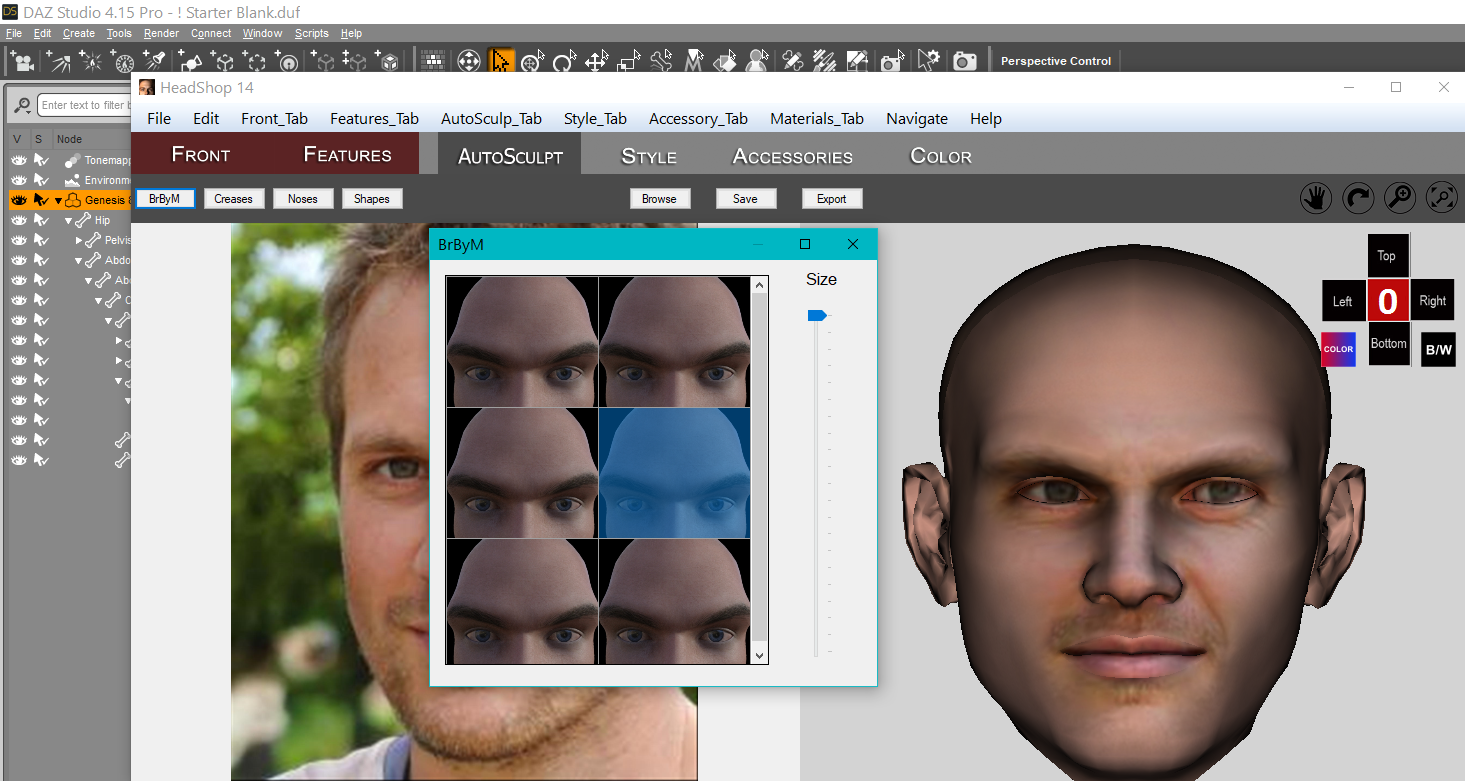
Free Tip re HeadShop 14's Add-onI installed the update for HS14. Has the ability for us to add our own morphs to the plugin :-)
They may think this is easy to use, few minor details we're not born knowing about, so I don't think so. A few hours later finally got something showing.
So, in the fond hopes that this info saves somebody some hair:
One can drag the head duf from the Desktop into D/S. As it loads, one realizes one has the figure at base resolution with almost all parts hidden.
So one sees a head. One morphs the head. Then one exports the .obj file.
Filling in a little gap, try selecting the Head to export, use the default D/S export settings, keep the names short, no spaces.
Ignore the .mtl files.
That json file ... can be opened in Notetab Light. The name of the folder and display has to be SHORT or it will not display.
One cannot edit files that are in the Program Folder.
Make many copies of that json example file, you may need them.
Maybe tomorrow one will work, but today, no. No way one was going to show for use. So finally I copied the information 6 times so it has its 0-5 places filled. I was testing only with one morph ;-)
At the end of each group is a comma EXCEPT at the last one, no comma.
Even though there is no counterpart .obj one still has to log a reference to it. If there is a counterpart made [using the other figure to make of it of course] it should have the same name with the F at the end of the Female's obj name. {going by the other files}
If ANY "mistake" is made in this additional folder one is putting into the Morphing drawer, HS wil NOT work.
Now before anybody gets too excited about making morphs to put into this plugin, remember where the Program Folders are located ;-)
Now I'm going to mention something 'cause the concept is that we can make these additional add-ons for ourselves as well as to share for others to use in their HeadShops. These folders have .obj files in them. So dear PAs and anybody else, please verify with the company whether this is okay with them or not.
Certainly what one can do safely is make the add-ons for themselves, then when the morph is in D/S, remake the morph properly {like we normally do - putting it on a slider}. And for these types there is all kinds of storage space as many of us have invested {a small fortune} in external hard drives, yes.
If anybody feels any info here has saved them hours of hair pulling and they can now run off and make a fortune, feel free to say tah ;-) {don't worry, nobody takes me seriously}
https://www.daz3d.com/gift-card
 MetaMorpher for Daz Studio (work in progress)
Faux2D said:
Frinkky said:
This looks really quite cool. How does it handle rigging? More extreme morphs will have had rigging adjusted to shape - cam it pull the rigging for the brow from one morph, the mouth from another, for example?
Rigging will have to be adjusted in most cases but it only takes 5 seconds using the Adjust Rigging to Shape feature in Studio.
That's too incomplete for a proper solution, workarounds are only good as a placeholder until an actual solution comes out, and plus the ARtS is not always an ideal solution, especially for the face... still, this is amazing work nonetheless can't wait to see it at the store!
I have two computers. My partner wants to play around with Daz, is this allowed?meganappstate said:
Not entirely true: a software license can be transferred to a new entity, provided that the original license allows for such transfer, e.g., the MS Home & Business 2019 and later states:
3. Transfer to a Third Party. The provisions of this section do not apply if you acquired the software in the European Economic Area (EEA) and only transfer it to another person or entity within the EEA, in which case any transfer of the software and the right to use it must comply with applicable law.
a.Software preinstalled on device. If you acquired the software preinstalled on a device, you may transfer the software directly to another user, only with the licensed device. The transfer must include the software and, if provided with the device, an authentic Office label including the product key. Before any permitted transfer, the other party must agree that this agreement applies to the transfer and use of the software.
b.Stand-alone software acquired from a retailer.If you acquired the software from a retailer as stand-alone software, you may transfer the software to another device that belongs to you, but not more than one time every 90 days (except due to hardware failure, in which case you may transfer sooner). If you transfer the software to another device, that other device becomes the “licensed device.” You may also transfer the software to a device owned by someone else if (i) you are the first licensed user of the software and (ii) the new user agrees to the terms of this agreement. Every time you transfer the software to a new device, you must remove the software from the prior device. You may not transfer the software to share licenses between devices.
Bottom line: check the software license.
Daz Users should definitely familiarize themselves with the TOS and EULA.
mweganappstate, the EEA has some minor weirdness when it comes to IP law, as seen in that MS EULA.
I don't think Das Studio or content comes pre-installed on any devices when the first retail sale happens (Provision 3(a)).
Daz content isn't stand-alone software, so nothing like 3(b) comes into play either.
Big Stompy RobotsZaciszna Dolina said:
In the styles of Pacfic Rim, Robotech and Battletech/Mechwarrior and of course pilot outfits as well.
Thinking more along the lines of more realistic style rather than anima style.
Supporting buildings, space craft and vehicles would be cool as well.
Honestly your best option would be to go to one of the Patreon fed figure conversion guys and ask them to start porting over models from MWO/MW5/Battletech and other games such as the failed Heavy Gear game that no longer works but is still for sale on steam.
Their comission prices aren't that bad an compared to creating a new character morph and making the clothing work, rigging a giant stompy robot wouldn't be that pricy.
As for the Heavy Gear style, Heavy Gear Blitz is a complete failure of a game that doesn't work but the models look good and I actually have extracted the game assets. I need to learn rigging one of these days...
SereneNight’s Sci-Fi Fun Thread 3For example, the expressions that came with Michael 8.1 When applied to Boyd's port his genesis 8 lips and mouth, are larger but the rigging seems to over-adjust when grabbing his lower lip, so the texture of the lip isn't the only bit that's grabbed but part of its chin. So it moves the mouth to make the expression fine, but the texture somehow not in alignment. . (Both Owen and Boyd have somewhat larger mouths than Genesis 8.1 figures.), So the lower lip has a dent where the mouth rigging moves the mouth, the lip, but not the whole lip. The lip surface below is considered under the lip, but its still part of his mouth.
Same for some reason with Boyd's eyelids. The figure I modeled him with had slightly puffy upper eyelids. This is using a morph that came with Genesis 8.0 but in Genesis 8.1 the eyelids are being pulled around in a way that doesn't jive with the morph.
I tried moving the lips, and lids, around, but they don't look the same... If that makes sense.
SereneNight’s Sci-Fi Fun Thread 3Nonesuch00 is correct. I can make Owen and Boyd nearly exact in g8.1 which would be my preference, But I would have to sacrifice expressions. Only some of the old and some of the new will work, without looking scary, or crumpling the features depending on the rig.
Some of the new expressions, don't look great on figures with the Michael 8 morph and the morphs I use to make the boys.. This is one reason, I'm seriously disappointed with the Changes to the new Michael 8.1. His head shape is so radically different than the original it cannot be used as a substitute. Perhaps a PA like Slosh will port original Michael 8 with correctives over to Genesis 8.1
I think I will use a direct port to Genesis 8.1 for now. At least when I want to take advantage of more fluidity.
[Released] Oso Horseman HD for Genesis 8.1 Male BundleCould you post a picture with his body morph mixed with a bulkier body, something like Maxx in size. I am thinking of some Kamandi or even Elephantmen style scenes but with a bulky Clydesdale soldier.off topic threadringo monfort said:
I sure do miss Kevin and Bruce. i have Kevin as a friend in Facebook and Linkedin. I have a connection with Bruce at Linkedin. He is doing very well in a none 3D industry. The Currect CEO of not DAZ3D but TAFI as now TAFI is the main parent company. He is at Linkedin. Do a search in Linkedin for DAZ3D and you will find that currenlty have about 100 employees, TAFI was know before as MORPH 3D.. You know the company that was to distribute the DAZ3D assets to the game development industry.. It morphed into TAFI and now the do Avatars. Dont be surprise if DAZ3D is rebranded as TAFI just to survive.
Ringo
Wow that's interesting... info and commentary!
 SileneHexagon BETA - version 2.5.2.137! (*UPDATED*)
stitlown said:
I've just built a new machine and am setting up my software again. ATM only 32bit Hexagon is present, and appears to be working (mainly). I've never been a Hexagon fan. On my old machine which had both 32bit 2.5 and 64bit 2.5Beta and the GUI was borderline painfull - whole seconds to recognise a selection of a vertex for instance. So far, on the new machine, the Hex GUI seems much more tractible.
So my question is whether it is worth installing the 64bit given the bad experiences I've had before? Or are people finding the 64bit is working well for them? I have seen some of the comments saying some users are finding Hex a good solution again, but thought I should ask because the last installation was sooooo bad. I only really use it for the bridge to Studio for morph development etc. If I'm doing any de-novo modelling I'm using other, much more tractible programs.
If the view is that 64bit is worth it, should I expunge all prior traces of hex from my machinne so there's no conflicts or inter-noise?
Looking forward to opinions.
Cheers. Lx
The 64-bit is fine, but then I don't use it every day. You can install the 32 bit alongside it.
off topic threadDartanbeck said:
ringo monfort said:
`i have wonderful memories of the original DAZ3D founders like Dan Farr, Chistopher Howard Creek, Steve Kondris, Chad Smith. they loved the entire community. They visited the forums all the time. The current leadership doesn't do personal communications with the forum members. The are too busy with TAFI. They sure don't get to have customer loyalty this way.
I miss them too, as well as our old boss, Kevin! Is Spooky (Bruce) even still around?

I sure do miss Kevin and Bruce. i have Kevin as a friend in Facebook and Linkedin. I have a connection with Bruce at Linkedin. He is doing very well in a none 3D industry. The Currect CEO of not DAZ3D but TAFI as now TAFI is the main parent company. He is at Linkedin. Do a search in Linkedin for DAZ3D and you will find that currenlty have about 100 employees, TAFI was know before as MORPH 3D.. You know the company that was to distribute the DAZ3D assets to the game development industry.. It morphed into TAFI and now the do Avatars. Dont be surprise if DAZ3D is rebranded as TAFI just to survive.
Ringo
I have two computers. My partner wants to play around with Daz, is this allowed?rcourtri_789f4b1c6b said:
Legal no-nos:
3. Similarly, software licenses aren't inheritable. When I die, my family doesn't get to play my Steam games or use my copy of Microsoft Word, nor can they use my Henrietta Heart Hen to create a masterpiece. It's standard for the industry and US law. If this concerns you, I'd contact Daz about a name change on the account in case of your demise.
Not entirely true: a software license can be transferred to a new entity, provided that the original license allows for such transfer, e.g., the MS Home & Business 2019 and later states:
3. Transfer to a Third Party. The provisions of this section do not apply if you acquired the software in the European Economic Area (EEA) and only transfer it to another person or entity within the EEA, in which case any transfer of the software and the right to use it must comply with applicable law.
a.Software preinstalled on device. If you acquired the software preinstalled on a device, you may transfer the software directly to another user, only with the licensed device. The transfer must include the software and, if provided with the device, an authentic Office label including the product key. Before any permitted transfer, the other party must agree that this agreement applies to the transfer and use of the software.
b.Stand-alone software acquired from a retailer.If you acquired the software from a retailer as stand-alone software, you may transfer the software to another device that belongs to you, but not more than one time every 90 days (except due to hardware failure, in which case you may transfer sooner). If you transfer the software to another device, that other device becomes the “licensed device.” You may also transfer the software to a device owned by someone else if (i) you are the first licensed user of the software and (ii) the new user agrees to the terms of this agreement. Every time you transfer the software to a new device, you must remove the software from the prior device. You may not transfer the software to share licenses between devices.
Bottom line: check the software license.
Hexagon BETA - version 2.5.2.137! (*UPDATED*)I've just built a new machine and am setting up my software again. ATM only 32bit Hexagon is present, and appears to be working (mainly). I've never been a Hexagon fan. On my old machine which had both 32bit 2.5 and 64bit 2.5Beta and the GUI was borderline painfull - whole seconds to recognise a selection of a vertex for instance. So far, on the new machine, the Hex GUI seems much more tractible.
So my question is whether it is worth installing the 64bit given the bad experiences I've had before? Or are people finding the 64bit is working well for them? I have seen some of the comments saying some users are finding Hex a good solution again, but thought I should ask because the last installation was sooooo bad. I only really use it for the bridge to Studio for morph development etc. If I'm doing any de-novo modelling I'm using other, much more tractible programs.
If the view is that 64bit is worth it, should I expunge all prior traces of hex from my machinne so there's no conflicts or inter-noise?
Looking forward to opinions.
Cheers. Lx
Victoria 5/G1F to V4 Pose Transfer ScriptI am constantly amazed at the number of times the scripts for these older characters are downloaded. Over on Rendo there have been 111 downloads, for a script to transfer a pose from one old character to an even older one. It just shows how much legacy material is still available waiting for an oportunity to be used. There is obviously a lot of current (G8) material in use, but the tail of older figures & content is much longer than I'd ever have guessed. [From somone who uses V3 every month or so - who am I to talk?]
Regards,
Richard
Morph Problem (transfer morph?)Hi,
I've made a morph with dformer on the base G8F and saved it as a morph. When I load the base G8F I see the morph in the list with its slider. But when I load an actor based on G8F I don't see the morph. Not in the list of the actor and not in the list of the G8F that is part of the actor. How do I get the morph show up for all G8F based chars ?
Sword and Sorcery DAZ-wide contestUnifiedBrain said:
After I stopped laughing, I had to rub my eyes. Did you just render an adult female?
Pretty good Vicky and sword, except the boobs are a bit small. :)
Yes I dialed up the morph dial to 'magnificent' but it made no difference to the gorilla's pecs
3D Art Freebie Challenge-July 2021-"Wild Wild West" -Main Thread OnlyBronzeDragon said:
My entry for the month is a bit different, an unusual take on the heat in the wild west.
Well, the contest is heat in the wild west, ok, you got it. It's really wild out there now. So we have a woman crawling across what used to be a lake bed in 120+ degree heat, no rain, no water of any kind, except the bottle she is headed for. Fires raging all around, sparks flying, grass and trees dead or dying. The West of 2021 is here, probably from now on.
Title: Parched and on fire
Items used:
Free items:Dead horse skeleton - https://sketchfab.com/3d-models/horse-skeleton-eaca504567604e879b8ab2cf2763025e
Lotion bottle - https://www.deviantart.com/poses17/art/Lotion-Bottle-Freebie-Prop-612435609
Path - https://www.renderosity.com/freestuff/items/88082/path-in-the-dunes-daz3d-iray-obj-and-maps-included
Grass - https://www.renderosity.com/freestuff/items/88095/grass-as-grass-can-be-daz3d-iray-
Figure morph - https://www.deviantart.com/checkertoo/art/Phantom-For-G8F-Dl-858507130
Hair - https://sharecg.com/v/97504/browse/21/DAZ-Studio/Short-Bob
Puma - https://www.most-digital-creations.com/puma.htm
Flames - https://www.deviantart.com/smida460/art/Freebie-SmidA-Magical-Flames-Iray-792443927
Pose - https://www.deviantart.com/cptn0bvious/art/Wrestling-Low-Blows-for-G8F-849840325
Dust - https://www.deviantart.com/squarepeg3d/art/Prop-Dust-Mote-Cloud-875458221
Dirty Skin - https://www.renderosity.com/freestuff/items/87636/swt-warfront-dirty-skin-for-g8f-and-g3f
Purchased items:Clothes - https://www.daz3d.com/badlands-roamer-outfit-for-genesis-3-female-s (I believe I got this in a free starter set during one of the sales events, but I can count it as purchased)
No count items:Creepy Trees - https://www.renderosity.com/rr/mod/bcs/lisas-botanicals---creepier-trees/146113/ (was a freebie but no longer is - hivewire3d virus contest spring/summer 2020)
Base Genesis 8 Female
Background image - must have been free since I don't buy backgrounds.
Post processing done in PSPx6 and ON1 Effects 2019 (free)
Hope you like the real world of the western US in the summer of '21.This is approved, please move to entries!
ByeThe funny thing is:
I originally came to Carrara to alleviate compatibility issues and create for myself a more efficient workflow.
I am all by myself in this, so while I do enjoy making models and other parts of this field, what I really want to do is combine things and put them in motion.
Carrara is still the only modeler that I know of that has a Poser Runtime/Daz Content Library manager built into it, which allows for figure rigging and morph retention, conforming cloth and hair use, pose application... while we still have to rework the shaders (as we would with any external render engine anyway) the rest of it works pretty well, and we can tweak the various mesh in many ways, right on the fly as we work!
That all still holds true today for me - and I'm glad!
I also love having all of you folks around! Where would we be if we didn't all share our ideas on how to make all of this stuff work?!!!
Share your Daz animation tips.Apart from learning Blender (which would be tip zero in this list), what are your hot tips for animating with Daz? I've got a few:
1. If you copy/paste keys and your entire timeline is now messed up, with characters disappearing or turning into something from a John Carpenter novel, select all the keys, change them to Constant, then change them back to TCB again (if you use different interpolation types on your timeline, unlucky).
2. Same tip works for above if you import an animation and the timeline completely messes up.
3. If you copy-pasta keys and your scene goes black, go to the first frame and change your light colour from black back to whatever it was before (strangely Daz sometimes zeroes out the light colour, even if you're not deleting or moving the zero'th key).
4. If you see keys that look selected and won't deselect themselves and (like me) you're not too sure if this is a graphical or a selection bug, right click in the timeline tree on the left and hit refresh.
5. If you try to delete one or more keys and nothing appears to happen, chances are those keys are actually in Properties under your character, usually Pose Controls. You have to manually find them in the tree and delete them there.
6. If your PC isn't powered by an aircraft carrier reactor, with Jay's Two Cent cooling solution and you're struggling with performance, take your character hair and clothes off (except for shoes/boots maybe, where floor contact is important), set their mesh resolution to 0. You might get decent FPS on the timeline. Hair is a big offender here, mostly due to the vert count.
7. If you want a foot or hand to remain stable, assuming you're not using extreme twists, sides or bends, use MCasual's mcjAutoLimb2015 and mcjKeepOrient to stabilise them.
8. If you want a head/neck to "look at" something, add a null and set the neck (lower) and/or head constraint to the null. Remember if you delete the null Daz will crash due to the dangling reference, so if you're going to remove it, make sure you remove the constraint first (I think I reported this as a bug a while back...).
9. If you want to make loops including dforce, follow Versluis tutorial on exporting the .objs to blender (with .mdd if you've got aniMate2) and exporting them out of blender as individual frame .objs, which you can then reimport as morphs, or if you're a baller, import the morphs with the animMorph script (on github). To loop dforce, delete the last five or so morphs and set the last morph values to the first. It should interpolate from (frame - 5) to (frame) without a noticeable difference but the last frame will match the first perfectly.
That's all I can think of for now. Anybody else? Share your knowledge
Problems loading G8F - Mercy HD issueAs Isaid, DS reads all morph files to know which sliders to show and how they relate. In the case of Alistair its default value was 1, so having read it in DS then applied it; this was fixed by an update long-since. mercy doesn't sound like the saem issue, more like bad files or something conflicting with another character (another "Mercy" probably), but without more information it's impossible to say.
Daz 3D is part of

Connect
DAZ Productions, Inc.
7533 S Center View Ct #4664
West Jordan, UT 84084Licensing Agreement | Terms of Service | Privacy Policy | EULA
© 2026 Daz Productions Inc. All Rights Reserved.