-
UltraScenery [Commercial]
Hi everyone,
I can't agree more with those in this thread on how much fun and addictive playing with this script can be. Here is my latest render using a height map snapshot from Tangram Heightmapper at github. I was excited that I was able to recreate a favorite place that I would frequently visit while out riding my pony. If you're interested in a full listing of everything I used in the image, please visit my gallery.
Trish

Hi everyone,
I can't agree more with those in this thread on how much fun and addictive playing with this script can be. Here is my latest render using a height map snapshot from Tangram Heightmapper at github. I was excited that I was able to recreate a favorite place that I would frequently visit while out riding my pony. If you're interested in a full listing of everything I used in the image, please visit my gallery.
Trish
When I re-logged in, the thread opened here and your image took my breath away. So beautiful.
I love those HDRIs Orestes does too.
Hi @memcneil70
I'm glad you like the image. I think UltraScenery and Orestes HDRIs are a winning combination. Here is one more using an Orestes HDRI.
Trish

Gorgeous renders, Trish!
 UltraScenery [Commercial]
I am a huge fan of Orestes hdris for skies; they are high quality and 'clean'.
Seconded. I use these and Cloudscape almost exclusively for outdoor scenes.
StormLyght's Render AdventuresI am having an awesome time rendering different landscape scenes using Ultrascenery. I have a recent image in my gallery I created using a custom heightmap. I also decided to share one using the base settings of the script and Orestes HDRI from their Vega System package. Let me know what you think!
Trish
UltraScenery [Commercial]Hi everyone,
I can't agree more with those in this thread on how much fun and addictive playing with this script can be. Here is my latest render using a height map snapshot from Tangram Heightmapper at github. I was excited that I was able to recreate a favorite place that I would frequently visit while out riding my pony. If you're interested in a full listing of everything I used in the image, please visit my gallery.
Trish
When I re-logged in, the thread opened here and your image took my breath away. So beautiful.
I love those HDRIs Orestes does too.
Hi @memcneil70
I'm glad you like the image. I think UltraScenery and Orestes HDRIs are a winning combination. Here is one more using an Orestes HDRI.
Trish
UltraScenery [Commercial]Hi everyone,
I can't agree more with those in this thread on how much fun and addictive playing with this script can be. Here is my latest render using a height map snapshot from Tangram Heightmapper at github. I was excited that I was able to recreate a favorite place that I would frequently visit while out riding my pony. If you're interested in a full listing of everything I used in the image, please visit my gallery.
Trish
When I re-logged in, the thread opened here and your image took my breath away. So beautiful.
I love those HDRIs Orestes does too.
UltraScenery [Commercial]I am a huge fan of Orestes hdris for skies; they are high quality and 'clean'.
I agree - I have some rather poor HDRIs (from other vendors) which disappointed, but I like the Orestes ones.
Edit to clarify.
UltraScenery [Commercial]Hi everyone,
I can't agree more with those in this thread on how much fun and addictive playing with this script can be. Here is my latest render using a height map snapshot from Tangram Heightmapper at github. I was excited that I was able to recreate a favorite place that I would frequently visit while out riding my pony. If you're interested in a full listing of everything I used in the image, please visit my gallery.
Trish
And you just made a future sale for Orestes Graphics - somehow I missed that set of HDRIs. Lovely image.
Hi @MelanieL
Thank you for the compliment. I just realized that I chose the wrong Orestes Graphics HDRI package in my list of items used for the image. The HDRI in the image is from the Orestes Iray HDRI Skydomes Vol 4 package, orestes-sky-sunset06-488.hdr.
Trish
Ah, thanks - I'll have to wishist that set too. (I have about 8 Orestes HDRI sets but neither of those for some reason - maybe I was short of funds when they released)
UltraScenery [Commercial]Hi everyone,
I can't agree more with those in this thread on how much fun and addictive playing with this script can be. Here is my latest render using a height map snapshot from Tangram Heightmapper at github. I was excited that I was able to recreate a favorite place that I would frequently visit while out riding my pony. If you're interested in a full listing of everything I used in the image, please visit my gallery.
Trish
And you just made a future sale for Orestes Graphics - somehow I missed that set of HDRIs. Lovely image.
Hi @MelanieL
Thank you for the compliment. I just realized that I chose the wrong Orestes Graphics HDRI package in my list of items used for the image. The HDRI in the image is from the Orestes Iray HDRI Skydomes Vol 4 package, orestes-sky-sunset06-488.hdr.
Trish
UltraScenery [Commercial]I am a huge fan of Orestes hdris for skies; they are high quality and 'clean'.
UltraScenery [Commercial]Hi everyone,
I can't agree more with those in this thread on how much fun and addictive playing with this script can be. Here is my latest render using a height map snapshot from Tangram Heightmapper at github. I was excited that I was able to recreate a favorite place that I would frequently visit while out riding my pony. If you're interested in a full listing of everything I used in the image, please visit my gallery.
Trish
And you just made a future sale for Orestes Graphics - somehow I missed that set of HDRIs. Lovely image.
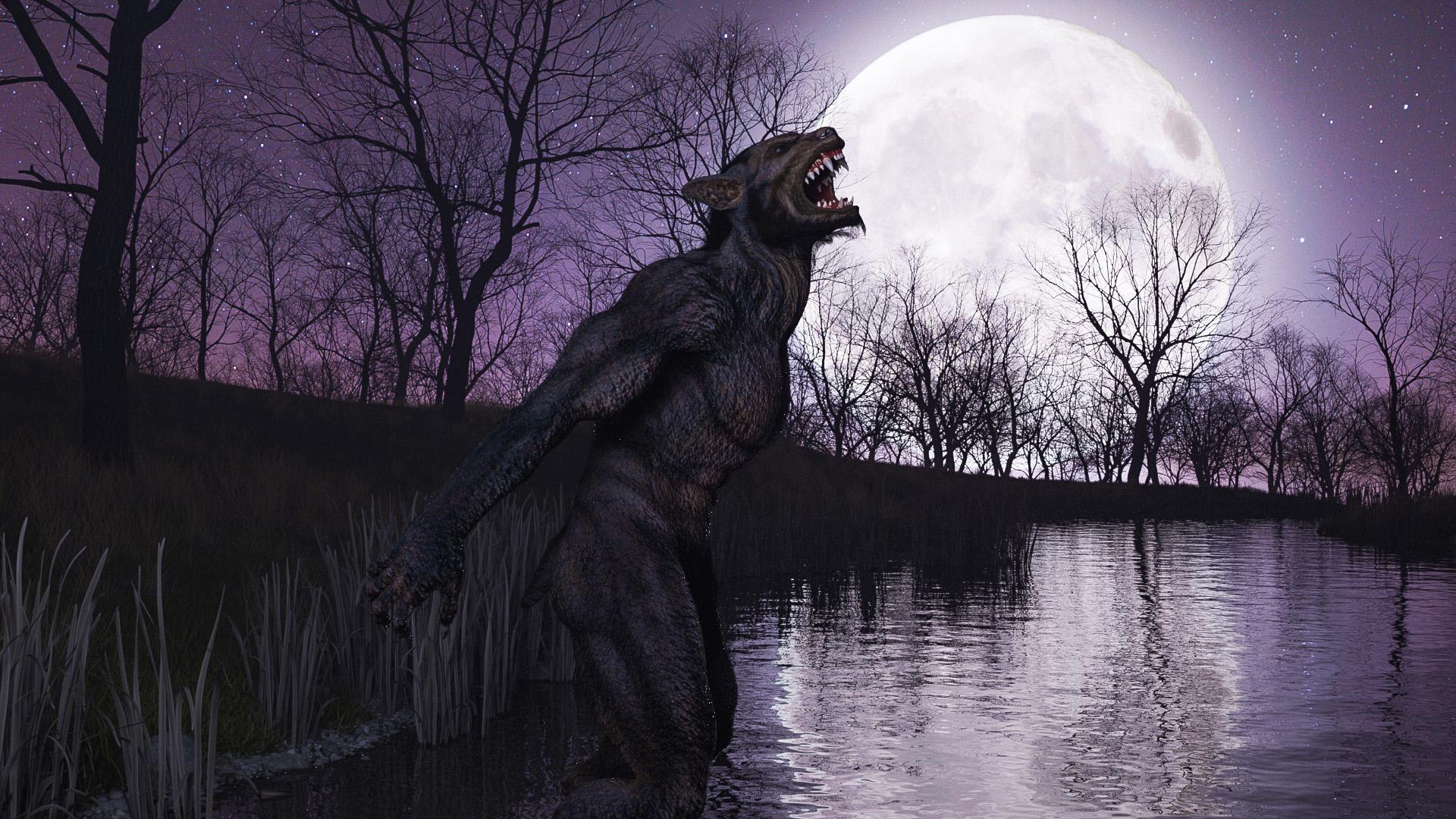
UltraScenery [Commercial]Anyone else been hanging around this thread, eagerly awaiting the release of the latest update? So many great renders to see! Thought the winter oaks could use more love. Coast preset with yet another Orestes HDRI.
 Novica & Forum Members Tips & Product Reviews Pt 13
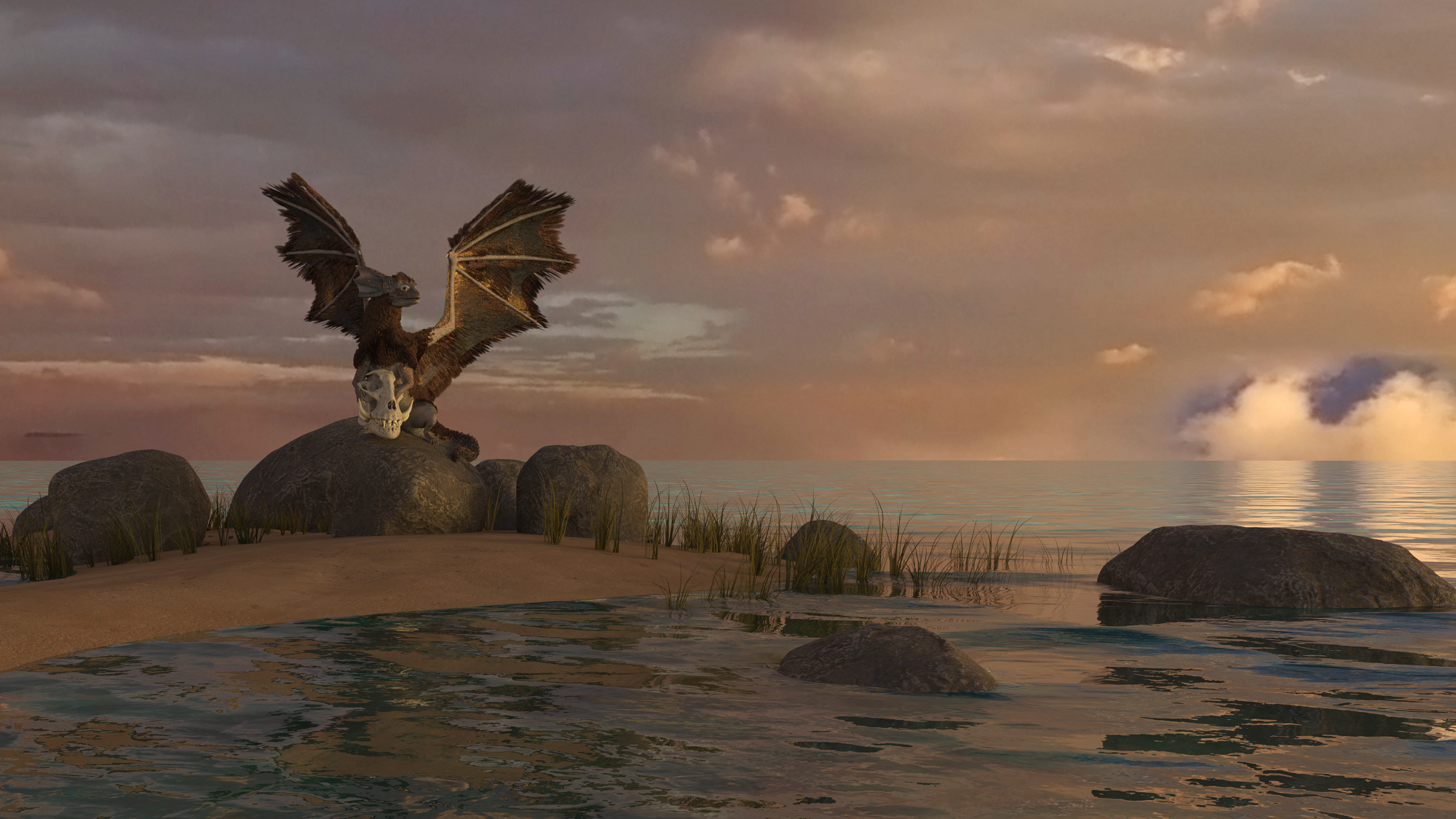
Working through recent purchases I test drove Muelsfell Vast Ocean and used two of the options. I was stoked, so easy! Two water planes, and others for under the water and above. I added Oso's Pixie Dragon, the Tusker Skull and the great Orestes Iray HDRI Skydomes - Vanilla Evening. So the purple dragon turned sandy.
Mary
Click below for a larger image. The original was too large for the forum.
Novica & Forum Members Tips & Product Reviews Pt 13I used Orestes Iray HDRI Skydomes https://www.daz3d.com/orestes-iray-hdri-skydomes-summer-day for the lighting & sky in this render. I also used the sand pit & placed a plane primitive behind it for the water. I think later on down the road I'm going to pick up a few more Orestes HDRI packs. The lighting looks great and they seem to render a bit faster.
The toes in the sand are a nice touch! You'll get a good variety with Orestes. :)
heh, I just decided to sink her down a little since there's not enough geometry on the sand pit to use a Dformer on it around the feet without either scaling the character up or scaling the sand pit down which probably wouldn't work for the camera shot. Its the first time I used these HDRIs so I'll have to play around with them more. I do like the fact that I don't have to mess around with spotlights & primitives to achieve acceptable lighting. Later on I might try using terrain from everyday morphing primitives.
Now I just have to figure out how to give the character wet skin in conjunction with the surface settings I used. I have the Top Coat Layer colored & set to "weighted" in order to lighten the skin tone a bit.
Novica & Forum Members Tips & Product Reviews Pt 13I used Orestes Iray HDRI Skydomes https://www.daz3d.com/orestes-iray-hdri-skydomes-summer-day for the lighting & sky in this render. I also used the sand pit & placed a plane primitive behind it for the water. I think later on down the road I'm going to pick up a few more Orestes HDRI packs. The lighting looks great and they seem to render a bit faster.
The toes in the sand are a nice touch! You'll get a good variety with Orestes. :)
Novica & Forum Members Tips & Product Reviews Pt 13I used Orestes Iray HDRI Skydomes https://www.daz3d.com/orestes-iray-hdri-skydomes-summer-day for the lighting & sky in this render. I also used the sand pit & placed a plane primitive behind it for the water. I think later on down the road I'm going to pick up a few more Orestes HDRI packs. The lighting looks great and they seem to render a bit faster.
What am I doing wrong?Iray render, quad HD with firefly filter on.
only lighting is Orestes sky hdri
I'm using a 1080p monitor and initially tried rendering at 4k. I brought this down thinking that might be the issue, but it's just the same.
 [In store now] Felidae by AM - Snow Leopard [Commercial]
Never had DS crash with dforce hair before. I am not able to use the Snow Leopard. (Only tried using the basic HDRI that DS loads with) Tried three times and DS closed down each time.
Here are the lines from the last attempt.
2020-06-24 21:06:49.731 Iray [INFO] - SCENE:IO :: 1.0 SCENE io info : Loading module "::daz_3d::dual_lobe_hair" from "C:\Program Files\DAZ 3D\DAZStudio4\shaders\iray\daz_3d\dual_lobe_hair.mdl".
2020-06-24 21:06:49.958 File loaded in 0 min 0.9 sec.
2020-06-24 21:06:49.960 Loaded file: Snow Leopard - Wearable Preset.duf
2020-06-24 21:06:50.031 Loaded Morph Deltas in 0 min 0.0 sec.
2020-06-24 21:06:50.031 Loaded file: Snow Leopard.dsf
2020-06-24 21:06:50.371 Loaded image SnowLeopard-Body-C1.jpg
2020-06-24 21:06:50.938 File loaded in 0 min 4.8 sec.
2020-06-24 21:06:50.938 Loaded file: Snow Leopard - Iray dForce.duf
2020-06-24 21:06:51.363 Loaded image Lion-Parts-D.jpg
2020-06-24 21:06:51.599 Loaded image SnowLeopard-Body-D.jpg
2020-06-24 21:06:51.767 Loaded image SnowLeopard-Eyes-D.jpg
2020-06-24 21:08:08.876 Loaded image SnowLeopard-Body-C1.jpg
2020-06-24 21:08:08.886 Loaded image SnowLeopard-Body-C1.jpg
2020-06-24 21:08:09.465 Loaded image SnowLeopard-Body-Density-1.jpg
2020-06-24 21:08:37.438 Loaded image SnowLeopard-Body-Density-1.jpg
2020-06-24 21:08:47.590 Loaded image SnowLeopard-Body-Density-1.jpg
2020-06-24 21:08:48.255 Loaded image SnowLeopard-Body-Density-1.jpg
2020-06-24 21:11:04.169 Iray [INFO] - IMAGE:IO :: 1.0 IMAGE io info : Loading image "E:\Daz 3D Content\Runtime\Textures\AM\Felidae\Lion-Body-A.jpg", pixel type "Rgb", 4096x4096x1 pixels, 1 miplevel.
2020-06-24 21:11:04.243 Iray [INFO] - IMAGE:IO :: 1.0 IMAGE io info : Loading image "E:\Daz 3D Content\Runtime\Textures\AM\Felidae\Lion-Body-R.jpg", pixel type "Rgb", 4096x4096x1 pixels, 1 miplevel.
2020-06-24 21:11:04.245 Iray [INFO] - IMAGE:IO :: 1.0 IMAGE io info : Loading image "E:\Daz 3D Content\Runtime\Textures\AM\Felidae by AM\SnowLeopard-Body-D.jpg", pixel type "Rgb", 4096x4096x1 pixels, 1 miplevel.
2020-06-24 21:11:04.324 Iray [INFO] - IMAGE:IO :: 1.0 IMAGE io info : Loading image "E:\Daz 3D Content\Runtime\Textures\AM\Felidae\Lion-Parts-W.jpg", pixel type "Rgb", 4096x4096x1 pixels, 1 miplevel.
2020-06-24 21:11:04.391 Iray [INFO] - IMAGE:IO :: 1.0 IMAGE io info : Loading image "E:\Daz 3D Content\Runtime\Textures\AM\Felidae\Lion-Parts-R.jpg", pixel type "Rgb", 4096x4096x1 pixels, 1 miplevel.
2020-06-24 21:11:04.489 Iray [INFO] - IMAGE:IO :: 1.0 IMAGE io info : Loading image "E:\Daz 3D Content\Runtime\Textures\AM\Felidae\Lion-Parts-D.jpg", pixel type "Rgb", 4096x4096x1 pixels, 1 miplevel.
2020-06-24 21:11:04.551 Iray [INFO] - IMAGE:IO :: 1.0 IMAGE io info : Loading image "E:\Daz 3D Content\Runtime\Textures\AM\Felidae\Lion-Parts-B.jpg", pixel type "Rgb", 4096x4096x1 pixels, 1 miplevel.
2020-06-24 21:11:04.610 Iray [INFO] - IMAGE:IO :: 1.0 IMAGE io info : Loading image "E:\Daz 3D Content\Runtime\Textures\AM\Felidae\Lion-Parts-G.jpg", pixel type "Rgb", 4096x4096x1 pixels, 1 miplevel.
2020-06-24 21:11:04.618 Iray [INFO] - IMAGE:IO :: 1.0 IMAGE io info : Loading image "E:\Daz 3D Content\Runtime\Textures\AM\Felidae by AM\SnowLeopard-Eyes-D.jpg", pixel type "Rgb", 4096x4096x1 pixels, 1 miplevel.
2020-06-24 21:11:04.619 Iray [INFO] - IMAGE:IO :: 1.0 IMAGE io info : Loading image "E:\Daz 3D Content\Runtime\Textures\AM\Felidae\Lion-Eyes-N.jpg", pixel type "Rgb", 2048x2048x1 pixels, 1 miplevel.
2020-06-24 21:11:31.779 Iray [INFO] - IMAGE:IO :: 1.0 IMAGE io info : Loading image "E:\Daz 3D Content\Runtime\Textures\AM\Felidae by AM\SnowLeopard-Body-F.jpg", pixel type "Rgb", 2048x2048x1 pixels, 1 miplevel.
2020-06-24 21:12:03.651 Iray [INFO] - IMAGE:IO :: 1.0 IMAGE io info : Loading image "E:\Daz 3D Content\Runtime\Textures\Orestes\SkyHdris-SunnyClouds\sunnysky01c-435.hdr", pixel type "Rgb_fp", 8192x4096x1 pixels, 1 miplevel.
2020-06-24 21:13:41.440 Iray [INFO] - IRAY:RENDER :: 1.0 IRAY rend info : Updating geometry.
2020-06-24 21:13:41.444 Iray [INFO] - IRAY:RENDER :: 1.0 IRAY rend info : Importing scene graph.
2020-06-24 21:13:41.445 Iray [INFO] - IRAY:RENDER :: 1.0 IRAY rend info : Importing geometry for motion time 0
2020-06-24 21:14:27.716 Iray [INFO] - IRAY:RENDER :: 1.0 IRAY rend info : Geometry import (6 objects with 161m triangles, 6 instances yielding 161m triangles) took 46.202s
2020-06-24 21:14:27.805 Iray [INFO] - IRAY:RENDER :: 1.0 IRAY rend info : Updating materials.
2020-06-24 21:14:29.322 Iray [INFO] - MATCNV:RENDER :: 1.0 MATCNV rend info : Material instance 'DS_Snow Leopard__bigCat_UpperTeeth_f82_13454' uses MDL JIT compilation.
2020-06-24 21:14:29.380 Iray [INFO] - MATCNV:RENDER :: 1.0 MATCNV rend info : Material instance 'DS_Snow Leopard__bigCat_LowerTeeth_f83_13472' uses MDL JIT compilation.
2020-06-24 21:14:29.606 Iray [INFO] - MATCNV:RENDER :: 1.0 MATCNV rend info : Material instance 'DS_Figure: Snow Leopard_guideHairs_SG0__bigCat_Skin_12a0_13559' uses MDL JIT compilation.
2020-06-24 21:14:29.634 Iray [INFO] - MATCNV:RENDER :: 1.0 MATCNV rend info : Material instance 'DS_Figure: Snow Leopard_guideHairs_SG1__default_12c4_13605' uses MDL JIT compilation.
2020-06-24 21:14:29.680 Iray [INFO] - MATCNV:RENDER :: 1.0 MATCNV rend info : Material instance 'DS_Figure: Snow Leopard_guideHairs_SG2__default_12e8_13651' uses MDL JIT compilation.
2020-06-24 21:14:29.681 Iray [INFO] - MATCNV:RENDER :: 1.0 MATCNV rend info : Material instance 'DS_Figure: Snow Leopard_guideHairs_SG3__default_130c_13697' uses MDL JIT compilation.
2020-06-24 21:14:29.735 Iray [INFO] - MATCNV:RENDER :: 1.0 MATCNV rend info : found 70 textures, 22 lambdas (7 unique)
2020-06-24 21:14:29.969 Iray [INFO] - IRAY:RENDER :: 1.0 IRAY rend info : Emitter geometry import (1 light source with 2 triangles, 1 instance) took 0.000s
2020-06-24 21:14:29.970 Iray [INFO] - IRAY:RENDER :: 1.0 IRAY rend info : Updating environment.
2020-06-24 21:14:32.190 Iray [INFO] - IRAY:RENDER :: 1.0 IRAY rend info : Updating backplate.
2020-06-24 21:14:32.191 Iray [INFO] - IRAY:RENDER :: 1.0 IRAY rend info : Updating lens.
2020-06-24 21:14:32.191 Iray [INFO] - IRAY:RENDER :: 1.0 IRAY rend info : Updating lights.
2020-06-24 21:14:32.192 Iray [INFO] - IRAY:RENDER :: 1.0 IRAY rend info : Updating object flags.
2020-06-24 21:14:32.193 Iray [INFO] - IRAY:RENDER :: 1.0 IRAY rend info : Updating caustic portals.
2020-06-24 21:14:32.193 Iray [INFO] - IRAY:RENDER :: 1.0 IRAY rend info : Updating decals.
2020-06-24 21:14:32.197 WARNING: ..\..\..\..\..\src\pluginsource\DzIrayRender\dzneuraymgr.cpp(305): Iray [WARNING] - IRAY:RENDER :: 1.0 IRAY rend warn : The 'iray_optix_prime' scene option is no longer supported.
2020-06-24 21:14:32.264 Iray [INFO] - IRAY:RENDER :: 1.0 IRAY rend info : Allocating 1-layer frame buffer
2020-06-24 21:14:32.270 Iray [INFO] - IRAY:RENDER :: 1.0 IRAY rend info : Using interactive scheduling, caustic sampler disabled
2020-06-24 21:14:32.271 Iray [INFO] - IRAY:RENDER :: 1.0 IRAY rend info : Initializing local rendering.
2020-06-24 21:14:32.351 Iray [INFO] - IRAY:RENDER :: 1.0 IRAY rend info : Rendering with 1 device(s):
2020-06-24 21:14:32.351 Iray [INFO] - IRAY:RENDER :: 1.0 IRAY rend info : CUDA device 0 (GeForce GTX 1080 Ti)
2020-06-24 21:14:32.352 Iray [INFO] - IRAY:RENDER :: 1.0 IRAY rend info : Rendering...
2020-06-24 21:14:32.662 Iray [VERBOSE] - IRAY:RENDER :: 1.6 IRAY rend progr: CUDA device 0 (GeForce GTX 1080 Ti): Processing scene...
2020-06-24 21:14:38.810 WARNING: ..\..\..\..\..\src\pluginsource\DzIrayRender\dzneuraymgr.cpp(305): Iray [ERROR] - IRAY:RENDER :: 1.11 IRAY rend error: Unable to allocate 579429216 bytes from 2584199987 bytes of available device memory
2020-06-24 21:14:38.907 WARNING: ..\..\..\..\..\src\pluginsource\DzIrayRender\dzneuraymgr.cpp(305): Iray [ERROR] - IRAY:RENDER :: 1.6 IRAY rend error: CUDA device 0 (GeForce GTX 1080 Ti): Scene setup failed
2020-06-24 21:14:38.915 WARNING: ..\..\..\..\..\src\pluginsource\DzIrayRender\dzneuraymgr.cpp(305): Iray [ERROR] - IRAY:RENDER :: 1.6 IRAY rend error: CUDA device 0 (GeForce GTX 1080 Ti): Device failed while rendering
2020-06-24 21:14:38.920 WARNING: ..\..\..\..\..\src\pluginsource\DzIrayRender\dzneuraymgr.cpp(305): Iray [WARNING] - IRAY:RENDER :: 1.6 IRAY rend warn : All available GPUs failed.
2020-06-24 21:14:38.924 WARNING: ..\..\..\..\..\src\pluginsource\DzIrayRender\dzneuraymgr.cpp(305): Iray [WARNING] - IRAY:RENDER :: 1.6 IRAY rend warn : No devices activated. Enabling CPU fallback.
2020-06-24 21:14:38.938 WARNING: ..\..\..\..\..\src\pluginsource\DzIrayRender\dzneuraymgr.cpp(305): Iray [WARNING] - IRAY:RENDER :: 1.6 IRAY rend warn : Re-rendering iteration because of device failure
2020-06-24 21:14:38.940 WARNING: ..\..\..\..\..\src\pluginsource\DzIrayRender\dzneuraymgr.cpp(305): Iray [ERROR] - IRAY:RENDER :: 1.6 IRAY rend error: All workers failed: aborting render
2020-06-24 21:14:38.942 Iray [INFO] - IRAY:RENDER :: 1.0 IRAY rend info : CPU: using 12 cores for rendering
2020-06-24 21:14:38.942 Iray [INFO] - IRAY:RENDER :: 1.0 IRAY rend info : Rendering with 1 device(s):
2020-06-24 21:14:38.942 Iray [INFO] - IRAY:RENDER :: 1.0 IRAY rend info : CPU
2020-06-24 21:14:38.943 Iray [INFO] - IRAY:RENDER :: 1.0 IRAY rend info : Rendering...
Report sales errors here: "There's Always Another Sale™"When I first checked the PC+ for a Day link, the products from yesterday were still there. That was about 15 minutes after Daz Midnight. I checked again later, and the page was empty, but the next refresh showed 58 items. If you're still seeing an empty page, the changes should show up soon.
ETA: Here is the correct link for View These Artists Together, (although it looks like all the vendors are listed at the bottom of the page.)
View These Artists TogetherThat link is added by the daz deals add-on. It takes the link to the first shop and changes the filter to add all featured artists names in it.
That works well when links to the various artists store are links to a category or to the shop with a filter for that artist, but not when the page is setup with individual links for each store like today.
If you look at today's link for example you'll see it starts by https://www.daz3d.com/ravenhair
https://www.daz3d.com/ravenhair#filter_vendor=ravenhair^rawart^orestes-graphics^arryn^onnel^riversoft-art^tesla3dcorp^3d-ghdesign^sade^abalone-llc^jgreenlees^the-antfarm^dreamlight^sarah-payne^inception8^moonscape-graphics^mousso^half-life^underconstruction^cynderblue^anna-benjamin^merlin-studios^ozichick^twiztedmetal^serum^mely3d^dimidrol^dglidden^peanterra^vyusur^ansiko^howiefarkes&filter_new=0&filter_platClub=0&filtered=1
If you replace that with "shop" the link should work as intended
https://www.daz3d.com/shop#filter_vendor=ravenhair^rawart^orestes-graphics^arryn^onnel^riversoft-art^tesla3dcorp^3d-ghdesign^sade^abalone-llc^jgreenlees^the-antfarm^dreamlight^sarah-payne^inception8^moonscape-graphics^mousso^half-life^underconstruction^cynderblue^anna-benjamin^merlin-studios^ozichick^twiztedmetal^serum^mely3d^dimidrol^dglidden^peanterra^vyusur^ansiko^howiefarkes&filter_new=0&filter_platClub=0&filtered=1
You peole won't be satisfied until I learn t code, will you? Thanks, that worked.
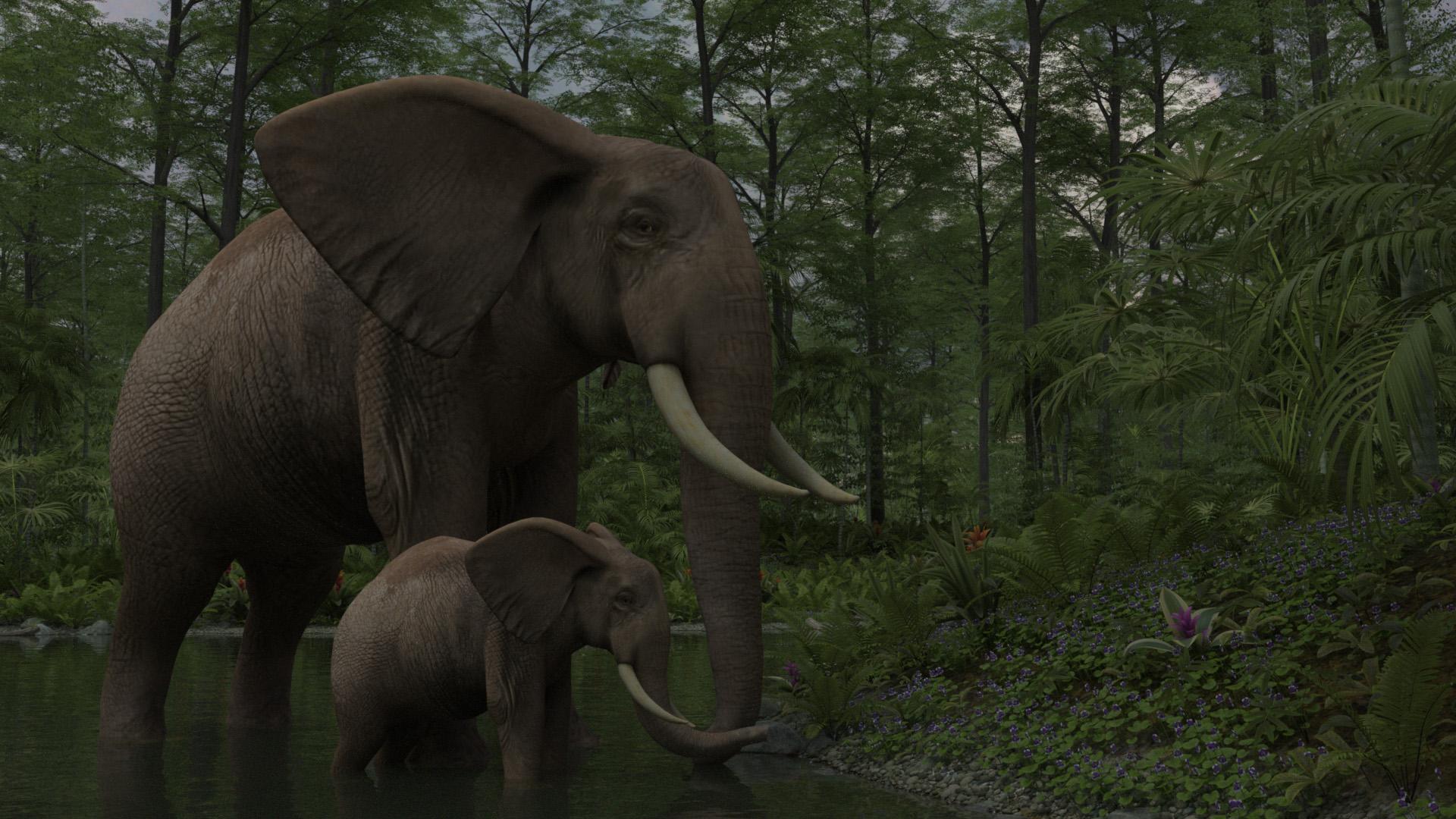
UltraScenery [Commercial]I really am beginning to think you can't go wrong with an UltraScenery scene combined with an Orestes HDRI and a Daz animal. I'm really enjoying rendering again, just rediscovering things in my old runtime libraries.
Daz 3D is part of

Connect
DAZ Productions, Inc.
7533 S Center View Ct #4664
West Jordan, UT 84084Licensing Agreement | Terms of Service | Privacy Policy | EULA
© 2026 Daz Productions Inc. All Rights Reserved.