-
Create artificially bright white fur
I am trying to get the Sujin Imperial Fantasy outfit to render bright white. I would like it to appear as bright as it does in the filament preview.
If I use Iray it appears grey. If I use 3Delight the fur renders the way I want it to but most of the rest of the scene is black. I assume this is because the other textures are Iray not 3d3light.
I will provide more information but I need a clue what is needed.
Thanks in advance
Video Card updgrade-kinda stuckDrunkMonkeyProductions said:
straker1999 said:
I don't quite understad what the difference is with the PBR Shaders, probably just a newer version issue since almost all the shaders from G8 down that I use show as PBR's in the Surface Editor. It's the G8.1 and up that will preview ok but not render at all. Too bad about the Filatoon Shaders. I thought the Filament Engine came out a while ago (I assume it's related to that)
Thanks so much for helping out. Any other insights are appreciated.
As for renders failing while the preview works, that's because they don't use the same settings, by default.
The Draw Settings for the Viewport's Iray preview mode is set to Interactive by default, which means it's ignoring much of the PBR's shader settings.
If you change this to Photoreal mode, you'll probably have the same problem and vice versa, where it will render if set to interactive mode under render settings.
Just my two cents on your initial issue.
You're kind of stuck between a rock and a hard place.
If you stick with win 7, you'll be locked to studio version 4.21.05 or below for gpu rendering, regardless of gpu you go with.
If you go with the GTX cards, Game ready driver support is dead in october this year(2025), and support of win 10 is gone next october(2026). accoding to a july 31 2025 article from tom's hardware.
The renders don;t fail, per se, they just render as white,
I don't mind that much if I have a 4.21, but I don't, and it looks like I can't get / find a copy of it either. I already have read the Daz won't help at all regarding "old versions". The GTX card and drivers are still available so no problem there. Since I do not use Studio professionally I can't justify building a cutting edge graphics optimized rig for on piece of software. Not to mention the work of transfering everthing over to a new machine. That would be just plain nuts.
Thanks again for efforts on the info. But unless I can come up with v4.21 or close to it my days with this software seem to be numbered cause it looks like I'm out of luck I guess.
Video Card updgrade-kinda stuckstraker1999 said:
I don't quite understad what the difference is with the PBR Shaders, probably just a newer version issue since almost all the shaders from G8 down that I use show as PBR's in the Surface Editor. It's the G8.1 and up that will preview ok but not render at all. Too bad about the Filatoon Shaders. I thought the Filament Engine came out a while ago (I assume it's related to that)
Thanks so much for helping out. Any other insights are appreciated.
Fundamentally, it's just a naming convention to differentiate the two shaders, Iray PBR and Iray Uber, as Iray only uses PBR(Physically Based Rendering) shaders AFAIK.
On a technical level, the PBR shaders are way more complex, with a lot of additional settings/controls compared to the Iray Uber shader.
As for renders failing while the preview works, that's because they don't use the same settings, by default.
The Draw Settings for the Viewport's Iray preview mode is set to Interactive by default, which means it's ignoring much of the PBR's shader settings.
If you change this to Photoreal mode, you'll probably have the same problem and vice versa, where it will render if set to interactive mode under render settings.
Just to be clear, this isn't an 8.1 and up issue, the Iray PBR shader can be used on anything.
I have character and material presets for 8.1 and even 9 that only use Iray Uber, and 8 and 3 presets that only use Iray PBR.
It's just up to the PA which they go with.
Just my two cents on your initial issue.
You're kind of stuck between a rock and a hard place.
If you stick with win 7, you'll be locked to studio version 4.21.05 or below for gpu rendering, regardless of gpu you go with.
If you go with the GTX cards, Game ready driver support is dead in october this year(2025), and support of win 10 is gone next october(2026). accoding to a july 31 2025 article from tom's hardware.
Which means, if your computer doesn't meet win11 requirements,which your's apparently doesn't based on the cpu, you'll be locked to what ever the last supported version of studio is under win10 at that point.
Now, there's nothing that says you have to have the latest and greatest version of studio, plenty of people around here still run older versions.
You'll just need to be careful in your purchases going forward to avoid anythying that's not compatible.
WIth all that in mind, i'd go with the 3060(12GB), and start looking at a used system that's win 11 compatible on ebay.
Unforunately, it's gonna hurt the wallet.
Let's appreciate/discuss today's new releases - more ongoinger threadI have tried this product, but I am unable to get results I want with PBRSkin Pro..
There is only a very brief instructions.

I have added PNG file with transparent background to the shell, but it does not show up in iray.

On the Filament preview render there is something, but I could not position it upper.
 Video Card updgrade-kinda stuck
Thanks for research. Seeing as though in many a thread I have read on this, Daz just won't help in the "old version" department so I'm pretty sure I'm out of luck there. Unless someone care
to donate an install package to the cause....
I don't quite understad what the difference is with the PBR Shaders, probably just a newer version issue since almost all the shaders from G8 down that I use show as PBR's in the Surface Editor. It's the G8.1 and up that will preview ok but not render at all. Too bad about the Filatoon Shaders. I thought the Filament Engine came out a while ago (I assume it's related to that)
Thanks so much for helping out. Any other insights are appreciated.
Setting up Iray lights in Viewport’s Texture-Shaded view?Can someone recommend a logical way to set up Iray lights, using the viewport, when in the Texture-Shaded view?
OK, so I'm on an Intel iMac Pro system. (Filament is not available on Mac). When I'm setting up lights in a scene, my choices are either Texture-Shaded or Iray viewing modes. And if I use the preferred Iray View method, so I can see real-time adjustments, it's painfully pixelated and cumbersomely slow. So, I mostly use Texture-Shaded when placing my lights, dome positioning, etc.. What I'd prefer to do at this stage is to see the approximate effect of my Iray lights while I'm still in texture-shaded mode. Because navigation is so much quicker in Texture-Shaded mode. Then once I'm mostly set up in my scene, then switch over to Iray View to dial in the final adjustments on my light levels.
Is there a logical way to do this?Just got a notice about 3Delight being retired.....My personal opinion is that iray is capable enough to convert 3delight shaders, indeed this is how we import 3dl in blender converting it first to iray. There may be some bump map to adjust as iray can't convert the bump height correctly, or some complex materials may need some adjustement too, but in general the conversion is good. As for the speed iray used with the cpu is far superior to 3dl with full ray tracing, while for 3dl without raytracing you can use filament instead, though in this case the shader conversion is not that good unfortunately as filament can't do most iray features, particularly transmapped hairs don't come good with filament.
The real advantage of 3dl is memory, as iray requires a vast amount of ram to render the scene while 3dl is tiled thus a small ram is enough. But ram alone doesn't cost much and most PCs can be upgraded for that.
Daz Studio 2026 Beta - version 6.25.2026.6423! (Updated March 09, 2026)There's a small problem with Filament views. Mainly in character eyebrows. When the "Refraction" is set to a high value, like "0.85" for eyebrows, common from what I have seen, in the Filament view, the eyebrows pretty much vanish from view. I have to set the Refraction value to either zero, or "0.01" or some such low value in order to see them. Which shouldn't be the case. I'll attach to Filament renders, one with the default refraction value for these eyebrows (0.85) and ond where I had to lower it to "0.01", or just 0 in order to be able to see them in my viewport.
No matter what, a change in the refraction value should not make them no invisible.
Will DAZ ever improve animating?Imago said:
wolf359 said:
How are you creating lipsynch for the G1 figures?
With the 32bit version of DAZ Studio that has the lipsynch tool integrated. Until now that's the best way I found to make good lipsynchs. It works with any figure but some times you have to find the MSC files that works with them. I compiled myself a few for older figure, it's not hard to create them.
I have both 64 and 32 bit versions installed, when I need to make a lipsynch, I simply start another session with the 32bit version, load G1 (or any other figure I need), select the audio file and input the text for a more precise result.
Once the lipsynch is done, I save it as Pose Preset selecting only the Visemes and the mouth movements and import that into the char I'm animating in the 64bit session.
I'm glad that I have options like Blender available to me should I need them (thanks again to wolf359 and the others who helped me get some figures into Blender to test them), but now that the DAZ Alpha allows Macs to use Filament and Filatoon, I'm going to do the next few 3D animations in DAZ Studio.
It's certainly not the best option for most serious animators, but my animations tend to be simple and very dialogue-centric, so it really works well for me.Similar to Imago as far as running 32-bit DAZ Studio, I have two older iMacs (2011 and 2012) on my network both running DAZ Studio, 32-bit version. With screensharing, they're basically extra windows on my MacBook Pro M4Pro, so they might as well be 64-bit and running native for what they're used for; they wouldn't lip sync any faster if they were. Like Imago, I do the lip syncs and save the pose subsets of just the head and necks.
This afternoon, I did all the Genesis 9 lip sync poses for 109 audio clips in just under 2 hours... roughly 11 minutes of audio, which should make a 13-15 minute video when I'm done.
I did a quick render test on the first clip, just to make sure things were set up correctly. It's about an 8-second clip, I only rendered at 720p, luckily, as it was still set to 30 fps, so I adjusted to 24 fps and did all 109 clips in one sitting.
For me, the best part is that the Alpha allows me to insert the audio clip and actually hear it (I haven't been able to do that using a 64-bit Mac OS in years) and export it as a single movie file with sound. No exporting individual frames and joining them later, then adding the audio. Such a smooth system for the type of animation I want to do, with some canned animations and sources like Mixamo that still work for me for non-facial animation. Again, it's not going to be enough for most serious animations, but as a hobbyist who just wants to have fun making quick little sci fi videos? Magic.
I also love how Mimic automatically handles the Genesis 9 lips, eyes and eye brows... not bad for free.
Bottom line, 7.7 seconds of 3D animation in under 8 miniutes including doing the lip sync (of course, 1080p would take longer to render, but you get the idea).
https://sterdan.com/wp-content/uploads/2025/08/04-A-little-over-12-hours-ago-Close-up.mp4
Methods for Graphic Novel creation.faeleshstudios said:
Also, one more question: Can I apply Filatoon to ANY Gen9s that I made? Or only if I start out the gate w/ a Filatoon Figure? I am currently of the understanding that they act as separate, independant entities and generally aren't compatible with each other. I want my models to have a "Arcane-esque" cartoony, cel-shaded sort of look that Gen9 doesn't offer.
Filatoon uses the Filament rendering engine (not the iRay one) - It's something like a series of "props and tools" that, as crosswind put, can be applied to any models (including figures of any generation). There's decent argument to say it works better with older content (G3 and even before), which - if you need assets - are generally cheaper to buy. There's also a couple of filatoon threads on the foums (which should be fairly easy to find!) and contain a ton of related info.
faeleshstudios said:
I'm sorry if it's generally not okay to go off topic like this, if need be I can make another thread.
AFAIK: It's absolutely fine
 AIUTO...CHI CONOSCE L’ITALIANO? PARTE QUATTORDICI
vangelrise said:
Farò delle prove appena possibile, così riesco a dirti con precisione. Non stavo usando alcuno shader, questo sicuro.
Grazie!
Approfitto per una seconda questione che non ho mai approfondito a dovere, cioè la risoluzione delle immagini.
Io vedo su Deviantart che ci sono render che, anche se li ingrandisci tantissimo, non perdono risoluzione, cioè rimangono nitidi e si vedono proprio i dettagli. I miei invece, ingrandendo, si tende a vedere la sgranatura. Ma come si regola la risoluzione di un render per aumentarla? Se la aumento, aumentano anche i tempi di renderizzazione?
Con IRay la differenza non è marcata come per 3Delight mentre con Filament non cambia quasi nulla.
Il problema vero con IRay sono le luci (spacciate come suo punto di forza, però no, è il punto debolissimo), maggiore la risoluzione e maggiore la "superficie" su cui la GPU deve gestire l'illuminazione. Se una immagine 3000x3000 necessita di un minuto, una risoluzione 6000x6000 avrà bisogno di un minuto e mezzo. Questi sono i tempi che ho rilevato io con le mie impostazioni "veloci" su una scena benchmark, dipende molto dal set di luci, dai parametri di render, dagli shader utilizzati e dalla VRAM della GPU.
La risoluzione la regoli dal pannello delle impostazioni di render, in alto sotto il tab Editor. Nella sezione General puoi impostare la tua risoluzione personalizzata o usare un preset. Puoi anche variare il rapporto d'aspetto se vuoi.
Altra nota, IRay è incredibilmente pessimo per i dettagli a meno di non usare delle impostazioni da incubo e GPU davvero possenti. Avrai sempre delle sbavature, imperfezioni o sgranature anche a risoluzioni alte.
Filament invece è più diretto, quello che vedi è quello che ottini in render.
3Delight invece è più impietoso con la risuluzione, se una scena in 1080 ci mette (diciamo) un minuto, una da 1280 ha bisogno di un minuto e quaranta, mentre una da 4000 richiede quasi quattro minuti. E' quasi esponenziale. Però a differenza di IRay, 3Delight non è rallentato dal contenuto della scena a parte qualche shader o molte trasparenze "impilate".
[Released] Bone Minion for Genesis 8 and 8.1 Poses [Commercial]That I would hesitate to answer. The PAs are dealing with moving from QT4 to QT6 and right now Alpha is not yet settled into place. If you read the Alpha thread you will see some of the discussions. V3Ditigtimes' Commercial threads are also addressing this too. As is Code66/Totte. I have installed simple Code66 scripts to favorites, but they do not work. But I am testing to see if they will stay in favorites from one version to another. What you can do in the Alpha now is work in Filament/Filatoon. But plugins and scripts use, you need DS 4.24.0.3. So plan to use both versions by saving your scene file and open and close in the version that has the tools you need. If you had a Windows computer with an RTX 5xxx card, the Alpha would be your only choice. (I really recommend reading the Alpha thread, I am not a programmer and do not have a technical understanding of all the issues, but I do understand that upgrading programs/computers does give fits to everyone involved. I can be patient.)
But we should take further discussion back to the Mac thread so we don't hijack the Bone Minion thread.
Mary
MimicMolly's Renders & WIPsI have finished the last eyebrows that belong to Nahuel. I hope there's a semi-toony resemblance in him now.
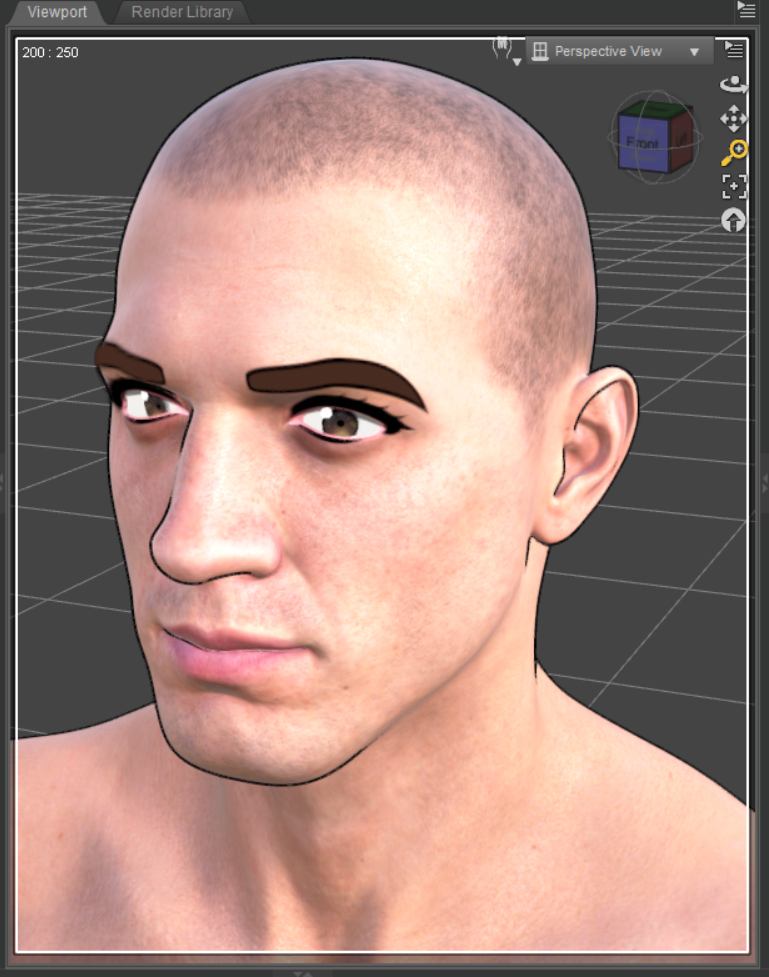
Ironically, my OC who uses Nahuel's eyebrows in the Iray version doesn't look like him with the approximated Nahuel eyebrows.
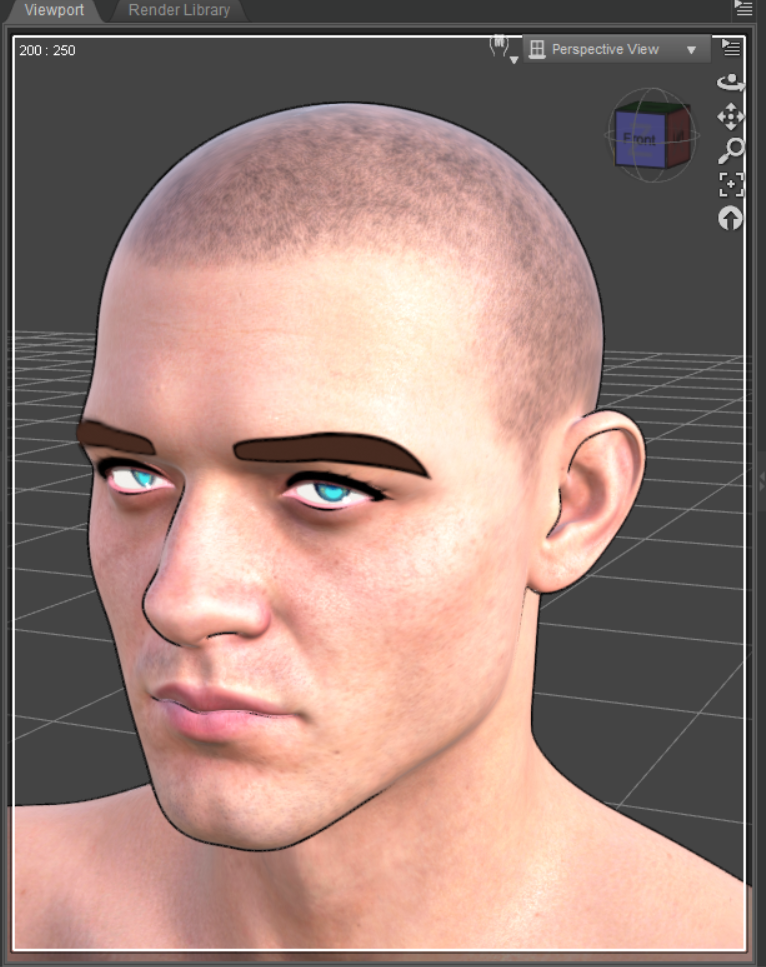
He does, look like himself with these other eyebrows I drew that are based off another OC.
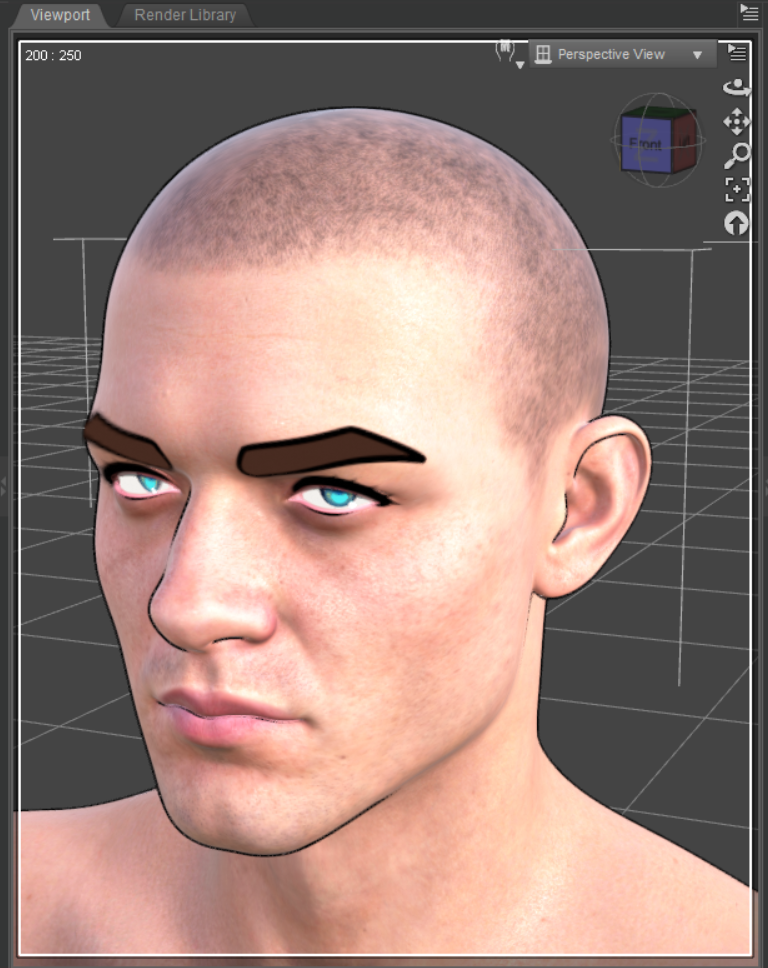
I feel like everyone thinks Filatoon = soft-shaded style because y'all aren't 2D illustrators, that somehow I have accidentally developed a distinct Filament style. Things like this are why I just don't bother with promoting anything I publicly upload. The interest in it is low as it is too niche. People who cry about wanting "originality" don't realize that it is, in fact, a curse if you wish to appeal to the majority. You're too different and no one wants that.
Disappearing object during animation renderWendyLuvsCatz said:
could be a geograft in the scene as some reported that causes it, however I have had stuff just randomly vanish in Filament too, closing D|S and reloading the scene only solution I found
Thank you
Disappearing object during animation rendercould be a geograft in the scene as some reported that causes it, however I have had stuff just randomly vanish in Filament too, closing D|S and reloading the scene only solution I found
Disappearing object during animation renderWendyLuvsCatz said:
are you using Filament?
Yes -- Filament, and Filatoon
Disappearing object during animation renderare you using Filament?
Daz Studio 2026 Beta - version 6.25.2026.6423! (Updated March 09, 2026)jbowler said:
Richard Haseltine said:
The headlamp is part of the camera, it is not separately selectable, so it should be hidden when the camera is - and hiding lights turns them off. You can disagree, but you can't call it a bug.
I can't recall, which Drawstyle is this using? None of the other light types you list has ever shown in Texture Shaded (except for domes made of scene lights, up to the - low - maximum number of lights that can be drawn).
Scene lights didn't show in 4.23.0.4. I attached a scene (created in 4.23.0.4, uncompressed) for your perusal. It's a sphere, a camera and a point light. All headlights are disabled; I admit this is not normal with Studio but I don't like headlights, they make light balance difficult. Note that the "preview lights" option must be turned off for this repro; it's always on (aargh).
In that scene I can toggle the pointlight "visible" and the "visible in viewport" on and off and this has no effect. Likewise for the camera; **the headlight is not being used**; I always turn headlights off!
It's like I said before, "texture shaded" in 4 is a weird, really weird, but most of the time convenient and fast way to do editing; it's the equivalent of Word "Normal view" from the bad old days when Word couldn't render fast enough to allow proper page editing.
With DS6 loading exactly the same scene the sphere does appear, even though the **camera** has no headlight; just like DS4. However the sphere goes "black" if I make the camera invisible in either the viewport or globally. Since the camera is not providing any light that doesn't make any sense, particularly as the "pointlight" is still there. Swapping to "Universal" (what that is) does not help but "Filament" shows the sphere because it is using the scene lighting. In my example DUF the pointlight ends up contributing nothing of import; the light comes from something else. I don't know enough about Filament to fathom where it is coming from.
John Bowler
I noticed the other day that with Filament, in a scene I had which had an environment dome which lite the scene as well as lights, that the lights didn't show, but the dome, environment lighting did.
I have no problems with Filament and cameras, whether visible or not, but the texture shaded mode is very annoying. I shouldn't have to make a camera visible to see through it. It's not IMPORTANT to hide or show camera lights in TEXTURE SHADED mode as we won't be RENDERING in that mode! It is use solely for setting up the scene and so, as it ALWAYS HAS, it should show everything when I look through it so I can adjust what is needed. Even in an IRAY render, without the camera lights YOU STILL SEE THE SCENE LIT UP with something else! So stating that everything going BLACK as being normal is the response of a person who refuses to admit when he was wrong (Richard).
Daz Studio 2026 Beta - version 6.25.2026.6423! (Updated March 09, 2026)Richard Haseltine said:
The headlamp is part of the camera, it is not separately selectable, so it should be hidden when the camera is - and hiding lights turns them off. You can disagree, but you can't call it a bug.
I can't recall, which Drawstyle is this using? None of the other light types you list has ever shown in Texture Shaded (except for domes made of scene lights, up to the - low - maximum number of lights that can be drawn).
Scene lights didn't show in 4.23.0.4. I attached a scene (created in 4.23.0.4, uncompressed) for your perusal. It's a sphere, a camera and a point light. All headlights are disabled; I admit this is not normal with Studio but I don't like headlights, they make light balance difficult. Note that the "preview lights" option must be turned off for this repro; it's always on (aargh).
In that scene I can toggle the pointlight "visible" and the "visible in viewport" on and off and this has no effect. Likewise for the camera; **the headlight is not being used**; I always turn headlights off!
It's like I said before, "texture shaded" in 4 is a weird, really weird, but most of the time convenient and fast way to do editing; it's the equivalent of Word "Normal view" from the bad old days when Word couldn't render fast enough to allow proper page editing.
With DS6 loading exactly the same scene the sphere does appear, even though the **camera** has no headlight; just like DS4. However the sphere goes "black" if I make the camera invisible in either the viewport or globally. Since the camera is not providing any light that doesn't make any sense, particularly as the "pointlight" is still there. Swapping to "Universal" (what that is) does not help but "Filament" shows the sphere because it is using the scene lighting. In my example DUF the pointlight ends up contributing nothing of import; the light comes from something else. I don't know enough about Filament to fathom where it is coming from.
John Bowler
MimicMolly's Renders & WIPsActually, after comparing the two shapes. I decided to redraw them anyway. (Notice how much of the original gray I removed.)
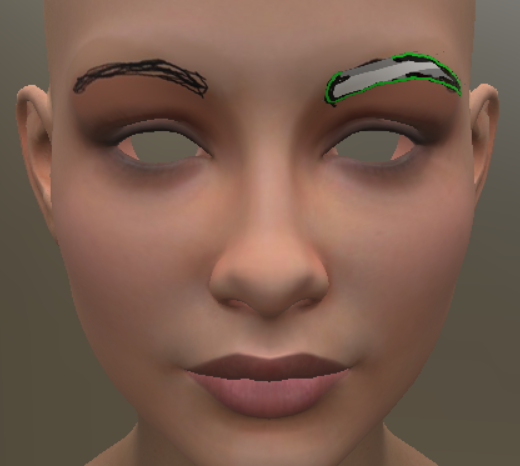
Here is how they look like on Claire, completed.

Finally, there is one last eyebrow pair I feel obligated to do because I use them a lot in the non-Filament renders -- the ones for FaberInc's Nahuel. Interestingly, Giacomo's Spock-like eyebrows are the closest match in terms of size. All I need to do is figure out how to edit the ends, so they can curve down "normally." Hopefully, I won't redo them like I did with Claire.
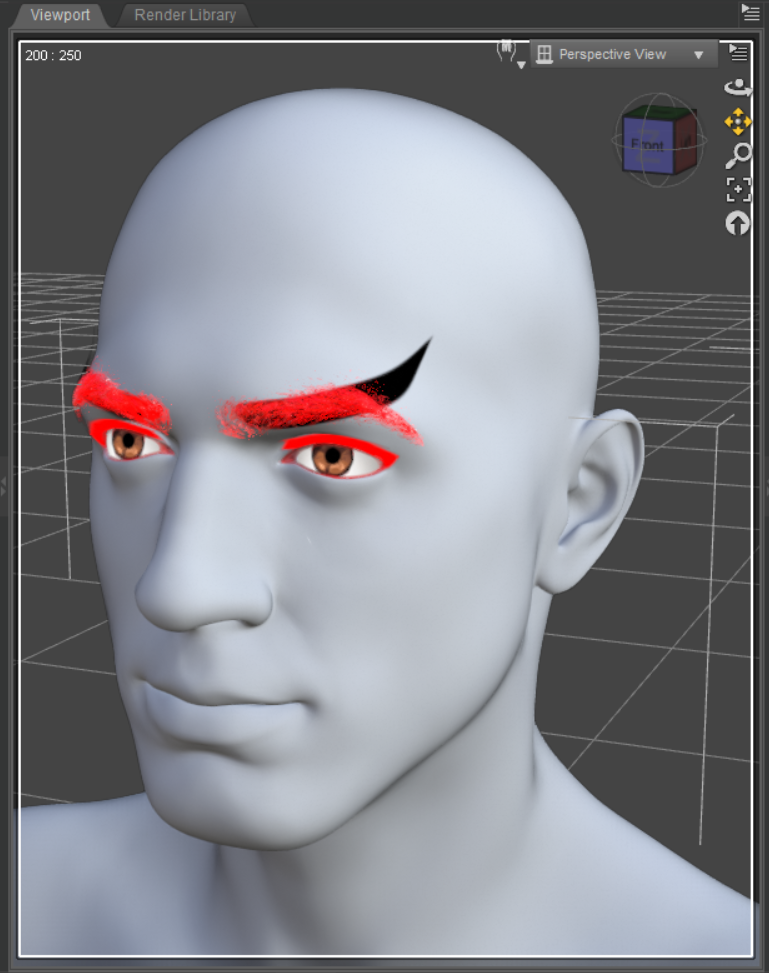
(I will work on these tomorrow, because Thursday evenings are my busiest days.)
For these eyebrows, the real challenge will be re-saving them as H. Materials. I want to do it like the default colors, but with the shades that I use for my OCs, so I won't keep hunting them down every time. I have made attempts because they look like they're saved as H. Materials. But tmy results either turn the whole eyebrow prop the came color without opacity, or save it out as only accepting the OC's opacity. In the icon, it says "RLA," so I may need to figure out how to use that. Unfortunately, I fear that's one of the DAZ settings whose information that's locked behind a video...
Daz 3D is part of

Connect
DAZ Productions, Inc.
7533 S Center View Ct #4664
West Jordan, UT 84084Licensing Agreement | Terms of Service | Privacy Policy | EULA
© 2026 Daz Productions Inc. All Rights Reserved.