-
HD addon versus HD charactersdavidtriune said:
Phoenix1966 said:
I guess Mrs Chow's HD detail are very specific tailored to her morph and her maps so her HD addon won't look so good with others.I don't think it is fair that the promo images for Mrs. Chow show her with all the HD details but the text does not mention the fact that these details require an extra purchase.
@marble I honestly don't see much difference between the HD add-on and the normal maps that Mrs. Chow comes with. The first render is a default G8F with only the HD add-on, rendered at subD 3. The second is the same figure with only the normal maps (no HD add-on) applied, rendered at the subD level G8F defaults to when loaded. The last is the normal maps cranked up to a value of 1.5.


I think this applies to all characters. Here is Mr Woo (left: nothing applied, middle: normal maps, right: HD):

I've gotten similar results with Diego and Ashan. It took me that long to realize the normal maps from the base chars were pretty much the exact same as their HD morphs.
You should only buy HD morphs if you want to mix and match them with other characters and even then there might be compatibility issues as others mentioned.
In game development, normal maps are baked textures made from the high-poly sculpt to save processing time. So it sounds like the normal maps that come with Daz core figures are literally just rendered from the HD AddOn.
Why Does It Take So Long To Load Figures? ("Solved", with GUIDE)
Ok thanks I will try when I get back to the office next week.thenoobducky said:charles said:
thenoobducky said:
charles said:
Those are cool! The second being a very clever speed option. I really just want to cull back my library of stuff I have never used and probably never will. I will probably do it in c# as I can't see it being very complicated. Just a dictionary bucket sort with simple class objects with a counter and cross matching. Parsing is my specialty from my NLP databasing days in PHP. xml and Json I don't even bother to handle in traditional ways. I use regex to locate markers and strip and grab around them. In the end it should just produce a list of every morph folder never used In anything I have in my scene files. I can then pick and choose what to unistall accordingly. That's the plan anyway!Coincidentally, I have enough features in my program in a law few days that it almost does what you want. It can analyse files in a single folder and spit out the required Daz product and other files. The only things missing are recursively processed a folder and find transitive dependencies (like if product A requires product B).
C# definitely make implementing the program easy. Just have to poke at DIM install manifest folder and Daz metadata.
If I can use it to make a negative list that would be cool. I could just copy all scene files across my work drive and dump then into a single folder on scratch drive. The other thing is though my daz content library is split into 2 locations. One for daz content on work drive and thousands of 3rd party add-ons on a dropbox dedicated drive.If you have files installed via DIM/Central, just point my program to the install manifest folder and get it to load all the products you have installed. Alternatively, you can add any folder as 3rd party folder. Then just get it to scan files and it will autoselect all products referenced in the scene and any 3rd party files it matches. You can then save it as a selection and it is just a JSON file with product names and file locations. You can edit the result into a format that DIM accepts and that should let you select all products used. Run this process on as many folders as you want before saving the list.
Edit: It appears DIM need "Product Name", "Product ID", and "Package ID" to make selection work. I can probably make it work for stuff sold through Daz store.
V 1.9 should work, but I have implemented a few more error handling and recursively scan a scene folder in V1.10 that is currently in the dev branch.
The program works for me, but it might still have many corner cases it is not handling. No one has told me if the current version works or not for them.
Why Does It Take So Long To Load Figures? ("Solved", with GUIDE)thenoobducky said:
TheMysteryIsThePoint said:
I mean exactly what I wrote. As for destroying characters, a morph that I did not apply, that I hadn't even known existed, suddenly and silently gets applied to my character. I didn't discover it until after an overnight render that I had to do again. As for installing unrelated morphs, I recently had to re-install everything for an unrelated reason. While loading up my main protagonist, it prompted me to install several assets that the character does not use, and did not even exist when I created the character. Things that I bought, installed, decided that I didn't really like, and that are not displayed on the "Currently Used" tab.
That is more of a problem with Daz QA. Daz definitely should do a better job at QA stuff they sell to make sure broken stuff doesn't get released. But the program's perspective, it is really hard to figure out what is broken. It can't read your mind and figure out what you think is broken. Although what would be useful is some tools for power users to make fixing stuff easier.
I disagree. It is not a job for a human being.
What you are saying is hard to do is only hard to do because there is no framework in place that could detect and prevent a large number of these mistakes. Consider this: if the product pages were automatically generated from some template, and everything else is created from that master template, the framework could automatically check to see that all the morphs included on the product page were actually in the asset pack. It could force them to be placed in the correct and consistent file locations. If it were an HD addon, it could enforce the name to be the original name with "HD" appended to the end, and make the product page always say so.
There is even a markup language called SGML that was designed to automatically create documents in a structured manner so that references, figures, footnotes, technical drawings, etc... always match up correctly no matter what is changed.
Daz needs to fix this. Period. But I do not have super high hopes, because Daz also made an "architecture" that allows PAs to mess up metadata and poorly name things...
Aside from speed, which as you say may involve tradeoffs, I'm not sure what core-feature issues there are (as opposed to errors in specific products).
I would certainly consider the issues I just described as core features. I repeat that an architecture that requires DS to evaluate all the morphs that are installed globally and not just the number of morphs actually deforming a mesh is just a bad architecture. Full stop. There is no way to explain this one away with technical sounding terms that don't help scenes load any faster by writing them in a forum.
This goes to the above point. Daz loads every morph related to the figure in the base directories you have added. Even if it might not do something now, the user might want to use the morph later. For example, I have asked people if they prefer no expressions in the posing panel and have the figure load faster or the current situation and many people I have talked to said they preferred having expression sliders. To make it beginner-friendly, Daz loads all expressions when you load the figure so that the user can just go to an expression slider and use it to apply the expression.
Even if I accepted that as a good idea, there should be a much lighter-weight method for doing that, that does not cause such strident complaints about the terrible user experience because of it. These are software engineers. They should engineer it. An explanation/justification of why my user experience is so bad is not what I want. I want a better user experience.
Like @charles said, I don't see how this can not be affecting Daz's bottom line, what with the number of people complaining about the user experience. I am just hoping that v5 rectifies as much technical debt as possible... if they're going to break binary compatibility, then let them fricking break binary compatibility and implement as many long-standing and invasive fixes as possible in one shot, as opposed to subjecting the userbase to these bugs for even longer, just to have to break it again later anyway.
I'll be the first one to profess my affection for Genesis as a framework and the incredible PAs that make it shine. I really, really want Daz to continue to succeed. I am actually as content giving Daz and the PAs my money as I am the Blender Foundation. But things like this really make me worry about its viability in the future.
Definitely agree that Daz should fix this. But disagree that they should fix this before releasing DS5. It is better to release a few features early than waiting forever for all features to finish. The fact is currently DS4 is broken for many users and DS5 is being released to fix that. Unless they already implemented a fix for character loading and are just waiting for a binary break, they should release DS5 and then work on a fix and release it later.
Fair enough, I see your point. Here is mine: as a plugin writer, I would prefer to be adding the new features that the people who use the plugin have asked for instead of re-reverse engineering the changes that Daz made and are no doubt not going to document. That sucks more than having a tooth pulled because the pain lasts longer. I'd like to do it as few times as possible.
HD addon versus HD charactersPhoenix1966 said:
I guess Mrs Chow's HD detail are very specific tailored to her morph and her maps so her HD addon won't look so good with others.I don't think it is fair that the promo images for Mrs. Chow show her with all the HD details but the text does not mention the fact that these details require an extra purchase.
@marble I honestly don't see much difference between the HD add-on and the normal maps that Mrs. Chow comes with. The first render is a default G8F with only the HD add-on, rendered at subD 3. The second is the same figure with only the normal maps (no HD add-on) applied, rendered at the subD level G8F defaults to when loaded. The last is the normal maps cranked up to a value of 1.5.
I think this applies to all characters. Here is Mr Woo (left: nothing applied, middle: normal maps, right: HD):
I've gotten similar results with Diego and Ashan. It took me that long to realize the normal maps from the base chars were pretty much the exact same as their HD morphs.
You should only buy HD morphs if you want to mix and match them with other characters and even then there might be compatibility issues as others mentioned.
Why Does It Take So Long To Load Figures? ("Solved", with GUIDE)charles said:
thenoobducky said:
charles said:
Those are cool! The second being a very clever speed option. I really just want to cull back my library of stuff I have never used and probably never will. I will probably do it in c# as I can't see it being very complicated. Just a dictionary bucket sort with simple class objects with a counter and cross matching. Parsing is my specialty from my NLP databasing days in PHP. xml and Json I don't even bother to handle in traditional ways. I use regex to locate markers and strip and grab around them. In the end it should just produce a list of every morph folder never used In anything I have in my scene files. I can then pick and choose what to unistall accordingly. That's the plan anyway!Coincidentally, I have enough features in my program in a law few days that it almost does what you want. It can analyse files in a single folder and spit out the required Daz product and other files. The only things missing are recursively processed a folder and find transitive dependencies (like if product A requires product B).
C# definitely make implementing the program easy. Just have to poke at DIM install manifest folder and Daz metadata.
If I can use it to make a negative list that would be cool. I could just copy all scene files across my work drive and dump then into a single folder on scratch drive. The other thing is though my daz content library is split into 2 locations. One for daz content on work drive and thousands of 3rd party add-ons on a dropbox dedicated drive.If you have files installed via DIM/Central, just point my program to the install manifest folder and get it to load all the products you have installed. Alternatively, you can add any folder as 3rd party folder. Then just get it to scan files and it will autoselect all products referenced in the scene and any 3rd party files it matches. You can then save it as a selection and it is just a JSON file with product names and file locations. You can edit the result into a format that DIM accepts and that should let you select all products used. Run this process on as many folders as you want before saving the list.
Edit: It appears DIM need "Product Name", "Product ID", and "Package ID" to make selection work. I can probably make it work for stuff sold through Daz store.
V 1.9 should work, but I have implemented a few more error handling and recursively scan a scene folder in V1.10 that is currently in the dev branch.
The program works for me, but it might still have many corner cases it is not handling. No one has told me if the current version works or not for them.
Why Does It Take So Long To Load Figures? ("Solved", with GUIDE)TheMysteryIsThePoint said:
I mean exactly what I wrote. As for destroying characters, a morph that I did not apply, that I hadn't even known existed, suddenly and silently gets applied to my character. I didn't discover it until after an overnight render that I had to do again. As for installing unrelated morphs, I recently had to re-install everything for an unrelated reason. While loading up my main protagonist, it prompted me to install several assets that the character does not use, and did not even exist when I created the character. Things that I bought, installed, decided that I didn't really like, and that are not displayed on the "Currently Used" tab.
That is more of a problem with Daz QA. Daz definitely should do a better job at QA stuff they sell to make sure broken stuff doesn't get released. But the program's perspective, it is really hard to figure out what is broken. It can't read your mind and figure out what you think is broken. Although what would be useful is some tools for power users to make fixing stuff easier.
Daz needs to fix this. Period. But I do not have super high hopes, because Daz also made an "architecture" that allows PAs to mess up metadata and poorly name things...
Aside from speed, which as you say may involve tradeoffs, I'm not sure what core-feature issues there are (as opposed to errors in specific products).
I would certainly consider the issues I just described as core features. I repeat that an architecture that requires DS to evaluate all the morphs that are installed globally and not just the number of morphs actually deforming a mesh is just a bad architecture. Full stop. There is no way to explain this one away with technical sounding terms that don't help scenes load any faster by writing them in a forum.
This goes to the above point. Daz loads every morph related to the figure in the base directories you have added. Even if it might not do something now, the user might want to use the morph later. For example, I have asked people if they prefer no expressions in the posing panel and have the figure load faster or the current situation and many people I have talked to said they preferred having expression sliders. To make it beginner-friendly, Daz loads all expressions when you load the figure so that the user can just go to an expression slider and use it to apply the expression.
Like @charles said, I don't see how this can not be affecting Daz's bottom line, what with the number of people complaining about the user experience. I am just hoping that v5 rectifies as much technical debt as possible... if they're going to break binary compatibility, then let them fricking break binary compatibility and implement as many long-standing and invasive fixes as possible in one shot, as opposed to subjecting the userbase to these bugs for even longer, just to have to break it again later anyway.
I'll be the first one to profess my affection for Genesis as a framework and the incredible PAs that make it shine. I really, really want Daz to continue to succeed. I am actually as content giving Daz and the PAs my money as I am the Blender Foundation. But things like this really make me worry about its viability in the future.
Definitely agree that Daz should fix this. But disagree that they should fix this before releasing DS5. It is better to release a few features early than waiting forever for all features to finish. The fact is currently DS4 is broken for many users and DS5 is being released to fix that. Unless they already implemented a fix for character loading and are just waiting for a binary break, they should release DS5 and then work on a fix and release it later.
Why Does It Take So Long To Load Figures? ("Solved", with GUIDE)Richard Haseltine said:
TheMysteryIsThePoint said:
Artist3d_36942d4e3a said:
But the problem is basically poor coding, and DAZ should really correct that !Not necessarily poor coding, but coding without foresight. It was probably acceptable at some point. OK, I suppose that's a specific case of a type of poor coding.
DS is not Open Source, so none of us know what is happening, and the current behavior could actually be not the worst case scenario; we shouldn't second-guess the devs as we don't know what kind of architecture they have been saddled with.
But as users, we are certainly entitled to say that we are having a poor user experience, regardless of the technical reasons for it, without anyone trying to minimize or justify. There is no excuse for an architecture that somehow allows other unrelated morphs to erroneously destroy your character, or to require you to install morphs that your character doesn't even use and that didn't even exist when you made the character.
I'm not sure what you mean about morphs destroying characters, unless it's the cases where a morph loads with a bad default value or the ERC is not correctly set up to limit the scope of a correction (both of which are good functions not correctly applied). I've no idea what you mean by needing to install unrelated morphs.
I mean exactly what I wrote. As for destroying characters, a morph that I did not apply, that I hadn't even known existed, suddenly and silently gets applied to my character. I didn't discover it until after an overnight render that I had to do again. As for installing unrelated morphs, I recently had to re-install everything for an unrelated reason. While loading up my main protagonist, it prompted me to install several assets that the character does not use, and did not even exist when I created the character. Things that I bought, installed, decided that I didn't really like, and that are not displayed on the "Currently Used" tab.
Daz needs to fix this. Period. But I do not have super high hopes, because Daz also made an "architecture" that allows PAs to mess up metadata and poorly name things...
Aside from speed, which as you say may involve tradeoffs, I'm not sure what core-feature issues there are (as opposed to errors in specific products).
I would certainly consider the issues I just described as core features. I repeat that an architecture that requires DS to evaluate all the morphs that are installed globally and not just the number of morphs actually deforming a mesh is just a bad architecture. Full stop. There is no way to explain this one away with technical sounding terms that don't help scenes load any faster by writing them in a forum.
Like @charles said, I don't see how this can not be affecting Daz's bottom line, what with the number of people complaining about the user experience. I am just hoping that v5 rectifies as much technical debt as possible... if they're going to break binary compatibility, then let them fricking break binary compatibility and implement as many long-standing and invasive fixes as possible in one shot, as opposed to subjecting the userbase to these bugs for even longer, just to have to break it again later anyway.
I'll be the first one to profess my affection for Genesis as a framework and the incredible PAs that make it shine. I really, really want Daz to continue to succeed. I am actually as content giving Daz and the PAs my money as I am the Blender Foundation. But things like this really make me worry about its viability in the future.
Why Does It Take So Long To Load Figures? ("Solved", with GUIDE)TheMysteryIsThePoint said:
Artist3d_36942d4e3a said:
But the problem is basically poor coding, and DAZ should really correct that !Not necessarily poor coding, but coding without foresight. It was probably acceptable at some point. OK, I suppose that's a specific case of a type of poor coding.
DS is not Open Source, so none of us know what is happening, and the current behavior could actually be not the worst case scenario; we shouldn't second-guess the devs as we don't know what kind of architecture they have been saddled with.
But as users, we are certainly entitled to say that we are having a poor user experience, regardless of the technical reasons for it, without anyone trying to minimize or justify. There is no excuse for an architecture that somehow allows other unrelated morphs to erroneously destroy your character, or to require you to install morphs that your character doesn't even use and that didn't even exist when you made the character.
I'm not sure what you mean about morphs destroying characters, unless it's the cases where a morph loads with a bad default value or the ERC is not correctly set up to limit the scope of a correction (both of which are good functions not correctly applied). I've no idea what you mean by needing to install unrelated morphs.
Daz needs to fix this. Period. But I do not have super high hopes, because Daz also made an "architecture" that allows PAs to mess up metadata and poorly name things...
Aside from speed, which as you say may involve tradeoffs, I'm not sure what core-feature issues there are (as opposed to errors in specific products).
V4 to genesis 8 prop converterFor necklaces and headwear, load the props in place, then one by one - use the transfer utility [from the hamburger menu on the scene tab] Figure is the donor, prop is the target ... be sure smoothing is UNchecked, for the bones select an appropriate option [NOT attachments - those are for geografts] and the program will do the work. Then select that one item and File > Save as > support assets > figure/prop to the clothing or accessory folder for the concern figure. Done. Then you can make mats etc. for it too if so desired.
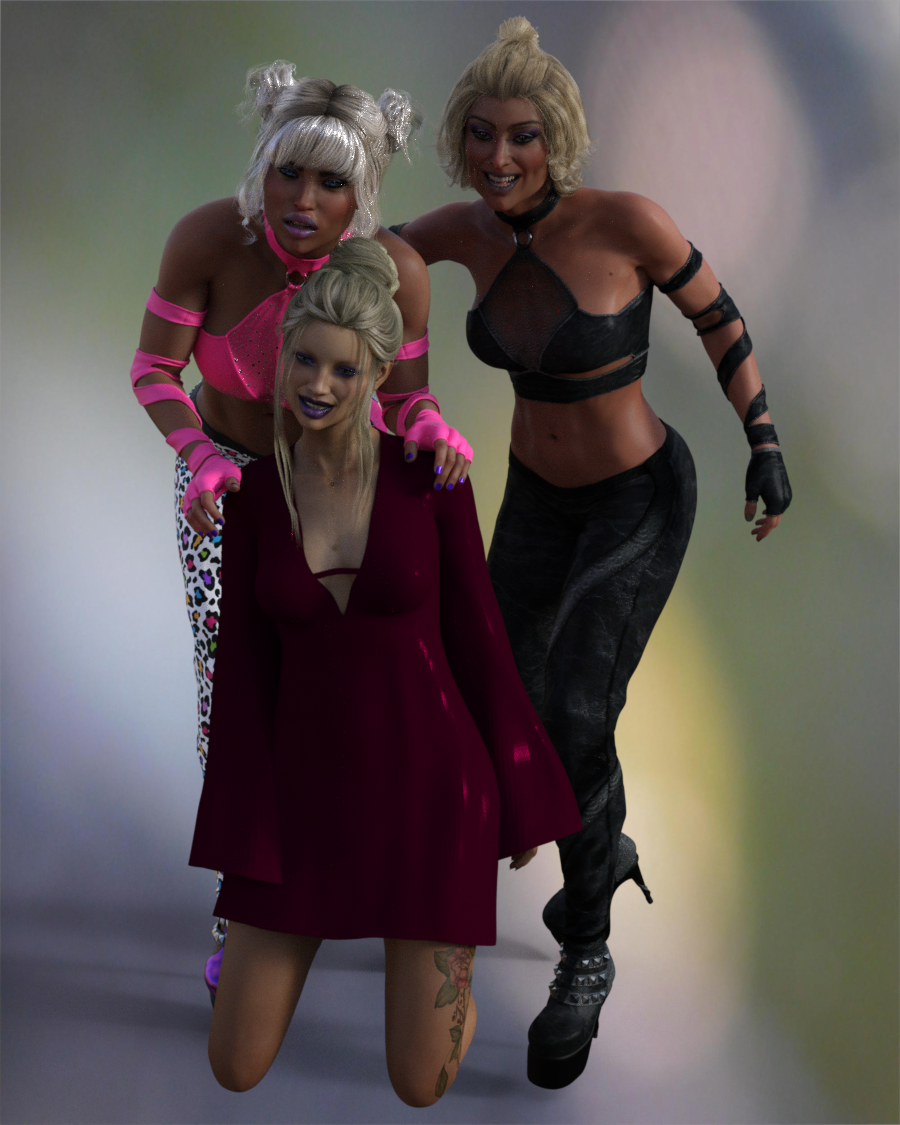
Saphirewild's Randomness RendersI just got CJ8 today so I thought I would give her a go!!!
I use both CJ and her Morph Gradi also used another GF8 Character!
Used IRay and no postwork
 Blender characters into Daz Studio
I suggest 2 option:
- import as FBX (OBJ doesn't support rigs)
- import as OBJ in the self pose (and self scale) of a G8. Use Transfer Utility to copy/paste the rigs from a G8 to your model. So clothing/hair/etc.. won't be supported but you will be able to apply G8 poses
There is also a third option: convert your model to a morph... it's the most complicated solution but you'll be able to use G8 pose and even cloths/hair/etc..
Have you made Yourself In DAZStudio and What is Best HeadShop or FaceGen?The facial geometry matching on all of those is fairly limited. Headshop does a good job with its markers but they are just too few for detailed transfer. There is KeenTools face builder that can do a lot more detailed sculpting but does not support actually applying it to a daz model so you have use it in blender and use a technique like shrink-wrap to get it on a g8 model and that requires some practice and patience and lots of trial and error. But that's just the shape the maps are useless from facebuilder so I usually use one of the other daz face tools for the texture map. That's still only going to get you so far because the blender to daz part is limited to non HD so you don't get the finer details. If it's not for closeups or portraits that's fine otherwise you need to then use your artistic eye and library of morphs to add in and adjust all those details and correct proportions. I'm about to release a type of virtual vellum for the pc for this purpose. In any case the point is there is no magic one click solution it still requires some elbow grease and art.Why Does It Take So Long To Load Figures? ("Solved", with GUIDE)
If I can use it to make a negative list that would be cool. I could just copy all scene files across my work drive and dump then into a single folder on scratch drive. The other thing is though my daz content library is split into 2 locations. One for daz content on work drive and thousands of 3rd party add-ons on a dropbox dedicated drive.thenoobducky said:charles said:
Those are cool! The second being a very clever speed option. I really just want to cull back my library of stuff I have never used and probably never will. I will probably do it in c# as I can't see it being very complicated. Just a dictionary bucket sort with simple class objects with a counter and cross matching. Parsing is my specialty from my NLP databasing days in PHP. xml and Json I don't even bother to handle in traditional ways. I use regex to locate markers and strip and grab around them. In the end it should just produce a list of every morph folder never used In anything I have in my scene files. I can then pick and choose what to unistall accordingly. That's the plan anyway!Coincidentally, I have enough features in my program in a law few days that it almost does what you want. It can analyse files in a single folder and spit out the required Daz product and other files. The only things missing are recursively processed a folder and find transitive dependencies (like if product A requires product B).
C# definitely make implementing the program easy. Just have to poke at DIM install manifest folder and Daz metadata.
Diffeomorphic -Daz to Blender - costume missing?I'm not sure where the files are on your computer, but here is a way to fix it.
Either search for the files on your computer or manually download the Rocker outfit from the DAZ site.
Right click, copy the 3 or 4 folders in the 'content' folder. They should include 'data', 'people', and 'runtime' folders.
Paste those folders to c:\users\admin\documents\daz 3d\studio\my library\ (those folders already exist there, you are adding to them)
Diffeo will then look for the '...data/mada/rockerg8/...' items in that directory since you have that directory listed in your global settings.
Basically you are re-saving the morph and texture data to a directory that is listed in the Diffeomorphic global settings so Diffeo knows where to look.
Blender characters into Daz StudioIt's pretty straightforward if it's a genesis.
1. you export the character from DAZ as an OBJ on base resolution
2. you import in blender with "keep vertex order" checked
3. make your changes and export from blender as obj and import that into DAZ using the advanced morph loader and find the morph dial on the figure
4. apply shape rigger plus
if you already have a character made and you want to convert it to a genesis character, can probably try shrinkwrapping it over your character as nicstt stated but can get messy if your character is very unique and you're probably better off starting over
AIUTO...CHI CONOSCE L’ITALIANO? PARTE TREDICIci sono anche altri 2 bundle in offerta a 1,99
https://www.daz3d.com/after-party-bundle
https://www.daz3d.com/sushmita-bundle
Dovrebbe essere l'offerta "Christmas in July" (sono partiti lo stesso giorno questi sconti).
Tra l'altro stanno regalando un freebe nuovo ogni giorno.Oggi ci sono i character base a 10 € (5€ invece i morph HD)
PS ho notato che ogni giorno cambiano qualche oggetto in sconto (qualcuno che era in sconto a 1,99 adesso non c'è più)
Why Does It Take So Long To Load Figures? ("Solved", with GUIDE)charles said:
Those are cool! The second being a very clever speed option. I really just want to cull back my library of stuff I have never used and probably never will. I will probably do it in c# as I can't see it being very complicated. Just a dictionary bucket sort with simple class objects with a counter and cross matching. Parsing is my specialty from my NLP databasing days in PHP. xml and Json I don't even bother to handle in traditional ways. I use regex to locate markers and strip and grab around them. In the end it should just produce a list of every morph folder never used In anything I have in my scene files. I can then pick and choose what to unistall accordingly. That's the plan anyway!Coincidentally, I have implemented enough features in my program in the last few days that it almost does what you want. It can analyse files in a single folder and spit out the required Daz product and other files. The only things missing are recursively processed a folder and find transitive dependencies (like if product A requires product B).
C# definitely make implementing the program easy. Just have to poke at DIM install manifest folder and Daz metadata.
how do i get hair to work with her head morphs : ( the ears are not separated....thank you ^^ it not working with this head morph very well as the top of the head still gets removed hmm will have to try a different morph setting
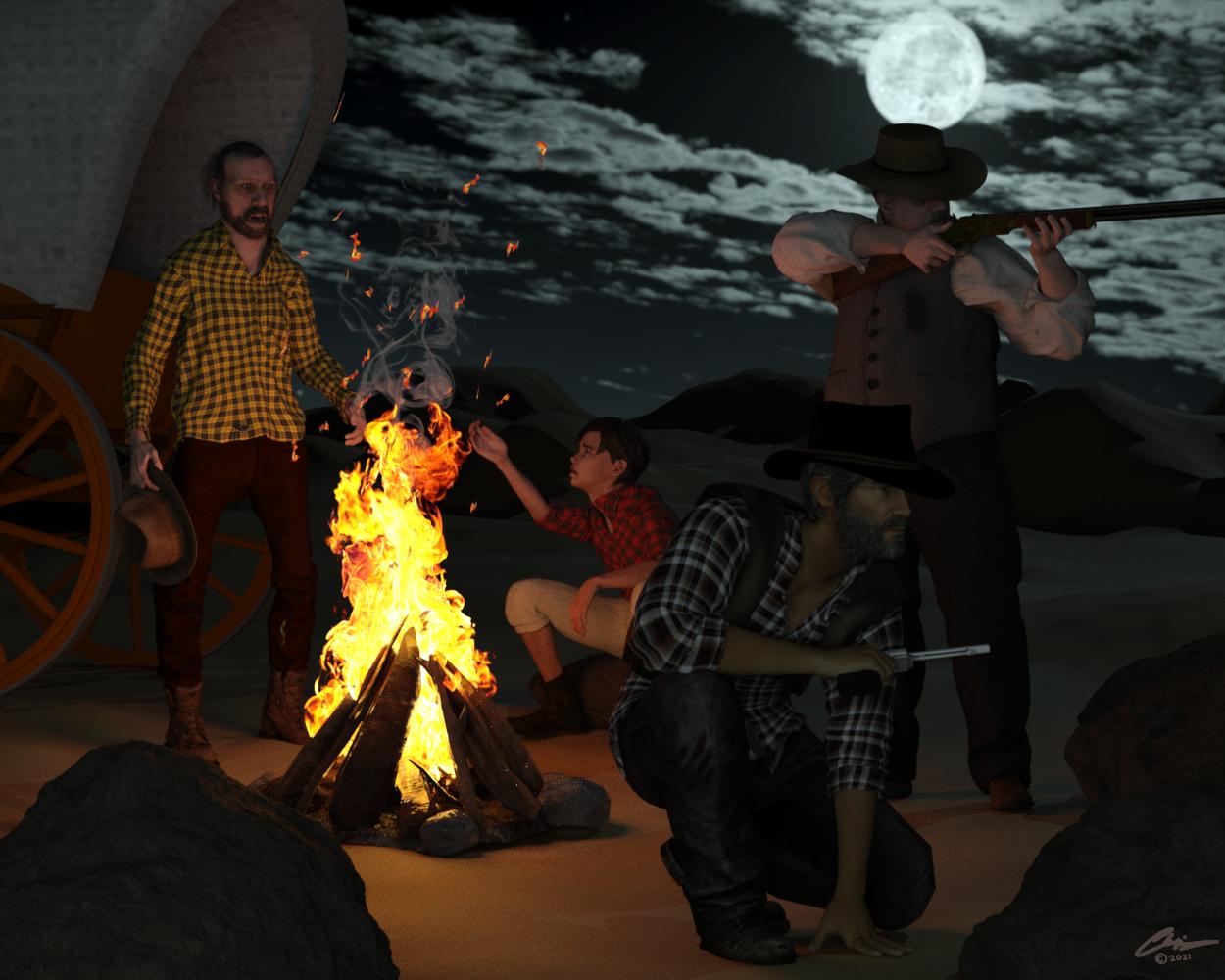
3D Art Freebie Challenge-July 2021-"Wild Wild West" -Entries Thread OnlyWell I finally got my render done... whew! So my take on the Wild West? How about a ghost story around a campfire... but is it really just a story??
A Noise in the Dark
Pete was just a young cowhand at the ranch. He had been thrilled to be invited by the trail boss to go on his first real cattle drive… at least until tonight. The noise was one he had never heard before and sent chills down his back. Shaken,he looked to Old Rick for reassurance. Old Rick had been around these parts since he was just a boy and knew everything there was to know. But Pete found no comfort from his friend as he saw even Old Rick looked pale and rattled...
Characters:
https://sharecg.com/v/97276/gallery/21/DAZ-Studio/G8M-Walther-2.0 Walther for G8M
https://sharecg.com/v/97283/gallery/21/DAZ-Studio/Walther-2.0-simple-hair-for-G8M Walther Hair
https://www.patreon.com/posts/joel-for-g8m-40154646 Joel for G8M
https://www.patreon.com/posts/49802480 Brian Irons for G8M
https://www.patreon.com/posts/42357035 Jack Baker for G8M
https://sharecg.com/v/97621/browse/21/DAZ-Studio/33-Eyes-Materials-for-the-Genesis-8-%2B-8.1-people eye materials (some of the characters do not have functional eye material)
Outfits
https://sharecg.com/v/80023/browse/21/DAZ-Studio/Ghastlys-Space-Cowboy-Genesis-1 space cowboy outfit
https://sharecg.com/v/95318/browse/21/DAZ-Studio/Leather-Cowboy-Hat leather hat
https://sharecg.com/v/56255/browse/21/DAZ-Studio/Medieval-Boots-and-Shoes medieval shoes
https://www.renderosity.com/freestuff/items/66816 famous hats
https://www.deviantart.com/infamous-k96/art/Fallout-Lincoln-s-Repeater-for-Daz-Studio-G8-868128400 repeater rifle
https://www.most-digital-creations.com/revolver.php revolver
https://sharecg.com/v/60586/browse/7/Material-and-Shader/J-Tex-Tartan-2-for-Fabricator applied to various shirts
https://sharecg.com/v/60285/browse/7/Material-and-Shader/J-Tex-Tartan-for-Fabricator applied to various shirts
https://sharecg.com/v/80223/browse/7/Material-and-Shader/Pd-Soft-Leather-Daz-Studio-Shaders-for-Iray leather shaders
Environment:
https://sharecg.com/v/78490/browse/11/Poser/desert-pp2-landscape desert landscape
https://www.deviantart.com/agentunawares/art/Skyset-005-715173309 sky set agentunawares
https://www.cgtrader.com/items/2765262/download-page CGTrader campfire
https://sharecg.com/v/83765/browse/21/DAZ-Studio/HD-Infinite-Rock rock
https://sharecg.com/v/31571/browse/21/DAZ-Studio/Blowing-Leaves-Prop Blowing Leaves Prop (used to make embers)
https://www.renderosity.com/freestuff/items/63946/covered-wagon-2 covered wagon 2
Tools:
https://www.renderosity.com/freestuff/items/86848/m4h4f4-pose-transfer-to-g8m M4 to G8M pose transfer by Richard (thanks!)
https://www.renderosity.com/freestuff/items/75710/wild-west-street-action wild west poses
Postwork:
fixed embers (made them slightly brighter), adjusted colors and added signature in PaintShop Pro 2020
No purchased items.
Looking for a LynxLyne made one for Poser a looong time ago that should be useable with some surface tweaking.
lynesfree (lynescreations.com) scroll down until you see pictures and it's the 4th one down.
ETA - it's a morph, textures and poses for the old Daz Mill Cat so you'll need that.
Daz 3D is part of

Connect
DAZ Productions, Inc.
7533 S Center View Ct #4664
West Jordan, UT 84084Licensing Agreement | Terms of Service | Privacy Policy | EULA
© 2026 Daz Productions Inc. All Rights Reserved.