-
Your guys recommended Sub-Division levels?
No need to go above 3 unless you have an HD morph that requires higher, even then I would never go above 4.
Face Transfer serial number?I used free face transfer with this gen 8 build for my own face, you have upto 3 uses before you need to activate the unlimited serial number.
Daz to Cinema 4D Bridge - Meet the TeamDAZ_sam said:
adploshko said:
Hi,
I recently upgrade to the 1.3 version and it completely stops exporting morphs for Gensesis 8. When I import into C4D R23, the pose morph tag and all the morph sliders are there, but they don't do anything. The mesh just remains static. This is the last time I ever update DAZ or any corresponding plugins like this one as each update ruins my projects more and more and I end up loseing months of work because of the slew of bugs each update brings. I've had enough. Can someone please post a link to the 1.0 version of the C4D bridge?
ThanksI can definitely understand your reasons until the plugin is in a state that you don't run into these problems here is a solution for now.
1.1 Packaged for support for R23
https://github.com/daz3d/DazToC4D/releases/tag/1.1 ;
and original release is here.
https://github.com/daz3d/DazToC4D/tree/5c74e073f2b39086ee0e6d0729f92e17a05b61b0First link is broken, seems an extra character got added onto it
Converting CO Ichigo Genesis 8 to Genesis 8.1 ProblemI'm experiencing the same issue with 4.15. Not really sure what to do. I've just simply dialed the face morph for CO Ichigo and it's deformed.
Daz Environments to Unity - Help! Transforms always get wonkyBelow is an example transfer to Unity with the bridge one of Stonemason sets: https://www.daz3d.com/urban-future-6
together with Daisy HD: https://www.daz3d.com/daisy-hd-for-genesis-81-female
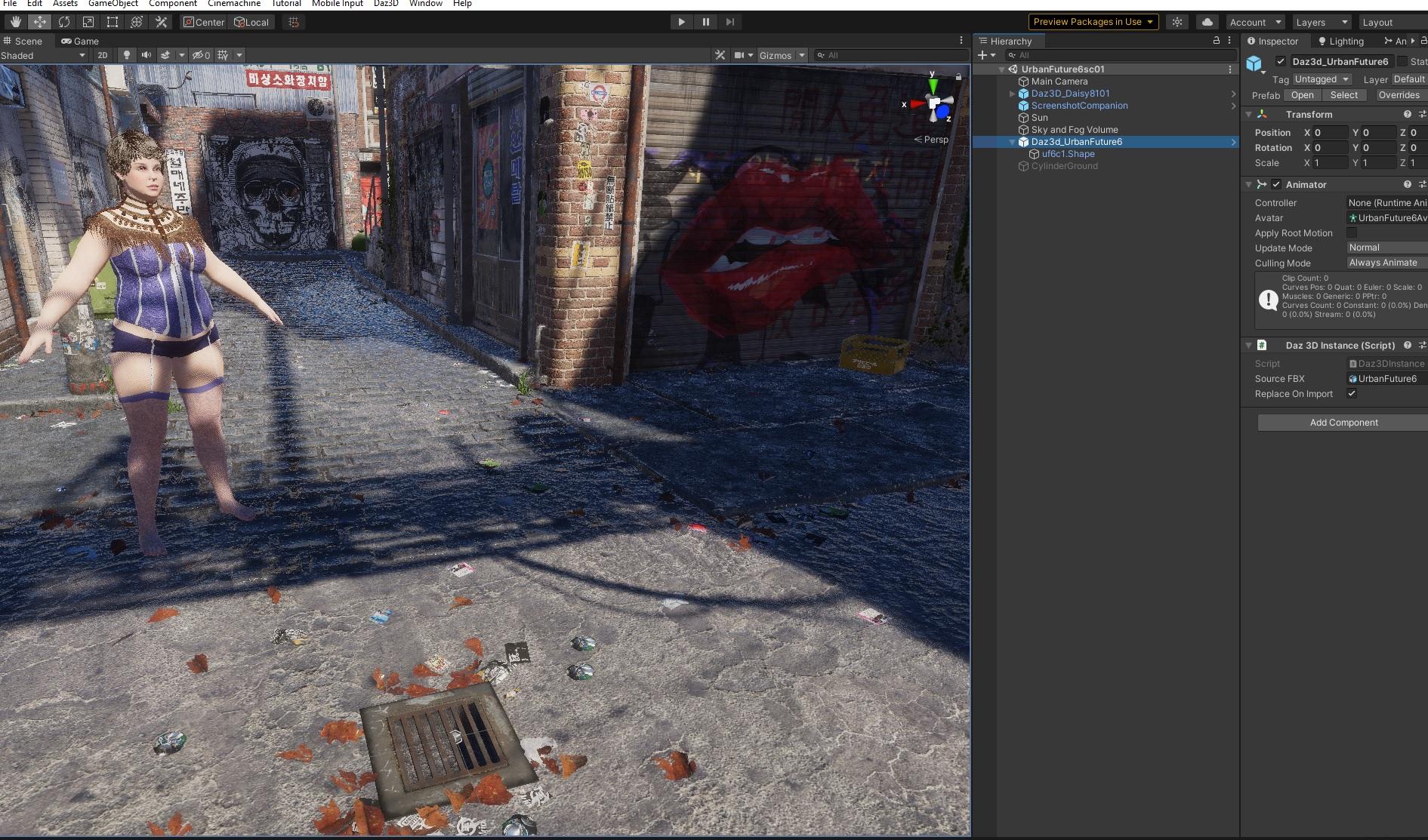
and its render in Unity:
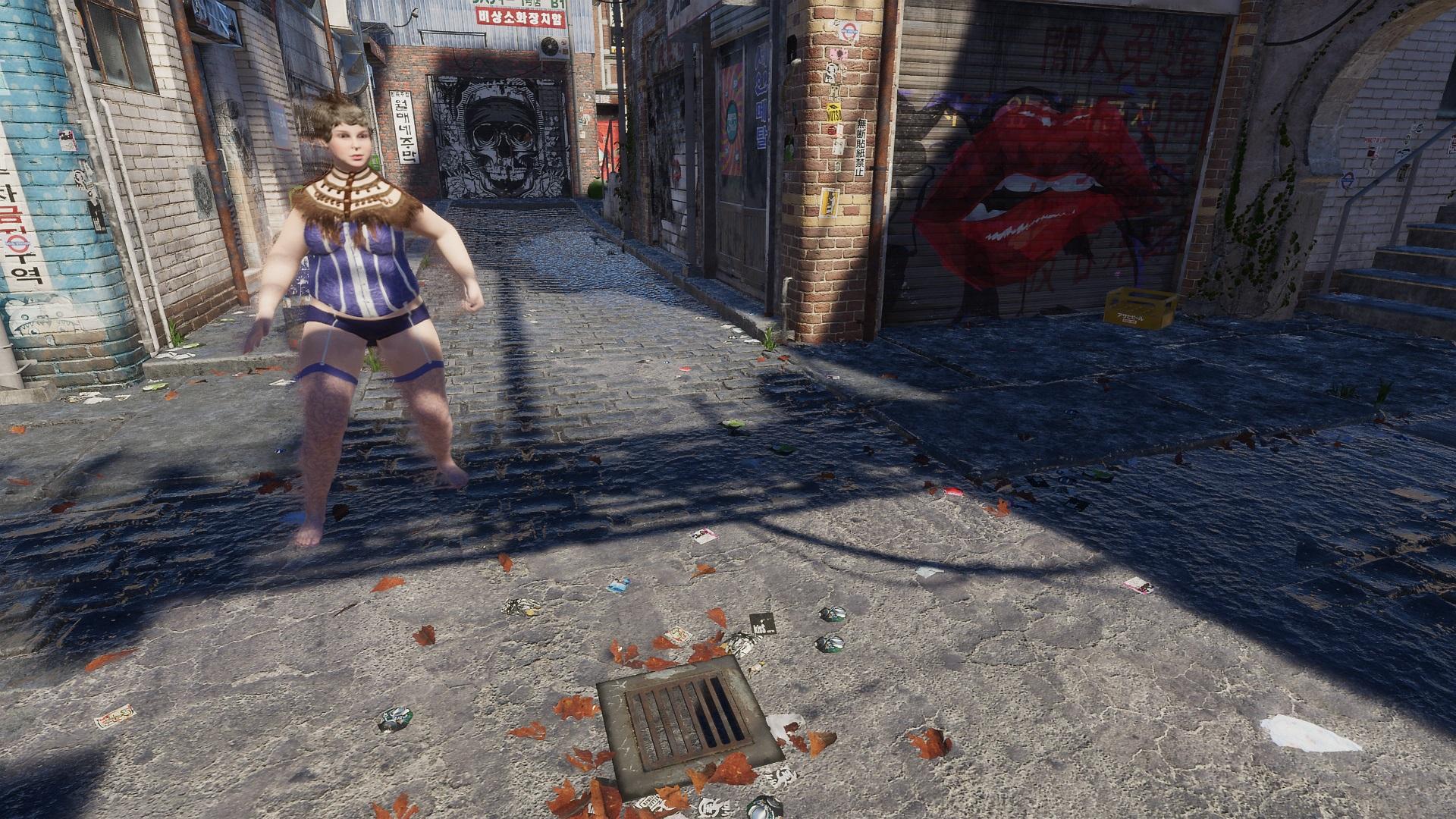 Look at my Hair dissappeared
Do you need to activate some sort of serial key for that catalyzer to work, some products like face transfer unlimited or other plugins like some world builders require serial activation for it to work fully,.
Modifying Textures (Adding Decals) In Daz Studio or PhotoShop?Decals usually best done in something like photoshop or substance painter, you can apply shaders and rescale them in DAZ3D but to do good texturing you'll probably need something better at retexturing DDS files and the like. DAZ3D lacks tools like clone brush & other texture tools for images.
The way i would tackle the issue would be use Photoshop with a DDS plugin view the DDS file transfer the decal you want by using clone brush from image you want then you set the bump maps for that by saving the file thats been edited in the DDS format then doing any final displacement detail of the decal if needed using something like mesh grabbber if your good at it in DAZ3D, so say you want to have a patch on some clothing you use mesh grabber to mould the mesh according to the shape of your decal kind of like a sculpter.
Or you could make a layered texture in photoshop place it over the DDS file to transfer the decal image then use displacement pattern shaders in DAZ3D to fit or scale to your needs.
In daz you could also tie the decal to a shaped mesh apply it like a prop to an outfit part then parent or graft the prop the the part of the body or outfit.
Coral 8.1 Discussion threadCoral's skin does not seem to be up to the level of specular three-dimensionality established by the other 8.1 females. It looks flat and dry, like Aubrey's and Robyn's. I like her morph though.
Dragon-person for G8FI know that personally, I tend to buy just about any female anthro type morph and character I can find. I would love to see female counterparts to male anthros. It can be done using the variety of trans morphs though, it does make transitioning for a sequence a bit more of a pain.
Why Does It Take So Long To Load Figures? ("Solved", with GUIDE)thenoobducky said:
mindsong said:
Richard Haseltine said:
mindsong said:
Richard Haseltine said:
...Well, if you actually know how to meet the design objectives without the lag on large data sets then you should be able to describe the process without needing acess to the code; if you don't have an actual solution then it is quite possible that you would do no better than the daz developers if you did have access to the code.
wow. just ... wow.
--ms
Please do note that that was in response to ana ssertion that the other poster would be able to write a better system - I don't hold with the "if you can't do better you can't criticise" school, and have previously been careful to say that making a case that the current system is sub-par could be made by pointing to another system that did a similar job with better scalability.
While it appears that the problem being discussed is sluggish figure loading, based on simple to describe, predict, and repeat DS behaviors...
I propose that a parallel issue being discussed here is the audacity of savvy programmer/users that would, without seeing the code (!), speculate as to why this is occurring, and even more irritating, folks that would propose reasons as to why it's still happening after all of these years and suggest (!) possible solutions.
How dare they!
I think the parallel issue being discussed here is more of equating there is a problem to be addressed with program design is bad while offering no plausible alternative solution. The current program has performance issue is not mutually exclusive to the current design is the best that can be done given the requirements. I think every here agrees that Daz have performance issue that the dev should address.
Saying there is an issue that the dev needs to address is fine by me. Saying the current design is bad because this other solution is much better is fine by me. What I disagree with is saying there is a problem therefore the current design is bad without offering any alternative.
This is hardly a new behavior in here, and in-fact it seems to be an open wound that keeps getting (usually inadverdently) poked by rational and frustrated programmer/users who seem to know this business pretty well.
Amidst this bantor, it appears that both sides are arguing about a black box that neither actually knows about with any real certainty, which presents as the recurring position of the frustrated defense: "you're speculating, you can't know that" - and this is true - we certainly can't know what's actually going on without seeing the code.
Yet, does not the DS black box speak to us who choose to listen, and us who know what to listen for?
*Regardless* the details of the code, the behavior in question is consistent and predictable, so perhaps it isn't so presumptuous for some of use who have struggled with this very problem to speculate about what might be going on in that DS black-box. I don't get why that's so taboo in here. It's what we do - how we're wired!
Perhaps there's some code in there that was written a long time ago (DS1.0), by some long-gone coder, at a time when 200meg drive, 256megs of memory and a 1024x768 moniter was hi-end (640K anyone?) and a V4 figure had 150 morphs on a good day. Likely that old code that serves as the foundation to the entire DS code framework. Code that, to fix, would effectively require a full rewrite of the DS code-base and all of the dependent supporting libraries. Darn that sounds like a lot of work, and *very* expensive. I'd probably consider a full re-write (DS5), rather than an expensive repair effort on an EOLife product version (DS4.x).
(yeah, I know, I can't know that, silly me...)
But, i certainly wouldn't castigate those who *would* speculate about such application behaviors, when in general, they're probably more right than wrong - based on both the available evidence and their own experience with one of the most classic of computer-science (and project budget) problems.
I would counter to someone arguing the contrary, yet *also* not having access to the code, that to simply assume that such speculative analysis is without merit is equally speculative, and comes across as, well... comes across as speculative (lets see if i can keep this post from being filtered).
I think the issue here is too much speculating without basing on the available evidence and making grand statements instead of having discussions on the technical details which I think can be much more calmly discussed. Talking on the high level just naturally leads to personal attack instead of discussing the details where technical merit can actually be assessed.
No, the better part of this discussion isn't about big-0 code design algorithms and possible data optimisation opportunities, it's about knowing the unknowable - based on observed and predictable DS behavior, and it's about business decisions in tension with available resources, and technological trade-offs.
This isn't personal, at least not until a viable speculative assertion is met with a 'you simply can't know that' and summarily dismissed without counter-substantiation - even if also speculative.
I have high confidence that if allowed, those who critique and speculate about the situation would be able to *quickly* identify and assess the problem code, and also (but less quickly?) be able to determine the implications and costs of fixing that code, along with the cascading side-effects of those changes, and probably come to a conclusion that would result in the very situation we're seeing now from the DAZ development team.
Just a guess. And I would fall out of my chair if a DAZ-dev chimed in and said something like "the original code is too expensive to fix - wait 'til you see the DS5 re-write!", or "that code could be fixed, but it works well-enough for now, relative to the other tasks we think are more pressing or beneficial to the community/company".
"that code could be fixed, but it works well-enough for now, relative to the other tasks we think are more pressing or beneficial to the community/company" is there I would bet my monkey on. Many people would no doubt be disappointed by it, but DS5 should be lets port the existing code to Qt5 as fast as possible so people can use it, instead of let's rewrite everything.
But, I would also assert that if the code were open-source (it'd be nice, but I have no expectation of such, nor resentment for the lack of), the active and savvy critics like myself and TMitP would walk their talk, and (assuming the code were salvagable) do the required work to upgrade the code and its dependencies, and do it well - regardless how silly that might seem. To assume otherwise, with the available evidence (see TMitP's Sagan and related projects - both the existence of, and the and quality of the code) is irrational and insulting. At least to my eye.
Per the original issue, I don't see the business case for retro-fitting the DS 4.x figure management core with major and likely disruptive fixes when DS 5.x is on the horizon, unless the code can be fixed one-time to work in both. I would be leaving the 4.x legacy app as stable as I could possibly make it pre-update migration.
Given the wide popularity of Gen 8 contents, any fix really needs to work with Gen 8 and not break backward compatibility with DS4.
That said, we'll certainly be sensitized to this current (big-O) behavior when DS 5.x comes out, and I'm sure we'll form lotsa opinions about the quality of the DS programmers and newly updated system code's (black box) design and architecture when DS 5.x is released.
No pressure, guys.
(And personally, I have nothing but respect for TMitP's walk of his talk, and appreciate that Richard is one of the most consistent, generous, and reliable providers of help and solutions for the wayward, confused, curious, and outright lost DS users that come to these forums for advice and assistance.)
--ms
Let us focus more on what causes the problem, and how to fix it instead of making grand statements that don't benefit anyone.
good feedback/comments, but let me offer that, to anyone in the business of algorithms and coding (as you are), the problems we see in DS may be self-evident (big-O, etc.) enough that saying anything with any more detail is fruitless without actually seeing code. This lack of detail is likely not a function of over-simplifying pie-in-the-sky critique as much as "that problem and its likely cause is clear, why won't the developers address it already?"
You've clearly done some great/real code (thanks), so I imagine you could see this as a possible reason for the high-level tone you describe rather than oversimplifying criticism from the peanut gallery. I don't see it as being that way. In this thread, I know that TMitP does similar and good work, so going into detail at any higher-a-level actually doesn't make much sense without seeing the code. His language and level of critique is appropriate for this context as I see it. I believe emails between him and DAZ_Rawb would have a decidely different level-of-detail.
which comes to our point of agreement, that it's probably not the capacity of the devs, but rather the available resources as allocated. Many of these problems are probably on their lists, but unlikely to ever get done due to the more pressing tasks of the current industry, hardware, and market-place, etc., as is usually determined by 'market research' - which is understandable but sad, and possibly a miscalculation in some cases.
and BTW, my appreciation for the practical situation doesn't at all imply that I would make the same decisions! In fact I sometimes think this place is run by lunatics (been watching to 10-some years now), yet it seems to work for them - who am i to argue with their staying power?
That said, I tend to respect the 'current user' more than the 'future user'. Probably not good business. I don't see this as DAZ's primary paradigm - but - their immediate numbers at any given moment may confirm the 'correctness' of their chosen ethic - whatever it may be (a black box as well). But over the long-term, I believe they pay a heavy price for what I see them doing. (The Debian linux distro is a great example of a solid product that follows the 'slow-stable-steady' philosophy that I like, and is both popular and is forked more than any other distro in its domain.).
I think DAZ mgt and the devs are making a large miscalculation in this specific domain, based on my history of updates, and what I see going on in the DS5 conversations - which has little to do with algorithms and design, and everything to do with that tension between moving into the future at the expense of an installed base. DS5 will certainly work, but will it work with my habits?, content?, and mental paradigm?, or ... will it be re-framed for a new beginner audience, or higher-margin users, or VR or gaming folks, graphic/design, animation?, or ?
And yes, Richard, this *is* both speculation *and* judgement based on that speculation, and anyone with three neurons can see that. What's the big deal? Do you agree? Do you disagree? Come speculate with me/us, but be willing to call it that and it'll be interesting. I'd be very interested (another thread) to hear your honest (non-DAZ-moderator) thoughts on the past and future of DAZ and DS, and how you might drive the operation if you had the reigns. That'd be fascinating - especially over a beer, heh. I'm certain I'd be both surprised and/or confirmed by your insights. I would also think DAZ would be very interested in your thoughts, considering the front-line trenches you know so well. My guess is they wouldn't weigh your opinions as highly as I would. per what I mentioned above.
The Ds/DAZ future is certainly not an easy problem with an obvious answer but the underlying trend that I sense concerns me in my workflow. But it also confirms the wisdom of my current workflow adjustments. "What DAZ mgt should do" is another thread (it'd be lively, I'm sure).
I am hoping for some final animation refinements and fixes in the 'last' of the DS 4.x family, but with my sense of the past as my own guide to the future, I'm resigned to be content with DS 4.11 and my alternate tool-sets - and long morph-lagging figure loads, unless I repackage my oft-used characters and figures with just their essential elements - which is my current solution to the OT of this thread.
best,
--ms
Wanted: Split tail geograft for Daz Dragon 3I was wondering if anyone would consider doind a split tail or fork tail geograft for Daz Dragon 3. Something with 2 long tendrils would be nice like the enclosed pic by kaiserflames. Would love this for my dragons. I'd even pay for the geograft and a morph of this fine dragon!
3rd Party (manually installed) content did not transfer properly to new computerSo I did my research before transfering my content over to a new computer, and I was sure I'd done everything I needed to to make sure it was done properly.
I copied over my DAZ 3D Library, CMS folder, exported my User Data from Content Database Maintenance, and re-installed it on the new machine. I pointed DAZ and DIM to the correct folders so they'd know where to look for the files.
But oddly, some (not all) of my 3rd party content that I'd manually installed and created Smart Content products for show up empty. The product folders show up in Smart Content, they have the correct thumbnail pictures, but once inside them they just say that the files don't exist, even though they're in the same places in the My DAZ 3D Library folder as they were on the old computer.
Can anyone help me out here? Why are only some of the products broken like this?
I'm hoping there's a quick fix where I can get it to recognize that the files are all still where they should be.
I should also point out that they files are all where they're supposed to be in the Content Library. It just seems that there's a disconnect about where the Products are looking for the locations of the files.
Daz Studio 5 development updatemarble said:Or are they specific to older generations of figures and thus not of interest to DAZ to promote such plugins?...I have a considerable library of V4/M4/Genesis content which I never even look at these days...
Mr Sesseler's plugin is definitely mostly aimed at those oldtimers who want to transfer morphs from Gen4 and older characters quickly and easily. I don't think that any developer currently active would even think of recreating that particular functionality, given that the majority of DAZ3D customers hold attitudes similar to yours :)
Gotta say that some of that Gen4/Genesis content is still very much viable, especially for niche needs. Some is not good at all... but then, stuff being released ATM isn't all amazing high-quality either.
Coral 8.1 Discussion threadtsroemi said:
Richard Haseltine said:
tsroemi said:
Richard Haseltine said:
Mr Bowen said:
Thank you, Richard.
The maps were not meant to be there, thanks for letting us know.
You mean the base character of the tail, right? Because the human character is supposed to be included: "... This striking character includes both human and mermaid forms".
Forms would, I assume, mean shapes - it has nothing to do with the maps.
Uhm, but what use would a human figure be without any maps? And why would there be promo pics included of the human form with - quite a broad variation of - texture maps?
Edit: Pics like this I mean: https://gcdn.daz3d.com/p/81853/i/coral8114daz3d.jpg.
Edit2: Just tested her, there is one complete mermaid form and one complete human, both with textures. So I do think this is about the generic texture maps for the tail only, that will enable it to be fitted properly to other G8Fs.
The maps would be those for the base. The HD usually just adds the new morph, and a preset for loading the figue with the HD morph on. The HD isn't a new figure.
Asian Beauty Appreciation ThreadRiverSoftArt said:
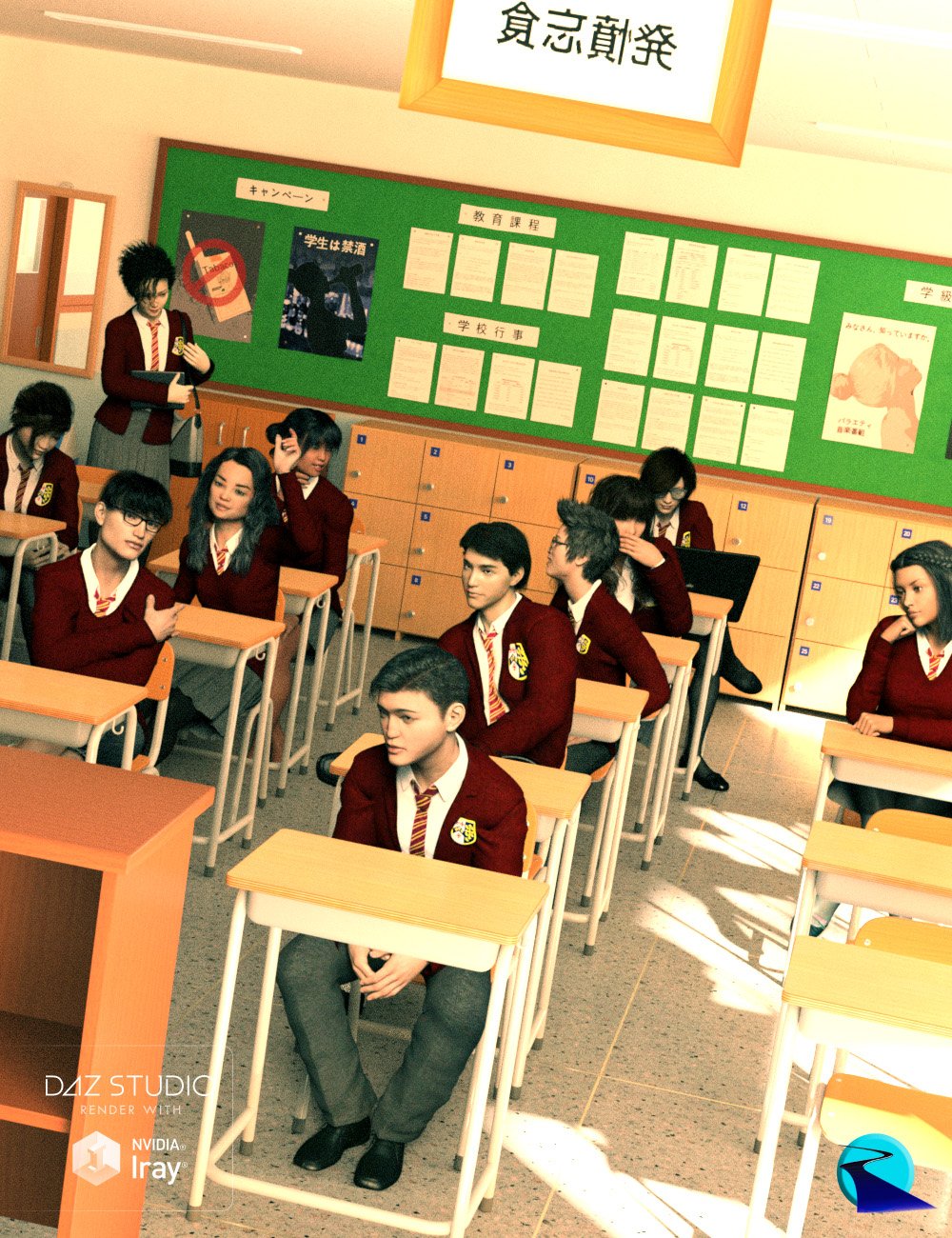
Nice lively classroom :)
BandoriFan said:

Could you tell more on this character and clothes? Very cute.
Leana said:
An old pic, but it fits the theme:

Very beautiful, poetic render! Calm and elegant.
algovincian said:
Decided to play a little at lunchtime today and make something to contribute to the thread. 2 hours later . . .

- Greg
Nice, but would love to see in higher resolution... Is there?
j cade said:
Slightly tweaked Kayo in some fun neon lighting

Love colours here!
csaa said:
Early on I enjoyed posing the Grace Yong figure for most of my work. Here's one.
Cheers!

Very sensual!
neosoul3d said:
Wow I love this thread. I have been using Daz Studio since a couple of months now. And I was trying to make some morphs. I morphed Genesis 8.1 after a scanned mesh. Now I still have to figure out all those shaders and how to texture. I made this morph in blender and 3D coat.
Great results so far. Would love to see more.
Celebrity Look-a-Likes for 3D figures part 3Odaa said:
coffman_steve2009 said:
RayDAnt said:
Haruchai said:
3dcheapskate said:
Any suggestions for Lee Van Cleef, Clint Eastwood and Eli Wallach ?
For pre-Genesis, i.e. Michael 4 (or earlier) or siblings (David, Hiro), and ideally free.
Lee Van Cleef for Michael 3
Bad Cowboy 3D Figure Assets Arduino (renderosity.com)
Clint Eastwood by the same artist is unavailable COWBOY Poser Arduino (renderosity.com)
I'm pretty sure they did an Eli Wallach too. The links I have to the store they used to have are dead. Maybe sending a PM via Rendo might yield some futher info.
Edit - I found a direct link to the Clint Eastwood page - Cowboy (arduino.net).
And Eli Wallach - Ugly Cowboy (arduino.net)
The buy buttons are still active but I would be wary of using them myself before checking the files are still available as the rest of the site, like the main menu, seems down.
Here's the Ugly Cowboy link at Rendo (also inactive now.)
And the Bad Cowbuy (arduino.net) link to round out the set.
I have all three Cowboy's and they are all of very high quality, but the Morphs don't convert to a newer Figure -- I was able to convert the M3 textures to M4, which I can apply to any of the Genesis family of figures -- Werts did a nice Clint Eastwood Morph that I use the Good Cowboy Texture with
Leo 7 feels like a good starting point for a Genesis-based Clint Eastwood to me. When I tried to do Lee Van Cleef style characters, I mostly used the skin from CC Cillian for G3M. If you have Facegen or one of the other software options for extrapolating faces from pictures (or are just dialing in a morph by hand and need reference photos without facial hair)...there are stills out there on the web from some movie called Captain Apache, where he doesn't have the mustache. Eli Wallach is trickier to recreate than the other two in some ways. He was such a chameleon as an actor that his facial expressions tend to register much more strongly with the viewer than his facial features, if that makes sense.
Attached is an image done with the Wert's Clint Eastwood morph converted to G3M and the Good Cowboy texture converted to M4 and applied to G3M
Odd Eye issue - SolvedI think over my years using DS, eyes have always caused the most grief. Here is another one! Any idea why these artifacts are showing up in the eyes? Turned off all eye morphs. Am using a character head morph, but no issues on a new version of that same character. It's G8F (I have no idea if its 8.1...)
 Do G3F Shoes and Boots Fit G8F ?
The big problem with any converter is the transfer of weight mapping. Specifically parts of the clothing item that are not close to the body, like heels, the converter is just guessing.
the forum flair baitScotty Z said:
Ruphuss said:
"You’ll stand out from the crowd with exclusive forum flair for all Season Pass holders"
does this bait work for you ?
you will buy season pass to stand out ? really ?
what awkward marketing is this ?
Not the least bit tempted by this sort of thing, but you miss 100% of the attempts you don't make so I can't blame them for trying.
TY @ /forums/profile/345848/Scotty%20Z ! I am glad they tried the Flair... and I am glad for this thread. How else will the people at DAZ learn what the customers want... (to buy). Face it, Daz is a business and they want you to buy stuff and are trying to figure out new ways for that to happen. Come on, there ARE marketing events Daz holds that many of you look forward to annually or seasonally. Season Pass could morph into one such event... or it could fail miserably - but you don't know til you try... and they won't know what YOU want until you tell them what does and does not work. Winner-Winner-Chicken-Dinner
Celebrity Look-a-Likes for 3D figures part 3coffman_steve2009 said:
RayDAnt said:
Haruchai said:
3dcheapskate said:
Any suggestions for Lee Van Cleef, Clint Eastwood and Eli Wallach ?
For pre-Genesis, i.e. Michael 4 (or earlier) or siblings (David, Hiro), and ideally free.
Lee Van Cleef for Michael 3
Bad Cowboy 3D Figure Assets Arduino (renderosity.com)
Clint Eastwood by the same artist is unavailable COWBOY Poser Arduino (renderosity.com)
I'm pretty sure they did an Eli Wallach too. The links I have to the store they used to have are dead. Maybe sending a PM via Rendo might yield some futher info.
Edit - I found a direct link to the Clint Eastwood page - Cowboy (arduino.net).
And Eli Wallach - Ugly Cowboy (arduino.net)
The buy buttons are still active but I would be wary of using them myself before checking the files are still available as the rest of the site, like the main menu, seems down.
Here's the Ugly Cowboy link at Rendo (also inactive now.)
And the Bad Cowbuy (arduino.net) link to round out the set.
I have all three Cowboy's and they are all of very high quality, but the Morphs don't convert to a newer Figure -- I was able to convert the M3 textures to M4, which I can apply to any of the Genesis family of figures -- Werts did a nice Clint Eastwood Morph that I use the Good Cowboy Texture with
Leo 7 feels like a good starting point for a Genesis-based Clint Eastwood to me. When I tried to do Lee Van Cleef style characters, I mostly used the skin from CC Cillian for G3M. If you have Facegen or one of the other software options for extrapolating faces from pictures (or are just dialing in a morph by hand and need reference photos without facial hair)...there are stills out there on the web from some movie called Captain Apache, where he doesn't have the mustache. Eli Wallach is trickier to recreate than the other two in some ways. He was such a chameleon as an actor that his facial expressions tend to register much more strongly with the viewer than his facial features, if that makes sense.
Daz 3D is part of

Connect
DAZ Productions, Inc.
7533 S Center View Ct #4664
West Jordan, UT 84084Licensing Agreement | Terms of Service | Privacy Policy | EULA
© 2026 Daz Productions Inc. All Rights Reserved.