-
Cross Gender Morph Transfer
MimicMolly said:
I use that cross-figure kit. https://www.daz3d.com/genesis-8-cross-figure-resource-kit I shape the male or female figure as the opposite one, and then save that out as an .obj file. Import this .obj and treat it as a bodysuit, shape the figure as desired, while wearing the bodysuit. Once I get the shake I like, I hide the figure and export the bodysuit as another .obj, to load with Morph Loader Pro. A lot of back and forth without a script, but it can be done.
Faster than my method at least...
which is G8 to G3 then G3 cross gender, then G3 to G8
Cross Gender Morph TransferI use that cross-figure kit. https://www.daz3d.com/genesis-8-cross-figure-resource-kit I shape the male or female figure as the opposite one, and then save that out as an .obj file. Import this .obj and treat it as a bodysuit, shape the figure as desired, while wearing the bodysuit. Once I get the shake I like, I hide the figure and export the bodysuit as another .obj, to load with Morph Loader Pro. A lot of back and forth without a script, but it can be done.Dragon-person for G8FMatt_Castle said:
Psyckosama said:
You can learn to transfer a number of morphs between male and female, just takes some work to set up.
Also there's the following production line: SY Genesis 8 male to Genesis 3 male, GenerationX2 Genesis 3 male to Genesis 3 female, then Genesis 3 Female to 8 Female
All of the figures linked in the OP are HD figures, and end users cannot transfer or edit HD morphs. (Only the SD component).
So? Look, it's an option. Personally, I'm not even overly fond of HD morphs, espically ones baked into the figure itself.
(Also, the suggested approach requires several separate products, most of which are rarely on sale because the original PA passed on and is no longer making new products to trigger a back catalogue sale).
I said it was an option, not that it was perfect.
And if you really need the HD morphs, export the figure to blender at maximum resolution, bake the HD details down into displacement maps, and there you go...
Honestly, HD morphs are nothing but fancy content locked Displacement maps anways...
 Cross Gender Morph Transfer
A G8F to G8M and GeM to G8F transfer option would be nice. Maybe something from Riversoft or a patch for X-Transfer?
Right now the process I go through to do it is G8 to G3 then use GenX and then G3 to G8
Dragon-person for G8FPsyckosama said:
You can learn to transfer a number of morphs between male and female, just takes some work to set up.
Also there's the following production line: SY Genesis 8 male to Genesis 3 male, GenerationX2 Genesis 3 male to Genesis 3 female, then Genesis 3 Female to 8 Female
All of the figures linked in the OP are HD figures, and end users cannot transfer or edit HD morphs. (Only the SD component).
(Also, the suggested approach requires several separate products, most of which are rarely on sale because the original PA passed on and is no longer making new products to trigger a back catalogue sale).
Asian young boy characters?If you have Growing up for G8M, then some of these older teen/adult male and, yes an anime-style character might be usable. I also agree that the G8 UV Swap is invaluable. Some of these characters may not be perfect or not enough Asian, but with a little use of morphing they might work. Others, with more defined faces may not age down the best. Sometimes you have to start with G8M base, age him down, the use the sliders to smooth in the character's features you want and avoid the weirdness of an adult chin or nose.
https://www.daz3d.com/fwsa-yong-hd-for-lee-8
https://www.daz3d.com/kichiro-hd-for-lee-8
https://www.daz3d.com/riku-for-lee-8
https://www.daz3d.com/yukio-for-lee-8-and-genesis-8-males
https://www.daz3d.com/m3d-teen-8-classmates-head-shapes-for-genesis-8-male
(the above is a morph pack and you will need a skin texture for the Asian character in it.)
https://www.daz3d.com/wufei-hd-for-genesis-8-male
https://www.daz3d.com/yang-and-expressions-for-genesis-8-male
https://www.daz3d.com/yuzuru-8
https://www.daz3d.com/kyoji-for-yuzuru-8
https://www.daz3d.com/jace-for-yuzuru-8
https://www.daz3d.com/hyun-ki-for-yuzuru-8
https://www.daz3d.com/dd-keita-for-yuzuru-8
https://www.daz3d.com/daeshim-hd-for-yuzuru-8
Suddenly Eyes Up-Down Dial Also Makes Eyes Crossed?Richard Haseltine said:
Compare the Currently Used section of the parameters pane, with the option menu>Preferences>Show Hidden properties on, before and after using the Eyes Up-Down control.
No unsual activities are observed. Seems to be more related to maybe a specific morph. Will try to figure out which one. Thanks!
Asian young boy characters?JoeQuick said:
margrave said:
The best thing you can do is get Growing Up and morph an adult into a child. You can do that for pretty much any character you want, so it's more of a bargain than a one-off child figure. I'd also recommend picking up Male Head Morphs (and/or learning how to sculpt in Blender) to fix any problem areas.
https://www.daz3d.com/genesis-8-uv-swap-male-and-female-base
I feel like all the official male characters wind up being a grizzled and stubbly, if you get the uv swap, you can put a baby smooth female skin on your character and they'll look younger.
Normally I'd agree with you, but it seems like Daz's Asian dudes already have baby smooth skin.
I don't know if that's a stereotype or what, but check out these characters for Lee 8 and Yuzuru 8.
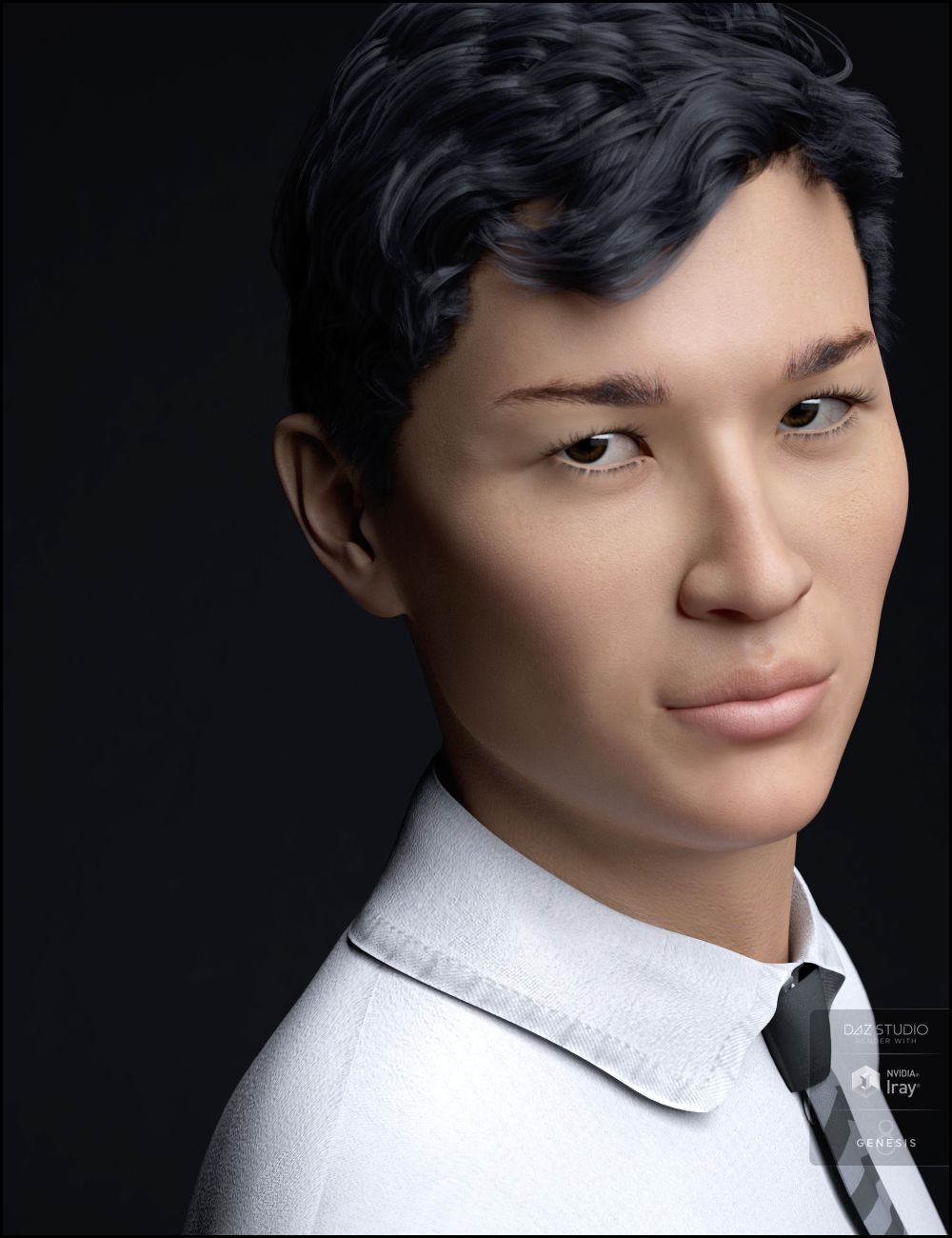
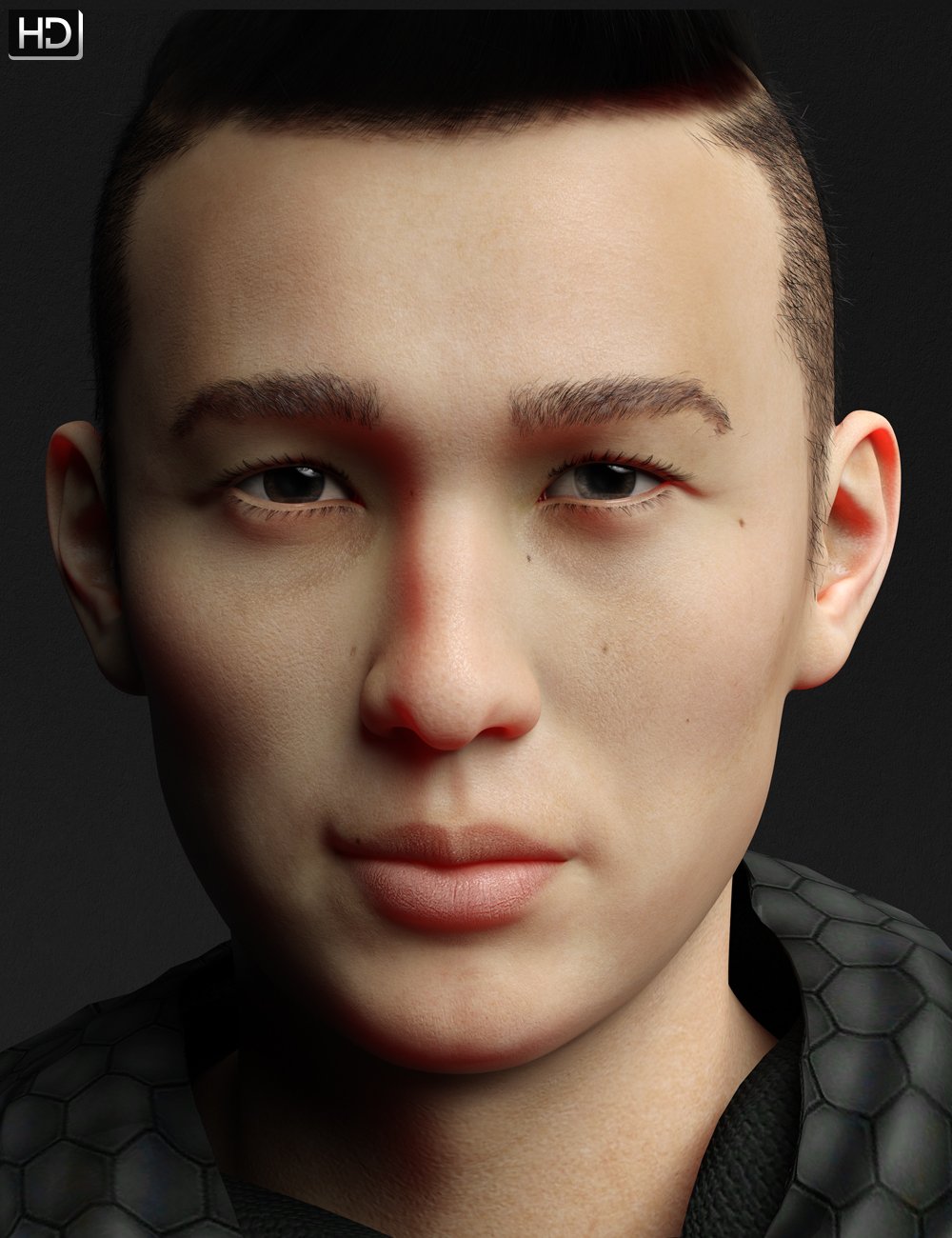
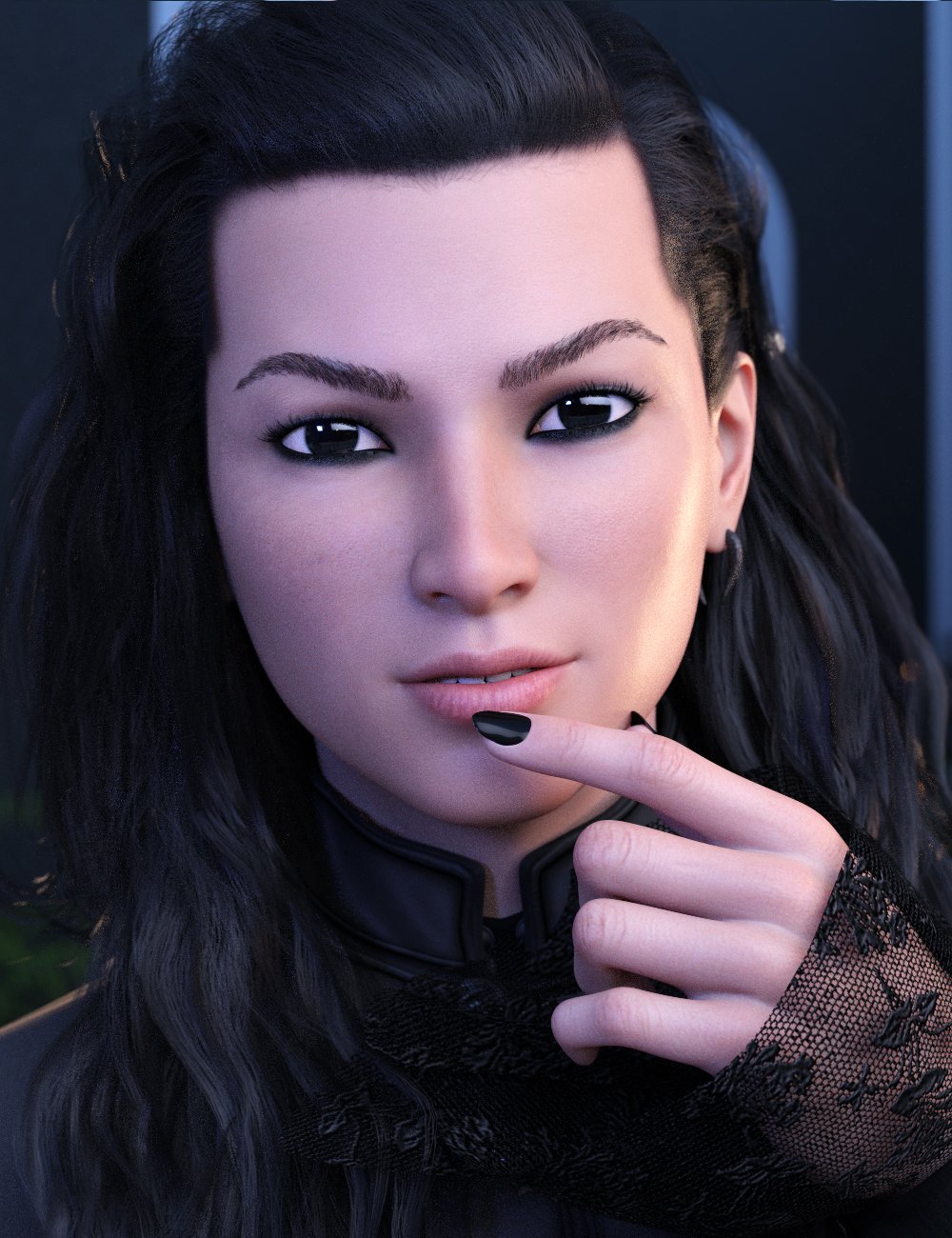 Suddenly Eyes Up-Down Dial Also Makes Eyes Crossed?
Matt_Castle said:
Is it happening with the very base G8M? If it's a morphed figure, this can happen because of a morph with bad rigging that rotates the eyes' axes.
It seems to happen to every base G8M. So I guess it's not character specific.
Asian young boy characters?margrave said:
The best thing you can do is get Growing Up and morph an adult into a child. You can do that for pretty much any character you want, so it's more of a bargain than a one-off child figure. I'd also recommend picking up Male Head Morphs (and/or learning how to sculpt in Blender) to fix any problem areas.
https://www.daz3d.com/genesis-8-uv-swap-male-and-female-base
I feel like all the official male characters wind up being a grizzled and stubbly, if you get the uv swap, you can put a baby smooth female skin on your character and they'll look younger.
Dragon-person for G8FYou can learn to transfer a number of morphs between male and female, just takes some work to set up.
Also there's the following production line: SY Genesis 8 male to Genesis 3 male, GenerationX2 Genesis 3 male to Genesis 3 female, then Genesis 3 Female to 8 Female
how do i pan the view in daz like in blenderI wholeheartedly agree Blender's UI is much better, but you get used to Daz's after awhile.
Kind of like Stockholm Syndrome.
Regarding your second question, every Genesis figure has the same mesh. You can export the base figure to a modeller, adjust the vertices, and re-import it to Daz Studio as a morph. You can also import an original character as an OBJ and rig it inside Daz Studio, but the only PA I can recall who did that--Lady Littlefox--stopped a long time ago. Probably because original figures aren't compatible with all the Genesis hair and clothing products for sale.
What essentials should I buy to start?I second the head- and body-morphs Gordig mentiones, they are truly essential.
I would argue the 200+ morph pack is also essential (which is basically just more head morphs), but perhaps not necessary from the very start.
Beyond that there's no products that are essential for all users. It really depends on what you want to do.
If you like the look of that character, hair, and environment then they're good for you!
I do recommend (eventually) buying at least a few characters; morph packs are essential but they only get you so far. And each character comes with a skin, and skins are extremely important!
Some beginner's tips for shopping here:
- There's always some sale or other going on here, literally almost every day. 50% is an ok deal, 70% is a good deal, 80%+ is a great deal. Unless you're rich, don't pay full price for things. If you're patient that one item you want is probably going to be on sale sooner than later! And don't worry if you miss a sale... there's always another one coming right up.
- That being said, don't let the constant marketing circus here charm you into spending more than intended! I personally find this more easily said than done!
- You can return everything within 30 days without giving a reason.
- Don't buy a lot of stuff at once, especially not a lot of the same kind of stuff, and especially not when starting out. Buy only a few things. Play around with them, make some renders. Make some more renders. Get a feeling for what works and what doesn't work for you. Don't buy a lot of stuff all at once that you're planning on using sometime down the line, in the far future.
- You say you want to spend $60. Sometimes we get gift-card sales. If by coincidence a gift card sales should come around, why don't you buy yourself a $60 gift card?
- There's a thing called PC+ freebies. These items are free for PC+ members. I won't get into PC+ membership here, it's not really my cup of tea... however, even if you're not a PC+ member, the PC+ freebies become free if you put them into the cart with any other item that costs money. So, whenever you're buying anything, go check if there are PC+ freebies and put them into your cart, they become free!
Good luck, have fun!
Duplicate keyGetting duplicate key error for the following products. How do we address these issues?
ERROR: duplicate key value violates unique constraint "product_guid_key"
UPDATE "product" SET name = 'SBibb Kitten Poses and Morph', default_name = 'SBibb Kitten Poses and Morph', store_id = 1, token = '79534', artists = 'SBibb'
UPDATE "product" SET name = 'Reindeer Irradiator and Poses', default_name = 'Reindeer Irradiator and Poses', store_id = 1, token = '79531', artists = 'FeralFey,Orestes Graphics'
UPDATE "product" SET name = 'Only Dress for Genesis 8 Female', default_name = 'Only Dress for Genesis 8 Female', store_id = 1, token = '79530', artists = 'Anain,Belladona'
UPDATE "product" SET name = 'Mars the planet', default_name = 'Mars the planet', store_id = 1, token = '78736', artists = 'Alvin Bémar
UPDATE "product" SET name = 'Stylized Animations for Genesis 8', default_name = 'Stylized Animations for Genesis 8', store_id = 1, token = '74489', artists = 'Daz Originals'
UPDATE "product" SET name = 'Beauties of the World for Genesis 8 Female', default_name = 'Beauties of the World for Genesis 8 Female', store_id = 1, token = '72333', artists = 'Cherubit,Daz Original'
UPDATE "product" SET name = 'Variety Facial Hair for Genesis 8 Male(s)', default_name = 'Variety Facial Hair for Genesis 8 Male(s)', store_id = 1, token = '54695', artists = 'RedzStudio'
UPDATE "product" SET name = 'Industrial Pneumatic Tools', default_name = 'Industrial Pneumatic Tools', store_id = 1, token = '20499', artists = 'Nightshift3D'
UPDATE "product" SET name = 'Genesis Starter Essentials', default_name = 'Genesis Starter Essentials', store_id = 1, token = '14812', artists = 'DAZ 3D,MAB,Neftis3D,Nouschka Design,PropsChick,Redhouse Studios,SWAM,Sarsa,WillDupre,Xena,Goldtassel,omnifreaker'
UPDATE "product" SET name = 'Lisa''s Botanicals - Palm Trees', default_name = 'Lisa''s Botanicals - Palm Trees', store_id = 1, token = '4751', artists = 'Lisa''s Botanicals'Asian young boy characters?The best thing you can do is get Growing Up and morph an adult into a child. You can do that for pretty much any character you want, so it's more of a bargain than a one-off child figure. I'd also recommend picking up Male Head Morphs (and/or learning how to sculpt in Blender) to fix any problem areas.
Maybe a trick way, to solve the Genesis 8 Female long loading time (30 to 60 Minutes) problemulrichmschaefer said:
Hello together,
maybe some of you will also know the problem, that Genesis 8 female took a very and nasty long time to load ! So in addition how much content you have for Genesis 8 Female (Morphs and Characters), it can sometimes took 30 til 60 Minutes or even longer to load a Genesis 8 Female character. Which is very depressing and a reason, why i and others mostly use Genesis 3 Female and not Genesis 8 Female any more. And this even that we have bought tons of content for it !
Anyway today i had maybe a good idea, how this damn problem could maybe and finally by solved. Unfortunally it didn´t work, but probably because i didn´t do it right. But maybe somebody here know the final step to make it work, which i didn´t know.Well my idea was, to creat a new subfolder in Daz3D (for example: G8F Fast loading) or even a directory on a other drive, in which i installed manually the Genesis 8 Female Starter Essentials. After this i tried to rename them into Genesis 9 Female. So i chanced every filename in Genesis 9. In this way i hoped, that i could stop the Daz3D Programm to load every single morph and stuff which is connect with Genesis 8 Female and which cause the damn long loading time.
Well my hope was, that in this way i could load the Genesis 8 Female in 2 or 3 Minutes again like it was after the new figure came fresh out back then. After this, i would simply use the shapes and other morphs from the content on this Basic Figure and could finally happy use the Genesis 8 Females again. Unfortunally it didn´t work and the Daz3D Programm at once realised it as Genesis 8 female again and started to load every damn morph and stuff again. But maybe it´s because i didn´t do it right !
So maybe somebody here know, how in such a way we finally could solve this damn Genesis 8 Female problem.
Thanks for listening and best regards to the CommunityDid you try using a g8.1 or g8?
So I tried this a while ago and thought it didn't work, which is why I ended up writing a program to solve the loading time issue (see my signature). Inspired by this post, I just had another try to figure out what the issue might have been. Turned out G8.1 explicitly references G8 base figure so Daz knows to load G8 contents as well when loading G8.1, if you make a copy of G8.1 you have to delete this reference.
The good news is there is an easier way to make a copy of the figure. Just go to "File->Save As -> Support Asset -> Figure/Prop Asset" and Daz will duplicate the figure for you.
The bad news is that major limitations of this method are: 1. have to duplicate tons of files, 2. no easy way to load morphs apart from character. 3. applying a character still takes forever.
You might as well just make multiple installations of g8 essential + whatever characters/morphs you want to group together as a set and switch between sets.
Best way to get content from one old Win 7 pc to a new one Win 10Catherine3678ab said:
boris0317_8c5066297c said:
Catherine3678ab said:
boris0317_8c5066297c said:
Hi,
I would really appreciate the best advise to transfer LOADS of content from my Win 7 pc to a brand new win 10 machine.
Also, is there a program free or other wise that can export the info for my G8F OCs also G3M OCs that transcribes all the morphs, FBM, character morphs, maybe even textures used with these characters, etc. so I can at least know what morphs, characters I need to install.
Thank you.
What is 'best' is subjective ;-)
Get yourself a nice big external harddrive.
Then bit by bit, copy the files from W7 to it.
When done, use the remove safely hardware option and/or shut down that computer.
Then open W10 and plug the harddrive into it.
Tell D/S where to look for the content.Allegedly there may be a cord that could be attached from one computer to another, making one the master the other the slave, and copy files over that way. However I'm not that much of a computer Geek so not recommending it. W7 and W10 are not likely to play nicely with each other ;-)
Thank you!
You're quite welcome! I see that the duplication ghost was quite active, possibly a MOD will come along and take care of those extras.
I may have clicked several times, ;-) and the forum was acting twitchy...
The "Dial Them Out" ThreadGordig said:
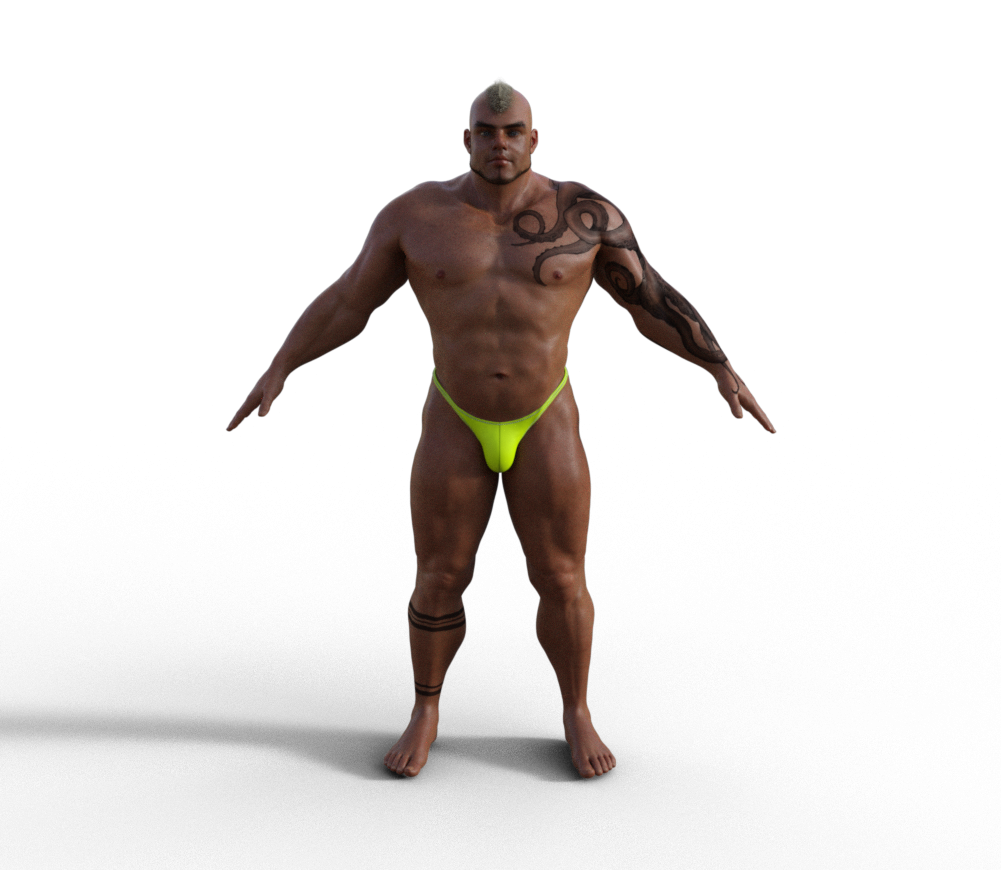
Here you go. Turns out I had already rendered Maxx before I got the Brute, so the render I just did was unnecessary, but here we are.
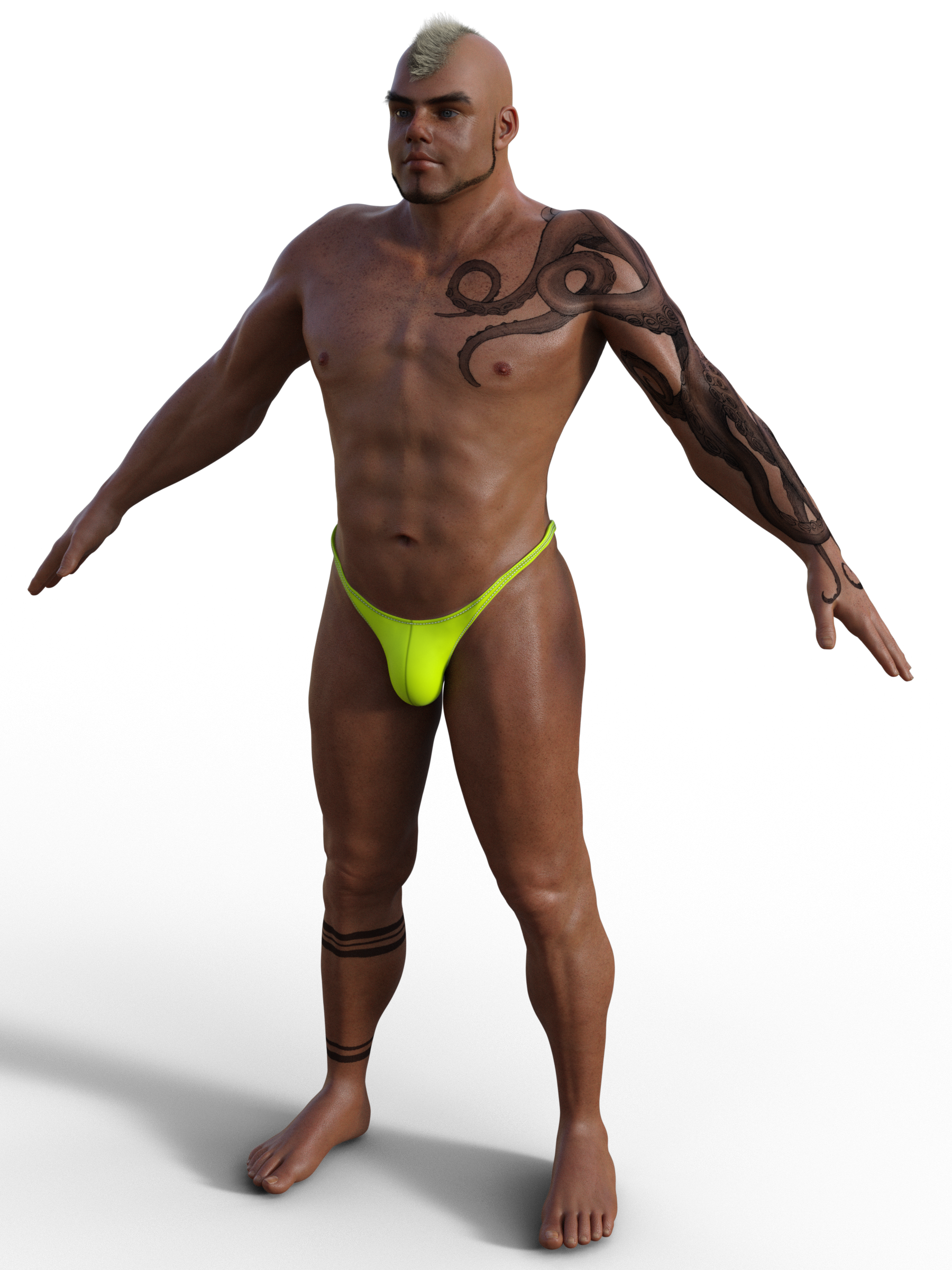
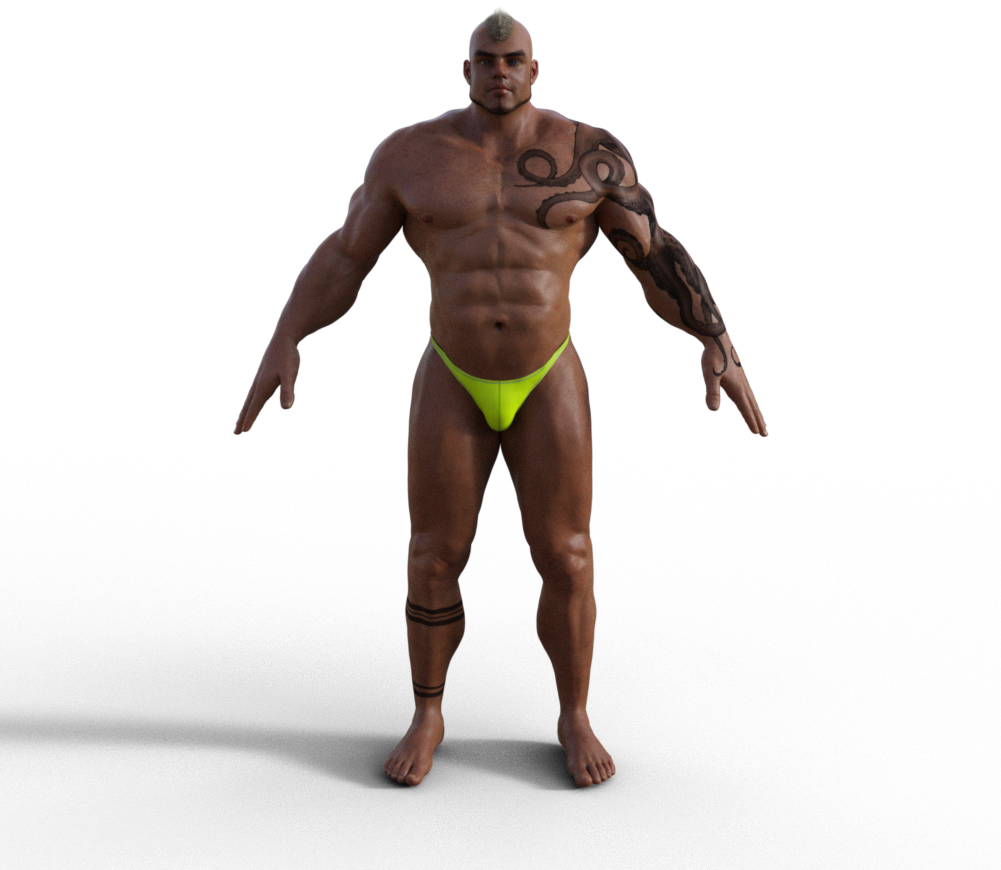
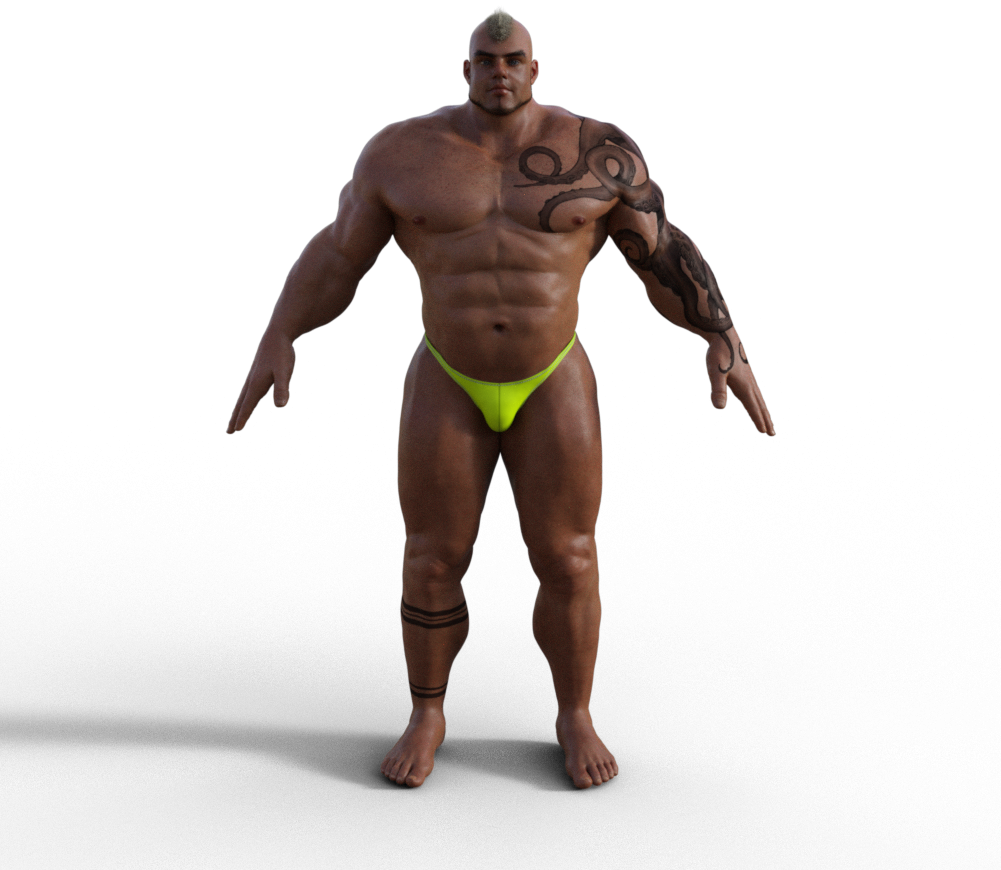
Thanks! I actually went on and got him anyway (I wish I'd picked him up when he was $2.99), then did a few renders to see if I could approximate him with The Brute using some other ones I have.
This one is w/ the Bodybuilder morph:
This one is w/ Niko 8:
I think Niko 8 + the Stocky morph might be the closest. I'll test him out some more, but figured I'd post these for others to consider, too.
 Daz/Blender Bridge Morphs error every time
I don't see keep vertex order. I'm using the bridge. Where would that be?
My exact workflow. In Daz: Load G8F dev. Scripts>bridges>blender>daz to blender. Export at SubDivision level 0 (have tried at other levels).
In Blender: New project. Open the tool panel for the daz to blender bridge. Click on Import new genesis figure. Select figure. Click the checkbox for create new morph, and click "to sculpt". Use draw tool to make a basic change (In this case, drew out the brows). Click "to daz morph".
In Daz with same model: Edit>Object>Morph Loader Pro. Chose the exported morph.
This time, it actually imported, but, instead of doing the brows when I use the slider, it is changing the scale of my model.
Best way to get content from one old Win 7 pc to a new one Win 10boris0317_8c5066297c said:
Catherine3678ab said:
boris0317_8c5066297c said:
Hi,
I would really appreciate the best advise to transfer LOADS of content from my Win 7 pc to a brand new win 10 machine.
Also, is there a program free or other wise that can export the info for my G8F OCs also G3M OCs that transcribes all the morphs, FBM, character morphs, maybe even textures used with these characters, etc. so I can at least know what morphs, characters I need to install.
Thank you.
What is 'best' is subjective ;-)
Get yourself a nice big external harddrive.
Then bit by bit, copy the files from W7 to it.
When done, use the remove safely hardware option and/or shut down that computer.
Then open W10 and plug the harddrive into it.
Tell D/S where to look for the content.Allegedly there may be a cord that could be attached from one computer to another, making one the master the other the slave, and copy files over that way. However I'm not that much of a computer Geek so not recommending it. W7 and W10 are not likely to play nicely with each other ;-)
Thank you!
You're quite welcome! I see that the duplication ghost was quite active, possibly a MOD will come along and take care of those extras.
Daz 3D is part of

Connect
DAZ Productions, Inc.
7533 S Center View Ct #4664
West Jordan, UT 84084Licensing Agreement | Terms of Service | Privacy Policy | EULA
© 2026 Daz Productions Inc. All Rights Reserved.